Wooassist

Assistance for Your Woocommerce Store

  • How it Works
  • Pricing
  • Services
    • Site Maintenance
    • AI SEO and Content Marketing
  • Blog
    • How-To Articles
    • Code Snippets
    • SEO For E-Commerce
    • Theme and Plugin Reviews
    • Wooassist News
    • WordPress/WooCommerce News
    • Interviews
  • About Us
  • Contact
You are here: Home / Code Snippets / How to Change Checkout Form Heading in WooCommerce

How to Change Checkout Form Heading in WooCommerce

February 26, 2015 By John 2 Comments

Here’s a neat trick if, for some reason, you want to change the checkout form heading in WooCommerce. By default, the heading is named “Billing Details” and you can change this to whatever you want in just a few steps.
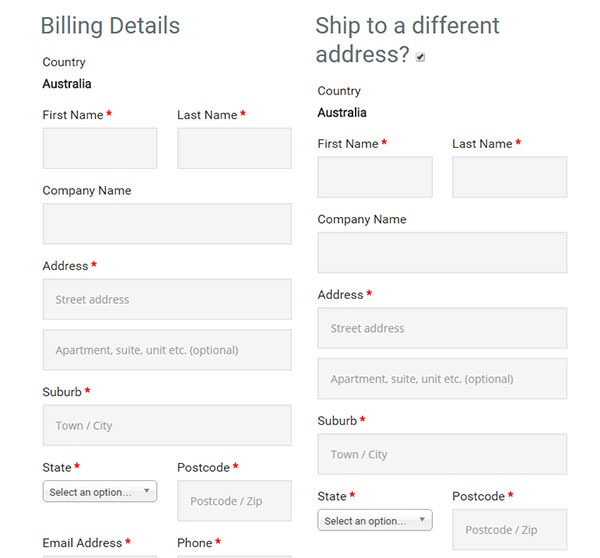
checkout form heading in WooCommerce billing-details

First off, you’ll need to copy the template to your theme or more specifically, your child theme since you definitely should be using one.

The template can be found at:

\woocommerce\templates\checkout\form-billing.php

You should copy and paste it at:

\yourtheme\woocommerce\checkout\form-billing.php

Afterwards, just open the copy that you pasted into your theme and find the following lines of code:

<?php if ( WC()->cart->ship_to_billing_address_only() && WC()->cart->needs_shipping() ) : ?>

	<h3><?php _e( 'Billing & Shipping', 'woocommerce' ); ?></h3>

<?php else : ?>

	<h3><?php _e( 'Billing Details', 'woocommerce' ); ?></h3>

<?php endif; ?>

Once you find it, simply change “Billing Details” to the text that you want to replace it with.

People that read this article also liked

How to Change the Arrows in Pagination for Storefront and WooCommerce How to Make WooCommerce Pages Full Width in Storefront Theme internet-characterHow to Create a Child Theme for Storefront Related-Products-in-WooCommerce_featured-imageHow to Change the Number of Related Products in WooCommerce

Filed Under: Code Snippets, How-To Articles Tagged With: checkout form, code snippet, design tweaks, how-to, shopping cart, WooCommerce

Comments

  1. Vlaicu Bogdan says

    March 25, 2020 at 11:47 pm

    And if you update woocommerce, all this changes will gone :)))

    Reply

Leave a Reply Cancel reply

Your email address will not be published. Required fields are marked *


Let us support your online store so you can manage your business

Get started today

Get 2 Hours of FREE SUPPORT

We are so confident that you will love our services that we will give you your first 4 hours at a 50% discount

That’s 4 hours for only $75

BUY NOW

Free eBook

5 Things Every Online Store Can Fix On Their Website In The Next Week To Increase Sales

Quick Links

  • How it Works
  • Pricing
  • Blog
  • Contact
  • About Wooassist
  • My Account
  • Checkout
  • Privacy Policy
  • Cookie Policy
  • Terms and Conditions

Wooassist

Australia:
59 Luke St.
Hemmant QLD 4174

Philippines:
San Miguel St.
Poblacion, Iligan City 9200

Connect


Copyright © 2026 · Wooassist

Yours FREE!

5 Things Every Online Store Can Fix On Their Website In The Next Week To Increase Sales