Wooassist

Assistance for Your Woocommerce Store

  • How it Works
  • Pricing
  • Services
    • Site Maintenance
    • AI SEO and Content Marketing
  • Blog
    • How-To Articles
    • Code Snippets
    • SEO For E-Commerce
    • Theme and Plugin Reviews
    • Wooassist News
    • WordPress/WooCommerce News
    • Interviews
  • About Us
  • Contact
You are here: Home / Archives for SEO For E-Commerce

How to Build Links for your Online Store with Guest Posting

April 1, 2015 By John 1 Comment

how-to-build-links-for-your-woocommerce-store

Most online store owners want to get links to their website for the sake of SEO. In this article, we’ll show you how to build links for your online store with guest posting.

There are many ways to get links such as through social media shares and directory listings. Social media is a powerful tool. Directory listings though might have a negative impact in your SEO efforts. For the past few years, Google has been penalizing many web directories. The single most promising way of earning free and quality links to your website is through guest posting in other blogs related to your industry.

How Does Guest Posting Work

Guest posting is creating content to post in another person’s blog or website with a link back to your own website. The more the links pointing to your website you have, the better it is for your SEO. Search engines such as Google look at your link network. The more popular the website that links to you, the better it is for your link profile. To learn more about the importance of links, check out this post.

How to Get Guest Posting Opportunitiesguest-post

Website Owners that You Know

To get guest posting opportunities, you can start with the people you know. You may have some friends who have a blog on a niche related to your website. You can ask them if they would let you guest post on their website or blog.

Social Networks

linkedin-logo

If you have a LinkedIn account, you can use that to reach out to other people that own websites within your niche.  You can then ask for guest posting opportunities. You can also use Facebook, Twitter or any other social network. LinkedIn better serves this purpose though since it is all about building a professional network.

Blog Search

Perhaps the most popular means of searching for guest posting opportunities is by searching for blogs on Google. You can do this by entering “your niche + blogs” in the search bar. When looking at the search results, analyse the website more closely. Ask yourself; is this a real fit for my niche? Do they accept guest posts? Try to see if they have accepted guest posts in the past or if they explicitly say that they don’t accept guest posts. If they haven’t had any guest posts in the past, don’t let that discourage you, there’s always a first time for everything. Also, make sure that the website is not a competitor.

guest-post-search

If you want to search specifically for blogs or websites that accepts guest posts, you can try these keywords on Google.

“your niche + guest post”

“your niche + submit guest post”

“your niche + write for us”

Once you’ve found a good website or blog, you should search for the owner’s email or a contact page. It will allow you to reach out to them about your concern.

Guest Posting Communities

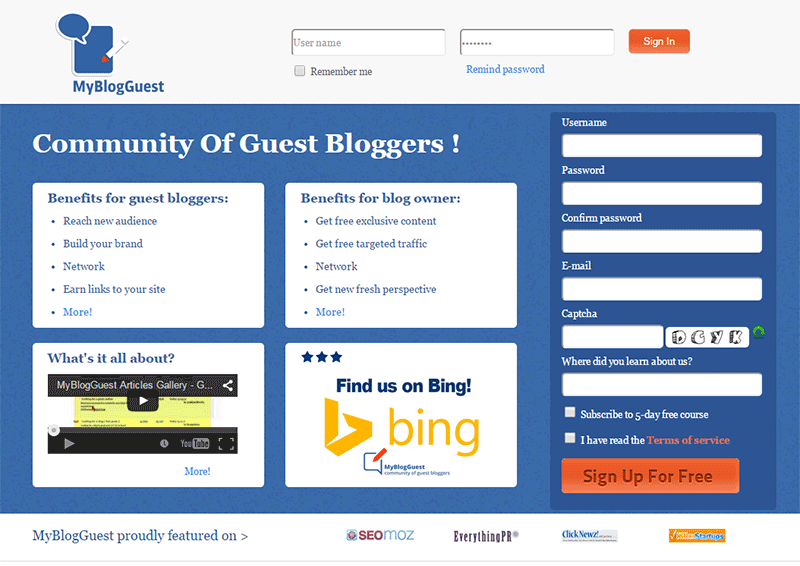
Another means of getting guest post opportunities is by joining guest posting communities. One of the most popular was MyBlogGuest but the site has already been shut down. MyBlogGuest was  a community for people looking for guest posting opportunities. People looking for bloggers to get free quality content also go to it. If you think about it, it’s a win-win situation. You get a link and the other person gets free quality content.
myblogguest

How to Request a Guest Post

When you request for a guest post, the golden rule is to not sound like spam.  Before emailing someone, check out the website first and read the blog. If they have a dedicated page for guest posting, they’ll have guidelines posted there. Read it and follow the guidelines strictly. If they ask you to email them a certain subject or to have a certain sentence as the first sentence in your email, then do so. By doing what they ask, you’ll come by as someone genuinely interested in a partnership and won’t be writing crappy content. This kind of practice separates the spammers from the real quality guest posters.

If they don’t have specific guidelines, just email them in a normal manner. It helps a lot if you address the recipient with using his/her first name. This is usually written in the ‘contact us’ page. If you can’t find it, that’s not a problem. Just be courteous. You can also write something about how you loved a specific post on their website. This shows that you’re not just interested in the guest post for a link. You’ll also show that you’re interested in the content that they publish. An important bit: Try not to come off as someone trying too hard to please them just so they would allow you to guest post.

In your email, you should also include one or two topics that you’re interested in writing about. Including a short summary of what your post will look like will go a long way.  Make sure that what you’re proposing is relevant to their audience otherwise it will just get rejected.

Many blogs don’t accept links within the content of the posts unless it’s integrated  well into the content. Usually, in cases like these, they will allow a link to your website in the author bio. Now here’s a pro-tip. When writing the author bio,  include your email and ask the readers to contact you if they would like you to guest post on their website. You’ll need to write some really good content for this to work though.

Getting Seconds

guest-blogging

­­In getting guest posts, it is more helpful if you guest post in a lot of different websites. But if you get offered another chance to guest post in the same website, always grab the opportunity. It will help you build your reputation as a guest blogger. Your second post can still contain a link back to your site. And while it will not be as valuable as your first post, it will still show on your link profile. It can also get you some organic traffic. This is true when your guest post is being posted in a popular website with a large following.

What Makes a Good Guest Post

A “good” guest post is subjective, but ideally, a good guest post should provide new information and is insightful. Reading  the guidelines of the website where you are guest posting will help you write a post which is “good” by their standards.

How-To posts that teach the readers how to do something are always a good idea. Try to target a specific topic. If you write an article entitled “How to Write an Essay” that’s not good at all. Just think of the thousands, maybe millions, of articles with the same title all over the internet. Something more specific is “How to Write an Essay Optimized for SEO” or “How to Write a Good Expository Essay”.

Always try to use subheadings on your guest post especially when it is long. If you write a 1000-word guest post without any subheadings, it’s not enticing to read. It will look like a big wall of text. While images can help make it more attractive, it’s not as helpful as subheadings.

Also, whenever possible, you should reference any claims on your post unless that is your expert opinion. You should establish that your opinion is credible. Claiming something without backing it up is akin to spouting gibberish and readers will take notice of that. If a claim links to some example or some study that proves your point, then it gets better.

Another important bit to remember is not to hard sell your products or services when guest posting. The blog or website you are guest posting on trusts that you will create good readable content and not a marketing gimmick. Don’t spam your article with links to different product pages, rather if you should add a link, make it a useful link. Maybe link to a related blog post on your own website’s blog. This is all the more reason, among the many other reasons, why you should have a blog on your online store with a bunch of useful and good posts.

Adding Your Links

This is the most important part of your guest post. You can post a link anywhere on the body of your post going to your website unless otherwise specified. The link can be on your home page or any other relevant page. Your link should integrate well into the content. To be integrated well into the content, the reader should know what to expect when they click a link. Are they going to get more information on the subject of your blog post or maybe an important resource? Just because you used a keyword that you are targeting doesn’t mean you should add a link there.

As I’ve mentioned earlier, some website owners refuse to add links in the body of the content. This is because many guest posters don’t integrate it well into the content. In these cases, they allow links in author bios.

So, that’s it. You got your crash course on guest posting. If you have any questions, feel free to hit the comments.


Filed Under: How-To Articles, SEO For E-Commerce Tagged With: blog, email, Google+, how-to, link building, LinkedIn, SEO strategy

On page SEO for Ecommerce: The Online Store Ultimate Guide

September 2, 2015 By John Leave a Comment

on-page-SEO

I know I need SEO, but I don’t know exactly what I need.

We have heard this statement several times. Entrepreneurs realize the value of SEO, but they don’t truly know how to do it for their e-commerce business.

Before embarking on optimizing on page SEO for ecommerce, it’s crucial to understand what you hope to gain.

In this article, you’ll learn about the following:

  • Understanding your SEO needs so you can focus on the most profitable areas
  • How SEO really works for E-Commerce Websites
  • Our 8 step technical On-Page SEO process to guarantee you more traffic.
  • Our 7 Step On-Page SEO guide to user experience and engagement

Most users prefer using Google because it returns the most relevant search results on the web – and by ‘users’, we mean your potential customers. This means that being ranked on the top pages allows online stores to receive more visitors and generate more leads.

So, how can you rank higher than your competitors on Google?

The answer is a well-rounded website. Whether you’re just getting started with a new online store, or improving an existing site, you need to step up your SEO game.

I. Understanding your SEO needs

SEO-success
SEO can help potential customers find your store in search results. Let’s say someone is looking for a product you’re selling. How can we make Google recommend your brand to that user, instead of another store? This is where SEO can help.

A. Business Goals

Your business goals should always come first. Do you want to increase conversion? Build brand or product awareness? If your business goals are clearly set, it will be easier to determine the SEO strategy that will best fit your needs.

B. Existing Performance

Look at your analytics data to assess the existing performance of your site. It will show your site’s traffic and conversion trends over the years, helping you understand what keywords you need to optimize for. We will show you exactly how to do keyword research shortly.

C. Resource Constraints

After looking at your analytics data, and knowing where you’re lacking, you’ll know how to fill in the gaps. Know where you need help, and it will make the SEO planning easier.

II. SEO Basics for E-commerce Websites

SEO-google

For an e-commerce site, driving relevant traffic to boost sales is crucial.

It’s critical for websites to appear on Page 1 of Google. Surprisingly, the top three organic positions alone receive 58.4 percent of all clicks from users.

CTR

Websites ranked number one received an average click-through rate of 36.4 percent. The second spot received a CTR of 12.5 percent, and number three had a share of 9.5 percent.

Do you want to know how to rank your e-commerce site? Read on.

A. Start your Research

On-page SEO work needs two types of research: Keyword and Competitor Research.

The primary objective of doing research is to identify the gaps between your site, and the sites that are doing better. Keep in mind that the market you are about to enter might already be well-served by savvy site owners.

1. Keyword Research

First of all, targeting the wrong keywords makes your campaign ineffective. It can lead to low quality traffic, and few conversions.

Go for keywords that are highly relevant to your brand or products. What terms are your ideal clients using when searching for your service?

You can use tools such as:

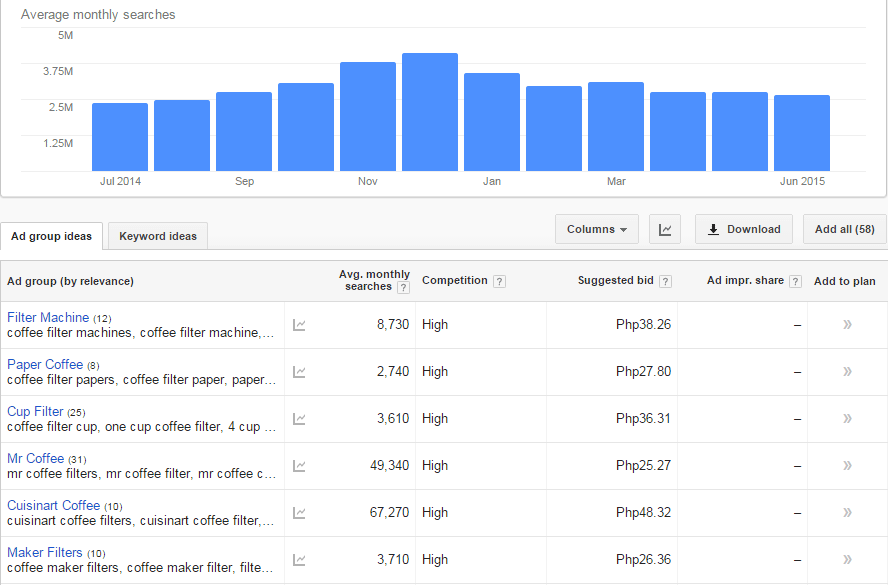
Google Keyword Planner (formerly the Keyword Tool)

keyword-tool

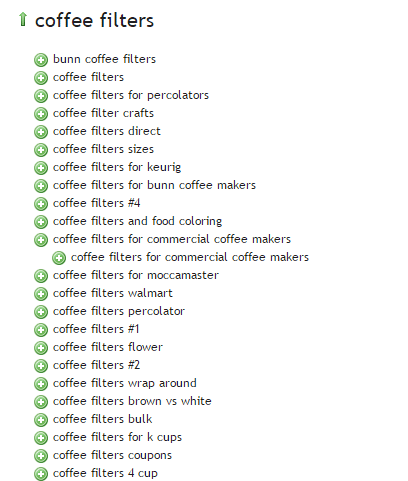
Übersuggest

ubersuggest

2. Competitor Research

Insightful competitor analysis

Insightful competitor analysis is an essential strategy to find out what rival e-commerce firms are doing. In SEO, you can track and analyze the performance of your competitors in relatively simple ways.

Which keywords are your main competitors going for?

List down the keywords which your competitors appear to be using with their SEO strategy. Check if they have higher Domain Authority and Page Authorities than you.

  • Domain Authority is a calculated metric for how well a given domain is likely to rank in Google’s search results. It is used to compare one site to another, or to track the strength of your website over time. It is scored on a 100-point, logarithmic scale.
  • Page Authority is a calculated metric for how well a given webpage is likely to rank in Google’s search results. It is also scored on a 100-point, logarithmic scale, and used to predict how well a specific page will rank on search engines.

If your competitors have higher DA’s or PA’s than you, contending against them will be very difficult. So, it may be a good idea to focus on other keywords or “longer tail” keywords instead.

You can use these tools to determine DA’s and PA’s:

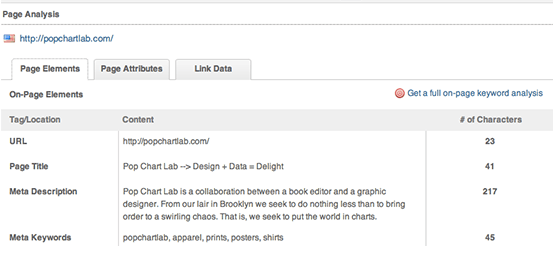
MozBar

Allows for checking the SEO title and description your competitors use in their title tags.

moz-browser-extension

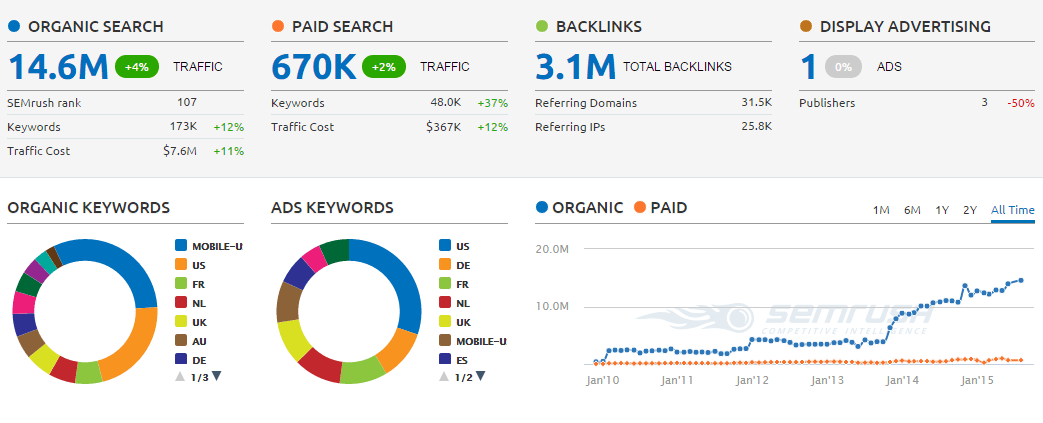
SEMrush

Allows for seeing what keywords your competitors are ranking for on both organic and paid search.

SEMRush

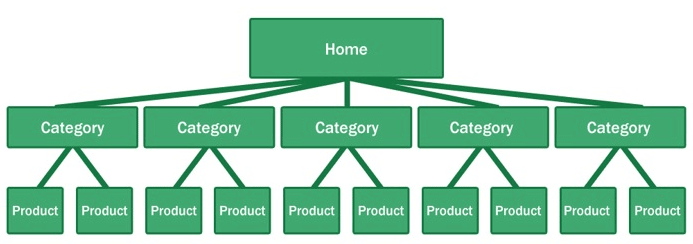
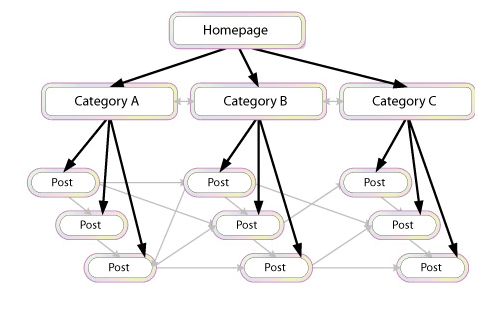
What is their site architecture like?

Try to look at the site architecture of competing sites, or the biggest companies in your industry. Pay special attention to popular products in a particular category, related products, top rated products, and recently viewed products.

site-architecture

Here’s why your site architecture is essential for organic traffic:

  • Google considers your site’s homepage the most authoritative page, so content closest to the homepage receives the most value.
  • By structuring your e-commerce store correctly, your main level navigation pages, such as the category pages, will contain a majority of your site’s authority.
  • Adding relevant, high-quality content to your main level navigation pages can increase conversion, page authority, and sub-category page’s authority.

B. Identify Current Problems

After discovering what keywords are going to make you the most profit comes auditing your site for problems.

404-error

1. Find site errors

Here are the top errors you’ll want to correct:

  • Redirecting any 404 pages to actual content
  • Changing 302 redirects to 301 redirects
  • Updating duplicate content pages, meta titles, and meta descriptions

The above mentioned are called HTTP status codes. These are three-digit numbers returned by servers that indicate the status of a web element.

404 HTTP status code

It can be shown as 404 Error, 404 Not Found, Error 404, 404 File or Directory Not Found, etc. This status code means that the server has not found anything matching the Request-URL. Or, simply the page you were trying to reach on a site couldn’t be found on their server, has been removed or does not exist.

Having lots of 404 pages will hurt your site in many ways. For instance, if a ranking page resolves to a 404 error, it might frustrate the user. This means you will be throwing away some earning potential. Google also counts it as a poor user experience. If you don’t fix the errors, Google will eventually remove that page from their index, which will eventually hurt your overall rankings.

302 Redirect HTTP status code

It’s also known as a temporary redirect. 302 should be put in place if you want to redirect visitors into another webpage, but you plan to bring the redirected page back after some time.

It’s not really recommended since it can hurt your site’s search engine visibility. While the redirected page will retain its page authority and traffic value, the temporary page won’t accumulate any. It’s often used to test a new page. You can gain client feedback without affecting the old page’s ranking.

301 Redirect HTTP status code

This refers to a permanent redirect from one URL to the other. All qualities of the redirected page will be passed on to the detour page. A 301 redirect is often implemented if one is ready to make a test page permanent. The old page will be removed from Google’s index, and the new one will replace it.

Without 301 redirect, the web authority which your previous domain collected will be thrown right out the window. Any inbound links earned will be lost, and you won’t get any SEO credit.

There are dozens of free online services that are capable of checking your website for errors, and finding ways of improving your web page.

Google Webmaster Tools, for instance, can help you identify any page or links with errors, scan for malware, find pages with short or missing titles, find duplicate meta tags, and much more.

2. Determine your site speed

Any delay is enough reason to make your customers leave. This converts to lost revenue, which can hurt your bottom-line.

One study revealed that 1 in 2 visitors will abandon a website that takes more than 6 seconds to load.

There are various tools to help you check your loading speed:

  • Yahoo! Y slow
  • Google Page Speed
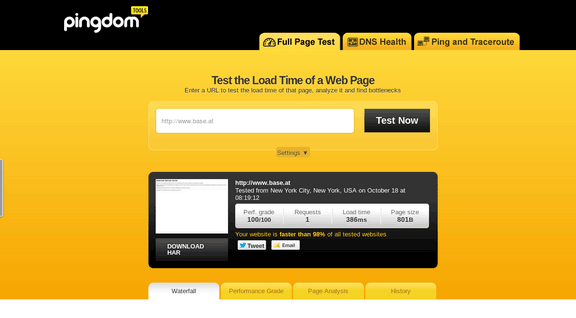
  • Pingdom is the quickest and easiest one

pingdom-site-speed-test

For a more in-depth guide to how to speed up your site see our article here.

C. On-Page Optimization

On-page optimization includes all of the actions you take within your own web pages to help your site rank better.

Learn more about on-page optimization for your online store on the next step.

III. Optimizing On-page SEO Technical Factors

optimizing-on-page-SEO

If your online store is not optimized for both search engines and users, you have a small chance for success. On-Page SEO refers to the settings you can apply on the website so that it is optimized for search engines.

A. Why start with On-page SEO?

  • With On-Page SEO, you ‘speak’ the language of search engines. You can easily make them understand what your website is about.
  • On-Page SEO can make the users happy. It ensures that your website is setup correctly, which leads to a better user experience.
  • Before promoting your site through off-page SEO, you need to be sure that the website is optimized and is running smoothly.

If you don’t know the basics of on-page SEO, you have very little chance of securing top spots for competitive key phrases. Get it right and you’ll succeed on the search engines.

Here are the basic factors of on-page SEO:

1. Title Tag

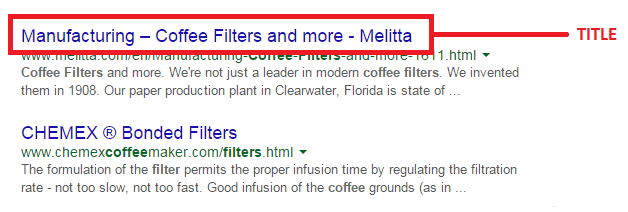
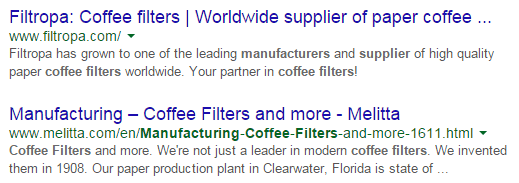
Title tags or title elements define the title of a document. It should be an accurate and concise description of a page’s content.

title-tag

Place your main keyword and variations in the title tag of a page. Google would display around 70 characters of a title tag, or based on pixel width. You can preview how your title tags will appear like through Moz’s preview tool. Make sure to include your business name along with the main keyword phrase you are targeting.

2. Title Tag Optimization

Your site’s title has to be appealing enough for a user to want to find out more information.

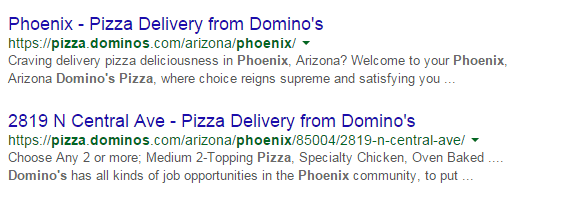
title-tag-optimization

Things to include in your title:

  • Business Name: Aside from customers may search you by your brand name, it’s also important for breading purposes. In the example above, it’s Domino’s.
  • Keywords: Putting certain keywords in your title can help them rank, just don’t staff too many. Domino’s used ‘pizza delivery’.
  • Toll-free numbers: It helps your visitors to take a direct action, and makes your title look professional. Users are left with an impression of authenticity of the business.

B. Meta Descriptions

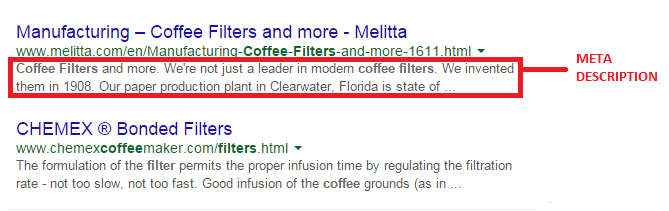
A meta description is the snippet of information below the link of a search result. It describes the contents of the page to the searcher, with the goal of convincing the searcher to click through to your website.

meta-description

They may not contribute as a ranking signal but meta descriptions can encourage people to want to visit your website. It describes your business and shows up in the search results page beneath the title tag. It should be well-written and approximately 156 characters.

Think of meta description as a sales pitch for what the landing page is about. Get practical instructions on how to update them using WooCommerce.

1. Meta Tags Optimization

As mentioned earlier, meta description is something that when done properly can urge users to check out your website.

meta-tag-optimization

Things to include in your Meta Description:

  • Selling Point: To get some advantage, write what your customers want to hear. For instance, a phrase like ‘affordable, all-natural coffee filters from only $3.99’ may result in more clicks.
  • Keywords: It will give you some advantage in Google’s relevancy algorithm.
  • Toll Free Numbers: If you don’t want to place it in your title tag, include it in your meta description instead. Again, it may help your visitors to take a direct action.

C. Heading Tags

Use headings correctly without over-optimizing them. Your main keyword should be in a H1 tag. Split sub-headings up with H2 and H3 tags. Only use the H1 tag once, and others can be used multiple times.

For more information of the correct use of when and how to use heading tags, check out How To Use H1-H6 HTML Elements Properly.

1. HTML Tags Optimization

The text inside your header tags is given very high importance by the search engine. They highlight certain parts of your website.

Header 1: Use it to define the most important section of your page. The H1 tag is an influential ranking factor, and an important signal to search engines as to what a page of content is about.

Header 2: Use it for sub-titles or important sections of your pages.

D. Content

Your content should be written primarily for users, and secondly for search engines. Make sure that the content on your homepage helps visitors learn more about your business, and the products you’re offering.

Use the keywords from your research, but make it look as natural as possible and easy to understand for the user.

Again, don’t forget to use H tags to break up your content into easy to digest sections.

E. URL Structure

Which has a more search engine friendly URL structure: “www.domain.com/page-name/” or “www.domain.com/index.php?id=1?” Obviously, the former makes more sense to both users and search engines.

Avoid having main pages sit too many directories deep in your site. Use hyphens rather than underscores. If you do make changes, implement 301 redirects from the old URL to the new. This way, your users won’t have to face 404 pages.

F. Keyword Optimization

Keyword stuffing is no longer acceptable. Maintain a balance between your keywords and your content.

1. Elements of Keyword Optimization:

  • Keyword Density: In SEO, keyword density is the measurement in percentage of the number of times a particular keyword or phrase appears compared to the total number of words in a page. It’s also an indicator whether your page is relevant to the targeted keyword. Yoast SEO plugin can help analyze keyword density.
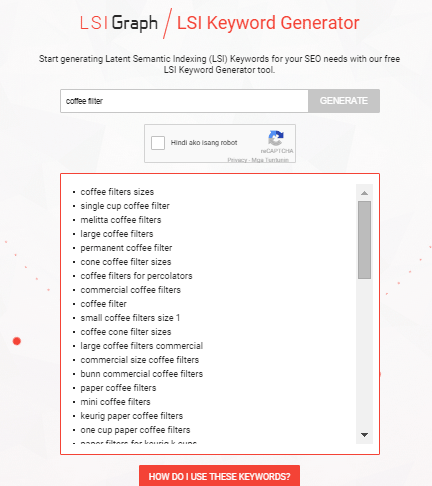
  • Related Keywords: Related keywords are keywords of industries and markets that are closely or somehow related to your niche. It’s using related, but less obvious keywords to bring targeted, conversion-friendly traffic. LSI is smart enough to see ‘coffee filters’ is somehow closely related to tea and accessories for brewing. LSI Graph is a good tool to find LSI keywords.

LSI

  • Long Tail Keywords: These are longer and more specific keyword phrases that visitors are more likely to use. It’s about adding common words like ‘best’, ‘free’, ‘cheap’, or ‘top’ to your actual keywords. Long tail keywords can help you craft the kind of content that engages and inspires readers.

Long tail keywords have less competition, give more qualified leads, and improve head term rankings. According to a research by Statistica, 50% of your focus should be on long-tail keywords in order to achieve a successful On-page SEO.

G. Internal Link Optimization

Internal linking is when you link pages of your website to other pages within your website. It’s a process that involves optimizing internal links, in order for algorithms to determine the relevance of web page content.

internal-link-optimization

If you lack internal links, it will be difficult for Google to crawl and index deeper sections of your website.

1. Why are internal links important?

  1. Internal links improve your ‘link flow’ or page rank to individual pages on your site, helping them to rank better.
  1. The anchor text of links helps Google to understand the context of a webpage, and to rank better.
  • Anchor text: It’s what you call the clickable text in a hyperlink. A good anchor text includes the appropriate keyword to give the page it is linking to more relevant meaning.
  1. Internal links help Google Bots crawl and access different parts of your site, and also improve user experience.

H. Image Optimization

On-page images need to be optimized because search engines can’t read them. This means the web crawlers would only read the text.

1. Elements of Image Optimization:

  • Alt text: Try to move the mouse over an image on a website. If a short description appears, that is alternate text. You can use your relevant keywords as ALT text.
  • File name: Use meaningful file names for your images, such as ‘coffee-filter-basket.jpg’ instead of just ‘DSC1234.jpg’. Make sure the file name is relevant to the image.

IV. Optimizing On-Page SEO for User Experience and Engagement.

user-experience

Google has been updating its ranking factors consistently, and user experience and engagement have become one of them, especially for mobile. What links UX and SEO? It’s about attracting visitors and converting them into customers.

Once you create a great user experience, visitors would perceive your site positively which encourages sharing, return visits, bookmarking, and inbound links. These factors are signals recognized by the search engines, contributing to high rankings.

  1. Focus on designs that fit SEO principles – you need to maximize H1 and H2 titles, optimize menu names and functionalities, create a clear navigation path, and provide focused product names and descriptions.
  1. Call-to-action – CTA buttons or even links with CTA should be designed not only for user experience, but also linked to content and page elements optimized for SEO.
  1. Focus on quality – when talking about quality websites, user experience is also taken into account page speed, easy navigation, internal link structure, descriptive content, and page layout.

A. Engagement Metrics

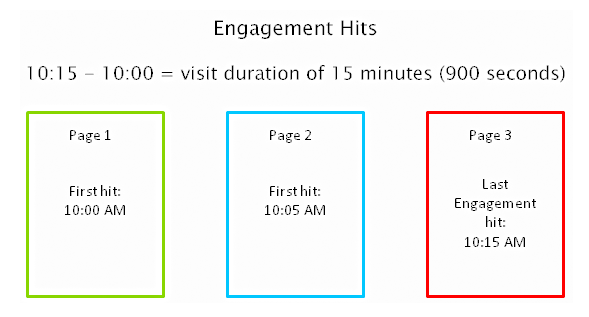
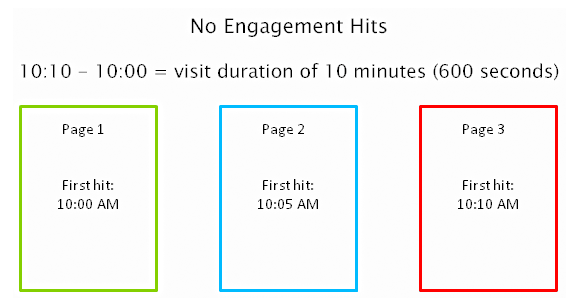
As a search engine delivers a page of results to you, it observes how you engage with those results, measuring the success of the rankings in the process. Search engines are looking for that ‘long click’, wherein a user does not immediately return to the search page.

engagement-metrics

For instance, you click on the first link found on the SERP, then immediately hit the back button and clicked the second link. The search engine will interpret this as not being satisfied with the first result.

engagement-hits

1. How important is Time on Site?

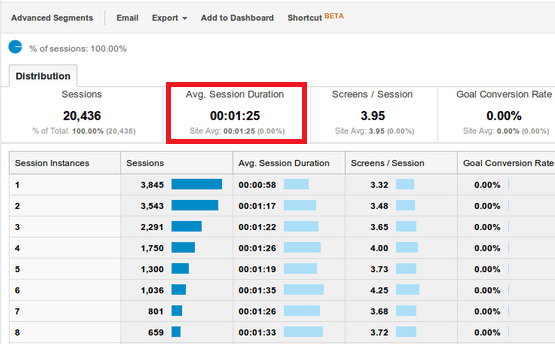
Time on site or visit duration refers to how long a visitor stays on your website. Because Google wants to give their users the best experience, they actively measure user behavior to help shape their algorithm. If a user is spending a significant time on a site, interacting with it, and going deeper within the content, it means there is something of value on the site for that particular user.

time-on-site

2. What is Relevance?

The relevance of a website’s content is particularly important for search engines. The term ‘relevance’ describes the extent to which the content of a website corresponds to the search term used. It can affect a website’s ranking in the search results, for a given search term.

If you’re selling coffee filters, you must not go off topic and talk about juicing machines. Go for the search terms that your potential customers are searching for. “Disposable paper coffee filters” could be a good choice for a keyword for a coffee-filter vendor, but “coffee maker parts” might not work. You would be confusing yourself, your to-be customers, and the search engines. Your relevance would get hurt, hence you ranking would get hurt too.

Ask yourself, how relevant is your page content to the keyword query of your visitor? You can make your site more relevant to searchers by optimizing the different on-page factors discussed in Part III. They include your site’s meta tags, headings, body text, and other content.

3. Google will reward you for being relevant.

According to Google’s official blog, their goal is simple: to give people the most relevant answers to their queries as quickly as possible.

relevance-to-users-reward

Maintaining your site’s relevance may lead to more clicks, and a higher position in search results. When Google changed its algorithm last February 2011, they began promoting sites with reports, in-depth analyses, and other forms of high-quality, value-adding content. Sites that were deemed irrelevant and invaluable by the algorithm were demoted.

4. How Google determines relevance?

Google displays web pages in their search results based on the authority and relevance of the page. So, how does it determine relevance? According to Neil Patel, it analyzes a page’s content based on several factors, including where and how often you use certain words in that piece of content. You can check out Google’s other ranking factors here.

Let’s move on to your WooCommerce product page.

B. Important Elements for On-Page Optimization

These are the elements that are important for on-page optimization:

1. Customer Reviews

These reviews not only improve your business, they also provide an amazing source of unique content. Internet Retailer reveals that an online store can increase its e-commerce conversion rate by 14-76% by adding product reviews.

Search engine spiders like unique content that is regularly updated, and user reviews are a great way to create more of this on your website. According to data, 88% of consumers trust online reviews as much as personal recommendations. This means that potential customers will be searching for the name of the product plus the word ‘review’, or related words such as ‘ratings’.

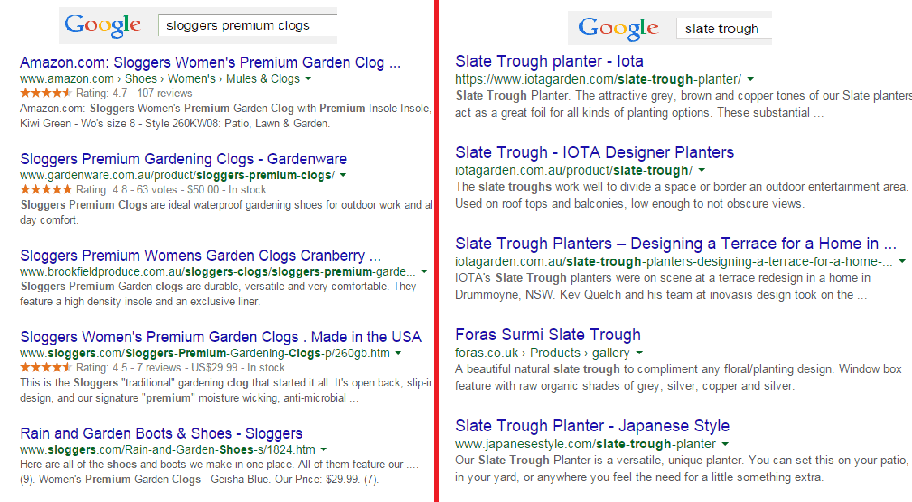
Compare these two images on SERPs:

customer-review-SERPS

The organic search results on the left are showing ratings just above the meta tag, while the image on the right doesn’t. So, what determines if ratings are shown on SERPs?

Apparently, sites on the left are using schema markup on their reviews. That is why their ratings occur on SERPs.

In AdWords, they are enabled through the product reviews ad extension. You have to submit your product data to Google, and be a client of selected review websites. Get reviewed by at least 30 unique users, submit your reviews to Google, and have your review extension enabled!

Increased CTR on results pages

Correctly formatted reviews can help increase click-throughs from search engine results pages. In the image below, the addition of star ratings make the first and third results stand out.

increased-CTR

Increased conversion rates

By increasing the chance of a click-through, you’re also increasing the chance for conversion. User reviews can increase trust in your ecommerce site, and can help remove doubts about products.

To collect customer reviews, try the following:

  • Email customers a few weeks after purchasing and ask for a review.
  • Offer discounts or other incentives on their next purchase in exchange for a review.

Don’t worry about negative reviews. Instead, take it as an opportunity to show good customer service. Offer to replace the faulty product or offer a refund.

2. Pagination

Because e-commerce sites are promoting a variety of products, they´re ultimately forced to divide them into multiple pages. This process is called pagination.

If you have product categories that contain thousands of products, make sure that all of them are indexed and regularly crawled. Google has some good instruction on pagination with rel=“next” and rel=“prev”.

Pagination affects two critical elements of search engine accessibility:

Crawl Depth: Google demands best practices, wherein spiders should reach content-rich pages in as few clicks as possible. If you have too much paginated content, Googlebot won’t travel through all of them. It won’t be able to index the final pages.

Duplicate Content: Search engines want to show only a single URL for a piece of content. If pagination is not implemented correctly, it may cause duplicate content problems. This will cause some confusion for the Googlebot, especially during search queries.

3. Page Speed

Google announced that website speed would begin having an impact on search ranking. Apparently for Google, a poor performing website results in a poor user experience. It’s enough reason for a website to gain less promotion in search results.

A user is not going to wait for your product pages to load, so you should care about site speed. Any delay is enough reason to make your customers leave. This converts to lost revenue, which can hurt your bottom-line.

There are several ways to optimize your WooCommerce site’s speed. You can read all about it here.

4. Search Option

Even with a good navigation structure, there are users who will just prefer to search. That’s why a search box has become an essential element of e-commerce sites.

Using your search feature, you can track your customers’ searches using CMS or Google Analytics. What phrases are they using? Does your site return good results? Is your search function working for singular and plural keywords?

search-option

Monitor the number of people who search and then leave straight away. What prevents them to go through the checkout process? Try including special offers related to the search, and see if it lessens your bounce rate. The data you have collected will help you improve your website and customer experience.

5. Product Description

It is very important to make your product descriptions unique. For retailers, don’t just rely on the manufacturer’s brochure. If you do, then you’ll have the same content as hundreds of other retailers. Make it unique and engaging.

Product descriptions shouldn’t just describe your products, product descriptions should sell them.

Here’s how:

Focus on your ideal buyer

If you focus on a huge group of buyers, you may end up addressing no one at all. Imagine your ideal buyer and consider how you would speak to him if you were selling your product face-to-face. Does he appreciate a good humor?

ThinkGeek starts their product description as:

think-geek

Entice with benefits

A consumer always wants to know what’s in it for them. What are your product’s features and specifications? Know how to highlight the benefits.

entice-with-benefits

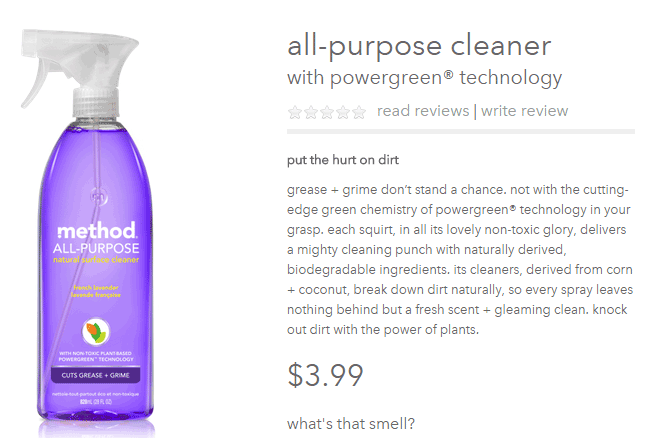
Methodhome highlights the powergreen action of their all-purpose cleaner, wherein grease and grime don’t stand a chance!

6. Business Information

To optimize your business information, make sure that it’s complete and accurate.

Phone number: this can actually inspire trust. If a phone number is shown, it gives customers the impression that you can provide customer support if ever they encounter some problems with the purchase.

Company details: this is especially helpful if you’re trying to target local markets. If you give Google some location signals, it can help your location keywords rank.

7. Social Sharing

Are you happy with how social share buttons work on your website? To maximize the benefits, social share buttons need to be optimized.

social-sharing

What’s an optimized share button?

It’s a share button that automatically generates a shareable message with custom information for your brand.

Here’s an example of an optimized Tweet:

Notice that the tweet has the brand’s Twitter handle @jcrew.

brand-on-Twitter-handle

Customizing your share buttons let your readers share useful information, and help you control brand messaging at the same time. You’re making it easy for your visitors to share your products on their social media profiles.

We all know how social media connects people who value each other’s opinions. People who see content being shared by their friends, family, or colleagues will think that it’s something worth checking out. This means more traffic to your site!

You can place social share buttons…

  • After the point of purchase on a confirmation type page
  • Email follow up and correspondence
  • After a review has been published – give the reviewer the option to share their review

V. Conclusion

team

With these steps, you can start optimizing the pages of your online store. If you want to do this by yourself, there are plenty of SEO tools given in this article to help you optimize your rankings. Nevertheless, don’t be shy to reach out to a professional for help. On the other side of the coin don’t try and outsource this completely, no one understands your products like you; an internal team member with intimate knowledge of the products and target market needs to be involved.

If on-page optimization is done right, you will see an increase in quality traffic, which will lead to more conversions and repeat visitors.

Keep in mind that Google constantly updates their algorithms, which also means you have to be up-to-date with your strategies. It may require a lot of work, but the benefits are worth it.

Filed Under: SEO For E-Commerce Tagged With: 404 error, conversion optimization, Google Analytics, Google Webmaster Tools, keyword research, redirection, SEO strategy, SEO tools, site speed optimization, social media

Maximizing Your Content’s Reach and Impact with Content Promotion

February 8, 2024 By John Leave a Comment

Content marketing for WooCommerce is the engine that drives brand awareness, fosters customer engagement, and ultimately fuels conversion rates. However, there’s a catch—a common misconception that has plagued many businesses. Most businesses stop at content creation. After publishing a good article, they just stop and move on to the next one. They spend zero time on content promotion. Truth be told, content creation alone is not enough to achieve your marketing goals. The key is in content promotion.

content promotion strategies

Imagine this scenario: You’ve spent weeks crafting a masterpiece of an article, invested time in research, carefully curated visuals, and edited every word to perfection. It’s a piece of content that truly encapsulates your brand message and expertise. It sets you apart from your competitors and positions you as an authority on the subject. Yet, after publishing it, you simply move on to the next one. As such, the response you get is underwhelming, and the impact falls short of your expectations. At some point, you wonder if it’s even worth the effort.

This is a situation that plagues many WooCommerce store owners, and the root cause is clear — content promotion is often an afterthought if it’s even considered at all.

Leverage AI for Your Content Marketing and SEO

Don’t Neglect Your Content Promotion

The answer is simple. Don’t neglect your content promotion.

It’s easy to fall into the trap of focusing solely on content creation. After all, creating valuable, informative, and engaging content takes time and effort. But what happens next? Your content is a brilliant piece hidden in the depths of the internet, waiting to be discovered. The truth is, if you do not dedicate just as much, if not more, time to content promotion, you’re missing out on the benefits.

Imagine creating a masterpiece, a work of art hanging in an obscure gallery. No one knows it exists because there’s been little effort to draw visitors to the gallery. Content promotion is akin to actively guiding people to that gallery so they can admire your creation.

Publishing a Good Article Does Not Mean It Will Immediately Rank Well on Search Engines

seo ranking chart

Simply publishing a good article does not guarantee that it will rank high immediately on search engines. The competition in the online landscape is fierce. Achieving top rankings on search engine results pages (SERPs) requires more than just quality content. This is where content promotion comes into play.

Content promotion is essential in improving Search Engine Optimization (SEO) efforts. When you actively promote your content across various channels, you create opportunities for other websites and platforms to discover and link back to your content. These backlinks are a critical factor in search engine ranking algorithms. When reputable websites link to your content, search engines perceive your content as valuable and relevant, boosting its authority and improving its search rankings.

Additionally, content promotion often results in increased engagement, such as social shares and comments, which can indicate to search engines that your content is engaging and valuable to users, further contributing to improved SEO performance.

In essence, effective content promotion not only broadens your content’s reach but also enhances its visibility and credibility, making it a powerful ally in your quest for higher search engine rankings.

Leverage AI for Your Content Marketing and SEO

The Benefits of Effective Content Promotion

Now, let’s explore why effective content promotion should be your top priority:

content promotion

Increased Visibility

Your content deserves to shine in the spotlight. Promotion helps your content stand out in the vast web of online information. Think of it as turning on the floodlights for your masterpiece, making sure the right audience sees it.

Enhanced Audience Engagement

Great content sparks conversations and interactions. When you promote your content, you invite your audience to engage with your brand. This in turns leads to good social signals which is an SEO ranking factor.

Higher Traffic

Content promotion is the highway leading to your website. It directs traffic to your online store, increasing the chances of converting visitors into loyal customers. Without promotion, your content remains hidden in a remote corner of the internet.

Improved Conversions

The ultimate goal of content marketing is conversions—whether it’s making a sale, capturing leads, or achieving other business objectives. Effective promotion ensures that your content reaches the right audience at the right time, increasing your chances of conversion.

Content Promotion Strategies

content marketing strategies

Now that we’ve highlighted the benefits, it’s time to delve into the diverse strategies that make up content promotion:

Social Media Marketing

Social media platforms are bustling hubs of communication. Use them to showcase your content. Create engaging posts, leverage hashtags, and interact with your audience. Promote your content where people gather but make sure you don’t spam and follow the community’s rules on self-promotion. Not following community guidelines could result in you being hated in the community you so want to please.

Email Marketing

Email remains a powerful tool for content promotion. In fact, it is one of the most effective content promotion strategies. You can craft compelling email campaigns that entice readers to explore your content. Use segmented lists to ensure your content reaches the right recipients.

If you haven’t been building your email list, it’s never too late to get started.

Influencer Collaboration

Influencers have a dedicated following. Partnering with influencers in your industry can introduce your content to a broader audience. Think of it as collaborating with an expert to amplify your brand messaging.

Content Syndication

Content syndication involves sharing your content on external platforms, often with a link back to your original source. It’s like broadening the reach of your content by sharing it with established platforms.

Content syndication allows your content to appear on authoritative websites and publications, driving traffic and building backlinks to your own site. It’s a powerful way to expand your content’s reach and impact.

Search Engine Optimization (SEO)

search-engine-optimization

Optimizing your content for search engines is essential. Proper SEO techniques ensure your content is discoverable when people search for related topics, effectively placing it on the map for online visibility.

Paid Advertising

Investing in paid advertising, such as Google Ads or social media ads, can fast-track your content’s visibility. It’s like putting up billboards to make sure your message reaches a wider audience.

Guest Blogging and Partnerships

Collaborating with other businesses or guest posting on reputable websites can introduce your content to new audiences. Think of it as teaming up with others to share your expertise.

Real-World Examples and Case Studies

To illustrate the power of content promotion, let’s look at a couple of real-world examples:

Dollar Shave Club

Dollar Shave Club disrupted the razor industry with its witty and engaging video content. Their “Our Blades Are F***ing Great” video went viral because of strategic promotion across social media platforms. This video catapulted them into the limelight, leading to millions of subscribers and a billion-dollar acquisition by Unilever.

Neil Patel

Neil Patel, a prominent digital marketer, consistently creates valuable blog content. His success isn’t just due to content quality but also to his relentless promotion efforts. Neil leverages social media, email marketing, webinars, and collaborations with influencers to ensure his content reaches a massive audience.

Canva’s Design Challenge Campaign

This campaign by Canva was able to achieve over 36,000 posts under the hashtag #CanvaDesignChallenge. It is a perfect example of user-generated content. This kind of campaign helps build a community while increasing presence in the industry.

Spotify’s Wrapped Playlist

This campaign from Spotify is also a great example of how content promotion for music streaming service should be. Spotify delights its users with a summary of their yearly music listening habits. This summary includes a detailed breakdown of genres, songs, artists, and more, all presented in a very eye-catching manner with vivid graphics.

BlendJet Influencer Marketing

BlendJet, a portable blender company, used influencer marketing to promote its products. They collaborated with influencers who created content showcasing their blenders in action. This strategy led to a significant increase in brand awareness and sales, showcasing the power of effective content promotion.

Moz Content Promotion

Moz, an SEO software company, regularly produces high-quality blog content. They’ve mastered content promotion by leveraging email marketing, social media, and partnerships within the industry. This approach has established Moz as an authority in the SEO field and driven substantial website traffic.

Leverage AI for Your Content Marketing and SEO

The Content Promotion Workflow

Effective content promotion doesn’t happen haphazardly. It follows a well-structured workflow which should be documented in your content marketing plan.

Planning Phase

Begin with thorough research to understand your audience and competition. Set clear goals for your content promotion efforts. Think of it as charting your course before embarking on a journey.

Execution Phase

Implement your promotion strategies diligently. Share your content across various platforms, making it easily accessible to your target audience. It’s like setting up your exhibition for all to see.

Monitoring and Optimization

Continuously monitor your content’s performance. Use A/B testing. Analyze data and metrics to assess what’s working and what needs improvement. Make data-driven adjustments to your promotion strategies, optimizing for better results. It’s akin to refining your artistic techniques for a more profound impact.

When You Do Content Promotion Right

Content promotion is the beacon that guides your message to the eyes of the world. While content creation is undeniably important, the true magic happens when you strike a balance. Dedicate just as much, if not more, time and effort to promoting your content, and you’ll see your WooCommerce business flourish.

Remember that content promotion is all about sharing your message with the world. It’s time to let your content shine and maximize its reach and impact.

Leverage AI for Your Content Marketing and SEO

Filed Under: SEO For E-Commerce

Content Marketing Best Practices for Optimizing Local Search Results

February 1, 2024 By John Leave a Comment

Local SEO involves optimizing your online presence to attract more business from relevant local searches. For e-commerce platforms like WooCommerce, this means ensuring your store comes on top of the search when your customers search for the products or services you offer. It’s about tapping into the local market by appearing in searches specific to your area, bringing your products closer to the community around you.

Best Practices for Optimizing Local Search Results

Imagine a WooCommerce store in a bustling New York neighborhood, initially overshadowed by online competitors. Through the strategic application of content marketing focused on local search optimization, this store transformed into a local online favorite. This scenario highlights the transformative power of local SEO for e-commerce businesses. In the digital marketplace, understanding and leveraging local SEO is critical for the survival and growth of WooCommerce store owners.

Leverage AI for Your Content Marketing and SEO

Why Local SEO Matters

why local seo matters

According to recent statistics, 46% of all Google searches seek local information. This statistic underscores the importance of local SEO in connecting with a community-based customer base. For WooCommerce store owners, this isn’t just a strategy; it’s an essential pathway to engage and convert local audiences into loyal customers. A robust local SEO presence leads to increased visibility, higher traffic, and ultimately, more sales.

Developing a Localized Content Strategy

Identifying Your Local Audience

The first step to a successful localized content strategy is understanding your local customer base. This involves researching and understanding the demographics, preferences, and buying behaviors of your local market. Knowing your audience allows you to create content that resonates with them on a personal and community level.

Content Customization

Tailoring your content to meet the specific needs and interests of your local audience can significantly enhance engagement and relevance. This could involve highlighting local trends, using region-specific language, or addressing community-specific issues. Customized content not only appeals to the local audience but also reinforces your store’s local presence.

Utilizing Local Keywords

utilizing local keywords for SEO

Effective local SEO heavily relies on the strategic use of local keywords. These are terms and phrases that local customers are likely to use when searching for products or services in your area. Utilizing tools like Google’s Keyword Planner, you can identify and integrate these keywords into your content, making your store more visible in local searches.

Creating Location-Specific Pages and Posts

Developing content specific to your location is a powerful tool in local SEO. This includes creating pages and posts that highlight local features, products, or services. Such location-specific content not only boosts your relevance in local search results but also provides a more personalized experience for your local customers.

Leverage AI for Your Content Marketing and SEO

Creating a Google My Business Page

Creating a Google My Business Page for your WooCommerce business is easily the single most important thing you can do to improve your local SEO rankings. This free tool allows businesses to manage their online presence across Google, including Search and Maps, making it an invaluable tool for local visibility.

How to Set up a Google My Business Page for Local SEO

How to Set up a Google My Business Page for Local SEO

A well-optimized Google My Business may increase your chances of appearing in Google’s Local Pack and Maps so more users can find your business.
To get started, just follow the steps below.

  1. Log in to your Google account and visit the Google My Business website. Check if your business is listed or add it as a new entry.
  2. Fill in your info. Provide accurate information like business name, address, and category. Consistency in details across the web is key for SEO.
  3. Verify your account. Usually done via a postcard from Google, this step is vital for authenticity. Google will send a postcard to your registered address, just enter the code in the postcard on the verification page and you’re all set.
  4. Populate your Google My Business profile. Post high-quality photos, update business hours, and use the Google Posts feature for regular updates. You can post your products and allow users to message you.
  5. Remember to engage with users as this is a good social signal that may affect your local SEO rankings.

The Importance of Consistency with Local SEO

Consistency in local SEO is the backbone of a successful online presence for WooCommerce store owners. It’s not just about listing your business across various platforms; it’s about ensuring that every piece of information is consistent across all your online profiles, from your Google My Business page to your social media profiles and local directories. This uniformity is vital for enhancing your store’s visibility and credibility in local search results.

Unified Business Information

Consistent NAP (Name, Address, Phone number) information across all online platforms is crucial. Discrepancies can confuse search engines and potential customers, negatively impacting your search rankings and customer trust.

Steady Content Publication

Regularly updating your website and social media with relevant, local-focused content keeps your audience engaged and signals to search engines that your business is active and relevant. Consistency in content publication helps in maintaining a steady flow of traffic and improving search engine visibility.

Keyword Consistency

Utilizing a consistent set of local SEO keywords across your online content helps reinforce your relevance for those terms. This consistency aids search engines in understanding your business’s focus and improves your rankings for those specific local searches.

Review Management

Actively managing and responding to reviews across various platforms demonstrates to potential customers that you value their feedback. Consistency in how you handle reviews, both positive and negative, can significantly influence your business’s reputation and SEO.

Importance of Local Citations

Consistent citations (mentions of your business name, address, and phone number) across the web strengthen your local SEO efforts. Search engines use these citations to confirm the accuracy of your business’s information, which can improve your local search rankings.

Leverage AI for Your Content Marketing and SEO

Technical SEO Considerations for WooCommerce

Website Optimization

For local SEO success, optimizing your website’s structure, tags, and URLs is crucial. This includes ensuring your WooCommerce product pages and categories are optimized for local search. A well-structured site with clear, local SEO-focused tagging improves your visibility in local search results.

Mobile Responsiveness and Speed

With the majority of local searches performed on mobile devices, having a mobile-friendly, fast-loading website is critical. A responsive site ensures a positive user experience, reducing bounce rates and increasing the likelihood of conversions from local searches.

Schema Markup for Local SEO

Implementing schema markup on your WooCommerce site can significantly enhance your visibility in local search results. Schema markup helps search engines better understand the local relevance of your website, leading to improved local search rankings.

Leveraging Local Events and Culture in Content

Incorporating Local Events

Integrating local events and news into your content marketing strategy is a dynamic way to boost your local presence and relevance. This can include writing about local festivals, markets, or community events, and providing a local angle to your content that resonates with the community.

Celebrating Local Culture

Your content should reflect and embrace local culture. This can involve showcasing how your products or services connect with local traditions or trends. Celebrating local culture in your content creates a deeper connection with your local audience, enhancing your store’s community integration.

Building Local Connections and Community Engagement

Networking with Local Businesses

community engagement for local seo

Building relationships with other local businesses can lead to valuable collaborations and cross-promotions. These connections not only enhance your local presence but also open opportunities for joint marketing efforts, broadening your local reach.

Social Media Engagement

Engaging with the local community on social media platforms is a powerful way to increase local visibility. Using local hashtags geotags, and interacting with local community groups can boost your social media presence in the area, driving more local traffic to your store.

Encouraging User-Generated Content

User-generated content, such as customer reviews and local stories, plays a significant role in boosting local SEO. Encouraging your customers to share their experiences and stories not only enhances your store’s credibility but also increases its relevance in local search results.

Leverage AI for Your Content Marketing and SEO

Beyond Content – Enhancing Local Presence

Local Link Building

Acquiring links from local websites and directories is a key strategy in enhancing your local SEO. These links not only improve your SEO but also drive local traffic to your site, increasing your visibility within the local community.

Collaborating with Local Influencers

Partnering with local influencers can extend your reach within the local community. Influencers with a strong local following can introduce your store to a broader local audience, increasing your store’s visibility and credibility.

Tracking and Improving Your Local SEO Performance

Key Metrics and Tools

Monitoring your local SEO performance is essential in understanding its effectiveness. Tools like Google Analytics provide insights into key metrics such as local search rankings, website traffic, and conversion rates. Regularly tracking these metrics helps in identifying areas for improvement.

Analyzing Performance

Analyzing your local SEO performance allows you to refine your strategies for better results. This involves reviewing your analytics to understand what’s working and what’s not, enabling you to make data-driven decisions to enhance your local SEO efforts.

Leveraging AI for Enhanced Local SEO

The integration of Artificial Intelligence (AI) into local SEO strategies offers unprecedented opportunities for WooCommerce store owners to enhance their online visibility and customer engagement. AI can significantly streamline and optimize various aspects of local SEO, from keyword research to customer interaction.

AI-Driven Keyword Optimization

AI tools can analyze search trends and predict keyword relevance, helping businesses target the most effective local keywords. This ensures content aligns with what local customers are searching for.

Efficient Local Market Analysis

AI algorithms can process vast amounts of data to provide insights into local market trends and consumer behavior. This information allows businesses to tailor their SEO strategies to better meet the needs of their local audience.

Automated Content Creation and Optimization

AI can assist in generating content that is both SEO-friendly and tailored to local audiences. Additionally, it can optimize existing content for local search by suggesting improvements or identifying gaps in local relevance.

Is it Worth Investing in Local SEO?

Investing in local SEO, particularly for WooCommerce store owners, is not just worthwhile; it’s essential. The digital age has transformed local search into a critical gateway for attracting potential customers. A robust local SEO strategy, including a well-managed Google My Business page and consistency across all your online profiles, ensures your business stands out in local searches, drives traffic, and increases conversions. This investment goes beyond mere visibility; it’s about establishing a trusted, engaging local presence that resonates with your community. The return on investment in local SEO is clear: higher local visibility, enhanced customer trust, and ultimately, a stronger bottom line.

Leverage AI for Your Content Marketing and SEO

Filed Under: SEO For E-Commerce

Measuring the Impact of Your Content Marketing Efforts

January 29, 2024 By John Leave a Comment

The saying “content is king” still rings true even in the age of AI. As a WooCommerce store owner, you’re not just selling products; you should be crafting stories, sharing experiences, and building relationships with your customers through content. But how do you know if your content marketing efforts are paying off? How do you go about measuring the impact of your content marketing efforts on your WooCommerce business?

Measuring the Impact of Your Content Marketing

Setting Clear Goals and Objectives

The promise of engaging blogs, captivating social media posts, and compelling product descriptions is hard to resist. However, getting started on content marketing without a clear, strategic plan is akin to sailing without a compass. It might lead to some interesting places, but it’s unlikely to be the most efficient or effective route to your desired destination.

Leverage AI for Your Content Marketing and SEO

Starting with a Plan

A well-thought-out content marketing plan acts as a roadmap. It will help you direct your efforts toward specific business objectives. It ensures that every piece of content, whether a blog post, a social media update, or a promotional video, has a purpose and fits into a larger strategy to drive traffic, engagement, and ultimately, sales.

It’s Never Too Late for a Plan

If you’ve already embarked on your content marketing journey without a structured plan, worry not – it’s never too late to course-correct. The first step is to pause and reflect. This is where a content audit becomes invaluable. By reviewing your existing content, you can assess what’s working, identify areas of improvement, and understand how your current efforts align (or don’t align) with your business goals.

The Role of a Content Audit

content audit

A content audit involves a comprehensive review of all the content you’ve created – from blog posts and social media updates to product descriptions and email newsletters. This process helps you to:

  • Understand the types of content that resonate most with your audience.
  • Evaluate the SEO effectiveness of your existing content.
  • Identify gaps in your content strategy.
  • Determine the consistency and relevance of your messaging.

Through this audit, you can gather critical insights that will inform the creation of a well-defined content marketing plan.

Setting Goals with Purpose

Similarly, it’s important to set clear, measurable goals for your content marketing strategy. Start with applying the SMART framework to your content marketing goals:

  • Specific – Your goals should be clear and specific, leaving no room for ambiguity. This specificity guides your efforts and helps focus your content marketing strategies. For a WooCommerce store, a specific goal might be, “Increase the number of product reviews on our site by 15% in the next quarter.” This goal is precise, directing your efforts towards a particular aspect of customer engagement.
  • Measurable – A goal must be measurable to track progress and know when it has been achieved. For your WooCommerce store, this could involve setting quantifiable targets like website traffic, conversion rates, or social media engagement metrics. For instance, “Achieve a 10% increase in social media-driven sales over the next three months.” By quantifying your goals, you can assess the effectiveness of your content marketing strategies.
  • Achievable – While ambition is important, your goals also need to be realistic and attainable. This doesn’t mean setting easy goals, but rather setting challenging yet possible goals. For a WooCommerce store, an achievable goal might be, “Launch a monthly blog series to boost SEO and increase organic search traffic by 25% within a year.” This goal is challenging but possible with consistent effort and quality content.
  • Relevant – Your goals should be relevant to your business and its overall objectives. They should align with your broader marketing strategy and business plan. For example, if your WooCommerce store is focused on expanding its customer base, a relevant content marketing goal could be, “Create a targeted content campaign to attract 20% more first-time buyers in the next six months.” This aligns with the larger objective of customer expansion.
  • Time-bound – Setting a deadline not only provides motivation but also a timeframe for you to focus your efforts. For example, “Increase email subscribers by 30% by the end of the fiscal year.” This timeframe helps you organize your content marketing activities and prioritize tasks.

Align these goals with your broader business objectives. For instance, if your WooCommerce store aims to increase organic traffic, set a specific goal like “Increase website visitors by 20% in 6 months.”

Leverage AI for Your Content Marketing and SEO

Goals Tailored for E-commerce

As an online retailer, your goals might include increasing sales, improving customer engagement, or boosting brand awareness. It’s important to differentiate between primary goals (like direct sales) and secondary goals (such as growing a mailing list), as they will guide your content strategy and measurement approach.

Key Performance Indicators (KPIs) for Content Marketing

digital marketing in the age of AI

Selecting the Right KPIs

Key Performance Indicators are the metrics that will help you track progress toward your goals. For a WooCommerce store, consider tracking KPIs related to website traffic, engagement metrics, conversion rates. and SEO performance.

Website Traffic

  • Overall Traffic Analysis: Keep track of the total number of visitors to your site. This helps in understanding the reach of your content. A steady increase in traffic is a good indicator of effective content marketing.
  • Traffic to Specific Content: Analyze the traffic directed to your blog posts or product descriptions. This gives insights into what content is driving interest and should be replicated or expanded upon.
  • Source of Traffic: Identify whether the traffic is coming from organic searches, social media, referrals, or direct visits. This helps in understanding which channels are most effective for your content distribution.

Engagement Metrics

  • Time Spent on Page: This metric indicates how engaging and relevant your content is to your audience. Higher time spent usually correlates with more engaging content.
  • Bounce Rate: A high bounce rate might indicate that visitors are not finding what they expected or that the content is not engaging enough. Analyzing bounce rate can help in optimizing content for better engagement.

Conversion Rates

  • Tracking Desired Actions: Measure how often visitors complete a specific action such as making a purchase, signing up for a newsletter, or downloading a resource. This is a direct measure of the effectiveness of your content in driving business goals.
  • Conversion Paths: Understand the journey your customer takes from engaging with your content to completing a purchase. This can help optimize the sales funnel and identify key content contributing to conversions.

SEO Performance

  • Keyword Rankings: Monitor where your content ranks for key terms related to your products or industry. High rankings can lead to more organic traffic.
  • Organic Search Traffic: Track the number of visitors coming from search engines. An increase in organic traffic is a good indicator of effective SEO in your content.
Leverage AI for Your Content Marketing and SEO

Tools and Techniques for Tracking and Analysis

Google Analytics 4 is an invaluable tool for tracking website traffic and user behavior. Integrate it with your WooCommerce store to track sales conversions and customer pathways. If you need help setting up Google Analytics or any other analytics tools you might want to use, our team can help you get started.

Also, utilize social media analytics to understand your audience’s engagement with your content.

Qualitative Analysis

Don’t overlook qualitative data. Customer feedback, reviews, and surveys can provide insights into how your content resonates with your audience.

Using AI to Help Analyze Data

Artificial Intelligence (AI) can take your data analysis to the next level. AI tools can handle large data sets, uncover trends, and even predict customer behavior which can sometimes be difficult for humans to do manually.

AI Benefits for WooCommerce Owners

  • Predictive Analysis: AI can forecast trends, helping you tailor your content strategy.
  • Automated Reporting: Save time with AI-driven reports that highlight key metrics.
  • Sentiment Analysis: Understand customer emotions and perceptions towards your brand.

Challenges and Considerations in Using AI

While AI offers advanced analytics capabilities, it’s important to approach it with an understanding of its limitations. AI tools require quality data to function effectively and can sometimes miss the nuances of human emotion and response that might be evident in direct customer feedback. Therefore, AI should be seen as a complement to, not a replacement for, human analysis.

Interpreting Data and Adjusting Strategies

Data-Driven Decisions

Now, it’s time to make sense of the numbers. Look for patterns and trends. Google Analytics 4 and data from your SEO software can help. Let the data dictate your decisions. For example, if product pages with video content consistently have higher conversion rates, consider adding more video content across your store.

Case Studies and Pivot Strategies

Learn from others in your industry. Case studies can provide inspiration and validation for your strategy adjustments.

Starbucks – Big Data and Customer Metrics

One example of this is Starbucks. The company utilizes big data and customer metrics, including real-time information to deliver more targeted service options. Using their mobile app and vast data stores display preferred orders to baristas before customers even get to the counter.

The North Face Using AI and Machine Learning

Another one is The North Face. They are a prominent clothing vendor that offers outdoor-friendly and activewear fashions. They utilize AI and machine learning – IBM Watson – to deliver a highly personalized customer experience via their mobile app.

Analyzing and Responding to Data Trends

As a WooCommerce store owner, your ability to quickly adapt based on data insights is critical. If the data shows that certain blog posts lead to higher engagement but not to sales, you might need to tweak your content to be more conversion-focused. Similarly, if certain products are consistently getting more views, consider highlighting them in your marketing efforts.

Leverage AI for Your Content Marketing and SEO

Long-Term Strategy and Continuous Improvement

Developing a Long-Term Content Strategy

Content marketing is not a one-time campaign; it’s a long-term strategy. Use the data you’ve gathered to develop a content roadmap. This might include diversifying your content types, exploring new topics, or investing more in high-performing channels.

Keep Learning and Adapting

The digital landscape is constantly changing, and so are the best practices in content marketing. Stay informed about trends, and be ready to experiment with new approaches. Attend webinars, participate in online forums, and network with other WooCommerce store owners to exchange insights and strategies.
Leveraging Customer Feedback for Improvement

Never underestimate the power of direct customer feedback. Encourage reviews, conduct surveys, and engage in social media conversations. This feedback can provide invaluable qualitative data that complements your quantitative analysis.

The Journey of Content Marketing Mastery

Measuring the impact of your content marketing efforts is a blend of art and science. It involves understanding numbers, interpreting trends, and maintaining a deep connection with your audience. As a WooCommerce store owner, your journey in content marketing is unique and evolving. Embrace the learning process, and let your insights guide you to new heights of success.

Filed Under: SEO For E-Commerce

  • 1
  • 2
  • 3
  • …
  • 7
  • Next Page »
Let us support your online store so you can manage your business

Get started today

Get 2 Hours of FREE SUPPORT

We are so confident that you will love our services that we will give you your first 4 hours at a 50% discount

That’s 4 hours for only $75

BUY NOW

Free eBook

5 Things Every Online Store Can Fix On Their Website In The Next Week To Increase Sales

Quick Links

  • How it Works
  • Pricing
  • Blog
  • Contact
  • About Wooassist
  • My Account
  • Checkout
  • Privacy Policy
  • Cookie Policy
  • Terms and Conditions

Wooassist

Australia:
59 Luke St.
Hemmant QLD 4174

Philippines:
San Miguel St.
Poblacion, Iligan City 9200

Connect


Copyright © 2026 · Wooassist

Yours FREE!

5 Things Every Online Store Can Fix On Their Website In The Next Week To Increase Sales