Wooassist

Assistance for Your Woocommerce Store

  • How it Works
  • Pricing
  • Services
    • Site Maintenance
    • AI SEO and Content Marketing
  • Blog
    • How-To Articles
    • Code Snippets
    • SEO For E-Commerce
    • Theme and Plugin Reviews
    • Wooassist News
    • WordPress/WooCommerce News
    • Interviews
  • About Us
  • Contact
You are here: Home / Archives for SEO strategy

How to Build Links for your Online Store with Guest Posting

April 1, 2015 By John 1 Comment

how-to-build-links-for-your-woocommerce-store

Most online store owners want to get links to their website for the sake of SEO. In this article, we’ll show you how to build links for your online store with guest posting.

There are many ways to get links such as through social media shares and directory listings. Social media is a powerful tool. Directory listings though might have a negative impact in your SEO efforts. For the past few years, Google has been penalizing many web directories. The single most promising way of earning free and quality links to your website is through guest posting in other blogs related to your industry.

How Does Guest Posting Work

Guest posting is creating content to post in another person’s blog or website with a link back to your own website. The more the links pointing to your website you have, the better it is for your SEO. Search engines such as Google look at your link network. The more popular the website that links to you, the better it is for your link profile. To learn more about the importance of links, check out this post.

How to Get Guest Posting Opportunitiesguest-post

Website Owners that You Know

To get guest posting opportunities, you can start with the people you know. You may have some friends who have a blog on a niche related to your website. You can ask them if they would let you guest post on their website or blog.

Social Networks

linkedin-logo

If you have a LinkedIn account, you can use that to reach out to other people that own websites within your niche.  You can then ask for guest posting opportunities. You can also use Facebook, Twitter or any other social network. LinkedIn better serves this purpose though since it is all about building a professional network.

Blog Search

Perhaps the most popular means of searching for guest posting opportunities is by searching for blogs on Google. You can do this by entering “your niche + blogs” in the search bar. When looking at the search results, analyse the website more closely. Ask yourself; is this a real fit for my niche? Do they accept guest posts? Try to see if they have accepted guest posts in the past or if they explicitly say that they don’t accept guest posts. If they haven’t had any guest posts in the past, don’t let that discourage you, there’s always a first time for everything. Also, make sure that the website is not a competitor.

guest-post-search

If you want to search specifically for blogs or websites that accepts guest posts, you can try these keywords on Google.

“your niche + guest post”

“your niche + submit guest post”

“your niche + write for us”

Once you’ve found a good website or blog, you should search for the owner’s email or a contact page. It will allow you to reach out to them about your concern.

Guest Posting Communities

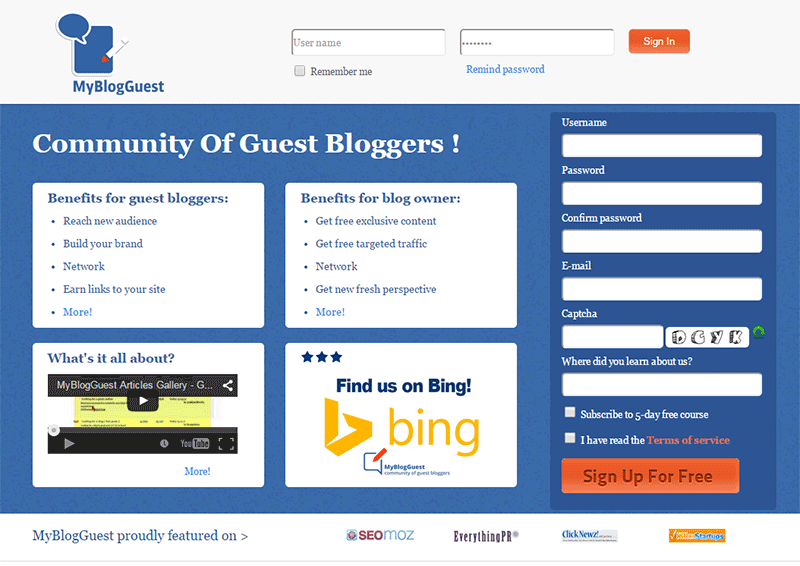
Another means of getting guest post opportunities is by joining guest posting communities. One of the most popular was MyBlogGuest but the site has already been shut down. MyBlogGuest was  a community for people looking for guest posting opportunities. People looking for bloggers to get free quality content also go to it. If you think about it, it’s a win-win situation. You get a link and the other person gets free quality content.
myblogguest

How to Request a Guest Post

When you request for a guest post, the golden rule is to not sound like spam.  Before emailing someone, check out the website first and read the blog. If they have a dedicated page for guest posting, they’ll have guidelines posted there. Read it and follow the guidelines strictly. If they ask you to email them a certain subject or to have a certain sentence as the first sentence in your email, then do so. By doing what they ask, you’ll come by as someone genuinely interested in a partnership and won’t be writing crappy content. This kind of practice separates the spammers from the real quality guest posters.

If they don’t have specific guidelines, just email them in a normal manner. It helps a lot if you address the recipient with using his/her first name. This is usually written in the ‘contact us’ page. If you can’t find it, that’s not a problem. Just be courteous. You can also write something about how you loved a specific post on their website. This shows that you’re not just interested in the guest post for a link. You’ll also show that you’re interested in the content that they publish. An important bit: Try not to come off as someone trying too hard to please them just so they would allow you to guest post.

In your email, you should also include one or two topics that you’re interested in writing about. Including a short summary of what your post will look like will go a long way.  Make sure that what you’re proposing is relevant to their audience otherwise it will just get rejected.

Many blogs don’t accept links within the content of the posts unless it’s integrated  well into the content. Usually, in cases like these, they will allow a link to your website in the author bio. Now here’s a pro-tip. When writing the author bio,  include your email and ask the readers to contact you if they would like you to guest post on their website. You’ll need to write some really good content for this to work though.

Getting Seconds

guest-blogging

­­In getting guest posts, it is more helpful if you guest post in a lot of different websites. But if you get offered another chance to guest post in the same website, always grab the opportunity. It will help you build your reputation as a guest blogger. Your second post can still contain a link back to your site. And while it will not be as valuable as your first post, it will still show on your link profile. It can also get you some organic traffic. This is true when your guest post is being posted in a popular website with a large following.

What Makes a Good Guest Post

A “good” guest post is subjective, but ideally, a good guest post should provide new information and is insightful. Reading  the guidelines of the website where you are guest posting will help you write a post which is “good” by their standards.

How-To posts that teach the readers how to do something are always a good idea. Try to target a specific topic. If you write an article entitled “How to Write an Essay” that’s not good at all. Just think of the thousands, maybe millions, of articles with the same title all over the internet. Something more specific is “How to Write an Essay Optimized for SEO” or “How to Write a Good Expository Essay”.

Always try to use subheadings on your guest post especially when it is long. If you write a 1000-word guest post without any subheadings, it’s not enticing to read. It will look like a big wall of text. While images can help make it more attractive, it’s not as helpful as subheadings.

Also, whenever possible, you should reference any claims on your post unless that is your expert opinion. You should establish that your opinion is credible. Claiming something without backing it up is akin to spouting gibberish and readers will take notice of that. If a claim links to some example or some study that proves your point, then it gets better.

Another important bit to remember is not to hard sell your products or services when guest posting. The blog or website you are guest posting on trusts that you will create good readable content and not a marketing gimmick. Don’t spam your article with links to different product pages, rather if you should add a link, make it a useful link. Maybe link to a related blog post on your own website’s blog. This is all the more reason, among the many other reasons, why you should have a blog on your online store with a bunch of useful and good posts.

Adding Your Links

This is the most important part of your guest post. You can post a link anywhere on the body of your post going to your website unless otherwise specified. The link can be on your home page or any other relevant page. Your link should integrate well into the content. To be integrated well into the content, the reader should know what to expect when they click a link. Are they going to get more information on the subject of your blog post or maybe an important resource? Just because you used a keyword that you are targeting doesn’t mean you should add a link there.

As I’ve mentioned earlier, some website owners refuse to add links in the body of the content. This is because many guest posters don’t integrate it well into the content. In these cases, they allow links in author bios.

So, that’s it. You got your crash course on guest posting. If you have any questions, feel free to hit the comments.


Filed Under: How-To Articles, SEO For E-Commerce Tagged With: blog, email, Google+, how-to, link building, LinkedIn, SEO strategy

On page SEO for Ecommerce: The Online Store Ultimate Guide

September 2, 2015 By John Leave a Comment

on-page-SEO

I know I need SEO, but I don’t know exactly what I need.

We have heard this statement several times. Entrepreneurs realize the value of SEO, but they don’t truly know how to do it for their e-commerce business.

Before embarking on optimizing on page SEO for ecommerce, it’s crucial to understand what you hope to gain.

In this article, you’ll learn about the following:

  • Understanding your SEO needs so you can focus on the most profitable areas
  • How SEO really works for E-Commerce Websites
  • Our 8 step technical On-Page SEO process to guarantee you more traffic.
  • Our 7 Step On-Page SEO guide to user experience and engagement

Most users prefer using Google because it returns the most relevant search results on the web – and by ‘users’, we mean your potential customers. This means that being ranked on the top pages allows online stores to receive more visitors and generate more leads.

So, how can you rank higher than your competitors on Google?

The answer is a well-rounded website. Whether you’re just getting started with a new online store, or improving an existing site, you need to step up your SEO game.

I. Understanding your SEO needs

SEO-success
SEO can help potential customers find your store in search results. Let’s say someone is looking for a product you’re selling. How can we make Google recommend your brand to that user, instead of another store? This is where SEO can help.

A. Business Goals

Your business goals should always come first. Do you want to increase conversion? Build brand or product awareness? If your business goals are clearly set, it will be easier to determine the SEO strategy that will best fit your needs.

B. Existing Performance

Look at your analytics data to assess the existing performance of your site. It will show your site’s traffic and conversion trends over the years, helping you understand what keywords you need to optimize for. We will show you exactly how to do keyword research shortly.

C. Resource Constraints

After looking at your analytics data, and knowing where you’re lacking, you’ll know how to fill in the gaps. Know where you need help, and it will make the SEO planning easier.

II. SEO Basics for E-commerce Websites

SEO-google

For an e-commerce site, driving relevant traffic to boost sales is crucial.

It’s critical for websites to appear on Page 1 of Google. Surprisingly, the top three organic positions alone receive 58.4 percent of all clicks from users.

CTR

Websites ranked number one received an average click-through rate of 36.4 percent. The second spot received a CTR of 12.5 percent, and number three had a share of 9.5 percent.

Do you want to know how to rank your e-commerce site? Read on.

A. Start your Research

On-page SEO work needs two types of research: Keyword and Competitor Research.

The primary objective of doing research is to identify the gaps between your site, and the sites that are doing better. Keep in mind that the market you are about to enter might already be well-served by savvy site owners.

1. Keyword Research

First of all, targeting the wrong keywords makes your campaign ineffective. It can lead to low quality traffic, and few conversions.

Go for keywords that are highly relevant to your brand or products. What terms are your ideal clients using when searching for your service?

You can use tools such as:

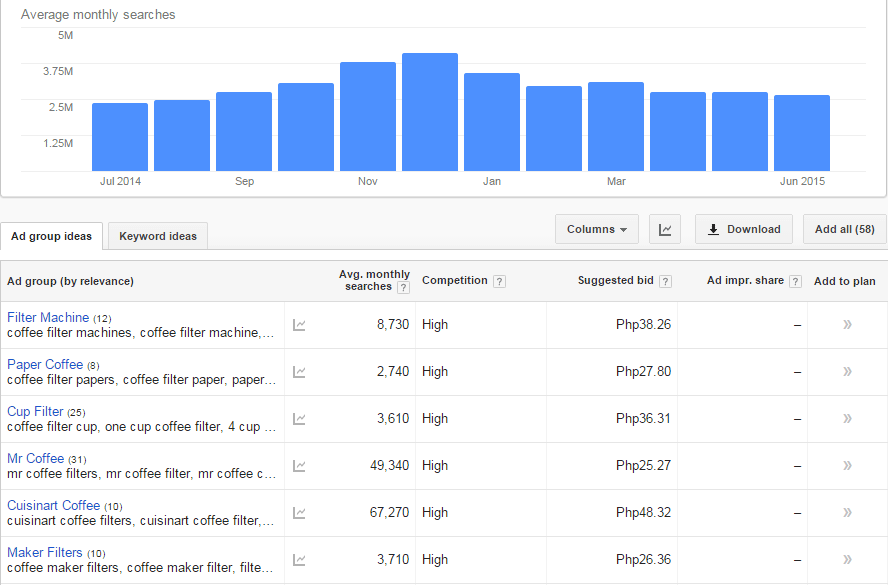
Google Keyword Planner (formerly the Keyword Tool)

keyword-tool

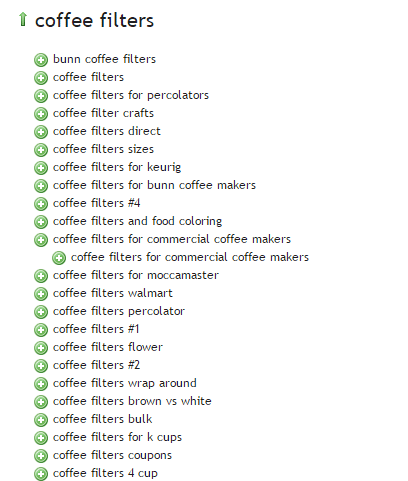
Übersuggest

ubersuggest

2. Competitor Research

Insightful competitor analysis

Insightful competitor analysis is an essential strategy to find out what rival e-commerce firms are doing. In SEO, you can track and analyze the performance of your competitors in relatively simple ways.

Which keywords are your main competitors going for?

List down the keywords which your competitors appear to be using with their SEO strategy. Check if they have higher Domain Authority and Page Authorities than you.

  • Domain Authority is a calculated metric for how well a given domain is likely to rank in Google’s search results. It is used to compare one site to another, or to track the strength of your website over time. It is scored on a 100-point, logarithmic scale.
  • Page Authority is a calculated metric for how well a given webpage is likely to rank in Google’s search results. It is also scored on a 100-point, logarithmic scale, and used to predict how well a specific page will rank on search engines.

If your competitors have higher DA’s or PA’s than you, contending against them will be very difficult. So, it may be a good idea to focus on other keywords or “longer tail” keywords instead.

You can use these tools to determine DA’s and PA’s:

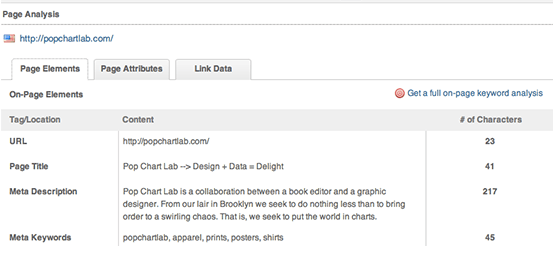
MozBar

Allows for checking the SEO title and description your competitors use in their title tags.

moz-browser-extension

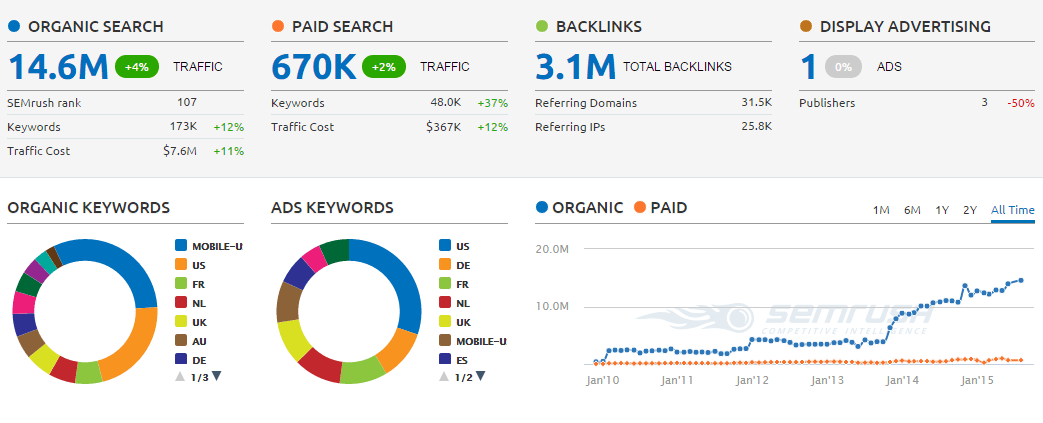
SEMrush

Allows for seeing what keywords your competitors are ranking for on both organic and paid search.

SEMRush

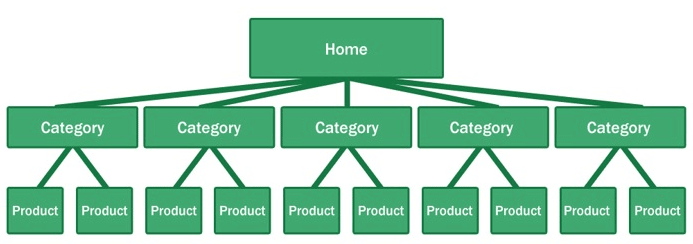
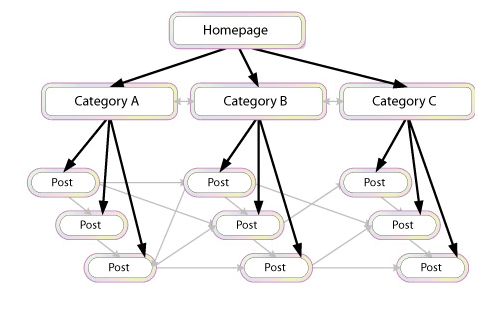
What is their site architecture like?

Try to look at the site architecture of competing sites, or the biggest companies in your industry. Pay special attention to popular products in a particular category, related products, top rated products, and recently viewed products.

site-architecture

Here’s why your site architecture is essential for organic traffic:

  • Google considers your site’s homepage the most authoritative page, so content closest to the homepage receives the most value.
  • By structuring your e-commerce store correctly, your main level navigation pages, such as the category pages, will contain a majority of your site’s authority.
  • Adding relevant, high-quality content to your main level navigation pages can increase conversion, page authority, and sub-category page’s authority.

B. Identify Current Problems

After discovering what keywords are going to make you the most profit comes auditing your site for problems.

404-error

1. Find site errors

Here are the top errors you’ll want to correct:

  • Redirecting any 404 pages to actual content
  • Changing 302 redirects to 301 redirects
  • Updating duplicate content pages, meta titles, and meta descriptions

The above mentioned are called HTTP status codes. These are three-digit numbers returned by servers that indicate the status of a web element.

404 HTTP status code

It can be shown as 404 Error, 404 Not Found, Error 404, 404 File or Directory Not Found, etc. This status code means that the server has not found anything matching the Request-URL. Or, simply the page you were trying to reach on a site couldn’t be found on their server, has been removed or does not exist.

Having lots of 404 pages will hurt your site in many ways. For instance, if a ranking page resolves to a 404 error, it might frustrate the user. This means you will be throwing away some earning potential. Google also counts it as a poor user experience. If you don’t fix the errors, Google will eventually remove that page from their index, which will eventually hurt your overall rankings.

302 Redirect HTTP status code

It’s also known as a temporary redirect. 302 should be put in place if you want to redirect visitors into another webpage, but you plan to bring the redirected page back after some time.

It’s not really recommended since it can hurt your site’s search engine visibility. While the redirected page will retain its page authority and traffic value, the temporary page won’t accumulate any. It’s often used to test a new page. You can gain client feedback without affecting the old page’s ranking.

301 Redirect HTTP status code

This refers to a permanent redirect from one URL to the other. All qualities of the redirected page will be passed on to the detour page. A 301 redirect is often implemented if one is ready to make a test page permanent. The old page will be removed from Google’s index, and the new one will replace it.

Without 301 redirect, the web authority which your previous domain collected will be thrown right out the window. Any inbound links earned will be lost, and you won’t get any SEO credit.

There are dozens of free online services that are capable of checking your website for errors, and finding ways of improving your web page.

Google Webmaster Tools, for instance, can help you identify any page or links with errors, scan for malware, find pages with short or missing titles, find duplicate meta tags, and much more.

2. Determine your site speed

Any delay is enough reason to make your customers leave. This converts to lost revenue, which can hurt your bottom-line.

One study revealed that 1 in 2 visitors will abandon a website that takes more than 6 seconds to load.

There are various tools to help you check your loading speed:

  • Yahoo! Y slow
  • Google Page Speed
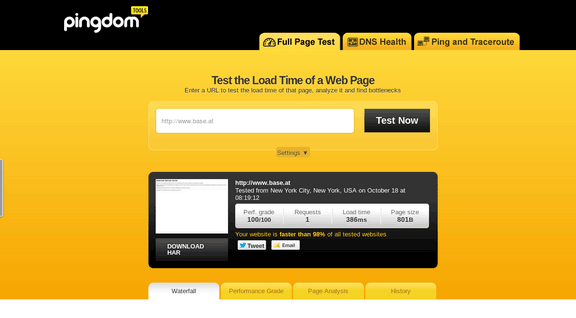
  • Pingdom is the quickest and easiest one

pingdom-site-speed-test

For a more in-depth guide to how to speed up your site see our article here.

C. On-Page Optimization

On-page optimization includes all of the actions you take within your own web pages to help your site rank better.

Learn more about on-page optimization for your online store on the next step.

III. Optimizing On-page SEO Technical Factors

optimizing-on-page-SEO

If your online store is not optimized for both search engines and users, you have a small chance for success. On-Page SEO refers to the settings you can apply on the website so that it is optimized for search engines.

A. Why start with On-page SEO?

  • With On-Page SEO, you ‘speak’ the language of search engines. You can easily make them understand what your website is about.
  • On-Page SEO can make the users happy. It ensures that your website is setup correctly, which leads to a better user experience.
  • Before promoting your site through off-page SEO, you need to be sure that the website is optimized and is running smoothly.

If you don’t know the basics of on-page SEO, you have very little chance of securing top spots for competitive key phrases. Get it right and you’ll succeed on the search engines.

Here are the basic factors of on-page SEO:

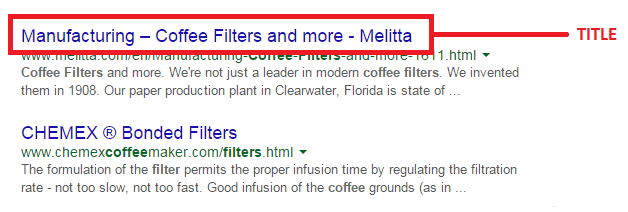
1. Title Tag

Title tags or title elements define the title of a document. It should be an accurate and concise description of a page’s content.

title-tag

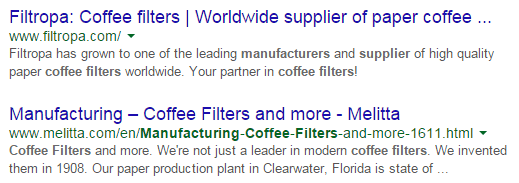
Place your main keyword and variations in the title tag of a page. Google would display around 70 characters of a title tag, or based on pixel width. You can preview how your title tags will appear like through Moz’s preview tool. Make sure to include your business name along with the main keyword phrase you are targeting.

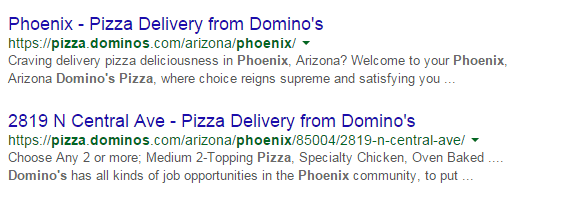
2. Title Tag Optimization

Your site’s title has to be appealing enough for a user to want to find out more information.

title-tag-optimization

Things to include in your title:

  • Business Name: Aside from customers may search you by your brand name, it’s also important for breading purposes. In the example above, it’s Domino’s.
  • Keywords: Putting certain keywords in your title can help them rank, just don’t staff too many. Domino’s used ‘pizza delivery’.
  • Toll-free numbers: It helps your visitors to take a direct action, and makes your title look professional. Users are left with an impression of authenticity of the business.

B. Meta Descriptions

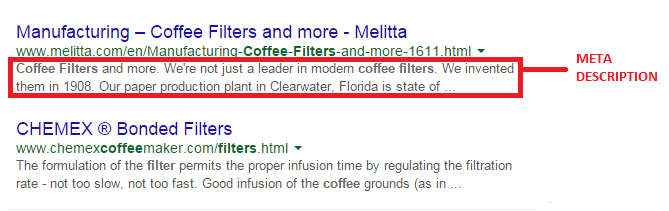
A meta description is the snippet of information below the link of a search result. It describes the contents of the page to the searcher, with the goal of convincing the searcher to click through to your website.

meta-description

They may not contribute as a ranking signal but meta descriptions can encourage people to want to visit your website. It describes your business and shows up in the search results page beneath the title tag. It should be well-written and approximately 156 characters.

Think of meta description as a sales pitch for what the landing page is about. Get practical instructions on how to update them using WooCommerce.

1. Meta Tags Optimization

As mentioned earlier, meta description is something that when done properly can urge users to check out your website.

meta-tag-optimization

Things to include in your Meta Description:

  • Selling Point: To get some advantage, write what your customers want to hear. For instance, a phrase like ‘affordable, all-natural coffee filters from only $3.99’ may result in more clicks.
  • Keywords: It will give you some advantage in Google’s relevancy algorithm.
  • Toll Free Numbers: If you don’t want to place it in your title tag, include it in your meta description instead. Again, it may help your visitors to take a direct action.

C. Heading Tags

Use headings correctly without over-optimizing them. Your main keyword should be in a H1 tag. Split sub-headings up with H2 and H3 tags. Only use the H1 tag once, and others can be used multiple times.

For more information of the correct use of when and how to use heading tags, check out How To Use H1-H6 HTML Elements Properly.

1. HTML Tags Optimization

The text inside your header tags is given very high importance by the search engine. They highlight certain parts of your website.

Header 1: Use it to define the most important section of your page. The H1 tag is an influential ranking factor, and an important signal to search engines as to what a page of content is about.

Header 2: Use it for sub-titles or important sections of your pages.

D. Content

Your content should be written primarily for users, and secondly for search engines. Make sure that the content on your homepage helps visitors learn more about your business, and the products you’re offering.

Use the keywords from your research, but make it look as natural as possible and easy to understand for the user.

Again, don’t forget to use H tags to break up your content into easy to digest sections.

E. URL Structure

Which has a more search engine friendly URL structure: “www.domain.com/page-name/” or “www.domain.com/index.php?id=1?” Obviously, the former makes more sense to both users and search engines.

Avoid having main pages sit too many directories deep in your site. Use hyphens rather than underscores. If you do make changes, implement 301 redirects from the old URL to the new. This way, your users won’t have to face 404 pages.

F. Keyword Optimization

Keyword stuffing is no longer acceptable. Maintain a balance between your keywords and your content.

1. Elements of Keyword Optimization:

  • Keyword Density: In SEO, keyword density is the measurement in percentage of the number of times a particular keyword or phrase appears compared to the total number of words in a page. It’s also an indicator whether your page is relevant to the targeted keyword. Yoast SEO plugin can help analyze keyword density.
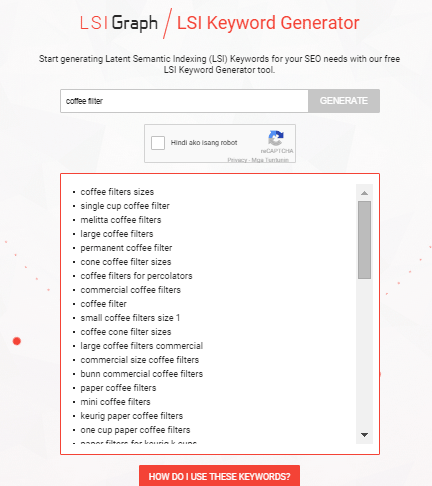
  • Related Keywords: Related keywords are keywords of industries and markets that are closely or somehow related to your niche. It’s using related, but less obvious keywords to bring targeted, conversion-friendly traffic. LSI is smart enough to see ‘coffee filters’ is somehow closely related to tea and accessories for brewing. LSI Graph is a good tool to find LSI keywords.

LSI

  • Long Tail Keywords: These are longer and more specific keyword phrases that visitors are more likely to use. It’s about adding common words like ‘best’, ‘free’, ‘cheap’, or ‘top’ to your actual keywords. Long tail keywords can help you craft the kind of content that engages and inspires readers.

Long tail keywords have less competition, give more qualified leads, and improve head term rankings. According to a research by Statistica, 50% of your focus should be on long-tail keywords in order to achieve a successful On-page SEO.

G. Internal Link Optimization

Internal linking is when you link pages of your website to other pages within your website. It’s a process that involves optimizing internal links, in order for algorithms to determine the relevance of web page content.

internal-link-optimization

If you lack internal links, it will be difficult for Google to crawl and index deeper sections of your website.

1. Why are internal links important?

  1. Internal links improve your ‘link flow’ or page rank to individual pages on your site, helping them to rank better.
  1. The anchor text of links helps Google to understand the context of a webpage, and to rank better.
  • Anchor text: It’s what you call the clickable text in a hyperlink. A good anchor text includes the appropriate keyword to give the page it is linking to more relevant meaning.
  1. Internal links help Google Bots crawl and access different parts of your site, and also improve user experience.

H. Image Optimization

On-page images need to be optimized because search engines can’t read them. This means the web crawlers would only read the text.

1. Elements of Image Optimization:

  • Alt text: Try to move the mouse over an image on a website. If a short description appears, that is alternate text. You can use your relevant keywords as ALT text.
  • File name: Use meaningful file names for your images, such as ‘coffee-filter-basket.jpg’ instead of just ‘DSC1234.jpg’. Make sure the file name is relevant to the image.

IV. Optimizing On-Page SEO for User Experience and Engagement.

user-experience

Google has been updating its ranking factors consistently, and user experience and engagement have become one of them, especially for mobile. What links UX and SEO? It’s about attracting visitors and converting them into customers.

Once you create a great user experience, visitors would perceive your site positively which encourages sharing, return visits, bookmarking, and inbound links. These factors are signals recognized by the search engines, contributing to high rankings.

  1. Focus on designs that fit SEO principles – you need to maximize H1 and H2 titles, optimize menu names and functionalities, create a clear navigation path, and provide focused product names and descriptions.
  1. Call-to-action – CTA buttons or even links with CTA should be designed not only for user experience, but also linked to content and page elements optimized for SEO.
  1. Focus on quality – when talking about quality websites, user experience is also taken into account page speed, easy navigation, internal link structure, descriptive content, and page layout.

A. Engagement Metrics

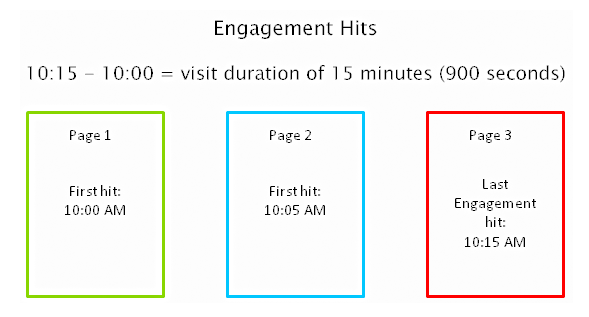
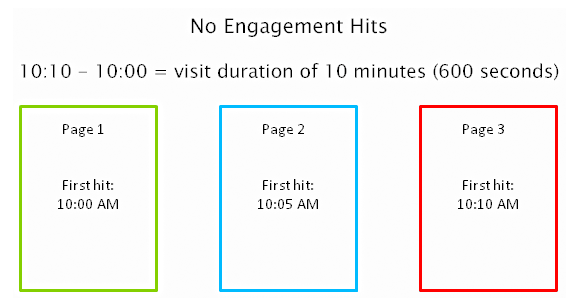
As a search engine delivers a page of results to you, it observes how you engage with those results, measuring the success of the rankings in the process. Search engines are looking for that ‘long click’, wherein a user does not immediately return to the search page.

engagement-metrics

For instance, you click on the first link found on the SERP, then immediately hit the back button and clicked the second link. The search engine will interpret this as not being satisfied with the first result.

engagement-hits

1. How important is Time on Site?

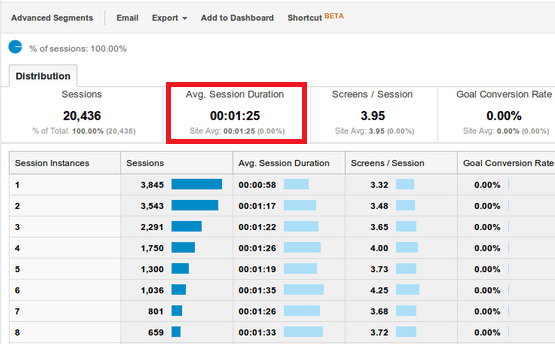
Time on site or visit duration refers to how long a visitor stays on your website. Because Google wants to give their users the best experience, they actively measure user behavior to help shape their algorithm. If a user is spending a significant time on a site, interacting with it, and going deeper within the content, it means there is something of value on the site for that particular user.

time-on-site

2. What is Relevance?

The relevance of a website’s content is particularly important for search engines. The term ‘relevance’ describes the extent to which the content of a website corresponds to the search term used. It can affect a website’s ranking in the search results, for a given search term.

If you’re selling coffee filters, you must not go off topic and talk about juicing machines. Go for the search terms that your potential customers are searching for. “Disposable paper coffee filters” could be a good choice for a keyword for a coffee-filter vendor, but “coffee maker parts” might not work. You would be confusing yourself, your to-be customers, and the search engines. Your relevance would get hurt, hence you ranking would get hurt too.

Ask yourself, how relevant is your page content to the keyword query of your visitor? You can make your site more relevant to searchers by optimizing the different on-page factors discussed in Part III. They include your site’s meta tags, headings, body text, and other content.

3. Google will reward you for being relevant.

According to Google’s official blog, their goal is simple: to give people the most relevant answers to their queries as quickly as possible.

relevance-to-users-reward

Maintaining your site’s relevance may lead to more clicks, and a higher position in search results. When Google changed its algorithm last February 2011, they began promoting sites with reports, in-depth analyses, and other forms of high-quality, value-adding content. Sites that were deemed irrelevant and invaluable by the algorithm were demoted.

4. How Google determines relevance?

Google displays web pages in their search results based on the authority and relevance of the page. So, how does it determine relevance? According to Neil Patel, it analyzes a page’s content based on several factors, including where and how often you use certain words in that piece of content. You can check out Google’s other ranking factors here.

Let’s move on to your WooCommerce product page.

B. Important Elements for On-Page Optimization

These are the elements that are important for on-page optimization:

1. Customer Reviews

These reviews not only improve your business, they also provide an amazing source of unique content. Internet Retailer reveals that an online store can increase its e-commerce conversion rate by 14-76% by adding product reviews.

Search engine spiders like unique content that is regularly updated, and user reviews are a great way to create more of this on your website. According to data, 88% of consumers trust online reviews as much as personal recommendations. This means that potential customers will be searching for the name of the product plus the word ‘review’, or related words such as ‘ratings’.

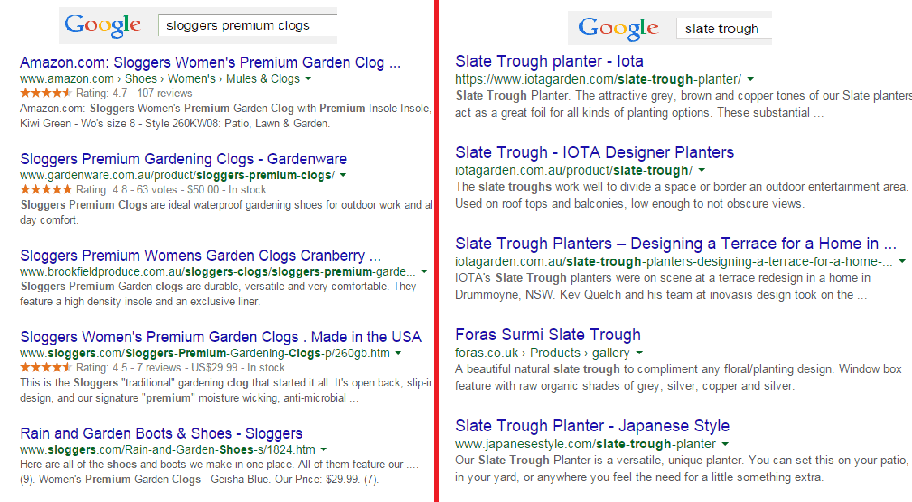
Compare these two images on SERPs:

customer-review-SERPS

The organic search results on the left are showing ratings just above the meta tag, while the image on the right doesn’t. So, what determines if ratings are shown on SERPs?

Apparently, sites on the left are using schema markup on their reviews. That is why their ratings occur on SERPs.

In AdWords, they are enabled through the product reviews ad extension. You have to submit your product data to Google, and be a client of selected review websites. Get reviewed by at least 30 unique users, submit your reviews to Google, and have your review extension enabled!

Increased CTR on results pages

Correctly formatted reviews can help increase click-throughs from search engine results pages. In the image below, the addition of star ratings make the first and third results stand out.

increased-CTR

Increased conversion rates

By increasing the chance of a click-through, you’re also increasing the chance for conversion. User reviews can increase trust in your ecommerce site, and can help remove doubts about products.

To collect customer reviews, try the following:

  • Email customers a few weeks after purchasing and ask for a review.
  • Offer discounts or other incentives on their next purchase in exchange for a review.

Don’t worry about negative reviews. Instead, take it as an opportunity to show good customer service. Offer to replace the faulty product or offer a refund.

2. Pagination

Because e-commerce sites are promoting a variety of products, they´re ultimately forced to divide them into multiple pages. This process is called pagination.

If you have product categories that contain thousands of products, make sure that all of them are indexed and regularly crawled. Google has some good instruction on pagination with rel=“next” and rel=“prev”.

Pagination affects two critical elements of search engine accessibility:

Crawl Depth: Google demands best practices, wherein spiders should reach content-rich pages in as few clicks as possible. If you have too much paginated content, Googlebot won’t travel through all of them. It won’t be able to index the final pages.

Duplicate Content: Search engines want to show only a single URL for a piece of content. If pagination is not implemented correctly, it may cause duplicate content problems. This will cause some confusion for the Googlebot, especially during search queries.

3. Page Speed

Google announced that website speed would begin having an impact on search ranking. Apparently for Google, a poor performing website results in a poor user experience. It’s enough reason for a website to gain less promotion in search results.

A user is not going to wait for your product pages to load, so you should care about site speed. Any delay is enough reason to make your customers leave. This converts to lost revenue, which can hurt your bottom-line.

There are several ways to optimize your WooCommerce site’s speed. You can read all about it here.

4. Search Option

Even with a good navigation structure, there are users who will just prefer to search. That’s why a search box has become an essential element of e-commerce sites.

Using your search feature, you can track your customers’ searches using CMS or Google Analytics. What phrases are they using? Does your site return good results? Is your search function working for singular and plural keywords?

search-option

Monitor the number of people who search and then leave straight away. What prevents them to go through the checkout process? Try including special offers related to the search, and see if it lessens your bounce rate. The data you have collected will help you improve your website and customer experience.

5. Product Description

It is very important to make your product descriptions unique. For retailers, don’t just rely on the manufacturer’s brochure. If you do, then you’ll have the same content as hundreds of other retailers. Make it unique and engaging.

Product descriptions shouldn’t just describe your products, product descriptions should sell them.

Here’s how:

Focus on your ideal buyer

If you focus on a huge group of buyers, you may end up addressing no one at all. Imagine your ideal buyer and consider how you would speak to him if you were selling your product face-to-face. Does he appreciate a good humor?

ThinkGeek starts their product description as:

think-geek

Entice with benefits

A consumer always wants to know what’s in it for them. What are your product’s features and specifications? Know how to highlight the benefits.

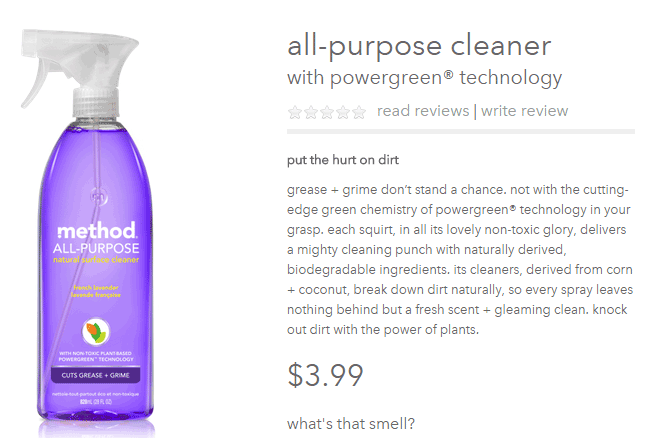
entice-with-benefits

Methodhome highlights the powergreen action of their all-purpose cleaner, wherein grease and grime don’t stand a chance!

6. Business Information

To optimize your business information, make sure that it’s complete and accurate.

Phone number: this can actually inspire trust. If a phone number is shown, it gives customers the impression that you can provide customer support if ever they encounter some problems with the purchase.

Company details: this is especially helpful if you’re trying to target local markets. If you give Google some location signals, it can help your location keywords rank.

7. Social Sharing

Are you happy with how social share buttons work on your website? To maximize the benefits, social share buttons need to be optimized.

social-sharing

What’s an optimized share button?

It’s a share button that automatically generates a shareable message with custom information for your brand.

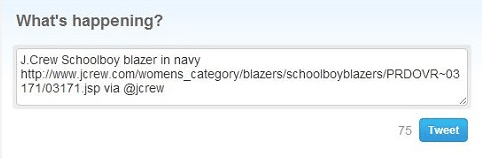
Here’s an example of an optimized Tweet:

Notice that the tweet has the brand’s Twitter handle @jcrew.

brand-on-Twitter-handle

Customizing your share buttons let your readers share useful information, and help you control brand messaging at the same time. You’re making it easy for your visitors to share your products on their social media profiles.

We all know how social media connects people who value each other’s opinions. People who see content being shared by their friends, family, or colleagues will think that it’s something worth checking out. This means more traffic to your site!

You can place social share buttons…

  • After the point of purchase on a confirmation type page
  • Email follow up and correspondence
  • After a review has been published – give the reviewer the option to share their review

V. Conclusion

team

With these steps, you can start optimizing the pages of your online store. If you want to do this by yourself, there are plenty of SEO tools given in this article to help you optimize your rankings. Nevertheless, don’t be shy to reach out to a professional for help. On the other side of the coin don’t try and outsource this completely, no one understands your products like you; an internal team member with intimate knowledge of the products and target market needs to be involved.

If on-page optimization is done right, you will see an increase in quality traffic, which will lead to more conversions and repeat visitors.

Keep in mind that Google constantly updates their algorithms, which also means you have to be up-to-date with your strategies. It may require a lot of work, but the benefits are worth it.

Filed Under: SEO For E-Commerce Tagged With: 404 error, conversion optimization, Google Analytics, Google Webmaster Tools, keyword research, redirection, SEO strategy, SEO tools, site speed optimization, social media

How to Fix Your Website Structure

April 13, 2021 By John Leave a Comment

how to fix your website structure

Have you ever considered looking at your WooCommerce store’s site structure? Probably not. After all, it doesn’t look like an urgent issue that warrants a lot of immediate attention. However, if your WooCommerce site suffers from poor structure, you could actually be hurting your SEO rankings. Odds are you are also making it difficult for your customers to navigate your site. In fact, depending on how bad your site structure is, it could be causing your customers a lot of frustration. You should make it a top priority to learn how to fix your website structure.

Why Should You Fix Your Site Structure?

If you know your site structure has problems, then do not delay. Address it right away so you can reap the benefits of following best SEO practices. If you are serious about getting on page of Google’s search results page, then you should not skimp on fixing your site structure. Not to mention, a good site structure will make it easier for your customers to navigate your site. This leads to good user experience which can increase your sales by as much as 30%.

What Does Good Site Structure Look Like?

Good site structure should look like a proper flow chart. The home page should have a link to all stand-alone pages this includes the about page, contact page, privacy policy page, pricing page, portfolio page, my account page, blog page, shop page and any other important pages.

Blog posts should make full use of blog categories and blog tags, if necessary. The same goes for products. Make full use of product categories and blog tags. Your blog categories and product categories should never have the same name as they will cannibalize each other. They will compete with each other for SEO rankings. Also, categories and tags should not be the same.

What You Should Do to Fix Site Structure?

Do a Content Audit

Before you go about fixing your WooCommerce store’s structure, it is important to understand your content. You can do a content audit to better understand your content assets and determine how to optimize your website’s structure. After doing a content audit and getting a clear picture of your content assets, the next step is to identify site structure problems.

Identify Site Structure Problems

Check and Fix Your Navigation Menu

Check all your navigation menus. From a user perspective, do they make sense? Do you use dropdown menus? More important menu items should go to your main navigation menu. Less important links to pages like Privacy Policy, Cookie Policy, Terms and Conditions should go to your secondary or footer menu. Having a privacy policy and cookie policy page is essential if you want to comply with GDPR regulations which you should.

You can even have people try using your site and ask them feedback about your site’s navigation.

What Should Be on Your Main Navigation

Your main navigation should contain your most important pages or all pages you want your visitors to have easy access to. We recommend your Shop Page, Blog Page, About Page, Contact Page, or depending on your business, a portfolio or pricing page.

Find 404 Errors

Isn’t annoying when you go a certain website, you click a link and then land at a 404 error page?

Google has been putting more attention on good user experience and having 404 errors on your website is not good user experience. Fixing 404 errors should be included in your website maintenance tasks. You can find 404 errors by using this Broken Link Checker tool. Once you determine which links lead to a 404 error, remove that link or point it to the appropriate page.

Redirect 404 Errors

In some cases, your broken links could be because of a change in your website’s URL structure. In this case, you might want to redirect all your all URLs to the new URLs. Make sure you use a 301 redirect. You can use the Redirection plugin to set up your redirects. For SEO purposes, it is important to set up a 301 redirect to tell search engines that the old page has been permanently moved to a new address.

Update or Remove Outdated Content

It is important for SEO to have fresh content so you should be updating your content regularly. In some cases, you might find that some of your old content may no longer be relevant so you can either update or delete that page. If you have updated content, you should redirect the deleted page to the updated content.

Make the Most of Your Internal Links

Proper internal linking creates a smooth flow between all your site’s pages. When you’re writing a blog post and you mention another blog post that is related to your current post, link to it. When you mention a specific page on your site, link to it. When you mention a specific product, link to it. Google appreciates good internal links.

Learn How to Properly Use Posts and Pages

Think of categories as a file cabinet where you place files that belong together so everything remains organized. So if a user is interested in a specific kind of product or blog post, the user can find them all in one place. Tags, on the other hand, are used differently. You can think of tags as the index section of a book. Properly tagging your posts and products makes it easier for users to find posts or products that mention a specific keyword or topic.

Should You Revise Your Categories?

If you found out that you’ve been using your categories all wrong and want to revise it to make it clearer, you should do it sooner rather than later. Making sure your category structure is optimum will go a long way in helping your SEO. Just make sure you properly redirect everything to the new URL.

Changing the Permalink Structure

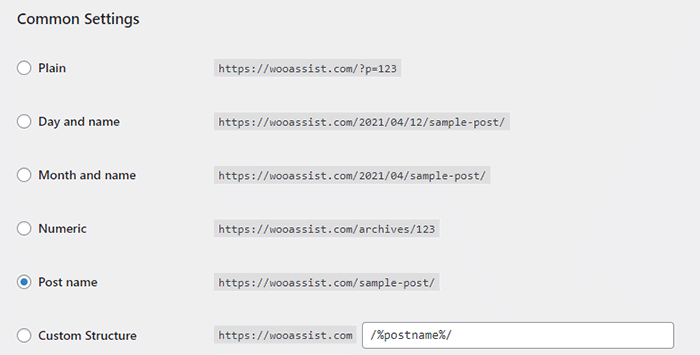
By default, WordPress sets your permalink structure to something that is not optimal. It is ideal to have a custom structure or a post name structure. It should be one of the first things you should change when you create a new WordPress site. So if you didn’t do it before and now have hundreds of posts and pages, then changing your site structure could become a major issue.

When you change your site structure, you will lose many external links pointing to your site and that’s a big SEO disaster. You have to make sure you make proper 301 redirects to the new URLs.

It might be a lot of work but you will soon reap better SEO rankings. If you already have good content, the benefits of optimizing your permalink structure could be significant. This means you should not skip doing this.

Resubmit Your Site Map

When you finish all your site structure optimizations, you should resubmit your sitemap to major search engines. That would be Bing and Google. Resubmitting your sitemaps ensure that search engines index the changes in your site structure.

Have you checked your site structure lately? What problems did you find?

Filed Under: How-To Articles Tagged With: 404 error, best practices, content marketing, navigation, SEO strategy, woocommerce seo, WordPress SEO, XML sitemap

How to Write Easy-to-Read Content for Your WooCommerce Store’s Blog

June 1, 2016 By John Leave a Comment

how to write easy-to-read content

It’s important to come up with a strong headline and back it up with great copy. But if readers find your content hard to read, they could leave your site. To avoid this, you should optimize your content for ease of reading. Use of simple words along with visual aids such as images, charts, graphs, videos, and proper heading structure should help you achieve this.

In this article, we’ll show you some tips on how to write easy-to-read content. We will also recommend a few tools that can help you write simple content.

Why Should Content Be Easy to Read?

A web usability study showed that 79% of web users are ‘scanners’, not readers. This means a typical user will scan the article, picking out individual words and sentences. If the scan deems the page as not very useful, the user won’t bother reading it and promptly skip to the next search result. Users can afford to be picky because of the abundance of good content on the web. With an estimated 3 million new blog posts every day, there’s a lot of competition.

Published content is meant to be read. For this to happen, you need to satisfy the user’s needs in the first 10 seconds as they scan your post. The web user clicked that link to your article because its headline promises an answer to the web user’s question or it has piqued his interest. With content optimized for ease of reading, the user will find more value in reading your content in its entirety.

Maintaining a blog on your WooCommerce store with great, easy-to-read content is an effective way to build traffic and convert visitors to customers. In fact, a survey showed that 57% of companies with a blog acquire customers from their blog.

How to Write Easy-to-Read Content?write-blog-laptop

Forget about complex sentences, long paragraphs, and difficult words. Keep the message clear. Avoid confusing your readers by trying to sound good. Here’s a list of the things that you can do to ensure your content is easy to read.

  • Break up your post with subheadings. Subheadings make the structure of your content clearer and easier to dissect. This is invaluable when writing long articles. Scanners will naturally be guided to the important points that they are searching for.
  • Introduce more white space. Adding just enough white space in between paragraphs makes content easier to read. Without line breaks, your article will look like a big block of content that is unreadable.
  • Use bulleted and/or numbered lists. Bullet lists are best used when enumerating. Numbered lists, on the other hand, are best used when mentioning steps that need to follow a certain order.
  • Structure your paragraphs in the inverted pyramid style. This means you include the most important information at the start of the article and the least important information at the end. This is the structure of most news reports. However, this kind of structure does not work for all audiences so take this with a grain of salt.
  • Avoid long paragraphs. If possible, a paragraph should be made up of 3-4 sentences at most and only deal with one idea. Neil Patel actually uses one-sentence paragraphs throughout his blog and it makes his content easier to read.
  • Avoid passive voice. Using passive voice is not necessarily wrong but it weakens the clarity of your writing.
  • Avoid using adverbs. Adverbs are unnecessary and most of the time is just overly descriptive to the point that it is insulting to the readers. For example, one can say “scream loudly” when in fact screaming is done loudly.
  • A complex topic can be broken into a series of posts. While long articles are good in their own right, short articles are easier to read. If you are looking to write a 2000-word article, you can consider writing a series of short articles instead. This can also help you gain a loyal following on your blog as the readers look forward to the next part of the series.
  • Add relevant links where needed. When you reference something, it is important to link to it. If your reader wants to learn more about that topic, they can simply click on the link. Linking to your sources also adds to your site’s credibility. Not to mention it can be an opportunity to reach out and network with other people in your niche.
  • Use images and other visual content. Images make your post less boring. Choose relevant images and make use of charts and graph as needed. Charts and graphs are especially useful when you are presenting data.
  • Use deep captions. These are captions that are two to three sentences long. Along with the image itself, deep captions can catch your reader’s interest, enough for them to read on.
  • Proofread before publishing. It is important to get a new set of eyes to review your content before publishing. Proofreading your own content is okay but a fresh set of eyes can spot errors that you may miss.

Tools to Help You Write Easy to Read Content

Here are some online tools that read easy-to-read content.

Hemingway Editor

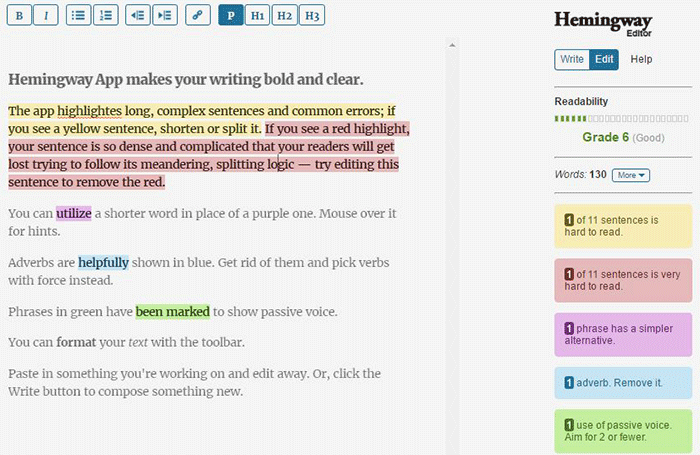
Hemingwayapp

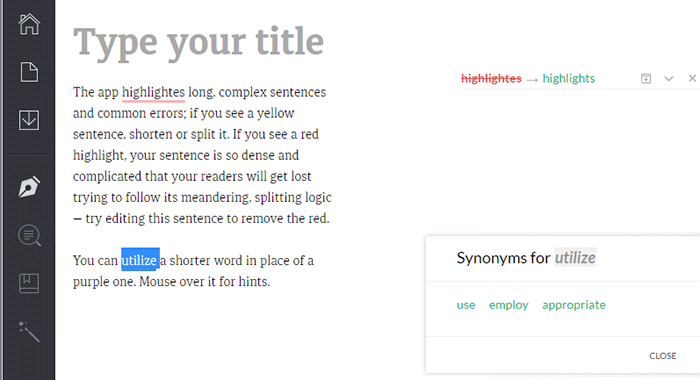
Hemingway Editor checks if your content is easy to read by identifying hard-to-read sentences. In ‘Edit’ mode, you can make changes and see real-time Hemingway feedback to the right of the editor. Adverbs, use of passive voice, difficult words/phrases and hard to read sentences are highlighted so you can fix them on the fly.

This style checker includes a readability grade level based on the Automated Readability Index. Readability is the ease with which your reader can understand your writing. A good target is 7 to 8, but don’t go over tenth-grade level.

Grammarly

Grammarly

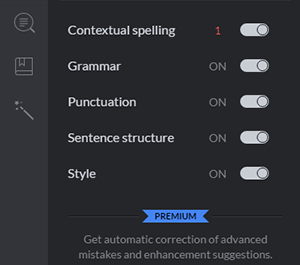
Grammarly_Menu_Grammarly offers free contextual spellchecker, grammar, punctation, sentence structure and style checks. With a premium account you also get plagiarism checks, vocabulary enhancement and professional proofreading.

If you choose to install its Chrome extension, you can use this to edit content in Gmail, WordPress, pretty much anywhere you write on the web.

After the Deadline

After-the-Deadline

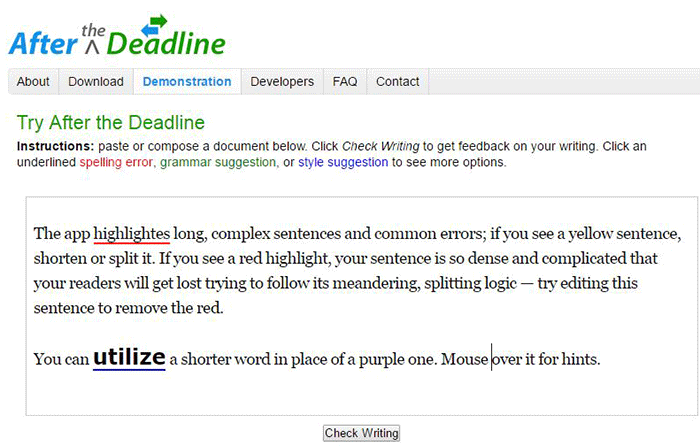
You can use the After the Deadline (AtD) Demo page to check your content online. After you click ‘Check Writing’, click each underlined word to see the suggestion to select or just ignore.

You can also download AtD and use it as a WordPress plugin and extensions to web browsers. This is free for personal use, and they have free server software for commercial needs.

Expresso

Expresso

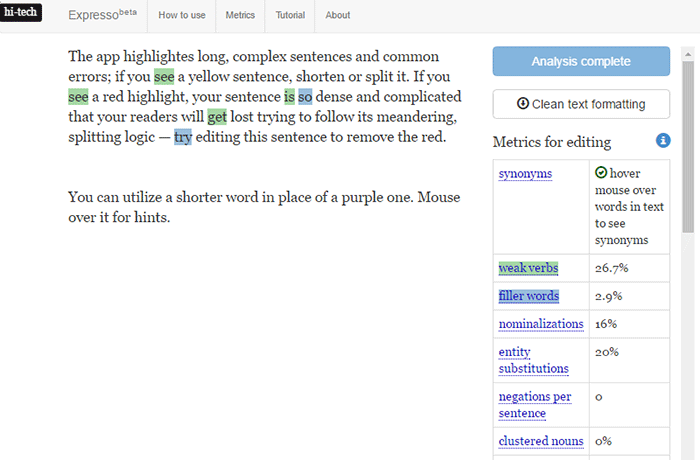
Expresso can help you analyze and edit content by helping you choose simpler words and identifying weak verbs, filler words, etc. An extensive list of general and editing metrics are found to the right of the editor. Click on one to highlight the associated words. Note that this is still in its beta phase.

Conclusion

Always aim for great content that is easy to read. This will keep readers on your site for longer periods. If you apply the above tips and make use of the online tools, you’re well on your way to writing easy-to-read content. You can even use these tools to optimize your current content and product copy. Soon enough you will see the payoffs in longer session times and probably an increase in conversion.

We hope the tools and formatting techniques here can help you create easy-to-read content. Do you have any other tips to share for writing easy-to-read content? Maybe you know of some other tools that can help. Let us know in the comments.

Filed Under: How-To Articles Tagged With: admin, best practices, blog, content marketing, how-to, marketing strategy, SEO strategy

Understanding Search Engine Optimization (SEO) Basics for Your Online Store

January 29, 2015 By John Leave a Comment

searchengineoptimization

Google’s business model is to return the most relevant search results on the web. That’s why people keep using them – and by ‘people’, it includes your potential customers. Being ranked on the top pages allows companies to receive more visitors and generate more leads.
Google uses complex algorithms to assess the relevance of website across the web. They have hundreds of criteria for determining rankings.

A high ranking in Google translates to more site visitors and potential revenue. But how do you achieve that coveted status?

The answer is a well-rounded website.

It should be a site built on a best-practice code base that offers interesting and engaging content users are searching for. In your case, it is an online store using the Woocommerce platform. Understanding Search Engine Optimization (SEO) for your online store is one of the main factors to creating a well-rounded website.

Search Terms

What terms are your ideal clients using when searching for your service? Play around by creating synonyms, abbreviations, plurals, past tense, present tense, verbs nouns, etc. From one word, multiple search terms can be obtained.

For example, from the word car, we can get: car, vans, automobile, pick-up, etc. You will not rank for cars because it’s too popular, making the competition tight. Go for specific keyword “phrases” like “funny car stickers” or “ford car mats” to help you rank higher, and attract your ideal client.

You can use tools such as:

  • Google Keyword Planner (formerly the Keyword Tool).
  • http://ubersuggest.org/
  • https://serps.com/tools/keywords

Once you come up with your list of keyword phrases, dedicate an optimized page on your site for each keyword phrase.

You can outsource some of the research, but the business owner or sales manager needs to check the list. There is no point optimizing your site for key phrases of products that you either don’t sell, or make very little margin from.

Help Google Find You

Assist Google by labeling your content. Everything on your site can be labeled by meta data. Meta data is not visible to the user, but helps Google web crawlers identify what your site is about.

SnapCrab_2015-06-26_14-32-58_No-0000

All good website platforms like WordPress have this baked in to make it easy to add “meta data” to any page on your site.

Using our example above, “funny car stickers” would need to have a page on your site with metatags, something like:

Title: Funny Car Stickers | Bumper and Window Stickers. Car Decals
Description: Find 1000s+ of Unique Bumper Stickers & Car Decals. Tons of Funny designs available, or personalize your own!

On its own, meta data won’t do much to get you in the rankings. It needs relevant content to back up what the meta data is saying about your site. Your content needs keywords, plus synonyms, and related words. If you are writing about the topic you want to rank for, then this should happen naturally.

On-Page -> Off-Page SEO

Up until this point we have been talking about on-page SEO, which involves strategies controlled by the website owner. Wooassist can help with all your on-page SEO needs, but at this stage we don’t offer an off-page SEO service.

Our proficiency is the technical aspects of WordPress and Woocommerce, not content creation. Off-page SEO is the overall publishing and running of the website across the internet. It involves obtaining in-bound links from other websites. To do that, you need remarkable content that people will share and link to.

Improving Relevance and Authority

Linking from relevant websites is still the number one way to rank high in Google. It’s just harder now to achieve this. A few years ago, it was possible to create these links and trick Google into thinking you were popular.

Now, part of Google’s mission is to detect “un-natural” links, and mark it as deceptive and manipulative. Any link scheme is a violation of Google’s Webmaster Guidelines.

Google encourages quality content, and they define it as written by an expert or enthusiast who knows the topic well. Choose topics that are driven by genuine interests of readers of the site. Provide useful content that people will link to, and share with their friends on social media.

With all the factors you need to consider about SEO, it is easy to make mistakes. Here is a good write-up about those common SEO mistakes that you need to avoid.

The irony is, your site will rank high in Google when there is no longer any need. If you create great content that Google wants you to, and people are sharing your content, then you can get a lot of traffic to your site without the help of Google.

Filed Under: How-To Articles, SEO For E-Commerce Tagged With: Google+, how-to, keyword research, SEO strategy, SEO tools

  • 1
  • 2
  • Next Page »
Let us support your online store so you can manage your business

Get started today

Get 2 Hours of FREE SUPPORT

We are so confident that you will love our services that we will give you your first 4 hours at a 50% discount

That’s 4 hours for only $75

BUY NOW

Free eBook

5 Things Every Online Store Can Fix On Their Website In The Next Week To Increase Sales

Quick Links

  • How it Works
  • Pricing
  • Blog
  • Contact
  • About Wooassist
  • My Account
  • Checkout
  • Privacy Policy
  • Cookie Policy
  • Terms and Conditions

Wooassist

Australia:
59 Luke St.
Hemmant QLD 4174

Philippines:
San Miguel St.
Poblacion, Iligan City 9200

Connect


Copyright © 2026 · Wooassist

Yours FREE!

5 Things Every Online Store Can Fix On Their Website In The Next Week To Increase Sales