Wooassist

Assistance for Your Woocommerce Store

  • How it Works
  • Pricing
  • Services
    • Site Maintenance
    • AI SEO and Content Marketing
  • Blog
    • How-To Articles
    • Code Snippets
    • SEO For E-Commerce
    • Theme and Plugin Reviews
    • Wooassist News
    • WordPress/WooCommerce News
    • Interviews
  • About Us
  • Contact
You are here: Home / Archives for e-commerce

WooCommerce vs Magento: Which One Is Best For You?

July 22, 2015 By John 3 Comments

WooCommerce vs Magento

Last time, we compared WooCommerce with Shopify. Now, it’s WooCommerce Vs Magento. Here we will look at their strengths and weaknesses as e-commerce platforms. This will help you find out which is the better fit for your business.

Are you considering moving form Magento to Woocommerce? We have done this for a number of businesses and it can be a daunting task.

The functionality does not cross over exactly and it can become complex web of options and decisions. We offer a service to help with this here.

As of June 22, 2015, stats from Builtwith reveal that WooCommerce is now the most popular e-commerce platform. There has been an increase of 247,245 sites just this quarter. Records show there are around 937,743 live websites using WooCommerce.
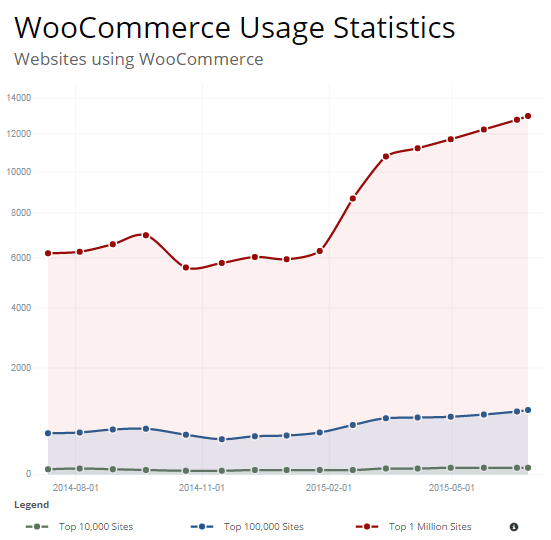
woocommerce-usage-statistics

Meanwhile, Magento still remains the high-performance, scalable e-commerce solution for large businesses. More than 240,000 merchants worldwide put their trust in this software. Data shows 427,571 websites are using it.

If you are torn between the two, then you’ve come to the right place.

When it comes to choosing the right e-commerce platform for your business, there are a number of things to consider. We’ll go right ahead and explore the factors one by one.

The Face-Off: WooCommerce vs. Magento

face-off

WooCommerce:

This open source e-commerce plugin for WordPress was launched in 2011. It was aimed at small-to-medium online merchants already comfortable with a WordPress set up. To date, there has been a total of 8,432,130 WooCommerce downloads. It quickly became famous for being free in nature and its simplicity to install.

Leading brands that trust WooCommerce include:

woocommerce-brands

Magento:

The platform is now owned by eBay, a global leader in e-commerce. It provides two distinct versions – Community Edition and Enterprise Edition. Since its launch in 2008, there has been more than 500,000+ downloads. One can find more than 2000 various extensions for additional functionalities.

Leading brands that trust Magento include:

magento-brands

ROUND 1: ‘Getting Started’ Comparison

Platform: Both WooCommerce and Magento’s Community Edition are open-source e-commerce platforms. That means both platforms are available for free. Bigger businesses can upgrade to Magento’s Enterprise edition, for a subscription fee. WooCommerce is totally free, but it has fewer features compared to Magento’s Community Edition.
woocommerce

Pricing:

For development costs, Magento may be priced a bit higher. This is because you’ll need to find a capable developer to help build out the site. However, it gives you a better initial suite of features. WooCommerce is entirely free to download and install, but you’ll probably need to buy some of its extension. For instance, its full range of payment options.

Hosting:

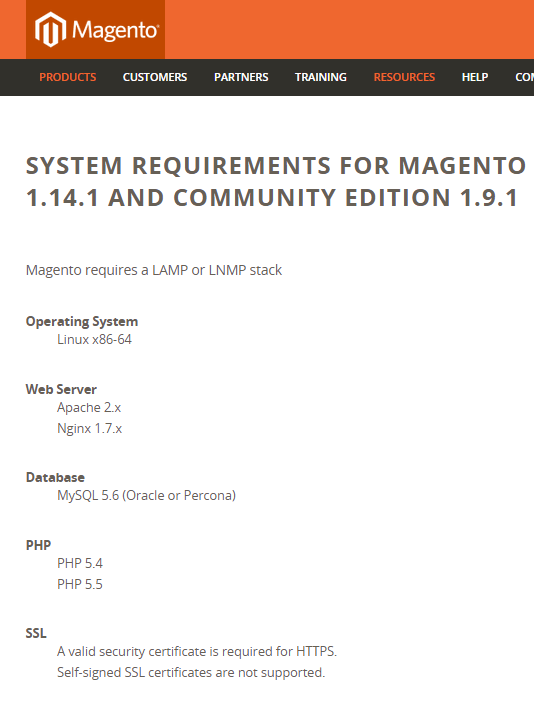
WooCommerce is an extension of WordPress therefore, there are very few server requirements. There should be no issue, as long as your server supports MySQL or PHP. As for Magento, there is a slightly longer list of server requirements. It may also require some technical knowledge before one can set it up properly.
magento

Installation:

The WooCommerce plugin is developer and designer friendly. It is easy to customize and change. It has a thorough help section, and video tutorials for beginners to help you get up and running. Magento comes with a full installation wizard, and a comprehensive help section. Videos and tutorials are available from the support community as well.

Round Conclusion:

Because WooCommerce is easier to use, the platform is ideal for less sophisticated users. Magento may be a more flexible solution for sophisticated clients selling online at an enterprise level. However, it’s a bit tougher to understand.

ROUND 2: Plugins and Themes
woocommerce-themes

Plugins: WooCommerce has a slight edge over Magento because it can take advantage of WordPress plugins. Nevertheless, a lot of community extensions are available for Magento, which can be easily integrated to suffice business requirements.

Themes:

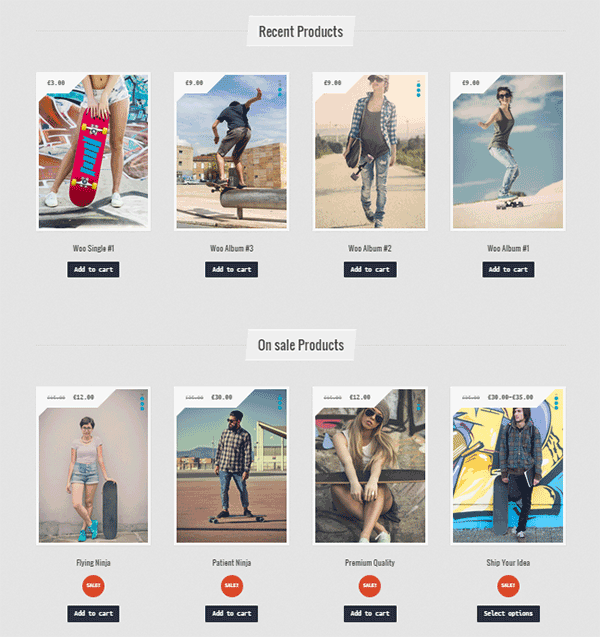
For both platforms, there are a lot of free and premium themes to choose from. Magento themes offer flexibility, functionality, and can be easily extended and modernized. But, you’ll need a professional webmaster to install, set up and update even the easiest Magento theme.
magento-themes

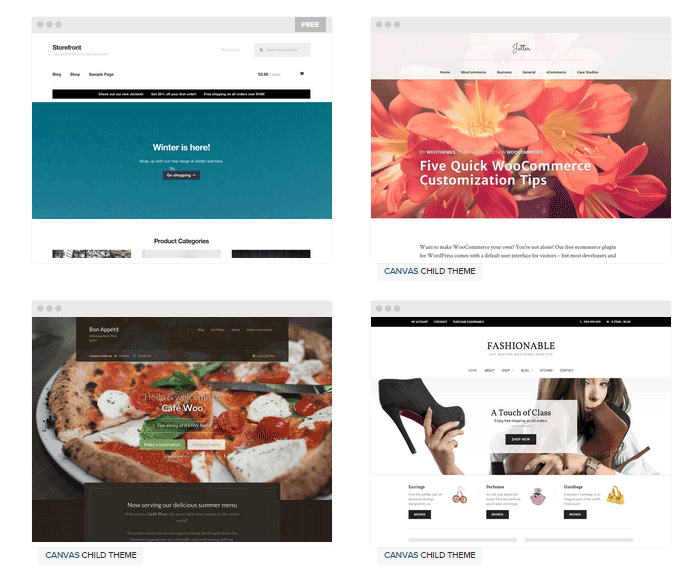
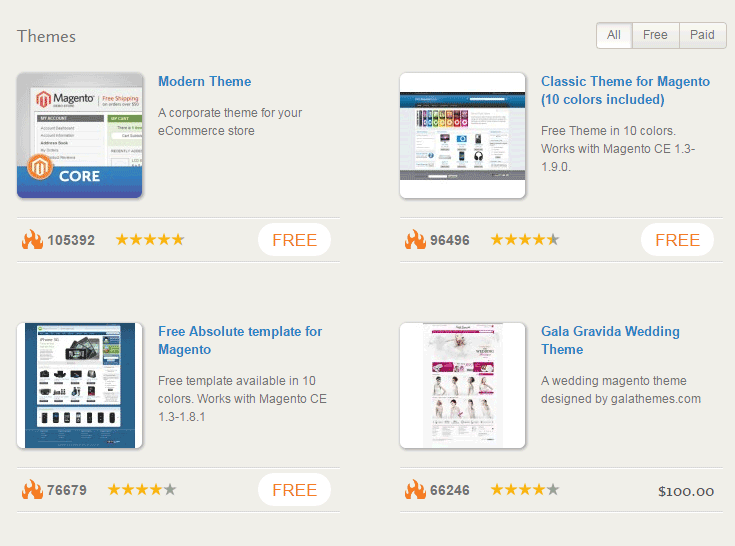
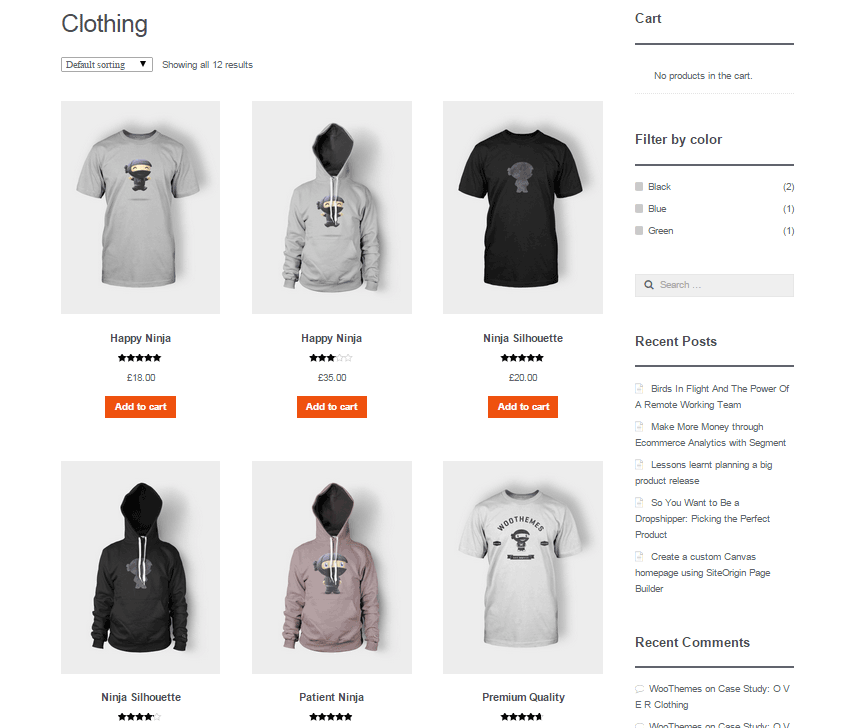
There are more WooCommerce themes to choose from compared to Magento choices. They’re also incredibly easy to install and upgrade. The only downside is they can conflict with other WP plugins. So, compatibility should be checked with WooCommerce before installing of any new plugin. This article can tell you more about the theme pros and cons of both platforms.

Customization:

Just because it’s free, doesn’t make WooCommerce a rigid platform. In fact, there’s a lot of room to customize and tweak your online store to a level of uniqueness. You can change pre-set CSS styles and color, tweak the code and experiment with the special features which each theme offers.
themes

With Magento, you also have the option to customize the theme as much or as little as you’d like. Your theme is designed to utilize all of Magento’s excellent built-in features that you should be taking advantage of.

Round Conclusion:

Magento can give you a bit more when it comes to extensions, but WooCommerce tends to be preferred because it relies on plugins for extra functionality. They basically have the same theme features. But, if you choose WordPress for your projects, then go for WooCommerce themes.

ROUND 3: Product Volume and Variations

Volume:

There is no real consensus on how many products you should have, for a WooCommerce store to be manageable. There are many WooCommerce stores out there that have thousands of products and manage just fine. According to MarketPress, 57% of WooCommerce store owners have more than 100 products, 40% has more than 250 products and 11% has up to 1,000 products.
store-volume

Magento will support an unlimited number of products. But as your catalog grows, you may start running into resource limitations that’ll require hosting upgrades, etc. When running a large catalog, product, URL rewrite, and inventory indexing are the major issues.

Variations:

Many WooCommerce users believe that WooCommerce only support up to 50 product variations per product, but this isn’t true. It can only create 50 variations at a time if you choose to automatically create the different product variations. After that you can again create another batch of 50.
magento-2

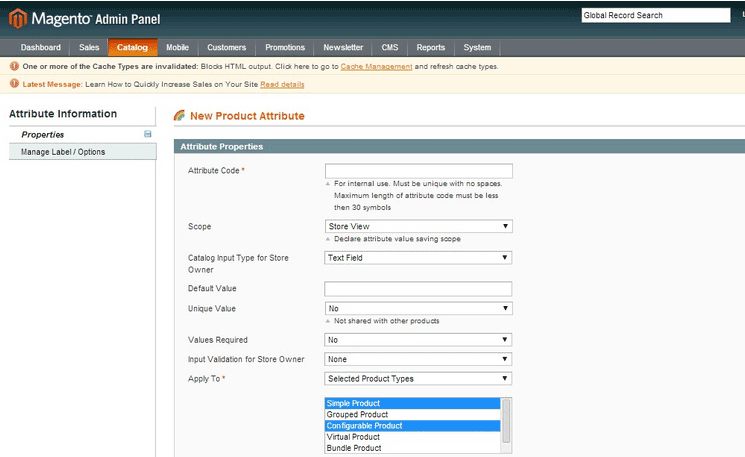
Magento supports multi-variant products, which they call configurable products. The platform treats a configurable product as a collection of simple products, and each variation has its own SKU and inventory listing. Here are steps to adding configurable products in Magento.

Multi-Store:

Multi-store is native to Magento. Let’s say you want to sell computer parts online, and your spouse wants to sell kitchen tools. It is unlikely that you would sell both of these product lines in a single store. With Magento, you can do both by setting up separate websites, wherein each can have its own domain name.
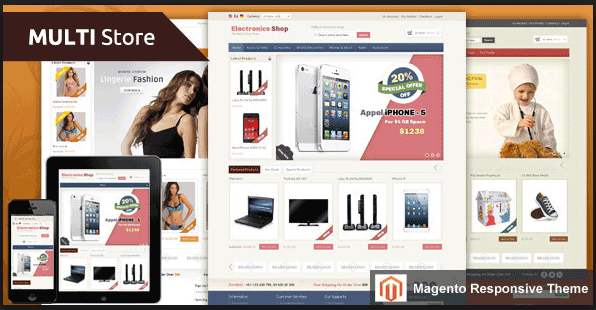
magento-multi-store

It’s possible to run WordPress as a multisite installation, and for each site, you can install plugins. Doing so allows you to control all three stores from one WP admin. However, WooCommerce doesn’t support this feature and cannot run multiple stores.

Round Conclusion:

As earlier mentioned, Magento is the better choice if you have a lot of products or products variation. Magento’s multi-store option is something to consider. While WooCommerce can handle an unlimited number of products, it becomes a lot difficult to manage if you have too many.

ROUND 4: Features and Ecommerce Trickery

Product Relations:

Magento features upsells, cross sells, and related products, which can all lead to more sales. You’re also able to add discount codes, and use an advanced filter to navigate your products. You can view them all on the same account.
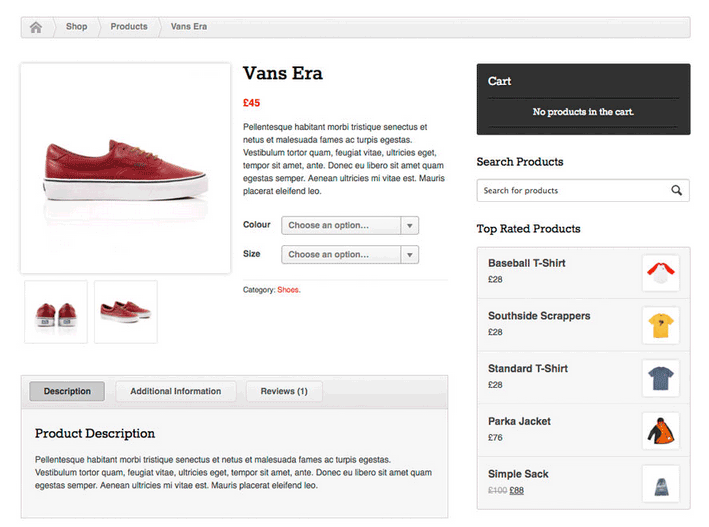
magento-products

It’s simpler with WooCommerce. You can rate products and showcase best sellers, or sale items through the available widgets. Anything more complex than these features will require an add-on. The navigation is sophisticated, but not as much as Magento’s.

Integration:

WooCommerce integrates seamlessly into WordPress. It gives site owners the ability to set up and publish blog posts, as well as create content with its easy-to-use CMS. You can take advantage of the almost limitless plugins available to make your site do practically anything.

As for Magento, its CMS is nowhere near as well developed as WordPress. That is why creating a custom menu structure is more challenging compared to WP’s drag and drop user interface. To even establish a blog in Magento, an extension is required.

Navigation:

Making the navigation path simple and obvious for potential customers can decrease your bounce rate. Magento stores allow customers to filter product listings on the criteria they prefer, which includes price range, color, brand, size etc. This advanced navigation gives them a more efficient shopping experience.
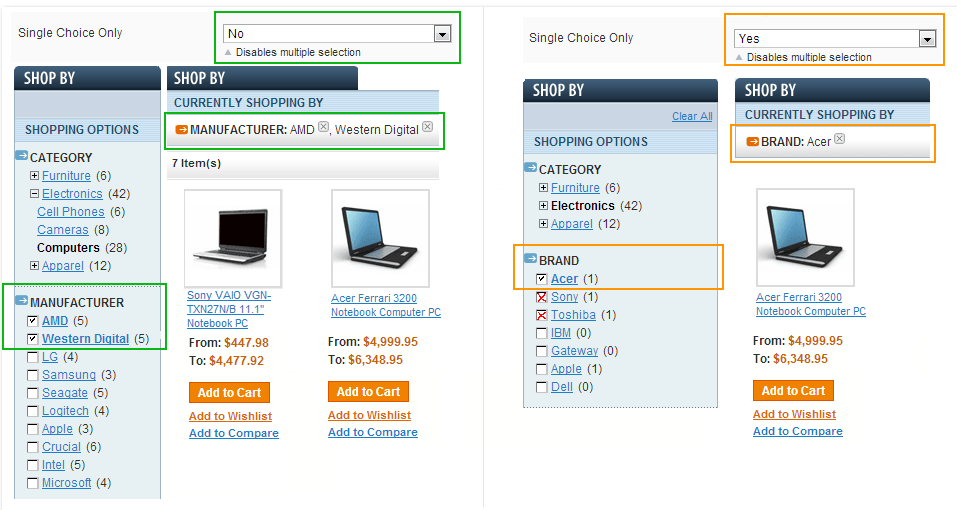
magento-navigation

Just like Magento, WooCommerce also has layered navigation, but it only allows selecting a single attribute for filtering. With its custom navigation, however, you can easily mix and match categories and pages. You can arrange the menu items via their drag and drop interface.

Analytics:

WooCommerce has a built-in analytics system. It can show you data, such as total sales, sales by date, average order totals, individual customer statistics and much more. It neatly presents the figures via graphs, without the user ever having to leave their admin panel.
woocommerce-analytics

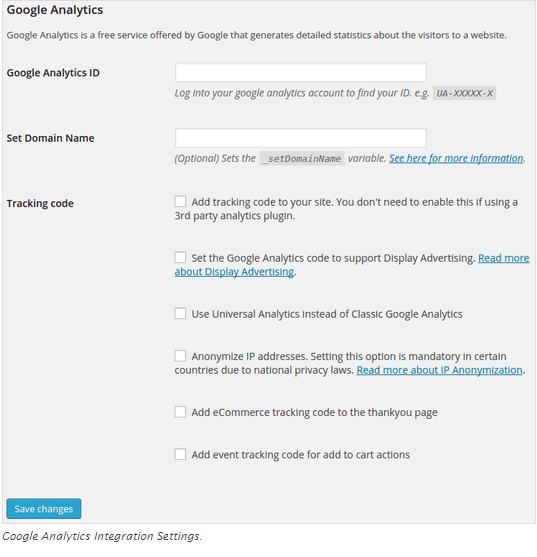
Although Magento doesn’t have their built-in analytics system, they provide a section to implement Google Analytics. Site owners can configure the free Google service to monitor their web sites’ traffic and conversion ratio. It can list and report the customers that make purchases and what they buy. You can follow these steps.

ROUND 5: SEO and Technical Support

SEO:

WooCommerce runs on WordPress, a renowned content creation platform. It’s one of the most reliable options when it comes to search engine optimization. Blog is organized, making it easy for admins to add and edit body content, as well as meta information. Here’s more information on WooCommerce SEO.
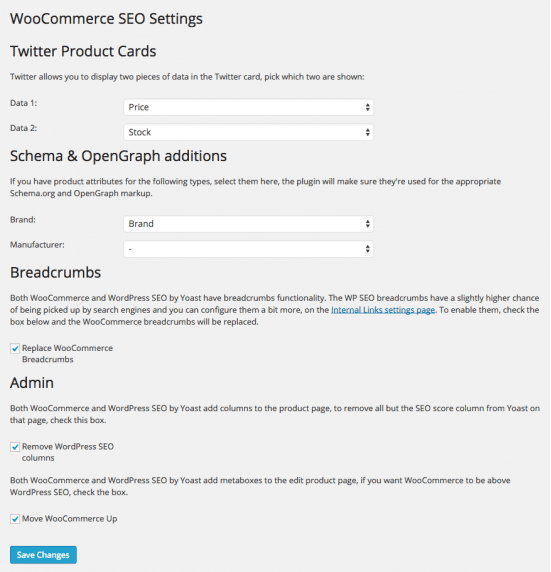
woocommerce-settings

Magento is also one of the most search engine friendly e-commerce platforms. Admins can implement a bevy of SEO techniques within Magento to enhance store ranking. You don’t need to do much to improve the on-page SEO. The main thing to do is to enable the URL rewriting.
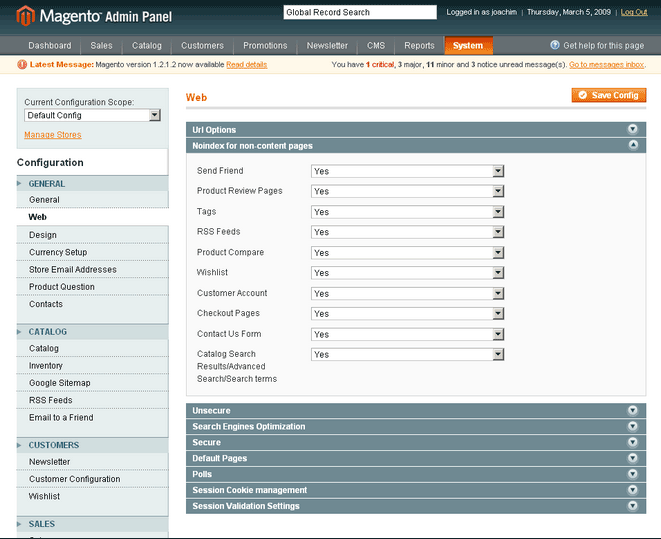
magento-configuration

Support:

Because WooCommerce is a free platform, strict support is only provided for paid products. Most of the time, users are left to figure it out themselves. However, there are people on forums who are happy to lend a hand. And, there are companies like Wooassist, which provide a dedicated assistance with WooCommerce configuration, installation, and general use.
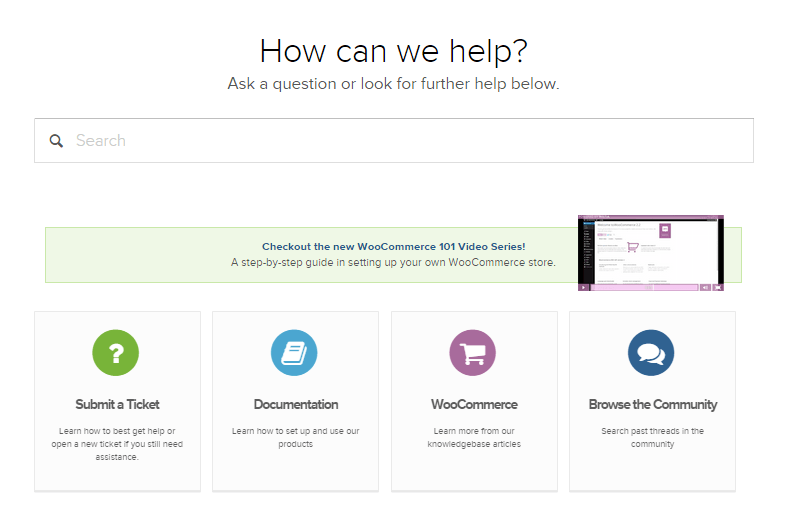
how-we-can-help

Although Magento’s team of support is available 24/7 around the globe, they provide resources to merchants based on the product you’re running. They offer assistance for installations and downloads, configurations, bug issues, and troubleshooting. Support for their community edition is provided through online forums as well.

Round Conclusion:

Both WooCommerce and Magento are SEO-friendly platforms. But, the well-supported and self-hosted WooCommerce can offer a wider range of free or low cost add-ons. If you aren’t technically-skilled, go for WooCommerce. Even without a strict customer care, the fact that it’s easier to use allows store owners to run it with minimal effort.

ROUND 6: Marketing Promotions and Tools
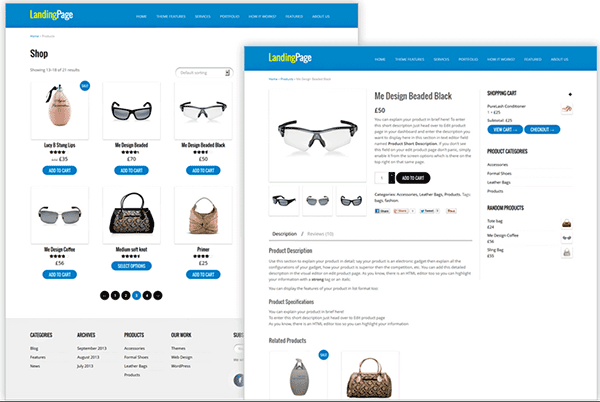
marketing-and-promotion

Landing page:

Building landing pages with WooCommerce can power numerous purchase options. Its reporting interface lets you know exactly how many sales occurred and when. You can also accept payments directly on site using any payment gateway, and can tie third-party shipping APIs to provide real time shipping rates.

There are many landing-page extensions in Magento, which can let you create multiple landing registration pages for your marketing campaigns. Similarly, it offers an affiliate tracking code to analyze the number of customers brought by each page. You can set payment configurations and shipping options for international users.

Newsletter:

WooCommerce is offering a flexible MailChimp integration for free. Admins can automatically subscribe customers to a designated MailChimp list.  It can help them stay up to date on their purchases. You can also opt for paid versions.
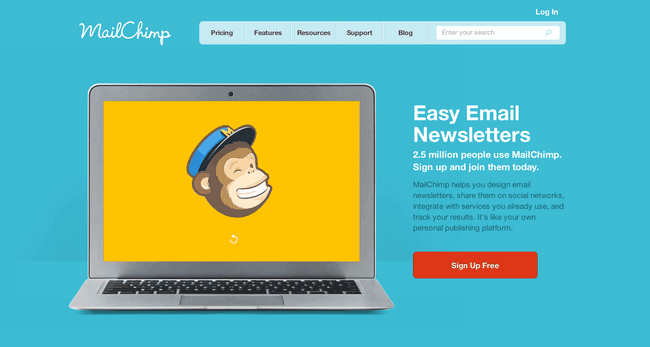
newsletter-configuration
Magento has its own newsletter plugin, which can help you inform customers about new promotions and discounts. The Magento Newsletter functionality allows store owners to send newsletters to clients who are subscribed to them. They also started to support MailChimp.

Round Conclusion:

WooCommerce core is bundled with numerous marketing features. It offers a simplified coupon system and improved support for discounting products to help you run sales and promotions. Marketing tools offered by Magento are neither expensive nor difficult to integrate as well.

In terms of marketing, it’s not a question of which one is better because both can be very powerful in their own rights. It is more a question of which one is right for your company.

Summary of Features and Drawbacks
woo

WooCommerce Features:

  • WooCommerce is entirely free to download and install, and there are very few server requirements.
  • Storefront design is clean and simple, but highly customizable. There are hundreds of themes available, and plenty of add-ons to optimize your site.
  • The reporting tool allows you to analyze incoming sales and reviews, stock levels and general store performance.
  • There are a variety of payment gateway extensions available. WooCommerce supports PayPal accepting credit cards and PayPal account payments.
  • Responsive design options, so your store will look good on a laptop, tablet or smartphone.
  • There is no real consensus on how many products and categories you should have.
  • Very SEO-friendly, with excellent blogging capabilities, to help you rank highly in Google searches.

WooCommerce Drawbacks:

  • Limited high-end features to support very large stores.
  • Some paid extensions are required, so the costs could quickly add up to be able to build a great store.
  • No free customer care, except for community forums.

magento-1

Magento Features:

  • Themes offer flexibility, functionality, and can be easily extended and modernized. You can customize the theme as much or as little as you’d like.
  • Magento will support an unlimited number of products and multi-variant products
  • Magento stores allow customers to filter product listings on the criteria they prefer, which includes price range, color, brand, size etc.
  • Huge community of users that offer help and support.
  • Very powerful system, so perfect for larger ecommerce stores. Scalable, so it can handle however many products you need to sell.
  • Offers multi-store feature to set up separate websites, wherein each can have its own domain name.
  • Multi-currency support, and mobile friendly with strong SEO functionality.

Magento Drawbacks:

  • Steep learning curve for those newbies. Could take a long time to learn how to use the system.
  • Add-ons are much more expensive than those available on the other platforms.
  • Its powerful system requires a dedicated server, which can be quite expensive.
  • Only offers free customer support to Enterprise version and Premium Enterprise version.
  • You might need to hire a professional who is able to code.

Are you considering moving form Magento to Woocommerce. We have done this for a number of businesses and it can be a daunting task.

The functionality does not cross over exactly and it can become complex web of options and decisions. We offer a service to help with this here

How to Choose an E-commerce Platform?
choose-platform

There are a number of things to consider when choosing the right e-commerce platform for your business. Before moving on to the final round, learning these factors will allow you to invest into an e-commerce platform that is right for your business.

Stock Size:

Consider the size of your stock, or the volume of products you’re planning to sell. If it’s just a couple of products, don’t go for a complicated platform. Make sure you’re paying the smallest amount of money for the services that you require.

Design options:

How would you like your online store to look? Most shoppers rely on site aesthetics to decide whether to trust a site. Your e-commerce platform should allow you to control and customize your online store.

Catalog:

If you’re planning on selling a diverse line of products, check the platform’s catalog features. Is it flexible enough for your presentation requirements? Be sure that it can present all of your products in the best possible way.

Payment Method:

PayPal is the easiest and popular payment processor, and not all platforms for e-commerce support third party these types of payment methods. Better check your platform-candidate regarding the payment methods they favor.

Payment Plan:

Select the platform that best suits your budget. Both WooCommerce and Magento offer free versions, but you’ll might need some extra features and extensions, for updates and maintenance. Look for opportunities to pay monthly amounts.

FINAL ROUND: Which One is Right for You?

e-commerce

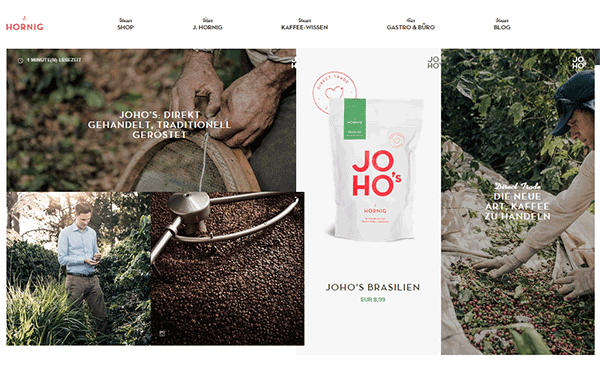
Professional Requirements:  WooCommerce is extremely easy to use and can be handled even by the novice users. Magento, on the other hand, requires professional skills and some background knowledge on web development.
Magento Site
Magento Site

Setup and Customization: Setting up a website through Magento may demand adequate effort from the developer. Customization can also be time-consuming. When it comes to WooCommerce, you have WordPress as your structural and functional framework. Because WP’s admin panel is self-guided, a customized website can be launched in just a short period.

Flexibility and Functionality:

WordPress supports a large pool of themes and plugins, which can be applied to WooCommerce. Users are provided with flexibility both in design and performance. Compared to WP, Magento supports a smaller number of templates and extensions.
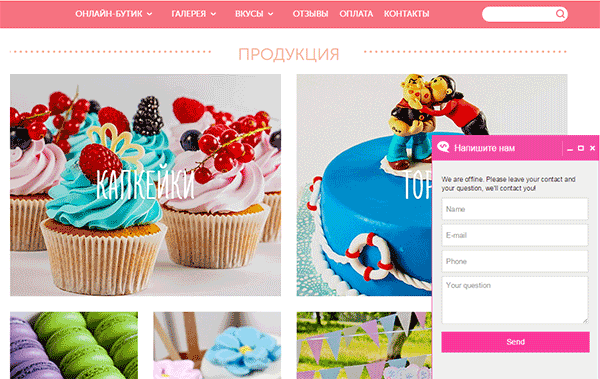
WooCommerce Site
WooCommerce Site

Premium vs. Free:

The base for WooCommerce – WordPress – is totally free to download and use or modify. Magento’s Community Edition is also free, but the Enterprise version is offered as premium. Magento extensions are also very costly. Meanwhile, premium WP templates are less expensive and easily affordable.

You’d think WooCommerce is a clear winner here, but it also has its limitations. It all depends on what your business can sustain.

Concluding Remarks:

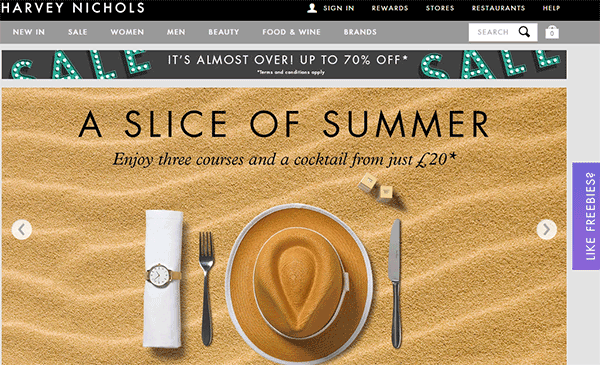
Small and medium enterprises (SMEs) will most likely find more value from WooCommerce since it is easier to set up and use. Larger scale businesses can find more value in Magento as they are more likely able to justify the higher development costs.
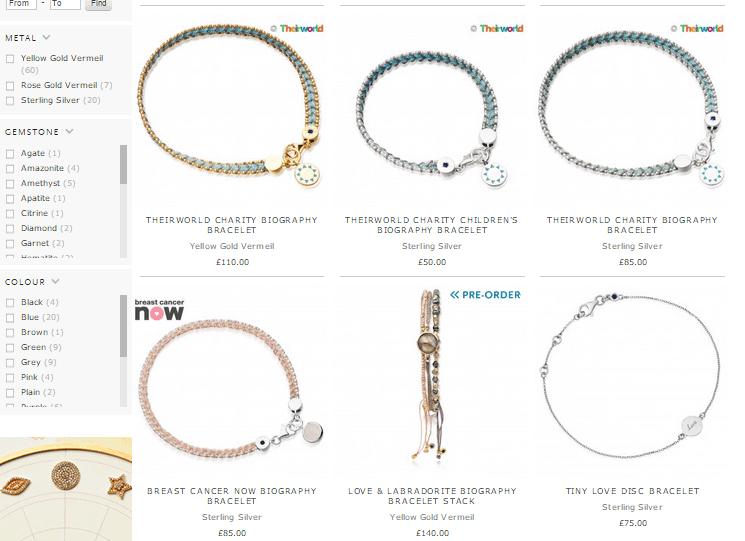
Magento Site
Magento Site

SMEs will find good value in Magento because it offers more features out of the box. Inversely, larger businesses can also still find good value in WooCommerce being a user-friendly platform.
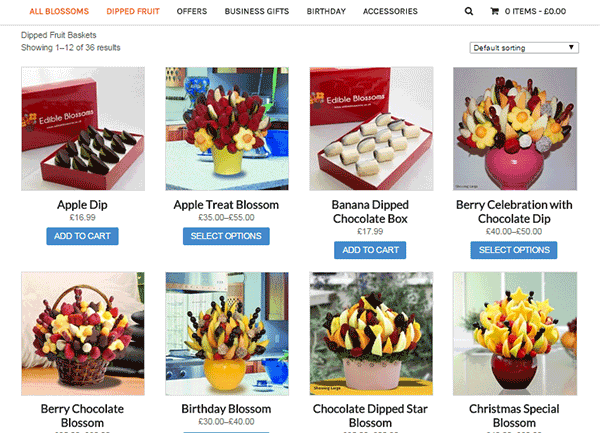
WooCommerce Site
WooCommerce Site

For larger companies selling a wide range of products, and businesses that have plans of expanding, Magento may be the best choice. For smaller stores looking for a simpler, initial user experience, WooCommerce will give you a great start.
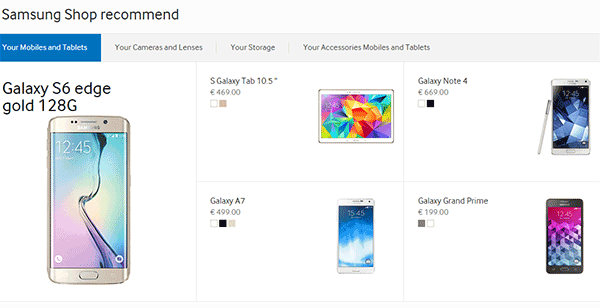
Magento Site
Magento Site

To summarize, we list down below the possible reasons you should favor one platform over the other.

When to Choose WooCommerce?

  • If you have a limited development budget
  • If you are comfortable and familiar with the WordPress platform
  • If you have less than 1000 products and product variations.
  • If you want a platform that is easier to use
  • If you only have one e-commerce store

When to Choose Magento?

  • If you have a big development budget
  • If you want more functionality out of the box.
  • If you have more than 1000 products/product variations
  • If you are more of a technical user
  • If you want to manage more than one site on one backend.

Are you considering moving form Magento to Woocommerce. We have done this for a number of businesses and it can be a daunting task.

The functionality does not cross over exactly and it can become complex web of options and decisions. We offer a service to help with this here
Filed Under: Theme and Plugin Reviews Tagged With: e-commerce, Magento, WooCommerce

Storefront Theme Review

January 1, 2016 By John Leave a Comment

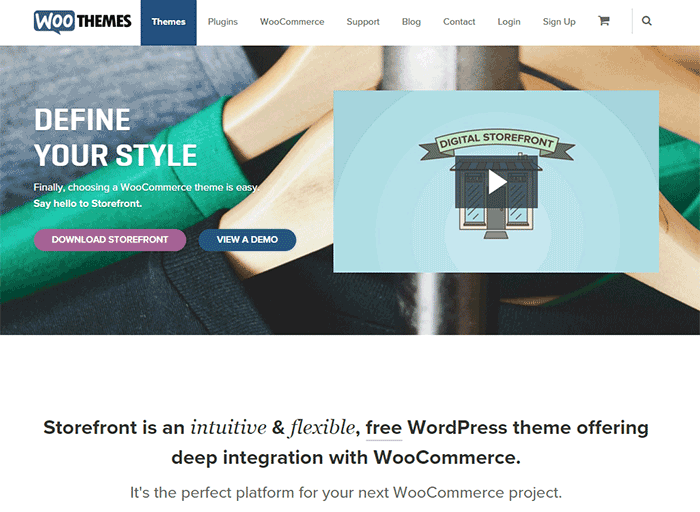
Storefront is the official WooCommerce theme built to the same high standards as WooCommerce itself. Best of all? It’s free!

storefront

A Storefront theme review is due. Here’s what’s included in this article:

  • Storefront Theme Overview
  • Storefront Key Features
  • What Makes Storefront Great
  • WooCommerce Integration
  • Storefront Setup
  • Arrival of Storefront 1.5
  • Storefront WooCommerce Styling
  • Popular Storefront Extensions
  • Choosing A Theme

Why WooCommerce?

WooCommerce is still the most popular e-commerce platform.

This open source e-commerce plugin for WordPress was launched in 2011 and is aimed at small-to-medium online merchants already comfortable with a WordPress set up.

There are a lot of free and premium themes to choose from, one of the most popular is – Storefront.

Storefront Theme Overview

Storefront is described as an intuitive, lightweight, and flexible theme offering deep integration with WooCommerce. It has several layout and color options to personalize your shop, multiple widget regions, a responsive design, and much more.

The main goal in developing Storefront is to provide a rock-solid foundation for your WooCommerce store without extra bloat or features.

It comes to no surprise that it reaches up to 3,000 downloads per day:

Integration:

Storefront theme is built and maintained by the same team that developed WooCommerce. This is why the integration between WooCommerce, its extensions, and Storefront is water-tight.

No Conflicts:

For e-commerce sites, uptime is of utmost importance. With the new Storefront, there will be no conflicts between theme and plugin during major WooCommerce updates.
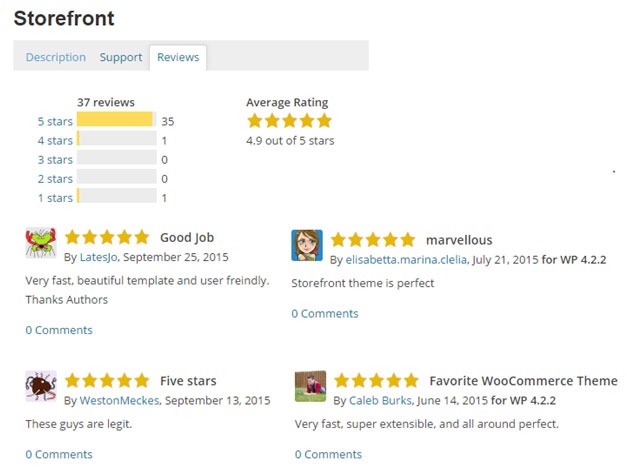
storefront-reviews

Here’s a glimpse of some of its great reviews:

Solid Foundation:

Based on the popular Underscores starter theme, Storefront features a responsive layout, and schema markup for enhanced SEO performance.

Clean and Simple:

storefront-clean-simple-design

Storefront allows you to customize your store to match your brand by providing a clean and simple design.
Storefront Key Features

Most store owners want their e-commerce theme design to be simple and flexible. Storefront can offer exactly that.

Here are some of the key included features:

WooCommerce Integration

storefront-woocommerce-integration

Storefront features an unrivalled deep integration with WooCommerce. Of course, having been developed by WooCommerce authors, this integration is compliant with the latest WooCommerce developments and standards.

Lightweight and Robust Core

Storefront-Lightweight-and-Robust-Core

Storefront is based on Automattic’s popular underscores starter theme. Its codebase is under constant review ensure it is kept nice and clean to provide as little disruption and conflicts as possible..

Design Customization

storefront-design-and-customization

Every store owner would want to create a look and feel that matches their business. There are several display settings in Storefront that let you customize the design of your page to meet your requirements. Settings are all accessible in the WordPress Customizer.

What Makes Storefront Great

what-makes-store-front-great

The Storefront philosophy is to do one thing well and provide a solid foundation for your online store. Although the theme appears to be plain, it’s meant to be a starting place that includes deep WooCommerce integration.

Keep in mind that simple is usually more profitable. Unless you are spending a few grand on a professional designer then the fancy design you try and add yourself will most likely distract the user and lose sales.

No Shortcodes and Page Builders

Shortcodes in WordPress are little bits of code that allow you to do various things with little effort. You only get what you need with Storefront, which means you won’t encounter any superfluous shortcodes and page builders.

The Storefront team believes that not including these features allows you to add them via whichever plugin you prefer. Even if you switch themes later on, all of those features will remain. According to the release announcement, Storefront was built with data portability in mind. This means that users will be able to switch themes without losing their content.

Appropriate Sliders

Whether you should use slider is a highly debated topic. While other WordPress themes bundle sliders, Storefront lets you choose the appropriate plugin for your slider needs if you decide you do want one. It is also compatible with the WooSlider plugin.

WordPress offers many slider plugins to add them to your home page, landing pages, posts, or anywhere you want.

storefront-slider

Schema Markup

Schema markup is code that you put on your website to help the search engines return more informative results for users. The content on your website gets indexed and returned in search results. Storefront has valid schema markup for improved SEO performance.

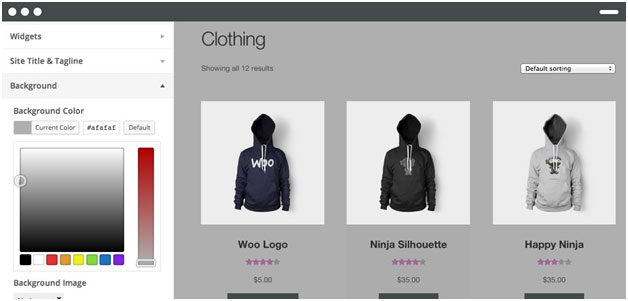
Display Options

storefront-display-option

In addition to attractive products, the design of your shop is equally crucial. It’s important to make a good first impression with the help of professional design. With Storefront, you can change the look and feel of your store in a few clicks, and see your tweaks in real-time.

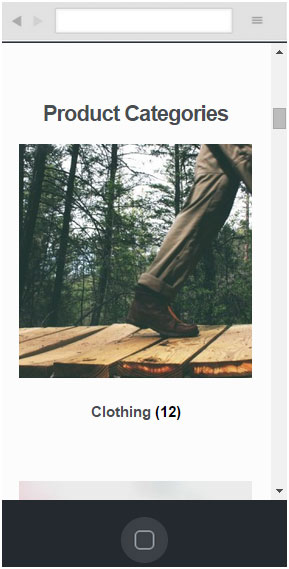
Responsive

If your site can’t be viewed effectively on mobile devices, you could be losing almost 50% of your customers.

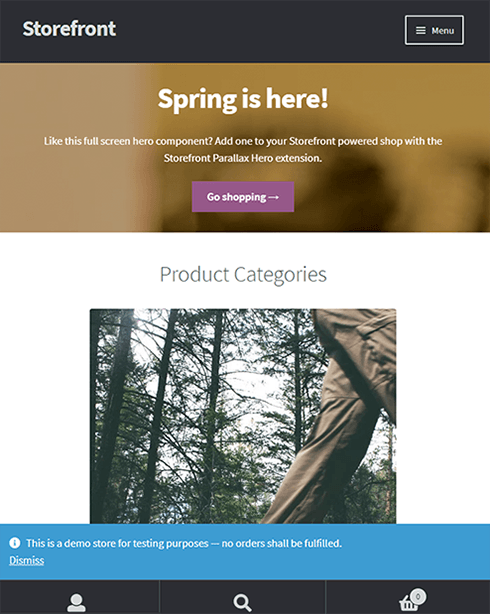
Storefront on mobile device:

storefront-on-mobile

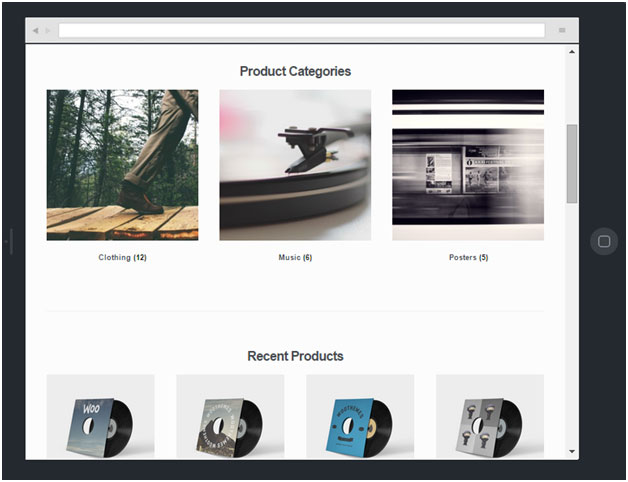
Storefront on tablet:

storefront-on-tablet

Non-responsive sites are now considered second-class businesses by Google. Storefront will adapt and display beautifully whether you view your store on a laptop, desktop computer, or handheld device.

Localized and Accessible

Storefront is fully localized and ready for your translations. It also adheres to the strict wordpress.org accessibility guidelines. That is why your store will be accessible to the widest audience possible.

Custom Homepage Template

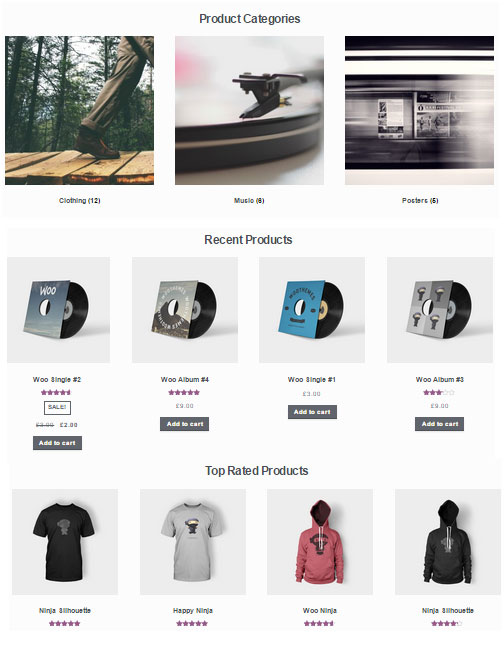
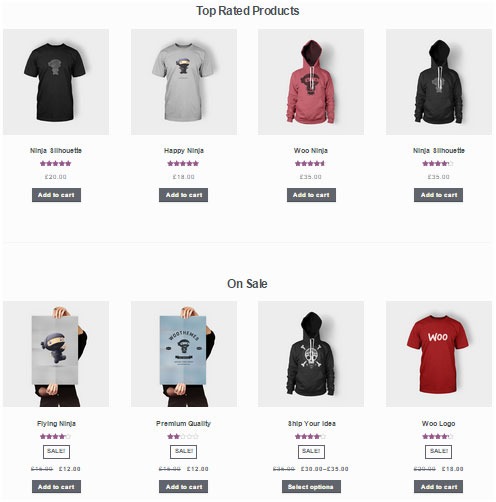
The homepage template in Storefront has been tested for user experience and conversion. It displays product categories, recent, featured, on sale & top-rated products.

storefront-custom-homepage-template

It’s a great start for most small businesses to immerse the visitor in your products, while providing enough flexibility to promote the products that will make you the most profit.

WooCommerce Integration

It includes deep integration for WooCommerce and it’s most popular extensions. This means everything will look nice straight away and you won’t have to hire a professional developer or designer to make things fit in.

Some of the more popular extensions supported are:

WooCommerce Bookings

storefront-woocommerce-bookings

This extension is perfect for those wanting to offer services, appointments, or rentals. It allows you to sell your time or date based bookings, adding a new product type to your WooCommerce site.

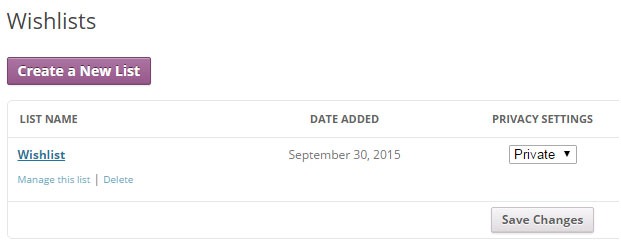
WooCommerce Wishlists

storefront-wishlist

From birthdays to weddings, and everything in between, this extension allows guests and customers to create and add products to an unlimited number of Wishlists.

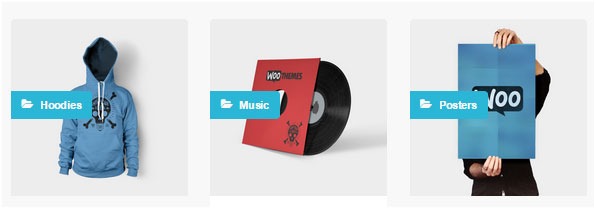
WooCommerce Brands

storefront-brands

This extension for WooCommerce allows you to create brands for your shop; each brand can be named, described and assigned an image.

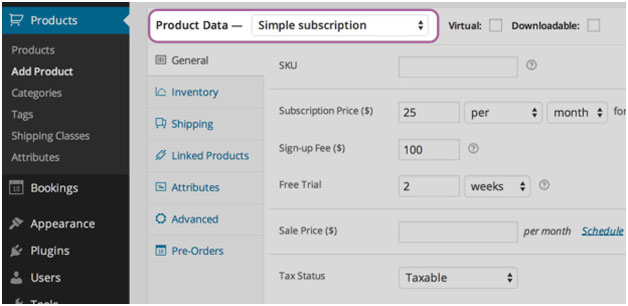
WooCommerce Subscriptions

storefront-subscriptions

WooCommerce Subscriptions is an extension that allows you to introduce a variety of subscriptions for physical or virtual products and services. Create product of the month clubs, weekly service subscriptions, or even yearly software billing packages.

WooCommerce Memberships

WooCommerce Memberships

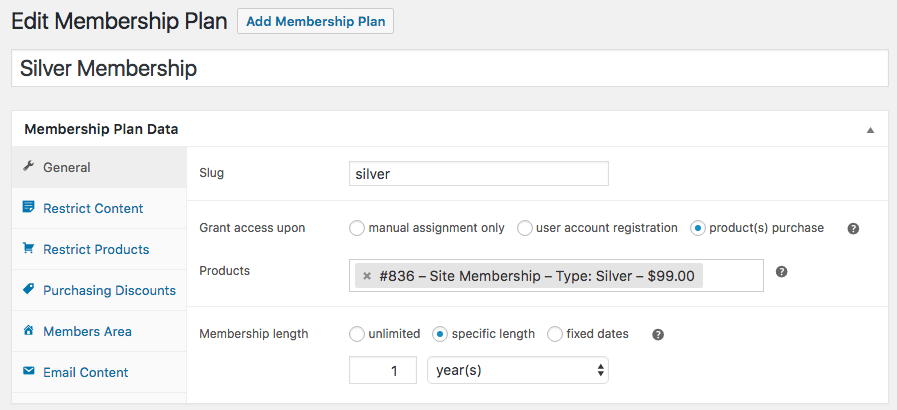
WooCommerce Memberships allows you to create a membership system that is tied completely to your WooCommerce Store. It is fully compatible with Storefront theme. You can restrict content to certain memberships classes. You can also turn your store into a membership club by restricting purchases to members. Among other useful features, you can even give members special discounts.

Composite Products

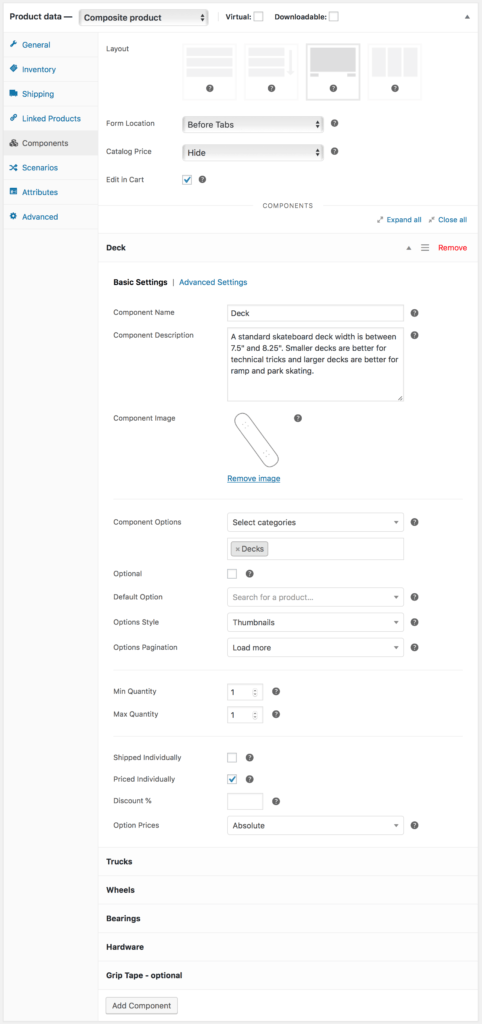
Composite Products allows you to create customizable products for your WooCommerce store. It is now fully compatible with Storefront theme. You can allow your customers to customize certain parts of their order.

WooCommerce Composite Products

Storefront Setup

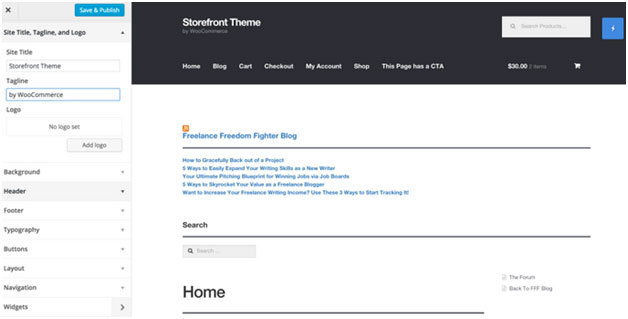
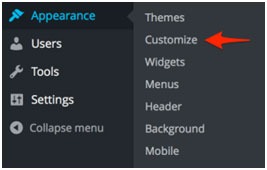
Almost all of the Storefront setup can be done via the theme Customizer.

storefront-setup

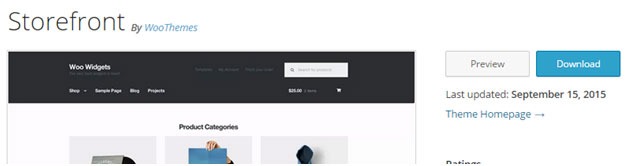
The easiest way to install Storefront is through the WordPress dashboard.

  1. Navigate to Appearance > Themes > Add New
  2. Hover over the Storefront screenshot and click the ‘Install’ button to install the theme.
  3. Activate Storefront as you would any other WordPress theme.

To install Storefront manually:

storefront-manual-install
  1. Download the latest version here.
  2. Upload the extracted folder to the /wp-content/themes/ directory on your server via FTP
  3. Activate Storefront from the Appearance > Themes screen in your dashboard

Read more on how to install and use themes here.

Menus

Storefront has two menu locations, Primary and Secondary. If you do not assign a Menu to the primary navigation, it will display each of your pages. On the other hand, the secondary navigation will display nothing.

storefront-menus

After activating Storefront for the first time, you won’t see anything in the secondary navigation. Here’s your guide to creating and assigning menus to theme locations.

Page Templates

Storefront comes with just two page templates.

Full Width

storefront-fullwidth

This is just a standard page template without a sidebar, allowing the content to span the full width of your site.

Homepage

storefront-homepage

The homepage template allows you to display a multitude of products and product categories.

Here’s a Woothemes guide on installing and configuring Storefront.

Arrival of Storefront 1.5

After the success of Storefront comes the newly improved Storefront 1.5, which achieves another coveted tag on wordpress.org. Its primary feature? A support for right-to-left languages in Storefront. The traditional RTL support standard overloads an additional stylesheet on top of the primary one.

storefront-version1-5

With Storefront 1.5, if you install WordPress in a right-to-left language, the theme will automatically recognize it. It will then load a different set of stylesheets tailored to that language. This makes Storefront a stronger global theme solution for WooCommerce.

You can also expect the following improvements:

Integration with More Extensions

storefront-integration-extentsion

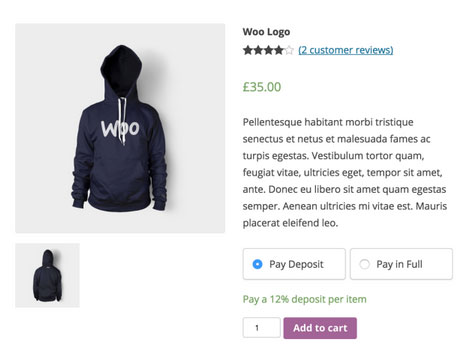
Storefront 1.5 has increased the number of customer-facing extensions it integrates with to 11. It offers added support for WooCommerce Deposits and Product Bundles.

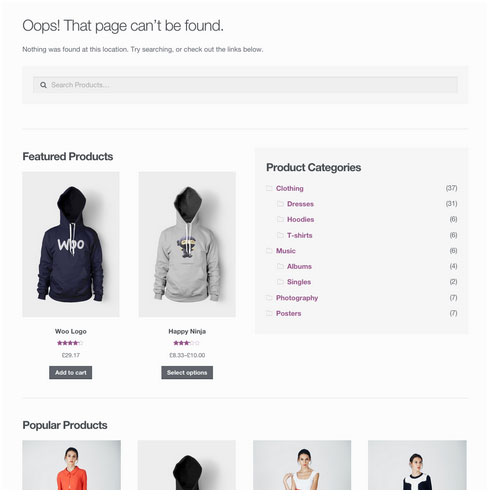
Revamped 404 Page

storefront-revamped-404

Storefront 1.5 is now made to be more useful to folks browsing a shop. The new 404 page now includes a product search box, links to product categories, featured products and popular products.

Featured Images

The previous version of Storefront didn’t cater to adding featured images to pages. Now, once you add a featured image to a page, it will appear on the frontend directly above the page title.

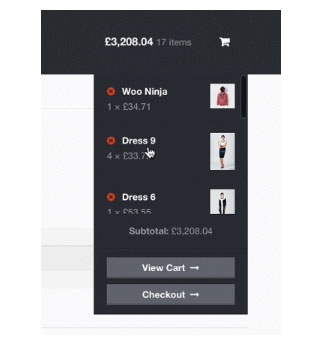
Scrolling Header Cart

storefront-header-cart

Considered a handy feature, the header cart lets visitors access their cart total, and the number of items it contains. It also reveals the carts contents upon hover. Using Storefront 1.5, the cart dropdown now has a set height that scroll as more items are added.

You can check out their awesome video about Storefront here.

Storefront WooCommerce Styling

A lot of themes we see, from Themeforest especially, do not style WooCommerce according to the best practice standards set by the Woocommerce authors.

The most common problem is overriding templates.  This causes the cost to update WordPress, Woocommerce and the theme itself to sky rocket down the track. You won’t have this problem with Storefront.

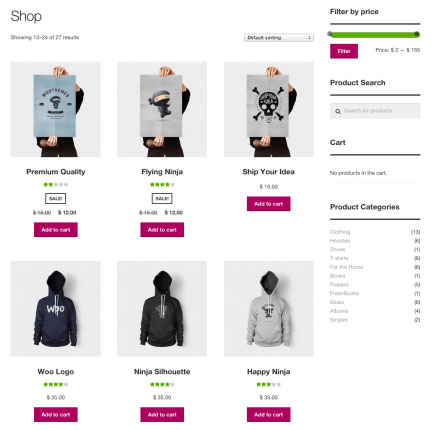
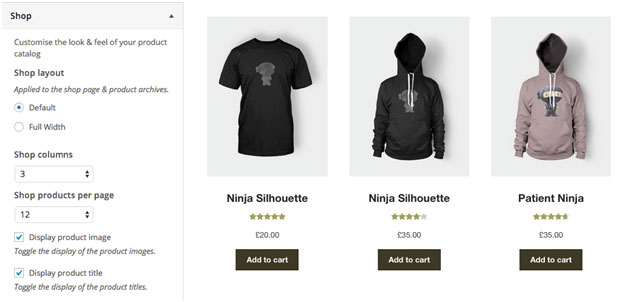
Shop Pages

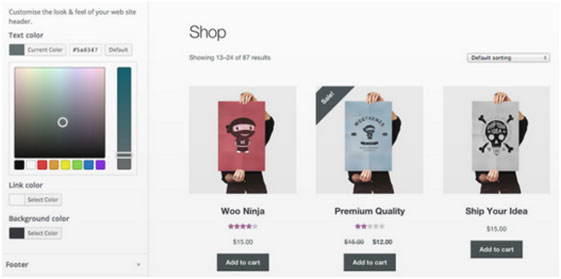
storefront-shop-pages

When it comes to shop pages, you can style for all product details and WooCommerce widgets, such as the price filter. The number of products per page is also automatically adjusted to 12.

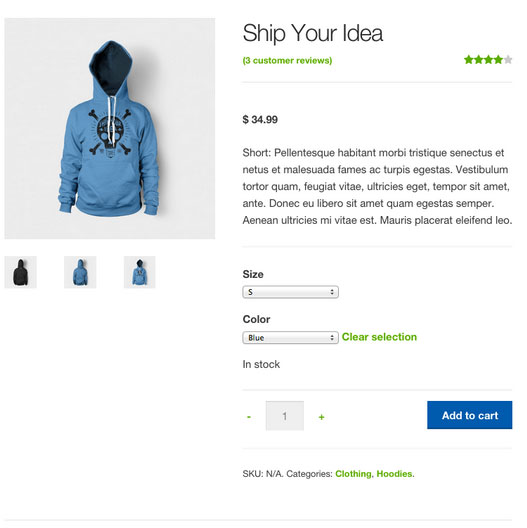
Single Product Page

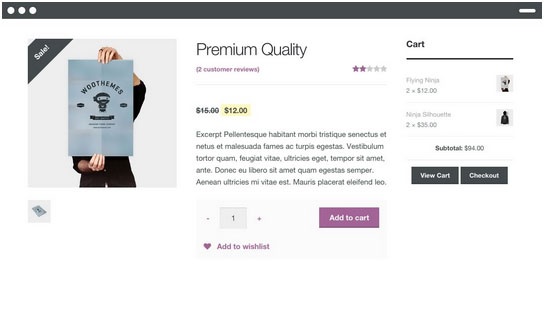
storefront-single-product

Single product pages include appropriate WooCommerce styling as well. The product tabs are presented in a vertical layout, and the number of related products is adjusted to three.

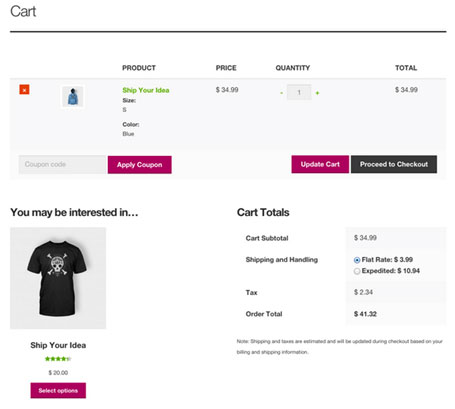
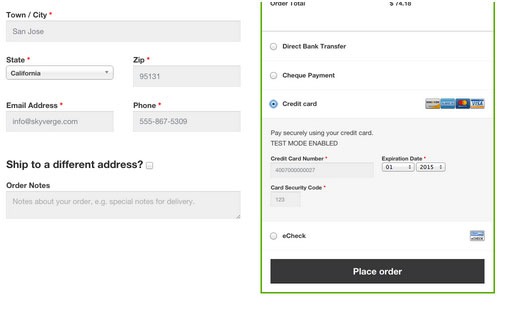
Cart and Checkout Page

storefront-cart-checkout

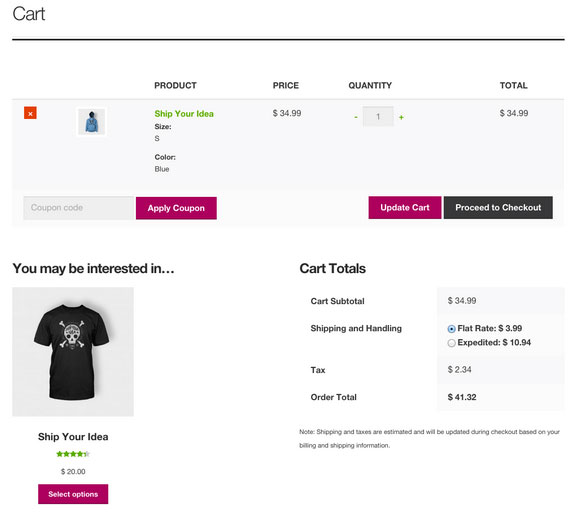
The checkout template features a two-column layout, with customer details on the left, and order details on the right. The ‘Place Order’ button is also always in view, making it easy to complete orders for customers.

storefront-place-order

And Now, It’s Storefront 2.5

Improved Mobile Design

From Storefront 2.0 and up, the theme now offers an improved mobile design for better mobile experience. The header section has been redesigned so that the content appears further up. This ensures that your visitors see more of the content on your WooCommerce store right away.

Storefront 2.0 Mobile View

New typography

Storefront 2.0 and up introduces a new font. Default font for WooCommerce has been changed from Helvetica to Source Sans. The font change provides users “greater depth and cohesion”. Some other small changes have been made to the design to fit the new font.

Introducing “Best Selling” Products

The theme also now offers a “best selling” products section on the home page. This is separate from product categories, recent products, featured products, top rated products and on sale products. Also, “Recent Products” has been renamed to “New In” and “Featured Products” have been changed to “We Recommend”.

Improved Appearance for Better Overall User Experience

Some other small changes have been put in place for better user experience. These include changes to styles, tables and embeds. The developers have also integrated with WordPress 4.5’s custom logo functionality. Adding a logo to your WooCommerce store is now made easier. Now there’s no need to install a plugin just to add your logo.

Popular Storefront Extensions

While Storefront provides a lot for free, there are some premium \add-ons that can add functionality or styling options to the theme.

Storefront WooCommerce Customiser

storefront-customizer

Without any custom code you can change or adjust labels and number of products displayed in homepage sections, which product details are shown on shop pages, and more.

It also lets you remove the product search and cart from the header.

Storefront Designer

storefront-designer

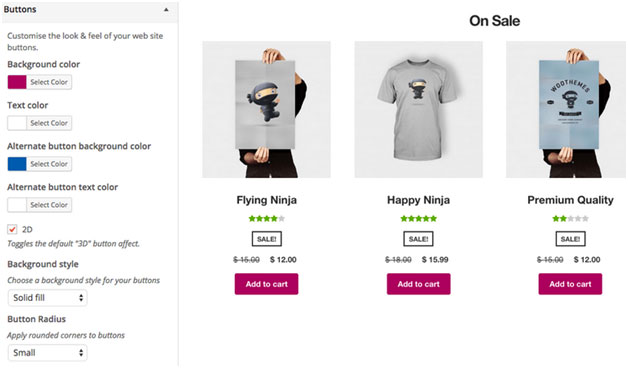
The Storefront Designer plugin adds the ability to change header layouts and make the header remain at the top of the page on scroll (sticky header). It also allows you to adjust button layouts and styles, and change some typography options.

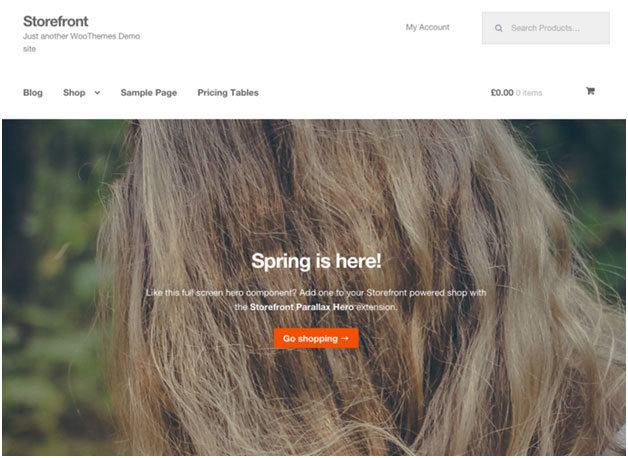
Storefront Parallax Hero

storefront-paralax-hero

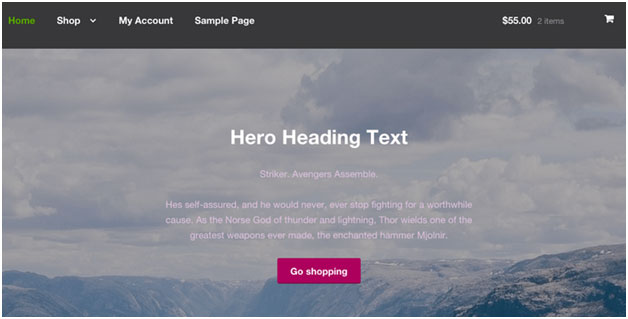
This plugin can be used to display a message and call to action over the top of an image on your homepage. It has a parallax effect, which means as the user scrolls the text and button appear to move over the image.

Child Themes

What is a child theme? According to the WordPress Codex:

A child theme is a theme that inherits the functionality and styling of another theme, called the parent theme. Child themes are the recommended way of modifying an existing theme.

In the case of Storefront, Storefront is the parent theme. You can check out the available child themes here.

Importance of a Child Theme – Easy and Safe Updates

When using a child theme, you will not lose any custom code or any custom styles that you have added to the child theme whenever you update the parent theme. Many website owners have learned the hard way losing custom code they have added to their themes after updating it. If you have a child theme, your custom updates are safe whenever a new version of the parent theme is available. We still recommend creating website backups every time you update your theme though.

Storefront: The Final Analysis

Simple, clear, and customizable, the Storefront theme for WordPress has everything to help you achieve success in e-commerce. For a free theme, the design is simple and no-nonsense and WooCommerce integration is unmatched by any other theme.

It may be too plain for some and if you are one of those, just ask yourself. Is it your personal taste and desire for it to look pretty, or is it a decision based on your user experience and the ultimate profitability of your site? In our experience, often the simpler the site the better is the user experience and the more profitable the website.

However, if you can’t find a Storefront child theme that resonates with you and don’t want the cost of a professional designer you might want to take a look at http://www.studiopress.com. They are the only other theme author we recommend if you don’t want to have troubles down the track when it comes to updates and customizations. It will take a bit more time to integrate with WooCommerce, but they have some lovely designs.

Filed Under: Theme and Plugin Reviews Tagged With: 404 error, checkout form, child theme, e-commerce, mobile friendly, plugins, shopping cart, Storefront, WooCommerce, woothemes

4 Steps to Creating Better Customer Personas for Online Stores

July 27, 2015 By John Leave a Comment

Not everyone is your customer. So, before spending thousands of dollars on your marketing campaigns, it’s important to know who you are trying to reach.

Creating customer personas should be the first step to any marketing campaign.

What you will learn:

  • How to increase sales using customer personas
  • How to create customer personas without breaking the bank?
  • Case studies on popular brands’ success and failure.
  • How to use your customer persona to 10X revenues?

To learn more, keep reading.

Susan, David, Matt, Monica, or John – one of these personas can be your customer. Consider them hypothetical representations of your target audience’s fears, favorite places online, and motivation to purchase your product.

If you’re like many small business owners who don’t have the means to hire a full-blown marketing team, it’s up to you to identify what makes your customers tick. Here is what we have done for our customer personas at Wooassist.

According to eMarketer’s latest forecasts, e-commerce sales will top $7 trillion by 2025.

With many ecommerce stores found on the web today, coming up with an effective marketing campaign can help a company get ahead of the competition.

Why Do Some Marketing Campaigns Succeed And Others Fail?

marketing-fail

It’s very important for marketers to put themselves into the shoes of their target audience. Companies that know how to think like, feel like and behave like their potential customers have the definite advantage.

It’s not a new technique.

Think of your favorite book author or screenwriter. When working on a new character, they write about every possible detail, from that character’s life, background and thought process.

Why Creating Customer Personas are Important?

Customer personas are becoming increasingly useful not only for large companies, but also for smaller online retailers. It’s now possible to have ultra-targeted ads and communications.

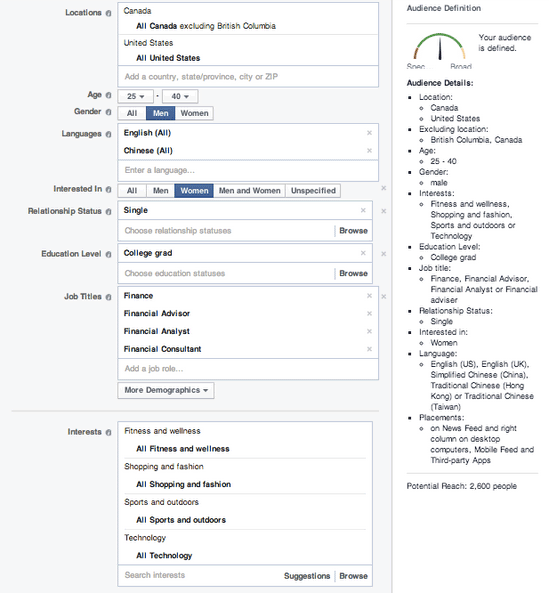
Take a look at Facebook’s advanced targeting when it comes to their advertising:

facebook-targetting

One can target a very specific audience. You can base it on a customer’s location, age, language spoken, education level and interests. To do this effectively, a company needs to define their customer personas.

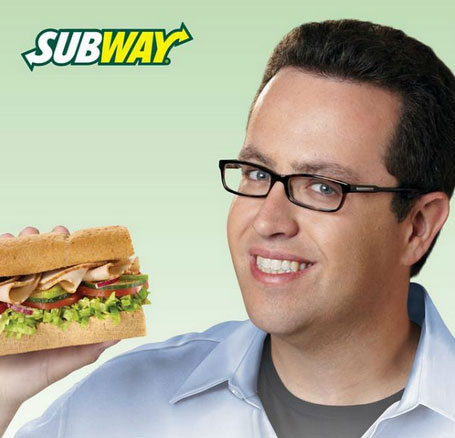
Case Study 1: Subway’s Jared

Subway, a popular fast-food franchise for sandwiches, named their fictional persona Jared. He is an overweight American who wants an easy-to-follow, affordable diet plan with lots of choices and familiar foods.

subway

When Subway has to make a marketing decision, they first ask, “Would Jared want this?”

This buyer persona helped Subway redefine itself as a healthy place to eat, and they reorganized its menu to highlight its low-calorie meal options.

So, are you ready to revamp your advertising?

If you’re planning to start an e-commerce business, or already have an existing one, it’s time to discover the concept of Customer Persona, and how it can help you grow success.

Step 1: Meet Your Potential Customer

Personas are fictional, generalized characters built from the real words of real consumers. They incorporate the various goals, needs, and observed behavior patterns among your real and potential customers.

It is not merely a description.

More than a one-dimensional profile, it delves more on the specific attitudes, concerns and criteria that drive prospective customers to choose you, or your competitor. When you have these insights, you have the knowledge to align your marketing decisions.

SUSAN is one example of a customer persona.

Watch the video below:

Before going through the basic customer persona template, it’s important to know where to get all the information you need – sources to help your persona take shape.

Take a look on these three places:

  1. Site analytics.
analytics

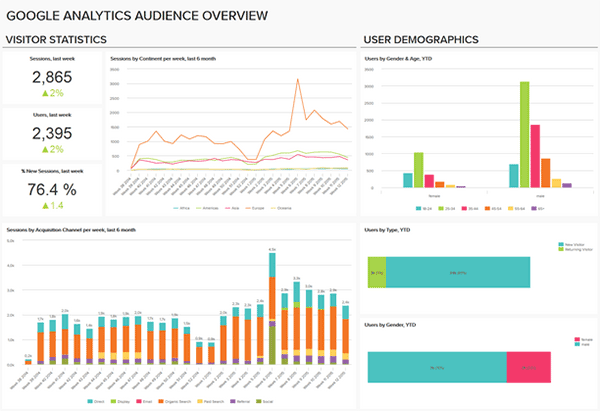
Take advantage of your site’s analytics. It’ll allow you to see what led your audience to your site, and even the device they used. Take note of where they came from, the keywords they’ve used, and how long they’ve spent on your site.

  1. Social Media.
social-media

They call it ‘social media listening’. Twitter, Facebook, LinkedIn, YouTube, etc. – explore on the different social media platforms to find your potential customers and get to know them. What are their questions, or common problems? How can your products or services be the solution?

  1. Surveys and interviews.
survey

Personas will become more useful if they’re based on interviews, or surveys, gathered from the buyers themselves, customer service interactions, and even sales people. These data can reveal a deeper insight into a customer’s goals and values.

Components of a Customer Persona

persona-components

When creating your persona, you need to address include several of its components. Take a closer look at your customer base. Identify both ‘good’ and ‘bad’ customers to get a more rounded understanding.

Let’s go through the ABCs of creating your customer personas:

Name.

It may seem unnecessary, but giving the persona a name is essential. It makes the persona closer to resembling a real person. It will also be easier to refer to your persona, instead of having to refer to it as a broad idea.

Background.

This includes the basic background information, including demographics and psychographics. Age, gender, location, family life, likes and dislikes, and location – these data will help you understand the motivations of your audience when it comes to navigating.

Goals.

Remember SUSAN – what was her goal when looking for a product? It’s to get the best price. Setting goals for your persona helps in identifying the results they want. Do they shop by price? Do they want to find a vendor they can work with quickly?

Online Skills.

How comfortable is your character online? Understanding their technical skills lets a business build its website in a way that customers can navigate with ease. It tells you how your audience interacts with your brand.

Platform.

What platforms are they using to get to your website? Your website should have a responsive design, so it can render correctly in any device. Including this in your persona ensures that your website is optimized.

Step 2: Create Your Customer Persona

Once you really get to know your customers, you will be able to make a more meaningful connection. Using a combination of raw data and educated guesses, which can include demographics and behavior, you will be able to create a client persona that portrays your model customer.

Give Your Persona a Name

It can be whatever you choose. Humanize it – give it a real name and even a photo. This psychological detail allows a marketer to see his products from the persona’s perspective.

persona-name

GardenWare does a good job of identifying their customer persona by creating two distinct profiles of their customers.

Job, role, and company.

The best resource for these data is from surveys or interview results. Build surveys that include a field for job title, or type of business.

Demographic information.

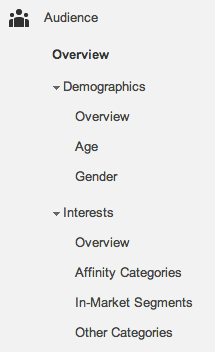
analytics-1

For this section of your template, don’t just rely on your best educated guesses. You can get some insight from Google Analytics and survey results.

Five dimensions available include Age, Gender, Affinity Categories, In-Market Segments, and Other Categories.

Affinity Categories identifies users in terms of lifestyle. In-Market Segments identifies users in terms of their product-purchase interests. On the other hand, ‘Other Categories’ provides a more specific, focused view.

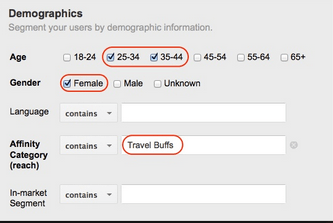
analytics-2

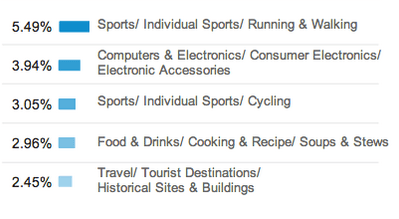
Google Analytics can also reveal the interests of your site’s visitors. Once you know their interests, you can come up with more customer-oriented posts and ads, in any platform.

analytics-3

For data which are not found on your analytics, you can check on your survey or interview results. Make sure to ask the right questions to get the most accurate responses.

Goals, Obstacles, Values and Fears.

To determine objectives, customer interviews will be of great help. As you identify these data, also come up with your solutions in order to help them meet their goals and overcome their challenges.

goals

Marketing Message.

After creating your fictional buyer, tailor your marketing message by identifying words that are likely to gain their attention. Make an effort to find out what triggers them to make a purchase. Common buzz words may include coupon, bargain, and sale.

marketing--message

How Many Do You Need?

You don’t have to minimize a thousand clients into just one representative. Ideally, there should be about 3 to 5 buyer personas for each business. These personas will be changing along with the growth of your store. You’ll have to review them from time to time.

Modern consumers are smarter. They know when they’re being manipulated.

poor-content

With a poorly-written content that’s all ‘sales talk’, that’s exactly what you’re making them feel. Be strategic and relate to them more as ‘human beings’. You’ll need a persona template, which you could apply in your marketing campaigns.

Case Study 2: MailChimp Persona Research

mailchimp-persona
Fred. MailChimp’s ideal user

Let’s take a look at MailChimp’s persona research. Their objective was to ‘find out who really uses MailChimp’. They believed that what they needed was a clear idea of their current users, to better empathize with them.

Here’s the process of their research:

  1. They interviewed stakeholders in order to identify who uses MailChimp. They were given the same characteristics – smart, self-reliant, and techie. Thus, they came up with the customer persona ‘Fred’.
  2. As for their next step, they ranked their pool of active users by industry. It was found that a huge number of MailChimp customers were represented by the nonprofits, education, and the arts.
  3. Subjects from popular industries were identified and interviewed. Customers were met at their workplaces, in different locations of North America and Europe. Data gathered also included the workplace’s environment, the customer’s emotional state, etc.
  4. Findings were organized and analyzed, and MailChimp discovered a lot of similarities across different roles or types of customers.
  5. MailChimp ended up with five archetypical personas, which they used as guides in developing MailChimp. The last step was sharing the outcome with the team. So, they created posters that now adorn the walls of their HQ.
Step 3: Put Your Persona to Work

Done with your customer persona? Great!

Now, it’s time to put those personas to work. Here are ways for you to start using them in order to make smarter marketing decisions.

Post Social Updates in Their Language.

social-media

When you post social updates, use the language your buyer persona uses. Is your persona a stay-at-home mom, or the head of the human resources? Speak like how you’d talk to someone in real life. Doing so can make your brand relatable.

Create Their Favorite How-To Blogs.

Even Google reminds online marketers to create relevant, educational content. With customer personas, you will be able to create content that makes a more meaningful connection. Write about the solution to their problems.

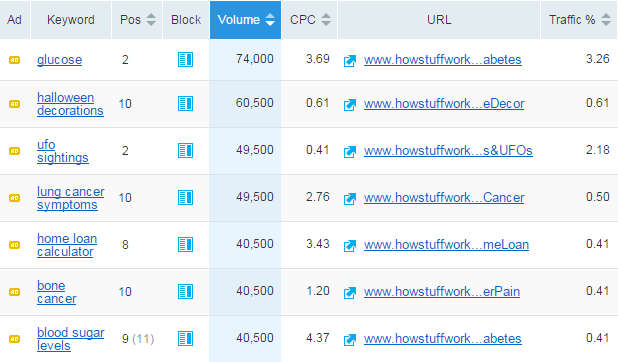
Customize Your Keyword Strategy.

Part of creating your persona is knowing their challenges. What’s the phrasing they’ll most likely use to search for solutions? Take this opportunity to customize your SEO, optimize content, and target keywords your buyer persona uses.

keyword-strategy

Create Offers That Can Solve Their Problems.

What does your target audience want help with? Since you have identified your customer persona’s fears and common obstacles, you will be able to offer effective solutions. This will mean more leads!

Align Campaigns With Your Persona’s Lifestyle

Is your buyer persona a night owl, or more of a morning person? What’s his or her daily lifestyle nuances? Let’s say your target audience goes on a vacation every summer. You can align your campaigns during that month.

campaign-personal-style

Apply Technology They Know How to Use.

Asking your customers to use a technology type that they aren’t comfortable using is not really a smart move. Take for example – making them download a mobile app when they don’t have a smartphone. Again, the platform they’re using is an important component to consider.

apply-technology

Mold Sales to Your Persona’s Decision-Making.

Is your buyer persona the budget conscious type? During the buying cycle, what information does he or she need to go through with the sale? This is a crucial information which can help your sales.

Case Study 3: JC Penney’s Big Mistake

JCP

JC Penney Corp. is a well-known chain of American mid-range department stores based in Texas. In June 2011, the company announced that they’ve hired Ron Johnson as CEO. He was the man in charge of Apple’s profitable retail stores, dubbed as Steve Jobs’ acolyte.

In just a month of his being CEO, Johnson suggested a radical rebranding.

Johnson

The plan was to create a more youth-oriented Penney, getting rid of its addiction to price promotions. The outcome was disastrous. JC Penney totally abandoned their existing customer personas. They have alienated traditional customers, without attracting new ones.

Around 16 months later, Johnson was out. Penney lost $1 billion during his one full year as CEO. After Johnson was gone, the company restored its past philosophy.

Ron Johnson admitted that he didn’t understand what his customers wanted. He didn’t take into account what drove JC Penney customers to shop.

How to Use Customer Personas

how-to-use-customer-personas

Don’t make the same mistake as Ron Johnson did. By clearly defining your buyer personas, you’ll have a much better idea of who, how, and where you should be marketing to achieve the greatest level of success.

Demographic data can help you target your ads, and psychographic information can help you create more engaging campaigns.

Step 4: Keep them on Target

Google always reminds us to keep our content fresh. One of the best ways to do that is keeping your customer personas on target.

How to keep your customer personas on target?

This means that you have to always keep their problems and concerns top of mind. You need to write directly to and for your buyer personas. Use them to modify and improve your marketing strategies.

Re-examine and Refresh.

It’s a competitive world out there. Make sure that your customer personas accurately reflect your target audience’s current life situation and purchasing needs. Do this on a regular basis. Put it in your calendar as necessary.

refresh

Prioritize Conversations with Customers.

It wouldn’t hurt to browse your blog and social media accounts and read customer comments. Include both positive and negative feedback. Doing so will provide your business with some fresh insights.

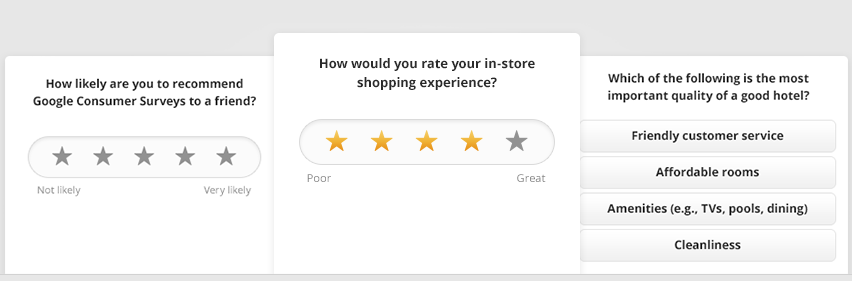
Use the Best Data Resources.

Google Consumer Surveys, Quora, Mechanical Turk, and other similar sources can help supplement your current data. Put them to good use in order to keep your personas fresh, and on target.

Google-survey
Google Consumer Survey

Add and Delete Personas.

The marketplace is ever evolving. In the months to come, there may be a need to add new personas and delete those who can no longer help. Personas are working tools that should be aligned to the present and the foreseeable future.

Visualize Your Audience.

You can either assign a photo to your customer persona, or keep photos of actual customers where you can see them. They’ll represent your target personas and remind you that you’re creating content for real people.

visualize

Popular Brands That Totally Get Their Buyer Personas

Do you ever buy products from the same brand, and stopped to think, ‘They totally get me’? It’s obviously a company that gets their target audience. Let’s take a look at some companies that totally “get” their buyer personas!

piece-of-cake

Seventeen Magazine

Believe it or not, Seventeen started shaping their customer personas back in the 1950s. The first buyer persona they’ve made was named Teena. They’ve based it on survey data from teenage girls and their mothers.

Seventeen Mag described Teena as the ‘High School Girl who has a peck of problems’.

seventeen

“She’s what older folks call an awkward adolescent — too tall, too plump, too shy — a little too much of a lot of little things. But they’re big things to Teena. She writes her favorite magazine for the tip-off on the clothes she wears, the food she eats, the lipstick she wields, the room she bunks in, the budget she keeps, the boy she has a crush on.”

Seventeen may have adjusted to the modern world, but its content still caters to girls like Teena, who have problems with their diet, boys, and dating. We can say that Seventeen has successfully channeled what was going on in high school girls’ minds.

Apple’s iPad 2

ipad2

When Apple launched its iPad2, the campaign was no longer geared towards consumers in general. Instead, Apple identified their customer persona as the on-the-go business professional who needs access at stock options, investment portfolios, etc.

They’ve promoted their iPad 2 into a device for a business professional who wants to make their job more effective and efficient.

JetBlue

jetblue

JetBlue finally took advantage of social media to reach a younger group of audience. The company’s buyer persona is now the low-budget traveler, who wants a comfortable yet affordable solution to flying.

fly-like-a-boss

They even tweeted their campaign ‘Fly like a BOSS’, and as expected, quick responses from their target audience were achieved.

Procter & Gamble

P&G

Procter & Gamble is known for the thousands of products they provide for households. And, one of their personas is the one who’s in charge of shopping for these items – moms!

One of their most unforgettable campaigns happened in 2012, which showed an ad dedicated to the Olympics. They called it ‘Raising an Olympian’, wherein the company focused on a mother’s role in her child’s success. Who can resist such a heart-moving story?

Conclusion

success

At the end of the day, you want to increase conversion rates and make more sales for your online store. And, creating buyer personas is an essential part of building a successful marketing strategy. You just have to know where, when and how to use it.

For your website.

Because of your customer persona, you will be able to craft a better user experience on your online store. You will be able to generate content that speaks directly to each persona, giving them solutions, instead of just generic content.

For your sales.

Your sales pitch is an important factor to your ecommerce conversion rate. It’s the last thing a customer reads before hitting the ‘buy now’ button. Customer personas can give ideas regarding the motivation, and psychology, behind the purchase.

For your content marketing.

You already know what type of articles your customer persona reads. Thus, you can create blog posts for your target audience. This makes your content relevant. It’ll attract more leads since you’re offering information they want, and they can actually use.

For your advertisements.

You may even use personas to optimize your PPC campaigns. Apply the same keywords your customer persona uses to make your ads more relevant. You can place banner ads on websites that your customers frequent. This will definitely improve your CTR.

Now that you have this information, you have the chance to make your marketing campaigns more effective. Don’t be afraid to meet your customers. The next time you launch a promotion, you can ask yourself the question…

‘Would Susan or Matt be interested in this news?’

Filed Under: How-To Articles Tagged With: customer persona, e-commerce, Google Analytics, how-to, keyword research, LinkedIn, marketing strategy, social media, Twitter

How to Integrate WooCommerce into a Non-WooThemes Theme

March 2, 2015 By John Leave a Comment

how to integrate WooCommerce into a non-WooThemes theme

WooCommerce (WC) and themes from WooThemes go hand in hand when building an e-commerce website. But what if you wanted to use a theme not from WooThemes? There may be some compatibility issues but it could still work. To solve these problems, we’ll need to set it up in such a way that your non-WooCommerce or custom theme supports Woocommerce and make the integration flawless.

WooCommerce provides two methods to do this. Either we use hooks or make use of their catch-all woocommerce_content() function. The second method is the easier of the two so we’ll only talk about the second method of the catch-all woocommerce_content() function in this post.

To start, know that it’s divided into 5 simple steps which we’ll outline below:

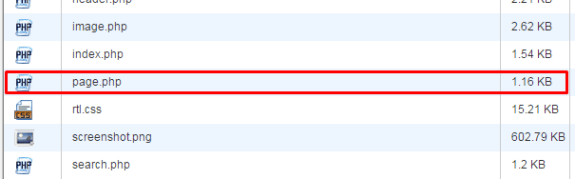
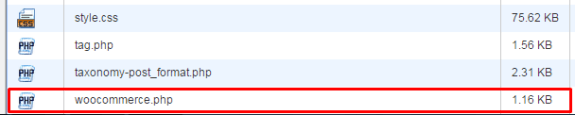
STEP 1: Duplicate your page.php file and rename it as woocommerce.php

For this, you’ll need to access your website files using an FTP program or cPanel file manager. Find your page.php file which is usually located in wp-content/themes/[YOURTHEME]/page.php.

copying page-php
creating woocommerce.php

All themes should have this file so make a copy of yours then rename it to woocommerce.php. Basically, you’re creating a file called woocommerce.php where the content is the same as page.php.

If you’re using a child theme, you’ll need to copy the page.php of the parent theme and place woocommerce.php on the child theme so that you don’t have to worry about it being overwritten when the theme is updated.

STEP 2: Edit woocommerce.php and locate the loop

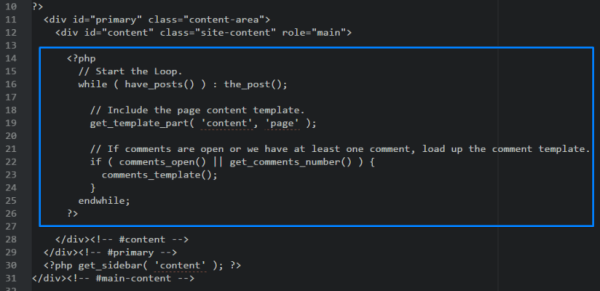
After creating the file woocommerce.php, you then need to edit it with the editor of your choice. When it’s opened, browse through and look for code that looks like the one below:

the loop

It usually starts with

<?php if ( have_posts() ) :

and ends with

<?php endif; ?>

but in our case it ends with

endwhile; ?>

so it’s not always the same. This bit is called the loop and you need to determine where it starts and where it ends.

STEP 3: Replace the loop with <?php woocommerce_content(); ?>

Now, after finding the loop, replace it with:

<?php woocommerce_content(); ?>

That lengthy bit of code will be replaced by just this one line. And that’s entirely the point – nothing to be alarmed of. And when you’ve done that, it should look like the one below:

woocommerce-content

Now, save it.

STEP 4: Declare support for WooCommerce

Next, we’ll do something about the notice message that looks like the one below.

woocommerce does not support notice

To do this, we’ll need to add:

add_theme_support( 'woocommerce' );

to our functions.php. If you’re using a child theme, you’ll need to find the functions.php file that is inside the child theme folder. Once you’ve found the correct functions.php, place the code exactly at the end. Now, save. And that’s it. That notice should be gone now.

STEP 5: Bask in your success

And that’s how to integrate WooCommerce with a non-Woothemes Theme. For the unavoidable instances that you need to make use of a non-WooCommerce or custom theme, you need to follow the steps above.

Do you have any other suggestions? Feel free to comment below.

Filed Under: How-To Articles Tagged With: code snippet, design tweaks, e-commerce, how-to, WooCommerce, woothemes

Ivan Bjelajac: On Working with Passionate People in a Dynamic Environment

July 11, 2016 By John Leave a Comment

Ivan-Bjelajac-Devana-COOUPDATE: Ivan Bjelajac is now CEO of Devana Technologies.


Ivan Bjelajac is Chief Operating Officer of Devana Technologies. Before joining Devana, he was a freelance web developer in 2006, moving onto various technical support and management roles. At one point, he became CEO of Cybernet Technologies. In this interview, Ivan shares his insights on the WordPress industry, how he does his job, the kind of people that he works with, and Kevin Garnett.

1. What sets ManageWP apart in today’s competitive WordPress niche?

I would say it’s the people. From the start of our journey we wanted to create a great premium product that would allow WordPress users to save time and increase productivity. It was the first product of its kind in the market and it obviously helped us out tremendously that we created a market niche in WordPress management but it’s not the product itself that earns us money. It’s the developers, product people and guys from the customer happiness departments that deliver the value to our customers on a daily basis. Without them we could not keep innovating and going the extra mile for our clients.  We would not be where we are today.

2. Could you describe the team that you are working with? How has your team dynamic changed over the years? What do you think can still be improved?

Devana-Technologies-Ivan-Bjelajac-Vladimir-Prelovac

Passionate is probably the right word. A number of people went through the company in the last 6 years, but passion has always been there.

In the beginning we thought we should just hire everyone that seemed to be good or have potential and we were completely flat as an organization. That did not turn out to be the best possible way to do things so now as the team grew we introduced strict hiring rules and gave more power to team leaders.

The good thing is that we managed to grow without sacrificing the focus on our customers and our product. We have some great mentors and seniors in our company and tend to hire great people, but we still have a long way to go when it comes to implementing processes, making our employee onboarding and development processes faster and more efficient.

3. Are there any people who have influenced your work ethic? And how? Are there any WordPress influencers that you look up to? Please tell us more about it.

Probably Kevin Garnett, although I have never met him personally. 😉

They say your own quality is an average of five people you spend the most time with. Most of the people I learned from are not involved with WordPress. Some are not even into technology but have successful businesses in other areas. I had the luck to surround myself with people that were not my role models but who did help me form certain beliefs. They are all of various ages, backgrounds and tend to offer different perspectives on things which can be invaluable.

When it comes to WordPress, there is of course our founder Vladimir Prelovac, whom I’ve known for 16 years and counting, but I also like to hear what Jason Cohen, Andrew Nacin, Adii Pienaar, Syed Balkhi and Mason James have to say about WordPress and business in general. I also tend to learn a lot from WordCamps and having different chances to talk to our customers in general.

Devana-Technologies-Ivan-Bjelajac-Vladimir-Prelovac-meeting

4. The work environment at Devana has been described as a ‘productive mess’. Can you tell us more about it?

Well I would have to say that it’s a pleasure and a curse to work with passionate people who believe in creating both great products for our users and in building a better life for their co-workers and their community. It is hard to match their resolve and honestly sometimes I find it hard to keep up. We tend to want to get too much done, step on each others toes, argue a lot but we also help each other, take pride in our work and keep a high standard of quality – so things tend to get unpredictable.

We are still looking for ways to incorporate a healthy amount of processes to go along with our creative chaos and keep that fine line between being efficient and creative.

5. What is a typical day for an Ivan Bjelajac? How do you get things done? Do you stick to a particular schedule or work rituals?

I would love for someone to answer this question for me. 🙂 We are a very dynamic environment so each day looks a lot different. I actively try to reduce the amount of things we work on and add more processes so hopefully I will be able to tell you about my typical day sometimes in the near future.

Devana-Technologies-Ivan-Bjelajac-meeting

6. Are you still involved in any development work for ManageWP or any other development projects?

Not that much. I am still involved in our business decisions, some feature and architecture decisions but I mostly focus on working with our partners and vendors. The team is more than capable doing most things without me and there are also many things where I actually think they are much better than me. I do tend to get involved a lot into our R&D. Sometimes our guys are happy about it and sometimes they hate me for it, but that is another story…

7. Aside from WordPress, what are your other interests? What do you like to do when you are not working?

I like to travel. I am trying to visit at least one country each month or two. Good thing is that my job actually helps me achieve that goal. Even if we are super-busy I can at least find a weekend to visit a conference or a WordCamp.

Ivan-Bjelajac-WordCamp-Europe-2015

8. Seems like you are fond of basketball. Have you ever played ball with the team at Devana?

Quite a few times though we haven’t done it for a while. We should probably do it again sometimes soon after we launch ManageWP Orion. That is a good idea, thanks for putting it in my head. 🙂

9. It is quite admirable that Devana has been pumping 10% of its profits Zivojin Misic Foundation. Why in particular did you choose this foundation?

All companies are built to make money. What makes them different is what they do with that money. There is a great TED talk by Simon Anholt that explains the concept we believe in.

When it comes to Zivojin Misic, we actually founded the foundation ourselves and so far it has been exclusively founded by our company. We chose to focus on education and promoting entrepreneurship because those are the areas that we think are lacking in systematic solutions and return the biggest ROI when it comes to our environment.

Ivan-Bjelajac-COO-Devana-Technologies-Zivojin-Misic

10. What makes you a successful COO? If you have one advice to give to a young entrepreneur, what would it be?

Be genuine. The COO is probably the only position in the company that is harder to describe than the CEO position as all kinds of different people get promoted to it and it is usually complementary to the CEO. So, as there are no 2 CEO’s that are exactly the same there usually are no 2 COO’s that are exactly the same and the position usually does not translate that well from company to company.

I think I owe my success to working with some great people and finding ways to help them do their jobs the best way possible without forgetting it’s about the product and other people in the company and mostly not about yourself.

So being a good COO is mostly about how well you play with others and complement your CEO and other senior executives.

If your main function is to play the role of an enabler for other people and you try to do it without being genuine – it’s probably not going to work out in the long run.

Filed Under: Interviews Tagged With: e-commerce, WordPress

  • 1
  • 2
  • 3
  • …
  • 8
  • Next Page »
Let us support your online store so you can manage your business

Get started today

Get 2 Hours of FREE SUPPORT

We are so confident that you will love our services that we will give you your first 4 hours at a 50% discount

That’s 4 hours for only $75

BUY NOW

Free eBook

5 Things Every Online Store Can Fix On Their Website In The Next Week To Increase Sales

Quick Links

  • How it Works
  • Pricing
  • Blog
  • Contact
  • About Wooassist
  • My Account
  • Checkout
  • Privacy Policy
  • Cookie Policy
  • Terms and Conditions

Wooassist

Australia:
59 Luke St.
Hemmant QLD 4174

Philippines:
San Miguel St.
Poblacion, Iligan City 9200

Connect


Copyright © 2026 · Wooassist

Yours FREE!

5 Things Every Online Store Can Fix On Their Website In The Next Week To Increase Sales