Wooassist

Assistance for Your Woocommerce Store

  • How it Works
  • Pricing
  • Services
    • Site Maintenance
    • AI SEO and Content Marketing
  • Blog
    • How-To Articles
    • Code Snippets
    • SEO For E-Commerce
    • Theme and Plugin Reviews
    • Wooassist News
    • WordPress/WooCommerce News
    • Interviews
  • About Us
  • Contact
You are here: Home / Archives for redirection

On page SEO for Ecommerce: The Online Store Ultimate Guide

September 2, 2015 By John Leave a Comment

on-page-SEO

I know I need SEO, but I don’t know exactly what I need.

We have heard this statement several times. Entrepreneurs realize the value of SEO, but they don’t truly know how to do it for their e-commerce business.

Before embarking on optimizing on page SEO for ecommerce, it’s crucial to understand what you hope to gain.

In this article, you’ll learn about the following:

  • Understanding your SEO needs so you can focus on the most profitable areas
  • How SEO really works for E-Commerce Websites
  • Our 8 step technical On-Page SEO process to guarantee you more traffic.
  • Our 7 Step On-Page SEO guide to user experience and engagement

Most users prefer using Google because it returns the most relevant search results on the web – and by ‘users’, we mean your potential customers. This means that being ranked on the top pages allows online stores to receive more visitors and generate more leads.

So, how can you rank higher than your competitors on Google?

The answer is a well-rounded website. Whether you’re just getting started with a new online store, or improving an existing site, you need to step up your SEO game.

I. Understanding your SEO needs

SEO-success
SEO can help potential customers find your store in search results. Let’s say someone is looking for a product you’re selling. How can we make Google recommend your brand to that user, instead of another store? This is where SEO can help.

A. Business Goals

Your business goals should always come first. Do you want to increase conversion? Build brand or product awareness? If your business goals are clearly set, it will be easier to determine the SEO strategy that will best fit your needs.

B. Existing Performance

Look at your analytics data to assess the existing performance of your site. It will show your site’s traffic and conversion trends over the years, helping you understand what keywords you need to optimize for. We will show you exactly how to do keyword research shortly.

C. Resource Constraints

After looking at your analytics data, and knowing where you’re lacking, you’ll know how to fill in the gaps. Know where you need help, and it will make the SEO planning easier.

II. SEO Basics for E-commerce Websites

SEO-google

For an e-commerce site, driving relevant traffic to boost sales is crucial.

It’s critical for websites to appear on Page 1 of Google. Surprisingly, the top three organic positions alone receive 58.4 percent of all clicks from users.

CTR

Websites ranked number one received an average click-through rate of 36.4 percent. The second spot received a CTR of 12.5 percent, and number three had a share of 9.5 percent.

Do you want to know how to rank your e-commerce site? Read on.

A. Start your Research

On-page SEO work needs two types of research: Keyword and Competitor Research.

The primary objective of doing research is to identify the gaps between your site, and the sites that are doing better. Keep in mind that the market you are about to enter might already be well-served by savvy site owners.

1. Keyword Research

First of all, targeting the wrong keywords makes your campaign ineffective. It can lead to low quality traffic, and few conversions.

Go for keywords that are highly relevant to your brand or products. What terms are your ideal clients using when searching for your service?

You can use tools such as:

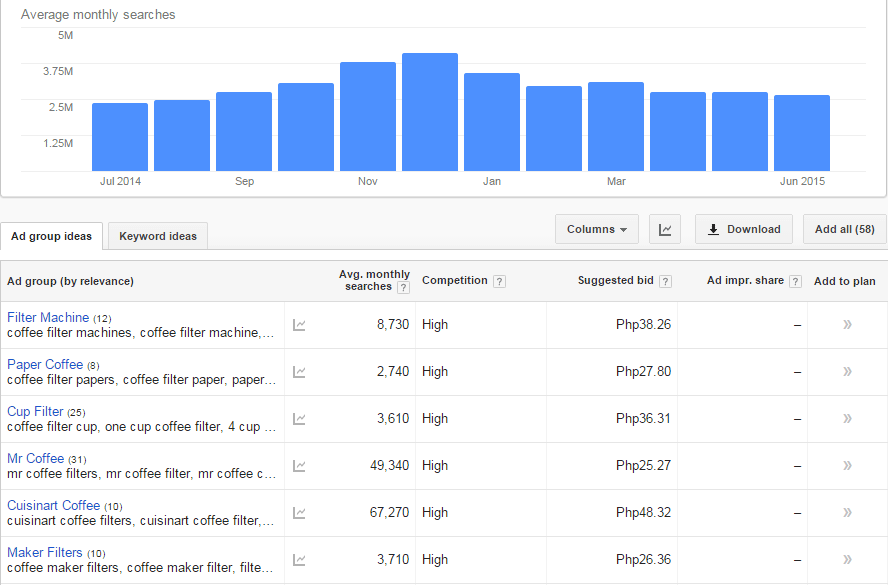
Google Keyword Planner (formerly the Keyword Tool)
keyword-tool

Übersuggest

ubersuggest

2. Competitor Research

Insightful competitor analysis

Insightful competitor analysis is an essential strategy to find out what rival e-commerce firms are doing. In SEO, you can track and analyze the performance of your competitors in relatively simple ways.

Which keywords are your main competitors going for?

List down the keywords which your competitors appear to be using with their SEO strategy. Check if they have higher Domain Authority and Page Authorities than you.

  • Domain Authority is a calculated metric for how well a given domain is likely to rank in Google’s search results. It is used to compare one site to another, or to track the strength of your website over time. It is scored on a 100-point, logarithmic scale.
  • Page Authority is a calculated metric for how well a given webpage is likely to rank in Google’s search results. It is also scored on a 100-point, logarithmic scale, and used to predict how well a specific page will rank on search engines.

If your competitors have higher DA’s or PA’s than you, contending against them will be very difficult. So, it may be a good idea to focus on other keywords or “longer tail” keywords instead.

You can use these tools to determine DA’s and PA’s:

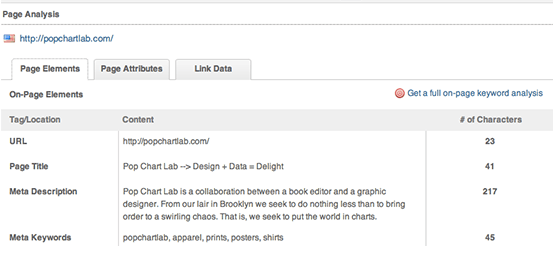
MozBar

Allows for checking the SEO title and description your competitors use in their title tags.
moz-browser-extension

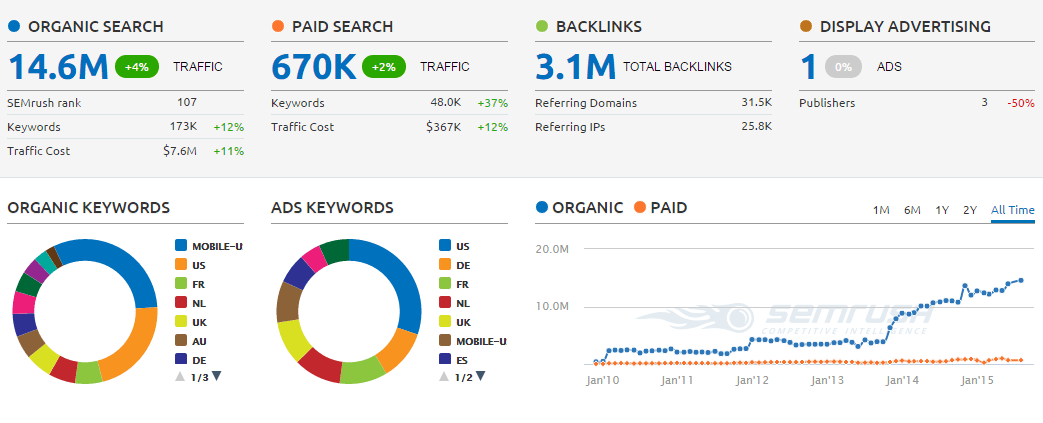
SEMrush

Allows for seeing what keywords your competitors are ranking for on both organic and paid search.
SEMRush

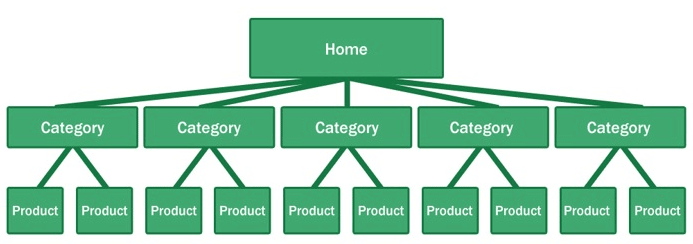
What is their site architecture like?

Try to look at the site architecture of competing sites, or the biggest companies in your industry. Pay special attention to popular products in a particular category, related products, top rated products, and recently viewed products.
site-architecture

Here’s why your site architecture is essential for organic traffic:

  • Google considers your site’s homepage the most authoritative page, so content closest to the homepage receives the most value.
  • By structuring your e-commerce store correctly, your main level navigation pages, such as the category pages, will contain a majority of your site’s authority.
  • Adding relevant, high-quality content to your main level navigation pages can increase conversion, page authority, and sub-category page’s authority.

B. Identify Current Problems

After discovering what keywords are going to make you the most profit comes auditing your site for problems.

404-error

1. Find site errors

Here are the top errors you’ll want to correct:

  • Redirecting any 404 pages to actual content
  • Changing 302 redirects to 301 redirects
  • Updating duplicate content pages, meta titles, and meta descriptions

The above mentioned are called HTTP status codes. These are three-digit numbers returned by servers that indicate the status of a web element.

404 HTTP status code

It can be shown as 404 Error, 404 Not Found, Error 404, 404 File or Directory Not Found, etc. This status code means that the server has not found anything matching the Request-URL. Or, simply the page you were trying to reach on a site couldn’t be found on their server, has been removed or does not exist.

Having lots of 404 pages will hurt your site in many ways. For instance, if a ranking page resolves to a 404 error, it might frustrate the user. This means you will be throwing away some earning potential. Google also counts it as a poor user experience. If you don’t fix the errors, Google will eventually remove that page from their index, which will eventually hurt your overall rankings.

302 Redirect HTTP status code

It’s also known as a temporary redirect. 302 should be put in place if you want to redirect visitors into another webpage, but you plan to bring the redirected page back after some time.

It’s not really recommended since it can hurt your site’s search engine visibility. While the redirected page will retain its page authority and traffic value, the temporary page won’t accumulate any. It’s often used to test a new page. You can gain client feedback without affecting the old page’s ranking.

301 Redirect HTTP status code

This refers to a permanent redirect from one URL to the other. All qualities of the redirected page will be passed on to the detour page. A 301 redirect is often implemented if one is ready to make a test page permanent. The old page will be removed from Google’s index, and the new one will replace it.

Without 301 redirect, the web authority which your previous domain collected will be thrown right out the window. Any inbound links earned will be lost, and you won’t get any SEO credit.

There are dozens of free online services that are capable of checking your website for errors, and finding ways of improving your web page.

Google Webmaster Tools, for instance, can help you identify any page or links with errors, scan for malware, find pages with short or missing titles, find duplicate meta tags, and much more.

2. Determine your site speed

Any delay is enough reason to make your customers leave. This converts to lost revenue, which can hurt your bottom-line.

One study revealed that 1 in 2 visitors will abandon a website that takes more than 6 seconds to load.

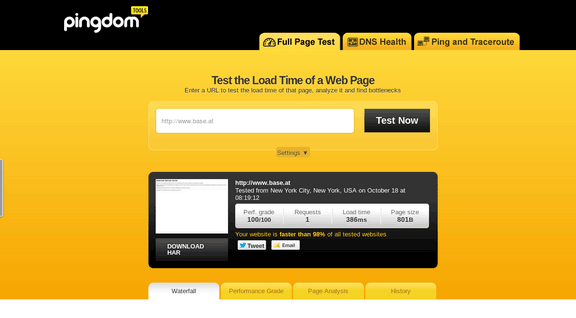
There are various tools to help you check your loading speed:

  • Yahoo! Y slow
  • Google Page Speed
  • Pingdom is the quickest and easiest one
pingdom-site-speed-test

For a more in-depth guide to how to speed up your site see our article here.

C. On-Page Optimization

On-page optimization includes all of the actions you take within your own web pages to help your site rank better.

Learn more about on-page optimization for your online store on the next step.

III. Optimizing On-page SEO Technical Factors

optimizing-on-page-SEO

If your online store is not optimized for both search engines and users, you have a small chance for success. On-Page SEO refers to the settings you can apply on the website so that it is optimized for search engines.

A. Why start with On-page SEO?

  • With On-Page SEO, you ‘speak’ the language of search engines. You can easily make them understand what your website is about.
  • On-Page SEO can make the users happy. It ensures that your website is setup correctly, which leads to a better user experience.
  • Before promoting your site through off-page SEO, you need to be sure that the website is optimized and is running smoothly.

If you don’t know the basics of on-page SEO, you have very little chance of securing top spots for competitive key phrases. Get it right and you’ll succeed on the search engines.

Here are the basic factors of on-page SEO:

1. Title Tag

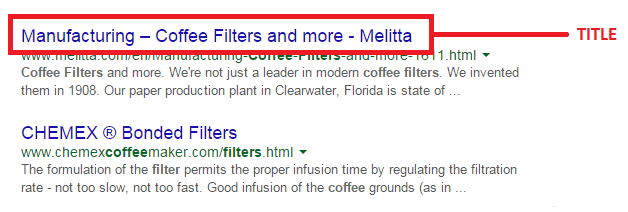
Title tags or title elements define the title of a document. It should be an accurate and concise description of a page’s content.
title-tag

Place your main keyword and variations in the title tag of a page. Google would display around 70 characters of a title tag, or based on pixel width. You can preview how your title tags will appear like through Moz’s preview tool. Make sure to include your business name along with the main keyword phrase you are targeting.

2. Title Tag Optimization

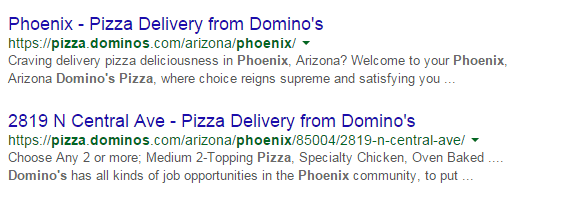
Your site’s title has to be appealing enough for a user to want to find out more information.
title-tag-optimization

Things to include in your title:

  • Business Name: Aside from customers may search you by your brand name, it’s also important for breading purposes. In the example above, it’s Domino’s.
  • Keywords: Putting certain keywords in your title can help them rank, just don’t staff too many. Domino’s used ‘pizza delivery’.
  • Toll-free numbers: It helps your visitors to take a direct action, and makes your title look professional. Users are left with an impression of authenticity of the business.

B. Meta Descriptions

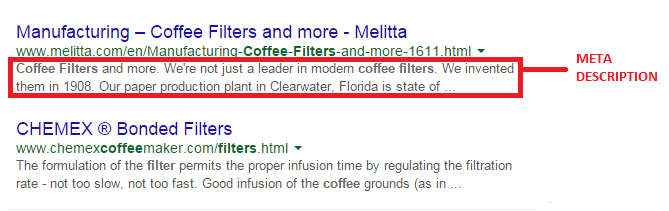
A meta description is the snippet of information below the link of a search result. It describes the contents of the page to the searcher, with the goal of convincing the searcher to click through to your website.
meta-description

They may not contribute as a ranking signal but meta descriptions can encourage people to want to visit your website. It describes your business and shows up in the search results page beneath the title tag. It should be well-written and approximately 156 characters.

Think of meta description as a sales pitch for what the landing page is about. Get practical instructions on how to update them using WooCommerce.

1. Meta Tags Optimization

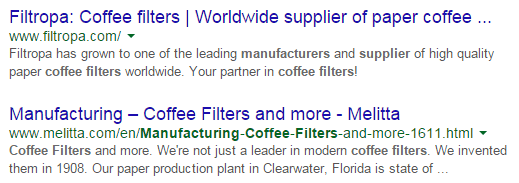
As mentioned earlier, meta description is something that when done properly can urge users to check out your website.
meta-tag-optimization

Things to include in your Meta Description:

  • Selling Point: To get some advantage, write what your customers want to hear. For instance, a phrase like ‘affordable, all-natural coffee filters from only $3.99’ may result in more clicks.
  • Keywords: It will give you some advantage in Google’s relevancy algorithm.
  • Toll Free Numbers: If you don’t want to place it in your title tag, include it in your meta description instead. Again, it may help your visitors to take a direct action.

C. Heading Tags

Use headings correctly without over-optimizing them. Your main keyword should be in a H1 tag. Split sub-headings up with H2 and H3 tags. Only use the H1 tag once, and others can be used multiple times.

For more information of the correct use of when and how to use heading tags, check out How To Use H1-H6 HTML Elements Properly.

1. HTML Tags Optimization

The text inside your header tags is given very high importance by the search engine. They highlight certain parts of your website.

Header 1: Use it to define the most important section of your page. The H1 tag is an influential ranking factor, and an important signal to search engines as to what a page of content is about.

Header 2: Use it for sub-titles or important sections of your pages.

D. Content

Your content should be written primarily for users, and secondly for search engines. Make sure that the content on your homepage helps visitors learn more about your business, and the products you’re offering.

Use the keywords from your research, but make it look as natural as possible and easy to understand for the user.

Again, don’t forget to use H tags to break up your content into easy to digest sections.

E. URL Structure

Which has a more search engine friendly URL structure: “www.domain.com/page-name/” or “www.domain.com/index.php?id=1?” Obviously, the former makes more sense to both users and search engines.

Avoid having main pages sit too many directories deep in your site. Use hyphens rather than underscores. If you do make changes, implement 301 redirects from the old URL to the new. This way, your users won’t have to face 404 pages.

F. Keyword Optimization

Keyword stuffing is no longer acceptable. Maintain a balance between your keywords and your content.

1. Elements of Keyword Optimization:

  • Keyword Density: In SEO, keyword density is the measurement in percentage of the number of times a particular keyword or phrase appears compared to the total number of words in a page. It’s also an indicator whether your page is relevant to the targeted keyword. Yoast SEO plugin can help analyze keyword density.
  • Related Keywords: Related keywords are keywords of industries and markets that are closely or somehow related to your niche. It’s using related, but less obvious keywords to bring targeted, conversion-friendly traffic. LSI is smart enough to see ‘coffee filters’ is somehow closely related to tea and accessories for brewing. LSI Graph is a good tool to find LSI keywords.
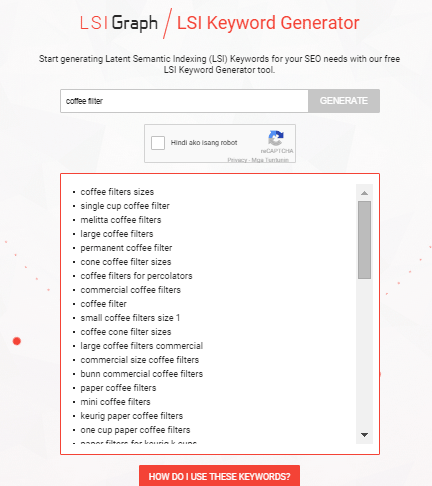
LSI

  • Long Tail Keywords: These are longer and more specific keyword phrases that visitors are more likely to use. It’s about adding common words like ‘best’, ‘free’, ‘cheap’, or ‘top’ to your actual keywords. Long tail keywords can help you craft the kind of content that engages and inspires readers.

Long tail keywords have less competition, give more qualified leads, and improve head term rankings. According to a research by Statistica, 50% of your focus should be on long-tail keywords in order to achieve a successful On-page SEO.

G. Internal Link Optimization

Internal linking is when you link pages of your website to other pages within your website. It’s a process that involves optimizing internal links, in order for algorithms to determine the relevance of web page content.
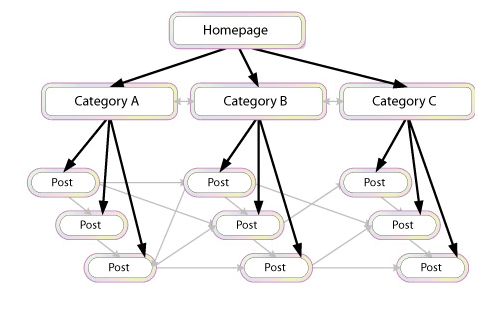
internal-link-optimization

If you lack internal links, it will be difficult for Google to crawl and index deeper sections of your website.

1. Why are internal links important?

  1. Internal links improve your ‘link flow’ or page rank to individual pages on your site, helping them to rank better.
  1. The anchor text of links helps Google to understand the context of a webpage, and to rank better.
  • Anchor text: It’s what you call the clickable text in a hyperlink. A good anchor text includes the appropriate keyword to give the page it is linking to more relevant meaning.
  1. Internal links help Google Bots crawl and access different parts of your site, and also improve user experience.

H. Image Optimization

On-page images need to be optimized because search engines can’t read them. This means the web crawlers would only read the text.

1. Elements of Image Optimization:

  • Alt text: Try to move the mouse over an image on a website. If a short description appears, that is alternate text. You can use your relevant keywords as ALT text.
  • File name: Use meaningful file names for your images, such as ‘coffee-filter-basket.jpg’ instead of just ‘DSC1234.jpg’. Make sure the file name is relevant to the image.

IV. Optimizing On-Page SEO for User Experience and Engagement.
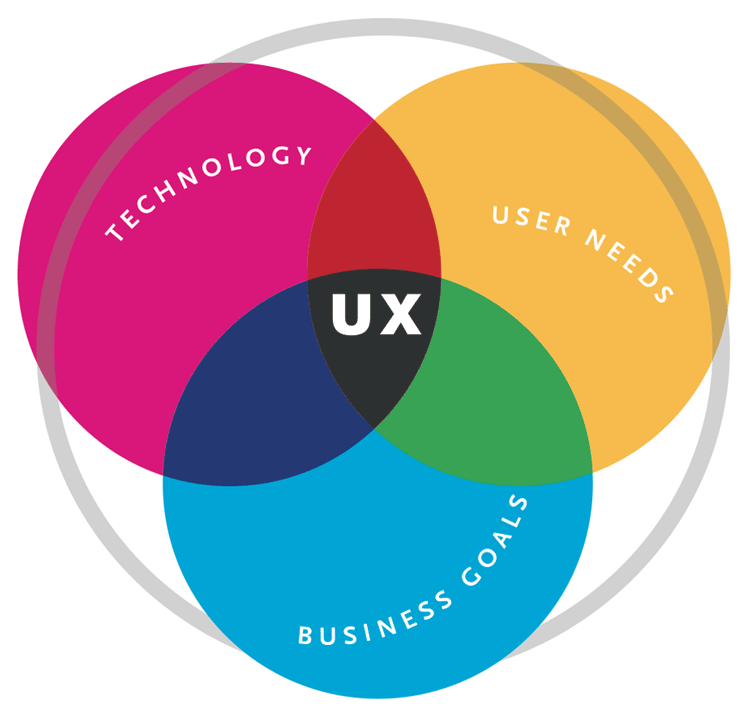
user-experience

Google has been updating its ranking factors consistently, and user experience and engagement have become one of them, especially for mobile. What links UX and SEO? It’s about attracting visitors and converting them into customers.

Once you create a great user experience, visitors would perceive your site positively which encourages sharing, return visits, bookmarking, and inbound links. These factors are signals recognized by the search engines, contributing to high rankings.

  1. Focus on designs that fit SEO principles – you need to maximize H1 and H2 titles, optimize menu names and functionalities, create a clear navigation path, and provide focused product names and descriptions.
  1. Call-to-action – CTA buttons or even links with CTA should be designed not only for user experience, but also linked to content and page elements optimized for SEO.
  1. Focus on quality – when talking about quality websites, user experience is also taken into account page speed, easy navigation, internal link structure, descriptive content, and page layout.

A. Engagement Metrics

As a search engine delivers a page of results to you, it observes how you engage with those results, measuring the success of the rankings in the process. Search engines are looking for that ‘long click’, wherein a user does not immediately return to the search page.
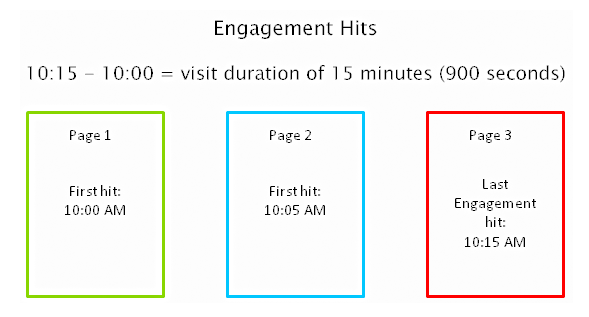
engagement-metrics

For instance, you click on the first link found on the SERP, then immediately hit the back button and clicked the second link. The search engine will interpret this as not being satisfied with the first result.
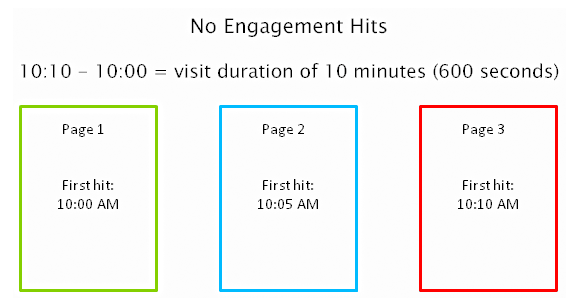
engagement-hits

1. How important is Time on Site?

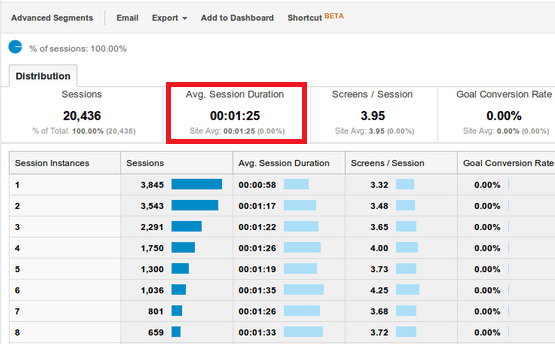
Time on site or visit duration refers to how long a visitor stays on your website. Because Google wants to give their users the best experience, they actively measure user behavior to help shape their algorithm. If a user is spending a significant time on a site, interacting with it, and going deeper within the content, it means there is something of value on the site for that particular user.
time-on-site

2. What is Relevance?

The relevance of a website’s content is particularly important for search engines. The term ‘relevance’ describes the extent to which the content of a website corresponds to the search term used. It can affect a website’s ranking in the search results, for a given search term.

If you’re selling coffee filters, you must not go off topic and talk about juicing machines. Go for the search terms that your potential customers are searching for. “Disposable paper coffee filters” could be a good choice for a keyword for a coffee-filter vendor, but “coffee maker parts” might not work. You would be confusing yourself, your to-be customers, and the search engines. Your relevance would get hurt, hence you ranking would get hurt too.

Ask yourself, how relevant is your page content to the keyword query of your visitor? You can make your site more relevant to searchers by optimizing the different on-page factors discussed in Part III. They include your site’s meta tags, headings, body text, and other content.

3. Google will reward you for being relevant.

According to Google’s official blog, their goal is simple: to give people the most relevant answers to their queries as quickly as possible.

relevance-to-users-reward

Maintaining your site’s relevance may lead to more clicks, and a higher position in search results. When Google changed its algorithm last February 2011, they began promoting sites with reports, in-depth analyses, and other forms of high-quality, value-adding content. Sites that were deemed irrelevant and invaluable by the algorithm were demoted.

4. How Google determines relevance?

Google displays web pages in their search results based on the authority and relevance of the page. So, how does it determine relevance? According to Neil Patel, it analyzes a page’s content based on several factors, including where and how often you use certain words in that piece of content. You can check out Google’s other ranking factors here.

Let’s move on to your WooCommerce product page.

B. Important Elements for On-Page Optimization

These are the elements that are important for on-page optimization:

1. Customer Reviews

These reviews not only improve your business, they also provide an amazing source of unique content. Internet Retailer reveals that an online store can increase its e-commerce conversion rate by 14-76% by adding product reviews.

Search engine spiders like unique content that is regularly updated, and user reviews are a great way to create more of this on your website. According to data, 88% of consumers trust online reviews as much as personal recommendations. This means that potential customers will be searching for the name of the product plus the word ‘review’, or related words such as ‘ratings’.

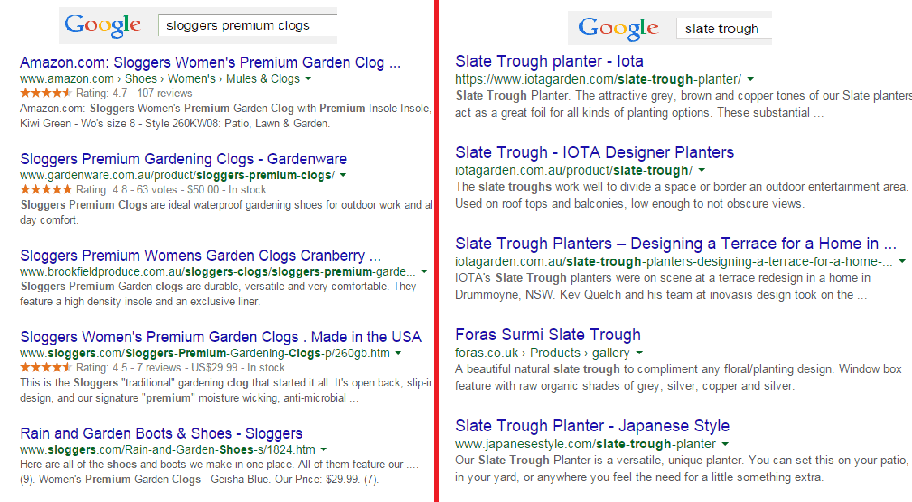
Compare these two images on SERPs:
customer-review-SERPS

The organic search results on the left are showing ratings just above the meta tag, while the image on the right doesn’t. So, what determines if ratings are shown on SERPs?

Apparently, sites on the left are using schema markup on their reviews. That is why their ratings occur on SERPs.

In AdWords, they are enabled through the product reviews ad extension. You have to submit your product data to Google, and be a client of selected review websites. Get reviewed by at least 30 unique users, submit your reviews to Google, and have your review extension enabled!

Increased CTR on results pages

Correctly formatted reviews can help increase click-throughs from search engine results pages. In the image below, the addition of star ratings make the first and third results stand out.

increased-CTR

Increased conversion rates

By increasing the chance of a click-through, you’re also increasing the chance for conversion. User reviews can increase trust in your ecommerce site, and can help remove doubts about products.

To collect customer reviews, try the following:

  • Email customers a few weeks after purchasing and ask for a review.
  • Offer discounts or other incentives on their next purchase in exchange for a review.

Don’t worry about negative reviews. Instead, take it as an opportunity to show good customer service. Offer to replace the faulty product or offer a refund.

2. Pagination

Because e-commerce sites are promoting a variety of products, they´re ultimately forced to divide them into multiple pages. This process is called pagination.

If you have product categories that contain thousands of products, make sure that all of them are indexed and regularly crawled. Google has some good instruction on pagination with rel=“next” and rel=“prev”.

Pagination affects two critical elements of search engine accessibility:

Crawl Depth: Google demands best practices, wherein spiders should reach content-rich pages in as few clicks as possible. If you have too much paginated content, Googlebot won’t travel through all of them. It won’t be able to index the final pages.

Duplicate Content: Search engines want to show only a single URL for a piece of content. If pagination is not implemented correctly, it may cause duplicate content problems. This will cause some confusion for the Googlebot, especially during search queries.

3. Page Speed

Google announced that website speed would begin having an impact on search ranking. Apparently for Google, a poor performing website results in a poor user experience. It’s enough reason for a website to gain less promotion in search results.

A user is not going to wait for your product pages to load, so you should care about site speed. Any delay is enough reason to make your customers leave. This converts to lost revenue, which can hurt your bottom-line.

There are several ways to optimize your WooCommerce site’s speed. You can read all about it here.

4. Search Option

Even with a good navigation structure, there are users who will just prefer to search. That’s why a search box has become an essential element of e-commerce sites.

Using your search feature, you can track your customers’ searches using CMS or Google Analytics. What phrases are they using? Does your site return good results? Is your search function working for singular and plural keywords?

search-option

Monitor the number of people who search and then leave straight away. What prevents them to go through the checkout process? Try including special offers related to the search, and see if it lessens your bounce rate. The data you have collected will help you improve your website and customer experience.

5. Product Description

It is very important to make your product descriptions unique. For retailers, don’t just rely on the manufacturer’s brochure. If you do, then you’ll have the same content as hundreds of other retailers. Make it unique and engaging.

Product descriptions shouldn’t just describe your products, product descriptions should sell them.

Here’s how:

Focus on your ideal buyer

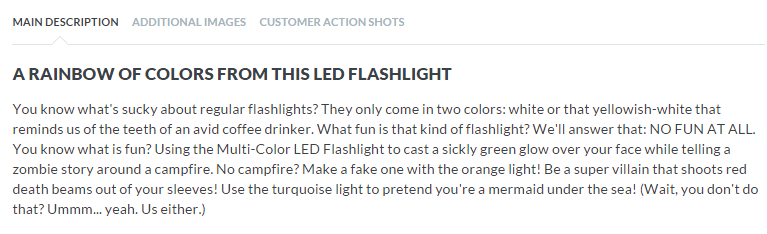
If you focus on a huge group of buyers, you may end up addressing no one at all. Imagine your ideal buyer and consider how you would speak to him if you were selling your product face-to-face. Does he appreciate a good humor?

ThinkGeek starts their product description as:
think-geek

Entice with benefits

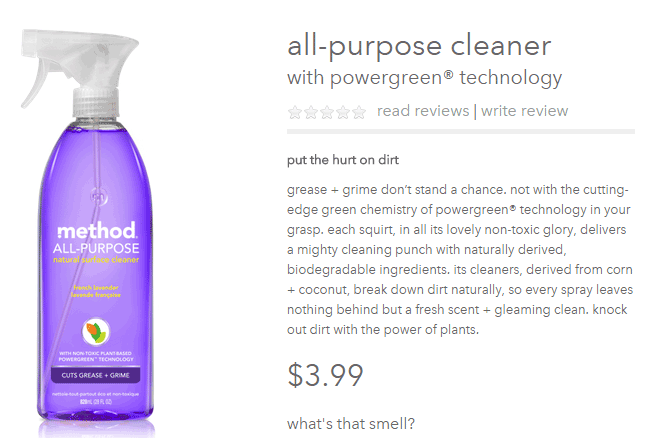
A consumer always wants to know what’s in it for them. What are your product’s features and specifications? Know how to highlight the benefits.
entice-with-benefits

Methodhome highlights the powergreen action of their all-purpose cleaner, wherein grease and grime don’t stand a chance!

6. Business Information

To optimize your business information, make sure that it’s complete and accurate.

Phone number: this can actually inspire trust. If a phone number is shown, it gives customers the impression that you can provide customer support if ever they encounter some problems with the purchase.

Company details: this is especially helpful if you’re trying to target local markets. If you give Google some location signals, it can help your location keywords rank.

7. Social Sharing

Are you happy with how social share buttons work on your website? To maximize the benefits, social share buttons need to be optimized.

social-sharing

What’s an optimized share button?

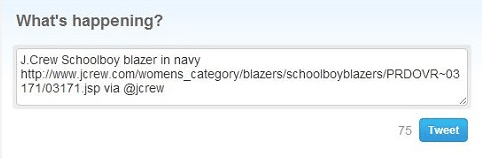
It’s a share button that automatically generates a shareable message with custom information for your brand.

Here’s an example of an optimized Tweet:

Notice that the tweet has the brand’s Twitter handle @jcrew.
brand-on-Twitter-handle

Customizing your share buttons let your readers share useful information, and help you control brand messaging at the same time. You’re making it easy for your visitors to share your products on their social media profiles.

We all know how social media connects people who value each other’s opinions. People who see content being shared by their friends, family, or colleagues will think that it’s something worth checking out. This means more traffic to your site!

You can place social share buttons…

  • After the point of purchase on a confirmation type page
  • Email follow up and correspondence
  • After a review has been published – give the reviewer the option to share their review

V. Conclusion

team

With these steps, you can start optimizing the pages of your online store. If you want to do this by yourself, there are plenty of SEO tools given in this article to help you optimize your rankings. Nevertheless, don’t be shy to reach out to a professional for help. On the other side of the coin don’t try and outsource this completely, no one understands your products like you; an internal team member with intimate knowledge of the products and target market needs to be involved.

If on-page optimization is done right, you will see an increase in quality traffic, which will lead to more conversions and repeat visitors.

Keep in mind that Google constantly updates their algorithms, which also means you have to be up-to-date with your strategies. It may require a lot of work, but the benefits are worth it.
Filed Under: SEO For E-Commerce Tagged With: 404 error, conversion optimization, Google Analytics, Google Webmaster Tools, keyword research, redirection, SEO strategy, SEO tools, site speed optimization, social media

How to Create a Custom 404 Error Page for Your WooCommerce Store

February 25, 2016 By John Leave a Comment

What is a 404 Error

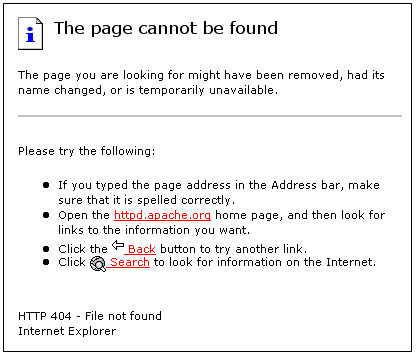
A 404 Error is an error message displayed when an accessed page is not found in the server that you want to access. It is a standard response when an entered address does not match a data from a server.

This happens when you rename, move, or delete a page. This message also appears when the URL is incomplete, mistyped or misspelled. You can change the way your WooCommerce store responds to this error by redirecting or just letting your visitors arrive at a custom 404 Error page.

Creating a Custom 404 Error Page

default-404-error-page_screenshot-pngYou can actually just leave it and most websites would just send out a typical text response. So why create a custom 404 error page for your Woocommerce store? A lot of people are highly visual.


Web design is a huge factor in discerning a company’s credibility. Zabisco found out that 40% will respond to visual information better than plain text. This alludes to the importance of creating a visually-appealing custom 404 error page.

Custom content will not only boost your branding but will make customers have a more positive view of your company. Custom content is one of the many reasons that make a customer feel positive about your website.

Statistics/Case Studies on 404 Error Pages

From a search engine ranking standpoint, 404 error pages will not hurt your ranking per se. It only matters when an important link in your site returns a 404 error. This important link could be your “about” page or “contact” page. Your rankings could suffer since these important pages are actually ranking factors.

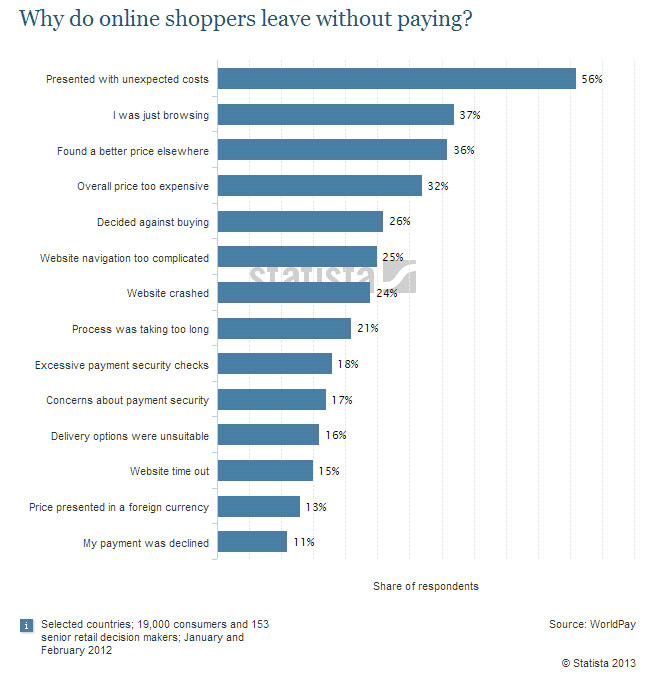
Any other 404 error could also frustrate your visitors and just leave your website. Shopify surveyed why online retailers are losing 67.45% of their sales. They discovered that some of the most common mentioned issues are website problems.

Shopify-survey-why-online-shoppers-leave_screenshot-png

A 404 error also affects a website’s bounce rate. A bounce happens when a visitor comes to your website, does not click on any other page and leaves. Search engines like Google use bounce rate as ranking factor.

A high bounce rate raises several red flags for your WooCommerce store. It may imply poor user experience and your website may be deemed irrelevant to your market.

Elements of a Custom 404 Error Pagelabyrinth

Now before you go and make any changes, keep in mind that each theme is different. There are different ways on how you can create a custom 404 Error page. Here are some important things that you need to consider.

Use Simple Language

A regular site visitor will not understand a typical technical 404 message. Use simple human language to inform your site visitor of what went wrong. You can even use language translations or location specific pages. The goal is to deliver a clear message.

How You Can Help

Apologizing and offering a helpful suggestion should be the main theme. The aim is to change the negative experience from 404 pages into a positive one. You can do this by:

touch-screen_touchscreen

  • Adding a search box
  • Showing your menu navigation
  • Adding a contact, subscription or ticket submission form
  • Adding a sitemap, category lists or key links
  • Linking popular posts or social media accounts
  • Giving out coupons, discounts, or other offers

Time spent in your site should not end in your 404 page. These elements are also engagement and conversion boosters. Your customers stay happy and you get a positive rep.

Examples of Good 404 Error Pages

A lot of huge brands out there appeal to human emotions in their marketing strategy. This is because customers are not buying products, they buy the experience. 404 Error pages in the past are just simple text warnings. Websites now use humor or a bit of personality to communicate their brand to the customers. You can use graphics, animations, or even videos. Here’s some inspiration to get you started.

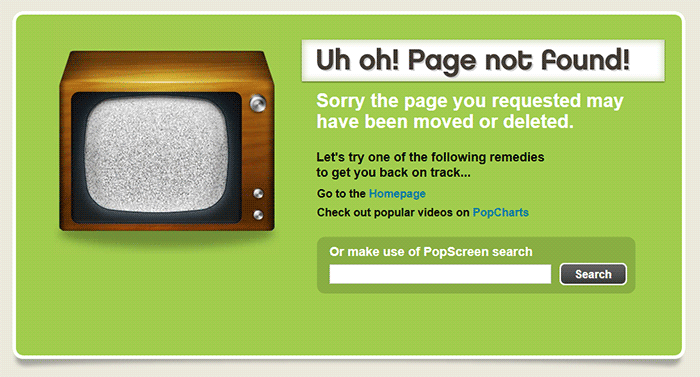
Popscreen

Popscreen showcases a clean and bright but simple and straightforward 404. You can see a link to the home page and popular videos as well as search bar.

404-error-page_Popscreen_screenshot

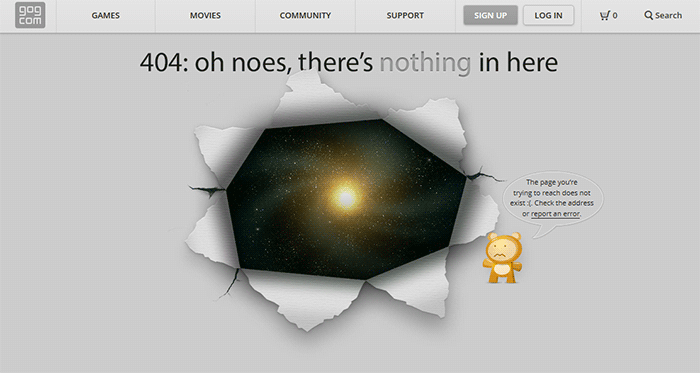
GOG

GOG displays a unique design to say that you lost your way. The 404 error page retains the navigation and footer menu so it is easy for users to navigate. Users can also report the error.

404-error-page_GOG_screenshot

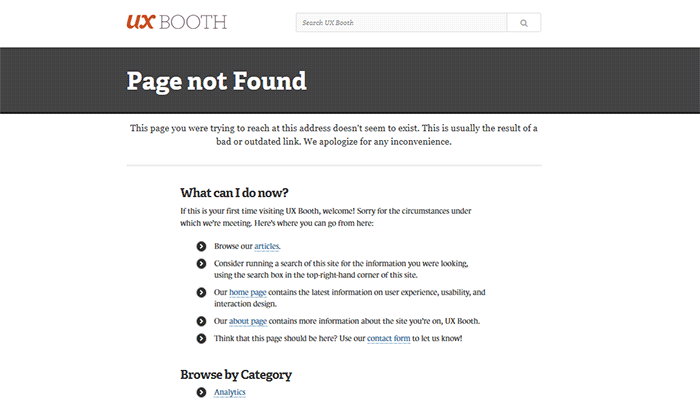
UX Booth

The UX Booth 404 error page uses simple, concise and direct language and an immediate apology. The page suggests popular links on the website as well as the list of categories. It also retains the footer links and the search bar.

404-error-page_UX-Booth_screenshot

Average Joes Blog

Average Joes Blog is a good example of category-rich 404 error page. In fact, the 404 error page is a replica of the home page.

404-error-page_Average-Joes-Blog_screenshot

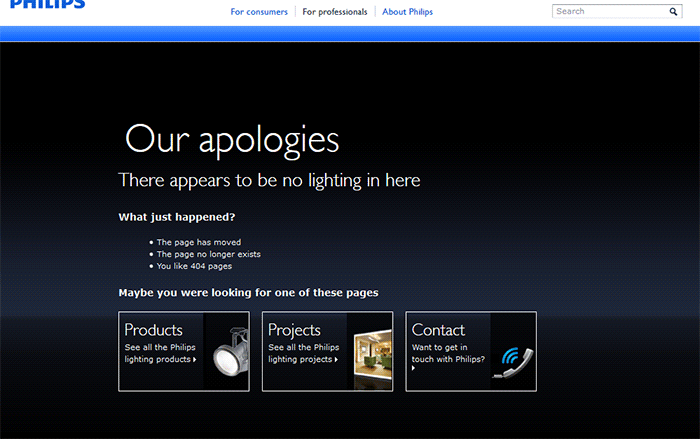
Philips

Philips goes creative and witty with its 404 error page. It mentions the absence of lighting then explains what happened and suggests popular links.

404-error-page_Philips_screenshot

Email Center UK

The Email Center UK website uses humor. Since you are at an error page, it means someone messed up and you get to choose who to fire for the fiasco. Below all that is a simple link to the home page.

404-error-page_Email-Center-UK_screenshot

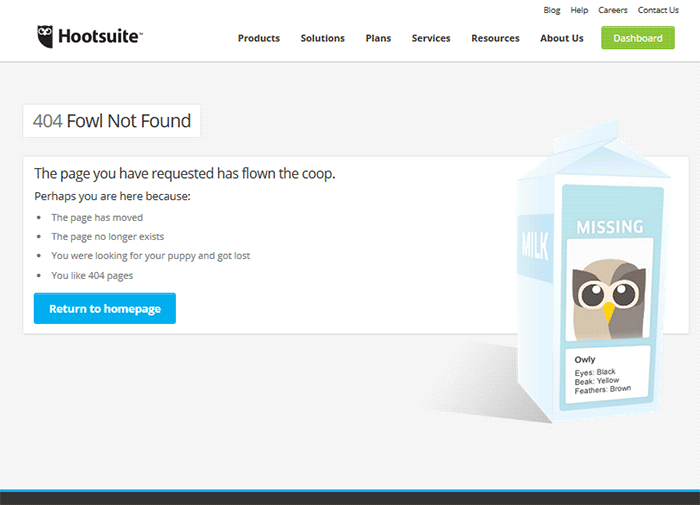
Hootsuite

The Hootsuite 404 error page lists down possible reasons for the error. They used ‘fowl” language to keep the identity of the brand/mascot.

404-error-page_Hootsuite_screenshot

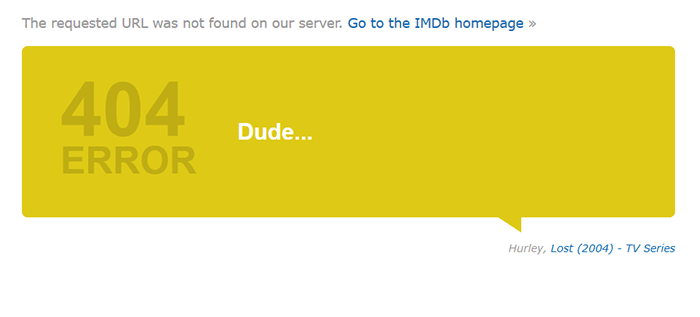
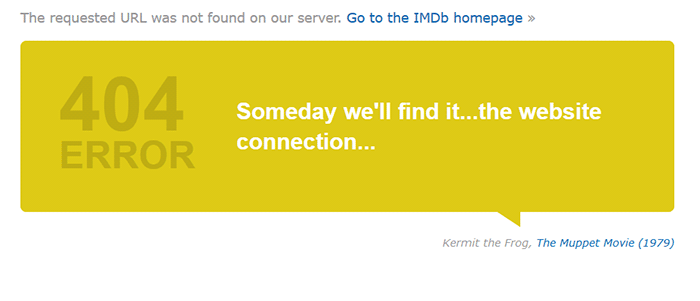
IMDB

The IMDB 404 error page uses a simple layout with a clever idea. Every visit to a 404 error displays a random movie quote. Movie buffs will definitely find this entertaining. A convenient link to the home page is also positioned at the top.

404-error-page_IMDB_screenshot

404-error-page_IMDB2_screenshot

Blue Fountain Media

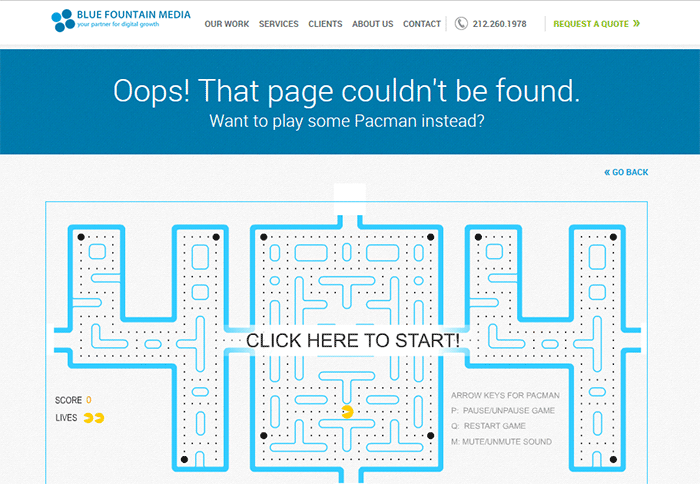
Blue Fountain Media makes a 404 page that you will look forward to – an actual PAC-MAN game. They retained their main navigation and a “Go Back” link that takes you to the last visited working page.

404-error-page_Blue-Fountain-Media_screenshot

Not Found Org

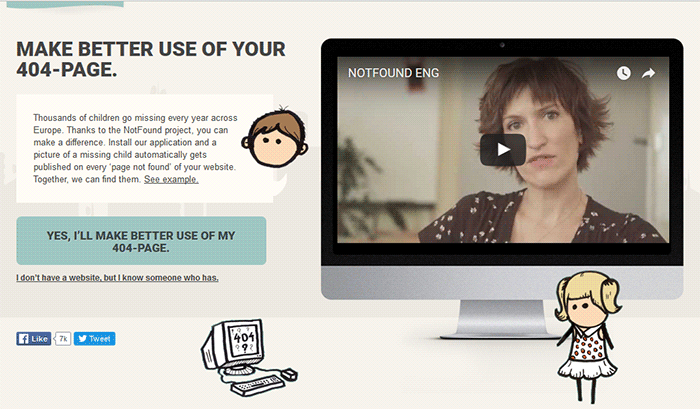
NotFound.org actually uses its 404 error page to achieve a goal. It is an app that you can install in your website. It lets you customize your 404 page to help their cause – find thousands of children that go missing every year.

404-error-page_Not-Found-Org_screenshot

Creating a Custom 404 Error Page

Now that you have some inspiration, it’s time to create your own. You can check out WordPress’ basic guide here if you are able to code, if not you can check out the plugins below.

Since WooCommerce is installed on the WordPress platform, you can use the power of WordPress plugins to create awesome About Us pages.

Custom 404 Pro

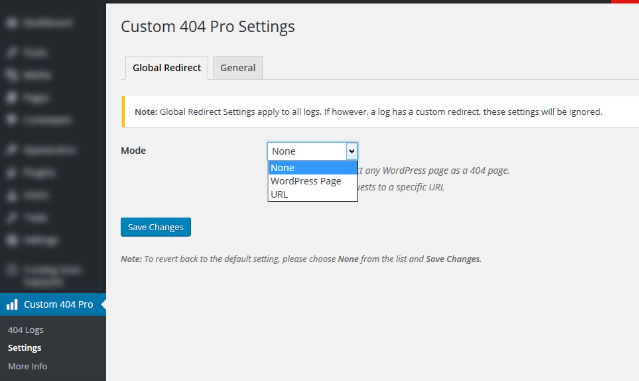
The Custom 404 Pro plugin lets you override the default 404 page with any page of your choice. To set your custom 404 error page:

  1. Install and activate the Custom 404 Pro plugin.
  2. Create a new page that you want to use as your 404 error page.
  3. Click on Custom 404 Pro on your WordPress Dashboard and then click on Settings.
  4. Set the page or URL that you want to use as your 404 error page and then click on Save Changes.

Create-custom-404-error-page_Plugin_Custom-404-Pro-Settings

404page

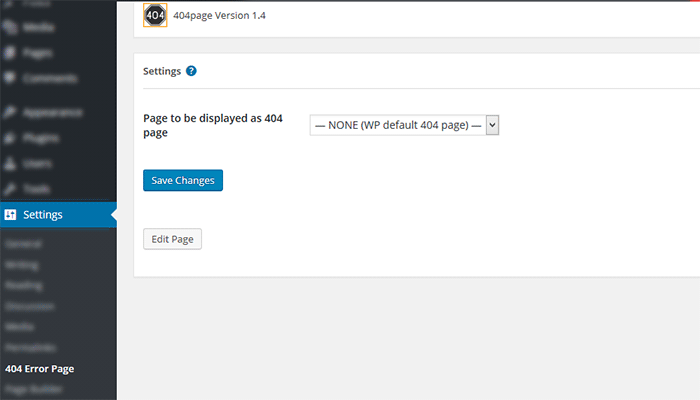
404page is another easy plugin to use to create custom 404 error pages. To create a custom 404 error page using the 404page plugin:

  1. Install and activate the plugin.
  2. Create a new page that you want to use as your 404 page.
  3. Click on Settings and then choose the page that you want to use as your 404 error page.
  4. Click on Save Changes.

Plugin_404page_Create-custom-404-error-page

Test Your 404 Error Page

To test if your new 404 error page is working, just pop any non-existent URL in your domain on your browser. If your new 404 error page does not appear, check if your website is set to redirect to your new 404 error page.

Create-custom-404-error-page_Plugin_404page

Conclusion

404 Error Pages can be annoying but you can use them to your advantage. Customize them to boost engagement and conversion. Align your new 404 error page with your brand image and website goals. It will do wonders for your WooCommerce store and your brand. Do you have any other suggestions for creating a good 404 error page?

Filed Under: Code Snippets, How-To Articles Tagged With: best practices, design tweaks, navigation, plugins, redirection, WordPress

How to Counter Brute Force Attacks on WordPress

January 15, 2016 By John Leave a Comment

Counter Brute Force

WordPress is one of the most popular Content Management System (CMS) available. Its popularity is the reason why it is highly targeted by attackers. A secure website is a must if you’re operating an online business so you can protect your business and your customers.

In this article, you will learn:

  • What is a brute force attack?
  • How to know if someone is brute forcing into your site
  • How to counter brute force attacks on WordPress
  • What to do when someone succeeds at brute forcing into your website

WordPress does not currently have any built-in feature to stop brute force attacks so you are responsible in preventing them on your own website.

What is a Brute Force Attack?

Brute Force Fist

Brute force attack or brute forcing is one of the leading causes of website compromises and is similar to a trial and error method. The objective of the attacker is to gain access to the server level of your site by using various username and password combinations repeatedly until it succeeds. Not only that, it can also be utilized to find hidden pages and content in a web application.

Brute Force Attack is, simply put, an attack to the weakest link in a website’s security. Sucuri, a security company focusing on spotting and repairing compromised websites, reports at least 770,000 brute force attacks every hour. Your website is vulnerable to this type of hacking if you require user authentication or login access.

There are endless catastrophic possible events that could happen once an attacker gains access to your site. The access will be exploited and accounts can be locked out, malware or viruses can be injected, important financial transactions can be compromised or blocked, or data can be changed or stolen. All the hard work you have invested in your business could go down the drain in an instant and hurt your virtual presence.

Brute Force Attack Methods

WordPress LoginBrute forcing can be done in different systematic ways. It can be done manually or with automated tools. This can be done in a matter of minutes or years depending on the complexity of your authentication data and process. In most cases, it is done by automated tools that use bots to crawl the web and look for weak preset conditions and weak targets. For WordPress, the common targets are the /wp-admin extensions, /wp-login.php and the XML-RPC.

Brute Force Attacks can be used positively if the goal is to test a website’s security but unfortunately, most of the time, it is used by hackers to crack encrypted data for their own advantage. There is a growing number and improving array of automated tools that can be used for brute force attacks. They are simple to use that even a teenager can use them. These tools determine the length of usernames or passwords and try different possible combinations to gain access. The following are commonly used methods:

Dictionary Attack

The common targets here are administrator accounts. In this method, the attacker will use a database or ‘dictionary’ containing millions of words that are commonly used as a login password. Each one will be tried for authentication. The attacker will succeed once the password is accepted as correct.

These attacks can lock out one account or more and gather more information from the site depending on the error responses. This is actually resource- and time- consuming but this can be done quickly with better computing power. It does not decrypt information. It only cycles through a list of words until it becomes successful.

Hybrid Brute Force Attack

This is similar to the dictionary attack but the attacker may use permutations of words from a password dictionary, your real or site user name, website and company name. It uses a smarter set of rules, such as adding numbers and doubling up some characters or words, to intelligently guess passwords. An attack can occur and succeed quicker if more information is available to the attacker.

Reverse Brute Force Attack

This is less common but your website is vulnerable to this if your site users use weak passwords. In this method, the attacker will try to use one password and try to match it against many user names.

How Do You Know if Someone is Brute Forcing into Your Site?

brute-force-maskThe tough reality is Brute Force attacks can be the same as DDoS (Distributed Denial of Service) or DoS (Denial of Service) attacks. You can differentiate them by the intent. DDoS/DoS is after disruption of service while Brute Forcing is after gaining access. DDoS/DoS however can be a byproduct of Brute Forcing as the access attempts can overload your servers. Some attacks are easy to detect but some are harder to detect because they use different open proxy servers.

Careful observation and monitoring is necessary to detect Brute Force Attacks. Be on the lookout for irregularities and malicious activities in your site. To help you out, these are the most common ones experienced by victims of brute forcing:

  • Numerous failed logins coming from the same IP address
  • Multiple usernames used to login from the same IP address
  • Continuous login for one username from various IP addresses
  • Logins with suspicious usernames and passwords
  • Overloaded server memory that results from excessive bandwidth consumption from a single use
  • Performance problems
  • Weird links
  • Notice from the webserver of attacks and an unusually large amount of data being used in a short period of time
  • Website redirects to a different page or website
  • Unwanted popups and ads are all over their site
  • Malware or virus
  • Spam emails or comments
  • Help desk flooded by complaints of locked out accounts.

How to Avoid Brute Force Attacks

A Brute Force Attack can be minimized, if not avoided, as long as you follow these steps.

Keep Everything Updated

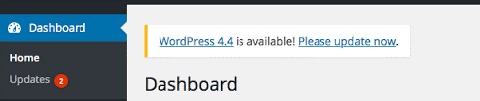
WordPress themes and other plugins update their version to keep them safe from vulnerabilities and to fix bugs. Updating can be tedious but this will help protect your site from known exploits. Just make sure that you keep a backup before doing updates. Be on the lookout for updates in your WordPress Dashboard for the following:

  • WordPress Version
  • WordPress Theme
  • WordPress Plugins

dashboard-update-message

Use Strong Passwords and Change Them Regularly

The best way to protect your site is to use strong passwords and avoid keeping the same password for a long time. If your site allows numerous login accounts, it is best to make sure that all your users follow these basic rules in making strong passwords:

  • Keep your passwords long. Use a minimum of 8 characters.
  • Keep it complex. Do not use dictionary words.
  • Keep it mixed. Use a combination of numbers, upper- and lower-case alphabets and non-alphanumeric characters.
  • Check if your password is a common password.

Avoid Common Usernames

sucuri-common-usernames-1
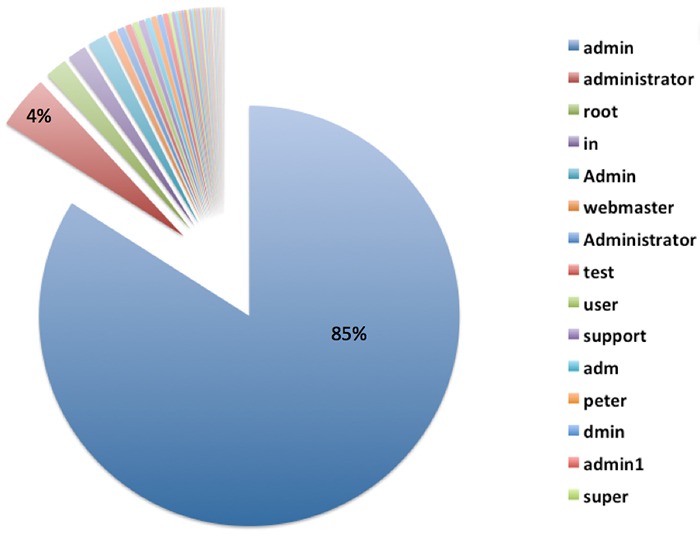
“admin” is the most used username for Brute Force attacks. Image Source: https://blog.sucuri.net/2014/03/understanding-denial-of-service-and-brute-force-attacks-wordpress-joomla-drupal-vbulletin.html

This is very important especially for administrator accounts. Do not use the default username ‘admin’ or any similar usernames containing the same word. Doing so will significantly increase the likelihood of your site being attacked by malicious users.

Use Two-Way Authentication for Administrator Accounts

For extra security, you can activate two-way authentication in your Cpanel or use a plugin such as miniOrange’s Two-Factor Authentication (Google Authenticator). The con to this, however, is you would need to have your phone with you all the time and your log-in process would take more effort and time from you.

Set Administrator Logins to Certain IP Addresses

If you have the privilege of getting a static IP address, this is a great added security option. You can actually block all sign in attempts from all other IP addresses by editing your .htaccess file. However, this can be a problem if your network uses dynamic IP addresses that can change over time.

Design Your Site to Not Use Predictable and Data Exposing Behavior for Failed Login Attempts.

If you are tech savvy, this is one option that you can do by changing the error messages that your website shows. For example, an error message that shows ‘bad username or password’ will make the attacker try the next information in their list. Adding progressive delays every failed attempt can also help improve your website’s security. You can also prompt your users to answer a captcha or a secret question after failed attempts. Be wary of using captcha though as it can negatively affect your websites user experience.

Secure Your Site with Tools and Plugins

There are many available tools and plugins that you can use. Some are free and some come with a price. Here are some tools, plugins and features that you should consider to significantly improve your website’s security. They can help you counter brute force attacks on your WordPress site. Before adding a plugin, you need to check if it’s compatible with your theme, other plugins, and WordPress version first. Some of the tools mentioned below may overlap with other ones in the list.

Security Scanner

There are so many security scanner plugins available for WordPress and most of them also include various tools that improve your website’s security. Top plugins that you can check out are:

  • Wordfence Security
  • VaultPress
  • iThemes Security
  • All In One WP Security & Firewall
  • Sucuri Security
  • Theme Authenticity Checker

Login attempt limit, blocks, and delay

There are plugins that can limit the rate of login attempts and block IP addresses temporarily to protect your site from brute force attacks such as WP Limit Login Attempts. You can also be on the lookout by tracking IP, usernames, passwords and adding idle timeout in your login with Login Security Solution.

Hide Login Page and Data

Attackers would normally target your /wp-login.php or /wp-admin. To hide your login page, you can use WPS Hide Login plugin.

Strong Passwords

brute-force-login

WordPress already generates a strong password for new users but if you are not a new user, you might want to create a very strong password by using a mix of upper case and lower case letters, numbers and symbols.

One way of creating a strong password that is easy to remember is to think of a sentence. For example: “The quick brown fox jumped over the lazy dog.” Take the first letter of every word and you will get “TQBFJOTLD”. Convert some letters to numbers or symbols and you can get “7Q3FJ0T1D” and then vary the remaining letters to upper case and lower case. Your strong password could be “7q3Fj0T1d”. Whenever you want to type your password, just recall the sentence that you used to generate your password.

Cloud/Proxy Services

You can use the aid of cloud or proxy services to help mitigate attacks all over the web as these block the IPs before they even reach your server. Cloudflare and Sucuri CloudProxy are notable services to check out.

What if Someone Already Got into My Site?

Brute Force Unlocked

Don’t Do Anything Rash

The worst mistake you can do is to delete things without backing up data first or cause further problems by troubleshooting. If your site has been compromised, the best option is to seek professional help.

Keep Calm and Regain Control of Your Site

Keep Calm and Chill

Take a step back and calm yourself down. You can still recover from this miserable event. Try to regain admin access of your site. If your password was changed, you can simply get access again by using the ‘forgot password’ option. If this has failed, get in touch with your hosting provider.

Change All Your Backend Passwords

This is an important step that you should do when you regain access to your hacked website. Make sure that you use a strong password so you can avoid further damage being done to your website.

Identify the Damage Done

Once you’ve gotten access to your site, scan your website with online malware scanners like Sucuri’s or with Google’s Safe Browsing. You can do the latter by typing this in your url: google.com/safebrowsing/diagnostic?site=yoursiteaddresshere.com

Check with Your Hosting Company

Some hosting services provide technical support for issues like this. Getting professional help is still recommended.

Restore from Backup

If you keep regular backups, you can restore your most recent backup just make sure the backup that you chose was from before your site was compromised.

Check and Change User Permissions

Checking user permissions, especially if there are many accounts that can access administrator settings, should be done to further prevent other users’ access while you’re cleaning up.

Close Hacker Backdoors

Secure your wp-config.php file and close all the backdoors that the hacker may have left. You will need professional help for this.

Change Your Passwords Again

Yes, again. The hacker may have gotten wind of your new password through a malware so change your password again when you are done cleaning up.

Have Your Site and IP Address Whitelisted

Once you have finished cleaning your site up, find out where you have been blacklisted. You may still be marked as spam by some online services like Unmask Parasites.

Summary

Your e-commerce website being compromised is one of the worst experiences an entrepreneur can go through. So planning ahead and hardening your websites security should never be taken lightly. The adage “An ounce of prevention is better than a pound of cure” rings true. If you did the hardening methods we have shown in this article, give yourself a pat on the back. If you are here because your website was compromised, get professional help as soon as possible.

Filed Under: How-To Articles Tagged With: brute force, CloudFlare, how-to, redirection, security, sucuri, website maintenance, WordPress

Things to Do Before Your Website Goes Live

May 7, 2015 By John Leave a Comment

checklistThe bulk of the work is done. Your website is ready to go live. But are you sure it is really ready? Here’s a handy checklist of things to do before your website goes live. Make sure everything is working fine before you click that “Go Live” button.



Page Content

  1. Proof read web copywriting, spelling and grammar are correct
  2. Paragraphs and headers and formatting are correct
  3. Copywriting date on the footer shows current year
  4. Company details and contact info are accurate all throughout the website.
  5. Lorem Ipsum has been removed
  6. Images, videos and audio files are properly formatted and are working on different devices
  7. Premium content such as PDFs, whitepaper, ebooks, etc. have been proofread, spelling and grammar are correct. These files are properly stored in their respective libraries.
  8. Images, font and other content are properly licensed or have proper citation

Design

  1. Site pages are compatible across different browsers (Firefox, Safari, IE 7, 8, 9, and 10, Chrome, Opera)
  2. Pages are compatible across different devices (tablets, laptops, desktops, and other mobile devices)
  3. Check for CSS and HTML error, fix and validate
  4. Favicon is uploaded and is rendering properly
  5. Paragraph and styles are working properly

design

Functionality

  1. Forms are submitting data properly
  2. Thank you message or confirmation message displays after the form is submitted.
  3. Form data is emailed to the recipient
  4. Auto-responders (if any) are working properly
  5. Internal links are working
  6. External links are working
  7. Social media icons are working properly
  8. Feeds are working properly
  9. Company logo is linked to the homepage
  10. Site load time should take not more than 2-3 seconds
  11. 404 Redirects are in place
  12. Integration with third-party tools such as e-commerce software, CRM, Marketing software platforms are running smoothly
  13. Site structure is clean and should be easy to navigate and maneuvered by your users
  14. Payment processing should be live
  15. Shipping options checked
  16. Credit card transaction checked
  17. Run a test order. Check tax, sub-total, total, coupons, etc
  18. Confirm order is placed
  19. Reset order number
  20. Verify MyAccount
  21. Dummy orders and test accounts are cleared.
  22. Test email from client to merchant
  23. Cart icon is on each page
  24. Checkout button should be large and is strategically located on the page.
  25. Search box with suggestive search
  26. Feedback tab at the bottom of each page for users to notify the webmasters when having problems with the site.

SEO

  1. Page titles should be unique, less than 70 characters and should include keywords.
  2. Meta Descriptions are unique and should not exceed 156 characters
  3. Keyword per page not more than 10, depending on the # of words per page
  4. Metadata for RSS in place
  5. Metadata for social media sharing in place
  6. Metadata spelling and grammar correct
  7. Alt tags for images
  8. Dynamic XML sitemap created and submitted to search engines
  9. Breadcrumbs in place
  10. Slugs should reflect site structure and should be short with relevant keywords.
  11. 301 redirects for old URLs are in place
  12. rel=”nofollow” tags are in place on applicable links and pages
  13. Site indexing is on

Google Analytics

  1. Analytics codes are properly inserted
  2. Relevant IP addresses have been excluded from analytics tracking.
  3. Google Webmaster Tools and Google Analytics are synced
  4. Google Adwords and Google Analytics are synced

Security and Backups

security

  1. Monitoring scripts installed.
  2. Copy of the final website stored in a safe place
  3. Ongoing copies of the site is being generated everyday (depending on how large the site is)
  4. Usernames and passwords stored in a secure database
  5. Check robots.txt file to restrict access to sensitive pages

Compliance to Web Rules and Regulations

This may vary depending on the country and industry.

  1. Pages offer accessibility to users with disabilities
  2. Users need to be informed if site is using cookies
  3. Compliant to usage rights of images, fonts, videos, etc.
  4. Terms and Privacy policy for users should be readily accessible and visible to site visitors
  5. Website is PCI compliant
  6. SSL certificate properly installed. Check receipt and checkout page, my account and my account details in SSL mode.
  7. SSL mode for logins and registrations

Filed Under: How-To Articles Tagged With: 404 error, backup, best practices, breadcrumbs, Google Analytics, Google Webmaster Tools, how-to, redirection, security, SEO strategy, website development, WordPress

The Wooassist Blueprint: What Goes on in the Wooassist Backend

July 22, 2016 By John Leave a Comment

We’ve created our fair share of WordPress sites and provided support for other WooCommerce store owners since 2014. At the same time, we maintain and improve Wooassist.com. But what goes on in the Wooassist backend? Here we’ll provide a sneak peek of what goes on behind the scenes.

Publishing Platform

wordpress-logo

WordPress is one of the best Content Management System (CMS) with over 60 million websites powered, Woasssist included. It is free and open-source, with thousands of available plugins and themes to change and extend the look and functionality of your site.

Hosting Provider

WPEngine-logo-white

WPEngine provides one of the best WordPress hosting services on the web. Our hosting plan with WPEngine comes with caching, backup features and Content Delivery Network (CDN) provided by their partner MaxCDN. They use Ever Cache for speed and massive scalability. They also have one of the best support compared to other hosting providers.

WordPress Themes

Genesis Framework

logo-Genesis-Framework

Genesis Framework is a powerful foundation for building websites in WordPress. It is compatible with WooCommerce and anything can be customized around its core code using child themes. It is also SEO optimized.

 Parallax Pro

logo-Parallax-Pro-white

We use Parallax Pro theme on top of the Genesis framework. Notice how the Wooassist homepage content has a vertical design for easy visual eye movement and flow. As you scroll down the page, you will see that the content is divided into sections. The theme is also mobile responsive.

Installed Plugins

It is best practice to deactivate and delete any unused plugins on your site to minimize site bloat. Just stick to what features you need and the plugin that offers just that.

WooCommerce

WooCommerce

Since Wooassist provides WooCommerce support, it makes sense that we use WooCommerce.

Built with developers in mind, WooCommerce is extendable, adaptable and open source. It works with the core features of WordPress and is one of the most widely used ecommerce plugins. It’s free and allows for maximum flexibility and customization. You can even expand its features with a growing collection of more than 300 extensions.

WooCommerce Customizer

WooCommerce-Customizer

WooCommerce Customizer is a free plugin that adds an extra settings page for WooCommerce. This helps you make quick changes which otherwise would require writing some custom PHP functions. Basically, you can optimize the look of your WooCommerce store for optimum conversion, without writing any code.

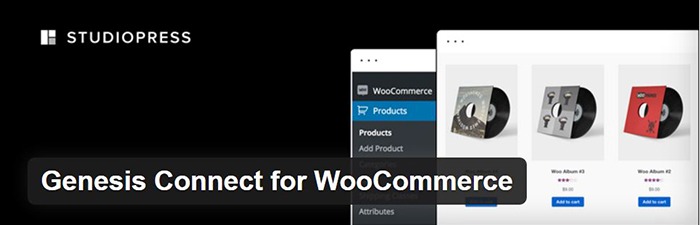
Genesis Connect for WooCommerce

Genesis-Connect-for-WooCommerce

When WooCommerce is installed on a site using the Genesis platform, you may find some product pages do not display properly. Genesis Connect for WooCommerce fixes this by replacing WooCommerce’s built-in shop templates with its own Genesis-ready versions. These templates are single-product.php, archive-product.php and taxonomy.php.

WooCommerce Google Analytics Integration

WooCommerce-Google-Analytics-Integration

WooThemes created WooCommerce Google Analytics Integration plugin and is a must to integrate analytics in WooCommerce versions 2.1 and up. This plugin inserts tracking codes into your store pages.

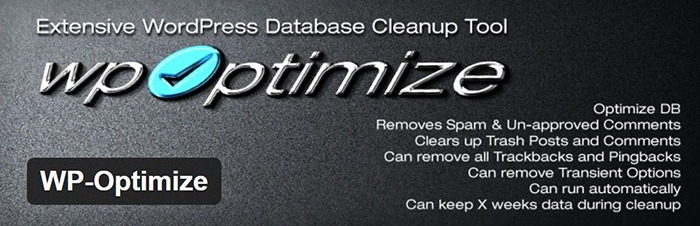
WP-Optimize

WP-Optimize

We use WP-Optimize to clean and keep our database down to a reasonable size. The plugin helps clean up your WordPress database by removing old revisions of posts and stale/trashed comments. It also allows for optimization of your WordPress core tables.

WordPress Related Posts

WordPress-Related-Posts

WordPress Related Posts automatically adds thumbnails at the footer of your content. This helps readers find other relevant posts in our blog for further reading.

WooCommerce Paypal Pro

WooCommerce-PayPal-Pro

We use WooCommerce Paypal Pro as our payment gateway. Our clients can pay with their credits cards. A Paypal account is not necessary.

WooCommerce Checkout Manager

WooCommerce-Checkout-Manager

We use WooCommerce Checkout Manager to customize the fields on our checkout page. This allows for faster and easier checkout.

Akismet

Akismet

We trust Akismet to safeguard our site against spam comments. This product by Automattic comes bundled with WordPress installations. You just need to sign up at their website and get your API key to activate it. Akismet automatically checks incoming comments and moves ‘spam-like’ comments to the Spam folder.

PopupAlly

PopupAlly

We use PopupAlly to show time-delayed and exit intent popups for our free e-book offer and newsletter subscription, respectively. The plugin makes it easy to customize popup forms even for novice users.

Yoast SEO

Yoast-SEO

We use Yoast SEO to optimize our blog post and pages for SEO. It is a powerful plugin that helps to give any site an SEO boost. This plugin can also help optimize product pages and product categories in WooCommerce.

Visual Form Builder

Visual-Form-Builder

We use Visual Form Builder to create forms such as our contact form and custom package form. Visual Form Builder is easy to set up and use even for novice users.

Responsive Pricing Table

Responsive-Pricing-Table

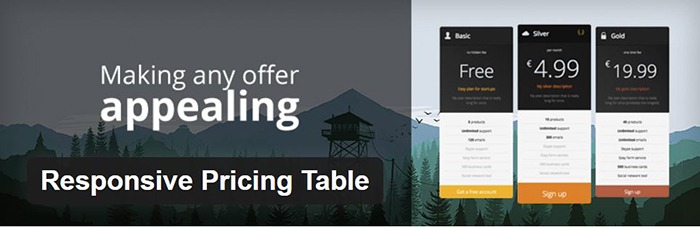
We use Responsive Pricing Table plugin to add a ‘Pricing Tables’ tab in the WordPress admin panel . This allows for creating pricing tables without coding. You can add features of up to 5 plans and display the price table anywhere with a shortcode.

Redirection

Redirection

Redirection is a free plugin that makes managing our 301 redirects easier. It also helps us keep tabs on any 404 errors. We use this mainly when changing slugs of blogs post when optimizing for SEO.

Filed Under: Theme and Plugin Reviews, Wooassist News Tagged With: Genesis, navigation, optimizations, plugins, PopupAlly, redirection, website development, Wooassist, WooCommerce, WooCommerce products, woothemes, WordPress, WPengine, Yoast

  • 1
  • 2
  • Next Page »
Let us support your online store so you can manage your business

Get started today

Get 2 Hours of FREE SUPPORT

We are so confident that you will love our services that we will give you your first 4 hours at a 50% discount

That’s 4 hours for only $75

BUY NOW

Free eBook

5 Things Every Online Store Can Fix On Their Website In The Next Week To Increase Sales

Quick Links

  • How it Works
  • Pricing
  • Blog
  • Contact
  • About Wooassist
  • My Account
  • Checkout
  • Privacy Policy
  • Cookie Policy
  • Terms and Conditions

Wooassist

Australia:
59 Luke St.
Hemmant QLD 4174

Philippines:
San Miguel St.
Poblacion, Iligan City 9200

Connect


Copyright © 2026 · Wooassist

Yours FREE!

5 Things Every Online Store Can Fix On Their Website In The Next Week To Increase Sales