
WordPress is one of the most popular Content Management System (CMS) available. Its popularity is the reason why it is highly targeted by attackers. A secure website is a must if you’re operating an online business so you can protect your business and your customers.
In this article, you will learn:
- What is a brute force attack?
- How to know if someone is brute forcing into your site
- How to counter brute force attacks on WordPress
- What to do when someone succeeds at brute forcing into your website
WordPress does not currently have any built-in feature to stop brute force attacks so you are responsible in preventing them on your own website.
What is a Brute Force Attack?

Brute force attack or brute forcing is one of the leading causes of website compromises and is similar to a trial and error method. The objective of the attacker is to gain access to the server level of your site by using various username and password combinations repeatedly until it succeeds. Not only that, it can also be utilized to find hidden pages and content in a web application.
Brute Force Attack is, simply put, an attack to the weakest link in a website’s security. Sucuri, a security company focusing on spotting and repairing compromised websites, reports at least 770,000 brute force attacks every hour. Your website is vulnerable to this type of hacking if you require user authentication or login access.
There are endless catastrophic possible events that could happen once an attacker gains access to your site. The access will be exploited and accounts can be locked out, malware or viruses can be injected, important financial transactions can be compromised or blocked, or data can be changed or stolen. All the hard work you have invested in your business could go down the drain in an instant and hurt your virtual presence.
Brute Force Attack Methods
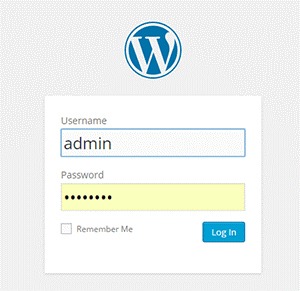 Brute forcing can be done in different systematic ways. It can be done manually or with automated tools. This can be done in a matter of minutes or years depending on the complexity of your authentication data and process. In most cases, it is done by automated tools that use bots to crawl the web and look for weak preset conditions and weak targets. For WordPress, the common targets are the /wp-admin extensions, /wp-login.php and the XML-RPC.
Brute Force Attacks can be used positively if the goal is to test a website’s security but unfortunately, most of the time, it is used by hackers to crack encrypted data for their own advantage. There is a growing number and improving array of automated tools that can be used for brute force attacks. They are simple to use that even a teenager can use them. These tools determine the length of usernames or passwords and try different possible combinations to gain access. The following are commonly used methods:
Dictionary Attack
The common targets here are administrator accounts. In this method, the attacker will use a database or ‘dictionary’ containing millions of words that are commonly used as a login password. Each one will be tried for authentication. The attacker will succeed once the password is accepted as correct.
These attacks can lock out one account or more and gather more information from the site depending on the error responses. This is actually resource- and time- consuming but this can be done quickly with better computing power. It does not decrypt information. It only cycles through a list of words until it becomes successful.
Hybrid Brute Force Attack
This is similar to the dictionary attack but the attacker may use permutations of words from a password dictionary, your real or site user name, website and company name. It uses a smarter set of rules, such as adding numbers and doubling up some characters or words, to intelligently guess passwords. An attack can occur and succeed quicker if more information is available to the attacker.
Reverse Brute Force Attack
This is less common but your website is vulnerable to this if your site users use weak passwords. In this method, the attacker will try to use one password and try to match it against many user names.
How Do You Know if Someone is Brute Forcing into Your Site?
 The tough reality is Brute Force attacks can be the same as DDoS (Distributed Denial of Service) or DoS (Denial of Service) attacks. You can differentiate them by the intent. DDoS/DoS is after disruption of service while Brute Forcing is after gaining access. DDoS/DoS however can be a byproduct of Brute Forcing as the access attempts can overload your servers. Some attacks are easy to detect but some are harder to detect because they use different open proxy servers.
Careful observation and monitoring is necessary to detect Brute Force Attacks. Be on the lookout for irregularities and malicious activities in your site. To help you out, these are the most common ones experienced by victims of brute forcing:
- Numerous failed logins coming from the same IP address
- Multiple usernames used to login from the same IP address
- Continuous login for one username from various IP addresses
- Logins with suspicious usernames and passwords
- Overloaded server memory that results from excessive bandwidth consumption from a single use
- Performance problems
- Weird links
- Notice from the webserver of attacks and an unusually large amount of data being used in a short period of time
- Website redirects to a different page or website
- Unwanted popups and ads are all over their site
- Malware or virus
- Spam emails or comments
- Help desk flooded by complaints of locked out accounts.
How to Avoid Brute Force Attacks
A Brute Force Attack can be minimized, if not avoided, as long as you follow these steps.
Keep Everything Updated
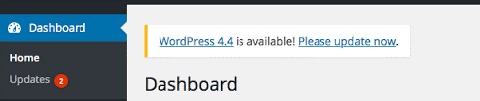
WordPress themes and other plugins update their version to keep them safe from vulnerabilities and to fix bugs. Updating can be tedious but this will help protect your site from known exploits. Just make sure that you keep a backup before doing updates. Be on the lookout for updates in your WordPress Dashboard for the following:
- WordPress Version
- WordPress Theme
- WordPress Plugins
Use Strong Passwords and Change Them Regularly
The best way to protect your site is to use strong passwords and avoid keeping the same password for a long time. If your site allows numerous login accounts, it is best to make sure that all your users follow these basic rules in making strong passwords:
- Keep your passwords long. Use a minimum of 8 characters.
- Keep it complex. Do not use dictionary words.
- Keep it mixed. Use a combination of numbers, upper- and lower-case alphabets and non-alphanumeric characters.
- Check if your password is a common password.
Avoid Common Usernames
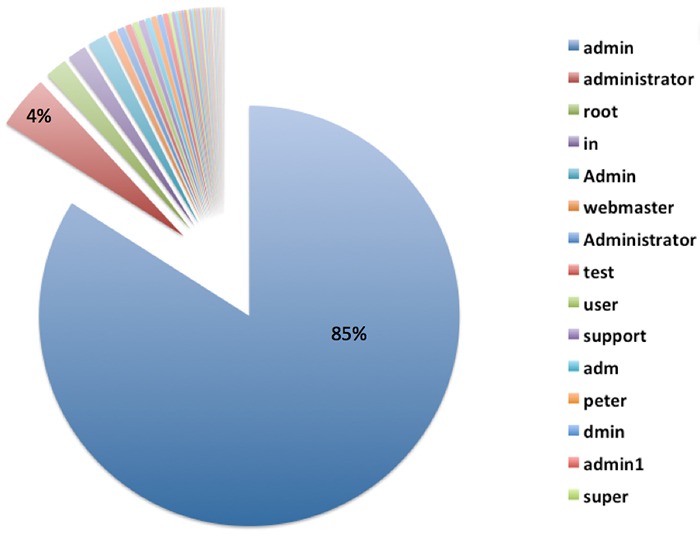
This is very important especially for administrator accounts. Do not use the default username ‘admin’ or any similar usernames containing the same word. Doing so will significantly increase the likelihood of your site being attacked by malicious users.
Use Two-Way Authentication for Administrator Accounts
For extra security, you can activate two-way authentication in your Cpanel or use a plugin such as miniOrange’s Two-Factor Authentication (Google Authenticator). The con to this, however, is you would need to have your phone with you all the time and your log-in process would take more effort and time from you.
Set Administrator Logins to Certain IP Addresses
If you have the privilege of getting a static IP address, this is a great added security option. You can actually block all sign in attempts from all other IP addresses by editing your .htaccess file. However, this can be a problem if your network uses dynamic IP addresses that can change over time.
Design Your Site to Not Use Predictable and Data Exposing Behavior for Failed Login Attempts.
If you are tech savvy, this is one option that you can do by changing the error messages that your website shows. For example, an error message that shows ‘bad username or password’ will make the attacker try the next information in their list. Adding progressive delays every failed attempt can also help improve your website’s security. You can also prompt your users to answer a captcha or a secret question after failed attempts. Be wary of using captcha though as it can negatively affect your websites user experience.
Secure Your Site with Tools and Plugins
There are many available tools and plugins that you can use. Some are free and some come with a price. Here are some tools, plugins and features that you should consider to significantly improve your website’s security. They can help you counter brute force attacks on your WordPress site. Before adding a plugin, you need to check if it’s compatible with your theme, other plugins, and WordPress version first. Some of the tools mentioned below may overlap with other ones in the list.
Security Scanner
There are so many security scanner plugins available for WordPress and most of them also include various tools that improve your website’s security. Top plugins that you can check out are:
- Wordfence Security
- VaultPress
- iThemes Security
- All In One WP Security & Firewall
- Sucuri Security
- Theme Authenticity Checker
Login attempt limit, blocks, and delay
There are plugins that can limit the rate of login attempts and block IP addresses temporarily to protect your site from brute force attacks such as WP Limit Login Attempts. You can also be on the lookout by tracking IP, usernames, passwords and adding idle timeout in your login with Login Security Solution.
Hide Login Page and Data
Attackers would normally target your /wp-login.php or /wp-admin. To hide your login page, you can use WPS Hide Login plugin.
Strong Passwords
WordPress already generates a strong password for new users but if you are not a new user, you might want to create a very strong password by using a mix of upper case and lower case letters, numbers and symbols.
One way of creating a strong password that is easy to remember is to think of a sentence. For example: “The quick brown fox jumped over the lazy dog.” Take the first letter of every word and you will get “TQBFJOTLD”. Convert some letters to numbers or symbols and you can get “7Q3FJ0T1D” and then vary the remaining letters to upper case and lower case. Your strong password could be “7q3Fj0T1d”. Whenever you want to type your password, just recall the sentence that you used to generate your password.
Cloud/Proxy Services
You can use the aid of cloud or proxy services to help mitigate attacks all over the web as these block the IPs before they even reach your server. Cloudflare and Sucuri CloudProxy are notable services to check out.
What if Someone Already Got into My Site?
Don’t Do Anything Rash
The worst mistake you can do is to delete things without backing up data first or cause further problems by troubleshooting. If your site has been compromised, the best option is to seek professional help.
Keep Calm and Regain Control of Your Site

Take a step back and calm yourself down. You can still recover from this miserable event. Try to regain admin access of your site. If your password was changed, you can simply get access again by using the ‘forgot password’ option. If this has failed, get in touch with your hosting provider.
Change All Your Backend Passwords
This is an important step that you should do when you regain access to your hacked website. Make sure that you use a strong password so you can avoid further damage being done to your website.
Identify the Damage Done
Once you’ve gotten access to your site, scan your website with online malware scanners like Sucuri’s or with Google’s Safe Browsing. You can do the latter by typing this in your url: google.com/safebrowsing/diagnostic?site=yoursiteaddresshere.com
Check with Your Hosting Company
Some hosting services provide technical support for issues like this. Getting professional help is still recommended.
Restore from Backup
If you keep regular backups, you can restore your most recent backup just make sure the backup that you chose was from before your site was compromised.
Check and Change User Permissions
Checking user permissions, especially if there are many accounts that can access administrator settings, should be done to further prevent other users’ access while you’re cleaning up.
Close Hacker Backdoors
Secure your wp-config.php file and close all the backdoors that the hacker may have left. You will need professional help for this.
Change Your Passwords Again
Yes, again. The hacker may have gotten wind of your new password through a malware so change your password again when you are done cleaning up.
Have Your Site and IP Address Whitelisted
Once you have finished cleaning your site up, find out where you have been blacklisted. You may still be marked as spam by some online services like Unmask Parasites.
Summary
Your e-commerce website being compromised is one of the worst experiences an entrepreneur can go through. So planning ahead and hardening your websites security should never be taken lightly. The adage “An ounce of prevention is better than a pound of cure” rings true. If you did the hardening methods we have shown in this article, give yourself a pat on the back. If you are here because your website was compromised, get professional help as soon as possible.
 A lot can be done to a hacked WordPress site. It is not just getting sensitive information. Actually, getting sensitive information like credit card numbers is just a “bonus”. It’s not really your website that the hackers want. What they want more is the power of your server resources: computing power, disk space, and anonymity on the internet. So how can they use your server to their advantage? Here are some ways:
 Most attacks are automated and target small and unsecure sites. This works similar to how a search engine uses search engine crawlers to index information on the web. The hacker’s crawlers roam around the web to find exploitable sites. When a vulnerability is spotted, the hackers will attack that vulnerable point. Attacks vary from
  Aside from the updates, there are a lot of things you can do to harden the security of your site. Here are some examples:


