Wooassist

Assistance for Your Woocommerce Store

  • How it Works
  • Pricing
  • Services
    • Site Maintenance
    • AI SEO and Content Marketing
  • Blog
    • How-To Articles
    • Code Snippets
    • SEO For E-Commerce
    • Theme and Plugin Reviews
    • Wooassist News
    • WordPress/WooCommerce News
    • Interviews
  • About Us
  • Contact
You are here: Home / Archives for woocommerce seo

How to Fix Your Website Structure

April 13, 2021 By John Leave a Comment

how to fix your website structure

Have you ever considered looking at your WooCommerce store’s site structure? Probably not. After all, it doesn’t look like an urgent issue that warrants a lot of immediate attention. However, if your WooCommerce site suffers from poor structure, you could actually be hurting your SEO rankings. Odds are you are also making it difficult for your customers to navigate your site. In fact, depending on how bad your site structure is, it could be causing your customers a lot of frustration. You should make it a top priority to learn how to fix your website structure.

Why Should You Fix Your Site Structure?

If you know your site structure has problems, then do not delay. Address it right away so you can reap the benefits of following best SEO practices. If you are serious about getting on page of Google’s search results page, then you should not skimp on fixing your site structure. Not to mention, a good site structure will make it easier for your customers to navigate your site. This leads to good user experience which can increase your sales by as much as 30%.

What Does Good Site Structure Look Like?

Good site structure should look like a proper flow chart. The home page should have a link to all stand-alone pages this includes the about page, contact page, privacy policy page, pricing page, portfolio page, my account page, blog page, shop page and any other important pages.

Blog posts should make full use of blog categories and blog tags, if necessary. The same goes for products. Make full use of product categories and blog tags. Your blog categories and product categories should never have the same name as they will cannibalize each other. They will compete with each other for SEO rankings. Also, categories and tags should not be the same.

What You Should Do to Fix Site Structure?

Do a Content Audit

Before you go about fixing your WooCommerce store’s structure, it is important to understand your content. You can do a content audit to better understand your content assets and determine how to optimize your website’s structure. After doing a content audit and getting a clear picture of your content assets, the next step is to identify site structure problems.

Identify Site Structure Problems

Check and Fix Your Navigation Menu

Check all your navigation menus. From a user perspective, do they make sense? Do you use dropdown menus? More important menu items should go to your main navigation menu. Less important links to pages like Privacy Policy, Cookie Policy, Terms and Conditions should go to your secondary or footer menu. Having a privacy policy and cookie policy page is essential if you want to comply with GDPR regulations which you should.

You can even have people try using your site and ask them feedback about your site’s navigation.

What Should Be on Your Main Navigation

Your main navigation should contain your most important pages or all pages you want your visitors to have easy access to. We recommend your Shop Page, Blog Page, About Page, Contact Page, or depending on your business, a portfolio or pricing page.

Find 404 Errors

Isn’t annoying when you go a certain website, you click a link and then land at a 404 error page?

Google has been putting more attention on good user experience and having 404 errors on your website is not good user experience. Fixing 404 errors should be included in your website maintenance tasks. You can find 404 errors by using this Broken Link Checker tool. Once you determine which links lead to a 404 error, remove that link or point it to the appropriate page.

Redirect 404 Errors

In some cases, your broken links could be because of a change in your website’s URL structure. In this case, you might want to redirect all your all URLs to the new URLs. Make sure you use a 301 redirect. You can use the Redirection plugin to set up your redirects. For SEO purposes, it is important to set up a 301 redirect to tell search engines that the old page has been permanently moved to a new address.

Update or Remove Outdated Content

It is important for SEO to have fresh content so you should be updating your content regularly. In some cases, you might find that some of your old content may no longer be relevant so you can either update or delete that page. If you have updated content, you should redirect the deleted page to the updated content.

Make the Most of Your Internal Links

Proper internal linking creates a smooth flow between all your site’s pages. When you’re writing a blog post and you mention another blog post that is related to your current post, link to it. When you mention a specific page on your site, link to it. When you mention a specific product, link to it. Google appreciates good internal links.

Learn How to Properly Use Posts and Pages

Think of categories as a file cabinet where you place files that belong together so everything remains organized. So if a user is interested in a specific kind of product or blog post, the user can find them all in one place. Tags, on the other hand, are used differently. You can think of tags as the index section of a book. Properly tagging your posts and products makes it easier for users to find posts or products that mention a specific keyword or topic.

Should You Revise Your Categories?

If you found out that you’ve been using your categories all wrong and want to revise it to make it clearer, you should do it sooner rather than later. Making sure your category structure is optimum will go a long way in helping your SEO. Just make sure you properly redirect everything to the new URL.

Changing the Permalink Structure

By default, WordPress sets your permalink structure to something that is not optimal. It is ideal to have a custom structure or a post name structure. It should be one of the first things you should change when you create a new WordPress site. So if you didn’t do it before and now have hundreds of posts and pages, then changing your site structure could become a major issue.
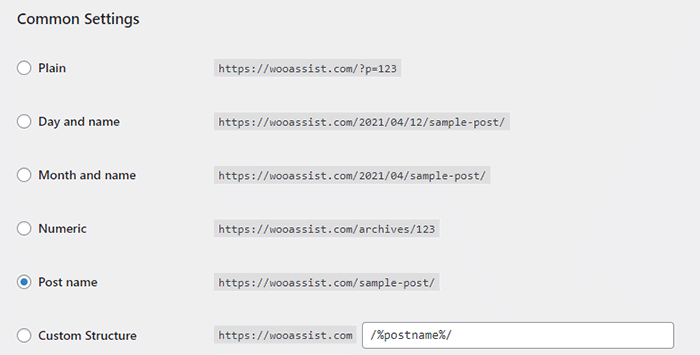
When you change your site structure, you will lose many external links pointing to your site and that’s a big SEO disaster. You have to make sure you make proper 301 redirects to the new URLs.

It might be a lot of work but you will soon reap better SEO rankings. If you already have good content, the benefits of optimizing your permalink structure could be significant. This means you should not skip doing this.

Resubmit Your Site Map

When you finish all your site structure optimizations, you should resubmit your sitemap to major search engines. That would be Bing and Google. Resubmitting your sitemaps ensure that search engines index the changes in your site structure.

Have you checked your site structure lately? What problems did you find?

Filed Under: How-To Articles Tagged With: 404 error, best practices, content marketing, navigation, SEO strategy, woocommerce seo, WordPress SEO, XML sitemap

8 Ways to Create Blog Content for Your WooCommerce Store

January 15, 2020 By John Leave a Comment

create blog content for your woocommerce store

Why You Should Have a Blog?

If you do not have a blog on your WooCommerce store, you should consider creating one. Having a blog is a good way to generate leads, get more traffic and build you brand. It can also become a good channel for providing good customer service. WordPress was created initially as a blogging platform so you should take advantage of it’s powerful blogging features – create blog content for your WooCommerce store.

Things to Consider Before Writing Your Content

Before you dive in and start creating blog posts, there are a few things that you should consider such as creating a content marketing plan. Even if you already have a blog, it is still a good idea to do this if you haven’t done it the first time. A content marketing plan can help you align your content with your goals.

Content Marketing Plan

A good content marketing plan has two important parts: (1) defining your goal and (2) defining your audience. For defining your goal, ask yourself what you want to achieve using the content that you create.

For defining your audience, you can create one or more customer personas. You can be as specific as you want and you can even give your customer persona a name. Everyone involved in your content marketing should be familiar with your customer persona.

Hubspot has a great post on how you can create your own content marketing plan.

content marketing for woocommerce

How to Come Up With Content Ideas

Now that you have a plan, you need to get ideas on what content to create.

1. Check What Your Competitors are Writing About

A good first strategy is to spy on your competitors. Find out what content they are writing about and improve on what they have.

2. Tutorials, Guides, and How-To Articles

You can create tutorials, guides and how-to articles on topics relevant to your niche or products. For these kinds of articles, it is important that the content helps address or fix a problem that your audience is having.

3. User Generated Content: Interviews, Guest Blogs

This one doesn’t require as much effort. You can reach out to influencers and other notable personalities in your industry and ask if they are willing to do an interview. Do remember that your interview must also be interesting to your audience. If it doesn’t resonate with your audience, it is not likely that your interview post will help achieve your goal. You can even coax influencers to write an article for you.

4. Internal Documents

Sometimes your internal documents can make for good content. If you have specific processes in place and you have an internal document that details this, you can convert this into in a blog post. You can just leave out the parts that cannot be revealed to the public. Do an audit of the resources you have to determine what documents you can use.

5. Reviews

If you use products in your niche, you can do a review post. You can position yourself as an expert in your niche when you do your review. You can even compare several products that do the same thing as a means to help your audience decide which product is a better fit for their needs.

review post

6. Listicles

The internet is abound with listicles. Heck, this post is a listicle. A listicle comes from the root words “list” and “article”. From there, you can deduce that it is an article that contains a list. Many people like to read listicles because they are clear and direct. The reader clicks a listicle because he/she is interested to know what the article lists. You know you click on listicles every now and then and that is a testament to how effective listicles are.

7. Company Events or Other Company News

If you have any upcoming or recently-concluded company events, you can write about it on your WooCommerce store’s blog. It’d give your audience a chance to connect with you. You can also leverage this as a networking opportunity.

You can also write about any news in your company that your audience might be interested in such as having a new member on your team, a move to a new office, or opening a new branch.

8. Research Work, Do a Survey and Discuss the Results

This one requires a bit more effort. Doing your own research or hosting a survey and then publishing the result on your blog can make for some good original content. If you take the extra mile on your research work, you can even leverage it as a link building opportunity. Imagine linking your study from a high-authority site like Wikipedia or some researcher catching wind of your study netting you a link from a high-authority “.edu” site. Google loves those.

9. Cornerstone Content

Cornerstone content should be the core articles on your blog. It should be detailed and well-researched. Cornerstone content should tell your readers everything they need to know about a certain topic in 2,000 words or more. Cornerstone content is great for SEO. Make sure you link it to different articles across your blog. Several links to external reputable sources will also help. Use keywords relevant to your niche but never over-optimize.

Depending on your niche, there will be other opportunities for creating great content that resonate with your customer persona. It is up to you to figure out what that kind of content will work for you.

If you have other ideas for creating great content for your WooCommerce store, let us know in the comments.

Filed Under: How-To Articles Tagged With: content marketing, customer persona, SEO strategy, woocommerce seo

How to Optimize WooCommerce Products for SEO

May 31, 2018 By John 1 Comment

You’ve set up your WooCommerce store but you’re not getting any traffic. You wonder what you’re doing wrong. Have you optimized your product pages for SEO? If not, that could be one of the reasons why you’re not getting any traffic. In this article, we’ll teach you how to optimize your WooCommerce products for SEO.

Why Optimize for SEO?

You can do all the link-building you want but if the pages that you want to rank for are not properly optimized for SEO, then you’ll have a hard getting ranked on top of Google.

Still, traffic is just a metric and what really matters is your conversion rate. Even if you are getting thousands in traffic but they are not converting, you still have a problem. On the other hand, you can’t convert anyone if you are not getting any traffic at all. Essentially, SEO and conversion optimization go hand-in-hand.

You have to optimize for SEO to make sure you are attracting the right people to your WooCommerce store.

Steps on How to Optimize WooCommerce Products for SEO

Identify What Keywords to Optimize For

Normally, it will be difficult to rank for regular keywords. For example, if you are selling digital cameras, it will be difficult to compete with Wikipedia or Amazon unless your WooCommerce store is already an authority on digital cameras. So optimizing for the keyword “digital cameras” won’t work for you. This is where long-tail keywords come in.

What is a Long-Tail keyword?

Compared to a regular keyword, long tail keywords are longer and more specific. Instead of optimizing for “digital camera”, you can optimize for specific camera models or for specific features of digital cameras. Optimize for anything unique about the product that you are selling. A few examples of long-tail keywords can be “digital camera for underwater photography”, “digital cameras for beginners”, or “sports action digital camera”.

Do Your Keyword Research

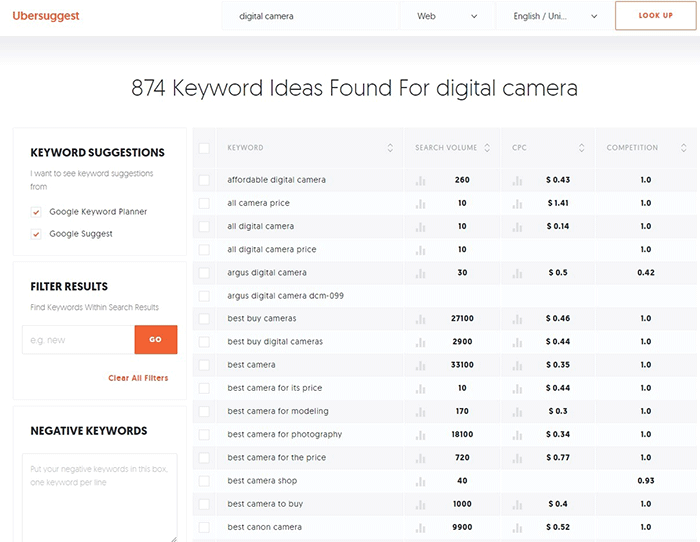
Don’t start optimizing until you do your keyword research. You can use whatever keyword research tool you have at your disposal. We can also recommend Ubersuggest. Just pop in a basic keyword and you can get a list of long-tail keywords that you can optimize for along with some valuable search data. You can even filter the keyword ideas and remove negative keywords. You can also export the keywords into a handy CSV file.

Ubersuggest Keyword Research

Add the Long-Tail Keyword to Your Product Page

To help with optimizing your WooCommerce Products for SEO, you can use the WordPress SEO plugin by Yoast. The plugin provides detailed information on how you can optimize your products for SEO. It also has a boatload of other features that will help boost your SEO. Just install the plugin and you’ll gain access to the SEO optimizations block on your WooCommerce product editor.

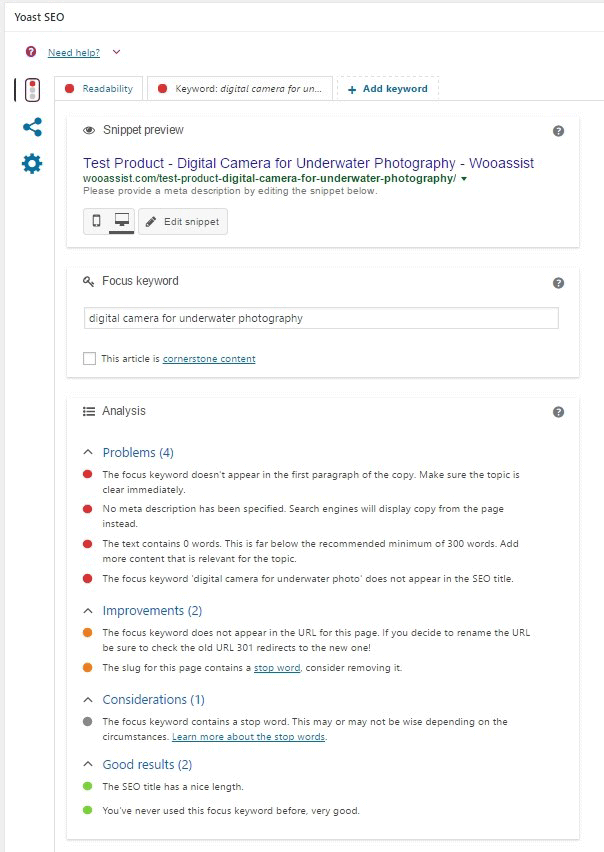
When optimizing products for SEO, input the long-tail keyword that you wish to target on the “Focus Keyword” field. After doing this, you can see the analysis section below will show you recommendations on how you can improve your product’s SEO score.

How to Optimize WooCommerce Products for SEO

Generally, you will need to add your focus keywords to:

  1. The article title
  2. The first paragraph of the article
  3. One of the heading tags
  4. On the body of the article
  5. In one of the image alt tags
  6. In the URL/slug

You don’t need to force yourself to do every little thing that the Yoast SEO section recommends. Just use it a rough guide since it does recommend the currently known best practices.

Improving Content Readability

Google now also considers content readability as an SEO ranking factor. So it is important to ensure that your product descriptions are easy to read. In some cases, you may have to use some technical terms when writing your product descriptions and that’s totally fine. Depending on your products, that may actually be best practice. Still, it’s a good idea to check the readability of your content.

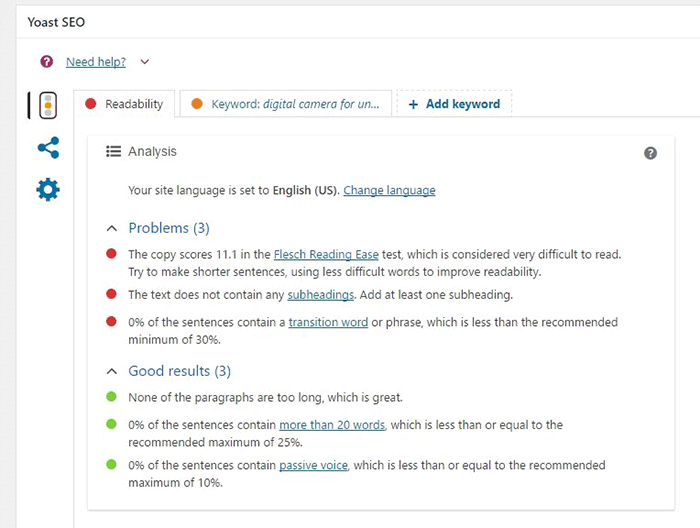
The Yoast SEO section also gives recommendations on Readability. Just click on the readability tab and you’ll see the problems that need to be addressed.

WooCommerce Products Optimize for Readability

When creating your product descriptions, you can also use Hemingwayapp to optimize its readability. You can also use this tool when writing blog posts.

Now that you know how to optimize your content for SEO, people who are interested in your products are now more likely to find your products. If you need help with SEO optimizations, the Wooassist Team can help. We’ll start off by doing an SEO audit of your site so we can determine what needs to be addressed and move forward from there.

Optimizing your WooCommerce store does not end with product optimizations. There are other optimizations that need to be done to ensure you are maximizing your conversion rates.

Filed Under: How-To Articles, SEO For E-Commerce Tagged With: keyword research, optimizations, seo, SEO strategy, SEO tools, WooCommerce, WooCommerce products, woocommerce seo, WordPress SEO, Yoast

Let us support your online store so you can manage your business

Get started today

Get 2 Hours of FREE SUPPORT

We are so confident that you will love our services that we will give you your first 4 hours at a 50% discount

That’s 4 hours for only $75

BUY NOW

Free eBook

5 Things Every Online Store Can Fix On Their Website In The Next Week To Increase Sales

Quick Links

  • How it Works
  • Pricing
  • Blog
  • Contact
  • About Wooassist
  • My Account
  • Checkout
  • Privacy Policy
  • Cookie Policy
  • Terms and Conditions

Wooassist

Australia:
59 Luke St.
Hemmant QLD 4174

Philippines:
San Miguel St.
Poblacion, Iligan City 9200

Connect


Copyright © 2026 · Wooassist

Yours FREE!

5 Things Every Online Store Can Fix On Their Website In The Next Week To Increase Sales