
Just like websites, hacking is changing and evolving. Hackers are always on the lookout for new ways to exploit and infect all kinds of websites, including online stores. They adapt, and can even get one step ahead of developers.
If you’re not careful, your WooCommerce store could be targeted and compromised. This underlines the need to update plugins and core of your WooCommerce store.
Protect Your Site from Hackers
One of the primary culprits of being targeted by hackers is the failure to update plugins.It has been proven to be disastrous to WordPress websites and blogs.
It’s a good idea to keep your plugins up-to-date and delete those that are not in use. There are also security plugins out there that will protect your website for free. This article can give you detailed tactics on what to do once your site gets infected, as well as tips on preventing a cyber-attack.
Some steps are being made to have this done automatically. You now have the option to do core updates through WordPress.org. Here’s an interesting post on what we might get in the future.
In the meantime, the responsibility lies with you. You need to arm yourself with the right knowledge, such as these WordPress security tips. As a WooCommerce store owner, it’s one of your top priorities to make hacking as difficult as possible. Keep these methods in mind.
Back-up Your Website
While updating plugins and WordPress might seem like an easy chore, it can be more complicated than that. It doesn’t work with just one click.
Before updating plugins such as WooCommerce, and your WordPress core, make sure that you have a current backup of your site. Just in case something goes wrong, you’ll have a fall-back.
It’s not uncommon for many websites to go down after installing an update. In some cases, you can even be locked out of your WordPress admin panel. While it may seem like a serious problem, it is actually easy to solve.
Just access your website’s files with an FTP client, find the folder of the plugin you updated, and just delete that plugin. If you updated multiple plugins, you can try deleting or renaming the specific plugin folders to find the culprit.
If your site goes down after updating your WordPress core, that’s a little more complicated. Learn how to backup your WordPress site here.
Wooassist Team Site Updates
Make sure that your WordPress core and plugins are always updated. It isn’t too difficult once you take the necessary measures. However, it can escape your notice if you’re quite busy and have a lot of things on your mind.
To ensure that problems with updates are immediately addressed, it would be a good idea to have a developer on board to handle the job. Better yet, have a developer do all your updates at regular time intervals. Handing over the responsibility to the Wooassist team is a viable option for you. As long as you have pre-paid credits in your account, we can automatically work on updating your WP Core, Themes and Plugins at regular intervals, either every fortnight or every month, depending on your preference.
How we do updates (click to enlarge image):
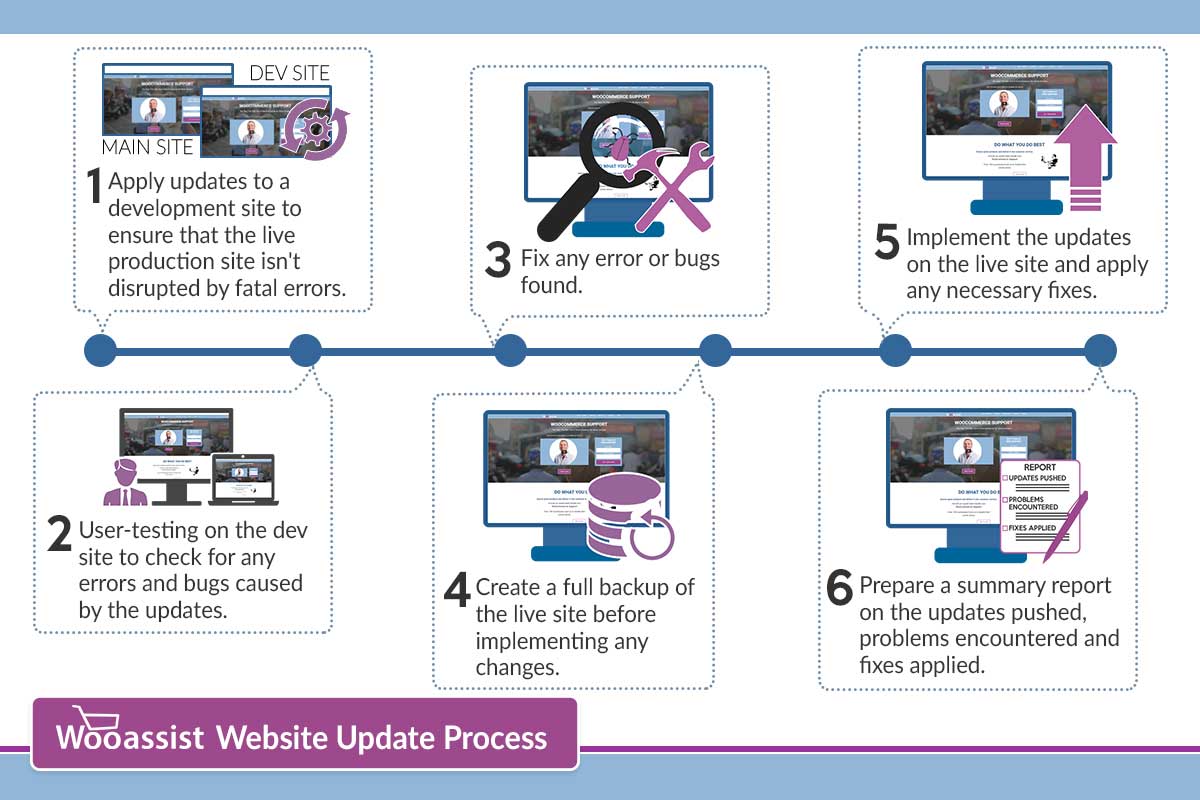
Although it might be possible to skip most of these steps, proceed directly to updating the live site and wait for whatever errors to come up, it may end up causing irreversible damage to your site. This could cost you thousands of dollars in lost sales and having support services spend more time fixing the issue when it could have been easily avoided in the first place.
On average, we take around 2 to 3 hours implementing the entire process when done once every month. We take pride in our service and do not cut corners and take shortcuts. If in the rare occassion that we miss an error that was created due to the updates, we will have it resolved at top priority.
Letting us do your site updates for you will rid you of having to worry about this part of website ownership altogether leaving you with peace of mind and time to focus on growing your business.







Leave a Reply