Editors Note: We have decided to retire the plugin mentioned in this article as the compact mode of the plugin no longer works with the new version of Storefront theme.
Editing a theme’s header is difficult for the average WordPress user. However, we’ve made it easier to do this for Storefront theme. With just a few clicks, you’ll be able to edit the format of the header, hide header elements, or change background, text and link colors.
But Why Storefront?
Storefront is the best theme to use with WooCommerce, which is the most popular e-commerce platform on WordPress. The theme was made and is being updated by the same people who created WooCommerce so compatibility will never be an issue. If you are already using Storefront theme on your WooCommerce store, then good for you. If not, you should consider using it to prevent any issues in the long run.
We’ve come across many WooCommerce stores that had a lot of problems due to conflicts with the theme. Each and every time, we recommended the use of Storefront theme. And each and every time, using Storefront fixed the problem.
Hence, we’ve created the Storefront Header Picker Plugin to make editing your header that much easier.
How to Install Storefront Header Picker Plugin
 You install the plugin just like any other plugin.
- Go to your WordPress Dashboard and click on “Plugins”.
- Click on “Add New” and search for “Storefront Header Picker”.
- Click on “Install” and then activate the plugin.
How to Edit Storefront Theme Header
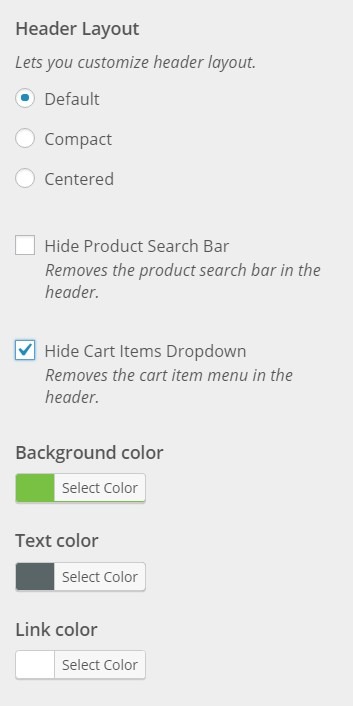
- To edit your Storefront theme header, click on Appearance > Customize > Header.
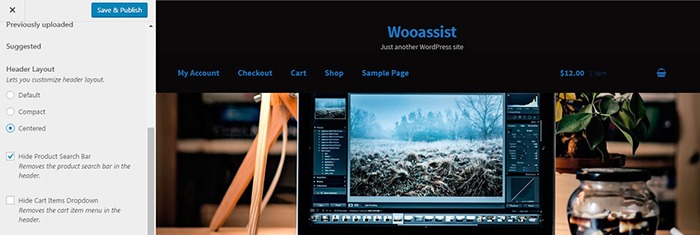
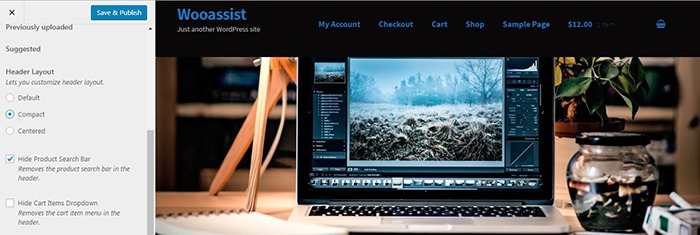
- Here you can choose between three header types: Default, Compact, and Centered.
- You can also choose to hide the product search bar and the cart. Just check/uncheck the corresponding boxes.
- At the bottom, you can change text and header colors.
- Once done, just click on “Save & Publish”.
Will This Work for Any Other Theme?
Unfortunately, this plugin will only wok for Storefront theme. It makes use of Storefront action hooks and filters. Activating the plugin when you are using a different theme will bring up a warning message.
Did this plugin help you edit your Storefront theme header? Do you have any questions about the plugin? Let us know in the comments.
 On this part of the Wooassist Interview Series, we talk to Lisa Shinham – owner of

 Nathalie Brouard started