There is abundant data available on the Internet to help you better understand website traffic. All that data can be meaningless if you don’t know how to analyze and interpret it. Once you do, you could use the information to maximize your online store’s profits. You can do all that by making proper use of analytics reports.
Google has its own service for tracking and reporting website traffic – Google Analytics. Ecommerce sites can use analytics reports from this tool to assess their overall performance. Best of all, it’s free.Before we go any further, the first thing you need to do is register for Google Analytics and install the tracking code.
Creating Custom Reports
The most useful feature in Google Analytics, custom reports allow you find the data and presentation that is most relevant for your goals.You pick the dimensions and metrics and decide how they should be displayed. Google Analytics has over 70 standard reports to select from.

This article can help you learn how to create and manage custom reports on Google Analytics on your own. You need not be an expert right away. What’s important is that you understand the process. Here’s another helpful resource on creating a custom report.
Wooassist Analytics Team
Google Analytics can monitor promotional activities, lead generation, visitor’s behaviour and conversion pattern. It can benefit your ecommerce store more than you expect.
Most website owners choose to do it themselves, but they end up collecting incorrect data. No matter easy it is to implement Google Analytics, you may still need the help of experts to make the best use of the data collected. If you find it too technical, or even time consuming to focus on, our Wooassist team can help you.



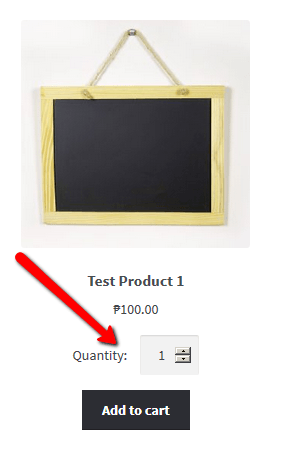 Adding the quantity field to the shop page is a necessity to some stores where buying several pieces and having repeat sales are common. For example, buying canned cat food in bulk is common so if you own a store selling pet food, having the quantity field on the shop page will really help. Many of your customers will be buying again after some time. They can just add the products directly from the shop page since they know what they are buying and no longer need to see the product details.
 If you are a store owner, it is important to know who you are trying to reach. Not everyone is your customer and knowing your target market will help you save thousands of dollars on marketing campaigns. We wrote a pretty
  Bob is a freelance website developer who builds e-commerce site with WordPress and WooCommerce. Bob is super busy building a lot of websites and he receives more jobs from new clients on a monthly basis. He also hangs out online on different forums to communicate with other developers to seek help and assist others as well.
 Bob doesn’t like this sort of maintenance work. He wants to help his previous clients but he is busy creating websites for new clients. If he tries to do both he ends up losing a lot of free time for himself and his family.
 Danny is the owner of an e-commerce store. He has 4 full-time employees and his wife works part-time in accounts. He will employ contractors regularly during busy periods.
 Danny wants to spend more time attending to marketing and building his business. He has a long list of marketing initiatives he wants to get up and running with the website that he is sure will bring in more sales, but he is just too swamped with the ongoing tasks currently on his plate.

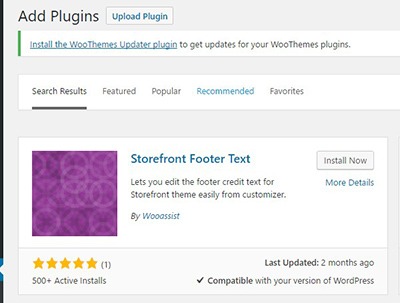 Head over to your WordPress Dashboard and go to plugins