Wooassist

Assistance for Your Woocommerce Store

  • How it Works
  • Pricing
  • Services
    • Site Maintenance
    • AI SEO and Content Marketing
  • Blog
    • How-To Articles
    • Code Snippets
    • SEO For E-Commerce
    • Theme and Plugin Reviews
    • Wooassist News
    • WordPress/WooCommerce News
    • Interviews
  • About Us
  • Contact
You are here: Home / Archives for outsourcing

Work “ON” Your Business Rather Than “IN” Your Business to Save Time and Increase Revenue for Your E-Commerce Store

May 16, 2016 By John Leave a Comment

work on your business rather than in your businessAs a business owner, you may struggle with having to wear so many different hats and working many hours.

An online business brings with it even more challenges, as you need to develop, secure and maintain your website. These are time-consuming and counter-productive if you do them yourself.

In this article, I’ll show you what steps you can take to effectively work on your business and what are the benefits of outsourcing your tasks.

What Does It Mean to Work “ON” Your Business Rather Than “IN” Your Business?

This popular entrepreneurial mindset has two points: you want a profitable business that produces consistent results, and you won’t need to do the day-to-day activities yourself. Basically, working “in” your business means doing those routine activities that keep the business going every day. On the other hand, working “on” your business means you prioritize developing your business and building customer relationships. Working on your business also means creating a systems-dependent business and delegating work.

Create Business Results that are Systems-Dependent, Not People-Dependent

process-diagramThe system you create becomes the tool everyone uses to get the job done in a way it needs to get done. Working on your business means you need to test and develop these systems to make sure they produce your desired result. When you have an efficient system in place, you’re mostly assured of the quality of work, and that business continues even if the people come and go. Training new staff becomes that much easier.

You may need to personally create these systems on your own. It is important that you document it. For Wooassist, we use DokuWiki to document our processes. You can find your own platform that you are comfortable with. Once the system is in place, it’ll be easier to delegate the task to someone else.

Delegate Work

It’s important that you build a team that you trust. These people will do the day-to-day activities of your business, following the systems you’ve approved or set. Delegation will only be effective if you trust the team to do the job for you. Because you trust these people, you can focus more on being the business owner and developing strategies to sustain and even grow your business.

Outsource Technical Tasks to Save Your Time

networkEven if you love working in your business, chances are there isn’t enough time to get everything done on your own. This is especially true as your business continues to grow. Hire reliable, technology-savvy staff and those with technical skills that match your needs. Doing so will help you better manage your time so you can focus on managing and growing your business.

You Can Be Assured that Experts Will Do a Good Job

You don’t necessarily need to be The Expert on each role in your company. You may only do a mediocre job at a technical task but a skilled professional can save you time by doing a great job on a role where he’s already an expert. You won’t need to spend too much time learning nor trying to do the job yourself. That’s the developer’s job. For an e-commerce store owner in need of a web developer, outsourcing is the way to go if hiring full time isn’t ideal.

You Have More Time for Leisure/Travel

Nanette Miller, founder of The Training Doctor LLC, outsources 40 hours of work weekly for non-revenue-generating tasks. This includes administrative work, website maintenance and social media posts. Outsourcing allowed her to focus on growing her business and keep a manageable work schedule that allows her to have a personal life. She gets to take about 12 weeks of well-deserved vacation per year. Just imagine the places you can visit with that much free time.

You Have More Time to Spend with Family and Friends

When you outsource, you free yourself of the daily worries of running your business. You have a better hold of your work schedule and productivity. After work, you have time to relax and be with your family. You can even go out and spend time with your friends.

WooCommerce Happiness Engineer Dustin Hartzler strictly adheres to his work schedule and wraps up work by 4:30pm. The rest of the evening is spent with his family and on non-computer activities.

Work on Things that Require Your Skills as a Business Owner

puzzle-business-componentsWith routine and technical tasks delegated to staff, you can devote more time in managing and developing your business. This means you can focus on exploring ways to innovate on what your business needs to grow. For an online business, here are some functions a business owner can prioritize:

Planning and Strategy

You should have more time to revisit your business roadmap and make changes as needed. Conduct market research to identify current trends that could help you sell your products. Check your competition and find ways to attract more customers. Devote time on continuous learning. You get to leverage on other people’s expertise, but the decision is still yours to make.

Marketing and Sales

You may feel comfortable handling your own SEO and advertising. This is because you’ve conducted market research and you know who your target customers are. When you have clearly defined your customer personas and know how to use them, you’re well on your way to maximizing your marketing efforts. You can also allot time to learn more online marketing strategies and apply them to your business.

Customer Experience

You build customer relationships. You make sure their needs are met, particularly as they navigate through your website. You may also opt to personally address customer queries. You may need help on this though, depending on your business’ size and nature.

Conclusion

stop-wasting-your-time_300x248While it’s understandable to be very busy at work, especially in the early stages of your business, you also need to know when and how to effectively delegate. Prioritize your core functions as a business owner and focus on growing your business. Set up systems and tools to maintain consistent, quality results for routine activities. Outsource technical and other non-income-generating functions. These actions will help you better achieve a work-life balance. Spend more time with your family and friends and go on much-needed vacations.

Was this post helpful? Do you have anything you’d like to add or share? Let us know in the comments.


Filed Under: How-To Articles Tagged With: admin, best practices, how-to, marketing strategy, outsourcing, website maintenance, Wooassist

Analytics Reports Help Your Online Store Maximize Profits

January 29, 2015 By John Leave a Comment

SnapCrab_2015-06-26_15-06-01_No-0000

There is abundant data available on the Internet to help you better understand website traffic. All that data can be meaningless if you don’t know how to analyze and interpret it. Once you do, you could use the information to maximize your online store’s profits. You can do all that by making proper use of analytics reports.

Google has its own service for tracking and reporting website traffic – Google Analytics. Ecommerce sites can use analytics reports from this tool to assess their overall performance. Best of all, it’s free.Before we go any further, the first thing you need to do is register for Google Analytics and install the tracking code.

Creating Custom Reports

The most useful feature in Google Analytics, custom reports allow you find the data and presentation that is most relevant for your goals.You pick the dimensions and metrics and decide how they should be displayed. Google Analytics has over 70 standard reports to select from.

SnapCrab_2015-06-26_15-06-22_No-0000

This article can help you learn how to create and manage custom reports on Google Analytics on your own. You need not be an expert right away. What’s important is that you understand the process. Here’s another helpful resource on creating a custom report.

Wooassist Analytics Team

Google Analytics can monitor promotional activities, lead generation, visitor’s behaviour and conversion pattern. It can benefit your ecommerce store more than you expect.

Most website owners choose to do it themselves, but they end up collecting incorrect data. No matter easy it is to implement Google Analytics, you may still need the help of experts to make the best use of the data collected. If you find it too technical, or even time consuming to focus on, our Wooassist team can help you.

Filed Under: How-To Articles Tagged With: conversion optimization, e-commerce, Google Analytics, how-to, outsourcing, Wooassist

How to Outsource Writing Blog Posts and Get 55% More Traffic to Your Site

October 7, 2015 By John Leave a Comment

blog-793047_640

Did you know that e-commerce websites that have a blog gain 55% more traffic?

Writing blog posts can be a daunting and a time-consuming task. Learning how to outsource writing blog posts makes a lot of sense. However, before you go about outsourcing, you should get a few things organized.

Prepare a Blog Strategy

If you already have a blog and didn’t start it with a strategy in mind, then you are doing it wrong. Without a clear strategy in mind, you are unlikely to reach your objectives. With a strategy, you will have a goal and everything you do on your blog should contribute to achieving that goal.

strategy

Being consistent with your strategy is key according to Neil Patel.

It’s hard – if not impossible – to succeed at content marketing without creating blog posts on a regular basis. Every successful blog is built on a solid foundation of content, but it’s consistency that’s the real key to success.

If you are going to write content, write the best content on that topic. Competition is tight so doing anything less than the best is not likely to give any results.

Prepare a Style Guide

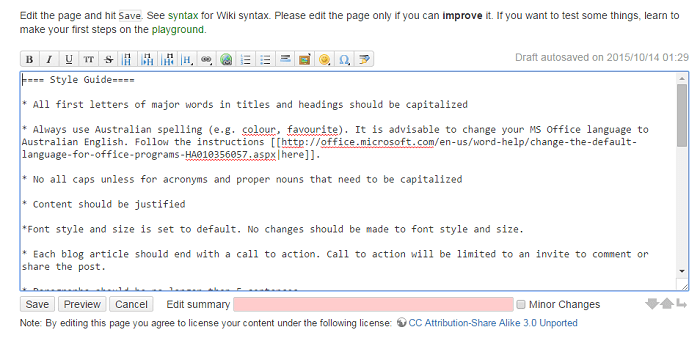
What is a style guide? Think of a style guide as the written rules for your blog. It can be a simple bullet point list available on the web. We use Dokuwiki for this.

style-guide

Your style guide should show what kind of language will be used throughout your blog. For example, if your target market is Australia, you should be using Australian English. If your market is the US, then US English.  Your style guide should also contain your preferred spelling of words with multiple spellings. Examples of words with different spellings are “aesthetic” and “esthetic” or “e-commerce” vs “ecommerce”.

You can also list how you plan to use images on your style guide including preferred sizes and alignment.

This style guide should be updated from time to time and should be made available to anyone writing content for you.

Prepare a Customer Persona­­

customer-personaYour blog needs to speak the language of your customers. This is best achieved by creating a customer persona. Check out this blog post to learn how to create a customer persona.

When you know your audience, you understand their needs. If you understand their needs you can speak their language and give them exactly what they want.

Prepare a Content Roadmap

A content roadmap shows a list of blog post ideas that you want to add to your blog. Each idea should include a title, a summary, and sources that you plan to use. You can have the writer that you will outsource do this after you have shown him/her your blog strategy.

Outsourcing a Writer

When it’s time to outsource a writer for your blog, share all the documents that you have prepared. This includes your blog strategy, style guide, customer persona, and content roadmap if you did it already. This will give the writer a better idea on how to write content that will accomplish your goals and speak with your customers.

blogging

Note that it might take a while before you can find a writer that you will like. Don’t be afraid to try a few writers to find the one satisfies your needs.

Find a Writer that Knows SEO

When looking for a writer to write content for your blog, you should find a writer that is knowledgeable in SEO. A blog should be targeting long-tail keywords. To know what a long-tail keyword is and to learn how it can be used to attract more visitors to your site, check out this post.

Communicating with the Writer

Your roadmap is not set in stone and should change from time to time as new trends arise and/or you come up with new ideas. You will often think of a topic that you need to act on straight away. When this happens a rough draft or a summary of the article will do to start with.

See what your writer comes back with and then make suggestions if needed. It will be much easier for you to start with a draft a quality writer has already created than a blank page

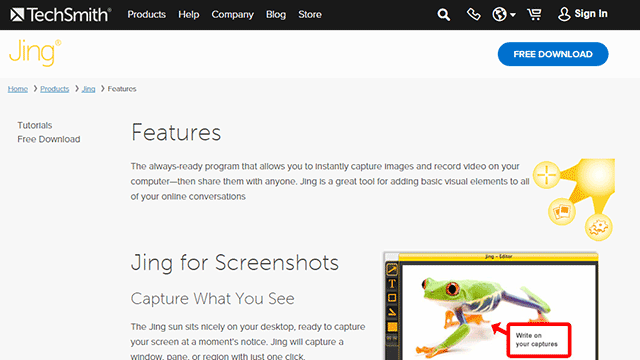
Sometimes you will need to talk about the content that you want written. It might be a good idea to record a video brief of the instructions. We do this sometimes and in such cases, we make use of Jing. Jing will capture a video of your screen. With a mic, you can send instructions. When you’re done making the video, you can just send a link to the contractor. Compared to Skype conversations, this is better as the contractor can review the instructions when needed.

jing

Proofreading and Editing Content

Proofreading and editing content is an important process that needs to be done every time you will publish content. Never skip this process as a poorly written blog post with lots of grammar and spelling errors will reflect poorly on your brand.

Even if you opt to write the blog posts yourself and not outsource. This is one step that you must outsource. You need a fresh pair of eyes on your content.

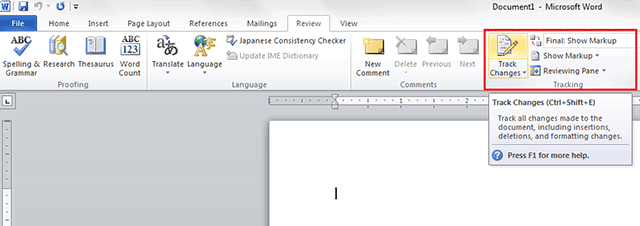
In our case, we have at least two other people check any article before it is published. The writer writes the content and sends it to the first editor who will check the content and give feedback. If there any changes to be made, it is returned to the writer to make the changes. After that, the article will be sent to the second editor. The second editor will check the style, fix any grammar or spelling errors, and ensure that it follows the blog style guide. The “Track Changes” function in Microsoft Word works great for proofreading and editing content.

track-changes

Summary

To sum it up, outsourcing a writer for your blog doesn’t mean just jumping in and immediately hiring someone to do the writing for you. You need to have a clear strategy before you do any of that. In line with your strategy, you should also prepare a blog style guide, a customer persona, and a content roadmap. When that’s out of the way, you can start looking for a writer that will accomplish all of your writing needs. Finding that perfect writer can take a while so keep at it.

Do you have any other tips for outsourcing a writer for a blog? Let us know in the comments.

Filed Under: How-To Articles, SEO For E-Commerce Tagged With: blog, customer persona, how-to, marketing strategy, outsourcing

WooCommerce Landing Pages to Boost Conversion

January 29, 2015 By John Leave a Comment

woocommerce-landing-pages

You just launched your e-commerce store using WooCommerce. Now, you want to go all out on your marketing campaign to boost conversion rates.If you want to get your campaign off to a great start, there’s one thing to remember – never start without a landing page.

What is a Landing Page?

A landing page is a standalone web page that stands apart from your actual website.  It is designed for a single focused objective, and serves as a guide for achieving conversion goals.It does not have any direct ties to your website. No global navigation exists to link the two together. Here is a good article explaining what it is.

SnapCrab_2015-07-03_10-28-23_No-0000

The landing page may be used either to capture leads or make a potential customer ready for purchase. Access to it is only possible through a link that you’ll provide in the content of your marketing campaign. This post further explains what a landing page is used for.

WooCommerce Landing Pages

Building landing pages for your WooCommerce store will help you generate more leads and conversions. Even if you plan to hand this task over to a professional, it would help if you understand the process.

This resource has tips on how to create effective landing pages.  WooCommerce Conductor. It can also show you how to create focused landing pages of featured WooCommerce products, capture leads, and build future marketing funnels.

SnapCrab_2015-07-03_10-28-41_No-0000

The first step to creating a successful, WooCommerce landing page is setting your business objectives. It’s worth noting that a landing page without a lot of thought behind it, will not be able to achieve its goals.

The potential uses for landing pages are almost limitless, but it can only benefit you if it’s done the right way. How well it is designed,and how skilfully it works,can make or break conversion. It is your ticket to more leads and sale, so having a professional landing page design is important. Let our Wooassist team do the job for you!

Filed Under: How-To Articles Tagged With: conversion optimization, how-to, marketing strategy, outsourcing, Wooassist, WooCommerce

How to Save Time and Money When Outsourcing a WooCommerce Developer

June 21, 2019 By John Leave a Comment

How much is your time worth? Do you usually spend a couple of hours trying to fix an issue on your WooCommerce store? You should be spending more time working on making your business more profitable. Don’t waste your time dealing with bugs and plugin updates. Leave that to a developer that can do the task more efficiently.

If you’ve never outsourced a WooCommerce developer before, you’ll find that it’s not that difficult. We’ve outlined some things that you can do so you can save time and money when hiring a WooCommerce developer.

Why Outsource?

If you are asking yourself why you should even outsource, outsourcing will help you free up your time. More free time means you can focus on the more important aspects of your business. Also, outsourced work is cheaper. Don’t waste time going through forums and various support channels for help. Sure, you might be able to fix your problem but at what cost?  That is time spent that you’ll never get back. You can outsource a WooCommerce developer that will do complex tasks in a fraction of the time.

What Tasks Can You Outsource?

You can outsource just about any tasks you don’t want to do. Outsourcing routine maintenance tasks is always a good idea.

Site Updates and Maintenance

There are plenty of tasks that you can outsource on WooCommerce and one of the most important one is your site updates. If you do not update your WooCommerce store on a regular basis, you are not getting important security updates. This exposes your and your customers’ data to cyber criminals.

Hackers typically look for outdated sites as they are easy targets for hacking. If you do not have time to do regular updates, you can have an outsourced WooCommerce developer do it for you.

On your end, you must ensure that your developer creates a back up of your site and tests updates on a staging site. Some WooCommerce store owners might be wary of updating their site because they experienced problems due to site updates in the past. This is the reason why you should test updates on a development site first. You should not wait for your production site to break because you haven’t been updating it in months. While your site can break when you update it, you can do this in a controlled environment. This is a lot better compared to being forced to take down your site while you troubleshoot. If this happens, your site could be down for hours or even days. You can do your site updates regularly to prevent this from happening.

Fixing Bugs and Other Issues

Things will break on your site every now and then. That’s an issue all ecommerce store owners will have to deal with. Instead of worrying about it, you can outsource a WooCommerce developer fix these issues for you.

Site Speed Optimization

Some elements on your site could be dampening your site speed. An experienced WooCommerce developer can help you optimize your site so it runs the fastest that it can.

Design Tweaks

If you need a quick design tweak, what would take you an hour or two to do might just be a 15-minute job to an experienced WooCommerce developer.

Adding New Features/Custom Development

WooCommerce is customizable if you know how to code. With a trusted WooCommerce developer, you can customize your site however you want to.

How Can You Save Time and Money When Ourtsourcing a WooCommerce Developer?

save time and money outsourcing

Find a Skilled Developer

Wooassist developers have spent years working on various WooCommerce sites. They have dedicated themselves to knowing everything about WooCommerce. If you are looking for WooCommerce expert, you can contact us. You can also try your luck hiring a freelancer at websites like Upwork. Try to find someone who has a lot of experience working with WooCommerce websites.

Wear the Project Manager Hat

If you’re going to outsource a WooCommerce developer, you’ll need to manage your projects. If you don’t have staff to do that for you, you’ll have to manage your projects yourself. Or you can hire Wooassist and you’ll be assigned your own project manager.

Use a Project Management Tool

There are several project management tools that you can use. You just need to determine which one would work for you. Some project management tools we can recommend include Asana, Kanbanflow and Trello.

Define Project Goals

A project is clearer if you have realistic and achievable goals. When talking to your developer about a project, always let them know what the goal is.

Make an Effort to Write a Detailed Project/Task Brief

Don’t downplay the importance of writing a project or task brief. Spending more time writing a detailed project brief actually saves you time. If you don’t write a good task brief, you will spend more time making corrections and asking for revisions. Define the objective and include all the necessary details in your task brief.

Prepare All Necessary Files

When you send a task to your developer, always send them all the necessary files needed to accomplish the task. Use appropriate file names to avoid confusion. Also, use common file formats.  If you are using the cloud to share your files, make sure you grant the necessary access permissions. In the task brief that you prepare, it helps to include a note on what the files are for.

Prepare and Double Check Login Information

Provide all the necessary login information to the developer working on your tasks. We recommend testing the login information to ensure they are correct. For a developer, nothing wastes more time than finding out you cannot log in to a site you are working on. More time is wasted if they can’t get the correct login information right away due to time zone differences.

If you have not tried outsourcing a developer before, don’t be afraid to take the first step. You can free yourself from your WooCommerce woes if you work with a trusted developer. Let us know in the comments if you might have any questions about outsourcing.

Filed Under: How-To Articles Tagged With: outsourcing, website development, website maintenance, WooCommerce

  • 1
  • 2
  • 3
  • Next Page »
Let us support your online store so you can manage your business

Get started today

Get 2 Hours of FREE SUPPORT

We are so confident that you will love our services that we will give you your first 4 hours at a 50% discount

That’s 4 hours for only $75

BUY NOW

Free eBook

5 Things Every Online Store Can Fix On Their Website In The Next Week To Increase Sales

Quick Links

  • How it Works
  • Pricing
  • Blog
  • Contact
  • About Wooassist
  • My Account
  • Checkout
  • Privacy Policy
  • Cookie Policy
  • Terms and Conditions

Wooassist

Australia:
59 Luke St.
Hemmant QLD 4174

Philippines:
San Miguel St.
Poblacion, Iligan City 9200

Connect


Copyright © 2026 · Wooassist

Yours FREE!

5 Things Every Online Store Can Fix On Their Website In The Next Week To Increase Sales