Wooassist

Assistance for Your Woocommerce Store

  • How it Works
  • Pricing
  • Services
    • Site Maintenance
    • AI SEO and Content Marketing
  • Blog
    • How-To Articles
    • Code Snippets
    • SEO For E-Commerce
    • Theme and Plugin Reviews
    • Wooassist News
    • WordPress/WooCommerce News
    • Interviews
  • About Us
  • Contact
You are here: Home / Archives for John

How to Set up AMP for WooCommerce and Speed Up Your Mobile Site

October 28, 2018 By John 2 Comments

For WooCommerce store owners, it is important to present your customers with a fast WooCommerce store. This is especially important for mobile the mobile platform. One means of achieving top speeds is to set up AMP. In this post, we’ll show you how to set up AMP for WooCommerce.

What is AMP?

Accelerated Mobile Pages, or simply AMP, makes websites load faster on mobile devices. This is an open-source initiative that Google started.

As Google pushes for a faster web experience, it approves of websites that have fast page loads speeds. And since AMP is  a pet project of Google, you have everything to gain and nothing to lose by adopting it. To be clear, AMP is not yet a ranking factor for SEO. However, you and your customers would still benefit from AMP since more searches are now being done on mobile devices.

How to Set Up AMP for WordPress
Before you can set up AMP for WooCommerce, you first need to set up AMP for WordPress.

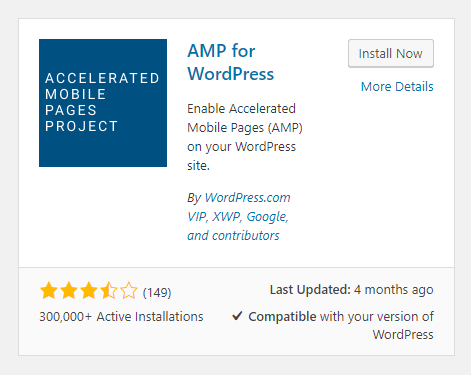
To set up AMP for WordPress, you will need to use a plugin. On your WordPress Dashboard, go to Plugins then Click on ‘Add New’. Search for AMP for WordPress. Once you find the plugin, click on Install Now and then activate it.

You can also download the plugin directly from the WordPress plugin repository and upload  it on your site. After that, you will need to activate the plugin from your plugins page.

If you are running a multisite network, you can install the AMP plugin on the multisite and activate it for the network.

Now that you have set up AMP for WordPress, you can get started on setting up AMP for your WooCommerce pages.

How to Set up AMP for WooCommerce

For integrating AMP for WooCommerce, you will need another plugin. Currently, there are no free plugins that add AMP functionality to WooCommerce so you will have to purchase a premium plugin. You can choose between the WooCommerce Pro for AMP plugin or the Publisher AMP plugin.

To enable AMP for WooCommerce, simply install and activate the plugin.

As you can see, setting up AMP for WordPress and WooCommerce is easy. But the work doesn’t stop there. You will still need to test your AMP site.

How to Test AMP

There are a few tools that can help you test your AMP set up. Simply input any of your AMP pages on the two sites below and you will be provided with results.

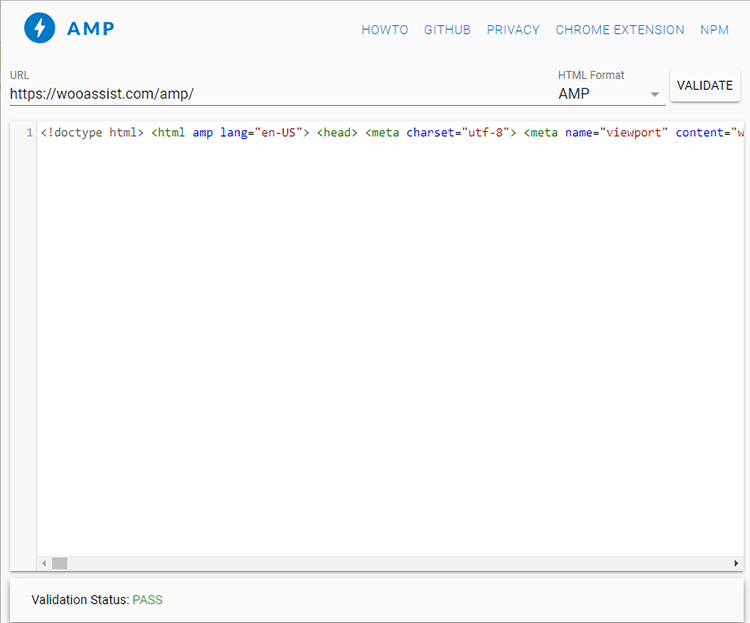
  • https://search.google.com/test/amp

  • https://validator.ampproject.org/

You might also want to check Google Search Console for any errors in your AMP set up. If you are not connected to Google Search Console, you can use Yoast SEO plugin to connect your WooCommerce store.

If you find any errors in your AMP set-up, you can get started on fixing them. If you are stuck and need help fixing any errors, you can contact the Wooassist team and we should be able to help out.

Check Your AMP Speed

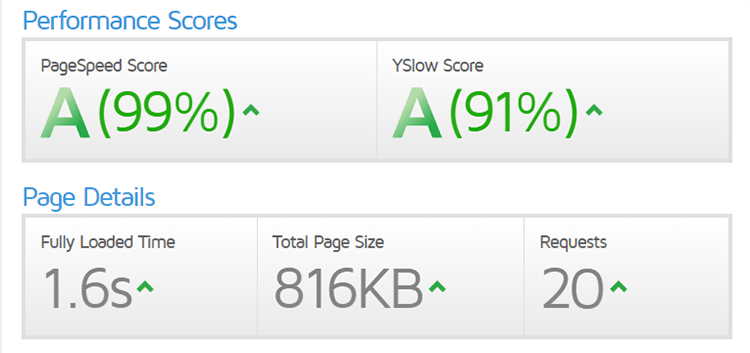
You can also check your AMP site for any improvements in site speed using GTmetrix or Pingdom.
Ensure Your AMP Pages are Indexed by Google

One way to ensure that your AMP pages will be indexed by Google is to generate a sitemap that includes the AMP pages. You can then upload it on Google Search Console. Just log in to your Google Search Console and then click on sitemap. In the field, just indicate your sitemap URL and click on “Submit”.

Ensure AMP Works with Yoast SEO Plugin

If you are using Yoast’s SEO  plugin, which we recommend you do, you will need to integrate Yoast SEO with AMP. This is a simple tasks and just requires that you install the Glue for Yoast SEO & AMP.

Final Notes

Now that you’ve set up AMP for your WooCommerce store, the mobile experience should be much faster. If you are having issues setting up your AMP, you contact us and we’ll see what we can do to help.

If you are looking for other ways to speed up your site, you can check out our post on how to speed up your WooCommerce store.

Filed Under: How-To Articles Tagged With: conversion optimization, seo, site speed optimization, WooCommerce

What to Do When Your WooCommerce Store’s Theme is Abandoned or Outdated?

October 19, 2018 By John Leave a Comment

What to Do When Your WooCommerce Store’s Theme is Abandoned or Outdated

We’ve had a few clients who have used themes that were abandoned by the theme developers. In some cases, the store owners come to us with problems regarding their theme and then we find out that the theme has not been updated in over a year. And when a theme has not been updated in a long time, it is inevitable that features will break.

Features Will Break

Sometimes it may just be small formatting issues. While formatting issues are usually easy to fix, this is just a band aid to a big problem. When running an outdated theme, the ideal solution is to address the root of the problem. Update the theme or change to a different theme that is constantly receiving updates.

Sometimes, an outdated theme can break some more important features when it has deprecated codes. These deprecated codes are no longer supported in current versions of WordPress or WooCommerce. Also, new features introduced in WordPress and WooCommerce may not work on your outdated theme. Unless you do something about it, things will just keep breaking. When a core feature of WooCommerce breaks as a result of an outdated theme, your online store will be put out of commission.

Dangers of Running an Outdated Theme

An outdated WordPress theme is not secure

Aside from breaking your site in the absence of updates, running an outdated theme is a major security issue. You are leaving your WooCommerce store vulnerable to many exploits. Some WordPress security tweaks might help keep your site secure. However, when your theme is not receiving updates, these security tweaks won’t help.

The Solution

The only solution to an outdated theme is to replace it with a new theme that is constantly receiving updates.

One thing to consider though is if you have spent hundreds of hours of work on your current theme. In this case, it might be worth hiring someone that will update your theme. If you are going to have someone updating your theme, make sure that that someone also addressed the latest known security vulnerabilities. Also, consider the costs of maintaining an outdated theme. Would it be more cost-effective in the long run if you changed your theme now?

How to Choose a New Theme

When you’ve decided that you want to go with a new theme, there are a few things to consider when choosing one.

Choose a Theme that is Responsive

A responsive theme is a theme that adjusts to different screen sizes. A theme must look good on both a mobile device and a desktop computer. Since Google now considers mobile devices in its search engine rankings, it is imperative to choose a theme that is responsive. Under no circumstances should you use a theme that is not responsive.

Choose a responsive theme

Choose a Theme that is Light

Another option to consider is choosing a theme that is not bloated by unnecessary features. It is definitely handy when a theme can let you change fonts, colors and your page layout in just a few clicks. However, this means that the theme is bloated with code that will slow down your site. What used to be one line of CSS code to change the color of your navigation menu can be hundreds of lines of code built into your theme. Themes made by Themeforest are notorious for this. And while it does make the life of a non-technical WooCommerce entrepreneur a lot easier, you have to ask yourself. Do you really want to add that much bloat to your site when site speed is such an important factor for both SEO and user experience?

Choose a Theme that was Developed by Trusted Developers

There are hundreds if not thousands of themes to choose from. But how do you know which ones are good? One way to look at a theme is to consider the developers who made the theme. We can recommend using Storefront theme since it is made by the same developers that created WooCommerce. You can be guaranteed that Storefront theme will work with WooCommerce with no issues.

The Genesis framework is also a good option. Note that Genesis is a theme framework and you will need to install a child theme when you use it.

Costs of Changing to a New Theme

Cost of Changing to a New ThemeEven if you choose to use a free theme such as Storefront, changing to a new theme will still cost you. If you are able to change your theme on your own, it won’t cost you anything financially but you’ll still be spending a lot of time on it. Hire people to do the grunt work. Don’t spend dozens of hours trying to work on tweaks to your theme when a developer can do it in an hour or two. If you don’t have access to a developer, you can contact the Wooassist team. We can help you change your theme.

What to Do Before Changing Your Theme?

Before changing your theme, it is best practice to create a development or staging site and test your new theme installation there. Several hosting providers such as WPEngine and Siteground have built in tools that let you easily create a staging site in just a few clicks. You can also create a development site manually.

Also, create backups. Before doing any development work on your WooCommerce store, it is important to create a backup. In the event that you break your site, you always have a working backup that you can restore.

What to Do Before You Go Live with Your New Theme?

When you’ve installed your new theme and you’ve done all of the tweaks that you want, it is important to do some user testing. Testing your site is a necessary step before moving any major changes to the live site. Check out this blog posts for a list of things that you need to check before your site goes live. On top of the list, make sure to check that any custom features that you have added to your site are working.

Do you require any help with changing an outdated theme? Drop us an email and we might be able to help.

Filed Under: How-To Articles Tagged With: Genesis, mobile friendly, responsive design, Storefront, WooCommerce

Lisa Shinham from WaveZoneSkim Shares Her Company’s Story – The Wooassist Interview Series

October 18, 2018 By John Leave a Comment

On this part of the Wooassist Interview Series, we talk to Lisa Shinham – owner of Wave Zone Skimboards. Together with her husband Jeff, Lisa first worked part-time building Wave Zone while she worked in corporate. At one point, the company experienced massive growth that Lisa had to leave her 15-year stint in the corporate world to focus on their company. “Good enough is never good enough” has always been their mantra. And now they own and a successful and thriving WooCommerce store that sells high-quality hand-crafted skimboards.

So let’s get started with the interview.

How did WaveZoneSkim start?

Wave Zone Surf Company opened in 1990 as a single location watersports store. Among the offerings were custom surfboards, skimboards, wind surfers and apparel. We expanded to include the wholesale of our skimboard brand to surf shops around the world. The growth was so massive that we decided to close the shop and transition purely to wholesale. As the customer need expanded, we found that we were able to reach additional market areas through our own website; a great option for holiday shoppers, those who do not live near a beach or surf shop location,

What are some of the major challenges for WaveZoneSkim?

Managing materials costs is a daily event, but one over which we can exercise some control.

Tougher to prepare for are the challenges presented by natural disasters. This year alone we have seen red tide spreading along the western coast of Florida, a hurricane strike to the eastern USA, a tsunami clipping Guam and volcanic activity threatening Hawaii. If one of our surf shops are affected, we are as well.

The exponential increase in online sales has created opportunity and challenge in equal measure. This could be counted as the largest ongoing shift in the way we do business today versus 25 years ago. Most significant is the detail needed for an individual transaction. This is much different and more labor intensive than shipping a case of a dozen boards to a surf shop. Customer expectations must be successfully managed on the front end. Fulfillment and customer service must be top notch.

What has been the biggest challenge in your career?

The largest challenge I have personally faced has been keeping up with technology. From e-commerce, to web design, to multiple social media platforms. Change is constant when determining how to best reach a customer. Having a good working knowledge as well as augmenting that by delegating to skilled individuals has been essential!

What are your tips on how to make a business startup a successful one?

Strategic planning is essential. It’s a relay race of sorts. A clear written timeline with each step assigned to a specialist. Communication is key. From concept to implementation to promotion to launch every step must be giving its due. Responsibility, accountability and respect to all must be flowing with the team working to build each other up. If the day has come to load website product then the individuals in charge of descriptions, SKUs, pricing and photography need to be aware and on point!

Skim Team Riders at the 2018 Vilano Pro-Am Competition

How has ecommerce changed over the past 10 years?

10 years ago there was a greater range of comfort in terms of buying online. As customers have gained understanding of secure sites and payment systems, closing the online deal has become far more achievable. Customers are largely at ease doing online business.

Today websites must be engaging and easy to navigate… truly streamlining the customer experience. A picture is worth a thousand words and the professionalism of your site must inspire confidence in your brand and products. A customer can comparison shop platforms and brands quickly and easily. The online marketplace continues to grow and a business must be on its game to stay out in front of competitors.

What do you think is the future of ecommerce?

The past few years ecommerce has paralleled brick and mortar business challenges. Smaller “mom & pop” retailers struggled to keep pace with big box stores, and still do. Today, online businesses battle the same fight to keep pace with large sites like Amazon. A marketplace the size of Amazon can afford to offer membership benefits such as free shipping and customer-centric return policies that can be tough for a small business retailer to match. With the continued increase in online sales, that pendulum is beginning to swing back a bit, with a bit more customer accountability to the tune of re-stocking fees and reduced eligibility for pre-paid return shipping.

With a continually growing base of tech savvy customers as well as online purchasing being the increasingly common choice, people will be continue to be more and more comfortable with doorstep delivery in many aspects of their lives. Convenience fees will become the norm and exceptional service will no longer include a huge ding to profit margins to secure the sale.

That said, however, individual sites will always need to continue bettering the customer experience in order to secure the business.

Team Manager, Alex Bevard, running a Technique Session for youth. This was a Demo Day hosted by Naples Outfitters in Florida.

How did you get started with WooAssist?

A colleague mentioned WooAssist to me in passing. Upon visiting the Wooassist site, I found a video on the home page told my story well. Like many, I had invested a generous sum to rebuild my site. After completion of the project, I found myself buried under lack of knowledge regarding WordPress and its many plugins. I felt a bit stranded… as if I was in a newly built house with a bit of furniture yet so much more was still needed to truly live there and call it mine. I learned as much as possible via trial, error and online resources to add content and enhance the sites direction.

I had big ideas and no way to bring them to fruition. I bought a small support package from Wooassist and tested a small job. The recommendations and results have been amazing. The Wooassist staff has been responsive and proactive. Their service and follow through have been superior.

What advice can you offer for aspiring ecommerce entrepreneurs?

Continuing education in the areas of technology and online marketing is important. Learn about meta tags, keywords, H1 headings, etc. Outsourcing is highly effective but, like all other business investments, it’s important to know what you are paying for. A good blend of both paid and organic exposure is important. Top notch photography, engaging content and relatable videos are very achievable and worth the investment. Most importantly, automation is critical. With systems and automation that cover everything from FAQs to inventory control, people can use time where it needs to be spent, such as building business and relationships.

Filed Under: Interviews, Wooassist News Tagged With: business development, Wooassist, WooCommerce

Why Have More Than One Payment Gateway for WooCommerce?

September 17, 2018 By John Leave a Comment

Why Have More Than One Payment Gateway for WooCommerce?

If you own a WooCommerce store and only have one mode of accepting payments, you might want to consider adding other payment options. Adding more payment gateways should be easy. WooCommerce can integrate easily with many payment gateway providers. In most cases, you’ll just need to configure a plugin and a few settings. But why have more than one payment gatewat for WooCommerce if the one you have is working fine?

Why Have More than One Payment Gateway?

There are several benefits to having more than one payment gateway.

Reduce Checkout Abandonment

One important reason why you should have more than one payment gateway is to reduce checkout abandonment. Not to be confused with cart abandonment, checkout abandonment is when a user reaches checkout and does not complete the checkout process.

There are various reasons your customers can abandon checkout. Common reasons include having too many form fields, hidden fees, and not having the user’s preferred payment option. For example, some users may prefer to pay using Paypal since it comes with buyer protection or they may believe it is more secure. But if you only have credit card payments, then users who want to use Paypal might abandon your checkout.

Backup Payment Gateway

If you only have one payment gateway and you encounter issues with your payment gateway, your customer will have no other options for completing checkout. That means you are out of business until you sort out your payment gateway issue. It’s great if these issues can be fixed in a matter of minutes, but sometimes these issues can go for days. The longer that it takes for you to fix the issue, the more business you lose.

In short, using only one payment gateway is risky. Having two or more modes of payment allows your customers to check out using another payment gateway if their first choice is not available or having problems.

Flexibility

Many payment gateways are not capable of handling different payment methods. If you want to cover all bases, then you should use more than one payment gateway. In addition, some payment gateways might not be able to process foreign currency. This can be a problem if your business caters to a global market.

Customer Preference

Having more choices is better when it comes to payment options. Trust is hard to come by and if you are using a payment gateway that your customers trust, they will hand you their money. The more payment options you offer, it is more likely that you’ll have your customers’ preferred payment option.

Some users may not be comfortable with entering their credit card information on every ecommerce site that they use. These users are more comfortable using services such as Paypal, Apple Pay or Amazon Pay. Still, some people might not have an account for these services and would prefer entering their credit card information. It’s all a matter of preference. Giving your customers the ability to pay with their preferred payment gateway scores you a point.

What are the Common Payment Options?

There are a lot of payment gateway choices to use for WooCommerce. These include Paypal, which can be Paypal Standard, Paypal Express, Paypal Advanced or Paypal Pro. Using Paypal is already akin to having two payment gateways since users can pay via Paypal or through their credits cards without need for a Paypal account. You can check out the Paypal Extension Comparison page to determine which Paypal option is right for your WooCommerce store.

Other popular payment gateway options include Stripe, Authorize.net, Amazon Pay and Apple Pay which is available through Stripe.

Which Payment Option is Right for Me?

How do you know which payment option is right for you? There are several factors to consider such as cost, location and security. Depending on where you do business, you might also want to consider location-specific regulations such as GDPR. There is no single right answer as to which payment gateway is the best, it all depends on your business’ particular needs.

Get to adding that extra payment gateway as soon as possible. If you ever need help setting up your payment gateways for WooCommerce, you can contact the Wooassist team and we’ll help you out. If you have any suggestions or comments, you can post them in the comments section below.

Filed Under: How-To Articles Tagged With: conversion optimization, payment gateway, Paypal, Stripe, WooCommerce

Wooassist Interviews WooCommerce Entrepreneurs – Nathalie Brouard on GardenWare

August 30, 2018 By John Leave a Comment

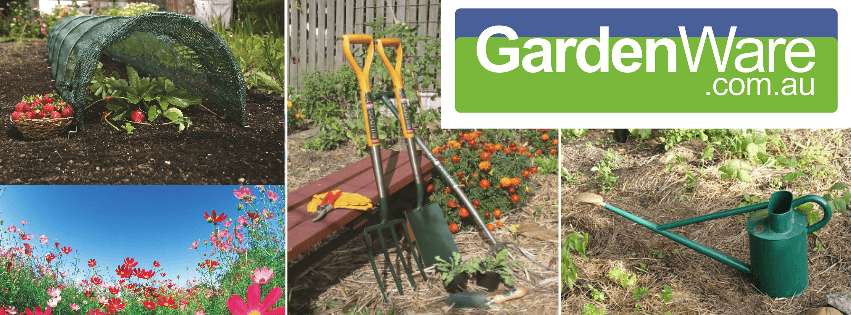
Nathalie Brouard started GardenWare with Nick 15 years ago.  Since then, GardenWare has grown leaps and bounds. Mothers who have started or want to start an ecommerce business can pick up a thing or two in our interview with Nat. She shares some tips on how to manage your time between your ecommerce business while tending to the kids.

Today, she continues to manage GardeWare while Nick has moved on to his other WooCommerce businesses. She writes regularly on the GardenWare blog and her posts are always a pleasure to read. GardenWare has now grown to be a leading provider of garden tools, footwear and apparel in Australia.

So let’s get started.

How did GardenWare start?

We moved to Queensland from Victoria 15 years ago. We were working remotely for the employer we had in Victoria. They were a garden footwear wholesaler selling Sloggers.

There would be customers that would like to buy Sloggers but they would be in locations where there wasn’t a Slogger retailer close by. Many of these customers would be used to buying from mail order catalogues as they were in remote locations. So the opportunity to sell direct to them arose.

What are some of the major challenges for the GardenWare?

In the beginning, trying to get our name out there was a challenge. We did a lot of garden shows as a solution and we were happy if we just broke even. Having young kids at the time meant we would have to organise care for them.

I got a second job to keep income coming in. That involved working nights and weekends. My son was eight months old when I started the second job so there was the juggle between work, feeding him and spending time with my family.

Although these may seem like personal challenges they also were intertwined with our company growth.

Being in a rural area saw us have some issues with couriers picking up some of our products. Long handled tools that Australia Post won’t send. We eventually found a courier company that does – yay.

What has been the biggest challenge in your career?

My work ethic has always been strong. Working from home can sometimes test this though. There are times when you want to extend your lunch break just a little bit longer to watch a bit more Netflix.

I can also miss working in a team. Sometimes the first time I talk to someone all day is when I drop off the orders at the post office.

Working for yourself means total responsibility, sometimes that can be scary and financial insecurity pops up, more so than when I was working for someone else and had a known wage coming in.

What are your tips on how to make a business startup a successful one?

Create a routine in your work week. The best strategy I use is having a strong morning routine. I wake up, go for a walk which centres me for the day, have breakfast with my kids. Then I’m in the office by 7.15am. This allows me to check my emails, get the orders ready for me to pack and set up a rough plan for the day. I check on the kids at roughly 8 o’clock to make sure they are getting ready for school! By nine o’clock I’m back in the office and ready to pick my work day back up with a clear idea of what to do.

A routine also gives me discipline and structure in my work day. I make sure I have a lunch break as well J

What works for me may not work for you – so create your own unique work routine.

Take time out where you can – I’ve had busy work times where I’ve juggled newborns or been pregnant. I’ve been no good to anyone when I’m burnt out. My garden has been my chill out at times like these. Even just five minutes away from my desk is helpful.

How has ecommerce changed over the past 10 years?

There is so much more competition out there. And with Google it is easy to compare and shop around – I do this myself. There is also more product transparency with most sites having product reviews. I see this as valuable information not only for your customer but for you as a company. If a negative review is left on your site, this is an opportunity to engage with your customer and offer a solution.

Improved technology has made it easier to shop online. Great websites offers a great customer experience, equivalent to being in a bricks and mortar store.

What do you think is the future of ecommerce?

It will only get better. Technology improvements have seen this happen. Our mindsets and comfortability have also changed over the years around online shopping. This will see it here to stay.

Do you have any advice for aspiring ecommerce entrepreneurs?

Be different. Provide great customer service. Companies that have websites with all the bells and whistles but suck at customer service are common. I’ve lost track of the number of times customers are grateful that I have responded to their email in timely way or returned their phone calls. Two basic things that you would think would be a given. We all remember when a company goes that extra mile to help us out – be that company. My customers love that we attach a couple of lollies to their invoices – I feel it is a touch that adds to the positive experience of them opening their order.

Be honest if you aren’t sure about something. Customers will pick up insincerity and pretty much all of the times I’ve been honest with a customer they have appreciated it.

What do you like about ecommerce?

Ecommerce has given me flexibility in my life. I can help out at my kids school which I love doing. If I need to go to an appointment during a work day I can. If I want to start early and finish early I can. This work/ life balance works for me.

Having orders come in at any time of the day or night is also a bonus – income coming in while I’m sleeping –why not J

We have also been able to involve our kids in our ecommerce adventures. They have benefited from learning life skills like a strong work ethic, dealing with customers, responsibility, time management, budgeting as well as some basic website backend skills.

And lastly being an online shopper myself, I love that I can browse and buy online any time. Even though I now live in a rural area I can still have access to all stores as if I still lived in the city.


Filed Under: Interviews, Wooassist News Tagged With: business development, Wooassist, WooCommerce

  • « Previous Page
  • 1
  • …
  • 15
  • 16
  • 17
  • 18
  • 19
  • …
  • 41
  • Next Page »
Let us support your online store so you can manage your business

Get started today

Get 2 Hours of FREE SUPPORT

We are so confident that you will love our services that we will give you your first 4 hours at a 50% discount

That’s 4 hours for only $75

BUY NOW

Free eBook

5 Things Every Online Store Can Fix On Their Website In The Next Week To Increase Sales

Quick Links

  • How it Works
  • Pricing
  • Blog
  • Contact
  • About Wooassist
  • My Account
  • Checkout
  • Privacy Policy
  • Cookie Policy
  • Terms and Conditions

Wooassist

Australia:
59 Luke St.
Hemmant QLD 4174

Philippines:
San Miguel St.
Poblacion, Iligan City 9200

Connect


Copyright © 2026 · Wooassist

Yours FREE!

5 Things Every Online Store Can Fix On Their Website In The Next Week To Increase Sales