Wooassist

Assistance for Your Woocommerce Store

  • How it Works
  • Pricing
  • Services
    • Site Maintenance
    • AI SEO and Content Marketing
  • Blog
    • How-To Articles
    • Code Snippets
    • SEO For E-Commerce
    • Theme and Plugin Reviews
    • Wooassist News
    • WordPress/WooCommerce News
    • Interviews
  • About Us
  • Contact
You are here: Home / Archives for John

James Grasty Tells The Bro Basket Story – The Wooassist Interview Series

April 25, 2019 By John Leave a Comment

This time around, we interview James Grasty from TheBroBrasket. He shares with us his insights on ecommerce as well as the story behind the success of the company that he started with his peers. He has actually started numerous other businesses until he finally found success in his first ecommerce venture. With that, let’s get started.

How did the TheBroBasket website start? What inspired the idea of gifts for men?

It’s actually a pretty cool story. Our MBA Entrepreneurship class at CSU Channel Islands was creating a business from scratch as our class project and the basic idea started as “If women get flowers, then what should men get? A bucket of beer!” which in 2013 was not really a thing you could send. A few of us liked the idea so much we turned it into a real business after the class ended in 2014 launching out website in December of that year. We started out with just a few gifts at higher price points, and a bucket of beer of course, but over time with customer feedback we added a bunch different gifts and made our old ones better. Now here we are almost 5 years later humming along, its been an interesting journey.

James Grasty from TheBroBasket


What are some of the major challenges for TheBroBasket?

Shipping gift baskets full of glassware, glass bottles, food, and accessories AND having it arrive in one piece looking good has been very challenging. It has taken us a lot of time and effort to get it right and things still break on occasion but from where we started we are light years ahead.

James Grasty (middle) with his colleagues Kenneth Connel (right) and Mike Mazza (left).

What has been the biggest challenge for the company?

Getting initial funding from venture, angel, or any kind of investment was a pretty big flop. We had to pile our own money together with some friends and family and launch the business. Honestly, we would have not made it out of our first year without our friend and fellow former classmate investing $10k. That helped us get us through ’til we received our SBA loan. Once we had the funding from that we were off to the races and were really able to start properly growing the business.

What are your tips on how to make a business startup a successful one?

We, as my above example shows you, either be well funded or run a tight ship and really boot strap till you have proof of concept and get off the ground, or both! As someone that started over half a dozen businesses, I would say there are a number of things that I have learned from my successes and my failures.

  • Get proof of concept and figure out if there is actually a market for the product(s) you are trying to sell before you go all in.
  • Have management level experience in the business you are trying to start – I have gone as far as getting a job with a competitor to try and see how they operated.
  • Properly plan, like really get in the nitty-gritty – I can’t tell you how many business I have failed at and seen other crash just because they, and I, didn’t do the proper planning and market research before launching the business
  • Be willing to pivot – we launched the business as a gift basket delivery service, we quickly realized that was not a viable idea and pivoted to a full eCommerce company.
  • Be consistent & persistent – pressure over time will always yield you results.
  • With that being said, know when to fold your hand – I have seen too many people waste countless years and money on businesses and products that suck, just kill it and move on!

How do you think eCommerce has changed over the past 10 years?

Well, I have only been in the game for 5 years, but I did try to start an ecommerce company way back in 2002. I realized I didn’t know enough coding to launch on 3dCart and had to move on. So I would say that the ease with which one can launch an ecommerce business has been one of the biggest changes. You don’t have to know the first thing about coding/programming, and hell you don’t even need that much money. The biggest downside to all that is its so easy now you get a lot of wannabees that think its easy to become some ecommerce stud, and yeah its easy to launch a business online but its still hard as ever to make that business succeed.

What do you think is the future of ecommerce?

I feel like it will continue to get easier and easier to own and operate a business in the ecom world, which is great for society as a whole, but means more competition for us that are already here and more expensive advertising. Amazon will continue to get bigger and Google will do the same, so hedging your bets and diversifying marketing channels and income streams is always a good idea.

How did you get started with WooCommerce?

Funny story; we paid way too much money to a local “website development” company that gave us a terrible website that I could probably make in a day these days, and it happened to be on WooCommerce. Thinking back, we should have been on a hosted solution like Shopify or BigCommerce, but it was what it was. It worked out for the best when we redeveloped the entire site and relaunched it less than 6 months later. We utilize a ton of customization and have customizable products and we would struggle to have these unique product offerings on a hosted solution.

What advice can you offer for aspiring ecommerce entrepreneurs?

Come up with or find a really cool and or unique idea and build a product/brand or service around that. We are looking at acquiring another ecommerce company and I really get annoyed when I find these companies that are just practicing retail arbitrage and/or selling cheap crap from China. Amazon and others are just going to get bigger and they will eat those people’s lunch sooner than later! So your best bet is to have a unique private labeled product and a solid brand that you can stand behind, that will help you become successful and stand the test of time.


Filed Under: Interviews Tagged With: business development, Wooassist, WooCommerce

Update Your WooCommerce Store Regularly to Prevent Your Site from Breaking

March 19, 2019 By John Leave a Comment

Update Your WooCommerce Store

Many times, when WooCommerce store owners come to us seeking for help, we usually find that the cause of the problem is an outdated site. In some cases, we find that the site’s plugins and themes have not been updated in years. And when a WooCommerce store site has not been updated in years, suddenly updating can sometimes break more things. Our recommendation is to update regularly.

Why Should You Update?

If you update your site regularly, you’ll be dealing with a lot less problems on your WooCommerce store. While it’s true that site updates may cause issues, these issues are usually less severe than issues that come up when you don’t update. In addition, you can troubleshoot these issues on a staging site which will have no effects on your live site. If your site breaks because it is outdated, your live site can go down for an indefinite period. That means no sales until you fix the issue. If this happens during a critical time for your business, it can have negative effects on your sales. Imagine running TV ads and then your site breaks due to being outdated. That’s advertising dollars down the drain.

How Often Should You Update Your WooCommerce Store?

The best schedule we’ve found for site updates is doing them at least monthly. You can update more often especially when severe security issues are patched.

What Happens When You Don’t Update?

When you don’t update your site, one or a few of these things could happen:

  • Your site may go down and become inaccessible
  • Your site layout may break
  • Images and icons may not load
  • Your payment processor may stop working
  • Your shipping plugins may stop working
  • Your product page may break
  • You may have various problems on your cart and checkout
  • Your sign-up forms and contact form may stop working
  • Your site may be hacked and infected with malware
  • Your SEO rating may drop
update woocommerce to increase security

What Do You Need to Do Before Updating Your Site?

Test Updates on a Development Site

It is important to test updates on a development site. If you do not have a development site, also called a staging site, you can check with your hosting company if they offer a staging service. Some hosting companies like WPEngine provide an easy-to-set-up staging service. You can also set up a staging site yourself. You can check this blog post to learn how to create a staging site for WordPress.

Before you update your live site, test updates on your development site first. Then do some user testing to find out if there are any issues with the updates. Some things you need to test are:

  • Your Site Layout
  • Opt-in Forms
  • Contact Forms
  • Shopping Cart
  • Checkout
  • Any custom development you’ve done on the site

If you find any issues on your staging site, it’s time to get fixing. If you do not know how to go about fixing the issue, you can check out our guide on troubleshooting for WooCommerce. You can also drop us an email so we can help you out.

Create a Backup

If there are no issues on your staging site, it’s time to update your live site. But first, don’t forget to create a backup. For backups, we can recommend UpdraftPlus or BackWPup. Once backup is successful, you can proceed to update then test your live site again. If more issues come up, proceed to troubleshoot.

backup your woocommerce store before updating

I updated my WooCommerce Store but my Site is Still Broken

Renew Your Plugin Subscriptions

Sometimes, issues may persist because automatic update are not available for your plugins. This is usually because your plugin subscription has expired. If this happens, you will need to renew your subscription. It is now easier to manage WooCommerce plugin subscriptions. You just need to connect your WooCommerce account to your WooCommerce store. For third-party premium plugins, you may need to check manually.

Do a Plugin Audit and Remove Abandoned Plugins

Another common reason why some websites break after updates is that it has a plugin that has been abandoned by the plugin developer. If a plugin is abandoned by the developer, it will not receive any updates and will eventually stop working. And it can break your site. Worse, it can even become a backdoor for hackers to get into your site. It is not easy to detect if your plugins are no longer being updated by the plugin developer so you will have to do it manually. View the details of each plugin on your plugin list and check when it was last updated. If the plugin has not been updated in a year or more, then remove that plugin right away. If a plugin has not been updated in over 6 months, use your better judgment if the plugin can be removed.

Find Incompatible Plugins

In some cases, plugins may break compatibility with each other. This is one reason why it is best to keep plugins to a minimum. Having more plugins can cause more problems. When plugins break compatibility, various errors can pop up on your site.

To troubleshoot incompatible plugins, deactivate all plugins on your site except WooCommerce. Then enable them one by and one while testing for the error. With some trial and error, you’ll be able to shortlist the incompatible plugins. When you find the incompatible plugins, you can replace one plugin with a compatible one. You can also report the issue to the plugin developers so they can address it.

WooCommerce Templates are Outdated

Sometimes you’ll find an error on your WordPress Dashboard alerting you of outdated WooCommerce templates. Most theme developers update their WooCommerce templates so check if your theme is updated. If your using a premium theme and have an expired license, you will receive automatic updates. If this is the case, update your subscription to get the updated templates. You can also fix this issue by following this guide from WooCommerce.

Final Notes

Add updating your WooCommerce store to your monthly to-do list to ensure your site is secure and won’t break in an uncontrolled environment. Renew your plugin subscriptions and do a plugin audit. If you find that you do not have time to do the monthly WooCommerce store updates yourself, the Wooassist team can help.

Filed Under: How-To Articles Tagged With: backup, plugins, security, shopping cart, WooCommerce, WooCommerce updates

Samantha Gowing on Food Health Wealth and Thriving in the Wellness Industry – The Wooassist Interview Series

February 15, 2019 By John Leave a Comment

Samantha Gowing has close to 20 years of experience in improving the health and well-being of Australians. Her background as a restaurateur and dietitian ensures she creates tasty and nutritious meals that everyone can enjoy. This, coupled with her business expertise, allowed Food Health Wealth to thrive in a trillion dollar indsutry.

We have been working with Sam since 2015 helping her maintain her website, among other things. We look up to her as an expert in her own field, so we saw it fit to include her in this interview series. Read on below for the interview.

How did the Food Health Wealth website start?

I co-created the first incarnation of the website in 2002 with a coder I met through a friend. I had wanted to build a site since the 90s, but web design was so expensive then. For about $500 I was able to work with a great developer who coded the back end originally in Mambo freeware. It was rather clunky in hindsight, yet it got my business up and running in the new digital era.

Samantha Gowing Wooassist Interview
Samantha Gowing started Food Health Wealth way back in 2002.
Image Credit: Nelly le Comte

What are some of the major challenges for Food Health Wealth?

Raising awareness so people understand the power of food as medicine and the benefits of cooking from scratch are some of the constant challenges.  The solution is to create a multi-faceted platform of services and skill sets that can constantly evolve and change to suit market trends, dietary changes and constantly researching the science-based evidence as it comes to hand, so you are always the leader in the field and top of the game.

What has been the biggest challenge in your career?

Transitioning from a successful career as a hotelier and restaurateur to retraining as a clinical nutritionist in 1999 and trusting that the wellness industry would be the $4.2 trillion global Industry it is today. Being ahead of the trend has allowed me to develop the unique spa and wellness programs that service the niche in the global marketplace for a spa cuisine and wellness specialist in the booming arena of luxury lifestyle retreats, health spas and elegant beach resorts.

Benefits to industry include intensive one-on-one training in the healing cuisines, exclusive cooking demonstrations, conference presentations ready-to-go spa food menus, management systems and kitchen templates.

What are your tips on how to make a business start-up a successful one?

Ask yourself if you are meeting your clients’ needs before you meet your own needs? Do you consider what the client can afford to pay more than what you need to earn? Letting go of the hourly rate structure brings about an opportunity to focus on the project as a whole and not incremental parts, which in my experience leads to less productivity as a consultant as constant clock-watching and cramming tasks into set hours can result in taking more time to do the actual work. If you’ve ever been self-employed in the healing arts or other creative health pursuits then you’ll probably agree that one of the biggest hurdles is knowing not what to charge, but how – and when.

How has eCommerce changed over the past 10 years?

It’s never been easier to set up an online store as it is today. While eBay and PayPal have made online transactions secure in the last ten years, it was unchartered territory. Contact forms were the target of cyber pests and unsecured payment gateways were fraught with danger.

What do you think is the future of eCommerce?

With internet access 24/7, it is easy to shop online almost anywhere. Be mindful of this when developing products and services. Consider lightweight products for better shipping rates and understand what your market really wants when it comes to purchasing a product online. VDO platforms and seamless downloadable modular courses are the way to go if you’re a service only provider such as a wellness consultant. If you’re a chef and nutritionist like me, then think about developing a signature range to sell within your own country with the view of global export in the longer term. Ecommerce is a rapidly growing vehicle that is constantly changing and evolving so stay ahead of the game and as Apple Pay and afterpay platforms ensure your customers can shop 24/7 it is an exciting time for ecommerce and online stores. .

How did you get started with WooCommerce?

I was looking for an ecommerce platform that would seamlessly integrate with my site and be just complex enough to navigate when I wanted to make changes and add new products. 

What advice can you offer for aspiring ecommerce entrepreneurs?

1. Know how to network your market. Get yourself a mentor or a go-to

I cannot stress this enough. You must surround yourself with like-minded peers. The biggest challenge many start-ups face is gaining clarity over their product and their offer. You simply cannot be all things to all people, and you must create a niche that is an inch wide and a mile deep. See my mentoring page here.

2. Future hunt trends before they arrive

Adopt an entrepreneur’s mentality. For example, current research from Global Wellness Institute forecasts that workplace wellness approaches will change radically. Embrace trend forecasting websites and blogs to help you identify emerging trends before they become part of the culture and business potential.

3. Beware of imitations

The highest form of flattery they say, however it can be very costly and very painful. This is the problem with being a pioneer. Don’t let it get you down. Rise up and rule your roost.

4. Protect and defend your IP

Trademark what you can. Image and recipe ‘borrowing’ is rife and always has been. Always credit your source! In academia, you’d be booted out of an institute for not referencing diligently – and plagiarism. Always declare your influence. Start with something like, ‘the work of (fill in this gap) has always inspired me’.

5. Develop Product

In order to get traction, you need to become very good at selling yourself and your products with grace, peace and ease. If you truly believe in yourself, your product and your offer, then you should not have to think twice about it as it will help your community. Get your product in to as many hands as possible and ask friends to take a pic of them reading, eating or wearing it.

Filed Under: Interviews Tagged With: business, business development, WooCommerce

How to Convert Your Old Posts and Pages into Gutenberg Blocks

February 5, 2019 By John Leave a Comment

Towards the end of 2018, WordPress 5.0, also known as the Gutenberg update was released. The notable thing about WordPress 5.0 is the introduction of “blocks”. Blocks have replaced the old WordPress text and visual editor.

Should You Update to Gutenberg?

Some WooCommerce store owners might be hesitant to update to Gutenberg. Gutenberg is a big change from the classic editor so being hesitant to move to Gutenberg is understandable. If you don’t really want to use Gutenberg, you can install the classic editor for WordPress. It is however imperative to update your site to the most recent WordPress version for security reasons. Sticking to an old version of WordPress will leave your site vulnerable to security threats. New versions of plugins and themes might also cause issues on older versions of WordPress.

Since WordPress 5.0 is a major update, we recommend testing your updates on a development site first. If you need help updating to WordPress 5.0, you can contact us and we can help you out.

Will Updating to Gutenberg Affect Your Old Posts and Pages?

Updating to Gutenberg will not affect your old posts and pages. Any new content you create will make use of blocks. Still, any old content that does not use Gutenberg blocks will be housed in a classic editor block.

How to Convert Old Posts and Pages into Blocks?

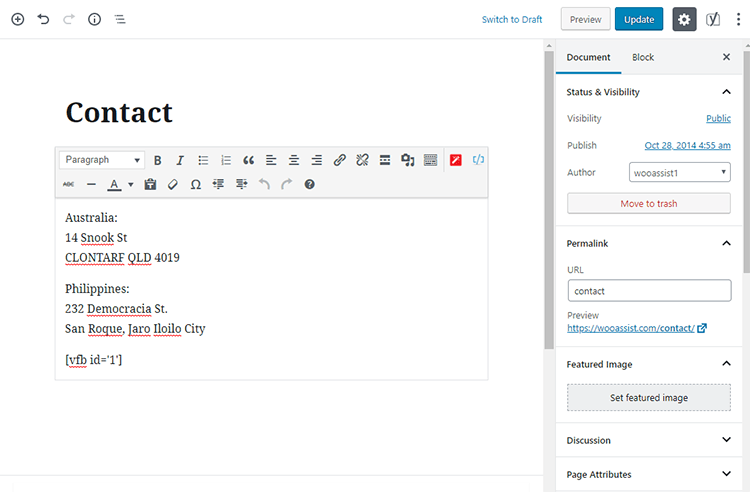
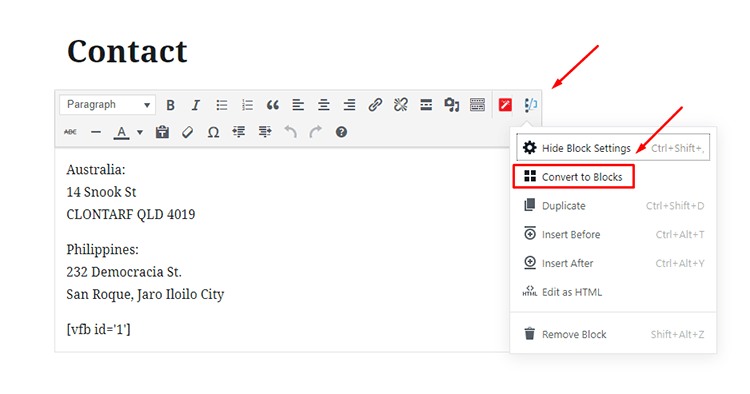
Converting your old posts and pages into Gutenberg blocks can be done in a few clicks. Click on Edit on the post or page that you want to convert. On the classic editor block, look at the upper right section. Here you will find an icon with three dots. Click that icon and click Convert to Blocks.

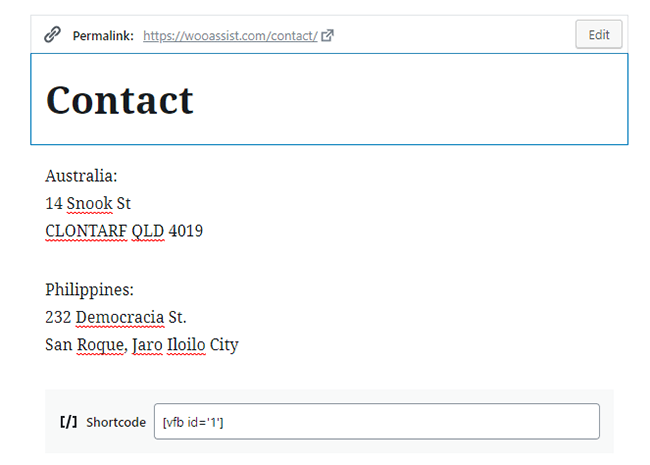
After that, you should see your post/page converted into Gutenberg blocks.

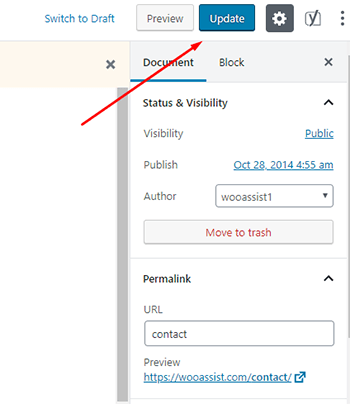
From here, click on Update to save your changes.

Repeat this process for each post or page that you want to convert into blocks.

After converting, be sure to check the actual page or post to make sure that there are no layout issues. If you are using shortcodes, check that the shortcodes are working as well.

If you have any questions about converting old posts into Gutenberg blocks, let us know in the comments.

Filed Under: How-To Articles Tagged With: blog, gutenberg, WordPress, wordpress 5.0

How to Properly Install SSL on Your WooCommerce Store

January 21, 2019 By John Leave a Comment

Having an SSL Certificate (using the https protocol) on ecommerce sites is now a must. Google has declared that they now consider HTTPS as a ranking signal. This means that it will be easier to rank your website in Google search results when you have an SSL Certificate installed.

What is HTTPS and Why Should You Bother?

An SSL Certificate is an encryption method that protects data being transferred from the browser to your servers. Having an SSL certificate ensures the security of your customers data. With SSL encryption, data is being transferred using an encrypted and secured connection. Even if an attacker is able to get a hold of the data, it will still need to be decrypted to be of any use.

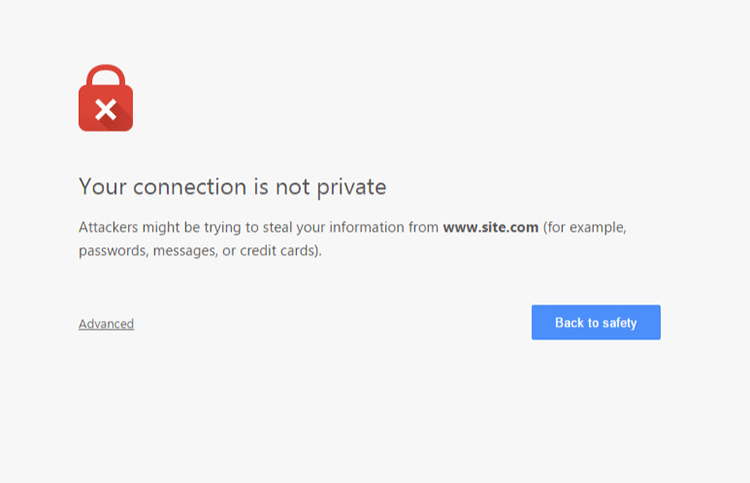
If you do not have an SSL certificate installed on your WooCommerce store, a big warning will come up on browsers about your site not being secure. This could drive away potential customers. If this happens, the only way to reach your site is if users click on the “Advanced” link. After that, they will still need to confirm that they want to proceed to your site even if it not secure.

How to Properly Install SSL on Your WooCommerce Store

Having this warning appear on your site can have devastating effects on your traffic and especially your sales. Don’t take that risk.

What Do You Need to Get an SSL Certificate?

Most hosting companies such as WPEngine and Siteground can provide you with a free SSL certificate. You’ll just need to configure it on your site to use it. If your host is unable to provide you with a certificate, you can purchase one from RapidSSL or any other SSL provider. Configuring your SSL certificate is actually quite easy.

How to Install Your SSL Certificate

You will need to install your SSL on your domain using cPanel on your hosting account. If you host does not use cPanel, it will most likely have a wizard that can help you through the installation. You can get support from your host if you need help getting this done. When that’s done, you will need to head over to your WordPress Dashboard.

Configuring Your SSL Certificate using a Plugin

A simple method for configuring your SSL certificate is by using a plugin. Just go to your plugins page and search for the Really Simple SSL plugin. Install and activate it. After that, go to Settings > SSL. When you reach this page, the plugin will automatically detect your SSL certificate. When that’s done, your site will have a functioning SSL certificate.

Configuring Your SSL Certificate Manually

To configure your SSL manually, go to your WordPress Dahsboard, go to Settings. In the General Tab, under WordPRess Adress (URL) and Site Address (URL), change http to https.

Configure SSL on WordPress

Common Issues When Installing SSL

Sometimes, you may come across some issues when installing your certificate. Here are some common issues and fixes.

Mixed Content Errors

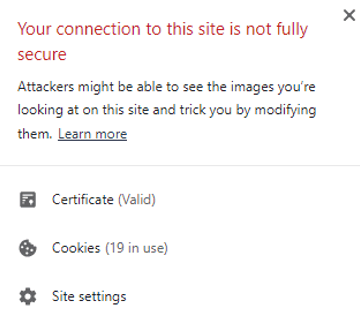
A common issue when installing an SSL certificate is that sometimes not all elements are being served securely. And you’ll get a warning like this:

SSL Mixed Content Error

If you used Really Simple SSL plugin, that automatically takes care of elements not being served securely. If you did not use the plugin, you can still fix the issue albeit requiring a bit more work.

WPBeginner details steps on how you can fix mixed content errors on your site.

Cache Errors

If you are having some errors related to the cache after installing your SSL certificate, just clear your cache and that should fix the issue. Steps will vary depending on your caching plugin so it is best to consult your plugin documentation.

Final Notes

If you’ve set up your SSL certificate on your WooCommerce store, you are one step closer to maximizing your site’s security and increasing your store’s trust rating. If you need help installing your SSL certificate or if you are having issues with your SSL certificate, you can contact the Wooassist team for expert help.

Filed Under: How-To Articles Tagged With: conversion optimization, CPanel, security, SSL, trust rating

  • « Previous Page
  • 1
  • …
  • 14
  • 15
  • 16
  • 17
  • 18
  • …
  • 41
  • Next Page »
Let us support your online store so you can manage your business

Get started today

Get 2 Hours of FREE SUPPORT

We are so confident that you will love our services that we will give you your first 4 hours at a 50% discount

That’s 4 hours for only $75

BUY NOW

Free eBook

5 Things Every Online Store Can Fix On Their Website In The Next Week To Increase Sales

Quick Links

  • How it Works
  • Pricing
  • Blog
  • Contact
  • About Wooassist
  • My Account
  • Checkout
  • Privacy Policy
  • Cookie Policy
  • Terms and Conditions

Wooassist

Australia:
59 Luke St.
Hemmant QLD 4174

Philippines:
San Miguel St.
Poblacion, Iligan City 9200

Connect


Copyright © 2026 · Wooassist

Yours FREE!

5 Things Every Online Store Can Fix On Their Website In The Next Week To Increase Sales