Wooassist

Assistance for Your Woocommerce Store

  • How it Works
  • Pricing
  • Services
    • Site Maintenance
    • AI SEO and Content Marketing
  • Blog
    • How-To Articles
    • Code Snippets
    • SEO For E-Commerce
    • Theme and Plugin Reviews
    • Wooassist News
    • WordPress/WooCommerce News
    • Interviews
  • About Us
  • Contact
You are here: Home / Archives for John

How to Enable Apple Pay for WooCommerce

June 16, 2017 By John 2 Comments

What is Apple Pay?

how to enable Apple PayApple Pay presents a new and more convenient way to pay for mobile e-commerce purchases. Since Apple does not share your credit card details when you pay, it is safe, secure and private. Currently, Apple Pay is already accepted in a number of stores and websites. You can check this list of merchants that accept Apple Pay.

Why Add Apple Pay to Your WooCommerce Store?

Early adopters of Apple Pay have experienced an increase in conversion rates of up to 80%. The checkout process is made much faster as payment only requires a fingerprint check as opposed to entering your credit card number.

What Do I Need to Install Apple Pay on WooCommerce?

To install apple pay with WooCommerce, there are a few requirements. First, the store must support Stripe payments. You’ll also need the WooCommerce Stripe Extension which is free. Stripe is currently available in 10 countries, namely, Australia, Switzerland, United Kingdom, Hong Kong, Singapore, Canada, Spain, France, New Zealand, and the United States.

How to Enable Apple Pay on Your WooCommerce Store

Just follow the steps below to enable Apple Pay on your WooCommerce store. If you have already set up the WooCommerce Stripe Extension, please proceed to Step 7.

    1. Install and activate the WooCommerce Stripe Extension. You can download it here or just search for it in the plugins page.
    2. Head over to WooCommerce > Settings > Checkout > Stripe and check the “Enable Stripe” box. Make sure you disable “Enable Test Mode” if you want to go live. If you are already accepting payment through Stripe, go to Step 7.
    3. Input your Live Secret Key and Live Publishable Key. You can get the information from your Stripe account.
    4. Input the Statement Descriptor. This is the text that will appear on your customer’s credit card statement.
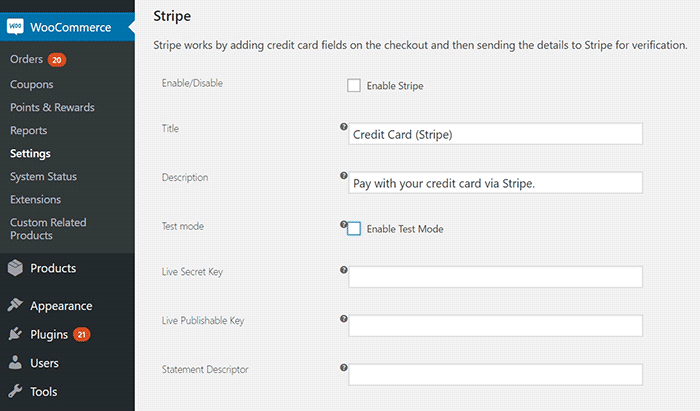
      Stripe setup
    5. Choose whether to “Capture Charge Immediately” or not. If you choose not to charge immediately, you will need to manually initiate the charge through the WooCommerce order page.
    6. You can choose to “Enable Stripe Checkout” for the plugin to create a pop-up that requests details. Choose this option if you want to accept Bitcoin.
    7. To enable Apple Pay, tick on the Enable Apple Pay box.
    8. Under “Apple Pay Button Style”, you can choose what color you want the Apple Pay button to be.
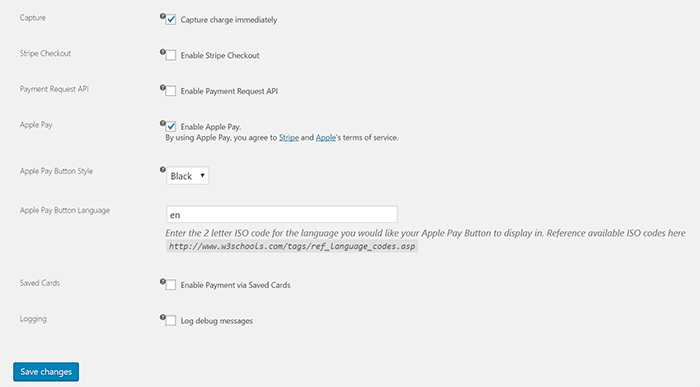
      Stripe setup2
    9. Under “Apple Pay Button Language”, you can enter the ISO code for the language you want to use. For English, just use “en”.
    10. Click on Save Changes when done.

That’s it. You are now ready to accept Apple Pay payments on your WooCommerce store.

If you are having problems enabling Apple Pay on WooCommerce, let us know in the comments.

Filed Under: How-To Articles, Theme and Plugin Reviews Tagged With: best practices, checkout form, e-commerce, how-to, plugins, WooCommerce

29 Business Principles From A Self-Made Billionaire Business, Entrepreneurship, and Success Principles From Richard Branson’s “Like A Virgin”

June 12, 2017 By John Leave a Comment

Richard Branson's Like A VirginIf you’re an entrepreneur it’s important to leverage the experience of other successful entrepreneurs so you can save time, avoid costly mistakes, and achieve your goals faster.


I’ll share with you some principles from one Entrepreneur—Richard Branson who founded the Virgin Group but first let’s get to know a little more about who he is.

Who is Richard Branson?

Richard Branson is an entrepreneur and a philanthropist who founded the Virgin Group, which has 400 companies under it. When he was still starting he stood against the giants in the industry such as the British Airlines and was able to rise up despite having less advertising budget.

How much is the net worth of Richard Branson?

As of 2017, his net worth is 5.1 billion US dollars.

What are Richard Branson’s Philanthropy projects?

First he works with The Elders which is a group of leaders who join together to resolve conflict all over the world. One of the founders is Nelson Mandela, the president of South Africa and a Nobel Peace Laureate.

Another is the Carbon War Room, an organization founded by Virgin Unite for combating global warming by reducing carbon emissions.

Richard Branson’s Reality TV about entrepreneurs

Richard Branson has a reality TV show about developing entrepreneurs called The Rebel Billionaire – Branson’s – Quest For The Best. See below video:

Who does Richard Branson consider as his role model?

Archbishop Desmond Tutu – who fought against racial discrimination and is also one of the founding members of The Elders.

What is Richard Branson’s vision?

To ensure world conflicts are resolved more effectively or even become a thing of the past.

29 Powerful Business Principles From Richard Branson

Now that we know who Richard Branson is and where he’s coming from, here are some of his principles and advice to grow your business. These principles were based on an interview of him written at the start of his book “Like A Virgin” which despite the title is actually a business and management book.

  1. What’s the best advice he can give? Look only for the best qualities in people.
  2. What’s the best advice he can give? Only a fool never changes his mind.
  3. The key to success in three words: People. People. People.
  4. Luck doesn’t just happen, you have to work at it.
  5. Love what you do, love people, love making a difference.
  6. Avoid negativity, avoid looking for the worst in others, avoid having ‘glass-empty’ mentality.
  7. Avoid gossiping.
  8. Overcome challenges, and if you fail, pick yourself up quickly.
  9. Five secrets to starting a business: if you don’t enjoy it, don’t do it. Why? Because starting a business consumes a lot of time so you need to be willing to spend huge amounts of hard work and time.
  10. Five secrets to starting a business: be innovative, create something radically different. Do things that have never been done before and continue innovating. If you enter a crowded industry, be ready to offer customer service that blows the competition away.
  11. Five secrets to starting a business: Build your business so that people are proud to be associated with the company. It generates a special level of advocacy and dedication from your people. In most businesses, people are your biggest assets.
  12. Five secrets to starting a business: lead by listening and be extremely good at lavishing praise. Never openly criticize people. Never lose your temper. Always be quick to applaud a job well done. People flourish on praise. Usually people don’t need to be told that they’ve done wrong because most of the time they know it.
  13. Be visible: even if you work from home be constantly out and about and meet people. Keep a notebook as you go out and jot down questions, concerns and good ideas. Meet as many of the people that your company is serving because you will get good suggestions or ideas. Write those ideas down. Talk to your staff and customers at every opportunity, listen to the good and the bad feedback and act on it. Appoint leaders in your team who have the same philosophy–keep it proactive, responsive, and friendly.
  14. Learn from failure, then pick yourself up again. Some of the best lessons are learned from failure, but pick yourself up and start all over again.
  15. The real engine of any business – people. Good people are not only crucial to your business, they ARE the business.
  16. Find the right people
  17. Manage the right people
  18. Inspire the right people
  19. Hold on to the right people
  20. Keeping and maintaining the right people are one of the most important challenges that a business leader faces
  21. What sets a business apart from others are the attitude of the people
  22. Your people should be smiling, cheerful, pleased to help, so customers want to do business with you again.
  23. People are your key asset.
  24. A good leader must know the team, its strengths and weaknesses. Socializing and listening to the team is key.
  25. Remind the managers and leaders in your team about having a true sense of pride in the business because that’s what makes all the difference.
  26. Be willing to give people a second chance. Remember the times when you too made mistakes and were given a second chance. Branson once tried to sneak duty-free records out of the UK and escaped a criminal record only by paying a fine. He was given a second chance to start over.
  27. Call people out in private when they do something wrong, but give them a second chance. Branson said this to one of his staff who messed up by trying to steal and then sell his record labels: “Everyone messes up, I expect you to learn from this mistake and go back to doing what you do best.”
  28. Your people need to be looked after, and celebrated.
  29. How to handle people who don’t perform up to standards:
  • Don’t be aggressive
  • There’s plenty of ways to get your point across and make your business successful without being aggressive
  • Always remember that you love what you do and your role is to persuade others to love your business too, so that people will want to work with you.
  • Engage with everyone in a positive, inclusive manner rather than in an aggressive, combative, or negative way
  • If the companies or individuals you deal with do not respond to a positive approach, ask yourself if they are the right companies or people to work with.
  • For every supplier or people who are aggressive towards you, there are another five who will want to work with you.
  • Look for companies or individuals who want an inclusive, positive partnership.
  • Strong personality is important when starting a business, but ‘strong’ does not have to mean ‘aggressive’.
  • Have confidence in your ability to follow you vision
  • Listen to others
  • Master the art of delegation
  • Delegate to a member of your team when you encounter frustrations when dealing with others.
  • Delegating difficult problems to your team brings a fresh pair of eyes and ears, and a different approach and perspective
  • Surround yourself with a great management team who complement you and ensure that the team have all-round skills to make the business succeed.
  • When negotiating, remain calm and collected.
  • When negotiating, if you are getting angry take a deep breath, pause, and realize that you are taking things personally. Take a step back. Rely on the team around you to help you out.
  • Learn to negotiate without aggression. Understand what you want to achieve and what leverage you possess to help you reach your goals. You need less aggression and more determination.
  • Confide in your team the difficulties you encounter, it will help you put everything in a clearer perspective.
  • Attract and keep good partners and staff by making them feel that they have done well with you.
  • Be willing to listen to other people’s suggestions, and recognize when those suggestions are better than yours. Don’t be afraid to admit you’re wrong. Take action when the suggestions are better.
  • Build a healthy rapport with your team and the companies you work with. Don’t take everything personally.

Take Action

That’s a lot of things you can act on here immediately that can have a positive on your business and that’s only from the first 21 pages of Richard Branson’s book! Personally I learned some new things I can implement immediately in several of my businesses. Which of these principles can you immediately implement in your business and why did you choose these principles over the others?

Filed Under: Wooassist News Tagged With: business, e-commerce

12 Business Principles From Lean Startup by Eric Ries

June 8, 2017 By John Leave a Comment

Eric RiesI read this book just before I started Wooassist, and recently decided to go through it again. It was just as thought provoking second time around.
Here is a summary of the principles I have taken away from the book Lean Startup by Eric Ries.

Who is Eric Ries?

Eric Ries is an entrepreneur and co-founder of IMVU, a social network, which grew to $50 million in annual revenues in 2011 employing over a hundred people in Mountainview California. IMVU’s virtual goods catalogue now has more than 6 million items in it, with 7,000 added every day and most of the items are created by its customers.

What are the principles from the Lean Startup Method?

  1. Lean Startup by Eric RiesStand up from failure. The author experienced difficult failures too. The first company where he worked as a software engineer failed. However that did not stop him because he partnered with one of the founders to form IMVU later.
  2. Recognize the reality that most start ups fail. Eric Ries has worked with hundreds of entrepreneurs and has seen many promising startups lead to failure. “The grim reality is that most startups fail. Most
    new products are not successful. Most new ventures do not live up to their potential.”
  3. Do not be afraid to make mistakes. Instead, be determined to make mistakes! Eric Ries and his cofounders are determined to make new mistakes. They make a point to do everything wrong: instead of spending years perfecting their technology they instead build a minimum viable product, an early product that is terrible, full of bugs and crash-your-computer stability problems. Then they ship it to customers way before it is ready. And they charge money for it. After securing initial customers, they change the product constantly and ship new versions of our product frequently.
  4. Take action: produce your minimum viable product. Even when your product is not yet perfect, start marketing it, start sending it out to customers. Get feedback to it. Charge money for it. Then improve it quickly.
  5. Eric Ries and his team listen to the customers but do not always follow what their customer says they want, instead they make experiments on their customers! Eric Ries said: “We really did have customers in those early days—true visionary early adopters—and we often talked to them and asked for their feedback. But we emphatically did not do what they said. We viewed their input as only one source of information about our product and overall vision. In fact, we were much more likely to run experiments on our customers than we were to cater to their whims.”
  6. The Lean Startup Method – is built on many existing management and product development ideas, including lean manufacturing, design thinking, customer development, and agile development. It is a method for creating continuous innovation in any organization.
  7. The Lean Startup Method puts a focus on what customers want (without asking them), and a scientific approach to making decisions.
  8. Experimentation is important: Eric Ries considers himself fortunate to have cofounders who were willing to experiment. One thing in common between the cofounders was that they were fed up with the failure of traditional thinking.
  9. Customer Development = Business + Marketing Functions Are As Important As Engineering And Product Development. Steve Blank who is an investor and adviser for IMVU. In 2004, Steve began to preach a new idea: the business and marketing functions of a startup should be considered as important as engineering and product development. Business and marketing deserves a rigorous methodology to guide them. He called that methodology Customer Development, and Eric Ries was greatly influenced by this.
  10. Eric Ries studied Toyota’s Lean Manufacturing System and used some of the ideas:
    Lean manufacturing originated in Japan with the Toyota Production System. This heavily influenced the Lean Startup Method.
  11. The Five Concepts:
    Entrepreneurs are everywhere – the strategies can work for small and large companies.
    Entrepreneurship is management – you need a management that can handle extreme uncertainties.
    Validated learning – part of the job of entrepreneurs is learning how to build a sustainable business. You need to run frequent scientific experiments that will test each element of the entrepreneur’s vision.
    Build-measure-learn – turn ideas into products, measure how customers respond, and decide whether to change direction or stay in the same direction. Your business needs a feedback loop.
    Innovation accounting – focus on the boring stuff, how to measure progress, how to set up milestones, how to prioritize work.
  12. Vision, Steer, Accelerate
    a. It’s also important to build a minimum viable product rather than aiming for perfection right at the start.
    b. It’s important to have leap-of-faith ideas—we don’t know if they will work or not, that’s why we will test these ideas rigorously. Don’t discount any idea because it doesn’t “seem” plausible, try these ideas out and then measure the results.

“Vision” – The entrepreneur has a vision, a leap of faith idea, but it’s important to gauge if they are making progress, and this is where we need validated learning. To achieve this validated learning, use scientific experimentation. The lessons you learn will help you build a sustainable business.

“Steer” – the process is first Build, second is Measure and third is to Learn. Build-measure-learn is a feedback loop and again is part of the validated learning. The entrepreneur begins with leap-of faith assumptions then build the minimum viable product, then the progress is measured through rigorous testing, and we measure whether or not the assumptions of the entrepreneur are valid or not. There is a need to establish a new accounting system for evaluating whether entrepreneurs are making progress, and a method for deciding whether to pivot (changing course) or persevere in the same direction.

Accelerate” – explores techniques for entrepreneurs to speed through the Build-Measure-Learn feedback loop as quickly as possible even as they scale. This focuses on lean manufacturing concepts such as producing small batches of your products rather than big batches, getting feedback to your product fast, and organizational design to improve product growth. Toyota uses principles such as drawing on the knowledge and creativity of individual workers, shrinking of batch sizes, just-in-time production and inventory control, and an acceleration of cycle time

Take Action

These twelve principles can help you grow your business faster than before.

Here are some actions you can immediately take:

  1. Produce your minimum product. Don’t wait for your product to be perfect—get it out and into the hands of your customers.
  2. Improve your product quickly. Once you have customers testing your products, you can immediately improve them.
  3. Listen to your customers (but not what they say). Observe your customers and observe their actions, but it’s not necessary to follow what they say.
  4. Be willing to experiment.
  5. Build the product, measure the progress, learn from the progress. This is the process of getting validated learning.
  6. Spend time for the boring stuff—measuring progress, establishing milestones, tracking.
  7. Do the same thing not only for your product development, but also for your marketing and business functions. Build, measure, and learn.
  8. Based on your learning, decide whether to change course (pivot) or to accelerate on the same path.

Filed Under: Wooassist News Tagged With: business, e-commerce

How to Revert to the Old WooCommerce Product Gallery in WooCommerce 3.0

April 11, 2017 By John Leave a Comment

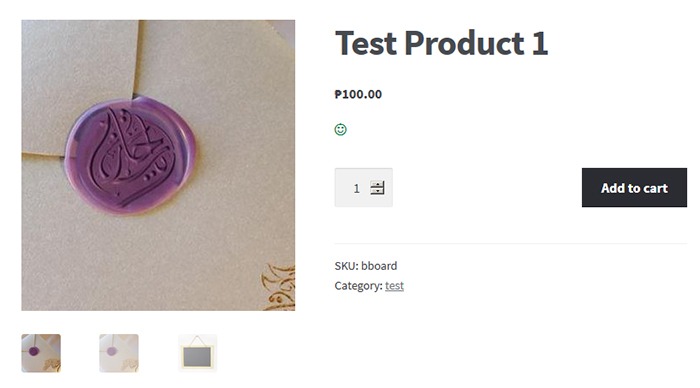
WooCommerce 3.0 is now live. In this version of WooCommerce, the product gallery receives a major overhaul. This includes zooming on product images, more intuitive behavior, improved mobile view and function, and the ability to display the image’s true size on click.

The updates are promising as you can see from the video below. However, the zoom functionality poses a problem for many WooCommerce store owners.

Many WooCommerce Stores Don’t Have Hi-Res Images

The zoom function for the product gallery in single product pages can become a problem for low-res images. Many WooCommerce store owners would not have high-resolution images uploaded to their WooCommerce stores. This is because high-resolution images are bad for page load speed. Large images can slow down a site. Hence, when the zoom function rolls out, low resolution product images will appear grainy and pixelated when zoomed.

How to Revert to the Old WooCommerce Product Gallery Zoom Function
Zoom function upon mouseover in WooCommerce 2.7

To solve this problem you can choose to revert to the old product gallery. While you use the old gallery, you can work on adding high-resolution product images to your store.

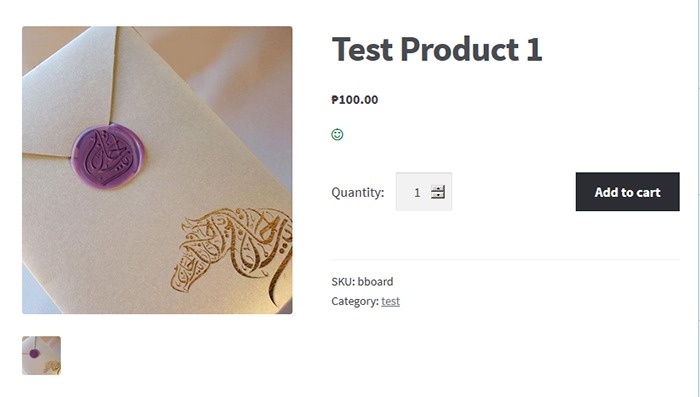
old-gallery_How to Revert to the Old WooCommerce Product Gallery
Old product gallery

Reverting to Old WooCommerce Product Gallery

Reverting to the old WooCommerce product gallery can be done by using the Revert WooCommerce Image Gallery plugin. Simply install and activate the plugin and your WooCommerce product gallery will automatically revert to the old product gallery. There are no complicated settings to tweak.

How to Update to the New Product Gallery

When you finish uploading high resolution images, simply deactivate or uninstall the plugin. The product gallery will automatically update to new product gallery. You can also choose to just keep the plugin if you want to keep the old product gallery.

We hope this tutorial is helpful.

Is your store ready for WooCommerce 3.0? Do you have questions about the WooCommerce 3.0 update or the Revert WooCommerce Image Gallery plugin? Let us know in the comments.

Filed Under: How-To Articles, Theme and Plugin Reviews Tagged With: admin, best practices, design tweaks, how-to, plugins, Storefront, Wooassist, WooCommerce

How to Add a Quantity Field on Your WooCommerce Shop Page

April 7, 2017 By John 30 Comments

counting-cubes-quantity-on-shop-page

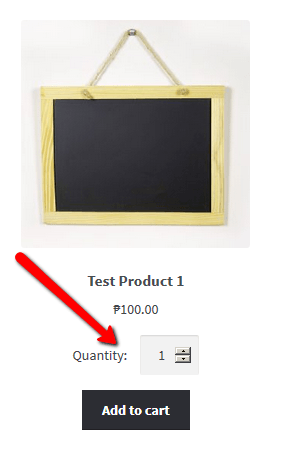
By default, WooCommerce does not allow users to change the quantity of the product on the shop page before adding to cart. To change the quantity, users would have to proceed to the cart page which can be an arduous process. In this post, we will show you how to add a quantity field on your WooCommerce shop page.

If a customer wants to buy three sunglasses, and you only have the “Add to Cart” button on the shop page, the user will have to go to the Cart to edit the quantity that he/she wants to buy. This takes a few extra clicks and can become a real problem if the customer wants to shop for more items.

Less Clicks to Checkout

It is important to note that less clicks leading to the checkout page leads to more sales. As an e-commerce store owner, making your store more profitable should be on top of your priority list. Another way to reduce clicks to checkout is allowing the customer to check out as guests without the need to create an account.

Also, refrain from asking unnecessary information. At the very least, your checkout page should only have the name, address, email and phone number fields aside from the payment details.

Quality of Life Improvement

Adding the quantity field to the shop page is a good quality of life improvement that many of your visitors would appreciate. Instead of having to navigate to the cart or the product page to increase the quantity, they can increase the quantity from the shop page. If you think about it, making it easier for your customers to purchase more of your products means more sales for you.

A Necessity for Some Online Stores

How to Add a Quantity Field on Your WooCommerce Shop PageAdding the quantity field to the shop page is a necessity to some stores where buying several pieces and having repeat sales are common. For example, buying canned cat food in bulk is common so if you own a store selling pet food, having the quantity field on the shop page will really help. Many of your customers will be buying again after some time. They can just add the products directly from the shop page since they know what they are buying and no longer need to see the product details.

How to Add a Quantity Field on Your Shop

You can use the Quantity Field on Shop Page for WooCommerce plugin to add a quantity field on your WooCommerce shop. Just install the plugin and activate it. There are no settings to tweak. Once the plugin is activated, the quantity field should be on your shop page.

Did this plugin work for you? Do you have any questions or ideas on how the plugin can be improved? Let us know in the comments.

Filed Under: How-To Articles, Theme and Plugin Reviews Tagged With: best practices, e-commerce, how-to, navigation, plugins, website development, Wooassist, WooCommerce

  • « Previous Page
  • 1
  • …
  • 20
  • 21
  • 22
  • 23
  • 24
  • …
  • 41
  • Next Page »
Let us support your online store so you can manage your business

Get started today

Get 2 Hours of FREE SUPPORT

We are so confident that you will love our services that we will give you your first 4 hours at a 50% discount

That’s 4 hours for only $75

BUY NOW

Free eBook

5 Things Every Online Store Can Fix On Their Website In The Next Week To Increase Sales

Quick Links

  • How it Works
  • Pricing
  • Blog
  • Contact
  • About Wooassist
  • My Account
  • Checkout
  • Privacy Policy
  • Cookie Policy
  • Terms and Conditions

Wooassist

Australia:
59 Luke St.
Hemmant QLD 4174

Philippines:
San Miguel St.
Poblacion, Iligan City 9200

Connect


Copyright © 2026 · Wooassist

Yours FREE!

5 Things Every Online Store Can Fix On Their Website In The Next Week To Increase Sales