Wooassist

Assistance for Your Woocommerce Store

  • How it Works
  • Pricing
  • Services
    • Site Maintenance
    • AI SEO and Content Marketing
  • Blog
    • How-To Articles
    • Code Snippets
    • SEO For E-Commerce
    • Theme and Plugin Reviews
    • Wooassist News
    • WordPress/WooCommerce News
    • Interviews
  • About Us
  • Contact
You are here: Home / Archives for Theme and Plugin Reviews

10 WooCommerce Plugins to Supercharge Your Store

April 5, 2016 By John Leave a Comment

ecommerce-cart-frog-mini-computer

WooCommerce is a great tool to sell online with unlimited possibilities for customization. One of WooCommerce’s best features is its extensive library of plugins available.

Many of the customizations you need for your WooCommerce store will most likely have been requested by a lot of WooCommerce users. This is where the plugin developers come in. Hence, there will almost always be a plugin for your specific needs.

Here we’ll list down 10 WooCommerce plugins to supercharge your store.

1. WooCommerce Customizer
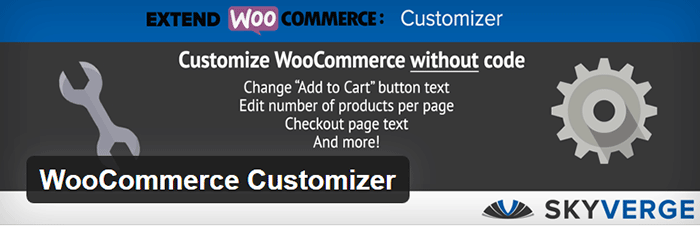
WooCommerce-Customizer

WooCommerce Customizer is a free plugin from Skyverge. It adds an extra settings page for WooCommerce to help you make quick changes which otherwise would require writing some custom PHP functions. The plugin allows users to edit the text for Add to Cart and Submit Order buttons on the WooCommerce store. It allows you to edit the number of products shown as well as the number of columns on the category pages. You can also edit page coupons, tax labels, logins, product headers and additional information tab headers. The plugin only works on individual sites and does not support multisite networks. It is a great tool for A/B testing because you can change settings in a few clicks. You can optimize the look of your WooCommerce store for optimum conversion.

2. WooCommerce Products Filter

WooCommerce Products Filter is a great plugin especially when you have a lot of products on your WooCommerce store. It lets you set search categories for your visitors and use this to filter products by categories, tags, attributes, and taxonomies. It uses AJAX for easy product search. This allows the user to continuously search without the need to reload the page which is convenient. You can choose from various display formats like drop-downs, check-boxes or radio buttons. These display formats let you customize how users can search products in your WooCommerce site. It also has simple options if you want your product search filter to be less complicated. To add the filter, you just need to insert the shortcode.


3. WooCommerce Products Slider

Create a mobile-friendly slider of your products anywhere in your site using WooCommerce Products Slider. You just create your sliders then paste the generated shortcode where you want them to appear. This plugin lets you display featured items, latest products, or sort products posted by date and more. The height, column numbers, size, items and button colors are easy to customize. The free version comes with two themes to help you showcase your products across your WooCommerce store.


4. Booster for WooCommerce

Booster-for-WooCommerce

Booster for WooCommerce is a free plugin that supercharges your e-commerce site with features that will empower your standard WooCommerce store. It extends WooCommerce features and lets you add more customizations. It lets you customize prices and currencies, button and price labels, products, cart and checkout, payment and gateways, shipping, invoices, emails, etc. You can check out the long list of features in the plugin page.

5. WooDiscuz WooCommerce Comments

WooDiscuz WooCommerce Comments is a plugin that can help you build customer trust, boost engagement and increase sales. This can also double as your instant FAQ and support platform for specific products. It gives you a platform where your customers or users can discuss your products and add reviews. Visitors can ask pre-sale questions.

This plugin allows you to moderate comments, tweak permissions, and edit security options. It also has anti-spam, AJAX pagination, and redirect to “Thank you” page features.


6. WooCommerce – Store Exporter

WooCommerce-Store-Exporter

Take control of your store data with WooCommerce – Store Exporter. It lets you design advanced and concise exports of your data in minutes. This will benefit e-commerce businesses that need to deal with large amounts of data. The free version lets you export your products, categories, tags, and user data into a CSV file or WordPress Media. It is also compatible with WordPress multisite.

7. WooCommerce PDF Invoices and Packing Slips
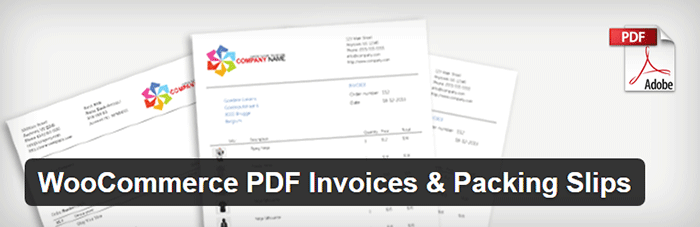
WooCommerce-PDF-Invoices-and-Packing-Slips

WooCommerce PDF Invoices and Packing Slips will automatically create and add a PDF invoice to WooCommerce emails sent to your customers. Save time from having to send invoices manually and increase your WooCommerce store’s trust rating. You can easily modify the base template for the invoices or create your own template. The plugin also allows for generating and downloading invoices and packing slips in bulk. Monitoring your invoices is easier with the custom format sequential invoice numbers. It has multi-language functionality and lets you add custom fonts.

8. Stripe Payment Gateway WooCommerce Addon

Stripe-Payment-Gateway-WooCommerce-Addon

Stripe Payment Gateway WooCommerce Addon is a free payment gateway plugin for WooCommerce. Setting a payment gateway with Stripe is made easier through this plugin. When configured, the plugin allows your WooCommerce store to accept credit cards payment on checkout. Stripe does this with a generated API. Paying won’t seem like they are redirected to a different site with its overlay appearance. Customers can choose to use and edit saved cards to speed up the checkout process. It also integrates well with refund options in WooCommerce 2.2 versions and above. Do note that an SSL certificate is still required for this to work.

9. Smart Manager for WooCommerce & WPeC

Smart Manager for WooCommerce & WPeC plugin gives you the functionalities of spreadsheet software like Excel within the WordPress Dashboard. It helps you manage products, product variations, customers, coupons and orders quickly with ease. No more tedious importing and exporting of data. The browser-like spreadsheet interface gets rid of distractions with a full-screen view. Typical store administration with WooCommerce will require you hundreds of hours. This plugin would reduce that significantly so you can focus on other important business aspects. The advanced search function will help you to easily manage large amount of data at once. The free version allows you to edit up to 3 items at once.


10. UltimateWoo

UltimateWoo

UltimateWoo plugin is like the JetPack for WooCommerce. The plugin provides access to a multitude of WooCommerce extension modules. UltimateWoo has a total of 72 modules that you can use to customize your WooCommerce store. These modules help manage analytics, reporting, e-mail, payment, products, sales, marketing, and shipping. For a complete rundown of all the modules, you can check out this page. A word of caution though, plugins with a lot of functionalities tend to add a lot of bloat to the site.

Conclusion

These are just some of the most useful plugins for WooCommerce. These 10 plugins will make WooCommerce much better for you. However, do note that you should only install plugins that you really need. While plugins are powerful tools when used properly, they can slow down your site. If this should happen, you could lose customers and your conversion rates would suffer.

What are your thoughts on this post? What other WooCommerce plugins do you think deserve a spot in this list? Let us know in the comments.
Filed Under: Theme and Plugin Reviews Tagged With: plugins, website development, WooCommerce, WooCommerce products

Woocommerce 2.3 Update: New Features and Common Issues Encountered

March 11, 2015 By John 4 Comments

It has been a month now since Woocommerce 2.3 was officially released. There has been mixed feelings about the new version. Some users find the new features awesome while others struggle to keep it together. To give you a recap, here are the new features of Woocommerce 2.3 “Handsome Hippo”.

Woocommerce 2.3 Features

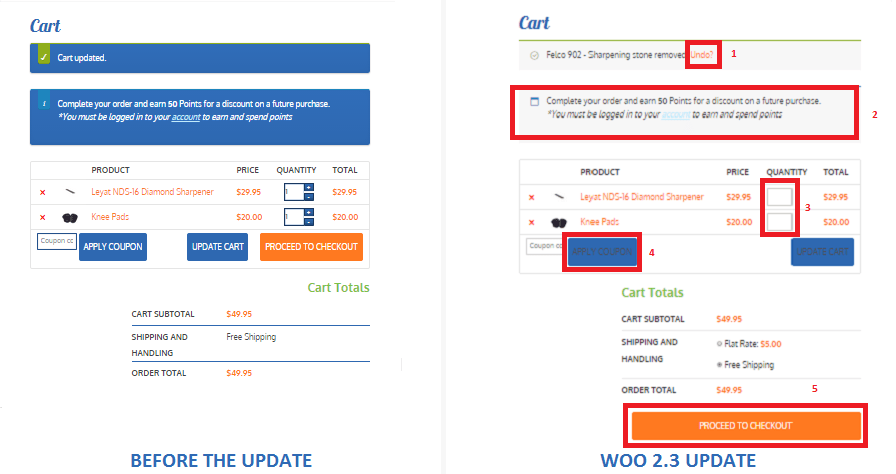
  • User Interface and User Experience Update- Woocommerce 2.3, also known as the handsome hippo, has a flat design that goes well with many themes. The messages, notices (2 in the figure below), buttons (4), and the payment box during checkout has an updated look.Woocommerce 2.3 Cart Update

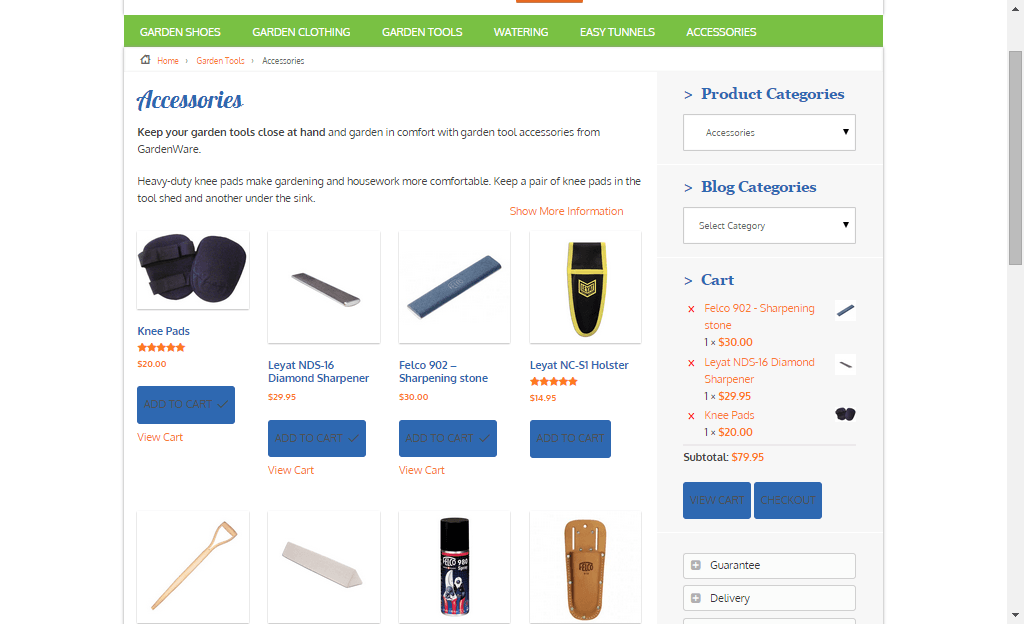
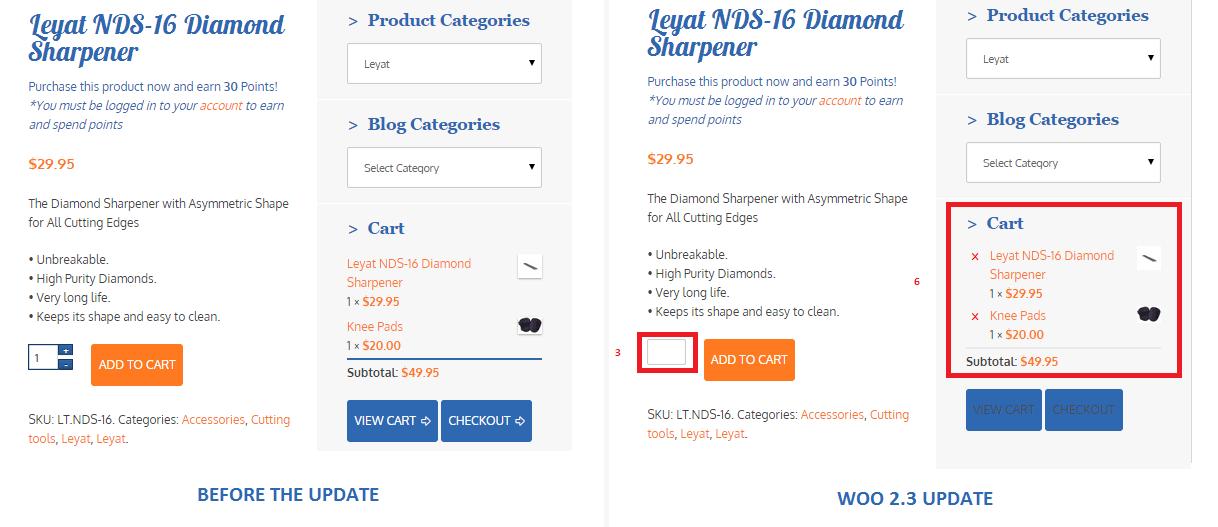
The cart template is also updated. The “Proceed to Checkout” button (5) was moved under the cart totals to enhance user experience. Another cool feature is the undo option (1) in the cart. That means that if you accidentally removed a product on your cart you can easily add it back in using the undo button. You also have the option to remove product from the cart widget (6), which I think is a really cool update on the default style template.

Woocommerce 2.3 cart_widget

There are also several features that were removed due to redundancy. The option to change the colors of the buttons as well as the increment and decrement button (3) were removed. Now, if you want to add those features back, you need to install additional plugins.

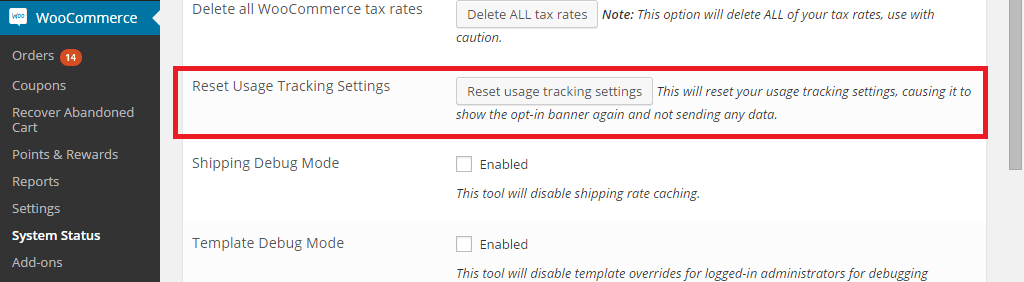
Woocommerce 2.3 also introduced an opt-in usage tracking that allows the Woocommerce team to view the settings of sites. This will allow them to upgrade their system to fit the requirements of their users. You will have an option to disable tracking in the woocommerce dashboard using this path: Woocommerce/System Status/Tools. Simply click the Reset Usage Tracking Settings button.

Woocommerce 2.3 usage_tracking

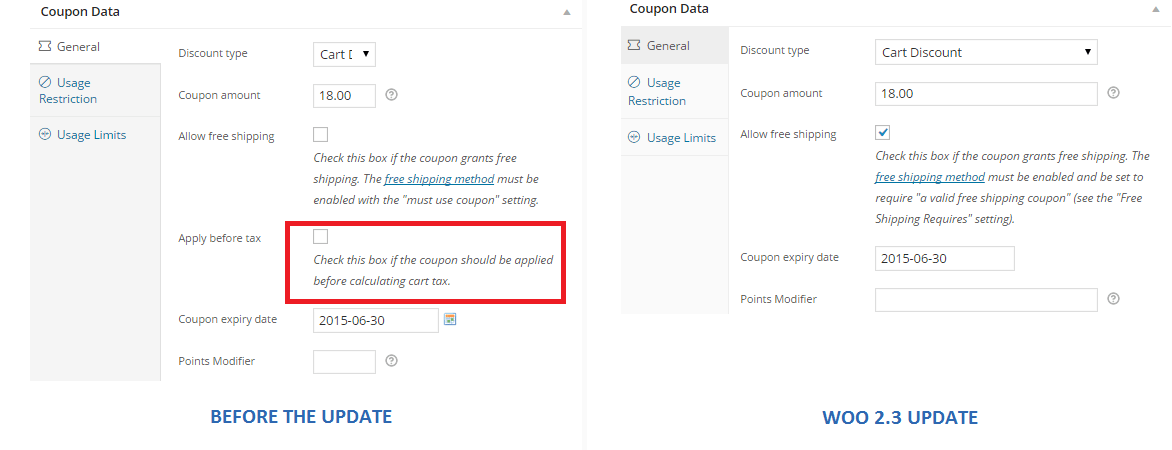
  • Coupons Update- This is probably one of the major updates in Woocommerce 2.3. Coupons will no longer be applied before taxes. The “apply before tax” option has been removed in the woocommerce settings.

Woocommerce 2.3 coupon

Aside from that, the rest of the coupons settings are left untouched. However, there are still a few issues with coupons that has not yet been sorted out on the latest version of woocommerce 2.3. We will get to that in a sec.

  • Emails- woocommerce 2.3 makes it easier for developers to override the CSS of emails sent through woocommerce. Additional hooks are created so that developers can easily adjust the CSS templates according to their preferences. In addition to that, emails sent will be using the woocommerce core templates but will also allow plugin templates to blend in with the shop emails.
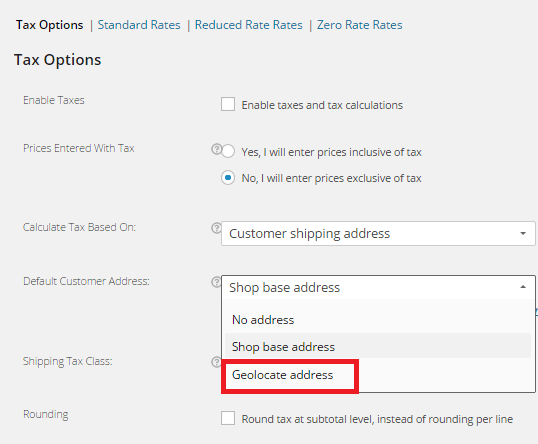
  • Geolocation- Now, with “Handsome Hippo”, you can easily locate your customers by using their IPs. This can be used to calculate tax based on the users estimated location.

Woocommerce 2.3 Geo_Location

Issues Encountered

Woocommerce informed large theme companies about the changes before releasing Woocommerce 2.3. Prior to the official release, Woocommerce also released Woocommerce 2.3 beta so that they can work hand in hand with theme companies and plugin authors to make the release as smooth as possible. Though a lot of site owners welcome the design update on the front-end, some sites suffered from CSS and theme incompatibility and had to do a complete overhaul. Woocommerce 2.3 started using Sass, and there are inevitable plugin incompatibilities encountered by sites that use plugins using LESS.

The image below is taken from one of our sites that we manage. You will notice that the buttons, due to the flat design, need fixing. You can barely see the labels of the buttons.

Woocommerce 2.3 buttons_and_option_to_remove_products_from_cart_widget

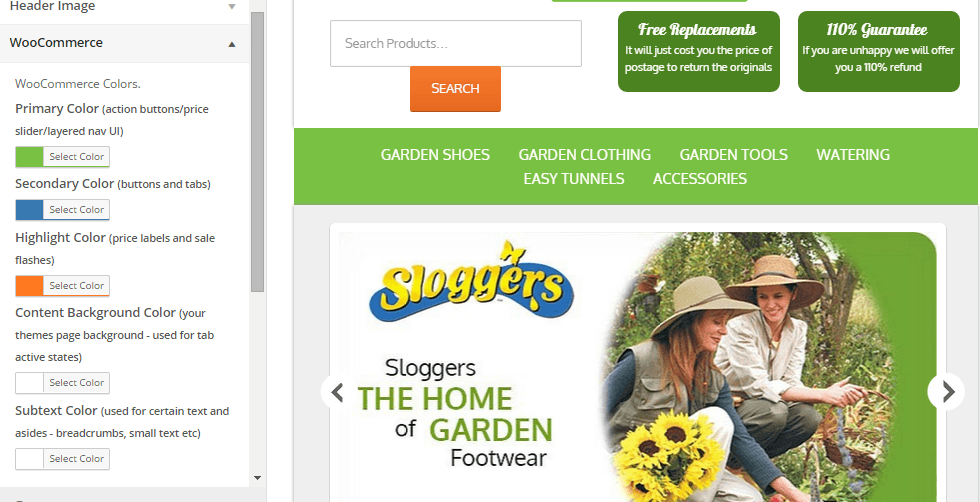
To fix this issue, Woocommerce suggests installing a plugin that will allow site owners to easily change the colors of buttons and other elements on their sites. You can customize the buttons by clicking Appearance/Customize/Woocommerce.

Woocommerce 2.3 buttons

On the same site, we also encountered problems with the application of coupon codes. Though the products added are exclusive of tax, which means that the tax calculations will not be affected, we experienced a weird issue with the application of coupons on top of a free shipping rule. The free shipping rule allows customers to get free shipping when the item bought is more than $49.

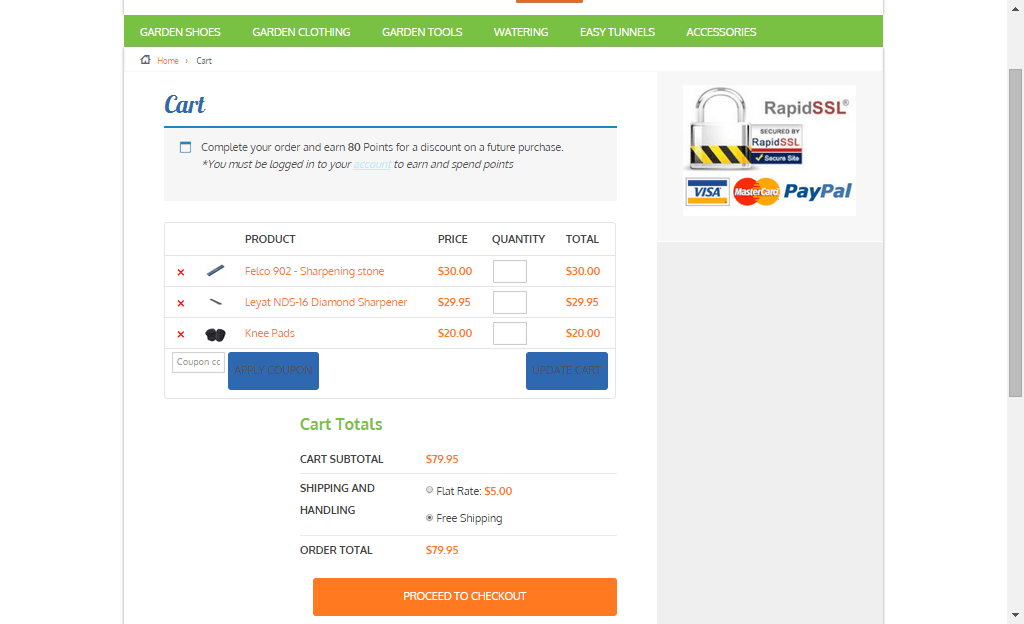
If you look at the image below, instead of displaying the free shipping note on the “Shipping and Handling”, it has been replaced by a radio. Here you will have the option to either choose free shipping or flat rate, which doesn’t make sense because customers would always want to choose the free shipping option. Aside from that, if you apply a coupon and the order total falls below $49, the flat rate automatically kicks in without the free shipping option. The store owner would not want that to happen and this issue only started after the Woocommerce 2.3 update. We will be discussing the solution to this issue on our next article.

Woocommerce 2.3 increment_decrement,_notices-2.3

Conclusion

Keeping your plugins up to date is very important. However, with major updates like this, it is best that you create several backups of your live site before doing anything. In some cases, it might even be necessary to copy your live site to a development site. Doing plugin updates on the development site allows you to fix errors caused by the update and at the same time reduce losses due to downtime.

The woocommerce team spend so much time and dedication for this update. Though there may be some hiccups along the way, their proactive communication with theme companies have been really helpful in ensuring that the update will not cause serious problems to their users.

If you have encountered some issues regarding the woocommerce 2.3 update or if you want to share your take on the new features of woocommerce, feel free to leave your comments below.


Filed Under: Theme and Plugin Reviews Tagged With: checkout form, colors, CSS, email, plugins, shopping cart, WooCommerce, woothemes, WordPress updates

WooCommerce vs Shopify: Which is the Better E-Commerce Platform for You?

April 24, 2015 By John Leave a Comment

Woocommerce vs ShopifyThere are a lot of platforms that you can choose from and two of the most popular ones are WooCommerce and Shopify. If you are torn between the two, then you’ve come to the right place.

Before you go comparing the two platforms, you should first know what your business needs are and how much resources you are working with.

WooCommerce is free, offers unlimited customizations but is a bit harder to set up. On the other hand, Shopify is more expensive, easier to set up, but does not have as many customizable options. Migrating from one platform to the other is not difficult. If you do choose Shopify you can still migrate to WooCommerce later if you find that you need more customizability.

If you need more functionality from the get go, you can get this from WooCommerce. WooCommerce can be a bit harder to set up and requires working knowledge of website development. But the customizability of WooCommerce is almost endless if you have the resources to get it done.

Pricing

Between WooCommerce and Shopify, which one is priced better?

WooCommerce is free for everyone to use. Shopify requires a subscription fee. Both platforms rely on plugins for added functionality. Woocommerce has a lot of free plugins, but you may need features that require paid versions. Paid plugins are subscription based which means the costs can really stack up in the long run.

For the non-technical entrepreneur, Shopify may seem like the better choice. You can easily set it up without needing a professional website developer. Instead of focusing your resources on website development, you can just buy a subscription on Shopify and focus on doing business.

woocommerce-vs-shopify

Ease of Use and Customizability

When it comes to ease of use, Shopify rates highly. Shopify is easy to use even for non-technical people. WooCommerce is still considered user-friendly but it just has more options to customize. You just need to learn what these options are and how to use them.

Out of the box, Shopify comes with 11 free responsive themes. And they look good too. If none of the free themes are to your liking, you can buy a new theme which costs around $150. Even if you are a new user, you can easily change colors and styles in Shopify. Also, more advanced users are not limited as they can do some more complex design tweaks in the code.

On the other hand, WooCommerce needs to be installed on the WordPress platform. The design will then depend on your chosen WordPress theme. There are thousands of free and premium themes to choose from. Since WooThemes created WooCommerce, their themes will work well with the platform. Their Storefront theme is made especially for WooCommerce so you can be sure that it is compatible with all releases of WooCommerce.

When it comes to customizability, WooCommerce wins. And if you have a developer available, it gets better. Your developer can do wonders with WooCommerce. You can have him create plugins and just about any functionality that you can think of. This is all because WooCommerce is open source. Anyone is free to alter the code for their own use.

Shopify is a complete ecommerce solution which includes hosting for your website. And while Shopify’s hosting service is not always rated that highly, it is certainly one less thing to worry about when setting up your ecommerce store. Shopify will provide you everything that you need to keep your ecommerce store up and running. For WooCommerce, if you have no experience with websites, you have to rely on a developer to get things done.

supportSupport

When it comes to support, Shopify offers premium support. You need only contact Shopify and they’ll help you out with whatever problem you have with your e-commerce store.

Because WooCommerce is free, Woothemes does not provide free support but a developer or support team like Wooassist can assist you. You first need to identify what is causing the problem. Is it a problem with your host? Is it a problem with a certain plugin? After you identify the root of the problem, you need to contact the specific service provider or plugin developer about the problem.

If you are using a free plugin or any other free service, you have no assurance that the developers or the service provider will address your concern. But since WooCommerce is powered by WordPress, you can ask for help from the WordPress community through the forum. A lot of website owners, including those that use WooCommerce, post problems they encounter in the forums. Most of these problems are resolved with the help of the ever-reliable community. If you’re lucky, someone should have already encountered the same problem that you have and posted in the forums with a resolution already documented.

Which one should you choose?

If you will be creating your own website and you already have a technical background, then WooCommerce will serve you better. And if you have a developer, it gets even better. If you do not have the time and the technical know-how to create a fully functional WooCommerce store, look at Shopify’s all in one e-commerce solution.

Shopify may provide everything that you need so you have less to worry about and spend more time doing actual business. It might be more expensive initially since you have to pay for subscriptions and plugins, but it is easier to set up. Albeit, with less customizability. There is no clear cut answer on which platform is better. It all depends on your needs and what is sustainable for your business.

Filed Under: Theme and Plugin Reviews Tagged With: e-commerce, WooCommerce, WordPress

  • « Previous Page
  • 1
  • …
  • 3
  • 4
  • 5
Let us support your online store so you can manage your business

Get started today

Get 2 Hours of FREE SUPPORT

We are so confident that you will love our services that we will give you your first 4 hours at a 50% discount

That’s 4 hours for only $75

BUY NOW

Free eBook

5 Things Every Online Store Can Fix On Their Website In The Next Week To Increase Sales

Quick Links

  • How it Works
  • Pricing
  • Blog
  • Contact
  • About Wooassist
  • My Account
  • Checkout
  • Privacy Policy
  • Cookie Policy
  • Terms and Conditions

Wooassist

Australia:
59 Luke St.
Hemmant QLD 4174

Philippines:
San Miguel St.
Poblacion, Iligan City 9200

Connect


Copyright © 2026 · Wooassist

Yours FREE!

5 Things Every Online Store Can Fix On Their Website In The Next Week To Increase Sales