Wooassist

Assistance for Your Woocommerce Store

  • How it Works
  • Pricing
  • Services
    • Site Maintenance
    • AI SEO and Content Marketing
  • Blog
    • How-To Articles
    • Code Snippets
    • SEO For E-Commerce
    • Theme and Plugin Reviews
    • Wooassist News
    • WordPress/WooCommerce News
    • Interviews
  • About Us
  • Contact
You are here: Home / Archives for security

How to Install an SSL Certificate on Your WooCommerce Store

April 11, 2016 By John Leave a Comment

cyber-security-lockFor WooCommerce stores, an SSL certificate plays a huge role in securing sensitive data for your users particularly their credit card details and other payment information. Having a secure WooCommerce store builds your customers’ trust. Without trust, the visitor will not convert. If you are serious about your e-commerce business, you should take the necessary steps to secure your site.

What is SSL?

SSL stands for secure sockets layer. It is a type of security that handles the encryption of data before they are sent to the internet. Encryption locks data to avoid unauthorized use. Data sent via SSL must be decrypted for the content to be readable.

Why is SSL a Requirement for Accepting Credit Card Payments?

credit-card-online-purchase

Connections that use plain Hyper Text Transfer Protocol (http) are sending data in plain text. Data will pass through a lot of internet nodes and it is possible to intercept the data before it reaches the destination server. It is a security concern when sensitive data like credit card numbers are sent unencrypted.

Connections that check for an SSL certificate and encrypt data use https (secured http). Aside from encryption, SSL certificates also provide authentication. Trusted SSL providers will only issue an SSL certificate after several layers of identity checks. A green https address bar and a lock icon in it are the best indicators that a site has an SSL certificate and can be trusted. Your customers are less likely to fall for a scam because scammers will not have an SSL certificate in their sites. Also, users will see a warning in their browsers should they try to go to a website without proper SSL certificate using https.

Maintaining Your SSL

One downside of getting an SSL is the added administrative burden in terms of cost, paperwork, and third party verification. Once you get an SSL certificate for your e-commerce site, you must not neglect its renewal. Your WooCommerce store will get a red flag as an unsecure site if you have an expired SSL certificate. It’s scary enough that many users will tend to back off seeing your site as a security threat. If you neglect to renew your SSL, your organic traffic would suffer and you could be penalized by Google.
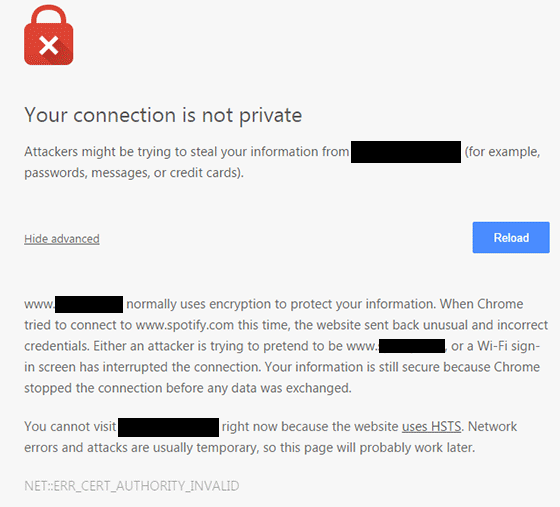
ssl-error_cert-authority-invalid

How to Choose an SSL Plan for WooCommerce
data-keyThere are a lot of SSL plans available. An SSL certificate is generally priced depending on its scope and type of validation.

Scope of Validation

Basic SSL only provides security on the main domain. Wildcard SSL certificate secures a domain together with its sub-domains. If you have sub-domains like sports.example.com, shop.example.com, and news.example.com, go for a wildcard SSL certificate.

Types of Validation

Domain Validation

Domain Validation SSL certificate is cheaper than other certificates and issued within minutes. It only verifies the domain name and you do not need to provide any documents.

Organization Validation

This certificate validates that your business really exists. The validation process usually takes two to five business days. Your organization’s name will be displayed in the certificate which in turn earns your customer’s trust.

Extended Validation

An EV SSL certificate has the highest form of SSL certificate validation. Sites with EV SSL certification will have unique visual cues in them: a green https address bar and a lock icon in it. To get an Extended Validated SSL, an organization will have to complete a process defined by Certificate Authority (CA).

paypal-validation

Choosing a reliable SSL certificate for your WooCommerce store is a matter of trust. You might choose to have an inexpensive yet relatively unknown certificate. Some of these inexpensive certificates are just as reliable as the expensive ones.

How to Acquire an SSL certificate

Installing an SSL on your e-commerce site can be really easy or quite frustrating, depending on your hosting provider. SSL installations require configuring the servers and hosting providers typically own the servers themselves.

There are two ways of getting an SSL certificate: buying from the hosting provider themselves or buying from a third party.

Buying from the hosting provider is the simplest way to get an SSL. The process differs from one hosting provider to another. But in most cases they will handle the installation themselves. All you have to do is fill out a form and accept the terms. In 1 to 2 days, you will get an email finalizing your SSL installation. Most of these SSL certificates are domain validation though.

If you want a higher type of validation, consider buying a certification from a third party. The process may vary with different SSL and hosting providers but here’s the general process that you need to follow:

  • Prepare your validating documents. Ask for a separate dedicated IP address from your hosting provider. Shared IP addresses aren’t allowed in SSL.
  • Generate the Certificate Signing Request (CSR) from your web hosting server. It is best to ask your hosting provider to generate the CSR. The Certificate Authority will create your certificate based on the information contained in the CSR.
  • Submit the CSR and other validating documents to the Certificate Authority. Usually, your SSL provider will handle this for you.
  • Have your domain and company validated.
  • After receiving the SSL certificate, you need to upload it to your hosting account, then “turn it on” for the site you want to secure. Depending on the hosting server, you can do this in the cPanel. Alternatively, you can send a ticket on your hosting provider to do this for you.

If you are having problems with securing an SSL certificate it is best to get in touch with your hosting provider.

Now that you have a better understanding of SSL certificates, it’s time to get one for your site if you don’t already have one. If you have any other questions or if anything is not clear, let us know in the comments and we’ll do our best to help.

Filed Under: How-To Articles Tagged With: best practices, e-commerce, how-to, security

Why Should You Keep WordPress Updated?

May 24, 2016 By John 1 Comment

WordPress is getting more popular as a platform for creating e-commerce stores. Because of this, WordPress sites have become attractive targets for hackers to try and break into. There are a few reasons why hackers do this but the main motive has always been for profit. In this article, we will discuss how hackers take advantage of a WordPress site with poor security. You’ll also learn what should be done before a site update and other means to keep your site safe.

How Does a Hacker Take Advantage of a Compromised WordPress Site?

why should you keep wordpress updatedA lot can be done to a hacked WordPress site. It is not just getting sensitive information. Actually, getting sensitive information like credit card numbers is just a “bonus”. It’s not really your website that the hackers want. What they want more is the power of your server resources: computing power, disk space, and anonymity on the internet. So how can they use your server to their advantage? Here are some ways:
Bitcoin Mining

Bitcoin mining is the process of adding transaction records to the Bitcoin’s public ledger. One offers processing power to the public Bitcoin community to validate transactions. He gets a portion of the money being transacted as processing fee. Bitcoin mining is intentionally resource and processing intensive so that the number of blocks found each day by miners remains steady. This is where the hackers can take advantage. They will use your server to mine for themselves, hence noticeably slowing down your site.

Distributed Denial of Service (DDoS)

This attack is an attempt to crash one’s server. It spams that server with thousands of traffic simultaneously, thus denying service for other users. This is commonly used for cheating in online gaming, online gambling, and in taking down a site. Since you can’t overwhelm a server with traffic using a single PC, the likely scenario is that the attacker will have thousands of hacked servers and personal computers to perform an attack. All they need is a single PHP script saved on each site which they can activate at will.

Anonymous Attacks and Spam

Hackers can also use your server to attack or spam anyone anonymously. Since they are using your servers to do these malicious things, these will point to your name and not theirs. They can be churning thousands of spam emails to other people at your expense. They can send viruses and malware through these emails to infect more PCs to aid their hacking.

Data Mining

Hackers can also just mine sensitive information like credit card numbers, passwords, emails and others.

Automated Hacking

hacking-code-destroyMost attacks are automated and target small and unsecure sites. This works similar to how a search engine uses search engine crawlers to index information on the web. The hacker’s crawlers roam around the web to find exploitable sites. When a vulnerability is spotted, the hackers will attack that vulnerable point. Attacks vary from brute force attacks to code injection on contact forms.
Importance of Updating WordPress for Security

The people behind WordPress are working hard to increase security against these attacks. This is what most of the minor updates are for. As the attacks get smarter, the security needs to upgrade as well. Fundamentally, there is no such thing as a perfectly secure system. So whenever WordPress developers see or hear about a possible vulnerability, they will try to fix it as fast as possible.

This is why WordPress updates are very important. By keeping your WordPress core updated, you are protecting yourself from the latest known vulnerabilities.

Things to Do Before Updating

Most of the time, updating WordPress is harmless. However, some major updates that involve the core code may break some plugins or theme files which in turn can break some layout or functionality on your site. That’s why it is important to follow a process before pushing through with an update to avoid breaking your site.

Create a Backup

Creating a backup is the best thing that you can do before pushing through with an update. Backups are your last line of defense in case something goes wrong. If you think it is a hassle, you can actually automate backup creation. There are even hosts that automatically do this for you. However, it is best to have your own backup and not depend on your host to make your backups for you.

Testing on a Staging Site

A staging site is an independent copy of your site. Most hosting sites offer an easy way to make them but you can always create your own. Staging sites are used to ensure that everything works perfectly before you present your site to your customers. This is very important especially for e-commerce sites. You can lose your customers’ trust if you let them experience downtime and bugs.

Other Things to Help You Secure Your Site

cyber-security_keyboard-lockedAside from the updates, there are a lot of things you can do to harden the security of your site. Here are some examples:


Installing a WP Security Plugin

Like creating a backup, installing a WP Security plugin is one of the best things that you can do. Sucuri Security plugin is highly recommended. Basically Sucuri will act as a firewall for your site. It will protect your website from hackers, malware, DDoS and blacklists. It will receive all the traffic going to your site and filter it before sending it to your host. This allows the plugin to block all the attacks and only send you legitimate traffic. Because the filtering/blocking is happening on the Sucuri servers, your servers are relieved of a lot of load. Sucuri has always been the top go-to plugin when it comes to security.

Password Protect Some Directories

Password protecting /wp-admin directory adds another layer of security to your site aside from the login page. This can be done either manually or using cPanel. This is addressed on sites that have a lot of users accessing the wp-admin; for example large news/blog sites that accept guest authors.

Disabling PHP Execution

Disabling PHP Execution from certain directories protects you from backdoor access file attacks. The attacks come disguised as a WordPress core PHP file and inserted in easy access directories like /wp-includes/ and /wp-content/uploads/. Preventing PHP execution from these directories reduces the risk of backdoor access.

Changing the Prefix of Your Database

The default prefix of a WordPress database is “wp_”. Everything on your database will start with this so changing it will make it difficult for attackers to access your database.

Conclusion

Now that you’re more familiar with how hackers work, you can better equip your site to avoid being a victim. Backup your site and do not skimp on WordPress updates, even the minor ones. Remember that these updates will help you safeguard your WordPress site from the latest known security threats. Updates are one thing but you should also harden your site by implementing the strategies mentioned above.

When was the last time you updated WordPress? Do you have any other security tips you’d like to share? Let us know in the comments.

Filed Under: How-To Articles Tagged With: admin, backup, best practices, brute force, e-commerce, how-to, plugins, security, sucuri, website maintenance, WordPress

Technical Solutions for Your Online Store

January 29, 2015 By John 2 Comments

SnapCrab_2015-06-26_14-58-43_No-0000

Your online store needs constant management, which includes the technical details. When you’re suddenly faced with a technical problem, do you have the capacity to resolve it? If your website becomes the target of hacking, then you need to take action.

Awareness of the Problem

The first step in dealing with any technical problem is being aware of it. You need to keep in mind that it has the potential to hurt you. For instance, a simple issue with your WooCommerce cart would take a big hit on your business profit.

Let’s say that a plugin stops working. Users will be left wondering or confused, and you’re left with emails from disgruntled customers. Time is of the essence. The longer the issue persists, the more revenue you lose.Be aware when the problem hits, so you can act on it right away.

Finding the Right Solution

 After the problem has been identified, seek help from the right team. It may be from the third party who provided your plugins and themes, or your web hosting company. They should be able to provide site backups, security support, plugin upgrades, etc.

SnapCrab_2015-06-26_15-00-03_No-0000

Securing knowledge for yourself can make a difference. You may check out these resources from WooCommerce. These provide details on the most common plugin problems and how to solve them. It will help you boost your know-how on important technical solutions.

When it comes to managing your online store, it’s best to leave the technical aspects in the hands of experts. At Wooassist, we can troubleshoot your WooCommerce issues in a more efficient manner.

Filed Under: How-To Articles Tagged With: how-to, outsourcing, security, Wooassist

Update Plugins and WordPress Core of Your WooCommerce Store

January 29, 2015 By John Leave a Comment

Just like websites, hacking is changing and evolving. Hackers are always on the lookout for new ways to exploit and infect all kinds of websites, including online stores. They adapt, and can even get one step ahead of developers.

If you’re not careful, your WooCommerce store could be targeted and compromised. This underlines the need to update plugins and core of your WooCommerce store.

Protect Your Site from Hackers

One of the primary culprits of being targeted by hackers is the failure to update plugins.It has been proven to be disastrous to WordPress websites and blogs.

It’s a good idea to keep your plugins up-to-date and delete those that are not in use. There are also security plugins out there that will protect your website for free. This article can give you detailed tactics on what to do once your site gets infected, as well as tips on preventing a cyber-attack.

Some steps are being made to have this done automatically. You now have the option to do core updates through WordPress.org. Here’s an interesting post on what we might get in the future.

In the meantime, the responsibility lies with you. You need to arm yourself with the right knowledge, such as these WordPress security tips. As a WooCommerce store owner, it’s one of your top priorities to make hacking as difficult as possible. Keep these methods in mind.

Back-up Your Website

While updating plugins and WordPress might seem like an easy chore, it can be more complicated than that. It doesn’t work with just one click.

Before updating plugins such as WooCommerce, and your WordPress core, make sure that you have a current backup of your site. Just in case something goes wrong, you’ll have a fall-back.

SnapCrab_2015-06-26_15-32-30_No-0000

It’s not uncommon for many websites to go down after installing an update. In some cases, you can even be locked out of your WordPress admin panel. While it may seem like a serious problem, it is actually easy to solve.

Just access your website’s files with an FTP client, find the folder of the plugin you updated, and just delete that plugin. If you updated multiple plugins, you can try deleting or renaming the specific plugin folders to find the culprit.

If your site goes down after updating your WordPress core, that’s a little more complicated. Learn how to backup your WordPress site here.

Wooassist Team Site Updates

Make sure that your WordPress core and plugins are always updated. It isn’t too difficult once you take the necessary measures. However, it can escape your notice if you’re quite busy and have a lot of things on your mind.

To ensure that problems with updates are immediately addressed, it would be a good idea to have a developer on board to handle the job. Better yet, have a developer do all your updates at regular time intervals. Handing over the responsibility to the Wooassist team is a viable option for you. As long as you have pre-paid credits in your account, we can automatically work on updating your WP Core, Themes and Plugins at regular intervals, either every fortnight or every month, depending on your preference.

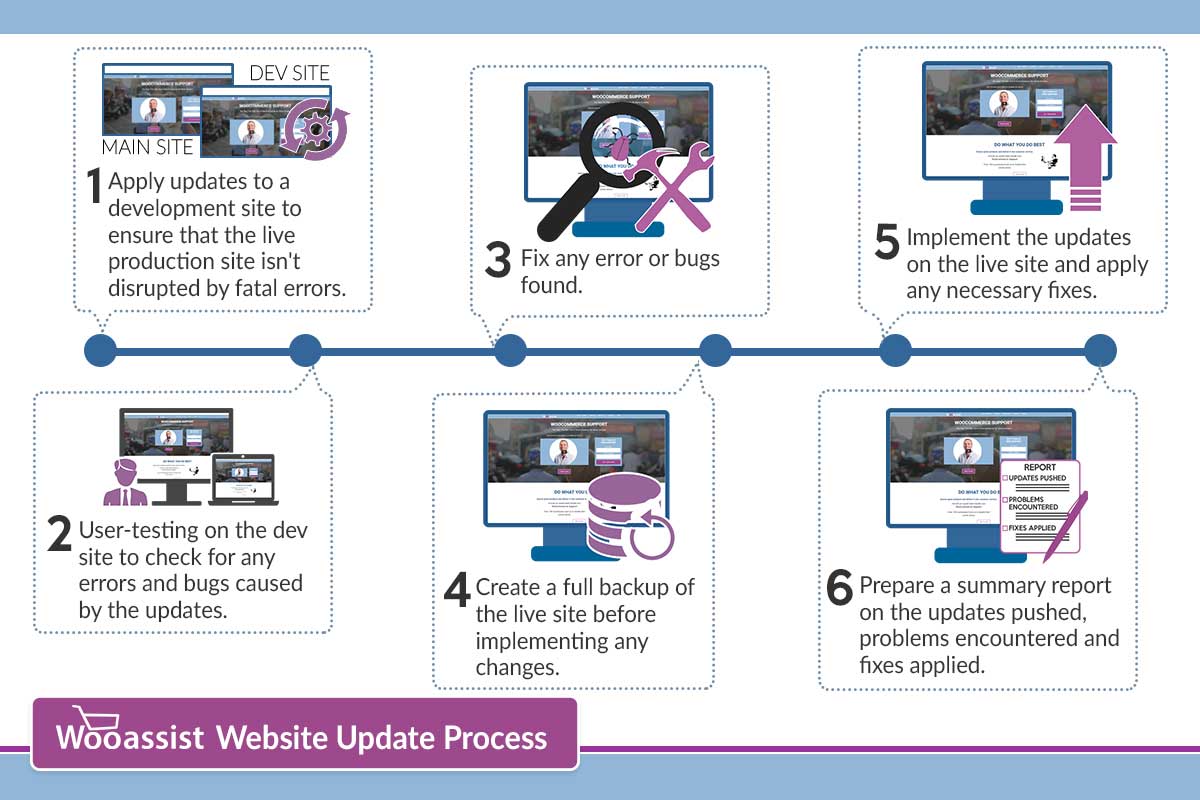
How we do updates (click to enlarge image):
wooassist-website-update-process

Although it might be possible to skip most of these steps, proceed directly to updating the live site and wait for whatever errors to come up, it may end up causing irreversible damage to your site. This could cost you thousands of dollars in lost sales and having support services spend more time fixing the issue when it could have been easily avoided in the first place.

On average, we take around 2 to 3 hours implementing the entire process when done once every month. We take pride in our service and do not cut corners and take shortcuts. If in the rare occassion that we miss an error that was created due to the updates, we will have it resolved at top priority.

Letting us do your site updates for you will rid you of having to worry about this part of website ownership altogether leaving you with peace of mind and time to focus on growing your business.

Filed Under: How-To Articles Tagged With: backup, how-to, plugins, security, Wooassist, WooCommerce, WordPress

  • « Previous Page
  • 1
  • 2
  • 3
  • 4
Let us support your online store so you can manage your business

Get started today

Get 2 Hours of FREE SUPPORT

We are so confident that you will love our services that we will give you your first 4 hours at a 50% discount

That’s 4 hours for only $75

BUY NOW

Free eBook

5 Things Every Online Store Can Fix On Their Website In The Next Week To Increase Sales

Quick Links

  • How it Works
  • Pricing
  • Blog
  • Contact
  • About Wooassist
  • My Account
  • Checkout
  • Privacy Policy
  • Cookie Policy
  • Terms and Conditions

Wooassist

Australia:
59 Luke St.
Hemmant QLD 4174

Philippines:
San Miguel St.
Poblacion, Iligan City 9200

Connect


Copyright © 2026 · Wooassist

Yours FREE!

5 Things Every Online Store Can Fix On Their Website In The Next Week To Increase Sales