Wooassist

Assistance for Your Woocommerce Store

  • How it Works
  • Pricing
  • Services
    • Site Maintenance
    • AI SEO and Content Marketing
  • Blog
    • How-To Articles
    • Code Snippets
    • SEO For E-Commerce
    • Theme and Plugin Reviews
    • Wooassist News
    • WordPress/WooCommerce News
    • Interviews
  • About Us
  • Contact
You are here: Home / Archives for marketing strategy

Wooassist Customer Personas: Meet Bob and Danny

January 24, 2016 By John Leave a Comment

wordpressIf you are a store owner, it is important to know who you are trying to reach. Not everyone is your customer and knowing your target market will help you save thousands of dollars on marketing campaigns. We wrote a pretty epic blog post about customer personas for ecommerce, but to give you an example of how Wooassist does it, here are our two main customer personas. Meet Bob and Danny.

Say Hello to Bob

bobBob is a freelance website developer who builds e-commerce site with WordPress and WooCommerce. Bob is super busy building a lot of websites and he receives more jobs from new clients on a monthly basis. He also hangs out online on different forums to communicate with other developers to seek help and assist others as well.

Some of the forums he has visited over the past few months are:

  • https://wordpress.org/support/theme/storefront
  • https://wordpress.org/support/plugin/woocommerce
  • https://support.woothemes.com/hc/communities/public/topics/200102403-05-WooCommerce

He is updated with the latest trends of WooCommerce development and has also heard the new Storefront theme that WooThemes have developed.

He uses a macbook pro for developing websites and uses the following tools with his development:

  • Codekit https://incident57.com/codekit/
  • Chrome Developer Tools
  • Sublime Text IDE – where all the coding happens
  • Git for versioning
  • SASS + Sussy (for styling – in replacement of plain CSS)

A lot of Bob’s clients come back to him after 6-12 months and want help with WooCommerce and the other plugin updates. Other times old clients were installing new plugins which broke their site and they needed “urgent” help.

macbookBob doesn’t like this sort of maintenance work. He wants to help his previous clients but he is busy creating websites for new clients. If he tries to do both he ends up losing a lot of free time for himself and his family.

He tried to outsource his customer support tasks to Elance. Some worked ok, but the ones that didn’t took him more time to fix than if he had done it himself.

Bob needed a company he was comfortable referring his clients to for the support he didn’t want to do, so he could just focus on his passion of building new websites. He had suggested www.wpcurve.com and www.wpsitecare.com but his clients didn’t want to pay for monthly subscriptions and he would prefer to recommend specialists in Woocommerce not just WordPress.

Then he found out about Wooassist. Wooassist was being helpful on a lot of posts on the support forum for both WooCommerce and Storefront. They have also built theme and plugin extensions that had benefited Bob in some of his projects.

He checked out what Wooassist offers, and was a bit skeptical at first, but liked the testimonials about the company. He also learned that his clients could get the first 2 hours free of charge, so he thought he would try them out.

Bob gave Wooassist a few tricky tasks to test them and was pleased with how they performed. He especially loved their process and the concise reporting. He then then felt comfortable to refer Wooassist to his clients to do support for them, and the rest was history.

Get to Know Danny

dannyDanny is the owner of an e-commerce store. He has 4 full-time employees and his wife works part-time in accounts. He will employ contractors regularly during busy periods.

Danny had a local agency design his website and it cost him $3000. Over the next 12 months he required a number of customisations and these totalled to about $3000 also. He was happy with the agency, but didn’t like the $100/hr fees so decided to skill-up and spent a considerable amount of time training himself in WordPress and WooCommerce. He now knows enough to make a lot of changes himself.

Because of this knowledge he also now feels more confident to outsources some of these tasks. He has tried Elance and Odesk with limited success and has gone back to either doing it himself, or what is too hard for him, asking the agency that built the site to do it for him.

When faced with problems that require a more technical solution he first searches for free plugins in the WordPress repository and reads the forums and reviews. If he can’t find what he needs he asks questions in the forums hoping that maybe he can get advice and perhaps a few snippets of code that can solve his problem.

He knows that a single line of wrong code can bring down the entire website down so he is very wary of adding code by himself. The solutions work most of the time, thankfully, but it’s not the best use of his time.

ecommerceDanny wants to spend more time attending to marketing and building his business. He has a long list of marketing initiatives he wants to get up and running with the website that he is sure will bring in more sales, but he is just too swamped with the ongoing tasks currently on his plate.

He also wants to spend more time with his family.

He feels he has failed with Elance and Odesk and doesn’t want to go down that route again. He has considered employing a full-time developer, but can’t justify the expense and really needs an all-rounder rather than a full on developer.

Danny, like most business owners, is under a lot of stress. He feels the weight of the world on his shoulders to keep his business afloat, his family comfortable and his employees employed. He loves e-commerce, but gets frustrated sometimes by the technology that he doesn’t completely understand.

marketing

He would love to be able to afford a full-time developer to take care of this and worry about it for him, but his business is just not to that scale yet. His main issue with Elance contractors was them not communicating with him in a way that would allow him to know they had his back and were working on his problems. He wants to be able to go to bed at night and know that his store is in good hands and exactly what will be done while he sleeps.

That’s when he stumbles upon Wooassist probably from a forum post somewhere or through Google search. He is now able to hire a WordPress and WooCommerce expert for the fraction of the cost of a full-time developer. And the rest is history.

How about you? Do you know who your customers are? If not, you might want to spend some time creating a persona. Is this post helpful? Let us know what you think in the comments.
Filed Under: Wooassist News Tagged With: customer persona, e-commerce, marketing strategy, Wooassist

How to Edit Storefront Theme Header

March 6, 2017 By John 24 Comments

Editors Note: We have decided to retire the plugin mentioned in this article as the compact mode of the plugin no longer works with the new version of Storefront theme.

Editing a theme’s header is difficult for the average WordPress user. However, we’ve made it easier to do this for Storefront theme. With just a few clicks, you’ll be able to edit the format of the header, hide header elements, or change background, text and link colors.

But Why Storefront?

Storefront is the best theme to use with WooCommerce, which is the most popular e-commerce platform on WordPress. The theme was made and is being updated by the same people who created WooCommerce so compatibility will never be an issue. If you are already using Storefront theme on your WooCommerce store, then good for you. If not, you should consider using it to prevent any issues in the long run.

We’ve come across many WooCommerce stores that had a lot of problems due to conflicts with the theme. Each and every time, we recommended the use of Storefront theme. And each and every time, using Storefront fixed the problem.

Hence, we’ve created the Storefront Header Picker Plugin to make editing your header that much easier.

How to Install Storefront Header Picker Plugin

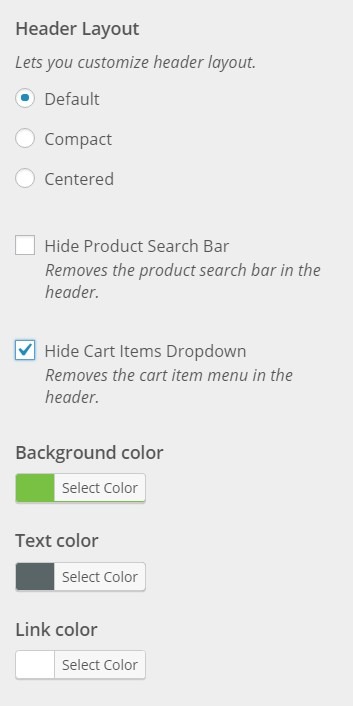
Header Layout - How to Edit Storefront Theme HeaderYou install the plugin just like any other plugin.
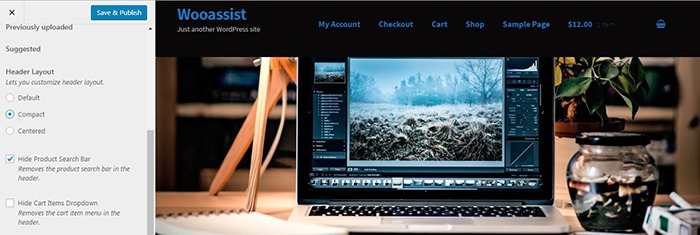
  1. Go to your WordPress Dashboard and click on “Plugins”.
  2. Click on “Add New” and search for “Storefront Header Picker”.
  3. Click on “Install” and then activate the plugin.

How to Edit Storefront Theme Header

  1. To edit your Storefront theme header, click on Appearance > Customize > Header.
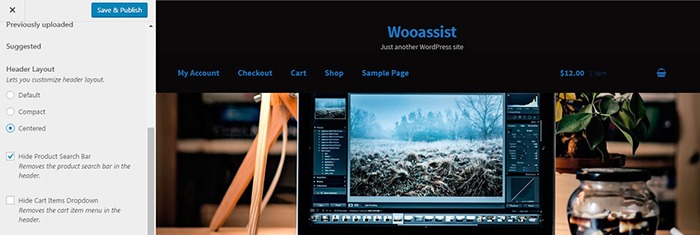
  2. Here you can choose between three header types: Default, Compact, and Centered.
  3. You can also choose to hide the product search bar and the cart. Just check/uncheck the corresponding boxes.
  4. At the bottom, you can change text and header colors.
  5. Once done, just click on “Save & Publish”.
Centered-Layout-How-to-Edit-Storefront-Theme-Header
Centered Layout
Compact-Layout-How-to-Edit-Storefront-Theme-Header
Compact Layout

Will This Work for Any Other Theme?

Unfortunately, this plugin will only wok for Storefront theme. It makes use of Storefront action hooks and filters. Activating the plugin when you are using a different theme will bring up a warning message.

Did this plugin help you edit your Storefront theme header? Do you have any questions about the plugin? Let us know in the comments.

Filed Under: How-To Articles, Theme and Plugin Reviews Tagged With: design tweaks, marketing strategy, plugins, Storefront, website development, Wooassist

Conversion Rate Optimization for WooCommerce – An Infographic

August 24, 2017 By John Leave a Comment

As a WooCommerce store owner, you want to make your store as profitable as it can be. This is where conversion optimization comes in. We created this easy-to-follow infographic to help you optimize your store’s conversion rates. Should you ever need help getting some of these things done, just send us a message and we can help you out.

If you want to share this infographic on your site, just paste the code below on your site’s text/HTML editor.

<a href="https://wooassist.com/conversion-rate-optimization-for-woocommerce-an-infographic"><img class="aligncenter wp-image-3020 size-full" src="https://wooassist.com/wp-content/uploads/2017/08/Conversation-Rate-Optimization-for-WooCommerce-An-Infographic-by-Wooassist.png" alt="Conversion Rate Optimization for WooCommerce - An Infographic by Wooassist" width="700" height="4428" /></a>

Filed Under: How-To Articles Tagged With: call-to-action, checkout, conversion optimization, free shipping, image optimization, marketing strategy, testimonials

How to Add “Where Did You Hear About Us” Field on WooCommerce Checkout

December 7, 2016 By John 16 Comments

As an e-commerce store owner, it is important to know where you are getting your customers so you can plan your marketing efforts. You can either focus on channels that help you convert or tweak your marketing strategy on channels that are not very successful. One way to find out where your customers are coming from is by adding a “Where Did You Hear About Us” field on WooCommerce checkout.

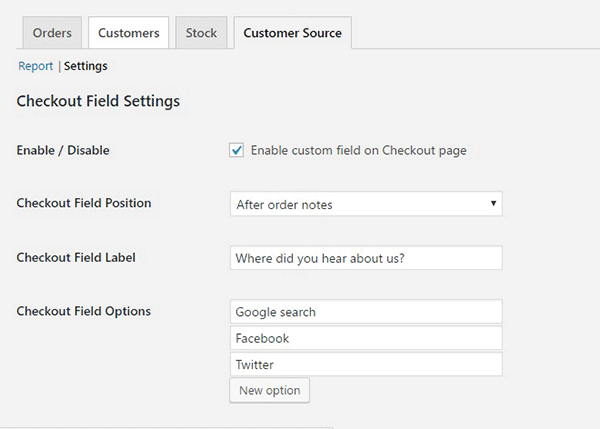
To start, just install and activate the “Where Did You Hear About Us Checkout Field for WooCommerce” plugin. When that’s done, go to WooCommerce > Reports > Customers Source Tab. Click on Settings to enable/disable the “Where Did You Hear About Us” custom field on checkout. Below you can see other plugin settings to customize. You can even make it a required field on your checkout page.

“Where Did You Hear About Us Field” on WooCommerce checkout

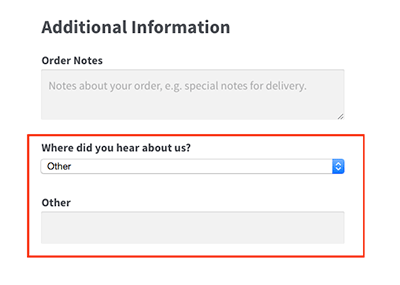
Using the plugin, you can add your channel options. You can even add an “Other” option so your clients can indicate how they found your e-commerce store if it is not in the list.

where-did-you-hear-about-us-plugin-additional-information

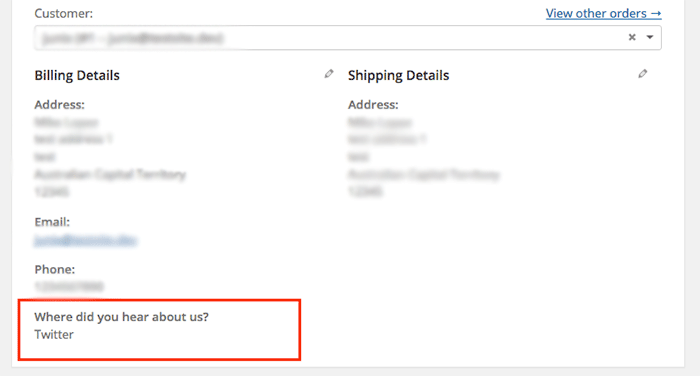
where-did-you-hear-about-us-plugin-below-billing-details

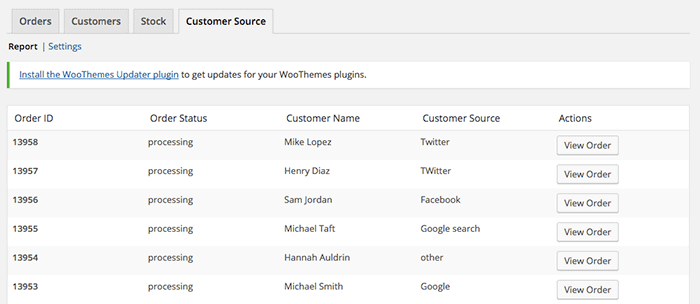
To view the data you gathered, go to Customer Source tab and click “Report”. You should be able to view the details which include customer name, customer source, order status, and order ID.

where-did-you-hear-about-us-plugin-customer-source-tab

The best part about this plugin is that it is totally free. There are no subscriptions. There is no premium version to buy. You can use it in as many websites as you want.

When you learn where your customers come from, you can make your business more profitable. If you tried using this plugin, tell us your experience about it in the comments section.

Filed Under: How-To Articles, Theme and Plugin Reviews Tagged With: e-commerce, how-to, marketing strategy, plugins, website development, Wooassist, WooCommerce

Why Use Long-Tail Keywords for your WooCommerce SEO

October 13, 2016 By John Leave a Comment

Are you optimizing your WooCommerce products but find that you are not getting any traction? It could be because you are optimizing for the wrong keywords. Many e-commerce businesses find more success with long-tail keywords. But what are long tail keywords and why use long-tail keywords for your WooCommerce SEO?

What are Long-Tail Keywords?

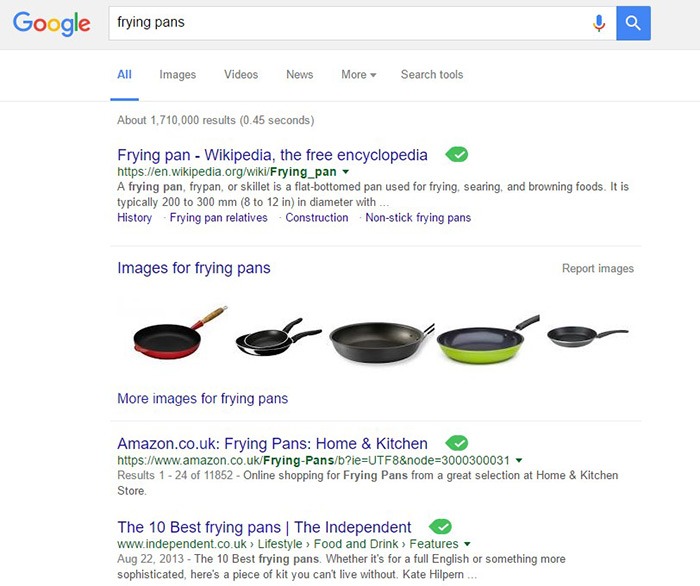
Long-tail keywords are longer, more specific keywords; much like a keyphrase. For example, if you are running an e-commerce store that sells frying pans, you could be tempted to optimize for keywords such as “frying pans”. However, ranking for “frying pans” would be very difficult. Do you expect to beat Wikipedia or Amazon who holds the top two spots in Google’s search results page? Even if you hire the most expensive SEO agency, that’s going to be hard to topple.

Why Use Long-Tail Keywords for your WooCommerce SEO

Let’s try to improve the keyword “frying-pan”. “Non-stick frying pan” is an improvement. It is more specific compared to just “frying pan” but this can still be made more targeted. “Non-stick stainless-steel frying pan” or “non-stick stainless-steel frying pan for induction stove” is taking it a step further.

bulls-eyeBenefits of Using Long-Tail Keywords

Long-Tail Keywords Produce Targeted Traffic that Converts Better

Long-tail keywords may or may not result in less traffic. The traffic that you do get will be more targeted and that means better conversion. Don’t stress yourself too much about losing traffic because traffic is a useless statistic. The important statistic to watch out for is your conversion rate because this is the moneymaker. Optimize your e-commerce store for increased conversion; not for increased traffic.

Long-Tail Keywords are Easier to Rank for

Because there is less competition for long-tail keywords, it is easier to rank for them. With a properly optimized page, you can land a top spot in the search results page. As long as you follow other known SEO best practices, this is achievable.

seo-google

But They Have Low Search Volume?

You might be looking at search data using Google’s Keyword Tool or any other tools. Then you see that there is no search volume for the long-tail keyword that you want to target. Don’t fret. Having no search volume does not mean that it will not show up in search results. Long-tail keywords are actually valuable. In the video below, Rand Fishkin talks about how valuable long-tail keywords are.

How to Choose the Right Long-Tail Keywords

Choosing the right long-tail keyword for your WooCommerce store is not difficult if you know who your customers are. If you already have a definitive image of your customers, then that’s a good thing. If not, it is imperative to identify your customer persona.

When you’ve created your customer persona, put yourself in your customers’ shoes. Think. What keyword would you search for if you were looking for the product you are selling? There is no single correct way to go about this. Most of the time, you will find that customers are looking for something specific. And once you identify that, that’s what you optimize for.

customer-persona

How Does Long-Tail Fare vs Popular Keywords?

If you choose to optimize for regular keywords, then you’re going to have a hard time getting to Page 1 of Google’s search results page. And if you don’t hit page one, then it won’t even matter. Page 1 of the search results page shows the top 10 results for the keyword. If you are ranked 11th, you’ll hardly get any traffic. This is not meant to discourage you to pursue the big keywords since it is not an impossible feat. It is possible but it’ll take some real genius or a lot of luck. Long-tail keywords, on the other hand, are easier to rank for.

Use Long-Tail Keywords with Other SEO Best Practices

seo-strategy

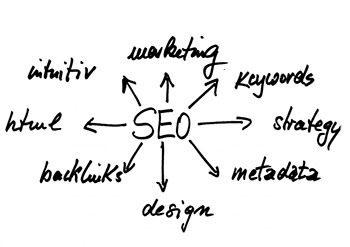
Using long-tail keywords alone won’t make your e-commerce store a conversion powerhouse. You need to use these keywords with other known SEO best practices. If you are using long-tail keywords right but doing everything else wrong, then it is not likely that you will get conversions.

You should create quality content that is easy to read. You should use proper URL structuring. Make your URLs readable. Implement proper navigation and good user interface. Upload a sitemap and make sure search engines can crawl your site. Use images properly and optimize your site for increased conversion. There’s a lot more to this but here’s a guide from Google to help you get started on best practices.

And that explains why you should use long-tail keywords for your WooCommerce store. If you have any questions, let us know in the comments.

Filed Under: SEO For E-Commerce Tagged With: best practices, e-commerce, marketing strategy, optimizations, SEO strategy

  • « Previous Page
  • 1
  • 2
  • 3
  • 4
  • Next Page »
Let us support your online store so you can manage your business

Get started today

Get 2 Hours of FREE SUPPORT

We are so confident that you will love our services that we will give you your first 4 hours at a 50% discount

That’s 4 hours for only $75

BUY NOW

Free eBook

5 Things Every Online Store Can Fix On Their Website In The Next Week To Increase Sales

Quick Links

  • How it Works
  • Pricing
  • Blog
  • Contact
  • About Wooassist
  • My Account
  • Checkout
  • Privacy Policy
  • Cookie Policy
  • Terms and Conditions

Wooassist

Australia:
59 Luke St.
Hemmant QLD 4174

Philippines:
San Miguel St.
Poblacion, Iligan City 9200

Connect


Copyright © 2026 · Wooassist

Yours FREE!

5 Things Every Online Store Can Fix On Their Website In The Next Week To Increase Sales