Wooassist

Assistance for Your Woocommerce Store

  • How it Works
  • Pricing
  • Services
    • Site Maintenance
    • AI SEO and Content Marketing
  • Blog
    • How-To Articles
    • Code Snippets
    • SEO For E-Commerce
    • Theme and Plugin Reviews
    • Wooassist News
    • WordPress/WooCommerce News
    • Interviews
  • About Us
  • Contact
You are here: Home / Archives for marketing strategy

How to Create Calls-to-Action that Convert Online Sales

January 28, 2016 By John Leave a Comment

calls-to-action

Successfully selling online requires more than just posting your products on a WooCommerce site and hoping for the best. You also must increase your e-commerce site’s traffic with visitors that match your target market. This takes a considerable investment of time and money, so before that investment you need to make sure you are set up to convert all those visitors into customers. In this post, we will teach you how to create calls-to-action that convert for your WooCommerce store.

What is a Call-to-Action?

For e-commerce sites, a call-to-action (CTA) is a message that moves visitors toward your desired response. It can be a hyper-linked text or phrase, a button, a banner or any clickable element. Calls-to-action are usually seen in lead generation, sales funnels, trials and downloads. Its purpose is to help you achieve a goal or a conversion for your e-commerce store.

Why are Calls-to-Action Important for E-Commerce Stores?

Ever wonder why some e-commerce sites make it big online while some do not? A survey on website failings showed that 70% of websites that fail do not have a CTA on their home page. Good website design and high traffic is not enough to get higher conversion rates. CTAs tell your visitors or audience what actions they can take.
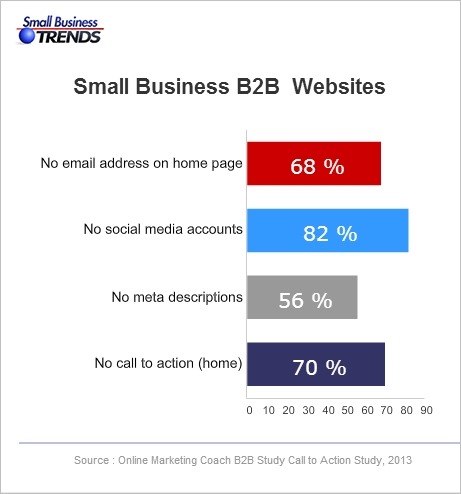
B2B-call-to-action
Source: http://smallbiztrends.com/2013/08/b2b-small-business-websites-lack-call-to-action.html

There are nearly a billion active websites today. People could easily switch to another website if you don’t get them to take action. Your CTA is your marketing tool to educate, engage, and capture your potential customers. It will help you increase your conversion rate as you guide visitors to complete your e-commerce goals.
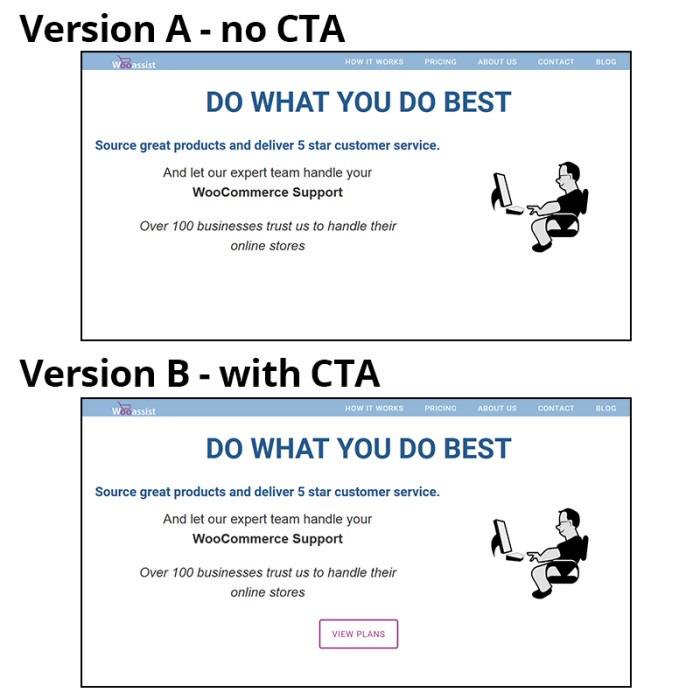
cta-samples-wooassist-view-plan

How to Create Calls-to-Action that Convert for Online Sales?

Having a CTA is not as simple as putting a text over a button. A weak or an unclear call-to-action may impede the sales process and you could end up losing a client. 30,000 new consumer products are being launched every year. Unfortunately, Clayton Christensen of Harvard Business School found that 95% of them fail.

Businesses often fail because they don’t take the time to understand their customers. Try to understand reasons behind sales and use that knowledge to your advantage. It will not only increase your online sales but promote customer loyalty.

There are four things you need to know to be able to create calls-to-action that convert online sales for your e-commerce store.

The Copy

You are often limited to just a few words or a phrase but that does not mean you should take this lightly. A subtle word change can make a big difference. Here are a few tips that you should consider.

Determine your Outcome

What outcome and action do you want from your audience? Is it accessing your shop page, signing up on your email list, downloading a trial version of the software, or downloading your e-book? Being clear with your desired outcome will allow you to get the results you want. CTAs should use specific, understandable and concrete language to lead customers to your goal. Avoid using ‘cute’ and vague language. To be effective, a customer must know what’s going to happen when they click on your CTA.


cta Change your life
Example of a vague CTA
cta Interested
Example of cute language. This CTA may seem attractive to some but it does not get as much clicks as ‘Download E-book’.

Identify your Audience

A CTA that works wonders for another website may not work the same way for you. A generic or copied call-to-action will work but conversions sky-rocket more with optimized versions. You can use analytics data to help you decide. Know your audience. Create a customer persona. By understanding your audiences’ desires and needs, you can convert them to paying customers better.
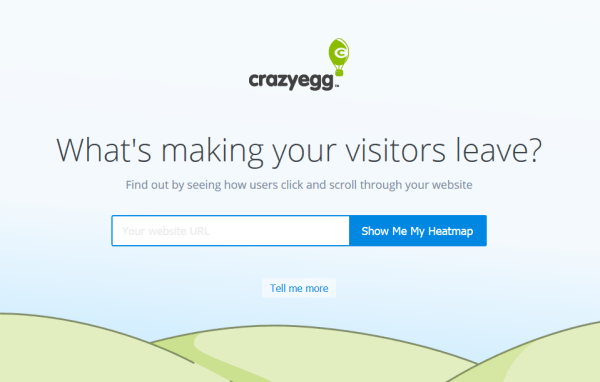
cta sample crazyegg
Crazy Egg asks its potential customers to try out their service for free.

Tailor to your Platform

Different platforms offer different methods of interaction so modify your call-to-action to the common responses for each medium. Requesting a comment or reaction is appropriate on a blog or social media post but not on a landing page.
cta sample share
This is the kind of CTA that you’ll use in a blog post.

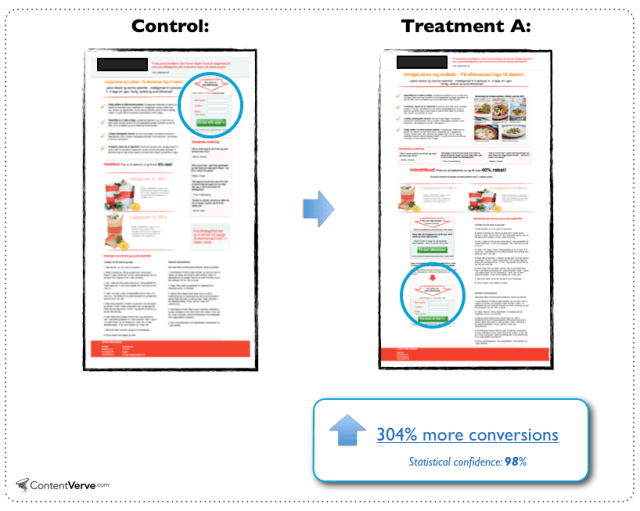
Position is Key

Calls-to-action should be placed after informing your visitors of what they are getting at. It can either be above the fold or below. You can also consider following the F pattern. You can add it at the end of a video or set up your website to display them before your visitor exits.
cta ab test sample
People need information so the change in location benefited this landing page.
Source: http://contentverve.com/10-call-to-action-case-studies-examples-from-button-tests/

Design is Important

Design should make your CTA noticeable but it should not interfere with your design. Don’t be too pushy with getting a sale as this might actually harm your online conversions. Your CTA needs to stand out from all the clutter. Try using white space to draw in more attention to it.
cta sample amazon ctas
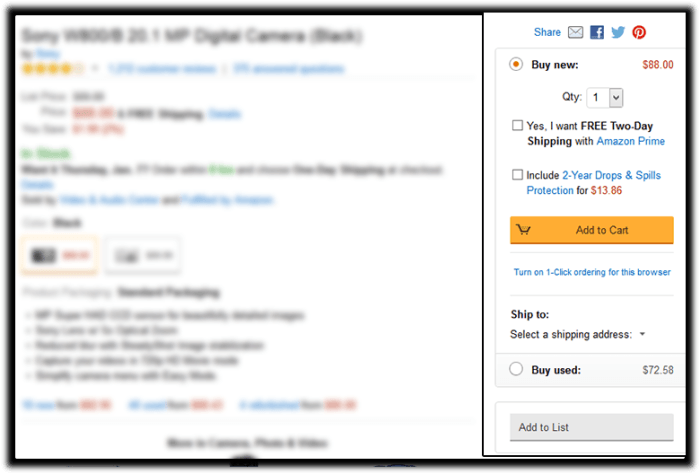
Amazon’s add-to-cart button stands out more than other CTAs in this sidebar. Its cart icon is good for visual association.

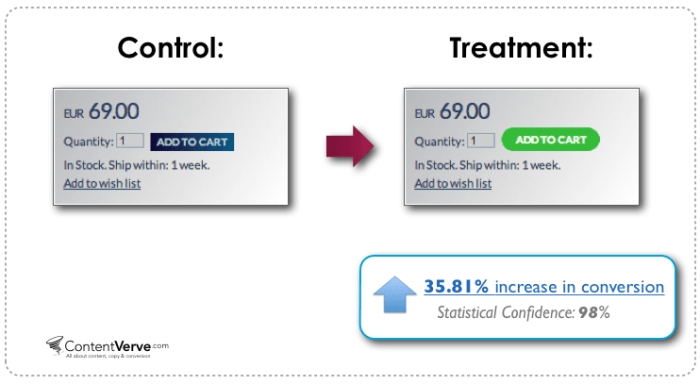
Colors help you increase your online conversion rates because colors have implied meanings. Your design needs balance. If you need a large button, choose a less prominent color that is relative to the elements around it. For smaller buttons, you may choose a brighter color. You can also make use of subtle hover animations.
cta ab test sample color
Change in color and design can increase conversion.
Source: http://contentverve.com/10-call-to-action-case-studies-examples-from-button-tests/

Optimization

Your CTA may be converting but is it the best one? Getting a high converting CTA needs constant testing. Set up your analytics and tracking services first. Use Google Analytics or Crazy Egg’s heat-maps and scroll-maps. You can also use A/B test services like Split Button for optimization. Once you have the data, do not be afraid to experiment and use the data to your advantage. You can use these A/B test ideas to get you started or check out this guide from Neil Patel on how to do split testing.

Summary

Calls-to-action help you to have higher conversion rates and good ROI for your e-commerce store. Good strategy, monitoring and optimization are keys to good CTAs. What calls-to-action ideas, experience and online marketing tips would you like to share for other online store owners? Let us know in the comments.

Filed Under: How-To Articles Tagged With: call-to-action, conversion optimization, e-commerce, how-to, marketing strategy, optimizations

How to Outsource Writing Blog Posts and Get 55% More Traffic to Your Site

October 7, 2015 By John Leave a Comment

blog-793047_640

Did you know that e-commerce websites that have a blog gain 55% more traffic?

Writing blog posts can be a daunting and a time-consuming task. Learning how to outsource writing blog posts makes a lot of sense. However, before you go about outsourcing, you should get a few things organized.

Prepare a Blog Strategy

If you already have a blog and didn’t start it with a strategy in mind, then you are doing it wrong. Without a clear strategy in mind, you are unlikely to reach your objectives. With a strategy, you will have a goal and everything you do on your blog should contribute to achieving that goal.

strategy

Being consistent with your strategy is key according to Neil Patel.

It’s hard – if not impossible – to succeed at content marketing without creating blog posts on a regular basis. Every successful blog is built on a solid foundation of content, but it’s consistency that’s the real key to success.

If you are going to write content, write the best content on that topic. Competition is tight so doing anything less than the best is not likely to give any results.

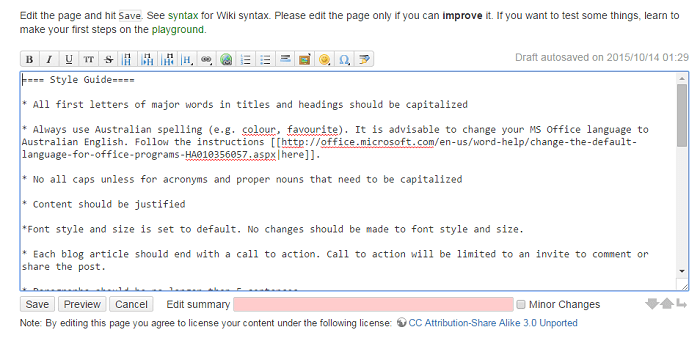
Prepare a Style Guide

What is a style guide? Think of a style guide as the written rules for your blog. It can be a simple bullet point list available on the web. We use Dokuwiki for this.

style-guide

Your style guide should show what kind of language will be used throughout your blog. For example, if your target market is Australia, you should be using Australian English. If your market is the US, then US English.  Your style guide should also contain your preferred spelling of words with multiple spellings. Examples of words with different spellings are “aesthetic” and “esthetic” or “e-commerce” vs “ecommerce”.

You can also list how you plan to use images on your style guide including preferred sizes and alignment.

This style guide should be updated from time to time and should be made available to anyone writing content for you.

Prepare a Customer Persona­­

customer-personaYour blog needs to speak the language of your customers. This is best achieved by creating a customer persona. Check out this blog post to learn how to create a customer persona.

When you know your audience, you understand their needs. If you understand their needs you can speak their language and give them exactly what they want.

Prepare a Content Roadmap

A content roadmap shows a list of blog post ideas that you want to add to your blog. Each idea should include a title, a summary, and sources that you plan to use. You can have the writer that you will outsource do this after you have shown him/her your blog strategy.

Outsourcing a Writer

When it’s time to outsource a writer for your blog, share all the documents that you have prepared. This includes your blog strategy, style guide, customer persona, and content roadmap if you did it already. This will give the writer a better idea on how to write content that will accomplish your goals and speak with your customers.

blogging

Note that it might take a while before you can find a writer that you will like. Don’t be afraid to try a few writers to find the one satisfies your needs.

Find a Writer that Knows SEO

When looking for a writer to write content for your blog, you should find a writer that is knowledgeable in SEO. A blog should be targeting long-tail keywords. To know what a long-tail keyword is and to learn how it can be used to attract more visitors to your site, check out this post.

Communicating with the Writer

Your roadmap is not set in stone and should change from time to time as new trends arise and/or you come up with new ideas. You will often think of a topic that you need to act on straight away. When this happens a rough draft or a summary of the article will do to start with.

See what your writer comes back with and then make suggestions if needed. It will be much easier for you to start with a draft a quality writer has already created than a blank page

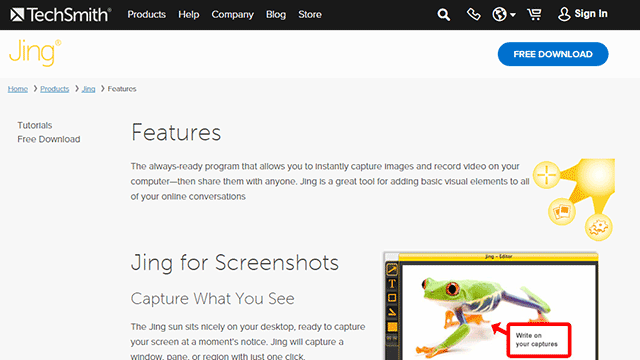
Sometimes you will need to talk about the content that you want written. It might be a good idea to record a video brief of the instructions. We do this sometimes and in such cases, we make use of Jing. Jing will capture a video of your screen. With a mic, you can send instructions. When you’re done making the video, you can just send a link to the contractor. Compared to Skype conversations, this is better as the contractor can review the instructions when needed.

jing

Proofreading and Editing Content

Proofreading and editing content is an important process that needs to be done every time you will publish content. Never skip this process as a poorly written blog post with lots of grammar and spelling errors will reflect poorly on your brand.

Even if you opt to write the blog posts yourself and not outsource. This is one step that you must outsource. You need a fresh pair of eyes on your content.

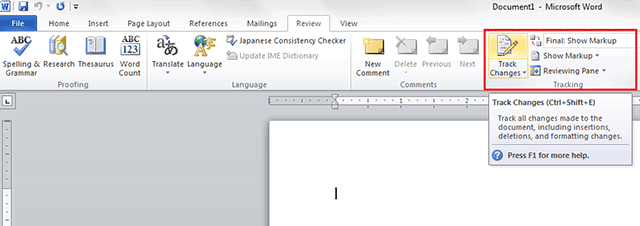
In our case, we have at least two other people check any article before it is published. The writer writes the content and sends it to the first editor who will check the content and give feedback. If there any changes to be made, it is returned to the writer to make the changes. After that, the article will be sent to the second editor. The second editor will check the style, fix any grammar or spelling errors, and ensure that it follows the blog style guide. The “Track Changes” function in Microsoft Word works great for proofreading and editing content.

track-changes

Summary

To sum it up, outsourcing a writer for your blog doesn’t mean just jumping in and immediately hiring someone to do the writing for you. You need to have a clear strategy before you do any of that. In line with your strategy, you should also prepare a blog style guide, a customer persona, and a content roadmap. When that’s out of the way, you can start looking for a writer that will accomplish all of your writing needs. Finding that perfect writer can take a while so keep at it.

Do you have any other tips for outsourcing a writer for a blog? Let us know in the comments.

Filed Under: How-To Articles, SEO For E-Commerce Tagged With: blog, customer persona, how-to, marketing strategy, outsourcing

How to Choose the Best Domain Name for Your WooCommerce Store

April 5, 2016 By John Leave a Comment

how to choose the best domain name for WooCommerce

Your domain name is part of your company’s identity. It should play an integral part in your branding strategy. In this article, we will identify how to choose the best domain name for your WooCommerce store.

Stay Relevant

You can start with a list of five to ten keywords that communicate what your WooCommerce store is about. You can then narrow it down, choose to add a prefix or a suffix, use them to make compound words, or make a new word.

Brand is not an SEO ranking factor but it has a positive influence on your SEO and reputation. At a glance, your customers should be able to connect your domain name to the nature of your business. Having a relevant domain name will also benefit you in defining your target market.

Stay Unique

Set your e-commerce business apart by having a unique and creative domain name. Avoid having your website domain name close to another brand’s name. A sure recipe for disaster is when users confuse you with another popular site.

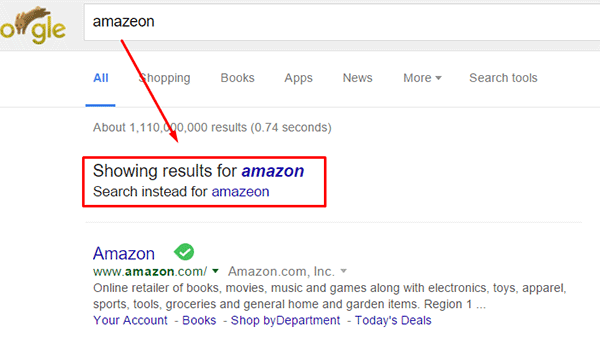
Intentionally going with a domain name similar to a popular brand in an attempt to deceive users can land you in jail. Same goes for intentionally misspelling a popular brand’s name. The practice is known as “typosquatting” and it is illegal. In fact, Facebook recently won $2.8 million and gained control of over 100 domains in a typosquatting case. You could also be charged with fraud or copyright infringement. Also, even if the popular brand does not catch wind of your site, intentionally misspelling a popular brand name can direct your traffic to the popular brand. Just check out the image below. A unique domain name will do wonders to your branding as it sticks into your customers minds.

misspell-popular-brand-name

Keep it Simple, Short and Memorable

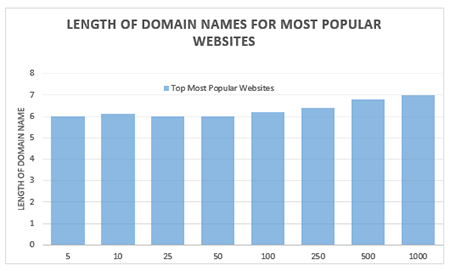
domain name lengthChoose a domain name that is easy to type and easy to remember. Don’t use hyphens, numbers, slang, and odd misspellings. In Alexa.com’s top 500 sites on the web, some of the top most popular websites have domain name lengths of 6-7 characters on average: Google, Youtube, Amazon and Linkedin, to name a few. From this data, it does appear that domain length matters.
Difficult-to-remember and hard-to-pronounce domain names would most likely rank low in search engines. A simple, short and memorable domain name is a great help with word-of-mouth marketing. It also fits well on any online or print form of marketing.

Tools to Help You Choose

There are now many tools online that you can use when you’re stuck or don’t know where to start in searching for a good domain name. Here are tools that can help you jump-start your domain name brainstorming session.

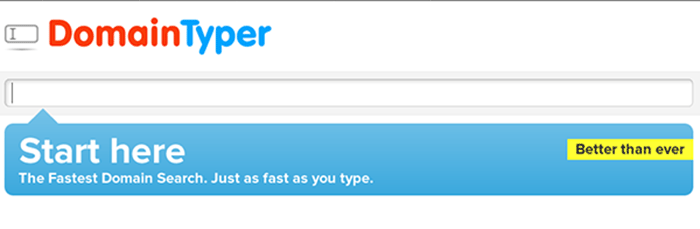
Domain Typer

Domain Typer helps you search for domain names. It displays popular domain name extensions like ‘.com’, ‘.net’, ‘.org’, ‘.co’, ‘.info’, and ‘.mobi’. It also displays prices should you need to compare.

If a domain name is not available, it displays links to its registration information, website and page ranking. It also has a domain hack section where you can select unusual combinations of your keywords.

domain-typer

Lean Domain Search (formerly Domain Pigeon)

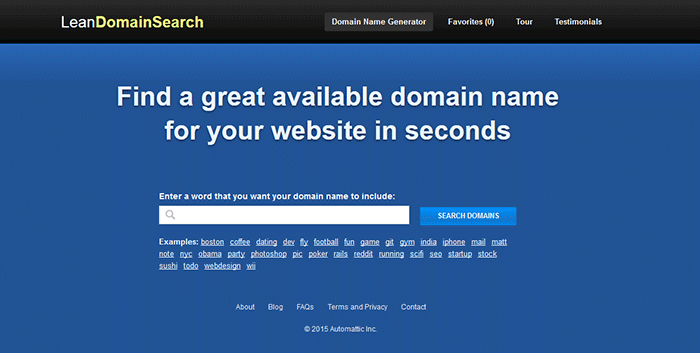
Aside from the search option, Lean Domain Search gives you some examples to help you get started. You can sort the results and even add search term filters. It shows ‘.com’ results and it shows you the popularity index of your keyword by domain count.

lean-domain-search

Wordoid

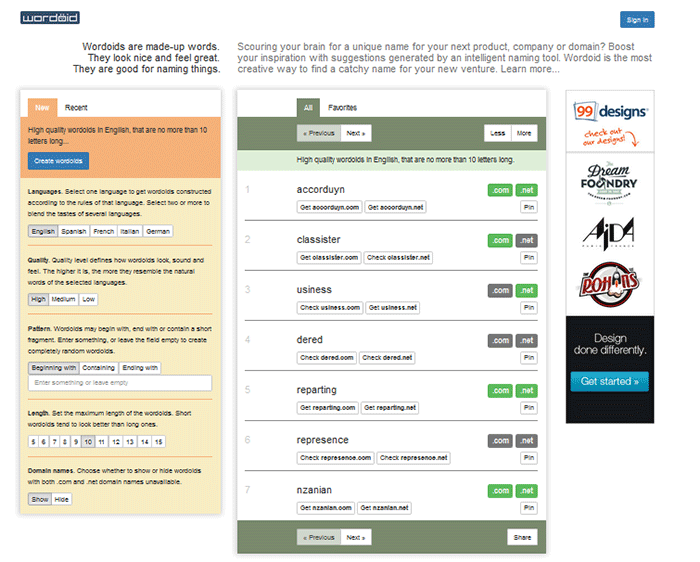
Wordoid is a more intelligent tool that sparks your creativity in getting a unique name for your domain. Just remember to not overdo it. Simple names are easier to remember.

wordroid

What if the Domain I Want is Not Available

You did your brainstorming and you have decided on the perfect domain name for your WooCommerce store. But upon checking, you find out that the domain you want is no longer available. You can try the alternative solutions below.

Just Come Up with a Different Domain Name

Discretion is the better part of valor. You may think you are smart by using the same domain and just using a different domain extension like .net or .co. However, you may just end up sending your hard-earned traffic to the other domain. Put on those thinking caps and think of another domain.

Create an Offer

One option is to find out who the registered owner is and create an offer. This is especially advisable when the domain is registered but not being used. Just visit the actual address or use a tool like theWhois Domain Tools or ICANN lookup tool to get information on the current registered owner. Send them a message and ask if they would consider selling the domain name. Most domain registrars offer services wherein they contact the domain owner in your stead. This is worth a try if you really want that domain.

If you decide to get in touch with the owner yourself, try to make your request sound casual. Don’t act too interested as you could get an overpriced offer.

Monitor the Domain Name

If your lookup shows that the domain registration is expiring soon, waiting it out might be a viable option. When the domain is back in the open market, grab it. However, do note that certain domain registrars give domain owners ample time to renew their registration. The domain may not appear on the market on the actual day that it expires.

Avoiding Overpriced Domains

money-financial-crisisIt is difficult to gauge the exact value of a domain name because it’s all about demand. Some domain names are really just expensive and there’s not much you can do about that. You can just build your not-so-popular domain’s reputation from the ground up. Many domain registrars provide discounts and offers so you can save a few bucks on that. If the domain that you want is being auctioned, you can join the auction and get it very cheap if you are lucky.


Background Check on Domains

Buying a domain, especially used ones, can be a nightmare if you don’t do your research. If you have decided to buy a used domain, don’t buy that domain yet unless you’ve done the following.

Check its Registration History and Reputation

Check the site ownership registration history. Use Whois Domain Tools to look up ownership information, ranking, traffic, SEO and more. The frequency of change in its owner or host speaks about its reputation and stability.

Avoid buying domain names sold numerous times in a short span of time. It might have a negative reputation from search engines that can be a nightmare to solve.

Analyze Link and Content History

You can use Internet Archive to check domain name’s content history. To check a domain’s reputation, google ‘site:yourdomain.com’ (without the quotations). You can also do a regular search to bring up all mentions of the domain name.

Be on the lookout for spammy illegitimate links. Check for Google red flags like bans and penalties. Make sure to also check the domain name’s Google cache date, including the text only version.

Do a thorough examination of its back-links. If you find anything shady, it might be a good idea to back off. While Google now gives website owners the ability to manually remove or disavow links, this isn’t something that you’d want to be doing. Save yourself from a lot of headache and go with a domain with a good rep.

To Sum It Up

A domain name is your online store’s identity. You can be successful with your branding and online business with a good domain name. You just need to carefully choose a domain name that is unique, relevant, short, simple and easy to remember. You also need to do a thorough background research to make sure you are not buying a domain with a bad rep.

Do you have any tips you’d like to share? Or did we miss something? Let us know in the comments.

Filed Under: How-To Articles Tagged With: best practices, e-commerce, how-to, marketing strategy, WooCommerce

WooCommerce Landing Pages to Boost Conversion

January 29, 2015 By John Leave a Comment

woocommerce-landing-pages

You just launched your e-commerce store using WooCommerce. Now, you want to go all out on your marketing campaign to boost conversion rates.If you want to get your campaign off to a great start, there’s one thing to remember – never start without a landing page.

What is a Landing Page?

A landing page is a standalone web page that stands apart from your actual website.  It is designed for a single focused objective, and serves as a guide for achieving conversion goals.It does not have any direct ties to your website. No global navigation exists to link the two together. Here is a good article explaining what it is.

SnapCrab_2015-07-03_10-28-23_No-0000

The landing page may be used either to capture leads or make a potential customer ready for purchase. Access to it is only possible through a link that you’ll provide in the content of your marketing campaign. This post further explains what a landing page is used for.

WooCommerce Landing Pages

Building landing pages for your WooCommerce store will help you generate more leads and conversions. Even if you plan to hand this task over to a professional, it would help if you understand the process.

This resource has tips on how to create effective landing pages.  WooCommerce Conductor. It can also show you how to create focused landing pages of featured WooCommerce products, capture leads, and build future marketing funnels.

SnapCrab_2015-07-03_10-28-41_No-0000

The first step to creating a successful, WooCommerce landing page is setting your business objectives. It’s worth noting that a landing page without a lot of thought behind it, will not be able to achieve its goals.

The potential uses for landing pages are almost limitless, but it can only benefit you if it’s done the right way. How well it is designed,and how skilfully it works,can make or break conversion. It is your ticket to more leads and sale, so having a professional landing page design is important. Let our Wooassist team do the job for you!

Filed Under: How-To Articles Tagged With: conversion optimization, how-to, marketing strategy, outsourcing, Wooassist, WooCommerce

How to Use Google Analytics to Track Website Goals in WooCommerce

May 25, 2016 By John 4 Comments

Google-Analytics

Knowing your site’s stats is critical in decision making to guide your site to success. Google Analytics is a web analytics service designed for this particular job. If you have a WooCommerce store, you probably have it set up to gather traffic data. In this article, we will teach you how to use Google Analytics to track website goals. Get more value from Google Analytics by tracking the completion of your site goals.

What is Google Analytics?

Google Analytics is a free web service from Google that tracks and reports website traffic data. It was launched in 2005 and is available to all users, whether they use Google for advertising or not. It is tightly integrated with Google Adwords, the company’s main advertising service, as it helps users keep track of their online web marketing campaigns. But using Adwords is not a necessity in order to get the most out of the Analytics.

Why Should You Use Google Analytics?

Google Analytics yields valuable information to help you make smarter marketing decisions, generate more leads and improve user experience. Traffic data can help you identify which of your blog posts provides the most user engagement and which one results in a conversion whether it’s a sale or an email sign-up. You can pinpoint the best time to post a new article. You can see the number of visitors who exit your site and from what page they exit. With that information on hand, you can look for ways to improve that specific page to reduce exit or what is known as bounce rate. In a nutshell, this treasure trove of data will be invaluable in your decision making for optimizing your website.

How to Track Completion of Goals in Google Analytics?

In Google Analytics, tracking page views and visitors is just the tip of the iceberg. Finding out if your website is actually accomplishing the goals you’ve set for your e-commerce site is more important. In fact, even if your traffic is ranging in the millions but you are not getting your intended conversions, that traffic is mostly worthless. This is where setting goals in Analytics come in. A ‘goal’ is a completed activity in your website that is tracked in Google Analytics. Defining your goals will depend on what kind of website you have. For an e-commerce site, goals can be a newsletter sign up, a purchase, downloading a trial software or e-book, or adding a product to a wish list.

Tracking your goals in Google Analytics will yield crucial data. If you see that many of your visitors add your products to the cart but exit when they reach checkout, there must be something in your checkout process that is preventing your visitors from completing purchases. You can then proceed to analyze and identify what factors you need to try and solve the problem After applying fixes, data from Analytics will help you identify if your tweaks have helped your conversion rates or not.

There are 4 ways to track goal completion: Destination, Duration, Pages per session, and Event.

Destination/URL Tracking

Your website is basically a network of pages represented by an identifier address or URL. Google Analytics provides an easy way to track specific URLs through destination goals. Each time someone navigates to a specific destination URL, it will trigger the goal as completed. This is the easiest and most common way to track goals because it is straightforward and easy to set up. This is ideal for tracking thank you pages every time someone subscribes, makes a purchase, or sends a contact email using the contact form, etc. which registers as a completed goal in analytics.

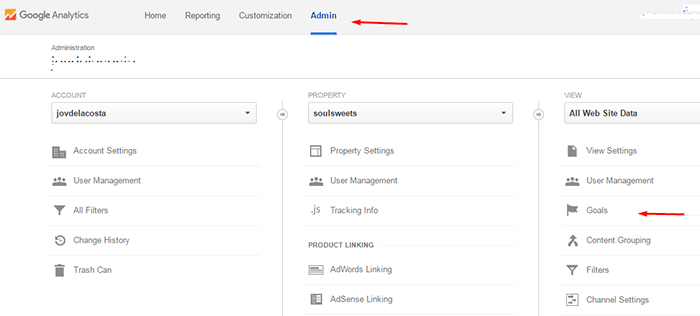
To setup a URL tracking goal, navigate to the Goals section in Analytics first. Go to Admin and click Goals.

how to use google analytics to track website goals

In Goal Setup, we set our goal name as “Place an order” and this goal will track how many visitors placed their orders/completed the checkout. Since checkout is normally closed with a thank you page, we can track how many times the thank you page is visited to track the number of purchases. Google Analytics also allows users to view other important statistics such as time on site and the referring URL which led to the sale.

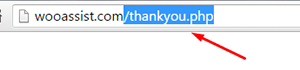
In Goal Description, set the goal type as Destination and enter the URL of your thank you page. You don’t have to enter the full URL, just the slug after the domain name will do. So, instead of www.example.com/thankyou.php, just enter /thankyou.php.

domain-slug

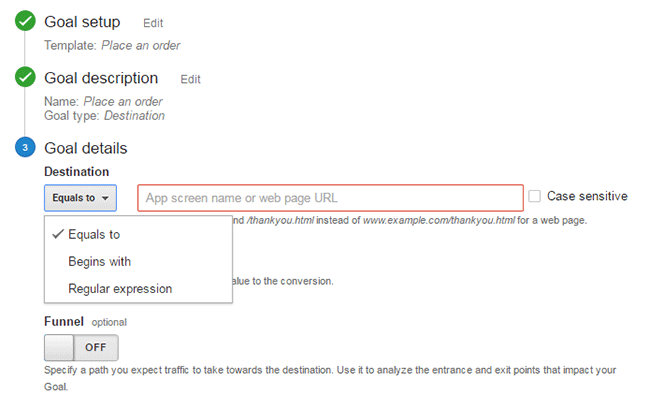
In Goal Details, select which of the below corresponds to your desired action.

  • Equals to – Requires the exact same string to trigger a goal. Good for tracking single pages.
  • Begins with – Only requires that string begins with the inputted URL. So if you put “/products” it will track any URL that starts with “/products”. This includes “/products/bags”, “/products/shirts”, etc. This is ideal for tracking a group of related pages under the same category.
  • Regular Expression – This is meant for advanced users. You can write wildcard terms to select a variety of URLs. You can read more about regular expressions in this guide.Google-Analytics_URL-Tracking_Goal-Details

Funnels

The basic concept of funnels for destination goals is to track a series of pages. These pages form the path you expect traffic to take. For example, you might want to get your visitors to watch a video of the product demo, proceed to add the product to cart, checkout and finally the thank you page.

Funnels are optional and not all e-commerce sites have a defined sales funnel. Still this should not be neglected. Tracking your funnel provides insights on how effective your website setup is in achieving your goal. When your visitor exits at the end of your funnel, the goal is triggered.

Setting up a funnel is very handy because you’ll also know how many visitors proceeded to each step. You’ll know at which step most of your visitors abandoned the process so you can make the necessary adjustments.

Google-Analytics_Funnel

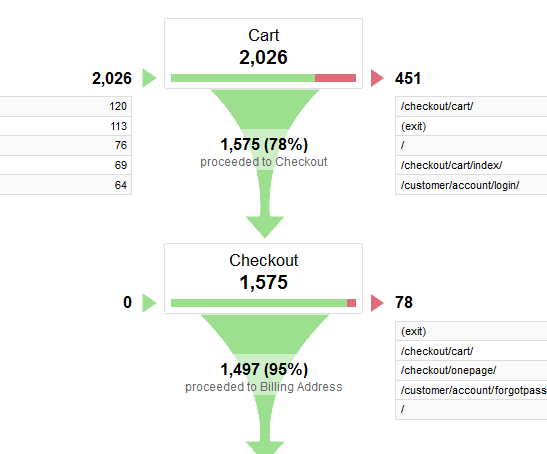
Here is a sample data from a funnel. Notice that you can easily view how many proceeded to the checkout from the carts page.

Duration Tracking

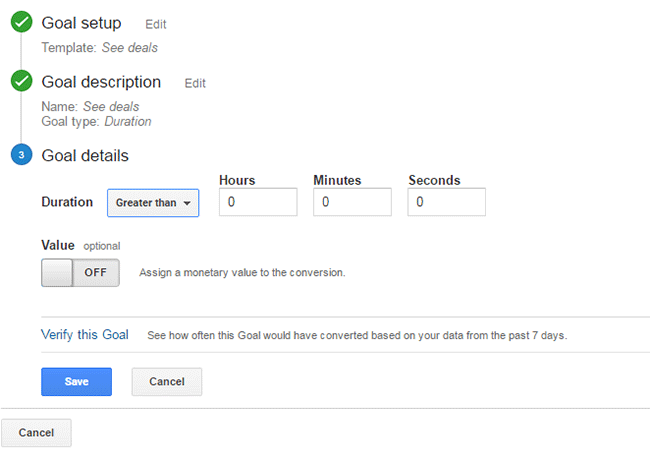
This tracks how much time the user spends on your site. To set this up, you just need to set a minimum amount of time in “Goal details” and if the user spends more than that, the goal will trigger. This tracking is useful for tracking goal pages with important content such as infographics, your portfolio or any other content that you want your visitors to view.

Google-Analytics_Duration-Tracking

Pages/Screens per Session

If your visitors reach a specific number of pages before exiting, it will trigger this goal type. This is useful when you have a lot of content that you want your visitors to view. This goal is used mostly by news and other media sites that earn advertising income.

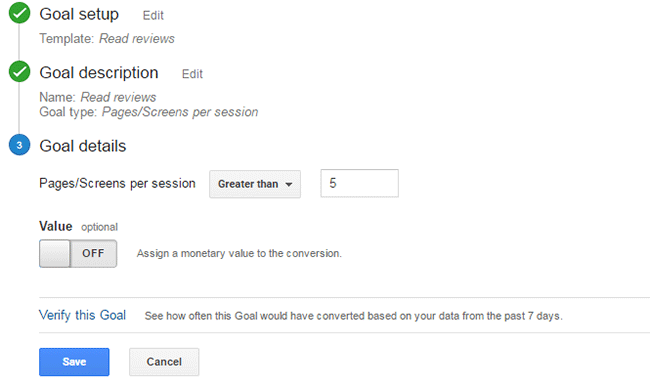
To set this up, set Pages/Screens per session in “Goal details” and then choose a number that you want to target for your goal.

Google-Analytics_Pages-per-Screen

Event

This goal is meant for advanced users. You need to know some script coding to trigger the event. And it can be as specific as you want it to be. Using scripts on your site, you can track a click of the button, scroll on a page, and more specific actions that are happening during the visit.

Wooassist_Call-to-Action_View-Plans

Mostly, an event goal is used on button clicks. While you can use URL tracking to track button click, it becomes a problem when you have multiple buttons on different pages that point to the same URL. You won’t know which button was clicked. With event tracking you can keep track of each button individually. This is very useful in identifying which particular button or button design is more effective in completing your goals. To know more about setting up event tracking, you can visit Google’s guide for event tracking.

Conclusion

Remember that Google doesn’t retroactively track your goals. So it is important that you set up your goals as soon as you have your site running so that you can effectively start collecting data right away. Use the data you gather to improve your conversion rates. Google has provided you the resources to improve your site and increase your income. Now it’s up to you how you will use that data to your benefit.

Was this post helpful? Do you have any tips you’d like to share about Google Analytics conversion tracking? Let us know in the comments.

Filed Under: How-To Articles Tagged With: best practices, call-to-action, conversion optimization, e-commerce, Google Analytics, how-to, marketing strategy, optimizations

  • « Previous Page
  • 1
  • 2
  • 3
  • 4
  • Next Page »
Let us support your online store so you can manage your business

Get started today

Get 2 Hours of FREE SUPPORT

We are so confident that you will love our services that we will give you your first 4 hours at a 50% discount

That’s 4 hours for only $75

BUY NOW

Free eBook

5 Things Every Online Store Can Fix On Their Website In The Next Week To Increase Sales

Quick Links

  • How it Works
  • Pricing
  • Blog
  • Contact
  • About Wooassist
  • My Account
  • Checkout
  • Privacy Policy
  • Cookie Policy
  • Terms and Conditions

Wooassist

Australia:
59 Luke St.
Hemmant QLD 4174

Philippines:
San Miguel St.
Poblacion, Iligan City 9200

Connect


Copyright © 2026 · Wooassist

Yours FREE!

5 Things Every Online Store Can Fix On Their Website In The Next Week To Increase Sales