Wooassist

Assistance for Your Woocommerce Store

  • How it Works
  • Pricing
  • Services
    • Site Maintenance
    • AI SEO and Content Marketing
  • Blog
    • How-To Articles
    • Code Snippets
    • SEO For E-Commerce
    • Theme and Plugin Reviews
    • Wooassist News
    • WordPress/WooCommerce News
    • Interviews
  • About Us
  • Contact
You are here: Home / Archives for best practices

How to Fix Blurry Product Images in WooCommerce

February 26, 2015 By John 10 Comments

Blurry ain't good
Blurry ain’t good

Sometimes you upload an image in WordPress/WooCommerce and it just doesn’t show up like you intended it. Sometimes they don’t align. Sometimes they don’t fit the placeholder. Sometimes the image just doesn’t show. And sometimes, the image gets blurry. Why the image gets blurry may be caused by one of a few problems. Here we discuss the common causes and how to fix blurry product images in WooCommerce.

You Uploaded a Blurry Image

If you uploaded a blurry image then don’t expect that you’re going to get a good image to show up. Maybe you viewed the image in a small screen so it looks okay but when you view it on a larger screen, you’ll find that it actually is blurry. If this is the case, there is hardly anything that you can do to fix the image. Image editing tools like Adobe Photoshop may be able to help a bit by making the image sharper but don’t be expecting any significant changes. Odds are you’ll have to get a better image.

WooCommerce Recommends Using Large Product Images
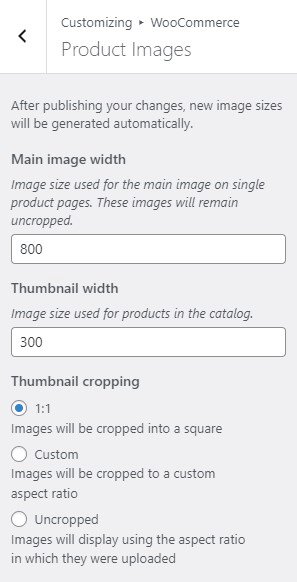
thumbnail cropping woocommerce

Before, WooCommerce images need to be a specific size that you set in WooCommerce settings. That is no longer the case. WooCommerce now uses a lighthouse so images pop up big when users click on it. Large images look great and will help sell your products. However, make sure they are properly optimized.

For most themes, WooCommerce recommends uploading an image that is at least 800×800 pixels. Don’t worry about the image being bigger than the placeholder as WooCommerce automatically sizes your images and will only show the full resolution when clicked.

To control thumbnail cropping of your product images, you can go to Appearance > Customize > WooCommerce >Product Images and then select your desired cropping settings.

If the image is not the problem, there might be a problem with how your images are rendered. You can try to regenerate image thumbnails.

How to Regenerate Thumbnails

Other than when changing image settings in WordPress and WooCommerce, you may also need to regenerate the image thumbnails on your website if they appear blurry after a redesign or changing to a different theme. The best and easiest way to regenerate image thumbnails is to use the Regenerate Thumbnails plugin. Simply install and activate the plugin and from there, go to “Tools” and “Regen. Thumbnails”. Just click on the button “Regenerate All Thumbnails” and the plugin will fix the blurry images like magic.
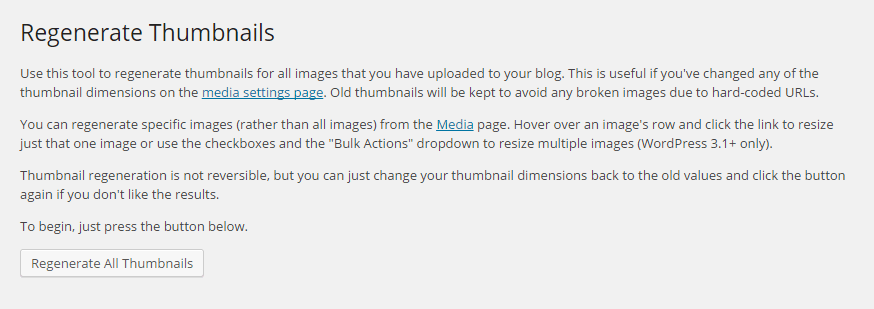
regenerate-thumbnails

If you want to regenerate thumbnails for specific images instead, you can do this on the Media page on your admin panel. Make sure you are viewing images with List view. Simply hover over the image and the link to regenerate thumbnail should appear. You can also mark all the images you want to regenerate thumbnails and use Regenerate Thumbnails from Bulk Actions and then apply.
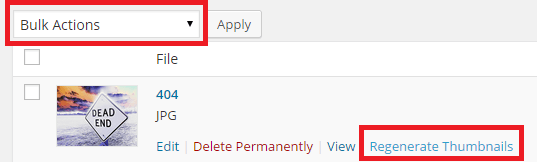
regenerate-thumbnails-1

Best Practices on Image Use

There are a lot of things that you can do to avoid blurry images by following best practices. Once you set an image dimension, make sure that the images you upload comply with that requirement. Uploading a bigger image in WooCommerce is okay but make sure the image is optimized so as not to affect your page load speed. You can set how you want image thumbnails to be cropped. If you upload a smaller image, it might look okay on a mobile device but not on a PC or laptop. It is also important to know what image file types to use.

Another best practice for images is to always set an alt text for your image. If the image fails to load, the alt text will show up and the user will at least know what the image is about. Also, name your files properly. Don’t name your files after SEO keywords. If you have an image of a ukulele, give it a descriptive file name and not “buy-cheap-ukulele”.


Filed Under: How-To Articles Tagged With: admin, best practices, conversion optimization, how-to, image optimization, plugins, product management, WooCommerce

How to Write Persuasive Copy for Your Online Store

September 23, 2015 By John Leave a Comment

creating-persuasive-copy

Is your online store not giving the conversion rates you need? Something you might be overlooking is “persuasive copy”.

Persuasion and conversion go hand-in-hand. If you’re not persuading visitors, it’s going to be very hard for you to boost your conversion rate.

In this post, you’ll learn:

  • E-commerce Copywriting That Sells
  • E-commerce Copy Analysis – What’s Missing?
  • Elements of Persuasive Copy to Increase Sales
  • How To Write Seductive Sales Copy to Woo Your Customers

The Rise of Online Shopping

Online shopping is now extremely lucrative.

Just this month, Remarkety revealed that the world e-commerce market has amounted to trillions of dollars in sales projected for 2015. China has the biggest e-commerce market with $562.66B, followed by US with $349.06B and UK with $93.89B.

ecommerce-markets
Source: Remarkety

The numbers are surprising. No wonder both budding and existing entrepreneurs are taking advantage of the online market.

According to a study by Harris Interactive, 36% of customers gather information from a company website prior to making a purchase. Only 22% gather from face-to-face conversation with a salesperson, or other company representative.

This proves how important it is to fill your website with relevant information about your products or services. That information should be a credible, persuasive copy to enhance your visitors’ trust and convince them to buy from you.

E-commerce Copywriting That Sells

Your online store is part of a highly competitive web marketplace. It not only serves as a store, but also a catalog, marketing tool, and company information source. That is why you should know exactly how to sell with words.

Essentially, your copy must achieve two goals:

  1. Establish trust and
  2. Convince visitors that your product is right for them.

Setting Your Tone

Who, exactly, are you writing for?

For instance, if your store sells products for teenagers, you wouldn’t want to use the formal writing style. Keep your copy focused on your target audience. Let your company’s personality shine through.

Image Source: http://store.delias.com/

Use this Customer or Buyer Persona to establish a tone for all of the copy throughout your site. Remember, each piece of copy is an opportunity to broadcast your brand.

There are three types of copy used by copywriters:

Informational. This is the type of copy often found in a site’s frequently-asked questions section. It offers customers to-the-point information. Straight-forward, uncluttered writing is often used, while still maintaining the tone.

Marketing. This copy is mainly used in promotional materials and product descriptions. It’s the most common form of copy, but it’s one of the hardest to write.

Notification. This copy appears when you want to notify a customer when they complete actions. They may encounter positive and negative messages. One example is when they stumble upon a dead link somewhere in your site.

Good Copywriting Samples

Being a copywriter isn’t easy. You need to have the ability to find the exact right words to sell whatever it is that your company is offering. Here are some websites with stellar copywriting.

Pay attention to their tones of voice.

1.     UrbanDaddy

urbandaddy

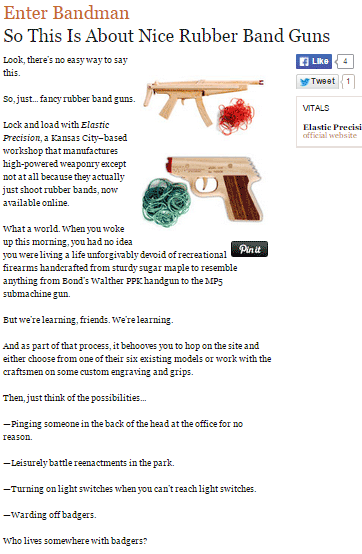
This Enter Bandman copy is really far from ‘boring’. UrbanDaddy’s unique tone can be found in every single one of their copies. From their homepage down to their editorial policy, the company clearly knows their audience.

2.     GymIt

gymit

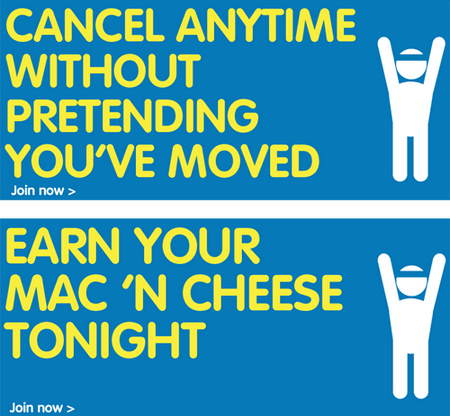
Instead of using the usual pics of ripped hunks and supermodels, with cliché fitness headlines, GymIt goes for a different approach. Their powerful copy is tailor made for the average Joe, and the humor’s great too!

3.     Velocity Partners

velocity-partners

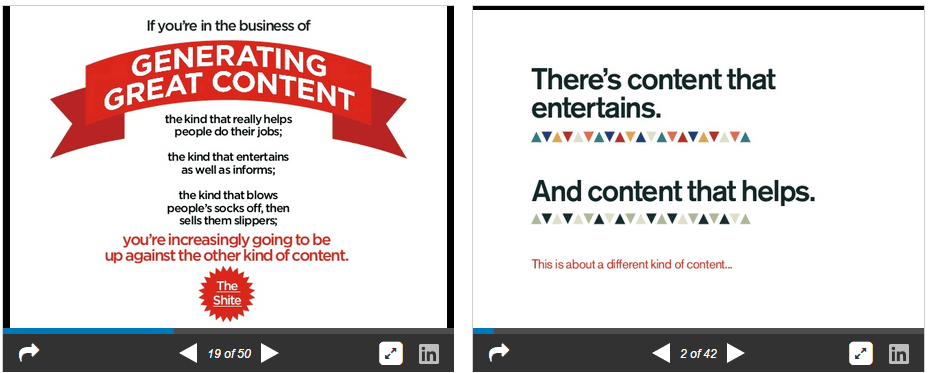
This B2B marketing agency’s co-founder, Doug Kessler, is dubbed as the master of word economy. You can check out their popular slideshares here.

4.     Tesco

tesco

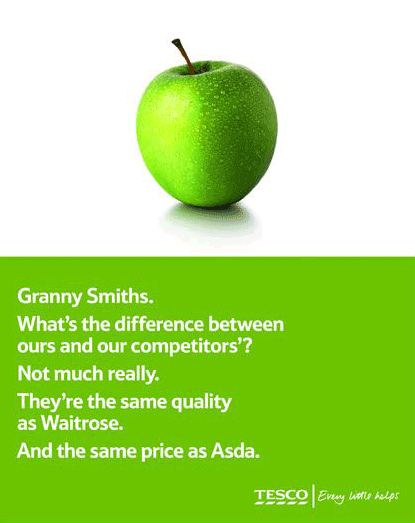
Tesco uses short sentences to captivate their audience, and they do it with a punch. It’s witty, personal, and effective. Of course, it depends on what you’re trying to sell and who your target audience is.

5.     ModCloth

modcloth

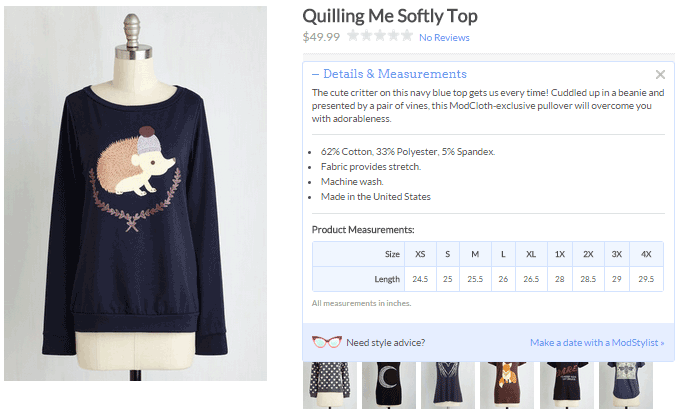
ModCloth is known for their joyous, pun-filled, and clever copy, especially when it comes to their product descriptions. They also tend to tell the story of what you’ll do while wearing their items.

Basic Rules to Follow

Avoid long sentences. Long sentences are difficult to digest, and inappropriate for persuading your audience. Shorten sentences by refraining from too many adjectives, adverbs, and pointless modifiers. Don’t use ‘for the purpose of’ when you can use ‘for’ instead.

Avoid jargon and clichés. Your aim is to sell and not to impress your readers with your vocabulary. Using jargon will only confuse your customers. If customers don’t understand something about your product, they won’t take the risk to buy it. Clichés are unoriginal and can only distract your readers.

Write in an active voice. This makes it easier to persuade your visitors to buy your products. It means to lead with the noun that is doing the action.

Hemingway is a great tool to run your copy through and reduce the fat.

E-commerce Copy Analysis – What’s Missing?

If you’re running an ecommerce site and you’re not testing your copy, you could be missing a huge opportunity to boost your sales. It’s recommended to test your copy for conversion drivers – relevance, clarity, and urgency.

ecommerce-copy-analysis

Relevance. Does the copy on the page relate to what the visitor thought he was going to see when he clicked on a link to your page? Be consistent with the incoming links.

Clarity. Does the landing page clearly articulate the value proposition? Clarity of content is often the most common factor ecommerce sites struggle with. If it’s hard to scan or understand, it can’t do its job.

Urgency. Is there an indication that the action needs to be taken now? The tone of the copy, offers, and deadlines can all influence urgency.

Test Your Copy

Businesses can make great gains by optimizing their site copy, content and headlines. As much as possible, find out what’s missing. Your visitors should understand your value proposition in your words.

While you’re focused on the merchandising aspects of your site, trying to get more products into carts, don’t neglect the benefits of testing copy.

Headlines

ecommerce-headlines

From the headline alone, do visitors understand why they should buy from your site, and not your competitors? Some sites bury their value proposition deep in the copy. Testing your headline can yield surprising results.

Most marketers know that connecting with customers on an emotional level is a key driver to increased sales and loyalty.

Transactional messages

ecommerce-shopping-cart

Managing your customer’s expectations reduces buyer anxiety. This copy drives action, and guides the customer towards completing the sale. Clarify expectations such as when to expect their shipments, or what will happen when they click the order button.

Tone of copy

Are you conveying the words your customers want to hear? Of the two call-to-actions, the first one was clear, but not compelling. The second is more personalized, gives a more positive message, and therefore more effective.

“Please select your tax-deductible gift amount below.”

“Yes I will donate a tax deductible gift of:”

Ideas, not words

Once you know what’s missing, you can apply the results across all the copy on your site. If you’re testing the effect of customer-focused copy, you might learn something about how your customers react.

Elements of Persuasive Copy to Increase Sales

Your copy should be engaging and should bring customers closer to your brand, allowing them to see what’s in it for them. A copywriter persuades customers to see their point of view. They want their writing to influence others in a positive manner.

Let’s have a look at the elements that contribute to persuasive copy:

1.    Conversational Tone

You won’t win over your readers with hyped copy. Customers turn away from anything over-the-top, especially those related to sales.

The first rule to writing persuasive copy is to write as you talk. Create that personal connection. This way it will be easier to read, since people usually have an internal monolog accompanying what they read.

2.    Be an Expert

You don’t necessarily need a degree or years of related experience. Being an expert just demonstrates that you’re knowledgeable in your particular market.

True experts know what they’re talking about. Establish yourself as an influencer by conveying confidence and certainty in your copy. Sharing your knowledge so others can learn bestows authority – and authority leads to persuasion.

3.    Good Structure

Copywriting is different from writing an essay or a short story. It’s more of a news article, wherein the most important information comes first.

This structure is called ‘inverted pyramid’. It starts with the relevant points, then followed by details. Make sure to captivate your audience with your headline, then motivate them to continue on with the benefits, features, and call-to-action.

4.    Give a Reason

Psychologist Ellen Langer has demonstrated in her book ‘Mindfulness’ that people are more likely to comply with a request if they’re given a reason, via the word ‘because’. Why are you asking them to take action?

You can also use the words ‘imagine’ or ‘picture’ to influence your readers into putting themselves into their desired outcome.

5.    Benefits, Then Features

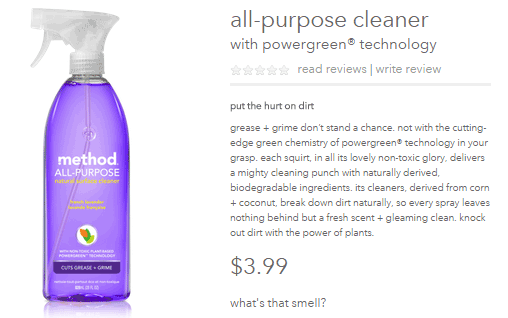
By using a ‘benefit first’ content strategy, customers will immediately know what’s in it for them. A benefit answers the question, ‘so what’. When you show the benefits of your product, think of it like telling a story. You want to engage the audience and leave them feeling an emotional connection.

Take this example from Method Home.

method-home

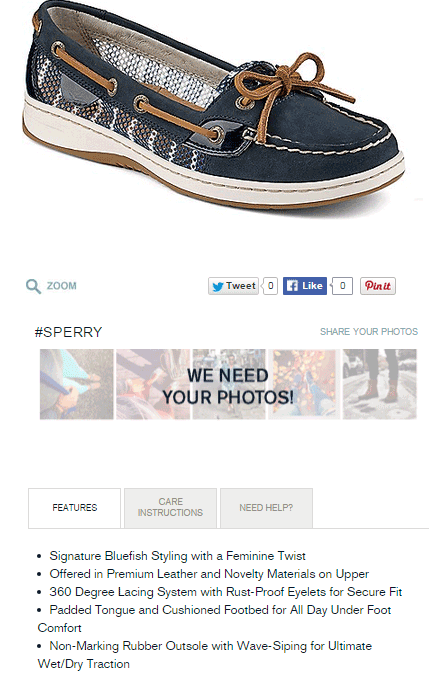
Product features are physical characteristics of a product sold and marketed by the company. It includes the form, color, size, weight, odor, material, and tactile qualities. They provide added functionality to products on your site.

Take a look at the product features from Sperry.

sperry

5.    Write for Scanners

Most online consumers scan a web page first, and if they find it interesting, they go on to read the whole article.  A study by Nielsen Norman Group revealed that 79% of customers don’t read, but scan when they are browsing.

It’s because of the following reasons:

  • Reading on a computer screen strains the eyes.
  • People’s ever-dwindling spans of attention.
  • Customers who are mostly surfing the Internet are on-the-go.
  • There are millions of websites vying for their attention.

You can persuade your prospects to actually read your content by using some of these eye candy elements:

  • Headings and subheads, relevant and on topic
  • Bullet lists to highlight benefits and features
  • Font variations, bold, italics, and colored links
  • Short sentences and short paragraphs, each with one idea only
  • Images and infographics
  • Memorable captions

How to Write Seductive Sales Copy

Ecommerce merchants have many pages to write copy for. Home and landing pages, category pages, product descriptions, articles, and shopping messages are just a few. It’s always important to strengthen your editorial skills whether you’re a seasoned writer or a novice.

Formula for Persuasive Copy

You can always start with the 1-2-3-4 method. It’s a handy little checklist for any copy you write. It’s so simple you won’t have to look it up.

1.     What I’ve got for you

What’s your product? What does it do? Who is it for? Let the folks know what they’re in for. Start with a simple overview, a birds-eye look at what you’ve got to offer.

persuasive-copy-formula

What’s in the box? These are the ‘features’ of your product or service. The best way to list them is usually a series of fascinating bullet points. Include enough specifics to make the product feel valuable.

When you can, attach a benefit to each feature.

Instead of saying, “Next-action worksheets come with every module.”

A better version is, “Next-action worksheets come with every module, so you can take what you’re learning and immediately put it into action.”

2.     What it’s going to do for you?

There’s a saying that goes, “sell with benefits, support with features”.

What’s better about life with your product? Talk about the great benefits of taking action. Describe the end result, or the “after” picture once your customer has bought your product and used it as you recommend.

3.     Who are you?

Most of the time, you need to establish your authority. Show in your copy that you know what you’re talking about. Make your customers believe that you’re a trustworthy and worthwhile person.

For instance, if your site is all about gardening, and there’s a photo of you in front of your own garden, customers will consider you more credible.

4.     What you should do next?

 This is where call-to-action comes in play.

From a copywriting standpoint, it’s been proven time and time again that if you want someone to do something, you’ll get better results if you tell them exactly what to do. A MarketingSherpa experiment revealed that two or three “click” link words can lift click through rates by more than 8%.

Never assume that a customer knows the whole process. A reader needs to know specifically what to do next. Don’t just put a link in. Instead, tell her to ‘click here’. 

7 Bulletproof Copywriting Techniques

Many people misinterpret the uniqueness of effective copywriting. It’s more than writing the hard-sell sales letter. A well-crafted copywriting should stand on its own without the overabundance of sales language and design embellishments.

Here are some seductive copywriting techniques from Henneke Duistermaat, a UK based content marketing expert:

  • 1. Create a One Big Idea

copy-headline

A good headline focuses on one big idea – usually your product’s most important benefit. Focus on that one message that you want to communicate to your audience.

  • 2. Short and Broken Sentences

Sales copy is different from academic writing. Readers will not make the effort of reading your entire content. Short sentences are much easier to read than long, spiritless sentences.

It doesn’t matter if you start a sentence with an ‘And’ or ‘But’. As long as it works. Shorter sentences improve the rhythm of copy. Don’t be afraid to cut long sentences into two.

  • 3. Be Memorable with Sound Bites

sound-bites

Sound bites are described as easy-to-remember, easy-to-quote nuggets of wisdom. They communicate one idea in a short and simple way. Contrast or surprise is used to startle the brain and attract attention.

“Everything you need. Everywhere you go.”

“The thinnest, lightest, fastest iPhone ever.”

“So much more than before. And so much less, too.”

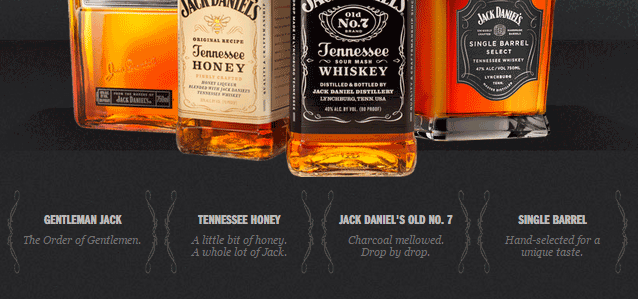
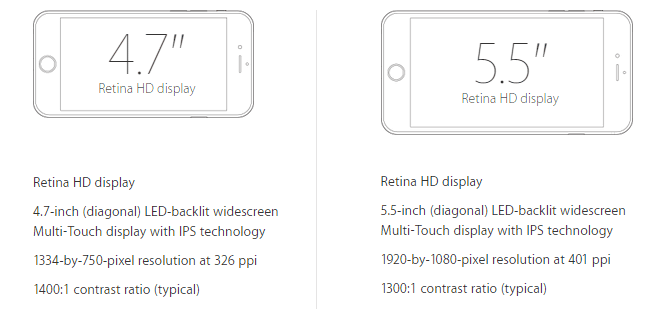
  • 4. Be Credible with Technical Details

copy-technical-details

Technical details are not only a sign of expertise, but also enhance trust, and make you more convincing. Presenting exact details actually sell.

  • 5. Fascinate with Stories

What stories can you tell about your product? Can you explain where the idea for your product came from? Sharing stories is a powerful copywriting tool. You can share the challenges you had to overcome, just make the delivery fascinating.

copy-storytelling

  • 6. Persuade with Problems

Customers often search for solutions. So, present features and specifications as solutions to their problems. Consider what problem each of your product’s features solves.

  • 7. Create a Persuasive Call-to-Action

copy-call-to-action

Your site may have a compelling headline, a well-written sales copy, and an unbelievable opt-in offer. But all these things are of no use if you don’t include a clear call-to-action. A good CTA should stand out and be specific.

More inspiring call-to-action examples in this article.

4 Copywriting Tricks Swiped from Psychology

Good persuasive writing leaves you wanting more, right? Here are four useful, little-known tricks from Joanna Wiebe, author of “Copy Hackers”.

1.    Don’t Be Sloppy – Write Rhyming Copy

A study conducted by Dr. Matthew McGlone found that rhyming phrases are somewhat believed more accurately.

Take this Animoto snippet for example. See that second line?

rhyming-copy

Rhyme has the power to influence the way we think, which relates to psychology. So, one rule to consider in writing a copy is, if it rhymes, it must be true.

2.    Use a Word that Humanoids Don’t Expect to See

According to Wiebe, “unusual or unfamiliar material is easier to remember than common material.” This is actually called the Bizarreness Effect.

As a copywriter, you have to grab that chance for recall. And, recall is a big deal not only for converting visitors. Customers need to remember messages as they move through your site. A study from Purdue University found that people were best able to recall messages when bizarre nouns were mixed with common words in a standard sentence.

3.    Repeat Your Message Again and Again

The more you hear a message, the more likely you are to believe it’s true. This is due to the Illusion of Truth Effect. In other words, repetition works.

It’s not just copying and pasting your marketing materials. For the Illusion of Truth Effect to work, you can use a copywriting technique called “3D”. It’s where you write the same message three different ways in sequence.

It actually works best when your audience isn’t that attentive. It doesn’t matter whether or not the audience is concentrating hard, repetition will increase persuasion.

4.    Organize Your Lists so Peeps Remember the Right Stuff

This method is about the Serial Position Effect. It simply states that people remember what they saw first or last, but almost never what they saw in the middle. This affects online customers as well.

So, in creating your copy, what stuff are you okay with your visitors NOT seeing? That’s what you should put in the middle of your bullet list, or in your Features page.

However, there’s always an exception, right? The Von Restorff Effect states that if an item in the middle of your list stands out, your visitors may remember that part better.

Conclusion

Start spotting these persuasion elements in your online store and you’ll be on your way to increasing sales.

Your online store offers you the opportunity to connect with potential buyers and to differentiate your products while establishing credibility and trust. Make the most of this opportunity by diving into your website copy with a clear purpose in mind.

In creating the content for a product description, an advertisement, a landing page, or a sales email, you want the copy to be powerful enough to convert visitors to sales.  Lead your boring copy out of the grave and make it live.

Filed Under: How-To Articles Tagged With: best practices, call-to-action, conversion optimization, copy writing, customer persona, e-commerce, how-to, infographic

How to Add a Hero Image in Storefront

July 1, 2016 By John 36 Comments

laptop_Hero-Image

The idea of using hero images came about because of issues caused by homepage sliders. Using a homepage slider is discouraged as it will slow down your WooCommerce store and it doesn’t have good conversion rates. If your WooCommerce store running on Storefront has sliders and you are looking for a good alternative, you should consider using a hero image instead.

What is a Hero Image?

To better explain what a hero image is, let’s define what is the “fold” and “above the fold content”. Originally, the fold is a term used in the newspaper industry. Since newspapers are normally folded in half, the upper half of the front page will be the part of the newspaper that is exposed. This is where the most important content is featured, hence the term “above the fold content”. In web design, this is the area of the page that can be seen without scrolling down.

A hero image takes up most of the space above the fold. The trend is to make it large, attractive and relative to the content of the entire site.

It is important that you provide a complete overview of what your company/site is about with just a glance of your hero image. 90% of the time, the hero image has a large text in the center that is related to the branding of the site.

Preparing Your Images

Before you add your image, make sure you have it optimized for web use. You’d want to have the best image quality for the hero image, but you have to take into account the image size as well. As of 2016, the most common screen resolution is 1920x1080px. You should try not to go over this mark. Any excess is just a waste of page size and will just slow down your page load time.

Once you get the right resolution, try to further reduce the image size by down-scaling the image quality. You can actually reduce the image quality without having noticeable pixelation in the image. This is because the human eye can only see limited minute differences in the color changes. Try to strike a balance between having a small image size and having a good looking image. Check out this other post on how to optimize images. Once you are done preparing your image, just upload it to your WordPress site.

Adding a Hero Image in Storefront

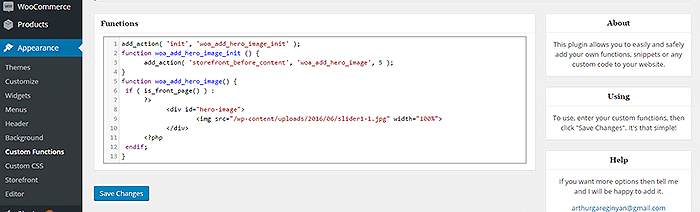
To add a full-width hero image in Storefront, we need to use Storefront’s extensive hooks. We’ll just need to insert a few lines of code.

How-to-add-a-hero-image-in-Storefront-Appearance-Functions

If you are comfortable working with code, you can paste the code below in the functions.php of your child theme. If you are a novice user, we recommend using My Custom Functions plugin to insert the code. Note that one error can cause your entire site to crash.

how to add a hero image in storefront

Copy and paste the code below. Just replace the “/wp-content/uploads/imageurl.jpg” with the URL of the image you uploaded earlier. Width set to 100% makes your image responsive to different screen sizes.

add_action( 'init', 'woa_add_hero_image_init' );
function woa_add_hero_image_init () {
   add_action( 'storefront_before_content', 'woa_add_hero_image', 5 );
}
function woa_add_hero_image() {
   if ( is_front_page() ) :
      ?>
         <div id="hero-image">
             <img src="/wp-content/uploads/imageurl.jpg" width="100%">
         </div>
      <?php
   endif;
}

Your hero image should now appear on your homepage below the main navigation.

If you want to add a link to the shop page or any other url on your image, copy and paste the code below. Just replace the “http://change_me_to_your_url” with the URL you want to link to.

add_action( 'init', 'woa_add_hero_image_init' );
function woa_add_hero_image_init () {
   add_action( 'storefront_before_content', 'woa_add_hero_image', 5 );
}
function woa_add_hero_image() {
   if ( is_front_page() ) :
      ?>
         <div id="hero-image">
             <a href="http://change_me_to_your_url"><img src="/wp-content/uploads/imageurl.jpg" width="100%"></a>
         </div>
      <?php
   endif;
}

Final Notes

Hero images are more effective than sliders in terms of aesthetics. You don’t have to keep using sliders if it’s slowing down your site. Explore more options. Keep your site simple and fast.

If you are still using sliders, you are most likely hurting your site speed. And a slow WooCommerce store will convert less. Your Google rankings could also suffer as a result. It’s time to do away with the slider. Go with a hero image instead.

Was this tutorial helpful? If you have any questions or anything you’d like to add, please let us know in the comments.

Filed Under: Code Snippets, How-To Articles Tagged With: admin, best practices, code snippet, conversion optimization, design tweaks, how-to, image optimization, plugins, site speed optimization, Storefront

How to Enable Apple Pay for WooCommerce

June 16, 2017 By John 2 Comments

What is Apple Pay?

how to enable Apple PayApple Pay presents a new and more convenient way to pay for mobile e-commerce purchases. Since Apple does not share your credit card details when you pay, it is safe, secure and private. Currently, Apple Pay is already accepted in a number of stores and websites. You can check this list of merchants that accept Apple Pay.
Why Add Apple Pay to Your WooCommerce Store?

Early adopters of Apple Pay have experienced an increase in conversion rates of up to 80%. The checkout process is made much faster as payment only requires a fingerprint check as opposed to entering your credit card number.

What Do I Need to Install Apple Pay on WooCommerce?

To install apple pay with WooCommerce, there are a few requirements. First, the store must support Stripe payments. You’ll also need the WooCommerce Stripe Extension which is free. Stripe is currently available in 10 countries, namely, Australia, Switzerland, United Kingdom, Hong Kong, Singapore, Canada, Spain, France, New Zealand, and the United States.

How to Enable Apple Pay on Your WooCommerce Store

Just follow the steps below to enable Apple Pay on your WooCommerce store. If you have already set up the WooCommerce Stripe Extension, please proceed to Step 7.

    1. Install and activate the WooCommerce Stripe Extension. You can download it here or just search for it in the plugins page.
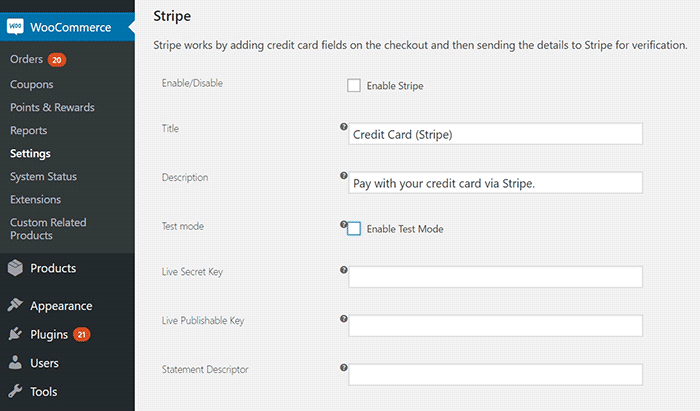
    2. Head over to WooCommerce > Settings > Checkout > Stripe and check the “Enable Stripe” box. Make sure you disable “Enable Test Mode” if you want to go live. If you are already accepting payment through Stripe, go to Step 7.
    3. Input your Live Secret Key and Live Publishable Key. You can get the information from your Stripe account.
    4. Input the Statement Descriptor. This is the text that will appear on your customer’s credit card statement.
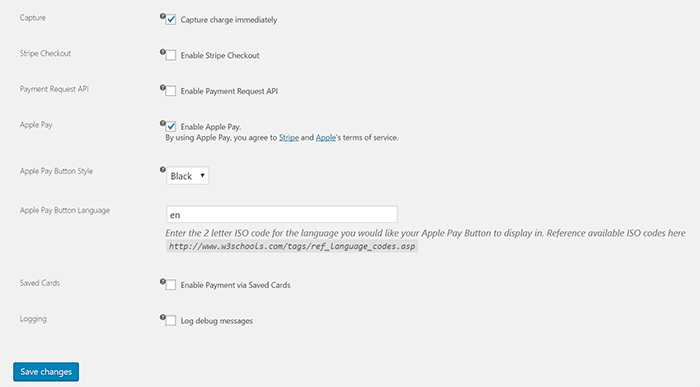
      Stripe setup
    5. Choose whether to “Capture Charge Immediately” or not. If you choose not to charge immediately, you will need to manually initiate the charge through the WooCommerce order page.
    6. You can choose to “Enable Stripe Checkout” for the plugin to create a pop-up that requests details. Choose this option if you want to accept Bitcoin.
    7. To enable Apple Pay, tick on the Enable Apple Pay box.
    8. Under “Apple Pay Button Style”, you can choose what color you want the Apple Pay button to be.
      Stripe setup2
    9. Under “Apple Pay Button Language”, you can enter the ISO code for the language you want to use. For English, just use “en”.
    10. Click on Save Changes when done.

That’s it. You are now ready to accept Apple Pay payments on your WooCommerce store.

If you are having problems enabling Apple Pay on WooCommerce, let us know in the comments.

Filed Under: How-To Articles, Theme and Plugin Reviews Tagged With: best practices, checkout form, e-commerce, how-to, plugins, WooCommerce

How to Troubleshoot Problems in WooCommerce

September 4, 2017 By John 2 Comments

How to Troubleshoot Problems in WooCommerce

When something breaks on your WooCommerce store, don’t panic. Usually, these issues are caused by an outdated software/plugin, a theme conflict or a plugin conflict. These issues can normally be resolved in a few basic steps. In this post, we’ll teach you how to troubleshoot problems in WooCommerce before you hire some professional help.

Before anything else, you need to identify the scope of the problem and if you need to set your site to maintenance mode. If the current problem will cause more problems down line like having to issue refunds for any sale, you might want to consider putting your site on maintenance mode. There are a lot of plugins on the plugin repository that can help you set up a maintenance mode page. When that’s done, you can proceed with the steps below.

Step 1: Update Your Themes and Plugins

The first step to troubleshooting an issue on your WooCommerce store is to update your themes and plugins. However, before you update, make sure you create a backup or test your updates on a development site.

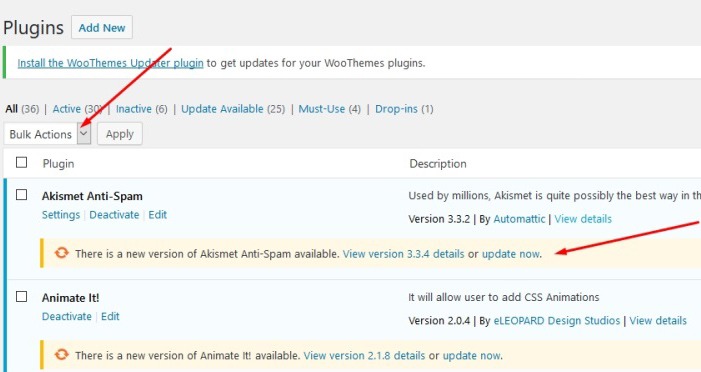
To update your plugins, just go to your WordPress Dashboard, click on plugins and click on Update Now for each plugin. To update all your plugins in one go, you can tick on the tick boxes and then click on Update in the Bulk Actions field and then click on Apply. If you are running some premium plugins, note that you may need to renew expired licenses to update those.

plugin-dashboard-1

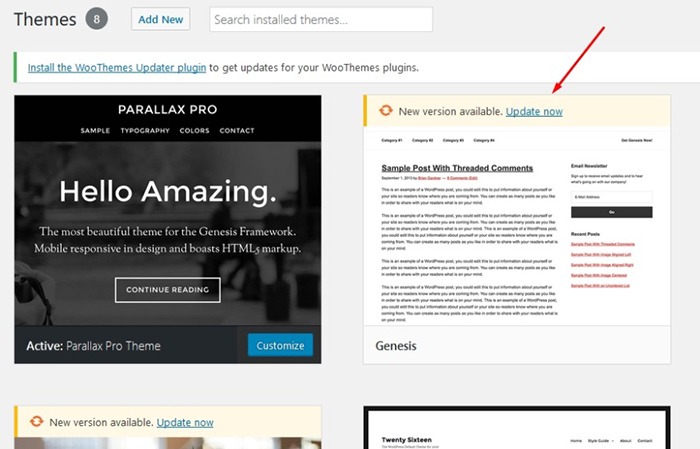
To update your themes, click on ‘Appearance’ and then ‘Themes’. This will bring you to the Theme page which shows all your installed themes. Here, just click on Update Now on the theme that you need to update.

themes-dashboard

Step 2: Deactivate All Your Plugins

If updating your themes and plugin does not fix the issue, you have to rule out the possibility that a plugin is causing the issue. You will need to deactivate all your plugins.

You can first choose to deactivate any new plugins you have recently installed and then test if that would fix the issue on your site.

If that does not fix the problem, you can deactivate other plugins that you think may be related to the issue. Minification and caching plugins often cause site issues so you can start with those plugins if you have any. If that still does not work, proceed to deactivate the rest of your plugins one by one.

When you’ve found the plugin in question, you can just leave it deactivated and find an alternative plugin. You can also reach out to the plugin developers to let them know about the problem you had so they can look into it and try to fix it.

If deactivating all your plugins still does not fix the issue. You can proceed to the next step.

Step 3: Use a Default WordPress Theme

Many theme developers bloat their themes with unnecessary features. Sometimes this causes conflicts with WordPress, WooCommerce and other plugins. Before you change your theme, make sure you back up your site.

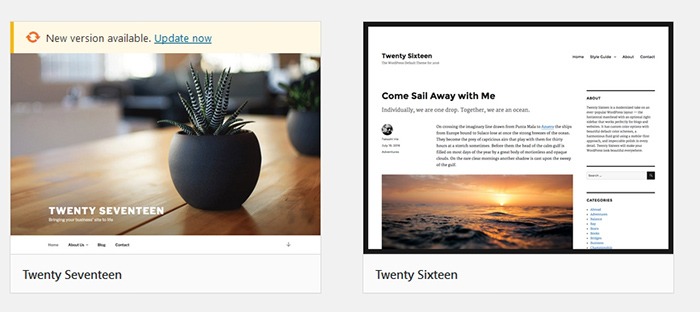
When you are ready, you can proceed to activate any of the basic WordPress themes such as Twenty Seventeen. If that fixes your problem, then you’ve got an issue with your theme. You can get in contact with your theme developer about the issue so they can fix it. You can use another theme but this is not an easy choice to make especially if you’ve invested a lot of work on your current site’s design. You can also contact us so we can advise if there is anything else that can be done to fix the theme issue. There is a chance that the problem can be fixed with a few simple tweaks.

twenty-seventeen

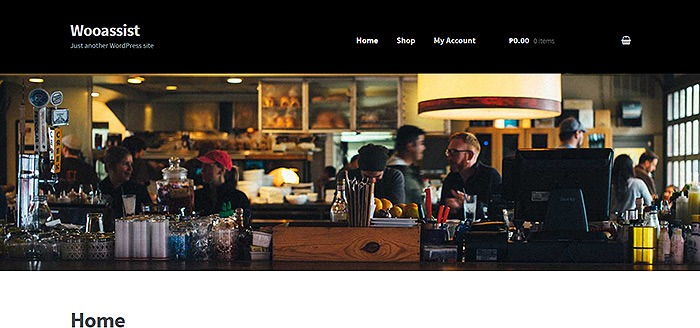
We recommend using Storefront theme which is one of the best themes to use for WooCommerce because of compatibility. Storefront theme was made specifically for WooCommerce by the same developers who created WooCommerce.

The Genesis Framework is also a good choice for a theme. It has a wide range of child themes customized for the needs of specific website types.

But My Problem Still Persists?

If the steps above did not solve your problems, there are still a few things you can do. Forums and message boards are a good way of getting help with issues concerning WordPress or WooCommerce. If you have a WordPress problem, you can post it in the WordPress forums and someone might be able to help you out. If your problem is specific to WooCommerce, you can head over to the WooCommerce support page.

If all else fails and you don’t have an in-house developer, you can contact us so we can have our expert WooCommerce developers try and fix the issue for you.

Filed Under: How-To Articles Tagged With: best practices, e-commerce, troubleshooting

  • « Previous Page
  • 1
  • …
  • 3
  • 4
  • 5
  • 6
  • 7
  • 8
  • Next Page »
Let us support your online store so you can manage your business

Get started today

Get 2 Hours of FREE SUPPORT

We are so confident that you will love our services that we will give you your first 4 hours at a 50% discount

That’s 4 hours for only $75

BUY NOW

Free eBook

5 Things Every Online Store Can Fix On Their Website In The Next Week To Increase Sales

Quick Links

  • How it Works
  • Pricing
  • Blog
  • Contact
  • About Wooassist
  • My Account
  • Checkout
  • Privacy Policy
  • Cookie Policy
  • Terms and Conditions

Wooassist

Australia:
59 Luke St.
Hemmant QLD 4174

Philippines:
San Miguel St.
Poblacion, Iligan City 9200

Connect


Copyright © 2026 · Wooassist

Yours FREE!

5 Things Every Online Store Can Fix On Their Website In The Next Week To Increase Sales