Wooassist

Assistance for Your Woocommerce Store

  • How it Works
  • Pricing
  • Services
    • Site Maintenance
    • AI SEO and Content Marketing
  • Blog
    • How-To Articles
    • Code Snippets
    • SEO For E-Commerce
    • Theme and Plugin Reviews
    • Wooassist News
    • WordPress/WooCommerce News
    • Interviews
  • About Us
  • Contact
You are here: Home / Archives for best practices

6 Things That Slow Down Your WooCommerce Site and What You Can Do To Fix It

April 8, 2016 By John Leave a Comment

highway-speed-lightsIf you see that your WooCommerce site visitors are leaving your site not long after they get in, you might want to check if your site is loading fast enough. Slow page loading is one of the primary reasons people leave websites. Studies have shown that a 1-second delay in page response can result in a 7% reduction in conversions. Even Google admitted they hate slow-loading sites and penalize the ranking of slow websites. In this article, we will get into the factors that cause your site to slow down and how you can fix them.

Unoptimized Images

camera-lensIt is critical for WooCommerce sites to have optimized images, specifically product images. The sheer number of product images and alternate images can significantly affect a WooCommerce site’s page speed. You might want to aim for a file size not larger than 100kb. But this is just a rule of thumb. Full-width images are of course an exception. Also always try to use appropriate sizes. For optimum speed, the images should not exceed the size of the placeholder. Lastly, try to adjust the quality of the image. It doesn’t mean you compromise image quality. There are ways to reduce image file size without affecting image quality. You can optimize the image by adjusting some settings and removing some color palettes that are not observable by the naked eye.

We suggest a plugin called WPSmush.it. This is a plugin that automatically optimizes the image as you upload your images through the WordPress Media Library. Still, it is important that you optimize your images before uploading them. Learn more about pre-upload adjustments in our post about image optimizations.

Serving Content without Caching

Content caching is basically preprocessing the files and storing them as static content instead of asking the server for the contents upon each client’s request. The static content can be stored either from an intermediary nearby server (server-side caching) or from the client’s web browser (client-side caching). This practice reduces page load time significantly because it reduces server load and the content is served from a closer location. Caching can improve your website speed by up to 300%. If you are looking for a caching plugin, we can recommend WP Super Cache.

Having Too Many Plugins Installed

run-track-and-fieldPage size is not the only thing that has a direct impact on your page load time. The total number of HTTP requests is a major factor as well. Every image, JavaScript file, CSS file, and jQuery file adds up to more HTTP requests.

This is why having too many plugins installed on your WooCommerce site is not advisable. The same goes for having a theme with a lot of bundled plugins. Plugins can have their own stylesheets and scripts and these add to total the number of requests. Of course, it depends on the plugin. Some plugins have efficient code, but others can have issues with poorly coded PHP scripts. A poorly coded plugin needs a longer server processing time before it completes a calculation. That’s why it is important to only use plugins that you really need. Avoid plugins with too many features that you don’t really need.

Not Minifying Scripts and Stylesheets

Even if you already uninstalled unused plugins, chances are you will still have a couple of individual stylesheets and scripts queued for request. Minifying is a technique made to handle this issue. What it does is combine stylesheets and scripts. So instead of 5-7 stylesheets and 9-12 scripts, you will end with a single file for each type. After combining, it will further compress the files and serve them with gzip compression. This technique reduces the number of requests and page size significantly. Don’t worry about the technicalities of minifying though. W3 Total Cache has Minify together with the caching service.

Plenty of Externally Hosted Content

binary-treeAnother culprit in slowing down a site is having externally hosted content. They can look harmless at first but without moderation, your site will get bogged down by these contents. Your site will only be as fast as your external host server. It is not limited to external videos, audio, and images. External content can also be stylesheets and scripts. One common culprit is the overuse of Google Fonts, so as much as possible try to only use at most 2 font families from Google fonts.

Server Load

Server overload is a common problem, especially for site owners that use shared servers. Shared servers don’t cost that much but they have their limits. Most of these servers can’t handle huge amounts of traffic. One solution is to invest in a pricier dedicated server. Another one is to use a Content Delivery Network (CDN) service. CDN is a system of distributed servers. Basically, you can apply to use a CDN service and they will store your cached site in their server systems across the globe. You can use the W3 Total Cache plugin to easily set up a CDN for your WooCommerce store.

Conclusion

It is important to invest in speed optimization to maintain a good user experience across your WooCommerce store and if you want to keep your SEO rankings. To test your WooCommerce store’s speed, you can use Pingdom’s site speed test or Google’s page speed tool. If your site takes more than 2 seconds to load, you have to make some adjustments. Hopefully, the pointers above will help you achieve an acceptable page load speed.

Was this article helpful? Do you know of any tips to help improve a WooCommerce store’s page load speed? Let us know in the comments.


Filed Under: How-To Articles Tagged With: best practices, caching, CDN, how-to, minification, page speed, site speed optimization, W3 Total Cache, website development, WooCommerce

How to Build an Ecommerce Roadmap in Under 3 Hours for a ROI of $1000’s

February 16, 2016 By John 1 Comment

Ecommerce-Roadmap-in-Under-3-Hours-for-a-ROI-of-$1000’s

Objective of the Blueprint

My goal for this post is to educate retailers, on exactly what they need to have as the foundation of their website, to build a strong digital strategy on successful online store on top of.

This is an action document. Every philosophy is followed by a list of action steps.

There is nothing new here, we have merely taken the best advice from top web design firms and condensed it into an actionable post. If you were to spend 20k plus at a prestigious web agency these are the sort of questions they would address in the pre-contract and kick-off phase of the project.

Invest Just 3 Hours for a ROI of $1000’s

time-invest-roiI recognize the opportunity cost of your time and I wholeheartedly believe in delegating as much as possible. But this 3 hours is not one of those times, the reality is it will take someone else much longer than you to do this because the information is already in your head. If you can allocate just a few hours of your time you will end up with a website brief worth 1000’s of dollars.

You will be able to take this brief to a number of web agencies and be a highly sought after client. The biggest challenge web agencies have is a client not providing them with the information they need to do their job. If you present this finished document to them they will love you and you will likely get a much better rate.

Some of these questions may feel repetitive or as though you have answered them 100 times before. Trust this process in the knowledge that all high end web design firms insist on this type of documentation, known as the “Discovery Phase”, and build $2000 plus into the project price to extract this information out of their clients.

If you have a business or marketing plan and some of these questions may have already been addressed, by all means use that as a reference. The critical thing is that you have all the information in your “Website Blueprint”.

Your Business Objectives

Whats-Your-StoryThe very start of the website blueprint is to identify why you have or want a website in the first place. Your website should be the core of your marketing, not a separate entity. As such, your website objectives need to be the core of your business objectives.

I’m going to throw you in the deep end and run a list of questions that in time you should be able to answer. Don’t worry, these questions are not designed to be answered right now. They are just meant to get your thinking going.

  • What specific reasons do you have for owning a website?
  • Are you not really sure, but see everyone else has one and don’t want to miss out?
  • What would life look like if you didn’t have a website?
  • What % of income is generated from the site?
  • What % of leads is generated from the site?
  • If improvements were made to your website what increase in these percentages could you expect?
  • What does a successful website look like to you?

Now list the top three business objectives of your website. Here are some examples.

  • Be found on Google.
  • Sell Products.
  • Actively generate leads.
  • Pre-qualify clients.
  • Show we are an authority in our particular niche/segment.
  • Resource to describe the services you offer.

Branding

BrandingYou probably already have some sort of visual branding such as a logo with a color scheme and brand or trading name. It will be a wise investment to spend 30 minutes looking at these and assessing if they still fit the business objectives you are trying to achieve.


Grab some of your marketing assets, e.g. print brochure, letter head, business cards, existing website, and have these in front of you while you go through the rest of this section.

Who are you? What do you do? Who do you do it for?

When a customer visits your website for the first time, you have only a few seconds to answer these questions. The words you use are only one way to address this, There are a lot more subtle cues such as the color, images and font type you use.

  • Who are you?
  • What do you do?
  • Who do you do it for?

Before answering the above questions I want to take you through an exercise.

Answering these questions below first will assist in uncovering the personality of your brand. They may feel a bit weird, but try and see it through.

  • If your website was a car, what make and model would it be?
  • If your website was a cookie, what sort of cookie would it be?
  • 10 – 20 Words that describe the business.

On a scale of 1-5, 5 being my business is most like this word, rank the following words.

Thats-my-Business

  • Feminine
  • Masculine
  • Young
  • Mature
  • Luxury
  • Economical
  • Modern
  • Classic
  • Playful
  • Serious
  • Loud
  • Quiet
  • Simple
  • Complex
  • Subtle
  • Obvious

Target Audience for the Website

If you could have 10 new customers today, but they all had to be a clone of one of your existing customers, who would the existing customer be?

The best way to find that existing client is to identify who is the most profitable, gives you the least amount of grief, is a joy to work with, refers you to new business, pays on time and who you would genuinely like to have more of.

Describe your ideal client. *Some things to consider.

  • Your-Ideal-CustomerInvolved in what industry/business
  • Title
  • Income bracket
  • Education level
  • Lifestyle
  • Social circle
  • Recreation activities
  • Type of car they drive

Now you can answer:

  • Who are you?
  • What do you do?
  • Who do you do it for?

Positioning

The main thing about positioning is you have to take a position. If you try and be all things to all people you will be nothing to everyone. Here are some different ways to position yourself.

  • Industry Segment.
  • Geographic. Position yourself as the local expert.
  • Price. Expensive or budget.
  • Process. Demonstrate your process is better and more organised.
  • Customer service.

The previous exercises will help. Now you know who you are and who you want to serve, it’s now time to present yourself exactly as you want to be seen.

  • What is your niche, specialty, or position in the market?
  • What makes you different from your competitors?
  • What are your strengths that can give you a competitive edge?
  • What is your Unique Selling Proposition (USP)?

Now you are ready to create a positioning statement. Fill in the blanks below:

A [Your Company] client is someone who wants […………………………….] and recognizes our specialized focus in […………………………].

Content Audit

You now need to do an audit of what assets you have that will affirm your position in the market. These include:

businessman-write-laptop

  • Images
  • Videos
  • Articles
  • Interviews
  • Tutorials
  • Whitepapers
  • Case Studies
  • Portfolios
  • Testimonials

If they are already on your existing website, that’s great. The questions then are. “What is there?” and “Are they being used as effectively as possible?”

Eventually every piece of content on your site will need to be reviewed and updated as necessary. But for the moment, just taking stock will do. At a glance you will be able to:

  • See what assets you have
  • Rate their quality
  • Rate their relevance to your position in the Market.
  • See what areas you will need to increase your investment

Call to Action

Now you have identified what assets you have and what you need. Go back to your list of three business objectives for your website and spend a minute to review them and see if they are still relevant now that you have refined your position in the market.

Now with these objectives in mind what are the top three actions you want users to take when they visit your site?customer_shopping-cart

Here are some ideas:

  • Buy a product
  • Phone you
  • Browse your services
  • Fill out the contact/quote request form
  • Look at your portfolio
  • Give you their email address
  • Like your Facebook page

These top three actions need to be the most prevalent items on the main pages of your site visitors are coming to. You can find out which pages on your site visitors are landing on from Google Analytics.

Fulfilling Website User Needs

Users come to your site with specific tasks in mind. You need to identify what these are and then present them with choices that fulfill their needs at the same time as meeting your own business objectives.

  • Why would people visit your website?
  • What tasks do they want to complete when they are at your website?

There are a number of core functionalities most web users expect when they go to a web site, these are:

  • Contact
  • Services/Products Offered
  • About Us
  • FAQ

Contact Page

contact-us_small-iconsYour contact page is the page your customer sees after they have made a significant mental shift in their decision making process. The moment they click on the contact page they become more invested in you and your brand.

The way you approach this will depend on the personality of your brand and the services you offer. Here are a few options.

Serious. Just the facts.

Let people know where they are on the page with a “Contact Us” heading. Followed by; address, phone number, email, and trading/office hours (if applicable).

A map, either an embedded map or just a link to your address on Google maps.

Simple Contact Form including fields for:

  • Name
  • Email
  • Phone
  • Postal Address
  • Inquiries

Prompt the User to Think About Their Purchase.

If the product/service you sell is more involved and has multiple options and additional purchasing criteria, you can encourage your visitors to invest time and energy into getting somewhat emotionally involved about their potential purchase with you. You can add fields like:

  • Type of Project
  • Budget – If you can’t profitably serve projects under a certain amount you can use this as a filtering process by having a drop down and not offering budgets under $X
  • Timeline

If the project requirements are more detailed than a few fields it will be worth considering a separate page titled “quotation request” or “project planner”.

Add Some Personality to the Contact Page.

Add a big background image. This could be a recent project, a photo of the team, or an aerial view of your office.

  • Some fun or cheeky text, e.g. For a good time call …………………
  • Encourage the client to contact you through social media channels.

Products/Services Offered

Your category page, or pages, acts as a quick link for users to see the details of what you do and just as importantly don’t do.

It is important that the home page, portfolio and about page only give snap shots of what you do, so that the user does not get overwhelmed with details, and instead can get a feel of your positioning in under the 3 seconds you have their attention for.

The category page is your opportunity to go into the detail that you have intentionally held back on the home page, portfolio and about pages. Visitors clicking deeper into your site that get to your category and products pages have requested this information, so will spend slightly more time looking at it.

Photographer-Camera_SLRThey still won’t spend as much time as you think, or want, so use of sub-headings and thumbnail images is critical. 90% of people won’t read the body copy. It needs to capture the viewers’ attention in a matter of seconds. This is achieved by allowing the photos to tell the story.

Don’t take the photos on your phone. You at least need a good quality camera and preferably someone that knows what they are doing with it. If you don’t have someone with these skills you should hire a professional photographer.

Is there anyone on the team with a good quality camera that has some training in photography?

FAQ

What are the 5-10 most common questions you get asked? Wouldn’t it be nice not to have to answer these as often? Wouldn’t it be nice for your clients not to have to ask? And what about the ones that are too shy to ask? Could you be missing out on a lead?

It’s a simple and easy process and most web users interested in you will appreciate it.

About Us Page

About-Us_BusinessmanUse this opportunity to go deeper into establishing your position in the market. Review the answers to your questions from the positioning exercise and back this position up here.

This page should be kept reasonably brief and it’s a good opportunity to link to other areas of your site like:

  • Products/Services
  • Case Studies
  • Team member profiles
  • Blog
  • Whitepapers
  • Testimonials

Viewable on All Devices

mobile-devices-tablet-androidIt is estimated that over half of website visitors will be viewing your site first from a mobile device. If your website is not “responsive” to all screen sizes you could be losing important leads before you even begin.

Responsive design is the practice that allows a website’s pages to reformat themselves depending on which device they are being displayed on. This ensures that whatever screen size the user is viewing your website on it will remain user-friendly.

There is no excuse now for small business sites not to be responsive.

Sales Funnel and Lead Capture

People buy from other people they know, like and trust. The object of lead capture is to get your leads into your know-like-trust funnel, and the best way to do that is by giving them incredibly valuable information over time via email. Yes, boring old email.

The Hero’s Journey

Time-for-change_DoorLuke Skywalker was living a simple life as a farmer on the planet Tatooine. He knew there was more opportunity out there in the universe and through a series of events he was called by a message from the princess. At first he resisted, but then his mentor Obi-Wan Kenobi showed up and guided him.

This story structure has been used over and over again. The Matrix is another good example, with Neo and his mentor Morpheus. You can use this story structure to develop your buyer’s journey.

Most of you reading this will have something to sell online in firms with less than a 10-person staff. You have some knowledge of digital marketing and can’t deny you need a strong web presence. There are a number of things you think might benefit your business like:

  • Increase in online sales
  • Blogging
  • Weekly Newsletters
  • Social Media

And generally engaging at a deeper level with your customers via an online strategy.

But how to execute all these moving parts into a cohesive system that does not take all your time or cost the earth is a bit of a quandary. You are resistant to throwing 20-30k to what you don’t understand well enough to monitor, control and be guaranteed a return on your investment.

How am I doing so far?

Wooassist offers a service that is affordable and may solve a lot of your challenges. Instead of selling you our core offer straight away we present this article that guides you through the fundamentals of an online store.

There is nothing here that sounds too farfetched; just some common sense, down to earth advice. And by the time you finish reading this article, you will be much more confident and prepared to outsource some assistance for your online store.

Now Your Buyers Journey

Where Are They Now?

Going back to your ideal client. Where are they now? What problems and challenges are they trying to solve?

Start with the End in Mind.

What do you want them to ultimately do? What do you want to ultimately sell them? Is it a commodity product, a project with X budget or an ongoing maintenance contract?

Bridge the Gap.

It’s your job to guide them from where they are now to where they can be knowledgeable enough in your process and confident enough in your expertise to pay for your service.

Identify the time line from interest to purchase for the niche you are in and then list the information your client needs over this time period to get them to know, like and trust you.

This doesn’t have to be complicated; a simple 2000 word report to get their email address followed up by 5-10 pre-written automated emails could increase your sales by 50%.

You can get into more of these details later. For the moment, all I want you to do is a quick brain storm and come up with 3 potential topics for an eBook or whitepaper.

Ongoing Correspondence

Email-Ongoing-CorrespondenceThe 5-10 pre-written automated emails are called email auto responders. They are not “Buy Now”. Like dating, we are asked in for “coffee” at some stage, but usually not the first date. And it’s always better to be asked than to ask.
The email auto responders add to the value of the report. They prompt your subscriber to think about working with your firm without blatantly stating it.

After 5-10 emails it might be appropriate to offer a gateway product. It’s much easier for a customer to give you $1000 if they have already given you $100 and feel like they got value out of it. And it’s much easier for them to sign a 10k contract if they have gotten value out of $1000.

A gateway product could be a preliminary design, a consultation or an educational product like a series of video tutorials.

What gateway product/s could you offer?

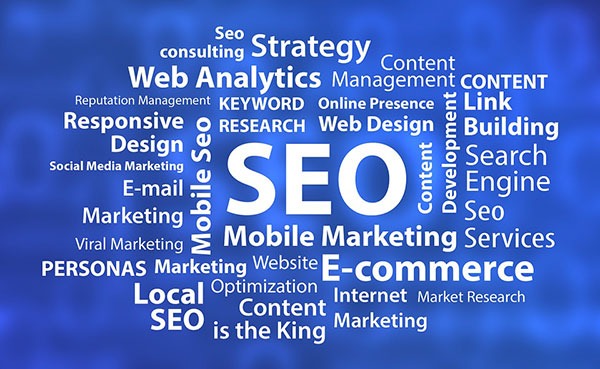
Search Engine Optimization (SEO)

SEO-Search.Engine.OptimizationGoogle’s business model is to return the most relevant search results so people keep using them to search online. Google is very good at correctly assessing the most relevant websites and have hundreds of criteria to determine their rankings.

There is no longer a magic bullet. The answer is to have a well-rounded website built on a best practice code base that offers the content your users are searching for in an interesting and engaging way.

 Search Terms

What terms are your ideal client using when searching for your products or service?

They may not be the same terms that you use.

Make a list of the 5-10 phrases that you think your ideal client will be searching and then play around with creating synonyms, abbreviations, plurals, past tense, present tense, verbs nouns, etc. From one word “Shoe” we can get: shoes, footwear, runners, joggers, walkers and probably many more.

You will not rank for shoe, so it’s keyword “phrases” that we are looking for that will attract your ideal client. E.g. Comfortable walking shoes. The words need to be compared to other variants like comfy trekking footwear.

For the moment we are just looking to brainstorm, down the track you can compare these terms and phrases in Google Trends and the Adwords keyword tool.

To go the extra mile you can do a short-term Adwords campaign for a few hundred dollars testing all these key phrases. The data you get from the Adwords campaign will tell you what are the most commonly searched terms and what terms generate the most engagement on your site. You can measure this by bounce rate, pages visited and time on site.

Help Google Find You

Magnifying-GlassYou can assist Google by basically labelling your content. Everything on your site can be labelled by what’s called meta data. Meta data is not visible to the user, but helps Google web crawlers identify what your site is about. All good website platforms like WordPress have this baked in to make it very easy to add “meta data” to any page, image or link on your site.
On its own, meta data won’t do much to get you in the rankings. It needs to be accompanied with relevant content that backs up what the meta data is saying your site is about. Your content needs to have your keywords in it, plus synonyms and related words. If you are genuinely writing about the topic you want to rank for then this should happen naturally.

Let Google Know you are Relevant and an Authority

Having links to your site from other relevant websites is still the number one way to rank highly in Google. It’s just a lot harder now to game the search results. A few years ago it was possible to create these links yourself and trick Google into thinking you were popular, but Google has made it its mission to recognize “un-natural” links and have been very successful in this. The best way moving forward is to create content so good and useful that people will link to it from their site and will share it with their friends on social media.

For more detailed information check these links.

http://moz.com/beginners-guide-to-seo

http://static.googleusercontent.com/media/www.google.com/en//webmasters/docs/search-engine-optimization-starter-guide.pdf

Noticed I linked to them because they are highly valuable and useful.

The irony is you will rank high in Google when you no longer need to. If you create the great content that Google wants you to, and people are sharing your content, then you will be getting a lot of traffic to your site without the help of Google.

Local Geographic Focus

A lot of companies operate within a geographic boundary. Google Places is a great free service that you can sign up for and will increase your chances of ranking on the first page in the Google Maps section, which is right up the top of the search results.

http://www.google.com/business/

You can also increase your chances of getting ranked in Google places for specific searches for your local area by writing articles that relate your service to the needs and uniqueness of your local area.

Social Media

Social media pages can become gateways to obtaining new clients and maintaining good relationships with your existing clients.

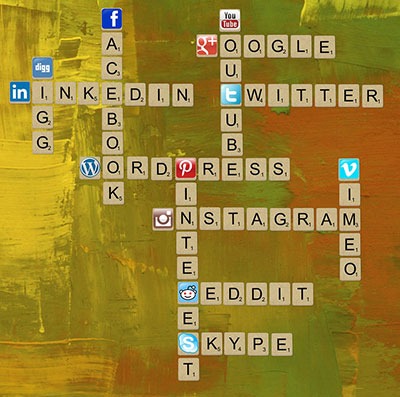
Scrabble_Social-MediaThe most important social networks to consider are:

  • Facebook
  • Twitter
  • LinkedIn
  • Google+

If your business relies heavily on visual media, then the following might also be considered:

  • Instagram
  • Youtube
  • Pinterest

How to Start

Once you have signed up for and created your social media profiles and pages, you can start getting followers or subscribers.

First off, try getting your own social media friends and connections, as well as your existing clients to like and follow your pages.

The next step is to create content that your targeted social media users will be interested in. These could be interesting photos, stories, articles and even recent info in your industry.

If you have created useful and interesting content, your followers will start sharing them with their own networks and this creates a chain reaction of sharing and get more people to see your content. If these people are interested in what your business offers, they will like your page and increase your social media presence.

It is also a good idea to provide links to your social media profiles directly on your website and email signatures.

Building Brand Awareness

Your social media profiles and pages give users an alternative glimpse from your website of what your company is all about. Give your profiles and pages an identity and real human voice that your ideal clients can relate to and who they would want to work with.

With that said, however, do not simply talk tirelessly about yourself. People use social media for connecting with others. They do not want to be simply marketed to.

Building Relationships

Web-tablet-social-mediaThe main purpose of creating a social media presence is to build and nurture relationships with your existing and previous customer base. Your social media profiles and pages can serve as a means for people to contact you and you can and should promptly reply to these inquiries as well.

If you keep your business at the forefront of your customers’ attention in social media, you will be the one they contact when they need to acquire your products and/or services once again.

Best Practices

  • Post content that is relevant to your industry like recent industry news.
  • Post content that interesting or informative to your audience like tips and tricks to home renovation.
  • Follow similar social media pages in your industry.
  • Be a part of the community. Interact, share others’ posts and respond to others’ interactions.
  • Make use of a human voice. Avoid sounding too corporate or salesy.
  • Observe social media etiquette. Your social media identity defines your brand identity.
  • Depending on your audience, post 1-4 short updates daily or 1-2 important announcements every week.

Social Media Tools

To save your time, there are multiple tools, free and paid, that can help automate your social media campaigns.

  • Hootsuite (https://hootsuite.com/)
  • Buffer (https://bufferapp.com/)

Conclusion

Start-Up_PlanningIf this is the first time you have read this, congratulations. Now go through it again and invest just three hours to build a really solid foundation for what is to become your website strategy.

If you have answered the questions, even with your best guesses, then congratulations. You have just developed a really solid platform for building a website strategy and put yourself miles ahead of your competition.

What to do now?

Collate your answers from this blueprint into an “Online Blueprint Document.” The time it takes you will pay dividends many times over.

Regardless of what you sell online there are 101 tasks you can outsource. Whether you choose a full service agency, do it yourself, or something in between like what wooassist.com offers, communication is the key and this doc will get your vision clearly stated and set the foundation for any web developer/designer relationship you have in the future.

Filed Under: How-To Articles Tagged With: best practices, conversion optimization, customer persona, LinkedIn, marketing strategy, social media, Twitter, Wooassist, WordPress, WordPress SEO

How to Choose the Best Domain Name for Your WooCommerce Store

April 5, 2016 By John Leave a Comment

how to choose the best domain name for WooCommerce

Your domain name is part of your company’s identity. It should play an integral part in your branding strategy. In this article, we will identify how to choose the best domain name for your WooCommerce store.

Stay Relevant

You can start with a list of five to ten keywords that communicate what your WooCommerce store is about. You can then narrow it down, choose to add a prefix or a suffix, use them to make compound words, or make a new word.

Brand is not an SEO ranking factor but it has a positive influence on your SEO and reputation. At a glance, your customers should be able to connect your domain name to the nature of your business. Having a relevant domain name will also benefit you in defining your target market.

Stay Unique

Set your e-commerce business apart by having a unique and creative domain name. Avoid having your website domain name close to another brand’s name. A sure recipe for disaster is when users confuse you with another popular site.

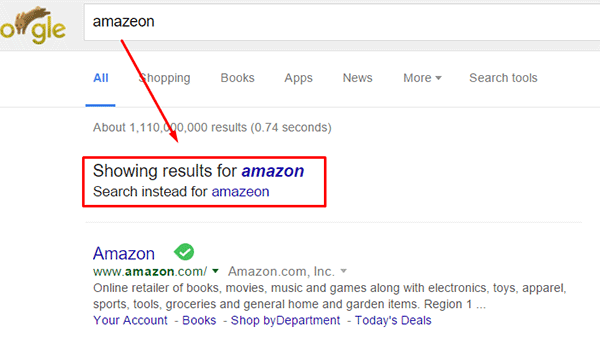
Intentionally going with a domain name similar to a popular brand in an attempt to deceive users can land you in jail. Same goes for intentionally misspelling a popular brand’s name. The practice is known as “typosquatting” and it is illegal. In fact, Facebook recently won $2.8 million and gained control of over 100 domains in a typosquatting case. You could also be charged with fraud or copyright infringement. Also, even if the popular brand does not catch wind of your site, intentionally misspelling a popular brand name can direct your traffic to the popular brand. Just check out the image below. A unique domain name will do wonders to your branding as it sticks into your customers minds.

misspell-popular-brand-name

Keep it Simple, Short and Memorable

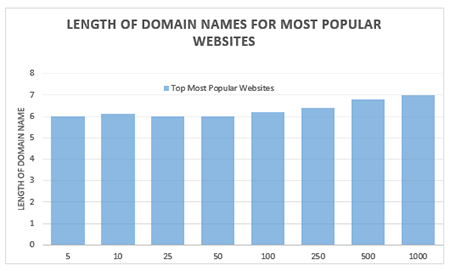
domain name lengthChoose a domain name that is easy to type and easy to remember. Don’t use hyphens, numbers, slang, and odd misspellings. In Alexa.com’s top 500 sites on the web, some of the top most popular websites have domain name lengths of 6-7 characters on average: Google, Youtube, Amazon and Linkedin, to name a few. From this data, it does appear that domain length matters.
Difficult-to-remember and hard-to-pronounce domain names would most likely rank low in search engines. A simple, short and memorable domain name is a great help with word-of-mouth marketing. It also fits well on any online or print form of marketing.

Tools to Help You Choose

There are now many tools online that you can use when you’re stuck or don’t know where to start in searching for a good domain name. Here are tools that can help you jump-start your domain name brainstorming session.

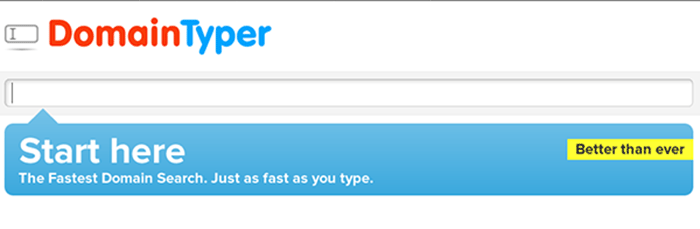
Domain Typer

Domain Typer helps you search for domain names. It displays popular domain name extensions like ‘.com’, ‘.net’, ‘.org’, ‘.co’, ‘.info’, and ‘.mobi’. It also displays prices should you need to compare.

If a domain name is not available, it displays links to its registration information, website and page ranking. It also has a domain hack section where you can select unusual combinations of your keywords.

domain-typer

Lean Domain Search (formerly Domain Pigeon)

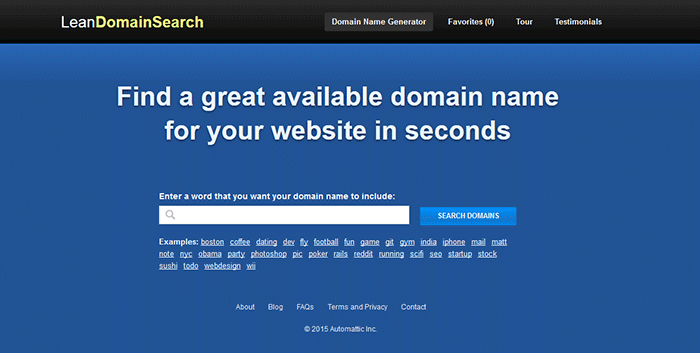
Aside from the search option, Lean Domain Search gives you some examples to help you get started. You can sort the results and even add search term filters. It shows ‘.com’ results and it shows you the popularity index of your keyword by domain count.

lean-domain-search

Wordoid

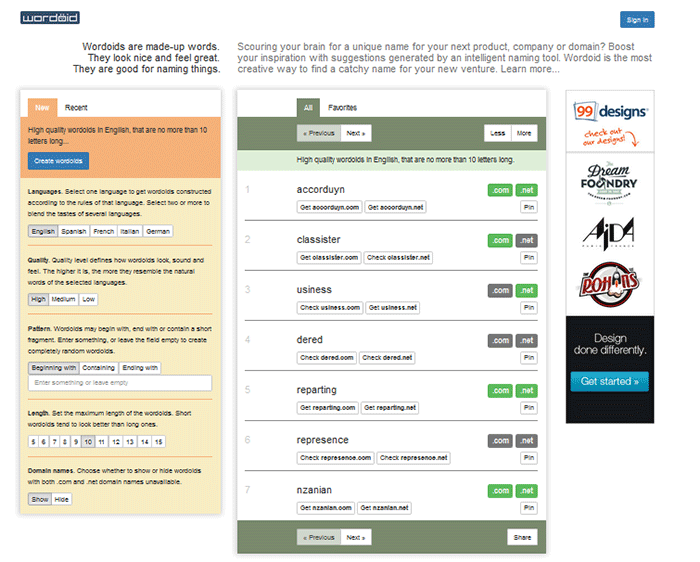
Wordoid is a more intelligent tool that sparks your creativity in getting a unique name for your domain. Just remember to not overdo it. Simple names are easier to remember.

wordroid

What if the Domain I Want is Not Available

You did your brainstorming and you have decided on the perfect domain name for your WooCommerce store. But upon checking, you find out that the domain you want is no longer available. You can try the alternative solutions below.

Just Come Up with a Different Domain Name

Discretion is the better part of valor. You may think you are smart by using the same domain and just using a different domain extension like .net or .co. However, you may just end up sending your hard-earned traffic to the other domain. Put on those thinking caps and think of another domain.

Create an Offer

One option is to find out who the registered owner is and create an offer. This is especially advisable when the domain is registered but not being used. Just visit the actual address or use a tool like theWhois Domain Tools or ICANN lookup tool to get information on the current registered owner. Send them a message and ask if they would consider selling the domain name. Most domain registrars offer services wherein they contact the domain owner in your stead. This is worth a try if you really want that domain.

If you decide to get in touch with the owner yourself, try to make your request sound casual. Don’t act too interested as you could get an overpriced offer.

Monitor the Domain Name

If your lookup shows that the domain registration is expiring soon, waiting it out might be a viable option. When the domain is back in the open market, grab it. However, do note that certain domain registrars give domain owners ample time to renew their registration. The domain may not appear on the market on the actual day that it expires.

Avoiding Overpriced Domains

money-financial-crisisIt is difficult to gauge the exact value of a domain name because it’s all about demand. Some domain names are really just expensive and there’s not much you can do about that. You can just build your not-so-popular domain’s reputation from the ground up. Many domain registrars provide discounts and offers so you can save a few bucks on that. If the domain that you want is being auctioned, you can join the auction and get it very cheap if you are lucky.

Background Check on Domains

Buying a domain, especially used ones, can be a nightmare if you don’t do your research. If you have decided to buy a used domain, don’t buy that domain yet unless you’ve done the following.

Check its Registration History and Reputation

Check the site ownership registration history. Use Whois Domain Tools to look up ownership information, ranking, traffic, SEO and more. The frequency of change in its owner or host speaks about its reputation and stability.

Avoid buying domain names sold numerous times in a short span of time. It might have a negative reputation from search engines that can be a nightmare to solve.

Analyze Link and Content History

You can use Internet Archive to check domain name’s content history. To check a domain’s reputation, google ‘site:yourdomain.com’ (without the quotations). You can also do a regular search to bring up all mentions of the domain name.

Be on the lookout for spammy illegitimate links. Check for Google red flags like bans and penalties. Make sure to also check the domain name’s Google cache date, including the text only version.

Do a thorough examination of its back-links. If you find anything shady, it might be a good idea to back off. While Google now gives website owners the ability to manually remove or disavow links, this isn’t something that you’d want to be doing. Save yourself from a lot of headache and go with a domain with a good rep.

To Sum It Up

A domain name is your online store’s identity. You can be successful with your branding and online business with a good domain name. You just need to carefully choose a domain name that is unique, relevant, short, simple and easy to remember. You also need to do a thorough background research to make sure you are not buying a domain with a bad rep.

Do you have any tips you’d like to share? Or did we miss something? Let us know in the comments.

Filed Under: How-To Articles Tagged With: best practices, e-commerce, how-to, marketing strategy, WooCommerce

How to Use Google Analytics to Track Website Goals in WooCommerce

May 25, 2016 By John 4 Comments

Google-Analytics

Knowing your site’s stats is critical in decision making to guide your site to success. Google Analytics is a web analytics service designed for this particular job. If you have a WooCommerce store, you probably have it set up to gather traffic data. In this article, we will teach you how to use Google Analytics to track website goals. Get more value from Google Analytics by tracking the completion of your site goals.

What is Google Analytics?

Google Analytics is a free web service from Google that tracks and reports website traffic data. It was launched in 2005 and is available to all users, whether they use Google for advertising or not. It is tightly integrated with Google Adwords, the company’s main advertising service, as it helps users keep track of their online web marketing campaigns. But using Adwords is not a necessity in order to get the most out of the Analytics.

Why Should You Use Google Analytics?

Google Analytics yields valuable information to help you make smarter marketing decisions, generate more leads and improve user experience. Traffic data can help you identify which of your blog posts provides the most user engagement and which one results in a conversion whether it’s a sale or an email sign-up. You can pinpoint the best time to post a new article. You can see the number of visitors who exit your site and from what page they exit. With that information on hand, you can look for ways to improve that specific page to reduce exit or what is known as bounce rate. In a nutshell, this treasure trove of data will be invaluable in your decision making for optimizing your website.

How to Track Completion of Goals in Google Analytics?

In Google Analytics, tracking page views and visitors is just the tip of the iceberg. Finding out if your website is actually accomplishing the goals you’ve set for your e-commerce site is more important. In fact, even if your traffic is ranging in the millions but you are not getting your intended conversions, that traffic is mostly worthless. This is where setting goals in Analytics come in. A ‘goal’ is a completed activity in your website that is tracked in Google Analytics. Defining your goals will depend on what kind of website you have. For an e-commerce site, goals can be a newsletter sign up, a purchase, downloading a trial software or e-book, or adding a product to a wish list.

Tracking your goals in Google Analytics will yield crucial data. If you see that many of your visitors add your products to the cart but exit when they reach checkout, there must be something in your checkout process that is preventing your visitors from completing purchases. You can then proceed to analyze and identify what factors you need to try and solve the problem After applying fixes, data from Analytics will help you identify if your tweaks have helped your conversion rates or not.

There are 4 ways to track goal completion: Destination, Duration, Pages per session, and Event.

Destination/URL Tracking

Your website is basically a network of pages represented by an identifier address or URL. Google Analytics provides an easy way to track specific URLs through destination goals. Each time someone navigates to a specific destination URL, it will trigger the goal as completed. This is the easiest and most common way to track goals because it is straightforward and easy to set up. This is ideal for tracking thank you pages every time someone subscribes, makes a purchase, or sends a contact email using the contact form, etc. which registers as a completed goal in analytics.

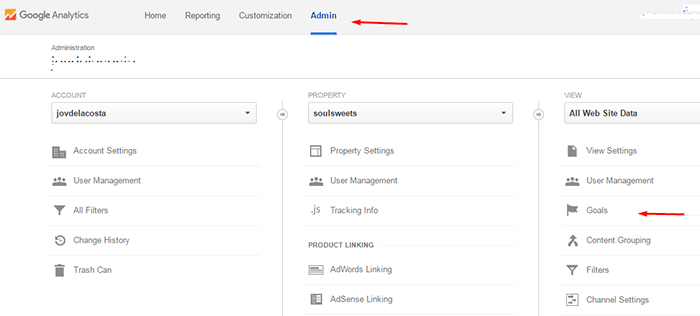
To setup a URL tracking goal, navigate to the Goals section in Analytics first. Go to Admin and click Goals.

how to use google analytics to track website goals

In Goal Setup, we set our goal name as “Place an order” and this goal will track how many visitors placed their orders/completed the checkout. Since checkout is normally closed with a thank you page, we can track how many times the thank you page is visited to track the number of purchases. Google Analytics also allows users to view other important statistics such as time on site and the referring URL which led to the sale.

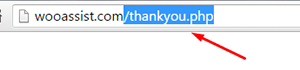
In Goal Description, set the goal type as Destination and enter the URL of your thank you page. You don’t have to enter the full URL, just the slug after the domain name will do. So, instead of www.example.com/thankyou.php, just enter /thankyou.php.

domain-slug

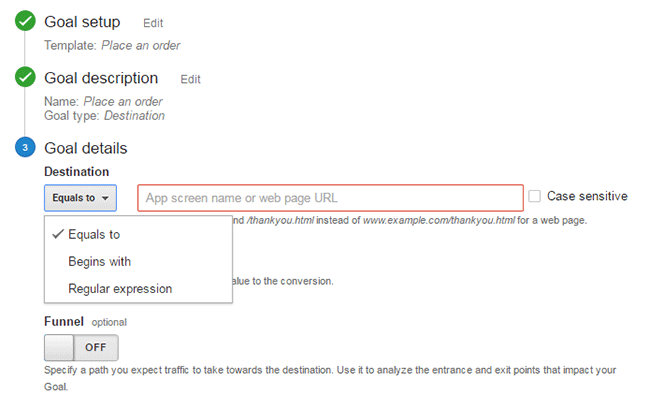
In Goal Details, select which of the below corresponds to your desired action.

  • Equals to – Requires the exact same string to trigger a goal. Good for tracking single pages.
  • Begins with – Only requires that string begins with the inputted URL. So if you put “/products” it will track any URL that starts with “/products”. This includes “/products/bags”, “/products/shirts”, etc. This is ideal for tracking a group of related pages under the same category.
  • Regular Expression – This is meant for advanced users. You can write wildcard terms to select a variety of URLs. You can read more about regular expressions in this guide.Google-Analytics_URL-Tracking_Goal-Details

Funnels

The basic concept of funnels for destination goals is to track a series of pages. These pages form the path you expect traffic to take. For example, you might want to get your visitors to watch a video of the product demo, proceed to add the product to cart, checkout and finally the thank you page.

Funnels are optional and not all e-commerce sites have a defined sales funnel. Still this should not be neglected. Tracking your funnel provides insights on how effective your website setup is in achieving your goal. When your visitor exits at the end of your funnel, the goal is triggered.

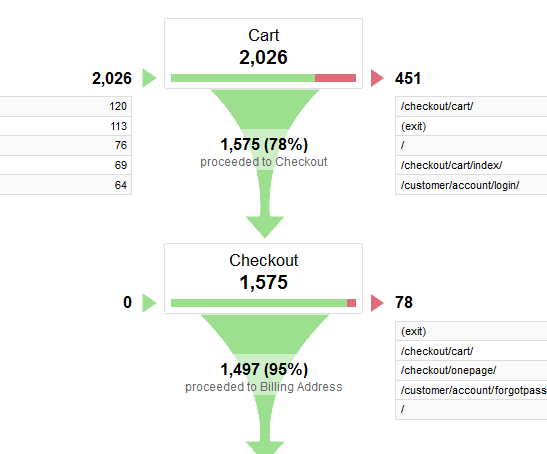
Setting up a funnel is very handy because you’ll also know how many visitors proceeded to each step. You’ll know at which step most of your visitors abandoned the process so you can make the necessary adjustments.

Google-Analytics_Funnel

Here is a sample data from a funnel. Notice that you can easily view how many proceeded to the checkout from the carts page.

Duration Tracking

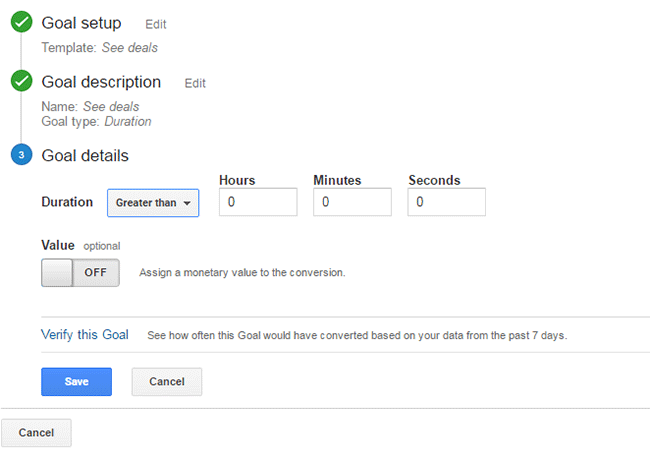
This tracks how much time the user spends on your site. To set this up, you just need to set a minimum amount of time in “Goal details” and if the user spends more than that, the goal will trigger. This tracking is useful for tracking goal pages with important content such as infographics, your portfolio or any other content that you want your visitors to view.

Google-Analytics_Duration-Tracking

Pages/Screens per Session

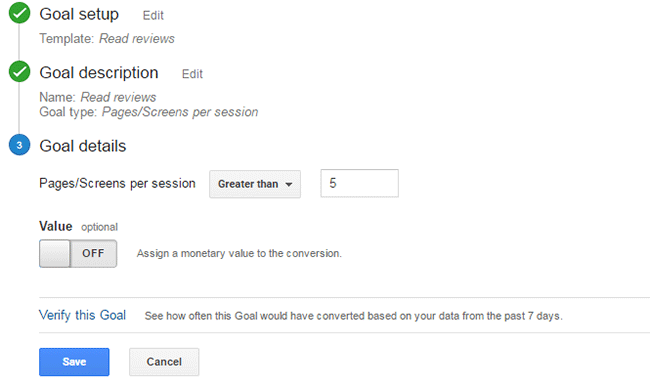
If your visitors reach a specific number of pages before exiting, it will trigger this goal type. This is useful when you have a lot of content that you want your visitors to view. This goal is used mostly by news and other media sites that earn advertising income.

To set this up, set Pages/Screens per session in “Goal details” and then choose a number that you want to target for your goal.

Google-Analytics_Pages-per-Screen

Event

This goal is meant for advanced users. You need to know some script coding to trigger the event. And it can be as specific as you want it to be. Using scripts on your site, you can track a click of the button, scroll on a page, and more specific actions that are happening during the visit.

Wooassist_Call-to-Action_View-Plans

Mostly, an event goal is used on button clicks. While you can use URL tracking to track button click, it becomes a problem when you have multiple buttons on different pages that point to the same URL. You won’t know which button was clicked. With event tracking you can keep track of each button individually. This is very useful in identifying which particular button or button design is more effective in completing your goals. To know more about setting up event tracking, you can visit Google’s guide for event tracking.

Conclusion

Remember that Google doesn’t retroactively track your goals. So it is important that you set up your goals as soon as you have your site running so that you can effectively start collecting data right away. Use the data you gather to improve your conversion rates. Google has provided you the resources to improve your site and increase your income. Now it’s up to you how you will use that data to your benefit.

Was this post helpful? Do you have any tips you’d like to share about Google Analytics conversion tracking? Let us know in the comments.

Filed Under: How-To Articles Tagged With: best practices, call-to-action, conversion optimization, e-commerce, Google Analytics, how-to, marketing strategy, optimizations

Improve Website Page Load Speed by Optimizing Images for Web

February 15, 2015 By John Leave a Comment

optimize-images-for-web

Optimizing images on your website whether it’s an e-commerce store, a blog, or both is one of the most important things thing that you can do to improve its performance. And it shouldn’t be a complex task really. Sure, high-res images look great but when you’re loading a 2MB image, it’s going to do more harm than good.

Essentially, you’re going to want to aim for a small image file size without compromising quality. As a rule of thumb, don’t let the images look bad or pixelated just for the sake of being smaller in size. You should strike a balance between a good-looking image and an acceptable image size. Here are a few ways on how to optimize images for the web.

Optimizing Images for Web Using Photoshop

Optimizing images for the web is not at all difficult. If you have Photoshop (or any other image editing software), it’s a very simple process. Open the image on Photoshop and resize or crop your image to the appropriate size.  Remember, when sizing images, the images you plan to use should not have a larger resolution than the image placeholder.

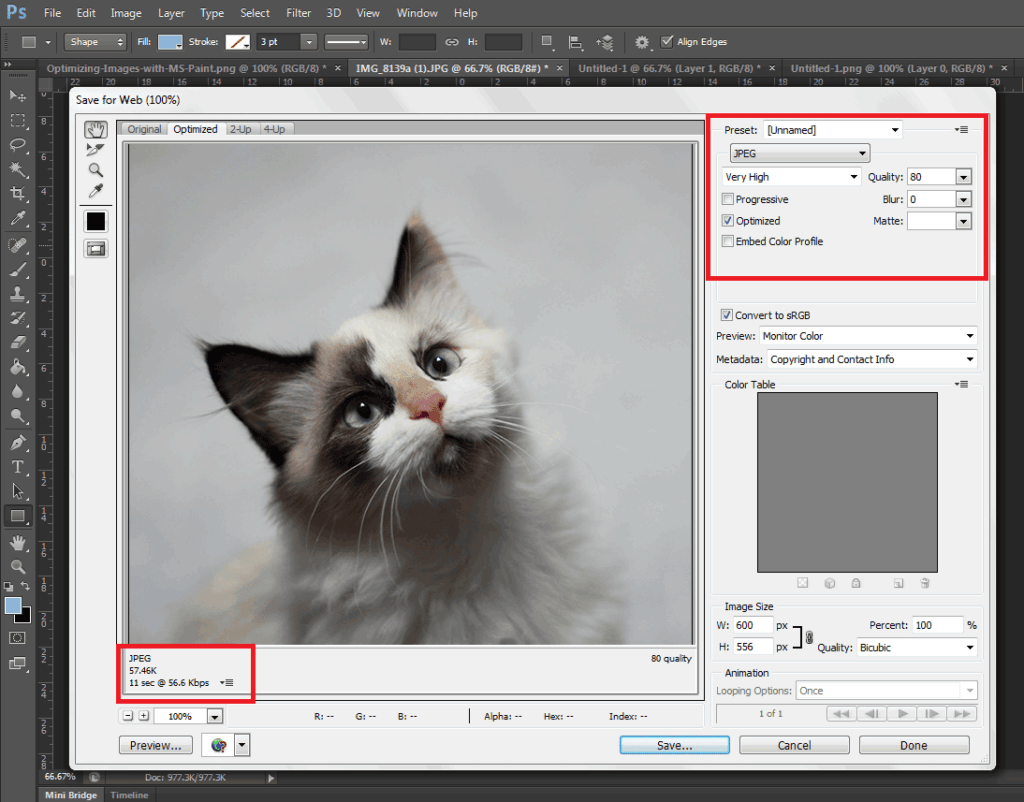
When you have resized your image to the appropriate resolution, click on File and Save for Web (Ctrl + Shift + Alt + S). Here you’ll be able to set the quality of the image while being able to see if the image still looks good. The image should not look pixelated and not have artifacts. In the bottom left section, you can see the file size of the image. You’re going to want to aim for an image that looks good, is not pixelated, and is less than 100kb in size — the smaller the size the faster the image loads on the page. On the upper right-hand section of the “Save for Web” window, you can use available presets or set the quality to your desired quality. Make sure you have the Optimized box is ticked and choose the correct file type. When you achieve a small file size with a good-looking image, click on Save.

Optimizing-Images-with-Photoshop

A Note on Image Types

image-file-types

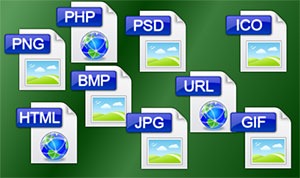
An important thing to note to make images look good even as you scale them down is to set the correct file type. Notably, the JPEG type is used for photos as it supports the most number of colors at 16 million. PNG is the better choice if you’re working with graphics such as logos and icons since it makes use of lossless compression. Lossless compression means that the image can be made smaller without affecting quality. PNG supports thousands of colors as well as transparency. JPEGs don’t support transparency.

GIF images are similar to PNG. It uses lossless compression and supports transparency. It however can only store a measly 256 colors. Using GIF images on web pages is generally not recommended.

Serve Images in WebP Format

We also recommend converting your image files to the modern webp image file format since these are smaller in size and are thus recommended for achieving optimum site performance. Uploading webp files are still not recommended however as there are still devices and browsers that do not support it. There are however plugins and services that allow converting regular image file types to webp and serve these images when it is supported by the user’s device. WP-Optimize is one plugin that provides free webp conversion.

Optimize Images Using WordPress Plugins

We also recommend having an image optimization plugin installed on your WooCommerce store. There are many image optimization plugins to choose from such as EWWW Image Optimizer, reSmush.it, Robin Image Optimizer. Once you set up these plugins, they will optimize your images on upload. Do note, however, that these image optimization plugins will not alter image resolution so it is still recommended to upload images in the correct resolution not exceeding the image placeholder size.

Properly Naming Files

A thing to note when naming files is to name files as they are. Don’t name files after a keyword when it is not appropriate. If you’ve got an image of a child playing the violin, name it something like “child-playing-violin.jpg” and not something like “learn-violin-online.jpg” or “free-violin-course-online.jpg”. If you try to force your SEO keywords on your image file names, your site may be flagged for overoptimization.

Optimize your images to ensure your site performs well. A fast e-commerce website provides a good user experience which translates to better SEO rankings and improved conversion rates.

Filed Under: How-To Articles Tagged With: best practices, conversion optimization, how-to, image optimization, optimizations, page speed, photoshop, plugins, site speed optimization

  • « Previous Page
  • 1
  • 2
  • 3
  • 4
  • 5
  • …
  • 8
  • Next Page »
Let us support your online store so you can manage your business

Get started today

Get 2 Hours of FREE SUPPORT

We are so confident that you will love our services that we will give you your first 4 hours at a 50% discount

That’s 4 hours for only $75

BUY NOW

Free eBook

5 Things Every Online Store Can Fix On Their Website In The Next Week To Increase Sales

Quick Links

  • How it Works
  • Pricing
  • Blog
  • Contact
  • About Wooassist
  • My Account
  • Checkout
  • Privacy Policy
  • Cookie Policy
  • Terms and Conditions

Wooassist

Australia:
59 Luke St.
Hemmant QLD 4174

Philippines:
San Miguel St.
Poblacion, Iligan City 9200

Connect


Copyright © 2026 · Wooassist

Yours FREE!

5 Things Every Online Store Can Fix On Their Website In The Next Week To Increase Sales