Wooassist

Assistance for Your Woocommerce Store

  • How it Works
  • Pricing
  • Services
    • Site Maintenance
    • AI SEO and Content Marketing
  • Blog
    • How-To Articles
    • Code Snippets
    • SEO For E-Commerce
    • Theme and Plugin Reviews
    • Wooassist News
    • WordPress/WooCommerce News
    • Interviews
  • About Us
  • Contact
You are here: Home / Archives for page speed

6 Things That Slow Down Your WooCommerce Site and What You Can Do To Fix It

April 8, 2016 By John Leave a Comment

highway-speed-lightsIf you see that your WooCommerce site visitors are leaving your site not long after they get in, you might want to check if your site is loading fast enough. Slow page loading is one of the primary reasons people leave websites. Studies have shown that a 1-second delay in page response can result in a 7% reduction in conversions. Even Google admitted they hate slow-loading sites and penalize the ranking of slow websites. In this article, we will get into the factors that cause your site to slow down and how you can fix them.

Unoptimized Images

camera-lensIt is critical for WooCommerce sites to have optimized images, specifically product images. The sheer number of product images and alternate images can significantly affect a WooCommerce site’s page speed. You might want to aim for a file size not larger than 100kb. But this is just a rule of thumb. Full-width images are of course an exception. Also always try to use appropriate sizes. For optimum speed, the images should not exceed the size of the placeholder. Lastly, try to adjust the quality of the image. It doesn’t mean you compromise image quality. There are ways to reduce image file size without affecting image quality. You can optimize the image by adjusting some settings and removing some color palettes that are not observable by the naked eye.

We suggest a plugin called WPSmush.it. This is a plugin that automatically optimizes the image as you upload your images through the WordPress Media Library. Still, it is important that you optimize your images before uploading them. Learn more about pre-upload adjustments in our post about image optimizations.

Serving Content without Caching

Content caching is basically preprocessing the files and storing them as static content instead of asking the server for the contents upon each client’s request. The static content can be stored either from an intermediary nearby server (server-side caching) or from the client’s web browser (client-side caching). This practice reduces page load time significantly because it reduces server load and the content is served from a closer location. Caching can improve your website speed by up to 300%. If you are looking for a caching plugin, we can recommend WP Super Cache.

Having Too Many Plugins Installed

run-track-and-fieldPage size is not the only thing that has a direct impact on your page load time. The total number of HTTP requests is a major factor as well. Every image, JavaScript file, CSS file, and jQuery file adds up to more HTTP requests.

This is why having too many plugins installed on your WooCommerce site is not advisable. The same goes for having a theme with a lot of bundled plugins. Plugins can have their own stylesheets and scripts and these add to total the number of requests. Of course, it depends on the plugin. Some plugins have efficient code, but others can have issues with poorly coded PHP scripts. A poorly coded plugin needs a longer server processing time before it completes a calculation. That’s why it is important to only use plugins that you really need. Avoid plugins with too many features that you don’t really need.

Not Minifying Scripts and Stylesheets

Even if you already uninstalled unused plugins, chances are you will still have a couple of individual stylesheets and scripts queued for request. Minifying is a technique made to handle this issue. What it does is combine stylesheets and scripts. So instead of 5-7 stylesheets and 9-12 scripts, you will end with a single file for each type. After combining, it will further compress the files and serve them with gzip compression. This technique reduces the number of requests and page size significantly. Don’t worry about the technicalities of minifying though. W3 Total Cache has Minify together with the caching service.

Plenty of Externally Hosted Content

binary-treeAnother culprit in slowing down a site is having externally hosted content. They can look harmless at first but without moderation, your site will get bogged down by these contents. Your site will only be as fast as your external host server. It is not limited to external videos, audio, and images. External content can also be stylesheets and scripts. One common culprit is the overuse of Google Fonts, so as much as possible try to only use at most 2 font families from Google fonts.

Server Load

Server overload is a common problem, especially for site owners that use shared servers. Shared servers don’t cost that much but they have their limits. Most of these servers can’t handle huge amounts of traffic. One solution is to invest in a pricier dedicated server. Another one is to use a Content Delivery Network (CDN) service. CDN is a system of distributed servers. Basically, you can apply to use a CDN service and they will store your cached site in their server systems across the globe. You can use the W3 Total Cache plugin to easily set up a CDN for your WooCommerce store.

Conclusion

It is important to invest in speed optimization to maintain a good user experience across your WooCommerce store and if you want to keep your SEO rankings. To test your WooCommerce store’s speed, you can use Pingdom’s site speed test or Google’s page speed tool. If your site takes more than 2 seconds to load, you have to make some adjustments. Hopefully, the pointers above will help you achieve an acceptable page load speed.

Was this article helpful? Do you know of any tips to help improve a WooCommerce store’s page load speed? Let us know in the comments.

Filed Under: How-To Articles Tagged With: best practices, caching, CDN, how-to, minification, page speed, site speed optimization, W3 Total Cache, website development, WooCommerce

Wooassist Reviews the Best WooCommerce Hosting Services

June 16, 2016 By John Leave a Comment

serverThe right hosting service should be secure. Your hosting service should be able to help you solve hosting-related problems and quick. Your hosting service should be fast because quick page loads are critical in retaining site visitors. So what is the best WooCommerce hosting service?

Here is our review of some of the more popular hosting services around.

GoDaddy

GoDaddy_logo

Our rating: 7/10

GoDaddy has one of the cheapest plans available for website owners. They have a basic plan for those on a tight budget. Their basic plan has limited features and may not be a good choice. Make sure to check if these features will fit your needs as you might end up spending more with add-ons. Choose their higher priced packages if you need better functionalities such as a staging site to aid in development work.

Its performance and speed are acceptable but not that outstanding. As for support, it is not as good as other hosting services. All in all, it’s a decent hosting service. There is not much to worry about if you decide to go with them.

Bluehost

Bluehost

Our rating: 8/10

Bluehost is one of the most popular hosting services. For us, this popularity is reasonable. We haven’t had much trouble with the sites hosted in Bluehost that we’ve handled. Its server response time or speed can range from average to fast. It is still better than other shared hosting providers.

Their basic plan has less storage compared to GoDaddy’s but they offer more features. Features include a Global CDN, domain privacy, and SiteBackup. Your online store can benefit from better speed and security. In a hostbenchmarker study, Bluehost support takes some time to respond compared to other hosting services. We haven’t had much opportunity to work with their support though. To us, this gives them more value in that we or our clients haven’t had much to complain about.

Web Synthesis

Web-Synthesis

Our rating: 7/10

Synthesis is another good hosting service for online stores. It is a managed hosting service so it’s a bit pricier than others. They offer features that optimize site performance and security. Their speed is one of the fastest around. They also have an efficient support team.

The downside is that they don’t provide a staging site feature. This might complicate the development of your site. The usage of a staging/development site is best practice for website development. With a staging site, you’re able test your website updates before applying them to your live site.

Their processing power is also great but they have metered bandwidths. It’s not much to worry about as they provide 2TB-6TB plans. Unless you get huge bursts of traffic from content going viral, you’ll be okay. Overall, it provides a reliable hosting service.

Siteground

Siteground

Our rating: 9/10

We consider Siteground as one of the best hosting services for online stores and websites in general. Other review sites have pegged it as their top hosting service. Our experience with it has also been great.

The prices for its plans are reasonable. It has a metered bandwidth but the speed is top-notch with their super-caching feature. At the time of writing, they have servers in 3 continents and offer free CDN to each account.

All plans provide a decent backup service. Based on our experience, their customer service is good. You won’t find many hosting services giving the same value for money as Siteground.

WP Engine

WPEngine

Our rating: 9/10

WP Engine is a managed WordPress hosting service. This makes it work well for WooCommerce sites. It’s our hosting of choice for Wooassist.com. We chose this as it works great and comes with a host of other features.

In our experience, speed has not been a problem. They use EverCache for speed and massive scalability. They are also CDN-ready and this helps in delivering global content. They also offer good security and backup features to boot.

In addition, they also have the best support service compared to other hosting sites we have worked with. They don’t have the cheapest plans but they have reasonable and flexible value-for-money plans. We consider it the best hosting for low to medium volume online stores.

VPS Hosting Services

VPS-Hosting

Our rating: 5/10

This isn’t a review on a particular hosting but VPS or Virtual Private Server hosting in general. This type of hosting service is well suited for large websites. It is also a type of shared hosting that benefits most advanced users. Its pricing is not as cheap as the hosting services we reviewed in this post, but it’s not as expensive as dedicated servers.

The downside is its standard interface requires a lot of digging. Some services may be inflexible or frustrating because of its steep learning curve. Most VPSs do not come with a myriad of features, unlike the hosting services we reviewed in this post.

Not exclusive to VPS, but bursts of traffic tend to slow down a VPS-hosted site too much. The entire website could also go down because of this. They have failed in speed and reliability. For your WooCommerce store, we’d recommend to stay away from VPS hosting services in general.

Conclusion

Choosing a hosting service is something that you should do after thorough consideration. Read the fine print and the features before you pay for the service. This will keep you from wasting your time and money for hosting that is not a good fit for your WooCommerce store. Please note that even if we are affiliates with Siteground and WP Engine, we chose them based on years of experience. We have dealt with these hosting services for our clients’ and our own sites. We can attest that these two are among the best. If you were to sign up to either of them, we’d be grateful if you did so by clicking either of the links above.

Filed Under: Theme and Plugin Reviews Tagged With: backup, page speed, security, site speed optimization, Siteground, WooCommerce, WPengine

Improve Website Page Load Speed by Optimizing Images for Web

February 15, 2015 By John Leave a Comment

optimize-images-for-web

Optimizing images on your website whether it’s an e-commerce store, a blog, or both is one of the most important things thing that you can do to improve its performance. And it shouldn’t be a complex task really. Sure, high-res images look great but when you’re loading a 2MB image, it’s going to do more harm than good.

Essentially, you’re going to want to aim for a small image file size without compromising quality. As a rule of thumb, don’t let the images look bad or pixelated just for the sake of being smaller in size. You should strike a balance between a good-looking image and an acceptable image size. Here are a few ways on how to optimize images for the web.

Optimizing Images for Web Using Photoshop

Optimizing images for the web is not at all difficult. If you have Photoshop (or any other image editing software), it’s a very simple process. Open the image on Photoshop and resize or crop your image to the appropriate size.  Remember, when sizing images, the images you plan to use should not have a larger resolution than the image placeholder.

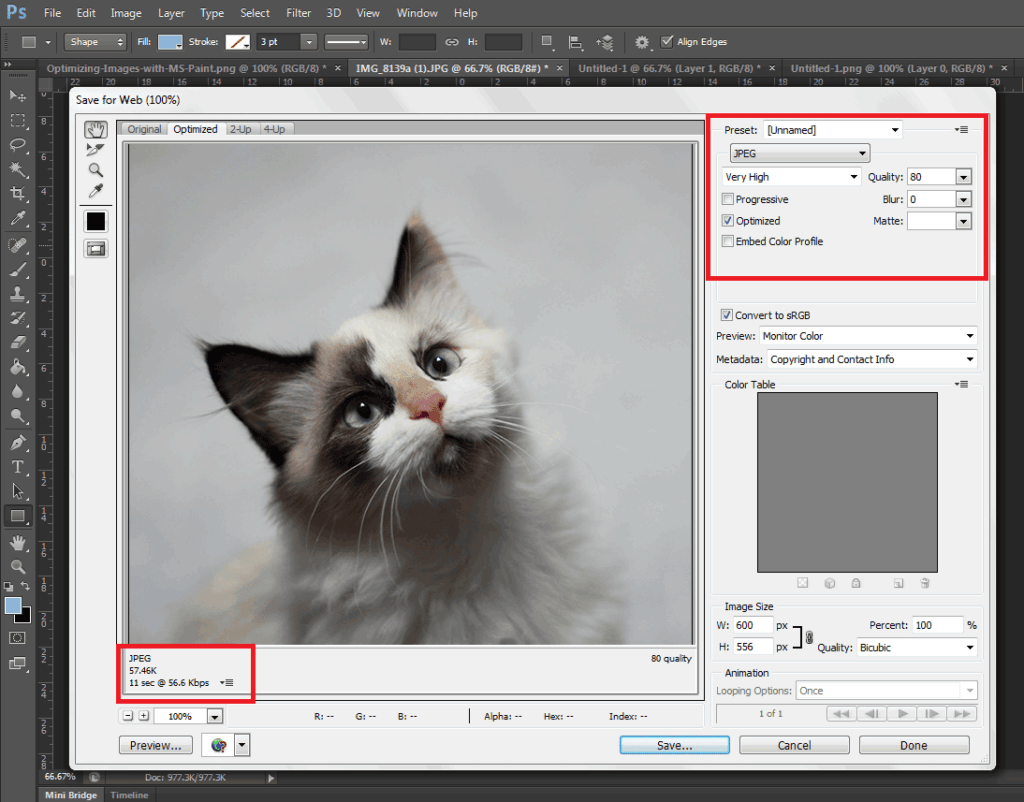
When you have resized your image to the appropriate resolution, click on File and Save for Web (Ctrl + Shift + Alt + S). Here you’ll be able to set the quality of the image while being able to see if the image still looks good. The image should not look pixelated and not have artifacts. In the bottom left section, you can see the file size of the image. You’re going to want to aim for an image that looks good, is not pixelated, and is less than 100kb in size — the smaller the size the faster the image loads on the page. On the upper right-hand section of the “Save for Web” window, you can use available presets or set the quality to your desired quality. Make sure you have the Optimized box is ticked and choose the correct file type. When you achieve a small file size with a good-looking image, click on Save.

Optimizing-Images-with-Photoshop

A Note on Image Types

image-file-types

An important thing to note to make images look good even as you scale them down is to set the correct file type. Notably, the JPEG type is used for photos as it supports the most number of colors at 16 million. PNG is the better choice if you’re working with graphics such as logos and icons since it makes use of lossless compression. Lossless compression means that the image can be made smaller without affecting quality. PNG supports thousands of colors as well as transparency. JPEGs don’t support transparency.

GIF images are similar to PNG. It uses lossless compression and supports transparency. It however can only store a measly 256 colors. Using GIF images on web pages is generally not recommended.

Serve Images in WebP Format

We also recommend converting your image files to the modern webp image file format since these are smaller in size and are thus recommended for achieving optimum site performance. Uploading webp files are still not recommended however as there are still devices and browsers that do not support it. There are however plugins and services that allow converting regular image file types to webp and serve these images when it is supported by the user’s device. WP-Optimize is one plugin that provides free webp conversion.

Optimize Images Using WordPress Plugins

We also recommend having an image optimization plugin installed on your WooCommerce store. There are many image optimization plugins to choose from such as EWWW Image Optimizer, reSmush.it, Robin Image Optimizer. Once you set up these plugins, they will optimize your images on upload. Do note, however, that these image optimization plugins will not alter image resolution so it is still recommended to upload images in the correct resolution not exceeding the image placeholder size.

Properly Naming Files

A thing to note when naming files is to name files as they are. Don’t name files after a keyword when it is not appropriate. If you’ve got an image of a child playing the violin, name it something like “child-playing-violin.jpg” and not something like “learn-violin-online.jpg” or “free-violin-course-online.jpg”. If you try to force your SEO keywords on your image file names, your site may be flagged for overoptimization.

Optimize your images to ensure your site performs well. A fast e-commerce website provides a good user experience which translates to better SEO rankings and improved conversion rates.

Filed Under: How-To Articles Tagged With: best practices, conversion optimization, how-to, image optimization, optimizations, page speed, photoshop, plugins, site speed optimization

10 Things You Can Do Right Now to Improve Your WooCommerce Store

October 10, 2017 By John Leave a Comment

Ecommerce - Improve your WooCommerce StoreAs a WooCommerce store owner, your goal is to make your business as profitable as it can be. Here, we list down 10 things that you can do today to improve your WooCommerce store.



1. Add a call-to-action button on your home page

Adding a call-to-action button on your home page encourages your visitors to take whatever action you want them to take. You can direct them to click on your shop, sign up to your email newsletter, send you an email, call you, or add a product to the cart.

thumbs-up

2. Add your contact details

Making sure that your contact details are immediately visible will increase your site’s trust rating. It can be your email or phone number. You can even add your store’s address if you have a physical store.

3. Add an email capture form

Getting your customer’s emails will allow you to send newsletters or special offers to those who sign up.

4. Remove distractions from your checkout page

Removing distractions from your checkout page will reduce cart abandonment. When a customer reaches your checkout page, you don’t want them clicking anything else except that “Pay Now” button.

5. Add related products to your product page

Adding related products to your products page will encourage your customers to purchase more items from your store. This will increase your average order value.

6. Offer free shipping

Not everyone can offer free shipping. But if you are able to, free shipping can really amp up your conversion rates. You can also offer free shipping with a minimum order value or for specific locations only. Make sure your visitors know you offer free shipping by placing a notice in a prominent area of your site.

7. Optimize your product copy

There are a lot of ways to optimize your product copy. You can optimize your copy to appeal to customers by emphasizing on the problems that your products can solve. You can also optimize your product copy to include technical details. Lastly, you can optimize your copy for ease of reading. How you optimize your product copy really depends on your product and your customer profile. You can use Hemingwayapp to check your copy’s readability score.

8. Optimize images on your WooCommerce store

product-zoom-in

When uploading product images, you must first optimize your product images to make sure you are uploading the correct image sizes. To determine the correct image sizes for your theme, you will need to use the “Inspect Element” feature of your browser. You will then need to go to WooCommerce settings to set the correct image size. Uploading anything bigger than the image placeholder’s size is a waste of resources and will just slow down your site. You can learn how to optimize images for the web in this blog post.

9. Remove sliders and use a single hero image with a call-to-action

Sure, sliders look good. But the truth is, they may actually do more harm than good to your site. Sliders can really slow down a site and a slow site is bad for SEO and conversion rate. Also, sliders can confuse customers and makes for bad user experience. Your website must send a clear message on what you want your customers to do. A slider just confuses your customers with various images that look like advertisements.

10. Make your site is mobile responsive

If you have not updated your site’s design for years, it might not be mobile responsive. This means that your website does not adapt to different screen sizes which makes browsing on a mobile device difficult. This is not good for your site’s user experience. Also, having a mobile responsive WooCommerce store is an advantage in terms of SEO. You can address this by using a responsive theme such as Storefront or the Genesis framework with a Genesis child theme. Both these themes are compatible with WooCommerce.

If you need any help getting any of these things done, you can contact us and we will help you get these sorted. If you have any questions, you can let us know in the comments section.

Filed Under: How-To Articles Tagged With: admin, best practices, call-to-action, content marketing, conversion optimization, design tweaks, e-commerce, how-to, optimizations, page speed, responsive design, website maintenance

Speed Optimization to Help Your Online Store Rank Higher

January 29, 2015 By John Leave a Comment

SnapCrab_2015-07-03_10-57-18_No-0000

Site speed sells – it can help your rankings, and increase conversion. Why is this so? First of all, Google announced that ‘page speed’ is now a ranking factor. Next, ensuring that your pages load quickly can lead to customer satisfaction. When you’re in the ecommerce industry,it is a must to invest in site speed optimization.

Higher Conversion Rates

A website that possesses optimum load speed has higher conversion rates. Any delay in site speed equates to unsatisfied customers. It’s enough reason to make them leave and go to other sites. Remember, your loss is your competition’s gain.

SnapCrab_2015-07-03_10-57-36_No-0000

Google has always rewarded sites that have clean codes and download quickly. They even launched a new web-based tool, which analyzes the performance of web pages. They also provide specific suggestions for making them faster. You can read more of this here.

This means that if your site loads slower, it will rank poorly in the search engines. You need speed optimization to help your online store rank higher.

Optimizing Site Speed

The window of opportunity for websites to engage and catch the interest of users is pretty small. We’re talking around three to five seconds. After that, users may leave.Chances are, they wouldn’t bother to make another visit. That converts to lost revenue, which hurts your bottom-line.

Page loading speed is the first thing site visitors notice. It even takes precedence over the site’s design. For that reason, you might find these tips about optimizing website speed helpful. Even more so for larger sites that have plenty of products.

Building and maintaining an ideal website takes a lot of hard work. There are so many things to consider, and site speed optimization is not the least of those. A fast loading site is essential to ranking well in Google and the other search engines.

Filed Under: How-To Articles Tagged With: e-commerce, how-to, page speed, site speed optimization

  • 1
  • 2
  • Next Page »
Let us support your online store so you can manage your business

Get started today

Get 2 Hours of FREE SUPPORT

We are so confident that you will love our services that we will give you your first 4 hours at a 50% discount

That’s 4 hours for only $75

BUY NOW

Free eBook

5 Things Every Online Store Can Fix On Their Website In The Next Week To Increase Sales

Quick Links

  • How it Works
  • Pricing
  • Blog
  • Contact
  • About Wooassist
  • My Account
  • Checkout
  • Privacy Policy
  • Cookie Policy
  • Terms and Conditions

Wooassist

Australia:
59 Luke St.
Hemmant QLD 4174

Philippines:
San Miguel St.
Poblacion, Iligan City 9200

Connect


Copyright © 2026 · Wooassist

Yours FREE!

5 Things Every Online Store Can Fix On Their Website In The Next Week To Increase Sales