
Wooassist

Assistance for Your Woocommerce Store

  • How it Works
  • Pricing
  • Services
    • Site Maintenance
    • AI SEO and Content Marketing
  • Blog
    • How-To Articles
    • Code Snippets
    • SEO For E-Commerce
    • Theme and Plugin Reviews
    • Wooassist News
    • WordPress/WooCommerce News
    • Interviews
  • About Us
  • Contact
You are here: Home / Archives for John

How to Set Up a Static Page as Your Home Page in a WordPress Site

February 9, 2015 By John Leave a Comment

homeIf you are creating an e-commerce store, chances are you’ll want a static page as your home page and not a blog or posts page which is the default home page for many WordPress themes. We’ll cover how you can do this in this article.

Before we dive deeper into this and assuming you are using Woocommerce, it might be a good idea to try the Woocommerce Storefront Theme.  Since the theme was built and is being maintained by the people behind Woocommerce, you can be assured that it integrates well with all Woocommerce features. Whenever a new version of Woocommerce comes out, you can be sure that it is optimized for the Storefront Theme. There is less chance of updates breaking your site.

Create a Page

The first step to creating a static home page in WordPress is to create the page that you want to set as your home page. On your WordPress Dashboard, hover over “New” and click on “Page”. Alternatively, you can hover over “Pages” and click on “Add New”.
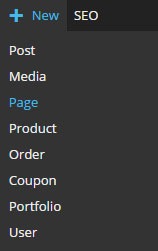
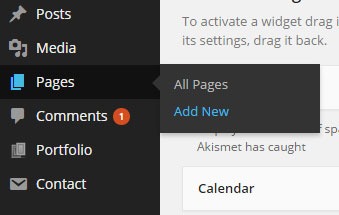
new-page      new-page-1

After that, just add the content you want on the page; format it accordingly then publish it. It is best practice to set the title of this page as “Home”.

Setting the Page as Home Page

To set the page you just created as your home page, go to “Settings” then click on “Reading”. Under “Front page displays”, tick on “A static page” then under “Front page” choose “Home” or whatever you named the page you are going to use as your home page.
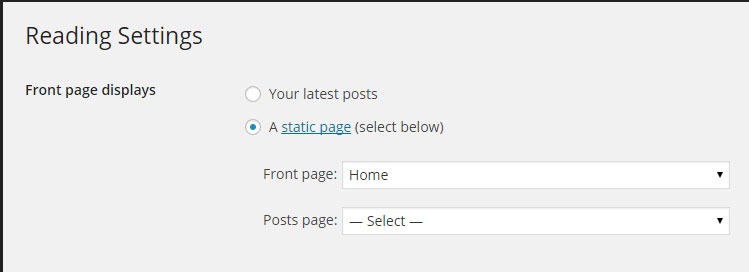
static-home-page

When that’s set, you’re done.

If you want a more powerful tool to help you create a good-looking home page without needing to know any sort of coding, we can recommend the SiteOrigin Page Builder plugin. This plugin enhances the content editor into a drag and drop widgetized editor which allows for easy creation of responsive grid-based pages. This plugin is optimized for the WordPress engine and will work with any theme that you are running. Let yourself create stunning pages that look like they were done by a professional web developer.
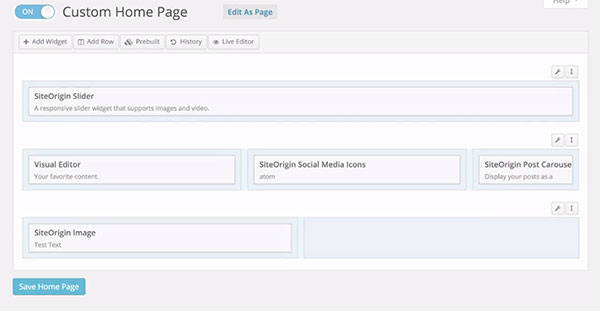
site-origin-page-builder

If you have any comments or questions, just hit the comments sections and we’ll get back to you.

Filed Under: How-To Articles Tagged With: e-commerce, how-to, plugins, Storefront, WordPress

Email Opt-in Solutions for Your Woocommerce Store for Increased Sales

January 29, 2015 By John 2 Comments

SnapCrab_2015-06-26_14-44-28_No-0000Many online entrepreneurs tend to overlook the value of emails because of the rise of social media and other marketing strategies. In reality, it remains one of the best means of delivering promotional messages to potential customers.


Opt-In Email vs. Spam

An opt-in email is a type of promotional email that is specifically requested by the person who is to receive it. It’s the reverse of spam emails, which are sent regardless of whether they were requested or not.

SnapCrab_2015-06-26_14-44-52_No-0000

Here is a better explanation of the difference between opt-in and spam. It also lists the advantages of opt-in emails, like showing consumers how you respect their privacy.

You can promote your products better by taking advantage of personalized opt-in emails. They may contain newsletters or information that consumers take interest in. It can also include special offers that promote specific products or services.

Opt-in Solutions to Increase Sales

Increasing your email opt-ins can actually get you more subscribers, as explained in this article. Aside from boosting your subscription, it can help you realize your conversion and sales goals.If you want an email opt-in form that converts, you have to combine timing, design, and incentive.

SnapCrab_2015-06-26_14-45-05_No-0000

Pop-ups are really effective at getting people to sign-up.However,applying them on an ecommerce store is risky. The goal of most ecommerce stores is to sell. Any barrier to achieve that primary objective is counter-productive and costly. A good compromise is a pop-up on exit, using a plugin like PopupAlly.

Opt-in email continues to be the industry standard for good email marketing. It not only preserves your email marketing reputation, but also saves you time and money.Our Wooassist team can help you find the perfect email opt-in solutions for your business.


Filed Under: How-To Articles Tagged With: conversion optimization, e-commerce, email, how-to, PopupAlly, WooCommerce

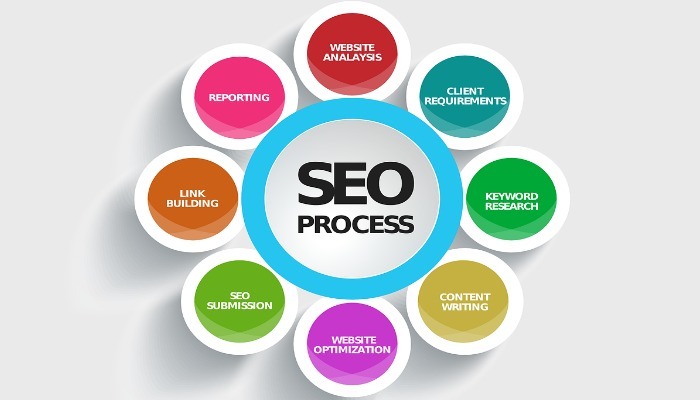
Understanding Search Engine Optimization (SEO) Basics for Your Online Store

January 29, 2015 By John Leave a Comment

searchengineoptimization

Google’s business model is to return the most relevant search results on the web. That’s why people keep using them – and by ‘people’, it includes your potential customers. Being ranked on the top pages allows companies to receive more visitors and generate more leads.

Google uses complex algorithms to assess the relevance of website across the web. They have hundreds of criteria for determining rankings.

A high ranking in Google translates to more site visitors and potential revenue. But how do you achieve that coveted status?

The answer is a well-rounded website.

It should be a site built on a best-practice code base that offers interesting and engaging content users are searching for. In your case, it is an online store using the Woocommerce platform. Understanding Search Engine Optimization (SEO) for your online store is one of the main factors to creating a well-rounded website.

Search Terms

What terms are your ideal clients using when searching for your service? Play around by creating synonyms, abbreviations, plurals, past tense, present tense, verbs nouns, etc. From one word, multiple search terms can be obtained.

For example, from the word car, we can get: car, vans, automobile, pick-up, etc. You will not rank for cars because it’s too popular, making the competition tight. Go for specific keyword “phrases” like “funny car stickers” or “ford car mats” to help you rank higher, and attract your ideal client.

You can use tools such as:

  • Google Keyword Planner (formerly the Keyword Tool).
  • http://ubersuggest.org/
  • https://serps.com/tools/keywords

Once you come up with your list of keyword phrases, dedicate an optimized page on your site for each keyword phrase.

You can outsource some of the research, but the business owner or sales manager needs to check the list. There is no point optimizing your site for key phrases of products that you either don’t sell, or make very little margin from.

Help Google Find You

Assist Google by labeling your content. Everything on your site can be labeled by meta data. Meta data is not visible to the user, but helps Google web crawlers identify what your site is about.

SnapCrab_2015-06-26_14-32-58_No-0000

All good website platforms like WordPress have this baked in to make it easy to add “meta data” to any page on your site.

Using our example above, “funny car stickers” would need to have a page on your site with metatags, something like:

Title: Funny Car Stickers | Bumper and Window Stickers. Car Decals
Description: Find 1000s+ of Unique Bumper Stickers & Car Decals. Tons of Funny designs available, or personalize your own!

On its own, meta data won’t do much to get you in the rankings. It needs relevant content to back up what the meta data is saying about your site. Your content needs keywords, plus synonyms, and related words. If you are writing about the topic you want to rank for, then this should happen naturally.

On-Page -> Off-Page SEO

Up until this point we have been talking about on-page SEO, which involves strategies controlled by the website owner. Wooassist can help with all your on-page SEO needs, but at this stage we don’t offer an off-page SEO service.

Our proficiency is the technical aspects of WordPress and Woocommerce, not content creation. Off-page SEO is the overall publishing and running of the website across the internet. It involves obtaining in-bound links from other websites. To do that, you need remarkable content that people will share and link to.

Improving Relevance and Authority

Linking from relevant websites is still the number one way to rank high in Google. It’s just harder now to achieve this. A few years ago, it was possible to create these links and trick Google into thinking you were popular.

Now, part of Google’s mission is to detect “un-natural” links, and mark it as deceptive and manipulative. Any link scheme is a violation of Google’s Webmaster Guidelines.

Google encourages quality content, and they define it as written by an expert or enthusiast who knows the topic well. Choose topics that are driven by genuine interests of readers of the site. Provide useful content that people will link to, and share with their friends on social media.

With all the factors you need to consider about SEO, it is easy to make mistakes. Here is a good write-up about those common SEO mistakes that you need to avoid.

The irony is, your site will rank high in Google when there is no longer any need. If you create great content that Google wants you to, and people are sharing your content, then you can get a lot of traffic to your site without the help of Google.

Filed Under: How-To Articles, SEO For E-Commerce Tagged With: Google+, how-to, keyword research, SEO strategy, SEO tools

Speed Optimization to Help Your Online Store Rank Higher

January 29, 2015 By John Leave a Comment

SnapCrab_2015-07-03_10-57-18_No-0000

Site speed sells – it can help your rankings, and increase conversion. Why is this so? First of all, Google announced that ‘page speed’ is now a ranking factor. Next, ensuring that your pages load quickly can lead to customer satisfaction. When you’re in the ecommerce industry,it is a must to invest in site speed optimization.

Higher Conversion Rates

A website that possesses optimum load speed has higher conversion rates. Any delay in site speed equates to unsatisfied customers. It’s enough reason to make them leave and go to other sites. Remember, your loss is your competition’s gain.

SnapCrab_2015-07-03_10-57-36_No-0000

Google has always rewarded sites that have clean codes and download quickly. They even launched a new web-based tool, which analyzes the performance of web pages. They also provide specific suggestions for making them faster. You can read more of this here.

This means that if your site loads slower, it will rank poorly in the search engines. You need speed optimization to help your online store rank higher.

Optimizing Site Speed

The window of opportunity for websites to engage and catch the interest of users is pretty small. We’re talking around three to five seconds. After that, users may leave.Chances are, they wouldn’t bother to make another visit. That converts to lost revenue, which hurts your bottom-line.

Page loading speed is the first thing site visitors notice. It even takes precedence over the site’s design. For that reason, you might find these tips about optimizing website speed helpful. Even more so for larger sites that have plenty of products.

Building and maintaining an ideal website takes a lot of hard work. There are so many things to consider, and site speed optimization is not the least of those. A fast loading site is essential to ranking well in Google and the other search engines.

Filed Under: How-To Articles Tagged With: e-commerce, how-to, page speed, site speed optimization

Analytics Reports Help Your Online Store Maximize Profits

January 29, 2015 By John Leave a Comment

SnapCrab_2015-06-26_15-06-01_No-0000

There is abundant data available on the Internet to help you better understand website traffic. All that data can be meaningless if you don’t know how to analyze and interpret it. Once you do, you could use the information to maximize your online store’s profits. You can do all that by making proper use of analytics reports.

Google has its own service for tracking and reporting website traffic – Google Analytics. Ecommerce sites can use analytics reports from this tool to assess their overall performance. Best of all, it’s free.Before we go any further, the first thing you need to do is register for Google Analytics and install the tracking code.

Creating Custom Reports

The most useful feature in Google Analytics, custom reports allow you find the data and presentation that is most relevant for your goals.You pick the dimensions and metrics and decide how they should be displayed. Google Analytics has over 70 standard reports to select from.

SnapCrab_2015-06-26_15-06-22_No-0000

This article can help you learn how to create and manage custom reports on Google Analytics on your own. You need not be an expert right away. What’s important is that you understand the process. Here’s another helpful resource on creating a custom report.

Wooassist Analytics Team

Google Analytics can monitor promotional activities, lead generation, visitor’s behaviour and conversion pattern. It can benefit your ecommerce store more than you expect.

Most website owners choose to do it themselves, but they end up collecting incorrect data. No matter easy it is to implement Google Analytics, you may still need the help of experts to make the best use of the data collected. If you find it too technical, or even time consuming to focus on, our Wooassist team can help you.

Filed Under: How-To Articles Tagged With: conversion optimization, e-commerce, Google Analytics, how-to, outsourcing, Wooassist

  • « Previous Page
  • 1
  • …
  • 37
  • 38
  • 39
  • 40
  • 41
  • Next Page »
Let us support your online store so you can manage your business

Get started today

Get 2 Hours of FREE SUPPORT

We are so confident that you will love our services that we will give you your first 4 hours at a 50% discount

That’s 4 hours for only $75

BUY NOW

Free eBook

5 Things Every Online Store Can Fix On Their Website In The Next Week To Increase Sales

Quick Links

  • How it Works
  • Pricing
  • Blog
  • Contact
  • About Wooassist
  • My Account
  • Checkout
  • Privacy Policy
  • Cookie Policy
  • Terms and Conditions

Wooassist

Australia:
59 Luke St.
Hemmant QLD 4174

Philippines:
San Miguel St.
Poblacion, Iligan City 9200

Connect


Copyright © 2026 · Wooassist

Yours FREE!

5 Things Every Online Store Can Fix On Their Website In The Next Week To Increase Sales