Wooassist

Assistance for Your Woocommerce Store

  • How it Works
  • Pricing
  • Services
    • Site Maintenance
    • AI SEO and Content Marketing
  • Blog
    • How-To Articles
    • Code Snippets
    • SEO For E-Commerce
    • Theme and Plugin Reviews
    • Wooassist News
    • WordPress/WooCommerce News
    • Interviews
  • About Us
  • Contact
You are here: Home / Archives for John

Backup Your WooCommerce Store on WordPress

January 29, 2015 By John Leave a Comment

hard-drive-656122_1280

Your online store may be up and running, but it still requires consistent management. Your database grows as you add new products or post something on your blog. It would be a shame if you lose everything in an instant.

This can be avoided by backing up your data. It’s one of the best ways to protect your investment. This post explains the importance of being backed up.

Set Your Own Backup

Most site owners assume that their web host does all the backing up. While most web hosts do have backups, they are not as reliable as your own. What’s more, there’s always a chance that your host failed to do so.
unita-disco-rigido-arch-01r

Not setting up your own backup is an unacceptable mistake. You can either learn to backup your data on WooCommerce, or you could have others to do it for you. These simple steps can teach you how to backup the data on your site. It’s crucial to choose a reliable web host that provides better security, and has backup solutions in case something happens to your own database.

Doing this right from the moment you go live with your WooCommerce store assures you peace of mind. Having all your data backed up means you don’t need to worry as much about any security problems. Your original site and all-important data can always be recovered.

WordPress-Specific Options

You shouldn’t rely solely on the backups made by web host companies. It’s because the backups they make, are not specific to WordPress. You need to look for WordPress-specific options. Using remote backup services is one good example. These services use cloud servers and guarantees that your data would be safe and secure.

BlogVault provides real-time backup solution in WooCommerce. It guarantees immediate backup with each update done. For a more detailed description of BlogVault, you can check it here.

For more information on how to backup your data on WooCommerce, check our earlier post. Having a good backup process helps keep all your data safe. But if you have your hands full on other areas of your business, the Wooassist team can setup a solid process for your online store.

Filed Under: How-To Articles Tagged With: backup, how-to, website maintenance, WooCommerce, WordPress

Creating and Editing Products on WooCommerce

January 29, 2015 By John Leave a Comment

Creating and Editing Products

Want to boost your online conversion and sales? Adding more products to an already existing store, with an already existing user base, is the way to go!

You are not as limited by shelf space as a physical store, so make use of this and add more products. It makes sense that the more you have to offer the more you can sell, right? But should you be adding them yourself?

Our Solution for Convenience

If you have a lot of products in your WooCommerce store, it may be difficult to manage it on your own.Tweaking the look of your product page, as well as creating variable and grouped products can be a little too complicated.

Adding and managing products can take a lot of your precious time. For one, you have to familiarize yourself with how the product categories, tags and attributes work. Then, all product data should be input.

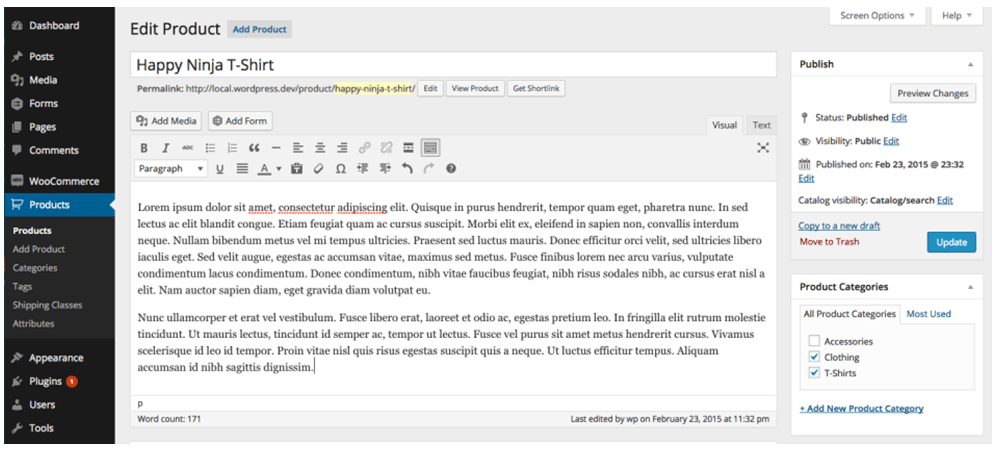
large

If you own the business, wouldn’t you rather have someone else do all this while you focus on growing your business?

Here’s the thing – you should spend more time working ‘on’ rather than ‘in’ your business. It means doing developmental activities to improve your business, rather than routine activities that you do every day to keep the business going. Why? Read more about this post here.

Instead of staring at your WordPress dashboard and clicking on Add New Product day in and day out,use the time in planning, marketing, and following up on leads. Or, spend the time with your family.

Our team can help you out with your WooCommerce store so you can prioritize on your tasks that really matter. Leverage your time by hiring people who can create, add, and edit products on your online store – fast.

Filed Under: How-To Articles Tagged With: admin, how-to, outsourcing, product management, Wooassist, WooCommerce, WooCommerce products

Design Tweaks on WooCommerce

January 29, 2015 By John Leave a Comment

SnapCrab_2015-06-26_15-14-47_No-0000

Your online business using WooCommerce is all set. Each important element is in place and accounted for. Your website is done. You get regular traffic. You got your marketing strategies in place. You have a blog and you are active in social media. You think you’ve got it all covered, but then a few things start to bug you.

Optimize Web Design

You realize the design needs few tweaks and you come up with a few ideas that should be able to increase sales. What you have to do right now is optimize your design for better conversion rates. This is called conversion rate optimization.

A few design tweaks on your website will help increase your conversion rates. It may involve adjusting or repositioning some visual and design elements. Color, images, cues and their placement on your landing or checkout pages, are all part of optimizing your web design – see here design tweaks.

Keep Your Design Simple

Your website needs to look good, but not necessarily flashy. Simplicity in your design can go a long way towards increasing conversions.

It is understandable that you’d like to fill your pages with a lot of useful features and elements. However, it could also be a hindrance. Visitors would usually turn away from complicated designs. Keep it simple and understandable.

Design Tweaks

In changing the colors on your website, take the context into consideration. Make use of call-to-actions (CTA), and place them in a favourable manner to make your visitors take action. The design of your website should encourage visitors to want to browse more. Essentially, they should immediately see what they’re looking for.

Use the right amount of white space. It can definitely put emphasis on where it is needed. It is a simple and effective way of making sure that important elements of your site are easy to locate. This post enumerates user interface tweaks can you make, to improve your conversion rates.

Know Your Audience

An important part of adjusting your site’s design is learning about your potential customers. Understand who they are what their personalities are like. That way, you could adjust your design elements to fit in with them.

SnapCrab_2015-06-26_15-15-17_No-0000

You can read more about customer personas in these articles:

New MailChimp User Persona Research

Web Design Tips that Increase Conversions

Having a clear idea of your current users can help you better empathize with them. Combining these tips will not only get people to visit your site, but also encourage visitors to take the next step.

A few design tweaks on your WooCommerce store can set you up for better conversions which will in turn lead to better sales for your business.

Filed Under: How-To Articles Tagged With: call-to-action, colors, conversion optimization, CSS, customer persona, design tweaks, how-to, optimizations, WooCommerce

WooCommerce Landing Pages to Boost Conversion

January 29, 2015 By John Leave a Comment

woocommerce-landing-pages

You just launched your e-commerce store using WooCommerce. Now, you want to go all out on your marketing campaign to boost conversion rates.If you want to get your campaign off to a great start, there’s one thing to remember – never start without a landing page.

What is a Landing Page?

A landing page is a standalone web page that stands apart from your actual website.  It is designed for a single focused objective, and serves as a guide for achieving conversion goals.It does not have any direct ties to your website. No global navigation exists to link the two together. Here is a good article explaining what it is.

SnapCrab_2015-07-03_10-28-23_No-0000

The landing page may be used either to capture leads or make a potential customer ready for purchase. Access to it is only possible through a link that you’ll provide in the content of your marketing campaign. This post further explains what a landing page is used for.

WooCommerce Landing Pages

Building landing pages for your WooCommerce store will help you generate more leads and conversions. Even if you plan to hand this task over to a professional, it would help if you understand the process.

This resource has tips on how to create effective landing pages.  WooCommerce Conductor. It can also show you how to create focused landing pages of featured WooCommerce products, capture leads, and build future marketing funnels.

SnapCrab_2015-07-03_10-28-41_No-0000

The first step to creating a successful, WooCommerce landing page is setting your business objectives. It’s worth noting that a landing page without a lot of thought behind it, will not be able to achieve its goals.

The potential uses for landing pages are almost limitless, but it can only benefit you if it’s done the right way. How well it is designed,and how skilfully it works,can make or break conversion. It is your ticket to more leads and sale, so having a professional landing page design is important. Let our Wooassist team do the job for you!

Filed Under: How-To Articles Tagged With: conversion optimization, how-to, marketing strategy, outsourcing, Wooassist, WooCommerce

Create Product Descriptions for Your Woocommerce Store

January 29, 2015 By John Leave a Comment

product-description

Product descriptions exist for one specific purpose – to sell.

Imagine a potential customer browsing through your ‘Products’ page. She finds the perfect pair of shoes and decides to purchase it. She clicks on the image only to find a poor product description, with no material details, instructions for sizing, etc.

She then hesitates and moves on to another website. That’s a lost sale right there, and the next buyer will go through the exact same thing. How many more customers will you lose?

Make it effective.

The goal is to make a visitor click all the way to check out form. To do this, your product descriptions should be effective and dynamic to engage customers. They have to know how your product or service can change their lives. And, they won’t be able to – unless they read the description.

An effective product description is one that goes beyond simply informing potential buyers about the product. It needs to convince them to buy it. Visitors of your website should feel the need to buy your products and/or use your services.

Make it unique.

Creating original content for your product descriptions is also a must. Don’t just copy and paste from the manufacturer’s brochures or website. Otherwise, you’ll have similar descriptions with hundreds of other websites – and this will affect your site’s ranking. What’s more, Google may penalize your website for this.

Tell a story with your descriptions. Make it about the customer and how your product can help him. Also, be careful about your voice.

Don’t make it sound boring, or as if you are lecturing in the course of telling your story. Try and be personal with your voice and make it seem like you’re talking to a friend. Learn more about the voice you need to use.

Make it sell.

In the competitive e-commerce landscape, good product descriptions can give you an edge. You can even learn how to write your own. There is no need to be fancy about it. In fact, a simple approach is the best, as shown here.

You need to find the time to write them even though you’re busy with other aspects of growing your business. This useful resource can help you learn the secrets of creating product descriptions to help you find success.

So there you go. Tell the world about your products. Use stories and read about the resources mentioned above to guarantee that you are going to get results. However, if you feel that you are not up to it and need to put your focus elsewhere, our Wooassist team can help.

At the very least send your supplier’s descriptions to Wooassist and we will re-word them to make them unique.

Filed Under: How-To Articles Tagged With: admin, content marketing, copy writing, duplicate content, how-to, product management, WooCommerce products

  • « Previous Page
  • 1
  • …
  • 38
  • 39
  • 40
  • 41
  • Next Page »
Let us support your online store so you can manage your business

Get started today

Get 2 Hours of FREE SUPPORT

We are so confident that you will love our services that we will give you your first 4 hours at a 50% discount

That’s 4 hours for only $75

BUY NOW

Free eBook

5 Things Every Online Store Can Fix On Their Website In The Next Week To Increase Sales

Quick Links

  • How it Works
  • Pricing
  • Blog
  • Contact
  • About Wooassist
  • My Account
  • Checkout
  • Privacy Policy
  • Cookie Policy
  • Terms and Conditions

Wooassist

Australia:
59 Luke St.
Hemmant QLD 4174

Philippines:
San Miguel St.
Poblacion, Iligan City 9200

Connect


Copyright © 2026 · Wooassist

Yours FREE!

5 Things Every Online Store Can Fix On Their Website In The Next Week To Increase Sales