Wooassist

Assistance for Your Woocommerce Store

  • How it Works
  • Pricing
  • Services
    • Site Maintenance
    • AI SEO and Content Marketing
  • Blog
    • How-To Articles
    • Code Snippets
    • SEO For E-Commerce
    • Theme and Plugin Reviews
    • Wooassist News
    • WordPress/WooCommerce News
    • Interviews
  • About Us
  • Contact
You are here: Home / Archives for e-commerce

12 Business Principles From Lean Startup by Eric Ries

June 8, 2017 By John Leave a Comment

Eric RiesI read this book just before I started Wooassist, and recently decided to go through it again. It was just as thought provoking second time around.

Here is a summary of the principles I have taken away from the book Lean Startup by Eric Ries.

Who is Eric Ries?

Eric Ries is an entrepreneur and co-founder of IMVU, a social network, which grew to $50 million in annual revenues in 2011 employing over a hundred people in Mountainview California. IMVU’s virtual goods catalogue now has more than 6 million items in it, with 7,000 added every day and most of the items are created by its customers.

What are the principles from the Lean Startup Method?
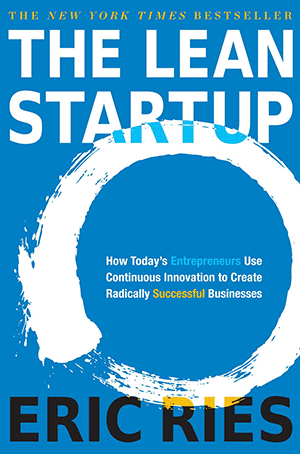
  1. Lean Startup by Eric RiesStand up from failure. The author experienced difficult failures too. The first company where he worked as a software engineer failed. However that did not stop him because he partnered with one of the founders to form IMVU later.
  2. Recognize the reality that most start ups fail. Eric Ries has worked with hundreds of entrepreneurs and has seen many promising startups lead to failure. “The grim reality is that most startups fail. Most
    new products are not successful. Most new ventures do not live up to their potential.”
  3. Do not be afraid to make mistakes. Instead, be determined to make mistakes! Eric Ries and his cofounders are determined to make new mistakes. They make a point to do everything wrong: instead of spending years perfecting their technology they instead build a minimum viable product, an early product that is terrible, full of bugs and crash-your-computer stability problems. Then they ship it to customers way before it is ready. And they charge money for it. After securing initial customers, they change the product constantly and ship new versions of our product frequently.
  4. Take action: produce your minimum viable product. Even when your product is not yet perfect, start marketing it, start sending it out to customers. Get feedback to it. Charge money for it. Then improve it quickly.
  5. Eric Ries and his team listen to the customers but do not always follow what their customer says they want, instead they make experiments on their customers! Eric Ries said: “We really did have customers in those early days—true visionary early adopters—and we often talked to them and asked for their feedback. But we emphatically did not do what they said. We viewed their input as only one source of information about our product and overall vision. In fact, we were much more likely to run experiments on our customers than we were to cater to their whims.”
  6. The Lean Startup Method – is built on many existing management and product development ideas, including lean manufacturing, design thinking, customer development, and agile development. It is a method for creating continuous innovation in any organization.
  7. The Lean Startup Method puts a focus on what customers want (without asking them), and a scientific approach to making decisions.
  8. Experimentation is important: Eric Ries considers himself fortunate to have cofounders who were willing to experiment. One thing in common between the cofounders was that they were fed up with the failure of traditional thinking.
  9. Customer Development = Business + Marketing Functions Are As Important As Engineering And Product Development. Steve Blank who is an investor and adviser for IMVU. In 2004, Steve began to preach a new idea: the business and marketing functions of a startup should be considered as important as engineering and product development. Business and marketing deserves a rigorous methodology to guide them. He called that methodology Customer Development, and Eric Ries was greatly influenced by this.
  10. Eric Ries studied Toyota’s Lean Manufacturing System and used some of the ideas:
    Lean manufacturing originated in Japan with the Toyota Production System. This heavily influenced the Lean Startup Method.
  11. The Five Concepts:
    Entrepreneurs are everywhere – the strategies can work for small and large companies.
    Entrepreneurship is management – you need a management that can handle extreme uncertainties.
    Validated learning – part of the job of entrepreneurs is learning how to build a sustainable business. You need to run frequent scientific experiments that will test each element of the entrepreneur’s vision.
    Build-measure-learn – turn ideas into products, measure how customers respond, and decide whether to change direction or stay in the same direction. Your business needs a feedback loop.
    Innovation accounting – focus on the boring stuff, how to measure progress, how to set up milestones, how to prioritize work.
  12. Vision, Steer, Accelerate
    a. It’s also important to build a minimum viable product rather than aiming for perfection right at the start.
    b. It’s important to have leap-of-faith ideas—we don’t know if they will work or not, that’s why we will test these ideas rigorously. Don’t discount any idea because it doesn’t “seem” plausible, try these ideas out and then measure the results.

“Vision” – The entrepreneur has a vision, a leap of faith idea, but it’s important to gauge if they are making progress, and this is where we need validated learning. To achieve this validated learning, use scientific experimentation. The lessons you learn will help you build a sustainable business.

“Steer” – the process is first Build, second is Measure and third is to Learn. Build-measure-learn is a feedback loop and again is part of the validated learning. The entrepreneur begins with leap-of faith assumptions then build the minimum viable product, then the progress is measured through rigorous testing, and we measure whether or not the assumptions of the entrepreneur are valid or not. There is a need to establish a new accounting system for evaluating whether entrepreneurs are making progress, and a method for deciding whether to pivot (changing course) or persevere in the same direction.

Accelerate” – explores techniques for entrepreneurs to speed through the Build-Measure-Learn feedback loop as quickly as possible even as they scale. This focuses on lean manufacturing concepts such as producing small batches of your products rather than big batches, getting feedback to your product fast, and organizational design to improve product growth. Toyota uses principles such as drawing on the knowledge and creativity of individual workers, shrinking of batch sizes, just-in-time production and inventory control, and an acceleration of cycle time

Take Action

These twelve principles can help you grow your business faster than before.

Here are some actions you can immediately take:

  1. Produce your minimum product. Don’t wait for your product to be perfect—get it out and into the hands of your customers.
  2. Improve your product quickly. Once you have customers testing your products, you can immediately improve them.
  3. Listen to your customers (but not what they say). Observe your customers and observe their actions, but it’s not necessary to follow what they say.
  4. Be willing to experiment.
  5. Build the product, measure the progress, learn from the progress. This is the process of getting validated learning.
  6. Spend time for the boring stuff—measuring progress, establishing milestones, tracking.
  7. Do the same thing not only for your product development, but also for your marketing and business functions. Build, measure, and learn.
  8. Based on your learning, decide whether to change course (pivot) or to accelerate on the same path.


Filed Under: Wooassist News Tagged With: business, e-commerce

Custom Development for Your WooCommerce Store

March 20, 2017 By John Leave a Comment

One of WooCommerce’s best-selling points is its customizability. But as extensive as the WooCommerce plugin database is, sometimes it’s still not enough. That’s where custom development for your WooCommerce store comes in. With custom development, we open a whole new world to your website’s capabilities. Still, as powerful as it is, it doesn’t come without its challenges.

Customizability

business-meeting-discuss-website-development

What exactly do we mean when we say custom development? Well, it’s like a custom tailored suit – it is tailoring code according to your exact specifications. With that, we’ll have precise control of the end-result. It is making changes to your website using configurations beyond what the software or plugins are originally capable of.

Sometimes you may find that WooCommerce is lacking a certain functionality that you require. You search for a plugin and there’s no viable plugin for it. In cases like these, we can custom code to add that functionality to your WooCommerce store. If you don’t like how a WooCommerce plugin works, we can add custom code to tweak it and make it work the way you want it to.

However, this does not come without its challenges.

Compatibility

In a vacuum, programming is predictable. For example, if you only had to deal with WooCommerce and you wanted to change something, it is simple and straightforward. However, in reality, a website exists as a combination of different software working together. What should be a straightforward change to WooCommerce could become unpredictable. Other installed plugins may behave differently as a result of the custom code.

These complications can create additional work but solving them is a necessary step in custom development.

Iterative Nature

keyboard-testing-thumbs-up-down

Other obstacles to custom development are unexpected bugs and simple errors.

Custom development is adding short pieces of software to the site. And as with all software, the first release rarely turns out as perfect from the get-go. Even with thorough testing, not all cases can be tested. In some instances, the bugs can pop up at an irrelevant area of the website.

Errors are also common, especially with complex customizations. At Wooassist we have tested over 500 developers in our recruitment program and trialed almost 100 of them. We are left with the cream of the crop and have 3 solid developers. They are the top one percentile, but they are not machines. They are not perfect. These unexpected bugs and mistakes go hand in hand with custom development. To get things right, several iterations may be necessary.

More meticulous testing is advised, but it will also cost more. It is up to the client to set the balance between testing and cost.

Maintenance Costs

Another challenge for custom development is its dependency on the parent software. This includes – either WordPress itself, WooCommerce or the other plugins you have installed. There’s the possibility that updates and new software versions will affect your custom development.

This is because the custom code has been specifically designed for the current setup at the time. If the setup changes, then the custom code needs to be modified as well. This means that custom development is not a build-it-and-leave-it process. It needs regular maintenance to keep up with the updates of the original technology.

So should you still get custom development for your WooCommerce store?

Web-developer-dual-mointor

It depends.

Most of the time, the ready-built plugins and extensions for WordPress and WooCommerce are enough to get a website up and going. There are thousands of extensions, both free and paid. Chances are, the functionality you are looking for might already be available. If it comes down to a choice between a paid plugin and custom development, sometimes the paid plugin is more advisable. It is much safer and easier to adjust your expectations and solution compared to custom code.

Business owners can be guilty of coming up with less than optimal ideas and then investing in development to implement these. A much better process is to invest more in researching the problem and the range of solutions available. Find some experts, send them the objective, the problem and your proposed solution and let them do some research for you. There is often a much simpler and cheaper solution.

Now what if there are no plugins for the functionality you require?

This is when you have to decide whether the functionality is worth the challenges and costs that come with custom development. If it is a functionality that gives the site admins the capability to spend less time working on a task, then it will pay itself off in the long run. If it improves customer experience and increases conversions, then it should also be an acceptable cost.

You can also choose the option that requires the least customization. Strike a compromise between the functionality you require and functionality of the original software. Bend the software less to avoid complications. All in all, custom development is not advisable for all projects. While challenging, custom development tells us that there will almost always be a solution. For most website owners, custom development is a necessary step in creating the website that they envision. To pursue this path, the site owner must accept the challenges of custom development.

Examples

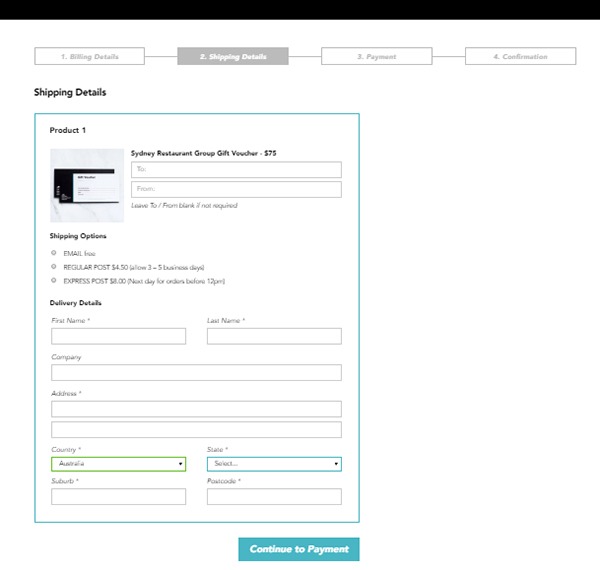
1. Here’s an example of a WooCommerce checkout that we’ve customized. Instead of the standard WooCommerce checkout page, we’ve separated certain sections grouping them together. We ended up with four sections, namely Billing Details, Shipping Details, Payment and Confirmation.

Example-1-Custom-Development-for-your-WooCommerce-Store

During the process, we encountered an error that cost some time to troubleshoot. So apart from the customization itself, we also needed to deal with unexpected complications.

Example-1-error-msg---Custom-Development-for-your-WooCommerce-Store

It turns out that it was caused by a conflict with an idle plugin activated on the site. Deactivating the plugin fixed the issue.

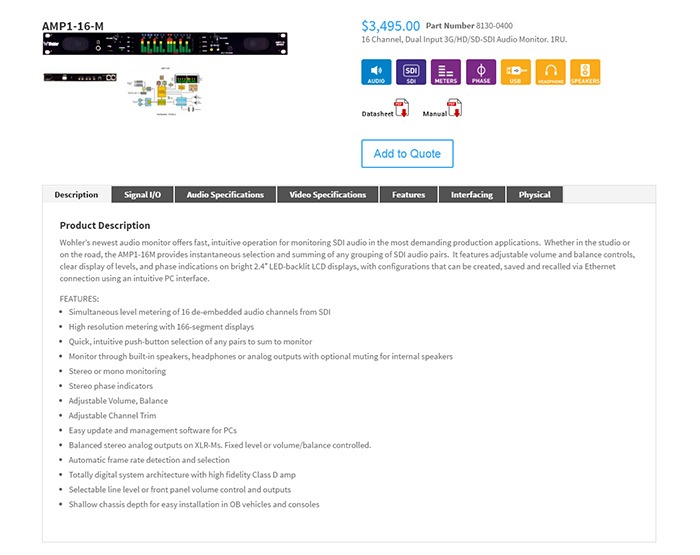
2. Here’s a product page that we’ve customized according to our client’s specifications. For this particular project, not only did we have to customize the product page, we also had to migrate an existing database of non-WooCommerce products to a WooCommerce website. This was complex as the existing products had attributes not compatible with WooCommerce.

The only viable solution we could think of was to make use of separate paid plugins to manage the attributes. In the end, the client had to purchase a separate premium plugin, WP All Import and the Advanced Custom Fields add-on. Unexpected costs like these may deter some website owners from custom development. However, these are often necessary.

Example-2 Custom Development for your WooCommerce Store

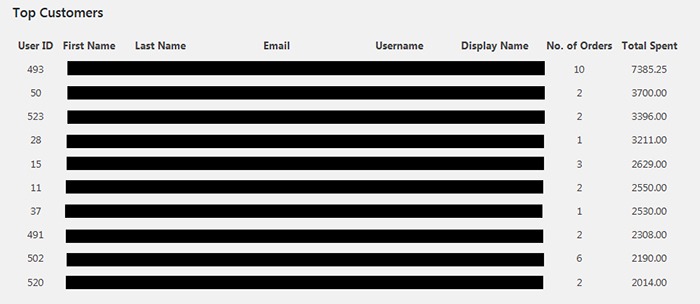
3. One of our clients asked for the functionality to create a list of the site’s most regular customers. She had installed a plugin for it. However, upon checking, the plugin has not been updated in over 2 years. As there are no alternative plugins, we figured that the most viable option would just be to build custom code for it.

The custom development itself was straightforward. Still, we needed to strike the right balance between spending time creating the code and spending time testing for errors. In the end, we were able to complete the custom development with the bare minimum in functionality in just a bit above 2 hours.

Example-3-Custom-Development-for-your-WooCommerce-Store

Final Advice

Here at Wooassist, we bill the work we do by the hour. So when it comes to custom development for your WooCommerce store, more complications can mean more time spent than expected. Most of our clients still prefer this arrangement as it is still cheaper than fixed price custom development work. Also, it is easier to arrange changes to the project along the way. Agencies that offer fixed-price quotes for free usually offer them at a premium as the client is also paying for the time when they didn’t get the work. And once the project has started, it is difficult to arrange changes without incurring additional charges.

But for those that would still prefer a fixed price quote, we can offer our Custom Project Roadmap product. When you purchase it, we will spend time researching, analyzing and defining the scope of the problem and solution. After these, we will offer a fixed price quotation. By having a clear strategy that is pre-assessed to be viable, we can minimize the complications. And when complications do arise, we won’t be billing you anymore for additional charges so you have control over the expense.

Filed Under: Theme and Plugin Reviews Tagged With: best practices, e-commerce, website development, website maintenance, Wooassist, WooCommerce

How to Add “Where Did You Hear About Us” Field on WooCommerce Checkout

December 7, 2016 By John 16 Comments

As an e-commerce store owner, it is important to know where you are getting your customers so you can plan your marketing efforts. You can either focus on channels that help you convert or tweak your marketing strategy on channels that are not very successful. One way to find out where your customers are coming from is by adding a “Where Did You Hear About Us” field on WooCommerce checkout.

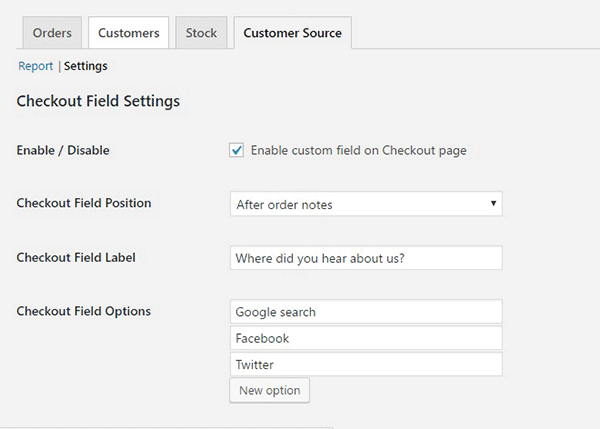
To start, just install and activate the “Where Did You Hear About Us Checkout Field for WooCommerce” plugin. When that’s done, go to WooCommerce > Reports > Customers Source Tab. Click on Settings to enable/disable the “Where Did You Hear About Us” custom field on checkout. Below you can see other plugin settings to customize. You can even make it a required field on your checkout page.

“Where Did You Hear About Us Field” on WooCommerce checkout

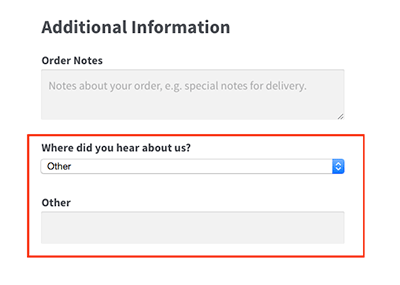
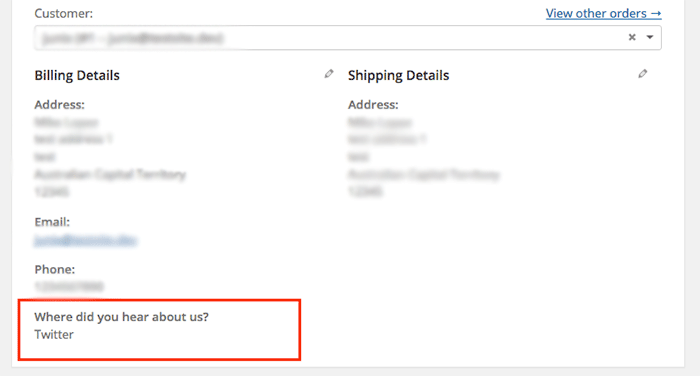
Using the plugin, you can add your channel options. You can even add an “Other” option so your clients can indicate how they found your e-commerce store if it is not in the list.

where-did-you-hear-about-us-plugin-additional-information

where-did-you-hear-about-us-plugin-below-billing-details

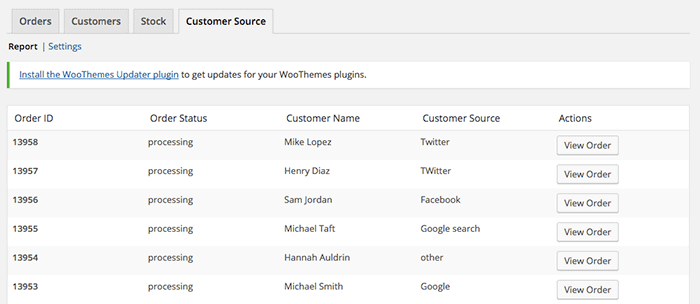
To view the data you gathered, go to Customer Source tab and click “Report”. You should be able to view the details which include customer name, customer source, order status, and order ID.

where-did-you-hear-about-us-plugin-customer-source-tab

The best part about this plugin is that it is totally free. There are no subscriptions. There is no premium version to buy. You can use it in as many websites as you want.

When you learn where your customers come from, you can make your business more profitable. If you tried using this plugin, tell us your experience about it in the comments section.

Filed Under: How-To Articles, Theme and Plugin Reviews Tagged With: e-commerce, how-to, marketing strategy, plugins, website development, Wooassist, WooCommerce

Why Use Long-Tail Keywords for your WooCommerce SEO

October 13, 2016 By John Leave a Comment

Are you optimizing your WooCommerce products but find that you are not getting any traction? It could be because you are optimizing for the wrong keywords. Many e-commerce businesses find more success with long-tail keywords. But what are long tail keywords and why use long-tail keywords for your WooCommerce SEO?

What are Long-Tail Keywords?

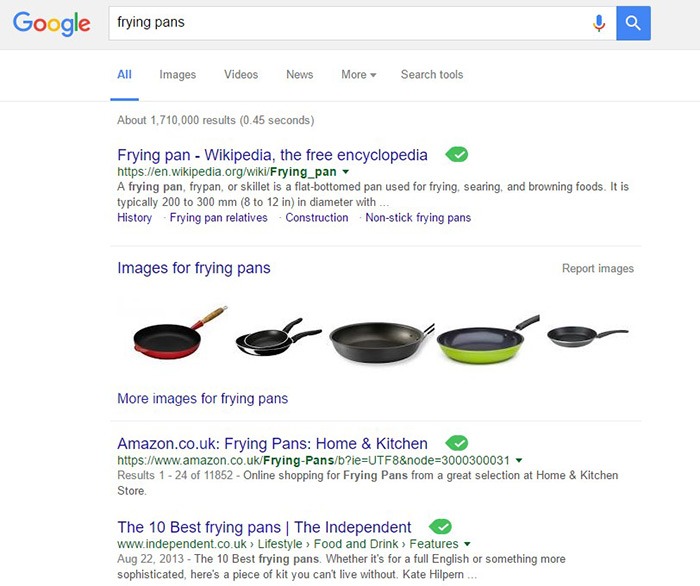
Long-tail keywords are longer, more specific keywords; much like a keyphrase. For example, if you are running an e-commerce store that sells frying pans, you could be tempted to optimize for keywords such as “frying pans”. However, ranking for “frying pans” would be very difficult. Do you expect to beat Wikipedia or Amazon who holds the top two spots in Google’s search results page? Even if you hire the most expensive SEO agency, that’s going to be hard to topple.

Why Use Long-Tail Keywords for your WooCommerce SEO

Let’s try to improve the keyword “frying-pan”. “Non-stick frying pan” is an improvement. It is more specific compared to just “frying pan” but this can still be made more targeted. “Non-stick stainless-steel frying pan” or “non-stick stainless-steel frying pan for induction stove” is taking it a step further.

bulls-eyeBenefits of Using Long-Tail Keywords

Long-Tail Keywords Produce Targeted Traffic that Converts Better

Long-tail keywords may or may not result in less traffic. The traffic that you do get will be more targeted and that means better conversion. Don’t stress yourself too much about losing traffic because traffic is a useless statistic. The important statistic to watch out for is your conversion rate because this is the moneymaker. Optimize your e-commerce store for increased conversion; not for increased traffic.

Long-Tail Keywords are Easier to Rank for

Because there is less competition for long-tail keywords, it is easier to rank for them. With a properly optimized page, you can land a top spot in the search results page. As long as you follow other known SEO best practices, this is achievable.

seo-google

But They Have Low Search Volume?

You might be looking at search data using Google’s Keyword Tool or any other tools. Then you see that there is no search volume for the long-tail keyword that you want to target. Don’t fret. Having no search volume does not mean that it will not show up in search results. Long-tail keywords are actually valuable. In the video below, Rand Fishkin talks about how valuable long-tail keywords are.

How to Choose the Right Long-Tail Keywords

Choosing the right long-tail keyword for your WooCommerce store is not difficult if you know who your customers are. If you already have a definitive image of your customers, then that’s a good thing. If not, it is imperative to identify your customer persona.

When you’ve created your customer persona, put yourself in your customers’ shoes. Think. What keyword would you search for if you were looking for the product you are selling? There is no single correct way to go about this. Most of the time, you will find that customers are looking for something specific. And once you identify that, that’s what you optimize for.

customer-persona

How Does Long-Tail Fare vs Popular Keywords?

If you choose to optimize for regular keywords, then you’re going to have a hard time getting to Page 1 of Google’s search results page. And if you don’t hit page one, then it won’t even matter. Page 1 of the search results page shows the top 10 results for the keyword. If you are ranked 11th, you’ll hardly get any traffic. This is not meant to discourage you to pursue the big keywords since it is not an impossible feat. It is possible but it’ll take some real genius or a lot of luck. Long-tail keywords, on the other hand, are easier to rank for.

Use Long-Tail Keywords with Other SEO Best Practices

seo-strategy

Using long-tail keywords alone won’t make your e-commerce store a conversion powerhouse. You need to use these keywords with other known SEO best practices. If you are using long-tail keywords right but doing everything else wrong, then it is not likely that you will get conversions.

You should create quality content that is easy to read. You should use proper URL structuring. Make your URLs readable. Implement proper navigation and good user interface. Upload a sitemap and make sure search engines can crawl your site. Use images properly and optimize your site for increased conversion. There’s a lot more to this but here’s a guide from Google to help you get started on best practices.

And that explains why you should use long-tail keywords for your WooCommerce store. If you have any questions, let us know in the comments.

Filed Under: SEO For E-Commerce Tagged With: best practices, e-commerce, marketing strategy, optimizations, SEO strategy

Why Use Storefront Theme on Your WooCommerce Store

August 26, 2016 By John Leave a Comment

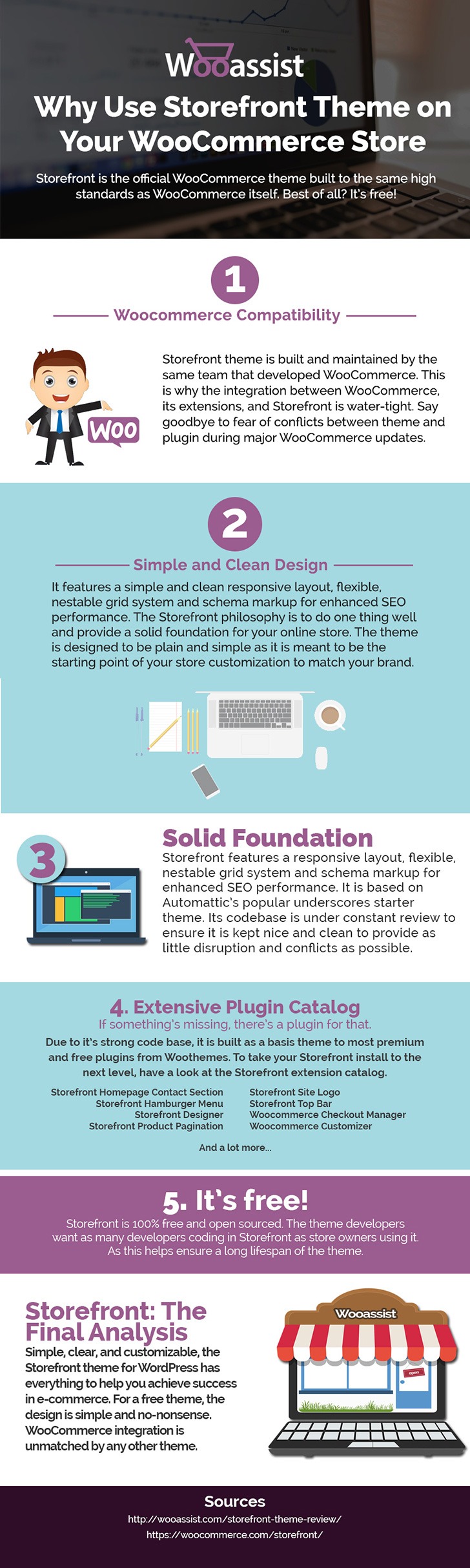
Storefront is the ideal platform for your WooCommerce store, providing a rock-solid foundation without the extra bloat or features. Developed by WooThemes, it reaches up to 3,000 downloads daily. But why use Storefront Theme on your WooCommerce Store? Find out in this infographic.

Why Use Storefront Theme on Your WooCommerce Store

To share this infographic on your site, just use the embed code below.

Filed Under: Theme and Plugin Reviews Tagged With: e-commerce, Storefront, website development, website maintenance, WooCommerce, WooCommerce products, woothemes, WordPress

  • « Previous Page
  • 1
  • …
  • 3
  • 4
  • 5
  • 6
  • 7
  • 8
  • Next Page »
Let us support your online store so you can manage your business

Get started today

Get 2 Hours of FREE SUPPORT

We are so confident that you will love our services that we will give you your first 4 hours at a 50% discount

That’s 4 hours for only $75

BUY NOW

Free eBook

5 Things Every Online Store Can Fix On Their Website In The Next Week To Increase Sales

Quick Links

  • How it Works
  • Pricing
  • Blog
  • Contact
  • About Wooassist
  • My Account
  • Checkout
  • Privacy Policy
  • Cookie Policy
  • Terms and Conditions

Wooassist

Australia:
59 Luke St.
Hemmant QLD 4174

Philippines:
San Miguel St.
Poblacion, Iligan City 9200

Connect


Copyright © 2026 · Wooassist

Yours FREE!

5 Things Every Online Store Can Fix On Their Website In The Next Week To Increase Sales