Wooassist

Assistance for Your Woocommerce Store

  • How it Works
  • Pricing
  • Services
    • Site Maintenance
    • AI SEO and Content Marketing
  • Blog
    • How-To Articles
    • Code Snippets
    • SEO For E-Commerce
    • Theme and Plugin Reviews
    • Wooassist News
    • WordPress/WooCommerce News
    • Interviews
  • About Us
  • Contact
You are here: Home / Archives for e-commerce

12 WooCommerce Tasks You Should Outsource

August 18, 2016 By John Leave a Comment

WooCommerce Tasks You Should OutsourceHow much value do you put on your time? As a business owner, this is a question that you should be asking yourself. Ideally, you should be working on your business rather than in your business. This entails hiring staff to handle the day-to-day operations and outsourcing works well for this purpose. Outsourcing is not easy but it can do good for your e-commerce business.

We’ll take a look at some of the benefits of outsourcing. We’ll also discuss the challenges that come with outsourcing, how you can deal with them, and the tasks that you can outsource.

Benefits of Outsourcing

You may opt for an in-house staff, but why is outsourcing a popular alternative? Here are a couple of reasons.

Getting a WooCommerce Expert to Do the Job

Outsourcing an experienced virtual assistant is made simpler. With some digging, you can find a WooCommerce expert who doesn’t charge exorbitant fees. With the right approach, you can even find someone who will stick with your company for years.

Reduced Costs

Hiring a virtual assistant will cost less than hiring a full-time in-house staff. You won’t need to invest in an office space for the outsourced worker. The outsourced worker will have his/her own computer with internet access. You may however need to provide some online tools and resources specific to your business.

You may have to offer a higher salary (still cheaper than your local rates) or offer some benefits if you want to keep a good virtual assistant. Do some research to find out what benefits are afforded to employees in certain countries. For example, virtual assistants from the Philippines will expect a 13th month bonus. Incentives for good performance are also good.

Challenges with Outsourcing

laptop-outsourcing

Outsourcing comes with its share of risks but these risks can be controlled.

The Need for Training

When you delegate work, the outcome may not always meet your expectations. To improve on this, make sure you create systems that the virtual assistant can follow. Provide ample time in training the outsourced worker.  Familiarize them with your business processes. This will help in paving the way for a long-term mutually beneficial relationship.

Confidentiality or Security Issues

You want to protect your business and that’s understandable so you might be hesitant in hiring someone from the other side of the world. When hiring a virtual assistant, you will most likely be sharing sensitive company information. On top of that, you will be providing access to your site and other accounts. Before hiring, you can do your research on the person that you are hiring. Check out social media profiles and other mentions on the web. Charles Haines also offers some interview tips for measuring integrity.

During the first few weeks, you can consider providing the outsourced worker limited access to your systems. When you are more comfortable, you can start providing more access.

WooCommerce Tasks You Should Outsource

As you work on growing your business, you may find that you spend a lot of your time on tasks that you can delegate. Outsourced WooCommerce tasks are web design and development, marketing, SEO and other back-office roles.

WooCommerce Tasks

1. Create and Edit Products – Creating and editing WooCommerce products can be time consuming. You need to set up products with different attributes and optimize and upload images for each one. Delegate this task so you can use your business expertise where it is needed.

2. Product Image Editing – Images need to be optimized before being used on your WooCommerce store lest you risk bloating your site and increasing page load times.

3. Improve Product Copy – Writing product descriptions that highlight your product benefits will help you sell. Copy writers and virtual assistant know this. Speak to your target market and convince them to make the purchase. This is one less task to worry about, as professional copy writers can do this for you.

Web Design and Development

programming-outsourcing4. Update Plugins and Core – It’s important to keep your WooCommerce store protected from the latest known vulnerabilities. A WooCommerce expert can help improve security and site performance by keeping everything updated.

5. Design Tweaks – Improving user experience (UX) is a major factor in the success of your online store. A professional web developer can recommend and apply design changes to your site to optimize UX.

6. Analytics and Webmaster Reports – When optimizing your site to increase conversion or improve user experience, analyzing and interpreting existing data is invaluable. A virtual assistant adept at Google Analytics can analyze and interpret your website data. This can help you make sound decisions.

7. Technical Solutions – Don’t get wrapped up in the technicalities of developing and maintaining your website. An experienced WooCommerce developer can optimize your design and add new functionality in a fraction of the time it takes you to do.

8. Secure Your Site – Apart from WordPress and plugins updates, a WooCommerce expert can help you set up automated backups and set up other security features.

9. Speed Optimization – Keeping your site running at its fastest will improve user experience and will reduce bounce rates. Notably, site speed is also an important ranking factor for SEO. A WooCommerce developer can help you optimize your site speed. This can include optimizing images, optimizing the HTCaccess file, setting up caching, minification, and DNS.

Marketing and SEO

10. Search Engine Optimization – Make it easier for potential customers to find your WooCommerce store by ranking high in organic search results. This is no small feat as SEO can take a lot of time. However, many virtual assistants make a living through SEO so finding an SEO expert is easy. A WooCommerce SEO expert can help optimize your product pages and blog posts to rank better in search engines.

11. Email Opt-in Solutions – To improve your site’s lead generation capabilities, a WooCommerce expert can help you add email opt-in forms in strategic locations on your site.

12. Landing Pages – An effective landing page should help you achieve your site’s goals. A WooCommerce expert can help you optimize your landing pages for this purpose.

Final Notes

Outsourcing a WooCommerce expert can help you save your time so you can focus on other things that need your attention. You now have a better idea of what tasks you can outsource to save your time. A WooCommerce expert can do tasks in a fraction of the time that it would take you. While outsourcing can be a challenge, the tips above should help ease the process.

Do you have any questions? Have you tried outsourcing? Do you have any tips that you can share? Let us know in the comments.

Filed Under: How-To Articles Tagged With: admin, best practices, e-commerce, how-to, marketing strategy, outsourcing, website maintenance, Wooassist, WooCommerce

How to Install an SSL Certificate on Your WooCommerce Store

April 11, 2016 By John Leave a Comment

cyber-security-lockFor WooCommerce stores, an SSL certificate plays a huge role in securing sensitive data for your users particularly their credit card details and other payment information. Having a secure WooCommerce store builds your customers’ trust. Without trust, the visitor will not convert. If you are serious about your e-commerce business, you should take the necessary steps to secure your site.

What is SSL?

SSL stands for secure sockets layer. It is a type of security that handles the encryption of data before they are sent to the internet. Encryption locks data to avoid unauthorized use. Data sent via SSL must be decrypted for the content to be readable.

Why is SSL a Requirement for Accepting Credit Card Payments?

credit-card-online-purchase

Connections that use plain Hyper Text Transfer Protocol (http) are sending data in plain text. Data will pass through a lot of internet nodes and it is possible to intercept the data before it reaches the destination server. It is a security concern when sensitive data like credit card numbers are sent unencrypted.

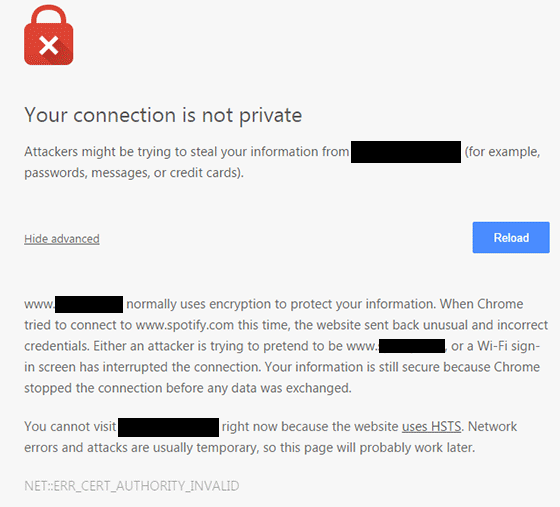
Connections that check for an SSL certificate and encrypt data use https (secured http). Aside from encryption, SSL certificates also provide authentication. Trusted SSL providers will only issue an SSL certificate after several layers of identity checks. A green https address bar and a lock icon in it are the best indicators that a site has an SSL certificate and can be trusted. Your customers are less likely to fall for a scam because scammers will not have an SSL certificate in their sites. Also, users will see a warning in their browsers should they try to go to a website without proper SSL certificate using https.

Maintaining Your SSL

One downside of getting an SSL is the added administrative burden in terms of cost, paperwork, and third party verification. Once you get an SSL certificate for your e-commerce site, you must not neglect its renewal. Your WooCommerce store will get a red flag as an unsecure site if you have an expired SSL certificate. It’s scary enough that many users will tend to back off seeing your site as a security threat. If you neglect to renew your SSL, your organic traffic would suffer and you could be penalized by Google.

ssl-error_cert-authority-invalid

How to Choose an SSL Plan for WooCommerce

data-keyThere are a lot of SSL plans available. An SSL certificate is generally priced depending on its scope and type of validation.

Scope of Validation

Basic SSL only provides security on the main domain. Wildcard SSL certificate secures a domain together with its sub-domains. If you have sub-domains like sports.example.com, shop.example.com, and news.example.com, go for a wildcard SSL certificate.

Types of Validation

Domain Validation

Domain Validation SSL certificate is cheaper than other certificates and issued within minutes. It only verifies the domain name and you do not need to provide any documents.

Organization Validation

This certificate validates that your business really exists. The validation process usually takes two to five business days. Your organization’s name will be displayed in the certificate which in turn earns your customer’s trust.

Extended Validation

An EV SSL certificate has the highest form of SSL certificate validation. Sites with EV SSL certification will have unique visual cues in them: a green https address bar and a lock icon in it. To get an Extended Validated SSL, an organization will have to complete a process defined by Certificate Authority (CA).

paypal-validation

Choosing a reliable SSL certificate for your WooCommerce store is a matter of trust. You might choose to have an inexpensive yet relatively unknown certificate. Some of these inexpensive certificates are just as reliable as the expensive ones.

How to Acquire an SSL certificate

Installing an SSL on your e-commerce site can be really easy or quite frustrating, depending on your hosting provider. SSL installations require configuring the servers and hosting providers typically own the servers themselves.

There are two ways of getting an SSL certificate: buying from the hosting provider themselves or buying from a third party.

Buying from the hosting provider is the simplest way to get an SSL. The process differs from one hosting provider to another. But in most cases they will handle the installation themselves. All you have to do is fill out a form and accept the terms. In 1 to 2 days, you will get an email finalizing your SSL installation. Most of these SSL certificates are domain validation though.

If you want a higher type of validation, consider buying a certification from a third party. The process may vary with different SSL and hosting providers but here’s the general process that you need to follow:

  • Prepare your validating documents. Ask for a separate dedicated IP address from your hosting provider. Shared IP addresses aren’t allowed in SSL.
  • Generate the Certificate Signing Request (CSR) from your web hosting server. It is best to ask your hosting provider to generate the CSR. The Certificate Authority will create your certificate based on the information contained in the CSR.
  • Submit the CSR and other validating documents to the Certificate Authority. Usually, your SSL provider will handle this for you.
  • Have your domain and company validated.
  • After receiving the SSL certificate, you need to upload it to your hosting account, then “turn it on” for the site you want to secure. Depending on the hosting server, you can do this in the cPanel. Alternatively, you can send a ticket on your hosting provider to do this for you.

If you are having problems with securing an SSL certificate it is best to get in touch with your hosting provider.

Now that you have a better understanding of SSL certificates, it’s time to get one for your site if you don’t already have one. If you have any other questions or if anything is not clear, let us know in the comments and we’ll do our best to help.

Filed Under: How-To Articles Tagged With: best practices, e-commerce, how-to, security

Why Should You Keep WordPress Updated?

May 24, 2016 By John 1 Comment

WordPress is getting more popular as a platform for creating e-commerce stores. Because of this, WordPress sites have become attractive targets for hackers to try and break into. There are a few reasons why hackers do this but the main motive has always been for profit. In this article, we will discuss how hackers take advantage of a WordPress site with poor security. You’ll also learn what should be done before a site update and other means to keep your site safe.

How Does a Hacker Take Advantage of a Compromised WordPress Site?

why should you keep wordpress updatedA lot can be done to a hacked WordPress site. It is not just getting sensitive information. Actually, getting sensitive information like credit card numbers is just a “bonus”. It’s not really your website that the hackers want. What they want more is the power of your server resources: computing power, disk space, and anonymity on the internet. So how can they use your server to their advantage? Here are some ways:

Bitcoin Mining

Bitcoin mining is the process of adding transaction records to the Bitcoin’s public ledger. One offers processing power to the public Bitcoin community to validate transactions. He gets a portion of the money being transacted as processing fee. Bitcoin mining is intentionally resource and processing intensive so that the number of blocks found each day by miners remains steady. This is where the hackers can take advantage. They will use your server to mine for themselves, hence noticeably slowing down your site.

Distributed Denial of Service (DDoS)

This attack is an attempt to crash one’s server. It spams that server with thousands of traffic simultaneously, thus denying service for other users. This is commonly used for cheating in online gaming, online gambling, and in taking down a site. Since you can’t overwhelm a server with traffic using a single PC, the likely scenario is that the attacker will have thousands of hacked servers and personal computers to perform an attack. All they need is a single PHP script saved on each site which they can activate at will.

Anonymous Attacks and Spam

Hackers can also use your server to attack or spam anyone anonymously. Since they are using your servers to do these malicious things, these will point to your name and not theirs. They can be churning thousands of spam emails to other people at your expense. They can send viruses and malware through these emails to infect more PCs to aid their hacking.

Data Mining

Hackers can also just mine sensitive information like credit card numbers, passwords, emails and others.

Automated Hacking

hacking-code-destroyMost attacks are automated and target small and unsecure sites. This works similar to how a search engine uses search engine crawlers to index information on the web. The hacker’s crawlers roam around the web to find exploitable sites. When a vulnerability is spotted, the hackers will attack that vulnerable point. Attacks vary from brute force attacks to code injection on contact forms.

Importance of Updating WordPress for Security

The people behind WordPress are working hard to increase security against these attacks. This is what most of the minor updates are for. As the attacks get smarter, the security needs to upgrade as well. Fundamentally, there is no such thing as a perfectly secure system. So whenever WordPress developers see or hear about a possible vulnerability, they will try to fix it as fast as possible.

This is why WordPress updates are very important. By keeping your WordPress core updated, you are protecting yourself from the latest known vulnerabilities.

Things to Do Before Updating

Most of the time, updating WordPress is harmless. However, some major updates that involve the core code may break some plugins or theme files which in turn can break some layout or functionality on your site. That’s why it is important to follow a process before pushing through with an update to avoid breaking your site.

Create a Backup

Creating a backup is the best thing that you can do before pushing through with an update. Backups are your last line of defense in case something goes wrong. If you think it is a hassle, you can actually automate backup creation. There are even hosts that automatically do this for you. However, it is best to have your own backup and not depend on your host to make your backups for you.

Testing on a Staging Site

A staging site is an independent copy of your site. Most hosting sites offer an easy way to make them but you can always create your own. Staging sites are used to ensure that everything works perfectly before you present your site to your customers. This is very important especially for e-commerce sites. You can lose your customers’ trust if you let them experience downtime and bugs.

Other Things to Help You Secure Your Site

cyber-security_keyboard-lockedAside from the updates, there are a lot of things you can do to harden the security of your site. Here are some examples:



Installing a WP Security Plugin

Like creating a backup, installing a WP Security plugin is one of the best things that you can do. Sucuri Security plugin is highly recommended. Basically Sucuri will act as a firewall for your site. It will protect your website from hackers, malware, DDoS and blacklists. It will receive all the traffic going to your site and filter it before sending it to your host. This allows the plugin to block all the attacks and only send you legitimate traffic. Because the filtering/blocking is happening on the Sucuri servers, your servers are relieved of a lot of load. Sucuri has always been the top go-to plugin when it comes to security.

Password Protect Some Directories

Password protecting /wp-admin directory adds another layer of security to your site aside from the login page. This can be done either manually or using cPanel. This is addressed on sites that have a lot of users accessing the wp-admin; for example large news/blog sites that accept guest authors.

Disabling PHP Execution

Disabling PHP Execution from certain directories protects you from backdoor access file attacks. The attacks come disguised as a WordPress core PHP file and inserted in easy access directories like /wp-includes/ and /wp-content/uploads/. Preventing PHP execution from these directories reduces the risk of backdoor access.

Changing the Prefix of Your Database

The default prefix of a WordPress database is “wp_”. Everything on your database will start with this so changing it will make it difficult for attackers to access your database.

Conclusion

Now that you’re more familiar with how hackers work, you can better equip your site to avoid being a victim. Backup your site and do not skimp on WordPress updates, even the minor ones. Remember that these updates will help you safeguard your WordPress site from the latest known security threats. Updates are one thing but you should also harden your site by implementing the strategies mentioned above.

When was the last time you updated WordPress? Do you have any other security tips you’d like to share? Let us know in the comments.

Filed Under: How-To Articles Tagged With: admin, backup, best practices, brute force, e-commerce, how-to, plugins, security, sucuri, website maintenance, WordPress

Speed Optimization to Help Your Online Store Rank Higher

January 29, 2015 By John Leave a Comment

SnapCrab_2015-07-03_10-57-18_No-0000

Site speed sells – it can help your rankings, and increase conversion. Why is this so? First of all, Google announced that ‘page speed’ is now a ranking factor. Next, ensuring that your pages load quickly can lead to customer satisfaction. When you’re in the ecommerce industry,it is a must to invest in site speed optimization.

Higher Conversion Rates

A website that possesses optimum load speed has higher conversion rates. Any delay in site speed equates to unsatisfied customers. It’s enough reason to make them leave and go to other sites. Remember, your loss is your competition’s gain.

SnapCrab_2015-07-03_10-57-36_No-0000

Google has always rewarded sites that have clean codes and download quickly. They even launched a new web-based tool, which analyzes the performance of web pages. They also provide specific suggestions for making them faster. You can read more of this here.

This means that if your site loads slower, it will rank poorly in the search engines. You need speed optimization to help your online store rank higher.

Optimizing Site Speed

The window of opportunity for websites to engage and catch the interest of users is pretty small. We’re talking around three to five seconds. After that, users may leave.Chances are, they wouldn’t bother to make another visit. That converts to lost revenue, which hurts your bottom-line.

Page loading speed is the first thing site visitors notice. It even takes precedence over the site’s design. For that reason, you might find these tips about optimizing website speed helpful. Even more so for larger sites that have plenty of products.

Building and maintaining an ideal website takes a lot of hard work. There are so many things to consider, and site speed optimization is not the least of those. A fast loading site is essential to ranking well in Google and the other search engines.

Filed Under: How-To Articles Tagged With: e-commerce, how-to, page speed, site speed optimization

How to Set Up a Static Page as Your Home Page in a WordPress Site

February 9, 2015 By John Leave a Comment

homeIf you are creating an e-commerce store, chances are you’ll want a static page as your home page and not a blog or posts page which is the default home page for many WordPress themes. We’ll cover how you can do this in this article.
Before we dive deeper into this and assuming you are using Woocommerce, it might be a good idea to try the Woocommerce Storefront Theme.  Since the theme was built and is being maintained by the people behind Woocommerce, you can be assured that it integrates well with all Woocommerce features. Whenever a new version of Woocommerce comes out, you can be sure that it is optimized for the Storefront Theme. There is less chance of updates breaking your site.

Create a Page

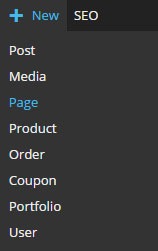
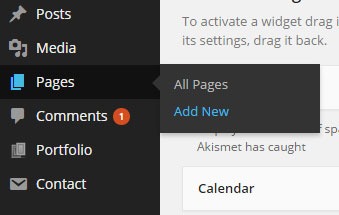
The first step to creating a static home page in WordPress is to create the page that you want to set as your home page. On your WordPress Dashboard, hover over “New” and click on “Page”. Alternatively, you can hover over “Pages” and click on “Add New”.

new-page      new-page-1

After that, just add the content you want on the page; format it accordingly then publish it. It is best practice to set the title of this page as “Home”.

Setting the Page as Home Page

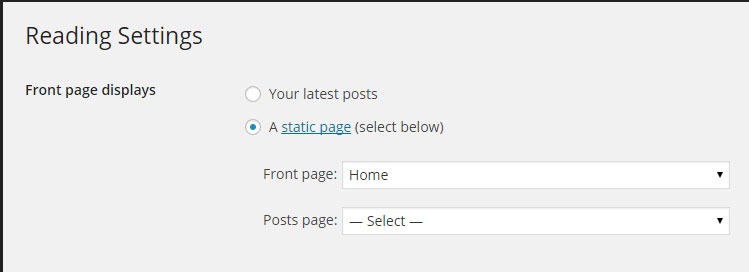
To set the page you just created as your home page, go to “Settings” then click on “Reading”. Under “Front page displays”, tick on “A static page” then under “Front page” choose “Home” or whatever you named the page you are going to use as your home page.

static-home-page

When that’s set, you’re done.

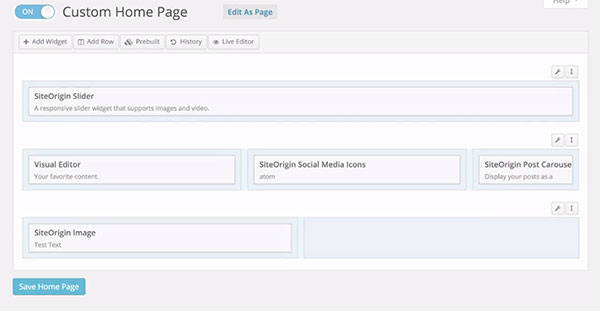
If you want a more powerful tool to help you create a good-looking home page without needing to know any sort of coding, we can recommend the SiteOrigin Page Builder plugin. This plugin enhances the content editor into a drag and drop widgetized editor which allows for easy creation of responsive grid-based pages. This plugin is optimized for the WordPress engine and will work with any theme that you are running. Let yourself create stunning pages that look like they were done by a professional web developer.

site-origin-page-builder

If you have any comments or questions, just hit the comments sections and we’ll get back to you.

Filed Under: How-To Articles Tagged With: e-commerce, how-to, plugins, Storefront, WordPress

  • « Previous Page
  • 1
  • …
  • 4
  • 5
  • 6
  • 7
  • 8
  • Next Page »
Let us support your online store so you can manage your business

Get started today

Get 2 Hours of FREE SUPPORT

We are so confident that you will love our services that we will give you your first 4 hours at a 50% discount

That’s 4 hours for only $75

BUY NOW

Free eBook

5 Things Every Online Store Can Fix On Their Website In The Next Week To Increase Sales

Quick Links

  • How it Works
  • Pricing
  • Blog
  • Contact
  • About Wooassist
  • My Account
  • Checkout
  • Privacy Policy
  • Cookie Policy
  • Terms and Conditions

Wooassist

Australia:
59 Luke St.
Hemmant QLD 4174

Philippines:
San Miguel St.
Poblacion, Iligan City 9200

Connect


Copyright © 2026 · Wooassist

Yours FREE!

5 Things Every Online Store Can Fix On Their Website In The Next Week To Increase Sales