Wooassist

Assistance for Your Woocommerce Store

  • How it Works
  • Pricing
  • Services
    • Site Maintenance
    • AI SEO and Content Marketing
  • Blog
    • How-To Articles
    • Code Snippets
    • SEO For E-Commerce
    • Theme and Plugin Reviews
    • Wooassist News
    • WordPress/WooCommerce News
    • Interviews
  • About Us
  • Contact
You are here: Home / Archives for WooCommerce

How to Outsource Creating Products for WooCommerce

October 14, 2015 By John Leave a Comment

Outsourcing tasks can make your e-commerce store more profitable. When managing a WooCommerce store, you will need to add new products regularly. Sure you can do it yourself but shouldn’t you be doing more important things? When you outsource creating products for WooCommerce, you save precious time.

outsource-creating-products

Before you outsource creating products for WooCommerce, you have to get your information organized. This ensures that the task will be done properly.

Here are a few things you should prepare before handing over any WooCommerce product creation task.

Documentation

You need to have a “workspace” where can you document all the elements of the products. This can be in project management software like Asana or Basecamp or a Google doc. We at Wooassist have created a spreadsheet template that you can use for handing over product creation tasks to a WooCommerce expert. You can download it here. Just fill it with the information on the products that you want to add to your WooCommerce store.

After you have the same contractor do this for you a few times and they are starting to get comfortable with your product range, they will be able to fill out a lot of this spreadsheet themselves. You will be able to just send them the links to suppliers and competitors sites and save you even more time.

Optimizing Images for Product Pages

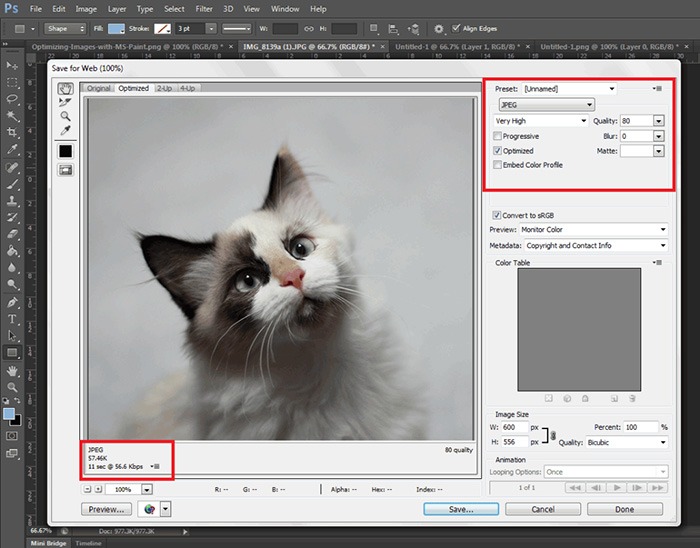
When selling online, having good images is crucial, since people need to see what they are buying.  Your contractor should have intermediate image editing skills.
optimizing-images

It is best practice have uniform image sizes on your site. When you set product image dimensions in WooCommerce settings, always keep your images to that same resolution and have this written clearly on your product creation documentation. Check out this post to learn more about optimizing images for web.

Writing Persuasive Copy

If you are at all serious about selling your products online, then you should have persuasive copy. We recommend outsourcing a professional copy writer. Putting a great deal of attention to writing persuasive copy for your products will help you convert more. For creating good product descriptions, you can check out our post on how to write persuasive copy.

persuasive-copy

You can give your product creation contractor a go at creating the copy and you might be pleasantly surprised, but more than likely you will need the help of a professional. Once you find a copy writer you are comfortable with, your product creation contractor can manage this specialist saving you time.

Different Types of Woocommerce Products

In WooCommerce, there are different product types: Simple, Grouped and Variable products. If you are not familiar with these product types, you can check out the WooCommerce Documentation for Managing Products.

Simple Products

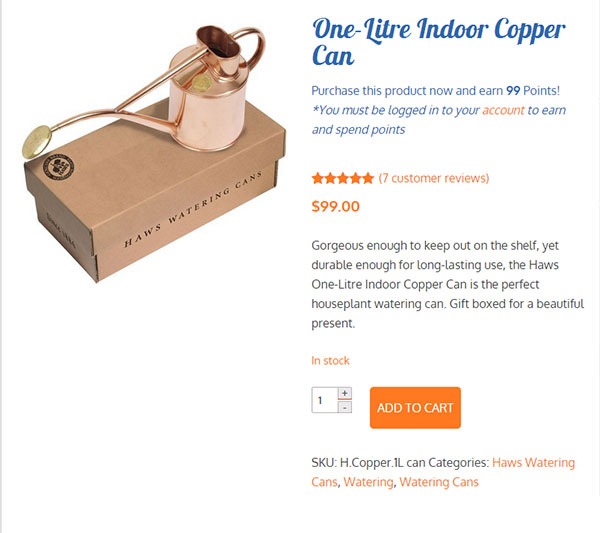
Simple products include: product name, SKU, inventory, price, sale price (if you are offering a discount), category, product tags if any, long and short product description, and any specific instructions.
simple-product

Upload your images to a file sharing website and be sure to include the download link in the spreadsheet. Before you do that, make sure you use folders and appropriate file names for easy identification. There is a field where you can put the link in the spreadsheet we created. For sharing files, we recommend Dropbox or Google Drive.

Grouped Products

For Grouped Products, it becomes a bit more complex as this involves grouping two or more simple products. However, the information that you need to provide is no different from the information required for simple products.
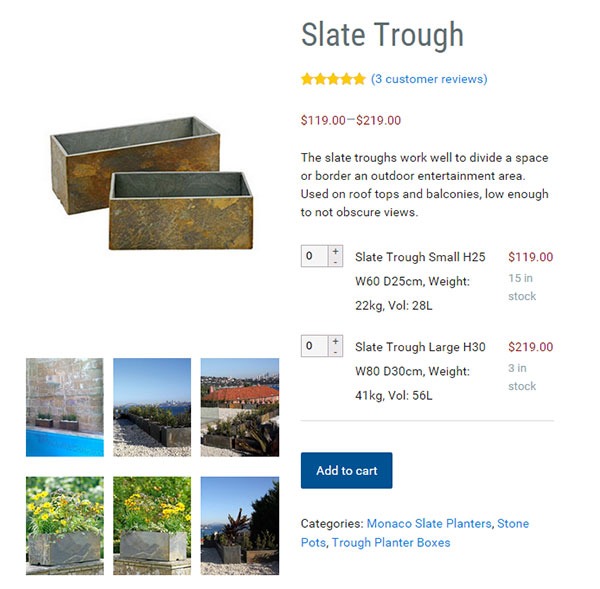
grouped-products

If you are going to set the simple products as “not viewable individually”, you won’t need to provide images or descriptions for each simple product. You only need to state the product name, price and inventory for the simple products. All the other information should go to the grouped product.

If you are going to make each simple product viewable then it makes sense to outfit each simple product. And that means complete images, complete product descriptions and everything else necessary.

Variable Products

Variable Products deal with different product attributes. When sending information to your WooCommerce product expert, you should include the attributes for the product.
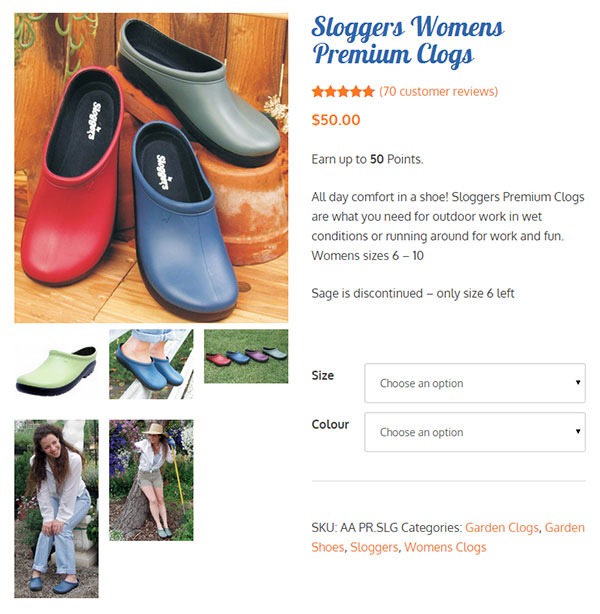
variable-products

For example, if you are selling shoes, you can have several product attributes such as size, color or type (laces or straps). That will result in multiple variations of the product.  You need to provide information for each product variation. In some cases, different product varieties will have different prices. So make sure you include the price for each product variation. If you downloaded the spreadsheet we prepared, you just need to fill in the details.

Recommended Websites to Outsource Work

There are a lot of websites out there that provide freelance services and they have a lot of WooCommerce experts. We can recommend Elance and Upwork, formerly known as Odesk. And of course, we also highly recommend our team of WooCommerce experts at Wooassist. Our expert team from the Philippines can help you out with whatever problems you are having with your WooCommerce store.

Summary

This process takes time to develop. Clear documentation is the key, followed closely by developing a good relationship with a Woocommerce product expert. The better and more familiar your contractor is with your products the easier it will be for you to create the documentation.

It will take you longer to create these processes than to do the task yourself initially, but will save you hundreds of hours in the long run. I have 2 Woocommerce stores that sell physical products and I have not created a product myself for over 3 years. I plan on keeping it that way.
Filed Under: How-To Articles Tagged With: admin, copy writing, how-to, image optimization, outsourcing, task management, WooCommerce, WooCommerce products

Woocommerce 2.3 Update: New Features and Common Issues Encountered

March 11, 2015 By John 4 Comments

It has been a month now since Woocommerce 2.3 was officially released. There has been mixed feelings about the new version. Some users find the new features awesome while others struggle to keep it together. To give you a recap, here are the new features of Woocommerce 2.3 “Handsome Hippo”.

Woocommerce 2.3 Features

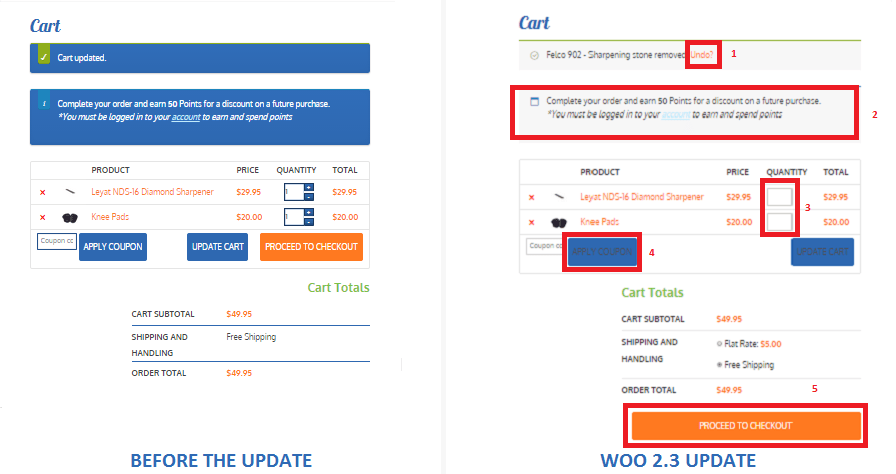
  • User Interface and User Experience Update- Woocommerce 2.3, also known as the handsome hippo, has a flat design that goes well with many themes. The messages, notices (2 in the figure below), buttons (4), and the payment box during checkout has an updated look.Woocommerce 2.3 Cart Update

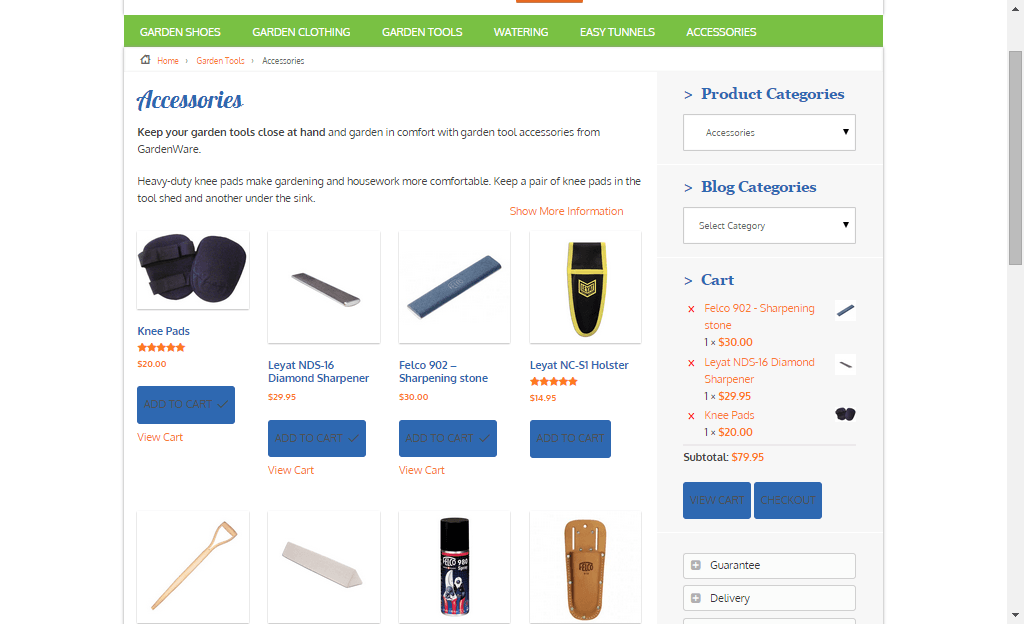
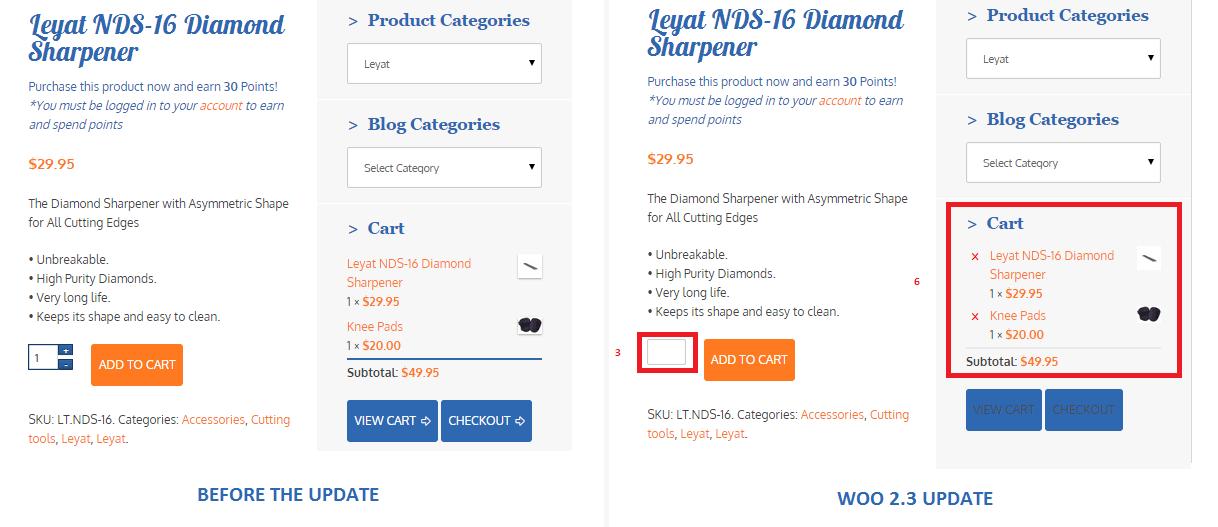
The cart template is also updated. The “Proceed to Checkout” button (5) was moved under the cart totals to enhance user experience. Another cool feature is the undo option (1) in the cart. That means that if you accidentally removed a product on your cart you can easily add it back in using the undo button. You also have the option to remove product from the cart widget (6), which I think is a really cool update on the default style template.

Woocommerce 2.3 cart_widget

There are also several features that were removed due to redundancy. The option to change the colors of the buttons as well as the increment and decrement button (3) were removed. Now, if you want to add those features back, you need to install additional plugins.

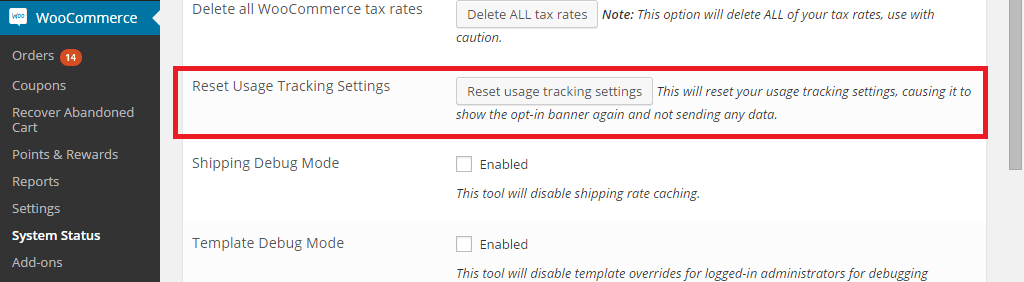
Woocommerce 2.3 also introduced an opt-in usage tracking that allows the Woocommerce team to view the settings of sites. This will allow them to upgrade their system to fit the requirements of their users. You will have an option to disable tracking in the woocommerce dashboard using this path: Woocommerce/System Status/Tools. Simply click the Reset Usage Tracking Settings button.

Woocommerce 2.3 usage_tracking

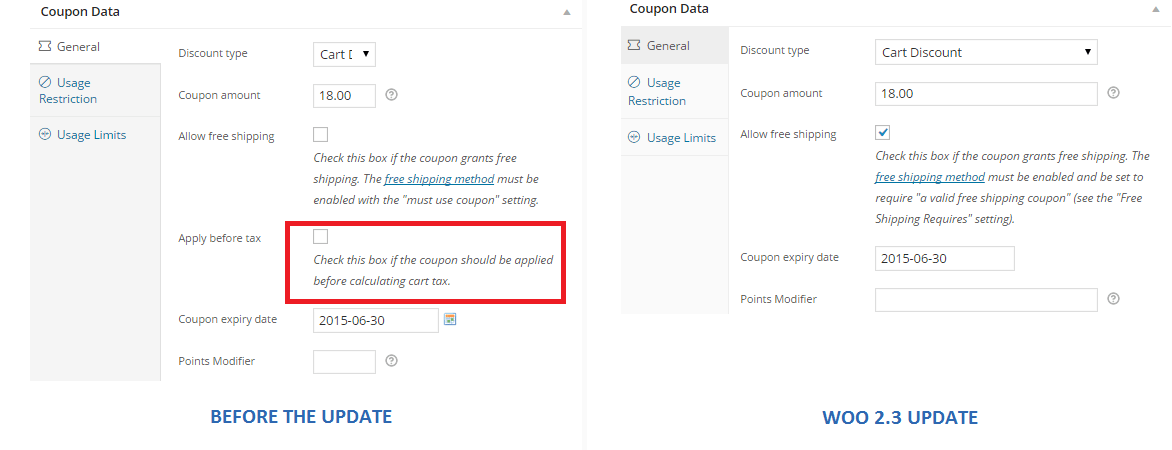
  • Coupons Update- This is probably one of the major updates in Woocommerce 2.3. Coupons will no longer be applied before taxes. The “apply before tax” option has been removed in the woocommerce settings.

Woocommerce 2.3 coupon

Aside from that, the rest of the coupons settings are left untouched. However, there are still a few issues with coupons that has not yet been sorted out on the latest version of woocommerce 2.3. We will get to that in a sec.

  • Emails- woocommerce 2.3 makes it easier for developers to override the CSS of emails sent through woocommerce. Additional hooks are created so that developers can easily adjust the CSS templates according to their preferences. In addition to that, emails sent will be using the woocommerce core templates but will also allow plugin templates to blend in with the shop emails.
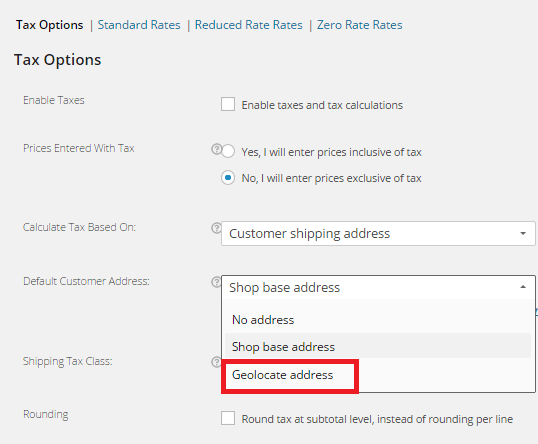
  • Geolocation- Now, with “Handsome Hippo”, you can easily locate your customers by using their IPs. This can be used to calculate tax based on the users estimated location.

Woocommerce 2.3 Geo_Location

Issues Encountered

Woocommerce informed large theme companies about the changes before releasing Woocommerce 2.3. Prior to the official release, Woocommerce also released Woocommerce 2.3 beta so that they can work hand in hand with theme companies and plugin authors to make the release as smooth as possible. Though a lot of site owners welcome the design update on the front-end, some sites suffered from CSS and theme incompatibility and had to do a complete overhaul. Woocommerce 2.3 started using Sass, and there are inevitable plugin incompatibilities encountered by sites that use plugins using LESS.

The image below is taken from one of our sites that we manage. You will notice that the buttons, due to the flat design, need fixing. You can barely see the labels of the buttons.

Woocommerce 2.3 buttons_and_option_to_remove_products_from_cart_widget

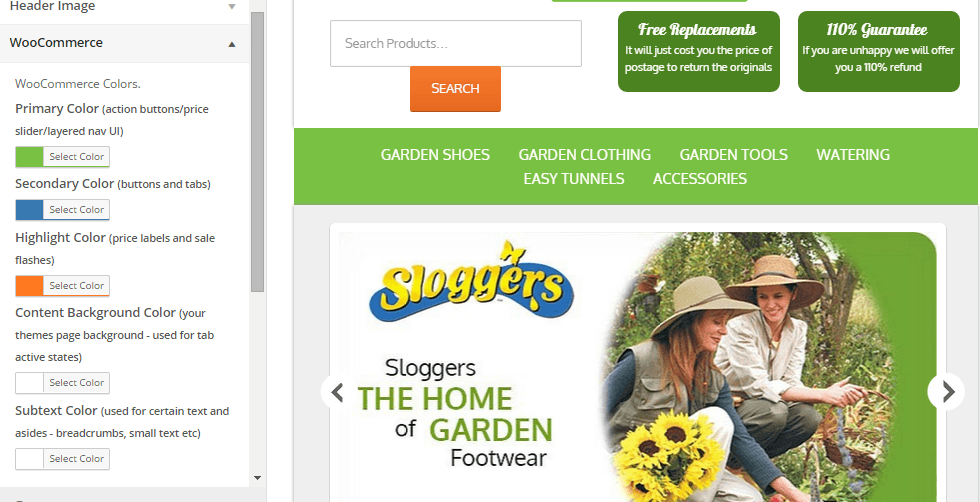
To fix this issue, Woocommerce suggests installing a plugin that will allow site owners to easily change the colors of buttons and other elements on their sites. You can customize the buttons by clicking Appearance/Customize/Woocommerce.

Woocommerce 2.3 buttons

On the same site, we also encountered problems with the application of coupon codes. Though the products added are exclusive of tax, which means that the tax calculations will not be affected, we experienced a weird issue with the application of coupons on top of a free shipping rule. The free shipping rule allows customers to get free shipping when the item bought is more than $49.

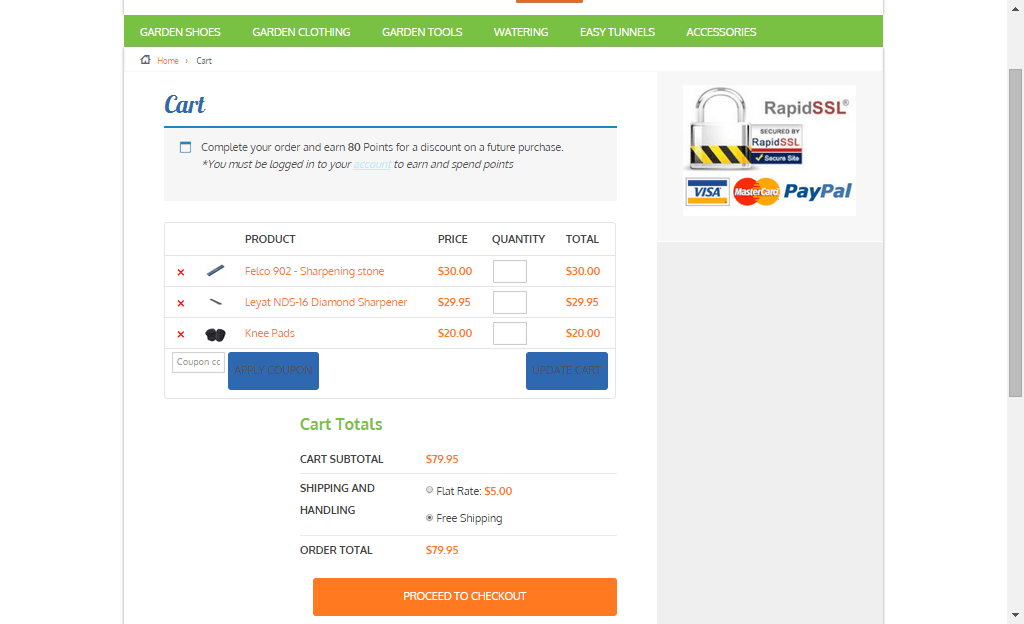
If you look at the image below, instead of displaying the free shipping note on the “Shipping and Handling”, it has been replaced by a radio. Here you will have the option to either choose free shipping or flat rate, which doesn’t make sense because customers would always want to choose the free shipping option. Aside from that, if you apply a coupon and the order total falls below $49, the flat rate automatically kicks in without the free shipping option. The store owner would not want that to happen and this issue only started after the Woocommerce 2.3 update. We will be discussing the solution to this issue on our next article.

Woocommerce 2.3 increment_decrement,_notices-2.3

Conclusion

Keeping your plugins up to date is very important. However, with major updates like this, it is best that you create several backups of your live site before doing anything. In some cases, it might even be necessary to copy your live site to a development site. Doing plugin updates on the development site allows you to fix errors caused by the update and at the same time reduce losses due to downtime.

The woocommerce team spend so much time and dedication for this update. Though there may be some hiccups along the way, their proactive communication with theme companies have been really helpful in ensuring that the update will not cause serious problems to their users.

If you have encountered some issues regarding the woocommerce 2.3 update or if you want to share your take on the new features of woocommerce, feel free to leave your comments below.


Filed Under: Theme and Plugin Reviews Tagged With: checkout form, colors, CSS, email, plugins, shopping cart, WooCommerce, woothemes, WordPress updates

WooCommerce vs Shopify: Which is the Better E-Commerce Platform for You?

April 24, 2015 By John Leave a Comment

Woocommerce vs ShopifyThere are a lot of platforms that you can choose from and two of the most popular ones are WooCommerce and Shopify. If you are torn between the two, then you’ve come to the right place.

Before you go comparing the two platforms, you should first know what your business needs are and how much resources you are working with.

WooCommerce is free, offers unlimited customizations but is a bit harder to set up. On the other hand, Shopify is more expensive, easier to set up, but does not have as many customizable options. Migrating from one platform to the other is not difficult. If you do choose Shopify you can still migrate to WooCommerce later if you find that you need more customizability.

If you need more functionality from the get go, you can get this from WooCommerce. WooCommerce can be a bit harder to set up and requires working knowledge of website development. But the customizability of WooCommerce is almost endless if you have the resources to get it done.

Pricing

Between WooCommerce and Shopify, which one is priced better?

WooCommerce is free for everyone to use. Shopify requires a subscription fee. Both platforms rely on plugins for added functionality. Woocommerce has a lot of free plugins, but you may need features that require paid versions. Paid plugins are subscription based which means the costs can really stack up in the long run.

For the non-technical entrepreneur, Shopify may seem like the better choice. You can easily set it up without needing a professional website developer. Instead of focusing your resources on website development, you can just buy a subscription on Shopify and focus on doing business.

woocommerce-vs-shopify

Ease of Use and Customizability

When it comes to ease of use, Shopify rates highly. Shopify is easy to use even for non-technical people. WooCommerce is still considered user-friendly but it just has more options to customize. You just need to learn what these options are and how to use them.

Out of the box, Shopify comes with 11 free responsive themes. And they look good too. If none of the free themes are to your liking, you can buy a new theme which costs around $150. Even if you are a new user, you can easily change colors and styles in Shopify. Also, more advanced users are not limited as they can do some more complex design tweaks in the code.

On the other hand, WooCommerce needs to be installed on the WordPress platform. The design will then depend on your chosen WordPress theme. There are thousands of free and premium themes to choose from. Since WooThemes created WooCommerce, their themes will work well with the platform. Their Storefront theme is made especially for WooCommerce so you can be sure that it is compatible with all releases of WooCommerce.

When it comes to customizability, WooCommerce wins. And if you have a developer available, it gets better. Your developer can do wonders with WooCommerce. You can have him create plugins and just about any functionality that you can think of. This is all because WooCommerce is open source. Anyone is free to alter the code for their own use.

Shopify is a complete ecommerce solution which includes hosting for your website. And while Shopify’s hosting service is not always rated that highly, it is certainly one less thing to worry about when setting up your ecommerce store. Shopify will provide you everything that you need to keep your ecommerce store up and running. For WooCommerce, if you have no experience with websites, you have to rely on a developer to get things done.

supportSupport

When it comes to support, Shopify offers premium support. You need only contact Shopify and they’ll help you out with whatever problem you have with your e-commerce store.

Because WooCommerce is free, Woothemes does not provide free support but a developer or support team like Wooassist can assist you. You first need to identify what is causing the problem. Is it a problem with your host? Is it a problem with a certain plugin? After you identify the root of the problem, you need to contact the specific service provider or plugin developer about the problem.

If you are using a free plugin or any other free service, you have no assurance that the developers or the service provider will address your concern. But since WooCommerce is powered by WordPress, you can ask for help from the WordPress community through the forum. A lot of website owners, including those that use WooCommerce, post problems they encounter in the forums. Most of these problems are resolved with the help of the ever-reliable community. If you’re lucky, someone should have already encountered the same problem that you have and posted in the forums with a resolution already documented.

Which one should you choose?

If you will be creating your own website and you already have a technical background, then WooCommerce will serve you better. And if you have a developer, it gets even better. If you do not have the time and the technical know-how to create a fully functional WooCommerce store, look at Shopify’s all in one e-commerce solution.

Shopify may provide everything that you need so you have less to worry about and spend more time doing actual business. It might be more expensive initially since you have to pay for subscriptions and plugins, but it is easier to set up. Albeit, with less customizability. There is no clear cut answer on which platform is better. It all depends on your needs and what is sustainable for your business.

Filed Under: Theme and Plugin Reviews Tagged With: e-commerce, WooCommerce, WordPress

  • « Previous Page
  • 1
  • …
  • 13
  • 14
  • 15
Let us support your online store so you can manage your business

Get started today

Get 2 Hours of FREE SUPPORT

We are so confident that you will love our services that we will give you your first 4 hours at a 50% discount

That’s 4 hours for only $75

BUY NOW

Free eBook

5 Things Every Online Store Can Fix On Their Website In The Next Week To Increase Sales

Quick Links

  • How it Works
  • Pricing
  • Blog
  • Contact
  • About Wooassist
  • My Account
  • Checkout
  • Privacy Policy
  • Cookie Policy
  • Terms and Conditions

Wooassist

Australia:
59 Luke St.
Hemmant QLD 4174

Philippines:
San Miguel St.
Poblacion, Iligan City 9200

Connect


Copyright © 2026 · Wooassist

Yours FREE!

5 Things Every Online Store Can Fix On Their Website In The Next Week To Increase Sales