Wooassist

Assistance for Your Woocommerce Store

  • How it Works
  • Pricing
  • Services
    • Site Maintenance
    • AI SEO and Content Marketing
  • Blog
    • How-To Articles
    • Code Snippets
    • SEO For E-Commerce
    • Theme and Plugin Reviews
    • Wooassist News
    • WordPress/WooCommerce News
    • Interviews
  • About Us
  • Contact
You are here: Home / Archives for How-To Articles

How to Check if a Theme is Suitable for WooCommerce

April 15, 2016 By John 1 Comment

How to Check if a Theme is Suitable for WooCommerceSome website owners might think that a good theme just needs to look good. Well, that’s not wrong but it’s also not entirely correct. You need to know how to check if a theme is a good theme for your WooCommerce store. Here’s a checklist to help you decide if a WordPress theme is good for your WooCommerce Store.

Theme Ratings and Reviews

Product ratings and reviews are solid indicators of quality. These reviews come from WordPress users who have actually used the theme themselves. Note that even good themes can get a few bad reviews so take them with a grain of salt. However, if the number of bad reviews is unusually high, then it is something to be wary of.

Update Frequency and Support

computer-thinking-manUpdate frequency is a good sign of a solid WordPress theme. It shows that the developers are continuously making it better by addressing bugs and other security threats. Similarly, check if the developer is active in public forums. This is a good sign that you will get answers if you are ever met a problem.

Demo Site

Having a demo site is not optional anymore. The demo site is not just where you see how the theme looks like. It is a place where you can perform some crucial tests on it. If your theme doesn’t have a demo site, it could just be outdated or at worst it’s hiding malicious stuff.

Responsiveness

Make sure your theme is responsive. That means it adjusts to fit different screen sizes of mobile devices. More and more traffic is now being generated from mobile devices so a theme that looks good on a mobile device will help make your WooCommerce site more competitive. In fact Google favors websites that work well across all devices. The easiest way to check for mobile responsiveness is Google’s mobile friendly test. Grab the URL of the demo site of your theme and paste it in there to check if the theme is mobile friendly.
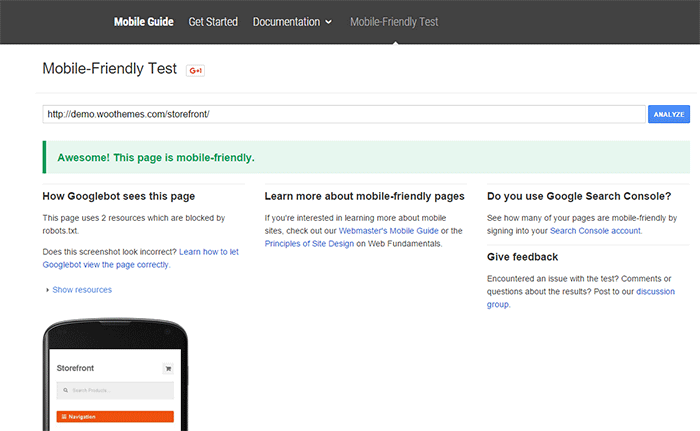
Google-mobile-friendly-test

Site Speed and Theme Bloat

You have only a few seconds to capture the attention of your e-commerce site’s visitors. Having a slow site doesn’t help. Even if your site looks good, none of that will matter if it is slow. Google hates slow websites and these slow websites are being penalized in rankings.

Themes become slow when they are loaded with unnecessary features. Be careful when the theme offers a lot of functionality that normally shouldn’t be in a theme like the ability to create sliders or change fonts, colors, and other add-ons like shortcodes, additional widgets, and content builders. The add-ons will make it hard for you to switch themes in the future. You may think you are getting good value for your money but its effects on site speed will only hurt your WooCommerce site and your SEO rankings.

Do note that other factors also affect site speed. You can read more about it in this blog post.

browsers

Cross Browser Compatibility

Your users will be using different browsers. You may not see any errors on your side but there might be something broken when someone else uses a different browser to view your site. Make sure your website looks the same across different browsers.

SEO-Friendly Markup

HTML isn’t so strict on errors so it will render your content as long as it isn’t something fatal. But when it comes to SEO the HTML markup is crucial. Proper HTML markup will help boost your SEO. You can easily check if your theme HTML code is valid using Markup Validation Service by W3C. Pop the theme demo site’s URL to check for errors in the HTML markup.

Plugin Readiness

A good well-coded theme is lightweight and can support a wide range of popular plugins. For your e-commerce site, you need to make sure that your theme supports WooCommerce. You will often see this in the list of theme features. During development, make sure not to bloat your site with unnecessary plugins. Install only plugins that you need and will actually use.

Page Templates

Another good indication of a good quality theme is the availability of page templates. These templates are fetched when a certain query is performed. Make sure your theme has it all.

  • home.php: the homepage template
  • single.php: the template for single posts
  • page.php: the template for pages
  • category.php: the template for category indexes
  • author.php: the template used when someone queries on the author
  • date.php: the template used when someone searches for posts on a certain date
  • archive.php: this template is used when either category.php, author.php ordate.php isn’t there
  • search.php: used when someone searches on your blog
  • 404.php: the template used when WordPress can’t find the URL on your site

Design

design-cursor-iconSimplicity is the epitome of great design. Select a proper theme that matches the nature of your e-commerce store and will appeal to your target market. If you are planning for a content rich website, go for a more formal look with good typography for enhanced readability. If you are selling products for kids, you can be more playful with the design. Spend some time researching for a theme that addresses your needs. Consider the aspects mentioned above and decide if this is the theme for you.

Theme Developers

Here’s a bonus. A good indication of a quality theme is the reputation of the developers who made the theme. Perform a background check on the people behind the theme. Are they helpful in the WordPress community? Do they have a good reputation? Do they respond in forums regarding questions on their creations? If you answered yes to all of these, then you’re dealing with a good developer/s and odds are their themes are great.

Our Recommended Themes

Storefront
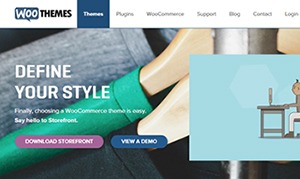
storefront_define-your-styleStorefront is an intuitive, lightweight, and flexible theme offering deep integration with WooCommerce. The main goal in developing Storefront is to provide a rock-solid foundation for your WooCommerce store, avoiding extra bloat and unnecessary features. It is built by the same people behind WooCommerce so the standards are as high as WooCommerce itself. To learn more about Storefront, you can check out our review.

Genesis Themes
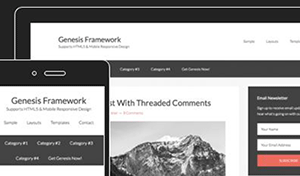
Genesis-FrameworkThe Genesis framework is known for its core code and is considered one of if not the best WordPress framework available. It is very flexible because of how well the core code is built. Anything can be customized around the core code using child themes. It is SEO optimized and compatible with WooCommerce.

Was this post helpful in choosing a theme for your WooCommerce store? Do you have any other tips that you’d like to share? Let us know in the comments.


Filed Under: How-To Articles, Theme and Plugin Reviews Tagged With: design tweaks, how-to, responsive design, site speed optimization, Storefront, Wooassist, WooCommerce

How to Write Easy-to-Read Content for Your WooCommerce Store’s Blog

June 1, 2016 By John Leave a Comment

how to write easy-to-read content

It’s important to come up with a strong headline and back it up with great copy. But if readers find your content hard to read, they could leave your site. To avoid this, you should optimize your content for ease of reading. Use of simple words along with visual aids such as images, charts, graphs, videos, and proper heading structure should help you achieve this.

In this article, we’ll show you some tips on how to write easy-to-read content. We will also recommend a few tools that can help you write simple content.

Why Should Content Be Easy to Read?

A web usability study showed that 79% of web users are ‘scanners’, not readers. This means a typical user will scan the article, picking out individual words and sentences. If the scan deems the page as not very useful, the user won’t bother reading it and promptly skip to the next search result. Users can afford to be picky because of the abundance of good content on the web. With an estimated 3 million new blog posts every day, there’s a lot of competition.

Published content is meant to be read. For this to happen, you need to satisfy the user’s needs in the first 10 seconds as they scan your post. The web user clicked that link to your article because its headline promises an answer to the web user’s question or it has piqued his interest. With content optimized for ease of reading, the user will find more value in reading your content in its entirety.

Maintaining a blog on your WooCommerce store with great, easy-to-read content is an effective way to build traffic and convert visitors to customers. In fact, a survey showed that 57% of companies with a blog acquire customers from their blog.

How to Write Easy-to-Read Content?write-blog-laptop

Forget about complex sentences, long paragraphs, and difficult words. Keep the message clear. Avoid confusing your readers by trying to sound good. Here’s a list of the things that you can do to ensure your content is easy to read.

  • Break up your post with subheadings. Subheadings make the structure of your content clearer and easier to dissect. This is invaluable when writing long articles. Scanners will naturally be guided to the important points that they are searching for.
  • Introduce more white space. Adding just enough white space in between paragraphs makes content easier to read. Without line breaks, your article will look like a big block of content that is unreadable.
  • Use bulleted and/or numbered lists. Bullet lists are best used when enumerating. Numbered lists, on the other hand, are best used when mentioning steps that need to follow a certain order.
  • Structure your paragraphs in the inverted pyramid style. This means you include the most important information at the start of the article and the least important information at the end. This is the structure of most news reports. However, this kind of structure does not work for all audiences so take this with a grain of salt.
  • Avoid long paragraphs. If possible, a paragraph should be made up of 3-4 sentences at most and only deal with one idea. Neil Patel actually uses one-sentence paragraphs throughout his blog and it makes his content easier to read.
  • Avoid passive voice. Using passive voice is not necessarily wrong but it weakens the clarity of your writing.
  • Avoid using adverbs. Adverbs are unnecessary and most of the time is just overly descriptive to the point that it is insulting to the readers. For example, one can say “scream loudly” when in fact screaming is done loudly.
  • A complex topic can be broken into a series of posts. While long articles are good in their own right, short articles are easier to read. If you are looking to write a 2000-word article, you can consider writing a series of short articles instead. This can also help you gain a loyal following on your blog as the readers look forward to the next part of the series.
  • Add relevant links where needed. When you reference something, it is important to link to it. If your reader wants to learn more about that topic, they can simply click on the link. Linking to your sources also adds to your site’s credibility. Not to mention it can be an opportunity to reach out and network with other people in your niche.
  • Use images and other visual content. Images make your post less boring. Choose relevant images and make use of charts and graph as needed. Charts and graphs are especially useful when you are presenting data.
  • Use deep captions. These are captions that are two to three sentences long. Along with the image itself, deep captions can catch your reader’s interest, enough for them to read on.
  • Proofread before publishing. It is important to get a new set of eyes to review your content before publishing. Proofreading your own content is okay but a fresh set of eyes can spot errors that you may miss.

Tools to Help You Write Easy to Read Content

Here are some online tools that read easy-to-read content.

Hemingway Editor

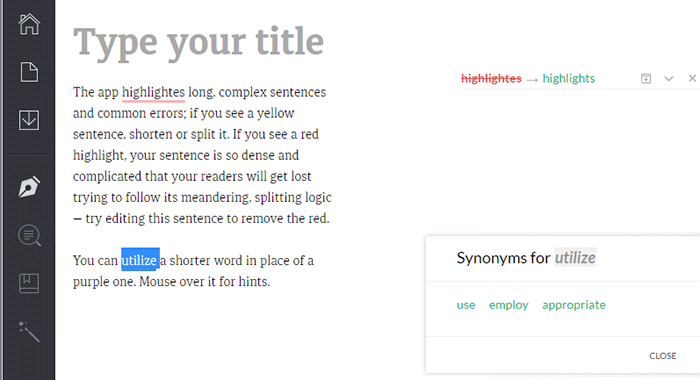
Hemingwayapp

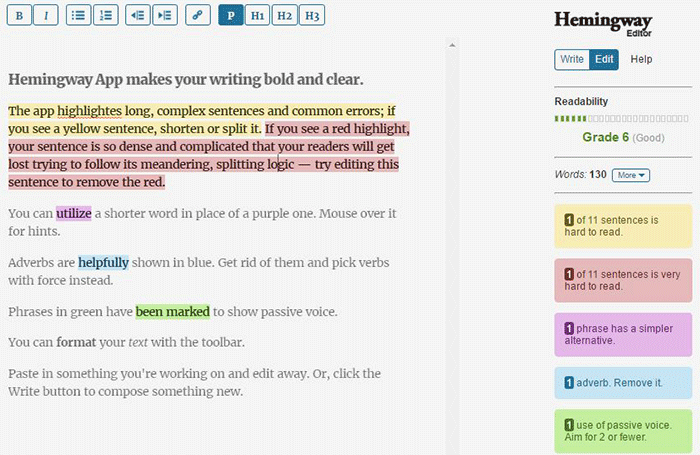
Hemingway Editor checks if your content is easy to read by identifying hard-to-read sentences. In ‘Edit’ mode, you can make changes and see real-time Hemingway feedback to the right of the editor. Adverbs, use of passive voice, difficult words/phrases and hard to read sentences are highlighted so you can fix them on the fly.

This style checker includes a readability grade level based on the Automated Readability Index. Readability is the ease with which your reader can understand your writing. A good target is 7 to 8, but don’t go over tenth-grade level.

Grammarly

Grammarly

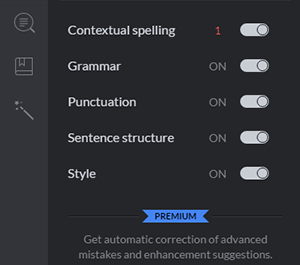
Grammarly_Menu_Grammarly offers free contextual spellchecker, grammar, punctation, sentence structure and style checks. With a premium account you also get plagiarism checks, vocabulary enhancement and professional proofreading.

If you choose to install its Chrome extension, you can use this to edit content in Gmail, WordPress, pretty much anywhere you write on the web.

After the Deadline

After-the-Deadline

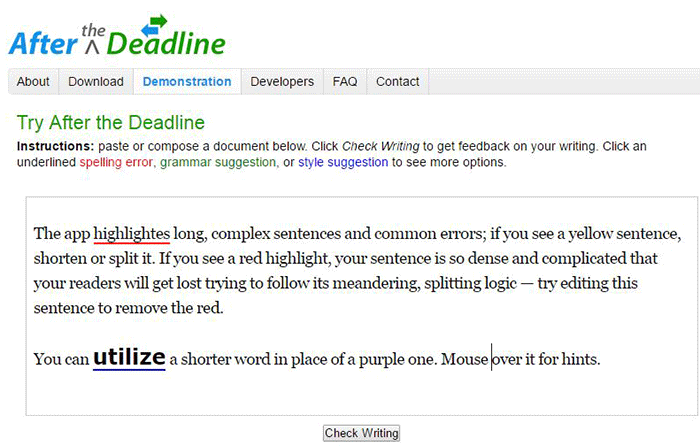
You can use the After the Deadline (AtD) Demo page to check your content online. After you click ‘Check Writing’, click each underlined word to see the suggestion to select or just ignore.

You can also download AtD and use it as a WordPress plugin and extensions to web browsers. This is free for personal use, and they have free server software for commercial needs.

Expresso

Expresso

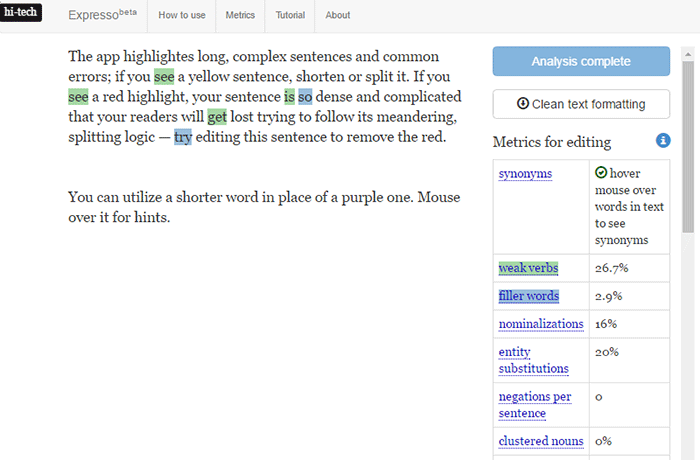
Expresso can help you analyze and edit content by helping you choose simpler words and identifying weak verbs, filler words, etc. An extensive list of general and editing metrics are found to the right of the editor. Click on one to highlight the associated words. Note that this is still in its beta phase.

Conclusion

Always aim for great content that is easy to read. This will keep readers on your site for longer periods. If you apply the above tips and make use of the online tools, you’re well on your way to writing easy-to-read content. You can even use these tools to optimize your current content and product copy. Soon enough you will see the payoffs in longer session times and probably an increase in conversion.

We hope the tools and formatting techniques here can help you create easy-to-read content. Do you have any other tips to share for writing easy-to-read content? Maybe you know of some other tools that can help. Let us know in the comments.

Filed Under: How-To Articles Tagged With: admin, best practices, blog, content marketing, how-to, marketing strategy, SEO strategy

Work “ON” Your Business Rather Than “IN” Your Business to Save Time and Increase Revenue for Your E-Commerce Store

May 16, 2016 By John Leave a Comment

work on your business rather than in your businessAs a business owner, you may struggle with having to wear so many different hats and working many hours.

An online business brings with it even more challenges, as you need to develop, secure and maintain your website. These are time-consuming and counter-productive if you do them yourself.

In this article, I’ll show you what steps you can take to effectively work on your business and what are the benefits of outsourcing your tasks.

What Does It Mean to Work “ON” Your Business Rather Than “IN” Your Business?

This popular entrepreneurial mindset has two points: you want a profitable business that produces consistent results, and you won’t need to do the day-to-day activities yourself. Basically, working “in” your business means doing those routine activities that keep the business going every day. On the other hand, working “on” your business means you prioritize developing your business and building customer relationships. Working on your business also means creating a systems-dependent business and delegating work.

Create Business Results that are Systems-Dependent, Not People-Dependent

process-diagramThe system you create becomes the tool everyone uses to get the job done in a way it needs to get done. Working on your business means you need to test and develop these systems to make sure they produce your desired result. When you have an efficient system in place, you’re mostly assured of the quality of work, and that business continues even if the people come and go. Training new staff becomes that much easier.

You may need to personally create these systems on your own. It is important that you document it. For Wooassist, we use DokuWiki to document our processes. You can find your own platform that you are comfortable with. Once the system is in place, it’ll be easier to delegate the task to someone else.

Delegate Work

It’s important that you build a team that you trust. These people will do the day-to-day activities of your business, following the systems you’ve approved or set. Delegation will only be effective if you trust the team to do the job for you. Because you trust these people, you can focus more on being the business owner and developing strategies to sustain and even grow your business.

Outsource Technical Tasks to Save Your Time

networkEven if you love working in your business, chances are there isn’t enough time to get everything done on your own. This is especially true as your business continues to grow. Hire reliable, technology-savvy staff and those with technical skills that match your needs. Doing so will help you better manage your time so you can focus on managing and growing your business.

You Can Be Assured that Experts Will Do a Good Job

You don’t necessarily need to be The Expert on each role in your company. You may only do a mediocre job at a technical task but a skilled professional can save you time by doing a great job on a role where he’s already an expert. You won’t need to spend too much time learning nor trying to do the job yourself. That’s the developer’s job. For an e-commerce store owner in need of a web developer, outsourcing is the way to go if hiring full time isn’t ideal.

You Have More Time for Leisure/Travel

Nanette Miller, founder of The Training Doctor LLC, outsources 40 hours of work weekly for non-revenue-generating tasks. This includes administrative work, website maintenance and social media posts. Outsourcing allowed her to focus on growing her business and keep a manageable work schedule that allows her to have a personal life. She gets to take about 12 weeks of well-deserved vacation per year. Just imagine the places you can visit with that much free time.

You Have More Time to Spend with Family and Friends

When you outsource, you free yourself of the daily worries of running your business. You have a better hold of your work schedule and productivity. After work, you have time to relax and be with your family. You can even go out and spend time with your friends.

WooCommerce Happiness Engineer Dustin Hartzler strictly adheres to his work schedule and wraps up work by 4:30pm. The rest of the evening is spent with his family and on non-computer activities.

Work on Things that Require Your Skills as a Business Owner

puzzle-business-componentsWith routine and technical tasks delegated to staff, you can devote more time in managing and developing your business. This means you can focus on exploring ways to innovate on what your business needs to grow. For an online business, here are some functions a business owner can prioritize:

Planning and Strategy

You should have more time to revisit your business roadmap and make changes as needed. Conduct market research to identify current trends that could help you sell your products. Check your competition and find ways to attract more customers. Devote time on continuous learning. You get to leverage on other people’s expertise, but the decision is still yours to make.

Marketing and Sales

You may feel comfortable handling your own SEO and advertising. This is because you’ve conducted market research and you know who your target customers are. When you have clearly defined your customer personas and know how to use them, you’re well on your way to maximizing your marketing efforts. You can also allot time to learn more online marketing strategies and apply them to your business.

Customer Experience

You build customer relationships. You make sure their needs are met, particularly as they navigate through your website. You may also opt to personally address customer queries. You may need help on this though, depending on your business’ size and nature.

Conclusion

stop-wasting-your-time_300x248While it’s understandable to be very busy at work, especially in the early stages of your business, you also need to know when and how to effectively delegate. Prioritize your core functions as a business owner and focus on growing your business. Set up systems and tools to maintain consistent, quality results for routine activities. Outsource technical and other non-income-generating functions. These actions will help you better achieve a work-life balance. Spend more time with your family and friends and go on much-needed vacations.

Was this post helpful? Do you have anything you’d like to add or share? Let us know in the comments.
Filed Under: How-To Articles Tagged With: admin, best practices, how-to, marketing strategy, outsourcing, website maintenance, Wooassist

How to Choose The Best Theme for WooCommerce?

July 28, 2020 By John Leave a Comment

Nowadays, it has become essential for many businesses to have an online presence. One of the easiest ways to create an ecommerce store is to use WooCommerce on WordPress. If you are creating a new site, you will need to decide on what theme you want to use for your new WooCommerce store.

Choosing a theme is not a simple matter. There are a lot of things one must consider before jumping on a theme. So in this post, we’ll talk about how to choose the best theme for WooCommerce.

Things to Consider When Choosing a Theme for WooCommerce

Theme Must Be Responsive

It is a must that a theme should be responsive. You’ll know a theme is responsive if it adjusts to different screen sizes. With Google’s mobile first update, you’ll be hard-pressed to rank for the keywords that you want to rank for if your WooCommerce store is not responsive. All modern WordPress themes should already be responsive but be sure to check your theme of choice is.

Must Support WooCommerce

Since you’ll be using your theme with WooCommerce, it is important that your theme supports WooCommerce. If not, you might have issues on WooCommerce pages such as broken product and category pages and shifting sidebars.

Theme Must be Fast – Not Bloated

Speed is of utmost importance especially since it is now an SEO ranking factor. You must use a theme that is not hampering the speed of your site. Choose a simplistic theme that follows good coding standards. Ideally, don’t choose a theme that let’s you easily change fonts, colors and other design elements. Don’t choose a theme that promises hundreds of design elements, layouts, templates, etc.

For someone that does not know how to write CSS code, these themes might appear to be a godsend but they actually hide a dark secret. Adding these functionalities to a theme will add hundreds, even thousands, of lines of code. The end result is a slow website.

Also, stay away from themes that use sliders. Sliders will slow down your site and it only contributes to banner blindness. Essentially, sliders won’t help you improve your sales.

Theme Must Be Updated

Check when the theme you want to use was last updated and how often it is being updated. To find when the theme was last updated, go to it’s website and look for the changelog which should mention dates when the theme has been updated. Take some time to read through the changelog. Check if the theme developer is actively fixing known issues and other security problems. If they have a forum/support page, it is also a good idea to check if the issues raised in the forum/support page are being addressed.

Consider the Design

Are you looking for a theme with a left sidebar, a right sidebar, or full-width? Do you want a parallax design? A sticky header perhaps? If you already have a design mock-up, it’s a good idea to choose a theme that already closely resembles the final design that you want. This will significantly reduce the work you need to do. In addition, the less things you customize, the easier it will be to maintain your WooCommerce store.

What Themes Can We Recommend

Genesis has many child themes for every format or design that you want. You can install Genesis and then choose a child theme that resembles your design mock-up.

Storefront Theme is also an ideal option for WooCommerce. It was made for WooCommerce by the same people that made WooCommerce. In that sense, it will always be compatible with WooCommerce and all other WooCommerce plugins.

Other Best Practices for WooCommerce Themes

Use a Child Theme

If you ever need to make modifications to your theme, it is best practice to use a child theme. If you use a child theme, your main theme becomes the parent theme. The child theme is completely dependent on your parent theme. If you make any changes to your theme’s files, updating it will remove any modifications you’ve made to it. Using a child theme and making your modifications on the child theme will keep the changes you make intact even if you update your parent theme. Check out this article if you want to learn more about child themes and if you need to use one.

Use Caching and Minification

Minification is a process wherein code is compressed without affecting the what is rendered in the browser. You can compress HTML, javascript and PHP. When minified, files will load faster and the result is improved website performance.

Caching, on the other hand, lets browsers store your site files in the cache. Hence, the same resources are not retrieved from the server every time the site is loaded on the browser. And again, the result is improved website performance.

Our Verdict

Choose your theme based on your needs. You can create a shortlist of themes that you want and evaluate them based on your needs, aesthetics and performance. Also, there is no benefit to using a theme that is not responsive and is outdated. Make sure your theme is responsive and current.

And if you already have a WooCommerce store set up and want to improve certain aspects, you can check out the articles below.

  • How to Increase Mobile Conversion Rates for Your WooCommerce Store
  • 10 Things You Can Do Right Now to Improve Your WooCommerce Store
  • 11 Things You Can Do to Increase the Security of Your WooCommerce Store
  • Improve Website Page Load Speed by Optimizing Images for Web

Filed Under: How-To Articles

Focus on Your Business: Let Wooassist Handle Your WordPress and WooCommerce Site Updates

March 25, 2024 By John Leave a Comment

Nowadays, a strong online presence is necessary if you want your business to be competitive. WordPress and WooCommerce have emerged as powerful tools to create and manage websites and online stores. However, the adage popularized by the Spider-Man movie rings true. With great power comes great responsibility. The responsibility lies in keeping up with your site updates and maintenance. Neglecting these vital aspects can lead to catastrophic consequences, including security breaches, performance issues, broken site functionality, and even site downtime.

We can help.

Wooassist offers you a lifeline in the form of our comprehensive WordPress/WooCommerce Site Updates Service.

The Cost of Neglecting Site Updates

Many website owners don’t pay attention to website updates, including WordPress Core updates, plugin updates, theme updates, and security checks. It’s easy to put them on the back burner, thinking they’re not as urgent as other business tasks. However, this negligence can prove to be a costly mistake.

When you neglect site updates, you leave your website vulnerable to security threats. Hackers are constantly on the lookout for outdated plugins or themes with known vulnerabilities that they can exploit. A security breach can compromise sensitive user data and damage your reputation and trustworthiness. When user data is compromised and not managed properly, this can even lead to litigation and hefty fines due to the General Data Protection Regulation (GDPR), California Consumer Privacy Act (CCPA), and other pertinent laws.

Furthermore, outdated plugins and themes can lead to compatibility issues and break the functionality of your website. Your site may become slow, unresponsive, or even crash, driving away potential customers and hurting your SEO rankings. On the off chance that an outdated element breaks your site and you don’t have an available working backup, this can result in your website being offline for days while you scramble to find a solution to the problem. The financial impact of this happening could be significant.

The Wooassist Advantage: Your Guardian Angels

At Wooassist, we understand the importance of keeping your WordPress and WooCommerce websites up-to-date and secure. Our WordPress/WooCommerce Site Updates Service is designed to take the burden of updates and maintenance off your shoulders, allowing you to focus on what you do best – growing your business.

1. Update Frequency Tailored to Your Needs

We recognize that different websites have different needs. That’s why we offer flexible update schedules. Whether you prefer monthly updates, weekly check-ins, or bimonthly maintenance, we’ve got you covered. Our team of WordPress/WooCommerce experts will work closely with you to determine the right frequency for your site, ensuring it stays in top shape year-round.

2. Comprehensive Site Updates and Maintenance

managing websites

Our service includes a wide range of essential tasks to keep your website in optimal condition. Here’s what you can expect when you choose Wooassist:

Site Backups

We’ll back up your website to ensure that your data is safe and secure. In the event of an unexpected issue, you can rest easy knowing that your site can be restored quickly. We will also set up scheduled backups so you have a recent restore point in case of any issues down the line.

Testing on Staging Site

Before applying any updates to your live site, we’ll thoroughly test them on a staging environment to identify and address any potential issues so they don’t affect your production site.

Fixing Update-Related Issues

We perform extensive user testing to identify if any problems arise during the update process. In case of any issues, our experts will swiftly address them, ensuring that your site remains functional and bug-free.

Security Checkups

We will perform an audit of your website’s security to identify and mitigate potential threats and vulnerabilities.

Abandoned Plugin Cleanup and Replacement

Unused and outdated plugins are a security risk. We’ll help you identify and remove any plugins that are no longer necessary, reducing your site’s attack surface. If such plugins are crucial to the functionality, we will find alternative plugins or implement a custom solution.

Site Speed/Performance Audit

A slow website can deter visitors and harm your SEO efforts. We’ll conduct regular speed and performance audits to ensure your site loads quickly and efficiently.

SEO Audit:

Search engine optimization is crucial for online visibility. We have expert tools that will analyze your site’s SEO performance and provide recommendations for improvement.

Additional Services as Needed

In addition to the standard maintenance tasks, we can also handle more advanced updates such as PHP version and other software upgrades. These updates are crucial for maintaining compatibility and security, and we’ll ensure they are executed seamlessly.

Invest in Your Website’s Future with Wooassist

Your website is often the first impression potential customers have of your business. It’s your digital storefront, and its performance and security should never be compromised. With Wooassist’s WordPress/WooCommerce Site Updates Service, you can invest in the future of your website, ensuring that it remains secure, functional, fast, and user-friendly.

Say goodbye to the stress and hassle of managing site updates on your own. Let Wooassist be your dedicated partner in keeping your WordPress and WooCommerce site in top shape. Our team of experienced professionals is ready to provide you with the peace of mind you deserve, knowing that your online presence is in safe hands.

Don’t wait for a security breach or a website meltdown to take action. Contact us today to discuss your needs and let us tailor a maintenance that is aligned with your goals.

Filed Under: How-To Articles

  • « Previous Page
  • 1
  • 2
  • 3
  • 4
  • 5
  • 6
  • …
  • 24
  • Next Page »
Let us support your online store so you can manage your business

Get started today

Get 2 Hours of FREE SUPPORT

We are so confident that you will love our services that we will give you your first 4 hours at a 50% discount

That’s 4 hours for only $75

BUY NOW

Free eBook

5 Things Every Online Store Can Fix On Their Website In The Next Week To Increase Sales

Quick Links

  • How it Works
  • Pricing
  • Blog
  • Contact
  • About Wooassist
  • My Account
  • Checkout
  • Privacy Policy
  • Cookie Policy
  • Terms and Conditions

Wooassist

Australia:
59 Luke St.
Hemmant QLD 4174

Philippines:
San Miguel St.
Poblacion, Iligan City 9200

Connect


Copyright © 2026 · Wooassist

Yours FREE!

5 Things Every Online Store Can Fix On Their Website In The Next Week To Increase Sales