Wooassist

Assistance for Your Woocommerce Store

  • How it Works
  • Pricing
  • Services
    • Site Maintenance
    • AI SEO and Content Marketing
  • Blog
    • How-To Articles
    • Code Snippets
    • SEO For E-Commerce
    • Theme and Plugin Reviews
    • Wooassist News
    • WordPress/WooCommerce News
    • Interviews
  • About Us
  • Contact
You are here: Home / Archives for SEO strategy

Things to Do Before Your Website Goes Live

May 7, 2015 By John Leave a Comment

checklistThe bulk of the work is done. Your website is ready to go live. But are you sure it is really ready? Here’s a handy checklist of things to do before your website goes live. Make sure everything is working fine before you click that “Go Live” button.

Page Content

  1. Proof read web copywriting, spelling and grammar are correct
  2. Paragraphs and headers and formatting are correct
  3. Copywriting date on the footer shows current year
  4. Company details and contact info are accurate all throughout the website.
  5. Lorem Ipsum has been removed
  6. Images, videos and audio files are properly formatted and are working on different devices
  7. Premium content such as PDFs, whitepaper, ebooks, etc. have been proofread, spelling and grammar are correct. These files are properly stored in their respective libraries.
  8. Images, font and other content are properly licensed or have proper citation

Design

  1. Site pages are compatible across different browsers (Firefox, Safari, IE 7, 8, 9, and 10, Chrome, Opera)
  2. Pages are compatible across different devices (tablets, laptops, desktops, and other mobile devices)
  3. Check for CSS and HTML error, fix and validate
  4. Favicon is uploaded and is rendering properly
  5. Paragraph and styles are working properly

design

Functionality

  1. Forms are submitting data properly
  2. Thank you message or confirmation message displays after the form is submitted.
  3. Form data is emailed to the recipient
  4. Auto-responders (if any) are working properly
  5. Internal links are working
  6. External links are working
  7. Social media icons are working properly
  8. Feeds are working properly
  9. Company logo is linked to the homepage
  10. Site load time should take not more than 2-3 seconds
  11. 404 Redirects are in place
  12. Integration with third-party tools such as e-commerce software, CRM, Marketing software platforms are running smoothly
  13. Site structure is clean and should be easy to navigate and maneuvered by your users
  14. Payment processing should be live
  15. Shipping options checked
  16. Credit card transaction checked
  17. Run a test order. Check tax, sub-total, total, coupons, etc
  18. Confirm order is placed
  19. Reset order number
  20. Verify MyAccount
  21. Dummy orders and test accounts are cleared.
  22. Test email from client to merchant
  23. Cart icon is on each page
  24. Checkout button should be large and is strategically located on the page.
  25. Search box with suggestive search
  26. Feedback tab at the bottom of each page for users to notify the webmasters when having problems with the site.

SEO

  1. Page titles should be unique, less than 70 characters and should include keywords.
  2. Meta Descriptions are unique and should not exceed 156 characters
  3. Keyword per page not more than 10, depending on the # of words per page
  4. Metadata for RSS in place
  5. Metadata for social media sharing in place
  6. Metadata spelling and grammar correct
  7. Alt tags for images
  8. Dynamic XML sitemap created and submitted to search engines
  9. Breadcrumbs in place
  10. Slugs should reflect site structure and should be short with relevant keywords.
  11. 301 redirects for old URLs are in place
  12. rel=”nofollow” tags are in place on applicable links and pages
  13. Site indexing is on

Google Analytics

  1. Analytics codes are properly inserted
  2. Relevant IP addresses have been excluded from analytics tracking.
  3. Google Webmaster Tools and Google Analytics are synced
  4. Google Adwords and Google Analytics are synced

Security and Backups

security

  1. Monitoring scripts installed.
  2. Copy of the final website stored in a safe place
  3. Ongoing copies of the site is being generated everyday (depending on how large the site is)
  4. Usernames and passwords stored in a secure database
  5. Check robots.txt file to restrict access to sensitive pages

Compliance to Web Rules and Regulations

This may vary depending on the country and industry.

  1. Pages offer accessibility to users with disabilities
  2. Users need to be informed if site is using cookies
  3. Compliant to usage rights of images, fonts, videos, etc.
  4. Terms and Privacy policy for users should be readily accessible and visible to site visitors
  5. Website is PCI compliant
  6. SSL certificate properly installed. Check receipt and checkout page, my account and my account details in SSL mode.
  7. SSL mode for logins and registrations

Filed Under: How-To Articles Tagged With: 404 error, backup, best practices, breadcrumbs, Google Analytics, Google Webmaster Tools, how-to, redirection, security, SEO strategy, website development, WordPress

8 Ways to Create Blog Content for Your WooCommerce Store

January 15, 2020 By John Leave a Comment

create blog content for your woocommerce store

Why You Should Have a Blog?

If you do not have a blog on your WooCommerce store, you should consider creating one. Having a blog is a good way to generate leads, get more traffic and build you brand. It can also become a good channel for providing good customer service. WordPress was created initially as a blogging platform so you should take advantage of it’s powerful blogging features – create blog content for your WooCommerce store.

Things to Consider Before Writing Your Content

Before you dive in and start creating blog posts, there are a few things that you should consider such as creating a content marketing plan. Even if you already have a blog, it is still a good idea to do this if you haven’t done it the first time. A content marketing plan can help you align your content with your goals.

Content Marketing Plan

A good content marketing plan has two important parts: (1) defining your goal and (2) defining your audience. For defining your goal, ask yourself what you want to achieve using the content that you create.

For defining your audience, you can create one or more customer personas. You can be as specific as you want and you can even give your customer persona a name. Everyone involved in your content marketing should be familiar with your customer persona.

Hubspot has a great post on how you can create your own content marketing plan.

content marketing for woocommerce

How to Come Up With Content Ideas

Now that you have a plan, you need to get ideas on what content to create.

1. Check What Your Competitors are Writing About

A good first strategy is to spy on your competitors. Find out what content they are writing about and improve on what they have.

2. Tutorials, Guides, and How-To Articles

You can create tutorials, guides and how-to articles on topics relevant to your niche or products. For these kinds of articles, it is important that the content helps address or fix a problem that your audience is having.

3. User Generated Content: Interviews, Guest Blogs

This one doesn’t require as much effort. You can reach out to influencers and other notable personalities in your industry and ask if they are willing to do an interview. Do remember that your interview must also be interesting to your audience. If it doesn’t resonate with your audience, it is not likely that your interview post will help achieve your goal. You can even coax influencers to write an article for you.

4. Internal Documents

Sometimes your internal documents can make for good content. If you have specific processes in place and you have an internal document that details this, you can convert this into in a blog post. You can just leave out the parts that cannot be revealed to the public. Do an audit of the resources you have to determine what documents you can use.

5. Reviews

If you use products in your niche, you can do a review post. You can position yourself as an expert in your niche when you do your review. You can even compare several products that do the same thing as a means to help your audience decide which product is a better fit for their needs.

review post

6. Listicles

The internet is abound with listicles. Heck, this post is a listicle. A listicle comes from the root words “list” and “article”. From there, you can deduce that it is an article that contains a list. Many people like to read listicles because they are clear and direct. The reader clicks a listicle because he/she is interested to know what the article lists. You know you click on listicles every now and then and that is a testament to how effective listicles are.

7. Company Events or Other Company News

If you have any upcoming or recently-concluded company events, you can write about it on your WooCommerce store’s blog. It’d give your audience a chance to connect with you. You can also leverage this as a networking opportunity.

You can also write about any news in your company that your audience might be interested in such as having a new member on your team, a move to a new office, or opening a new branch.

8. Research Work, Do a Survey and Discuss the Results

This one requires a bit more effort. Doing your own research or hosting a survey and then publishing the result on your blog can make for some good original content. If you take the extra mile on your research work, you can even leverage it as a link building opportunity. Imagine linking your study from a high-authority site like Wikipedia or some researcher catching wind of your study netting you a link from a high-authority “.edu” site. Google loves those.

9. Cornerstone Content

Cornerstone content should be the core articles on your blog. It should be detailed and well-researched. Cornerstone content should tell your readers everything they need to know about a certain topic in 2,000 words or more. Cornerstone content is great for SEO. Make sure you link it to different articles across your blog. Several links to external reputable sources will also help. Use keywords relevant to your niche but never over-optimize.

Depending on your niche, there will be other opportunities for creating great content that resonate with your customer persona. It is up to you to figure out what that kind of content will work for you.

If you have other ideas for creating great content for your WooCommerce store, let us know in the comments.

Filed Under: How-To Articles Tagged With: content marketing, customer persona, SEO strategy, woocommerce seo

How to Optimize WooCommerce Products for SEO

May 31, 2018 By John 1 Comment

You’ve set up your WooCommerce store but you’re not getting any traffic. You wonder what you’re doing wrong. Have you optimized your product pages for SEO? If not, that could be one of the reasons why you’re not getting any traffic. In this article, we’ll teach you how to optimize your WooCommerce products for SEO.

Why Optimize for SEO?

You can do all the link-building you want but if the pages that you want to rank for are not properly optimized for SEO, then you’ll have a hard getting ranked on top of Google.

Still, traffic is just a metric and what really matters is your conversion rate. Even if you are getting thousands in traffic but they are not converting, you still have a problem. On the other hand, you can’t convert anyone if you are not getting any traffic at all. Essentially, SEO and conversion optimization go hand-in-hand.

You have to optimize for SEO to make sure you are attracting the right people to your WooCommerce store.

Steps on How to Optimize WooCommerce Products for SEO

Identify What Keywords to Optimize For

Normally, it will be difficult to rank for regular keywords. For example, if you are selling digital cameras, it will be difficult to compete with Wikipedia or Amazon unless your WooCommerce store is already an authority on digital cameras. So optimizing for the keyword “digital cameras” won’t work for you. This is where long-tail keywords come in.

What is a Long-Tail keyword?

Compared to a regular keyword, long tail keywords are longer and more specific. Instead of optimizing for “digital camera”, you can optimize for specific camera models or for specific features of digital cameras. Optimize for anything unique about the product that you are selling. A few examples of long-tail keywords can be “digital camera for underwater photography”, “digital cameras for beginners”, or “sports action digital camera”.

Do Your Keyword Research

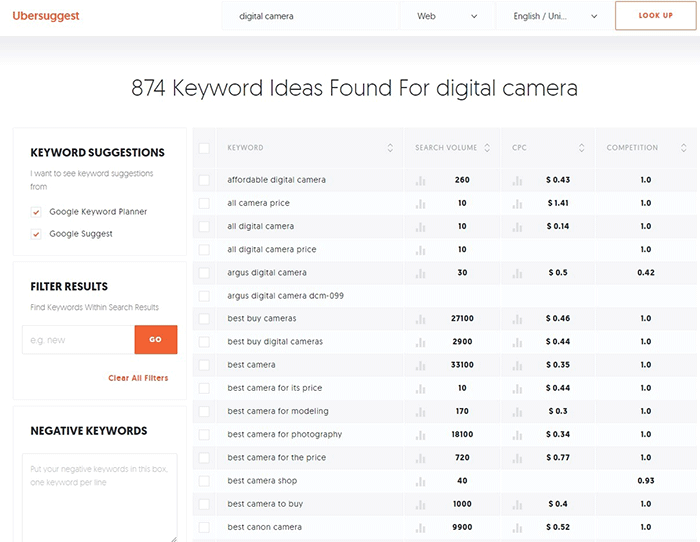
Don’t start optimizing until you do your keyword research. You can use whatever keyword research tool you have at your disposal. We can also recommend Ubersuggest. Just pop in a basic keyword and you can get a list of long-tail keywords that you can optimize for along with some valuable search data. You can even filter the keyword ideas and remove negative keywords. You can also export the keywords into a handy CSV file.

Ubersuggest Keyword Research

Add the Long-Tail Keyword to Your Product Page

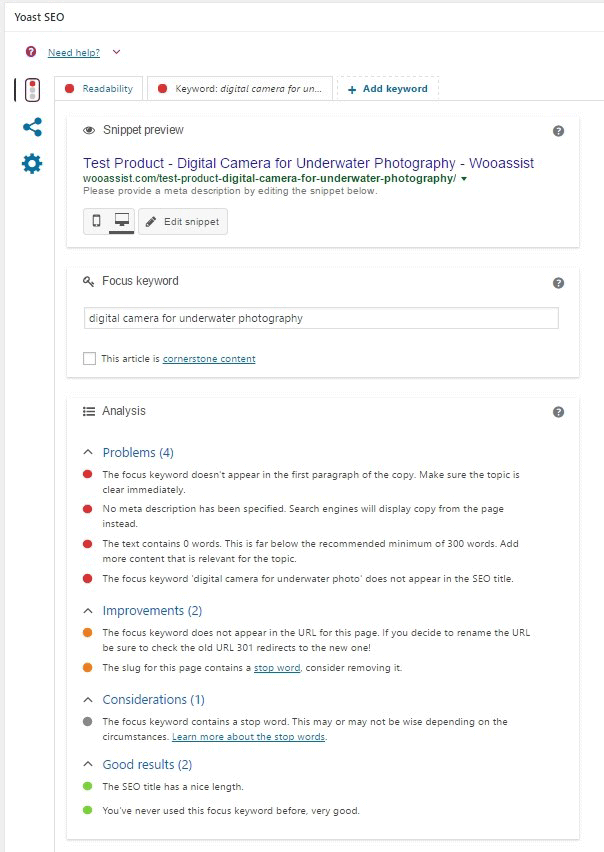
To help with optimizing your WooCommerce Products for SEO, you can use the WordPress SEO plugin by Yoast. The plugin provides detailed information on how you can optimize your products for SEO. It also has a boatload of other features that will help boost your SEO. Just install the plugin and you’ll gain access to the SEO optimizations block on your WooCommerce product editor.

When optimizing products for SEO, input the long-tail keyword that you wish to target on the “Focus Keyword” field. After doing this, you can see the analysis section below will show you recommendations on how you can improve your product’s SEO score.

How to Optimize WooCommerce Products for SEO

Generally, you will need to add your focus keywords to:

  1. The article title
  2. The first paragraph of the article
  3. One of the heading tags
  4. On the body of the article
  5. In one of the image alt tags
  6. In the URL/slug

You don’t need to force yourself to do every little thing that the Yoast SEO section recommends. Just use it a rough guide since it does recommend the currently known best practices.

Improving Content Readability

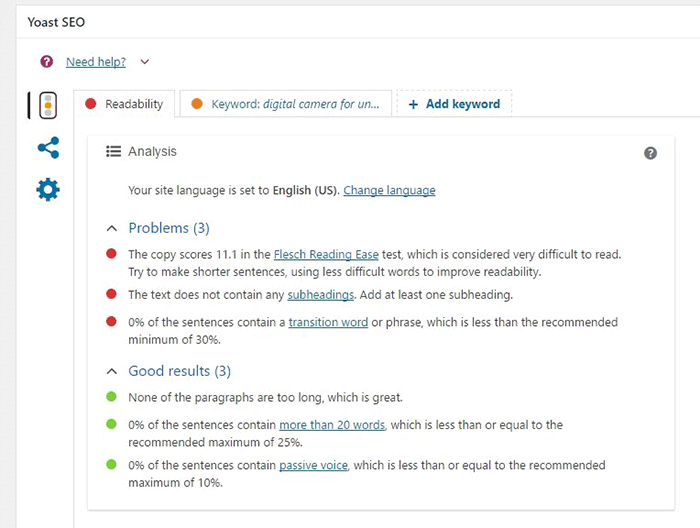
Google now also considers content readability as an SEO ranking factor. So it is important to ensure that your product descriptions are easy to read. In some cases, you may have to use some technical terms when writing your product descriptions and that’s totally fine. Depending on your products, that may actually be best practice. Still, it’s a good idea to check the readability of your content.

The Yoast SEO section also gives recommendations on Readability. Just click on the readability tab and you’ll see the problems that need to be addressed.

WooCommerce Products Optimize for Readability

When creating your product descriptions, you can also use Hemingwayapp to optimize its readability. You can also use this tool when writing blog posts.

Now that you know how to optimize your content for SEO, people who are interested in your products are now more likely to find your products. If you need help with SEO optimizations, the Wooassist Team can help. We’ll start off by doing an SEO audit of your site so we can determine what needs to be addressed and move forward from there.

Optimizing your WooCommerce store does not end with product optimizations. There are other optimizations that need to be done to ensure you are maximizing your conversion rates.

Filed Under: How-To Articles, SEO For E-Commerce Tagged With: keyword research, optimizations, seo, SEO strategy, SEO tools, WooCommerce, WooCommerce products, woocommerce seo, WordPress SEO, Yoast

Why Use Long-Tail Keywords for your WooCommerce SEO

October 13, 2016 By John Leave a Comment

Are you optimizing your WooCommerce products but find that you are not getting any traction? It could be because you are optimizing for the wrong keywords. Many e-commerce businesses find more success with long-tail keywords. But what are long tail keywords and why use long-tail keywords for your WooCommerce SEO?

What are Long-Tail Keywords?

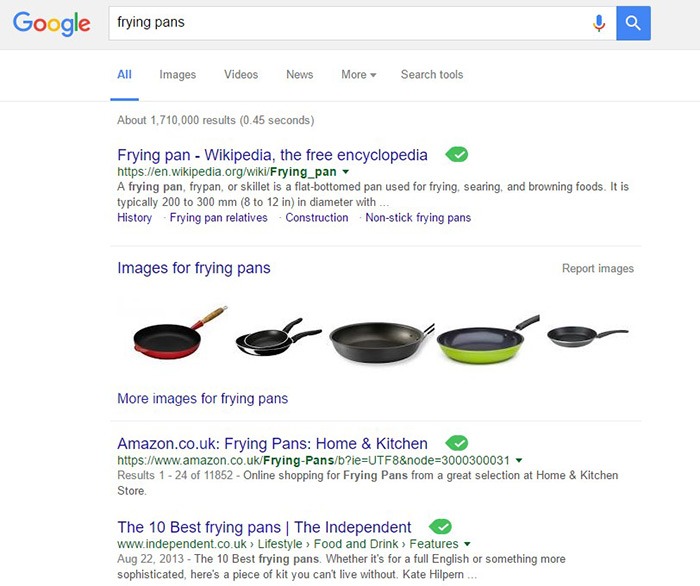
Long-tail keywords are longer, more specific keywords; much like a keyphrase. For example, if you are running an e-commerce store that sells frying pans, you could be tempted to optimize for keywords such as “frying pans”. However, ranking for “frying pans” would be very difficult. Do you expect to beat Wikipedia or Amazon who holds the top two spots in Google’s search results page? Even if you hire the most expensive SEO agency, that’s going to be hard to topple.

Why Use Long-Tail Keywords for your WooCommerce SEO

Let’s try to improve the keyword “frying-pan”. “Non-stick frying pan” is an improvement. It is more specific compared to just “frying pan” but this can still be made more targeted. “Non-stick stainless-steel frying pan” or “non-stick stainless-steel frying pan for induction stove” is taking it a step further.

bulls-eyeBenefits of Using Long-Tail Keywords

Long-Tail Keywords Produce Targeted Traffic that Converts Better

Long-tail keywords may or may not result in less traffic. The traffic that you do get will be more targeted and that means better conversion. Don’t stress yourself too much about losing traffic because traffic is a useless statistic. The important statistic to watch out for is your conversion rate because this is the moneymaker. Optimize your e-commerce store for increased conversion; not for increased traffic.

Long-Tail Keywords are Easier to Rank for

Because there is less competition for long-tail keywords, it is easier to rank for them. With a properly optimized page, you can land a top spot in the search results page. As long as you follow other known SEO best practices, this is achievable.

seo-google

But They Have Low Search Volume?

You might be looking at search data using Google’s Keyword Tool or any other tools. Then you see that there is no search volume for the long-tail keyword that you want to target. Don’t fret. Having no search volume does not mean that it will not show up in search results. Long-tail keywords are actually valuable. In the video below, Rand Fishkin talks about how valuable long-tail keywords are.

How to Choose the Right Long-Tail Keywords

Choosing the right long-tail keyword for your WooCommerce store is not difficult if you know who your customers are. If you already have a definitive image of your customers, then that’s a good thing. If not, it is imperative to identify your customer persona.

When you’ve created your customer persona, put yourself in your customers’ shoes. Think. What keyword would you search for if you were looking for the product you are selling? There is no single correct way to go about this. Most of the time, you will find that customers are looking for something specific. And once you identify that, that’s what you optimize for.

customer-persona

How Does Long-Tail Fare vs Popular Keywords?

If you choose to optimize for regular keywords, then you’re going to have a hard time getting to Page 1 of Google’s search results page. And if you don’t hit page one, then it won’t even matter. Page 1 of the search results page shows the top 10 results for the keyword. If you are ranked 11th, you’ll hardly get any traffic. This is not meant to discourage you to pursue the big keywords since it is not an impossible feat. It is possible but it’ll take some real genius or a lot of luck. Long-tail keywords, on the other hand, are easier to rank for.

Use Long-Tail Keywords with Other SEO Best Practices

seo-strategy

Using long-tail keywords alone won’t make your e-commerce store a conversion powerhouse. You need to use these keywords with other known SEO best practices. If you are using long-tail keywords right but doing everything else wrong, then it is not likely that you will get conversions.

You should create quality content that is easy to read. You should use proper URL structuring. Make your URLs readable. Implement proper navigation and good user interface. Upload a sitemap and make sure search engines can crawl your site. Use images properly and optimize your site for increased conversion. There’s a lot more to this but here’s a guide from Google to help you get started on best practices.

And that explains why you should use long-tail keywords for your WooCommerce store. If you have any questions, let us know in the comments.

Filed Under: SEO For E-Commerce Tagged With: best practices, e-commerce, marketing strategy, optimizations, SEO strategy

  • « Previous Page
  • 1
  • 2
Let us support your online store so you can manage your business

Get started today

Get 2 Hours of FREE SUPPORT

We are so confident that you will love our services that we will give you your first 4 hours at a 50% discount

That’s 4 hours for only $75

BUY NOW

Free eBook

5 Things Every Online Store Can Fix On Their Website In The Next Week To Increase Sales

Quick Links

  • How it Works
  • Pricing
  • Blog
  • Contact
  • About Wooassist
  • My Account
  • Checkout
  • Privacy Policy
  • Cookie Policy
  • Terms and Conditions

Wooassist

Australia:
59 Luke St.
Hemmant QLD 4174

Philippines:
San Miguel St.
Poblacion, Iligan City 9200

Connect


Copyright © 2026 · Wooassist

Yours FREE!

5 Things Every Online Store Can Fix On Their Website In The Next Week To Increase Sales