Wooassist

Assistance for Your Woocommerce Store

  • How it Works
  • Pricing
  • Services
    • Site Maintenance
    • AI SEO and Content Marketing
  • Blog
    • How-To Articles
    • Code Snippets
    • SEO For E-Commerce
    • Theme and Plugin Reviews
    • Wooassist News
    • WordPress/WooCommerce News
    • Interviews
  • About Us
  • Contact
You are here: Home / Archives for website maintenance

How Often Should I Update My WooCommerce Store?

July 20, 2017 By John Leave a Comment

update my woocommerce store

How often should I update my WooCommerce store? We get that a lot from our clients. The ideal answer is that site updates should be done whenever there are critical security updates to keep your site secure.

For regular scheduled site updates, we have found that monthly updates are ideal. Weekly updates may be too frequent. There usually isn’t a lot to update in one week’s time. Every two or three months is way too long that the site remains vulnerable to security threats. Monthly updates are just about right. Note that even if monthly updates are being done, site owners must promptly update their WooCommerce stores should a critical security update come up.

Should I Even Update my WooCommerce Store?

We sometimes get this question too. It is true that updating your WooCommerce store can break your site. However, not updating your WooCommerce store can also eventually break your site. So essentially, it is still best to do the updates.

How to Prevent Issues When Updating My WooCommerce Store?

There is no sure-fire way to know if there will be any issues on your site as a result of updates. The best you can do is to test the updates first on a development site to see if any errors would occur. Also, you can stay on top of what the WordPress and WooCommerce developers are doing. You can sign up to newsletters or follow developer blogs to stay updated. You can check out the WooCommerce changelogs and the WordPress changelogs too.

When major updates are released, it might be ideal to wait a few weeks before updating your site. This is to give WordPress, WooCommerce and other plugin and theme developers sufficient time to update anything that was broken during the update.

What to Do Before Updating My WooCommerce Store?

There are a few steps you can take before updating your WooCommerce store. First, you can test your site updates on a development or staging site. Many hosting providers, such as WPEngine, provide their clients a staging environment for testing site updates. If your hosting provider does not provide a staging environment, don’t worry. You can still create a staging site manually.

checklistAfter applying the updates on the development site, the next step is to check if the site has any broken features. Some important elements to check are:

  • Home Page Formatting
  • Product Page Formatting
  • Product Image Gallery
  • Add to Cart and Checkout Process
  • Contact Forms
  • Email Signup Forms

If you find that anything is not working, you can proceed to fix or forward to your developer to fix. If you do not have an in-house developer, you can contact us and we can help you fix the problem. If there are no problems, you can proceed to the next step.

The third step is to back up the live site. WPEngine features a one-click backup. You can also use a plugin for creating backups. We recommend Updraft Plus plugin which also features a quick restore feature in case something goes wrong.

Once you have created a backup, you can proceed to update WooCommerce, all other plugins, themes and the WordPress core. When that’s done, you need to check if anything is broken on the live site. If everything is working and there are no formatting issues, then that’s it. You have successfully updated your site. If something gets broken, you can attempt to fix the problem or restore your backup.

What to Do When Something Breaks When Updating Your Site?

The WordPress infrastructure makes updating your WooCommerce store easy. But dealing with the complications that come with updates can be very daunting, especially if you are not a developer. As such, we recommend working with a developer when doing your site updates so that any issues can be resolved quickly. If you do not have a full-time developer on board, you can contact us so we can get our experienced WooCommerce developers to help fix any issues.


Filed Under: How-To Articles Tagged With: admin, best practices, e-commerce, how-to, security, website maintenance, WooCommerce

Custom Development for Your WooCommerce Store

March 20, 2017 By John Leave a Comment

One of WooCommerce’s best-selling points is its customizability. But as extensive as the WooCommerce plugin database is, sometimes it’s still not enough. That’s where custom development for your WooCommerce store comes in. With custom development, we open a whole new world to your website’s capabilities. Still, as powerful as it is, it doesn’t come without its challenges.

Customizability

business-meeting-discuss-website-development

What exactly do we mean when we say custom development? Well, it’s like a custom tailored suit – it is tailoring code according to your exact specifications. With that, we’ll have precise control of the end-result. It is making changes to your website using configurations beyond what the software or plugins are originally capable of.

Sometimes you may find that WooCommerce is lacking a certain functionality that you require. You search for a plugin and there’s no viable plugin for it. In cases like these, we can custom code to add that functionality to your WooCommerce store. If you don’t like how a WooCommerce plugin works, we can add custom code to tweak it and make it work the way you want it to.

However, this does not come without its challenges.

Compatibility

In a vacuum, programming is predictable. For example, if you only had to deal with WooCommerce and you wanted to change something, it is simple and straightforward. However, in reality, a website exists as a combination of different software working together. What should be a straightforward change to WooCommerce could become unpredictable. Other installed plugins may behave differently as a result of the custom code.

These complications can create additional work but solving them is a necessary step in custom development.

Iterative Nature

keyboard-testing-thumbs-up-down

Other obstacles to custom development are unexpected bugs and simple errors.

Custom development is adding short pieces of software to the site. And as with all software, the first release rarely turns out as perfect from the get-go. Even with thorough testing, not all cases can be tested. In some instances, the bugs can pop up at an irrelevant area of the website.

Errors are also common, especially with complex customizations. At Wooassist we have tested over 500 developers in our recruitment program and trialed almost 100 of them. We are left with the cream of the crop and have 3 solid developers. They are the top one percentile, but they are not machines. They are not perfect. These unexpected bugs and mistakes go hand in hand with custom development. To get things right, several iterations may be necessary.

More meticulous testing is advised, but it will also cost more. It is up to the client to set the balance between testing and cost.

Maintenance Costs

Another challenge for custom development is its dependency on the parent software. This includes – either WordPress itself, WooCommerce or the other plugins you have installed. There’s the possibility that updates and new software versions will affect your custom development.

This is because the custom code has been specifically designed for the current setup at the time. If the setup changes, then the custom code needs to be modified as well. This means that custom development is not a build-it-and-leave-it process. It needs regular maintenance to keep up with the updates of the original technology.

So should you still get custom development for your WooCommerce store?

Web-developer-dual-mointor

It depends.

Most of the time, the ready-built plugins and extensions for WordPress and WooCommerce are enough to get a website up and going. There are thousands of extensions, both free and paid. Chances are, the functionality you are looking for might already be available. If it comes down to a choice between a paid plugin and custom development, sometimes the paid plugin is more advisable. It is much safer and easier to adjust your expectations and solution compared to custom code.

Business owners can be guilty of coming up with less than optimal ideas and then investing in development to implement these. A much better process is to invest more in researching the problem and the range of solutions available. Find some experts, send them the objective, the problem and your proposed solution and let them do some research for you. There is often a much simpler and cheaper solution.

Now what if there are no plugins for the functionality you require?

This is when you have to decide whether the functionality is worth the challenges and costs that come with custom development. If it is a functionality that gives the site admins the capability to spend less time working on a task, then it will pay itself off in the long run. If it improves customer experience and increases conversions, then it should also be an acceptable cost.

You can also choose the option that requires the least customization. Strike a compromise between the functionality you require and functionality of the original software. Bend the software less to avoid complications. All in all, custom development is not advisable for all projects. While challenging, custom development tells us that there will almost always be a solution. For most website owners, custom development is a necessary step in creating the website that they envision. To pursue this path, the site owner must accept the challenges of custom development.

Examples

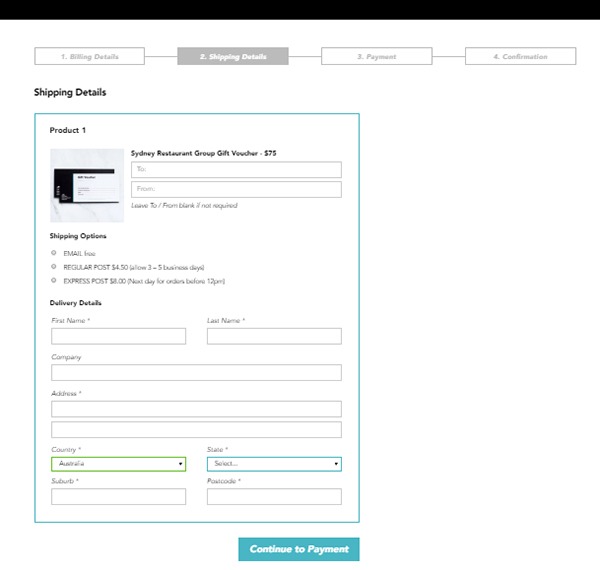
1. Here’s an example of a WooCommerce checkout that we’ve customized. Instead of the standard WooCommerce checkout page, we’ve separated certain sections grouping them together. We ended up with four sections, namely Billing Details, Shipping Details, Payment and Confirmation.

Example-1-Custom-Development-for-your-WooCommerce-Store

During the process, we encountered an error that cost some time to troubleshoot. So apart from the customization itself, we also needed to deal with unexpected complications.

Example-1-error-msg---Custom-Development-for-your-WooCommerce-Store

It turns out that it was caused by a conflict with an idle plugin activated on the site. Deactivating the plugin fixed the issue.

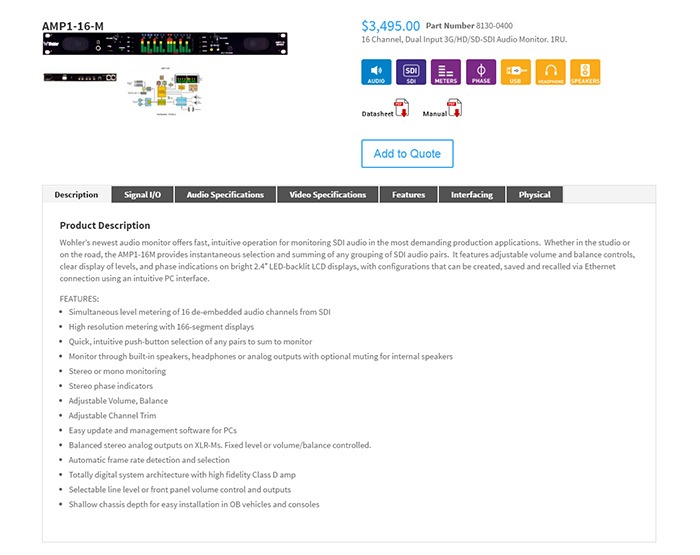
2. Here’s a product page that we’ve customized according to our client’s specifications. For this particular project, not only did we have to customize the product page, we also had to migrate an existing database of non-WooCommerce products to a WooCommerce website. This was complex as the existing products had attributes not compatible with WooCommerce.

The only viable solution we could think of was to make use of separate paid plugins to manage the attributes. In the end, the client had to purchase a separate premium plugin, WP All Import and the Advanced Custom Fields add-on. Unexpected costs like these may deter some website owners from custom development. However, these are often necessary.

Example-2 Custom Development for your WooCommerce Store

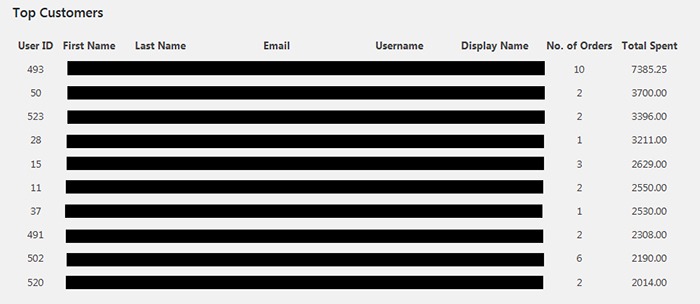
3. One of our clients asked for the functionality to create a list of the site’s most regular customers. She had installed a plugin for it. However, upon checking, the plugin has not been updated in over 2 years. As there are no alternative plugins, we figured that the most viable option would just be to build custom code for it.

The custom development itself was straightforward. Still, we needed to strike the right balance between spending time creating the code and spending time testing for errors. In the end, we were able to complete the custom development with the bare minimum in functionality in just a bit above 2 hours.

Example-3-Custom-Development-for-your-WooCommerce-Store

Final Advice

Here at Wooassist, we bill the work we do by the hour. So when it comes to custom development for your WooCommerce store, more complications can mean more time spent than expected. Most of our clients still prefer this arrangement as it is still cheaper than fixed price custom development work. Also, it is easier to arrange changes to the project along the way. Agencies that offer fixed-price quotes for free usually offer them at a premium as the client is also paying for the time when they didn’t get the work. And once the project has started, it is difficult to arrange changes without incurring additional charges.

But for those that would still prefer a fixed price quote, we can offer our Custom Project Roadmap product. When you purchase it, we will spend time researching, analyzing and defining the scope of the problem and solution. After these, we will offer a fixed price quotation. By having a clear strategy that is pre-assessed to be viable, we can minimize the complications. And when complications do arise, we won’t be billing you anymore for additional charges so you have control over the expense.

Filed Under: Theme and Plugin Reviews Tagged With: best practices, e-commerce, website development, website maintenance, Wooassist, WooCommerce

Why Use Storefront Theme on Your WooCommerce Store

August 26, 2016 By John Leave a Comment

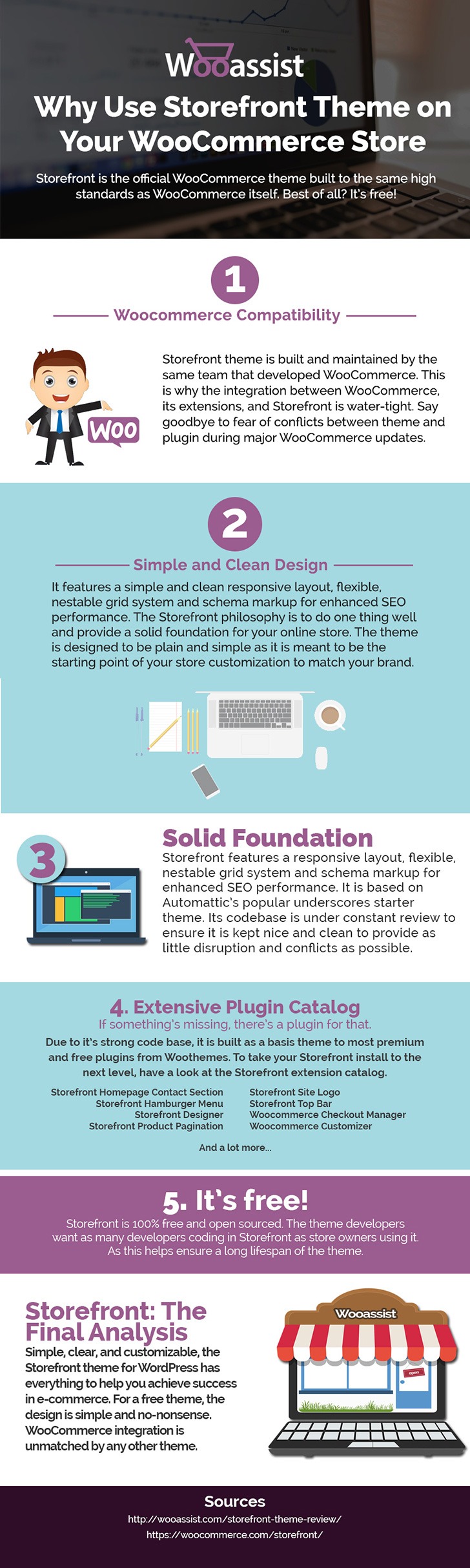
Storefront is the ideal platform for your WooCommerce store, providing a rock-solid foundation without the extra bloat or features. Developed by WooThemes, it reaches up to 3,000 downloads daily. But why use Storefront Theme on your WooCommerce Store? Find out in this infographic.

Why Use Storefront Theme on Your WooCommerce Store

To share this infographic on your site, just use the embed code below.

Filed Under: Theme and Plugin Reviews Tagged With: e-commerce, Storefront, website development, website maintenance, WooCommerce, WooCommerce products, woothemes, WordPress

12 WooCommerce Tasks You Should Outsource

August 18, 2016 By John Leave a Comment

WooCommerce Tasks You Should OutsourceHow much value do you put on your time? As a business owner, this is a question that you should be asking yourself. Ideally, you should be working on your business rather than in your business. This entails hiring staff to handle the day-to-day operations and outsourcing works well for this purpose. Outsourcing is not easy but it can do good for your e-commerce business.

We’ll take a look at some of the benefits of outsourcing. We’ll also discuss the challenges that come with outsourcing, how you can deal with them, and the tasks that you can outsource.

Benefits of Outsourcing

You may opt for an in-house staff, but why is outsourcing a popular alternative? Here are a couple of reasons.

Getting a WooCommerce Expert to Do the Job

Outsourcing an experienced virtual assistant is made simpler. With some digging, you can find a WooCommerce expert who doesn’t charge exorbitant fees. With the right approach, you can even find someone who will stick with your company for years.

Reduced Costs

Hiring a virtual assistant will cost less than hiring a full-time in-house staff. You won’t need to invest in an office space for the outsourced worker. The outsourced worker will have his/her own computer with internet access. You may however need to provide some online tools and resources specific to your business.

You may have to offer a higher salary (still cheaper than your local rates) or offer some benefits if you want to keep a good virtual assistant. Do some research to find out what benefits are afforded to employees in certain countries. For example, virtual assistants from the Philippines will expect a 13th month bonus. Incentives for good performance are also good.

Challenges with Outsourcing

laptop-outsourcing

Outsourcing comes with its share of risks but these risks can be controlled.

The Need for Training

When you delegate work, the outcome may not always meet your expectations. To improve on this, make sure you create systems that the virtual assistant can follow. Provide ample time in training the outsourced worker.  Familiarize them with your business processes. This will help in paving the way for a long-term mutually beneficial relationship.

Confidentiality or Security Issues

You want to protect your business and that’s understandable so you might be hesitant in hiring someone from the other side of the world. When hiring a virtual assistant, you will most likely be sharing sensitive company information. On top of that, you will be providing access to your site and other accounts. Before hiring, you can do your research on the person that you are hiring. Check out social media profiles and other mentions on the web. Charles Haines also offers some interview tips for measuring integrity.

During the first few weeks, you can consider providing the outsourced worker limited access to your systems. When you are more comfortable, you can start providing more access.

WooCommerce Tasks You Should Outsource

As you work on growing your business, you may find that you spend a lot of your time on tasks that you can delegate. Outsourced WooCommerce tasks are web design and development, marketing, SEO and other back-office roles.

WooCommerce Tasks

1. Create and Edit Products – Creating and editing WooCommerce products can be time consuming. You need to set up products with different attributes and optimize and upload images for each one. Delegate this task so you can use your business expertise where it is needed.

2. Product Image Editing – Images need to be optimized before being used on your WooCommerce store lest you risk bloating your site and increasing page load times.

3. Improve Product Copy – Writing product descriptions that highlight your product benefits will help you sell. Copy writers and virtual assistant know this. Speak to your target market and convince them to make the purchase. This is one less task to worry about, as professional copy writers can do this for you.

Web Design and Development

programming-outsourcing4. Update Plugins and Core – It’s important to keep your WooCommerce store protected from the latest known vulnerabilities. A WooCommerce expert can help improve security and site performance by keeping everything updated.

5. Design Tweaks – Improving user experience (UX) is a major factor in the success of your online store. A professional web developer can recommend and apply design changes to your site to optimize UX.

6. Analytics and Webmaster Reports – When optimizing your site to increase conversion or improve user experience, analyzing and interpreting existing data is invaluable. A virtual assistant adept at Google Analytics can analyze and interpret your website data. This can help you make sound decisions.

7. Technical Solutions – Don’t get wrapped up in the technicalities of developing and maintaining your website. An experienced WooCommerce developer can optimize your design and add new functionality in a fraction of the time it takes you to do.

8. Secure Your Site – Apart from WordPress and plugins updates, a WooCommerce expert can help you set up automated backups and set up other security features.

9. Speed Optimization – Keeping your site running at its fastest will improve user experience and will reduce bounce rates. Notably, site speed is also an important ranking factor for SEO. A WooCommerce developer can help you optimize your site speed. This can include optimizing images, optimizing the HTCaccess file, setting up caching, minification, and DNS.

Marketing and SEO

10. Search Engine Optimization – Make it easier for potential customers to find your WooCommerce store by ranking high in organic search results. This is no small feat as SEO can take a lot of time. However, many virtual assistants make a living through SEO so finding an SEO expert is easy. A WooCommerce SEO expert can help optimize your product pages and blog posts to rank better in search engines.

11. Email Opt-in Solutions – To improve your site’s lead generation capabilities, a WooCommerce expert can help you add email opt-in forms in strategic locations on your site.

12. Landing Pages – An effective landing page should help you achieve your site’s goals. A WooCommerce expert can help you optimize your landing pages for this purpose.

Final Notes

Outsourcing a WooCommerce expert can help you save your time so you can focus on other things that need your attention. You now have a better idea of what tasks you can outsource to save your time. A WooCommerce expert can do tasks in a fraction of the time that it would take you. While outsourcing can be a challenge, the tips above should help ease the process.

Do you have any questions? Have you tried outsourcing? Do you have any tips that you can share? Let us know in the comments.

Filed Under: How-To Articles Tagged With: admin, best practices, e-commerce, how-to, marketing strategy, outsourcing, website maintenance, Wooassist, WooCommerce

Why Should You Keep WordPress Updated?

May 24, 2016 By John 1 Comment

WordPress is getting more popular as a platform for creating e-commerce stores. Because of this, WordPress sites have become attractive targets for hackers to try and break into. There are a few reasons why hackers do this but the main motive has always been for profit. In this article, we will discuss how hackers take advantage of a WordPress site with poor security. You’ll also learn what should be done before a site update and other means to keep your site safe.

How Does a Hacker Take Advantage of a Compromised WordPress Site?

why should you keep wordpress updatedA lot can be done to a hacked WordPress site. It is not just getting sensitive information. Actually, getting sensitive information like credit card numbers is just a “bonus”. It’s not really your website that the hackers want. What they want more is the power of your server resources: computing power, disk space, and anonymity on the internet. So how can they use your server to their advantage? Here are some ways:

Bitcoin Mining

Bitcoin mining is the process of adding transaction records to the Bitcoin’s public ledger. One offers processing power to the public Bitcoin community to validate transactions. He gets a portion of the money being transacted as processing fee. Bitcoin mining is intentionally resource and processing intensive so that the number of blocks found each day by miners remains steady. This is where the hackers can take advantage. They will use your server to mine for themselves, hence noticeably slowing down your site.

Distributed Denial of Service (DDoS)

This attack is an attempt to crash one’s server. It spams that server with thousands of traffic simultaneously, thus denying service for other users. This is commonly used for cheating in online gaming, online gambling, and in taking down a site. Since you can’t overwhelm a server with traffic using a single PC, the likely scenario is that the attacker will have thousands of hacked servers and personal computers to perform an attack. All they need is a single PHP script saved on each site which they can activate at will.

Anonymous Attacks and Spam

Hackers can also use your server to attack or spam anyone anonymously. Since they are using your servers to do these malicious things, these will point to your name and not theirs. They can be churning thousands of spam emails to other people at your expense. They can send viruses and malware through these emails to infect more PCs to aid their hacking.

Data Mining

Hackers can also just mine sensitive information like credit card numbers, passwords, emails and others.

Automated Hacking

hacking-code-destroyMost attacks are automated and target small and unsecure sites. This works similar to how a search engine uses search engine crawlers to index information on the web. The hacker’s crawlers roam around the web to find exploitable sites. When a vulnerability is spotted, the hackers will attack that vulnerable point. Attacks vary from brute force attacks to code injection on contact forms.

Importance of Updating WordPress for Security

The people behind WordPress are working hard to increase security against these attacks. This is what most of the minor updates are for. As the attacks get smarter, the security needs to upgrade as well. Fundamentally, there is no such thing as a perfectly secure system. So whenever WordPress developers see or hear about a possible vulnerability, they will try to fix it as fast as possible.

This is why WordPress updates are very important. By keeping your WordPress core updated, you are protecting yourself from the latest known vulnerabilities.

Things to Do Before Updating

Most of the time, updating WordPress is harmless. However, some major updates that involve the core code may break some plugins or theme files which in turn can break some layout or functionality on your site. That’s why it is important to follow a process before pushing through with an update to avoid breaking your site.

Create a Backup

Creating a backup is the best thing that you can do before pushing through with an update. Backups are your last line of defense in case something goes wrong. If you think it is a hassle, you can actually automate backup creation. There are even hosts that automatically do this for you. However, it is best to have your own backup and not depend on your host to make your backups for you.

Testing on a Staging Site

A staging site is an independent copy of your site. Most hosting sites offer an easy way to make them but you can always create your own. Staging sites are used to ensure that everything works perfectly before you present your site to your customers. This is very important especially for e-commerce sites. You can lose your customers’ trust if you let them experience downtime and bugs.

Other Things to Help You Secure Your Site

cyber-security_keyboard-lockedAside from the updates, there are a lot of things you can do to harden the security of your site. Here are some examples:

Installing a WP Security Plugin

Like creating a backup, installing a WP Security plugin is one of the best things that you can do. Sucuri Security plugin is highly recommended. Basically Sucuri will act as a firewall for your site. It will protect your website from hackers, malware, DDoS and blacklists. It will receive all the traffic going to your site and filter it before sending it to your host. This allows the plugin to block all the attacks and only send you legitimate traffic. Because the filtering/blocking is happening on the Sucuri servers, your servers are relieved of a lot of load. Sucuri has always been the top go-to plugin when it comes to security.

Password Protect Some Directories

Password protecting /wp-admin directory adds another layer of security to your site aside from the login page. This can be done either manually or using cPanel. This is addressed on sites that have a lot of users accessing the wp-admin; for example large news/blog sites that accept guest authors.

Disabling PHP Execution

Disabling PHP Execution from certain directories protects you from backdoor access file attacks. The attacks come disguised as a WordPress core PHP file and inserted in easy access directories like /wp-includes/ and /wp-content/uploads/. Preventing PHP execution from these directories reduces the risk of backdoor access.

Changing the Prefix of Your Database

The default prefix of a WordPress database is “wp_”. Everything on your database will start with this so changing it will make it difficult for attackers to access your database.

Conclusion

Now that you’re more familiar with how hackers work, you can better equip your site to avoid being a victim. Backup your site and do not skimp on WordPress updates, even the minor ones. Remember that these updates will help you safeguard your WordPress site from the latest known security threats. Updates are one thing but you should also harden your site by implementing the strategies mentioned above.

When was the last time you updated WordPress? Do you have any other security tips you’d like to share? Let us know in the comments.

Filed Under: How-To Articles Tagged With: admin, backup, best practices, brute force, e-commerce, how-to, plugins, security, sucuri, website maintenance, WordPress

  • « Previous Page
  • 1
  • 2
  • 3
  • 4
  • Next Page »
Let us support your online store so you can manage your business

Get started today

Get 2 Hours of FREE SUPPORT

We are so confident that you will love our services that we will give you your first 4 hours at a 50% discount

That’s 4 hours for only $75

BUY NOW

Free eBook

5 Things Every Online Store Can Fix On Their Website In The Next Week To Increase Sales

Quick Links

  • How it Works
  • Pricing
  • Blog
  • Contact
  • About Wooassist
  • My Account
  • Checkout
  • Privacy Policy
  • Cookie Policy
  • Terms and Conditions

Wooassist

Australia:
59 Luke St.
Hemmant QLD 4174

Philippines:
San Miguel St.
Poblacion, Iligan City 9200

Connect


Copyright © 2026 · Wooassist

Yours FREE!

5 Things Every Online Store Can Fix On Their Website In The Next Week To Increase Sales