Wooassist

Assistance for Your Woocommerce Store

  • How it Works
  • Pricing
  • Services
    • Site Maintenance
    • AI SEO and Content Marketing
  • Blog
    • How-To Articles
    • Code Snippets
    • SEO For E-Commerce
    • Theme and Plugin Reviews
    • Wooassist News
    • WordPress/WooCommerce News
    • Interviews
  • About Us
  • Contact
You are here: Home / Archives for WooCommerce

13 Routine Maintenance Tasks that You Should Do on WordPress and WooCommerce

April 2, 2018 By John Leave a Comment

Routine Maintenance Tasks for WordPress

Maintaining a WooCommerce store is a lot of work. There are a lot of routine maintenance tasks for WordPress and WooCommerce that need to be done on a regular basis. In this post, we list down the most important tasks that you should do on your WooCommerce store.

1. Create Regular Website Backups

Create Regular Website BackupsCreating regular site backups is critical. It is your first fallback in case something breaks on your site. While you can make backups manually, it is important to make regular automated backups. Check with your hosting provider if they create regular backups of your database as well as a complete backup of your site. You can also install a backup plugin such as Updraft Plus or BackWPup and set it up to make regular automated backups for you. We still recommend creating manual backups before doing major work on your WooCommerce store though.

2. Update WordPress, WooCommerce, Themes and Plugins

Updating all elements of your WooCommerce store should be done on a regular basis. Do this weekly if you have the time. If not, monthly updates are good enough. Updates include updating WordPress Core, themes, WooCommerce and all other installed plugins. Remember to backup up your site before proceeding with updates since updates could cause your website to break. If you have a development site, it would be best to test the updates first on this staging environment. Then, do some user testing to make sure that there are no errors. After that, you can proceed to update your live site. When that’s done, you will need to do another round of testing. Some important elements to test include checkout, add to cart, contact form emails, opt-in forms and other customizations that were done on the site.

3. Update WooCommerce Template Files

After updating WooCommerce, you will sometimes get an error notifying you of outdated WooCommerce template files. This just means that your theme has not updated to include the latest WooCommerce template files. In some cases, this could cause some formatting issues on your store. If there are no errors on your store, you can simply wait for your theme to release an update that includes the most recent template files. Or you can also fix this manually by following the steps in this documentation from WooCommerce.

4. Change User Passwords

It is important to use strong passwords. However, it is just as important to change passwords on a regular basis. There are times when security breaches can go undetected for a long time. Changing your password regularly blocks out these security breaches that you might not realize are there. You should change your password for WordPress admin, FTP, database and cPanel. And a pro-tip, never use “admin” as your username. This is the first username that hackers try out when brute forcing into websites.

5. Optimize Your Product Images

We’ve always emphasized the importance of optimizing images for your WooCommerce store to keep your site running fast. If you have uploaded any product image that is more than 100KB in size, it might be a good idea to replace that image with an optimized product image. To learn more, you can check out our blog post on how to optimize images.

6. Approve and Respond to Product Reviews

Moderate Product ReviewsIf you are not asking your customers for product reviews then you might want to reconsider. Most people who buy online look for product reviews before they decide to purchase something. One study found that 85.57% of users read reviews before they purchase. And if you are asking your customers for product reviews, then you will need to approve reviews on a regular basis. A word of advice, do not remove negative reviews of your products. Instead, make it an avenue where you can show good customer service. Respond to the negative review. Offer a replacement for a defective product or offer a refund. People reading reviews will want to see some negative reviews to get a well-rounded picture of your product. When moderating reviews, you only need to remove the spam reviews.

7. Approve and Respond to Blog Comments

If you have a blog that is made to drive customer engagement, then your blog will most likely attract comments. Same with product reviews; don’t delete the negative comments. Rather, address them positively. Remove any spam comments as this will negatively impact the user experience of your blog. If you are using Akismet: Anti Spam plugin, this will block out most spam comments. However, some spam comments can still get through and you will need to manage them manually.

8. Test Your Contact Forms and Email Opt-in Forms

Every now and then, you will need to make sure that your contact forms and email opt-in forms are working. Just fill in your forms and send. If you receive it in your email, then you’re all good. But if you don’t, there’s something wrong and you need to do something about it. Have your developer look into it.

9. Optimize Your Database

Over time, your database accumulates a lot of gunk and you need to clean it to make sure your website runs fast. Before you go about this task, make sure you create a backup. You can choose to clean your database manually if you are comfortable and familiar with working on your database. Otherwise, you can use a plugin to do the optimizations for you. Notable plugins include WP-DBManager and WP-Optimize. You can check out our guide on how to clean your database.

10. Test Your WooCommerce Store’s Speed

If you have not yet made optimizations to your WooCommerce store’s speed, you should consider doing it now. Site speed has become increasingly important for WooCommerce store owners. Google now considers site speed as a ranking factor for SEO. Also, if you have a slow site, this will negatively impact the customer’s experience on your site. It is easy for your customers to buy instead from your competitors. You can test your site speed on Google’s Page Speed test and Google will provide you with recommendations on how you can improve your site’s speed. Other notable tools that you can use to test your site are Pingdom Website Speed Test and GTmetrix.

11. Scan Your Site for Malware

One way to keep on top of your website’s security is to regularly test your site for any malware. If you are connected to Google Search Console, it will let you know if malware is detected on your site. If your site has been found to have any form of malware, Google Chrome will actually alert your visitors that your site is dangerous. This can have devastating effects on your traffic and conversion rate. No one will want to enter their payment information on a site that has malware. In extreme cases, Google may block your site from appearing in the Google search results page. You want to prevent this from happening. It would be best to invest on your site’s security by installing a security plugin such as Sucuri Security and WordFence. Even if you have those plugins installed, it is still a good idea to a manual scan. You can scan your website at Sucuri’s Website Malware and Security Scanner, or at SiteGuarding. If any manual scans detect anything malicious, you can contact your developer to fix the issue. You should get it fixed before Google applies any penalties. Wooassist also offers a security hardening service to improve the security of your site so you can prevent this from happening.

12. Fix Broken Links

Broken links are bad for user experience so check your site regularly for any broken links. You can use W3C Link Checker or any other similar tool to check for broken links. Once you’ve found the broken links on your site, you can start fixing them. You can either remove the links or points the links to a new relevant URL.

13. Test Your Checkout Process

Last but definitely not the least; you should regularly test your checkout process. If you suddenly experience loss of sales, it’s a good idea to test your checkout. There might be an error that prevents your customers from checking out. Testing also gives you a feel of what your customers go through so you can optimize your checkout. Once you’ve determined that your checkout has problems, you can check out our post on how to fix the most common checkout problems in WooCommerce.

Final Notes

By doing these tasks on a regular basis, you can keep yourself on top of any issues that may occur on your WooCommerce store. If you find yourself overwhelmed by the all these, you can hire someone else to do it. You can also contact us and our team will be glad to assist with any of these tasks.

Are there any other routine maintenance tasks for WordPress and WooCommerce you think should be done on a regular basis? Do you have any suggestions? Let us know in the comments.

Filed Under: How-To Articles Tagged With: blog, contact form, conversion optimization, image optimization, plugins, security, site speed optimization, website maintenance, WooCommerce, WooCommerce products, WordPress, WordPress SEO, WordPress updates

How to Recover Abandoned Carts in WooCommerce?

November 30, 2019 By John Leave a Comment

How to Recover Abandoned Carts in WooCommerce

It’s not uncommon for ecommerce shoppers to abandon carts. You may not know it, but your store might also be suffering from carts being abandoned. This problem can be addressed however. To start, you must determine why your customers abandon their carts.

Why online shoppers abandon carts and what you can do about it?

There are various reasons why online shoppers abandon their carts. We lay out the most common ones and what you can do to address them.

Checkout is Too Complicated

Your customers will nitpick and that is to be expected. When you make your customers jump hoops during checkout, you’re not doing them a favor. Your checkout should be quick and straightforward. If you must add some other stuff that will complicate checkout, consider if you can add it on the thank you page instead. The thank you page is the page where the customer is redirected to after making a successful purchase. If you need help tweaking your thank you page, the Wooassist team can help.

Users Need to Create an Account to Check Out

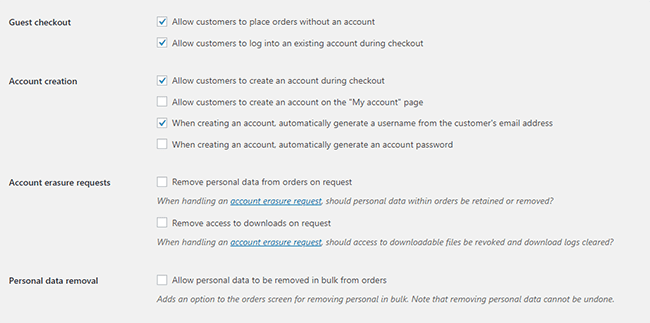
Internet users are already burned out having to create an account for each internet service that they use. Don’t add to that burden. Don’t force your customers to create an account if it’s not necessary. To enable guest checkouts on WooCommerce, go to your WordPress Dashboard, click on WooCommerce > Settings. Under the Account and Privacy tab, enable “Allow customers to place orders without an account”. You can tweak other account related settings here to your liking.

Too Many Checkout Form Fields

The default WooCommerce checkout page is good enough as it is. There is no need to add more fields unless necessary. If you’ve edited your checkout page before to add some unnecessary fields, look into it and consider removing it.

Unexpected Charges

Customers will abandon your checkout when they see the shipping fee. No one will force you to offer free shipping if it will make your business unsustainable. There are however some things that you can do to reduce abandoned carts as a result of shipping and other fees. People now are more accepting of shipping fees. For other fees, be transparent from the get-go. If you charge taxes, handling fees, and other fees, make it clear starting from the product page that you charge these fees. If they are suddenly greeted by these fees on checkout, it will look like unscrupulous practice.

Too Many Clicks to Checkout

Reducing cart abandonment is all about simplifying your product purchase process. Ideally, it should not take more than three clicks for a customer to check out. If it takes four clicks to check out, that is one click too many. Get rid of unnecessary barriers to completing checkout.

Don’t Make it Hard to Contact You

Some of your prospective customers will look for your contact details before they make a purchase. If they added a product to their cart but could not find your contact information or even a contact us page, there is a high likelihood that that user will abandon that cart. To prevent this from happening, make sure you have a contact us page. Even better, if you can add your email or phone number on your WooCommerce store’s header.

Payment Issues

Another common reason for abandoning shopping carts is payment issue. When the customer tries to pay for his/her order and it fails, you can bet that cart will be abandoned. The solution here is simple. Offer more than one mode of payment. Some common payment channels you can use are Paypal, Stripe, Authorize.net, Apple Pay, Amazon Pay, and Square.

Other Things You Can Do to Reduce Cart Abandonment

Show Security Certificates

To be able to sell your products or services online, you’ll need to be able to establish that you are trustworthy. You can show security certificates and security seals on your checkout page to improve your trust rating. Some security seals that you can add to your site as Norton, McAfee and TRUSTe.

Offer Free Shipping

Free shipping can significantly reduce your cart abandonment rates. However, not every business can make a profit when offering free shipping. As an alternative, you can offer free shipping when your customers meets a required minimum order value or quantity. This strategy can also help improve your average order value.

Offer a Money-Back Guarantee

Most consumer laws dictate that you should have a return policy anyway. So there’s no reason not to do it. Making your money-back guarantee known shows your prospective customers that you have faith in the quality of your product or service. Don’t worry about the people that might abuse your money-back guarantee. It hardly ever happens. And if it happens a lot, the problem might be your product.

Improve Your Page Load Speeds

If your site is slow, some of your prospective customers might get frustrated and abandon their carts. Make sure your site is fast.

How to Recover Abandoned Carts

There are many ways to recover abandoned carts. Some of the more common methods are remarketing and abandoned cart emails.

Using Remarketing to Recover Abandoned Carts

There are many platforms that you can use for remarketing. Essentially, remarketing works by saving a cookie on the user’s browser so you can show them your tailored ads. Neil Patel details how you can use remarking on Adwords to recover abandoned carts. Facebook is another platform that you can use for remarketing. SproutSocial details how to use remarketing on Facebook.

Using Abandoned Cart Emails to Recover Abandoned Carts

Abandoned cart emails send your customers a reminder email if they did not complete their purchase. For guest checkouts, this requires that the user must at least have entered his/her email address. This won’t be an issue if you require your customers to register before making a purchase. Do note however that requiring customers to create an account may hurt your conversion rates. There are a lot of abandoned cart email plugins that work for WooCommerce, you just have to find the plugin that works for your needs.

Recover abandoned carts and improve your sales by implementing these strategies. If you have any questions, you can post a comment below. If you need help setting up abandoned cart emails or anything else, you can send us email.

Filed Under: How-To Articles Tagged With: abandoned carts, checkout, checkout form, conversion optimization, email marketing, optimizations, remarketing, security, trust rating, WooCommerce, woocommerce checkout

How to Save Time and Money When Outsourcing a WooCommerce Developer

June 21, 2019 By John Leave a Comment

How much is your time worth? Do you usually spend a couple of hours trying to fix an issue on your WooCommerce store? You should be spending more time working on making your business more profitable. Don’t waste your time dealing with bugs and plugin updates. Leave that to a developer that can do the task more efficiently.

If you’ve never outsourced a WooCommerce developer before, you’ll find that it’s not that difficult. We’ve outlined some things that you can do so you can save time and money when hiring a WooCommerce developer.

Why Outsource?

If you are asking yourself why you should even outsource, outsourcing will help you free up your time. More free time means you can focus on the more important aspects of your business. Also, outsourced work is cheaper. Don’t waste time going through forums and various support channels for help. Sure, you might be able to fix your problem but at what cost?  That is time spent that you’ll never get back. You can outsource a WooCommerce developer that will do complex tasks in a fraction of the time.

What Tasks Can You Outsource?

You can outsource just about any tasks you don’t want to do. Outsourcing routine maintenance tasks is always a good idea.

Site Updates and Maintenance

There are plenty of tasks that you can outsource on WooCommerce and one of the most important one is your site updates. If you do not update your WooCommerce store on a regular basis, you are not getting important security updates. This exposes your and your customers’ data to cyber criminals.

Hackers typically look for outdated sites as they are easy targets for hacking. If you do not have time to do regular updates, you can have an outsourced WooCommerce developer do it for you.

On your end, you must ensure that your developer creates a back up of your site and tests updates on a staging site. Some WooCommerce store owners might be wary of updating their site because they experienced problems due to site updates in the past. This is the reason why you should test updates on a development site first. You should not wait for your production site to break because you haven’t been updating it in months. While your site can break when you update it, you can do this in a controlled environment. This is a lot better compared to being forced to take down your site while you troubleshoot. If this happens, your site could be down for hours or even days. You can do your site updates regularly to prevent this from happening.

Fixing Bugs and Other Issues

Things will break on your site every now and then. That’s an issue all ecommerce store owners will have to deal with. Instead of worrying about it, you can outsource a WooCommerce developer fix these issues for you.

Site Speed Optimization

Some elements on your site could be dampening your site speed. An experienced WooCommerce developer can help you optimize your site so it runs the fastest that it can.

Design Tweaks

If you need a quick design tweak, what would take you an hour or two to do might just be a 15-minute job to an experienced WooCommerce developer.

Adding New Features/Custom Development

WooCommerce is customizable if you know how to code. With a trusted WooCommerce developer, you can customize your site however you want to.

How Can You Save Time and Money When Ourtsourcing a WooCommerce Developer?

save time and money outsourcing

Find a Skilled Developer

Wooassist developers have spent years working on various WooCommerce sites. They have dedicated themselves to knowing everything about WooCommerce. If you are looking for WooCommerce expert, you can contact us. You can also try your luck hiring a freelancer at websites like Upwork. Try to find someone who has a lot of experience working with WooCommerce websites.

Wear the Project Manager Hat

If you’re going to outsource a WooCommerce developer, you’ll need to manage your projects. If you don’t have staff to do that for you, you’ll have to manage your projects yourself. Or you can hire Wooassist and you’ll be assigned your own project manager.

Use a Project Management Tool

There are several project management tools that you can use. You just need to determine which one would work for you. Some project management tools we can recommend include Asana, Kanbanflow and Trello.

Define Project Goals

A project is clearer if you have realistic and achievable goals. When talking to your developer about a project, always let them know what the goal is.

Make an Effort to Write a Detailed Project/Task Brief

Don’t downplay the importance of writing a project or task brief. Spending more time writing a detailed project brief actually saves you time. If you don’t write a good task brief, you will spend more time making corrections and asking for revisions. Define the objective and include all the necessary details in your task brief.

Prepare All Necessary Files

When you send a task to your developer, always send them all the necessary files needed to accomplish the task. Use appropriate file names to avoid confusion. Also, use common file formats.  If you are using the cloud to share your files, make sure you grant the necessary access permissions. In the task brief that you prepare, it helps to include a note on what the files are for.

Prepare and Double Check Login Information

Provide all the necessary login information to the developer working on your tasks. We recommend testing the login information to ensure they are correct. For a developer, nothing wastes more time than finding out you cannot log in to a site you are working on. More time is wasted if they can’t get the correct login information right away due to time zone differences.

If you have not tried outsourcing a developer before, don’t be afraid to take the first step. You can free yourself from your WooCommerce woes if you work with a trusted developer. Let us know in the comments if you might have any questions about outsourcing.

Filed Under: How-To Articles Tagged With: outsourcing, website development, website maintenance, WooCommerce

Lisa Shinham from WaveZoneSkim Shares Her Company’s Story – The Wooassist Interview Series

October 18, 2018 By John Leave a Comment

On this part of the Wooassist Interview Series, we talk to Lisa Shinham – owner of Wave Zone Skimboards. Together with her husband Jeff, Lisa first worked part-time building Wave Zone while she worked in corporate. At one point, the company experienced massive growth that Lisa had to leave her 15-year stint in the corporate world to focus on their company. “Good enough is never good enough” has always been their mantra. And now they own and a successful and thriving WooCommerce store that sells high-quality hand-crafted skimboards.

So let’s get started with the interview.

How did WaveZoneSkim start?

Wave Zone Surf Company opened in 1990 as a single location watersports store. Among the offerings were custom surfboards, skimboards, wind surfers and apparel. We expanded to include the wholesale of our skimboard brand to surf shops around the world. The growth was so massive that we decided to close the shop and transition purely to wholesale. As the customer need expanded, we found that we were able to reach additional market areas through our own website; a great option for holiday shoppers, those who do not live near a beach or surf shop location,

What are some of the major challenges for WaveZoneSkim?

Managing materials costs is a daily event, but one over which we can exercise some control.

Tougher to prepare for are the challenges presented by natural disasters. This year alone we have seen red tide spreading along the western coast of Florida, a hurricane strike to the eastern USA, a tsunami clipping Guam and volcanic activity threatening Hawaii. If one of our surf shops are affected, we are as well.

The exponential increase in online sales has created opportunity and challenge in equal measure. This could be counted as the largest ongoing shift in the way we do business today versus 25 years ago. Most significant is the detail needed for an individual transaction. This is much different and more labor intensive than shipping a case of a dozen boards to a surf shop. Customer expectations must be successfully managed on the front end. Fulfillment and customer service must be top notch.

What has been the biggest challenge in your career?

The largest challenge I have personally faced has been keeping up with technology. From e-commerce, to web design, to multiple social media platforms. Change is constant when determining how to best reach a customer. Having a good working knowledge as well as augmenting that by delegating to skilled individuals has been essential!

What are your tips on how to make a business startup a successful one?

Strategic planning is essential. It’s a relay race of sorts. A clear written timeline with each step assigned to a specialist. Communication is key. From concept to implementation to promotion to launch every step must be giving its due. Responsibility, accountability and respect to all must be flowing with the team working to build each other up. If the day has come to load website product then the individuals in charge of descriptions, SKUs, pricing and photography need to be aware and on point!

Skim Team Riders at the 2018 Vilano Pro-Am Competition

How has ecommerce changed over the past 10 years?

10 years ago there was a greater range of comfort in terms of buying online. As customers have gained understanding of secure sites and payment systems, closing the online deal has become far more achievable. Customers are largely at ease doing online business.

Today websites must be engaging and easy to navigate… truly streamlining the customer experience. A picture is worth a thousand words and the professionalism of your site must inspire confidence in your brand and products. A customer can comparison shop platforms and brands quickly and easily. The online marketplace continues to grow and a business must be on its game to stay out in front of competitors.

What do you think is the future of ecommerce?

The past few years ecommerce has paralleled brick and mortar business challenges. Smaller “mom & pop” retailers struggled to keep pace with big box stores, and still do. Today, online businesses battle the same fight to keep pace with large sites like Amazon. A marketplace the size of Amazon can afford to offer membership benefits such as free shipping and customer-centric return policies that can be tough for a small business retailer to match. With the continued increase in online sales, that pendulum is beginning to swing back a bit, with a bit more customer accountability to the tune of re-stocking fees and reduced eligibility for pre-paid return shipping.

With a continually growing base of tech savvy customers as well as online purchasing being the increasingly common choice, people will be continue to be more and more comfortable with doorstep delivery in many aspects of their lives. Convenience fees will become the norm and exceptional service will no longer include a huge ding to profit margins to secure the sale.

That said, however, individual sites will always need to continue bettering the customer experience in order to secure the business.

Team Manager, Alex Bevard, running a Technique Session for youth. This was a Demo Day hosted by Naples Outfitters in Florida.

How did you get started with WooAssist?

A colleague mentioned WooAssist to me in passing. Upon visiting the Wooassist site, I found a video on the home page told my story well. Like many, I had invested a generous sum to rebuild my site. After completion of the project, I found myself buried under lack of knowledge regarding WordPress and its many plugins. I felt a bit stranded… as if I was in a newly built house with a bit of furniture yet so much more was still needed to truly live there and call it mine. I learned as much as possible via trial, error and online resources to add content and enhance the sites direction.

I had big ideas and no way to bring them to fruition. I bought a small support package from Wooassist and tested a small job. The recommendations and results have been amazing. The Wooassist staff has been responsive and proactive. Their service and follow through have been superior.

What advice can you offer for aspiring ecommerce entrepreneurs?

Continuing education in the areas of technology and online marketing is important. Learn about meta tags, keywords, H1 headings, etc. Outsourcing is highly effective but, like all other business investments, it’s important to know what you are paying for. A good blend of both paid and organic exposure is important. Top notch photography, engaging content and relatable videos are very achievable and worth the investment. Most importantly, automation is critical. With systems and automation that cover everything from FAQs to inventory control, people can use time where it needs to be spent, such as building business and relationships.

Filed Under: Interviews, Wooassist News Tagged With: business development, Wooassist, WooCommerce

Wooassist Interviews WooCommerce Entrepreneurs – Nathalie Brouard on GardenWare

August 30, 2018 By John Leave a Comment

Nathalie Brouard started GardenWare with Nick 15 years ago.  Since then, GardenWare has grown leaps and bounds. Mothers who have started or want to start an ecommerce business can pick up a thing or two in our interview with Nat. She shares some tips on how to manage your time between your ecommerce business while tending to the kids.

Today, she continues to manage GardeWare while Nick has moved on to his other WooCommerce businesses. She writes regularly on the GardenWare blog and her posts are always a pleasure to read. GardenWare has now grown to be a leading provider of garden tools, footwear and apparel in Australia.

So let’s get started.

How did GardenWare start?

We moved to Queensland from Victoria 15 years ago. We were working remotely for the employer we had in Victoria. They were a garden footwear wholesaler selling Sloggers.

There would be customers that would like to buy Sloggers but they would be in locations where there wasn’t a Slogger retailer close by. Many of these customers would be used to buying from mail order catalogues as they were in remote locations. So the opportunity to sell direct to them arose.

What are some of the major challenges for the GardenWare?

In the beginning, trying to get our name out there was a challenge. We did a lot of garden shows as a solution and we were happy if we just broke even. Having young kids at the time meant we would have to organise care for them.

I got a second job to keep income coming in. That involved working nights and weekends. My son was eight months old when I started the second job so there was the juggle between work, feeding him and spending time with my family.

Although these may seem like personal challenges they also were intertwined with our company growth.

Being in a rural area saw us have some issues with couriers picking up some of our products. Long handled tools that Australia Post won’t send. We eventually found a courier company that does – yay.

What has been the biggest challenge in your career?

My work ethic has always been strong. Working from home can sometimes test this though. There are times when you want to extend your lunch break just a little bit longer to watch a bit more Netflix.

I can also miss working in a team. Sometimes the first time I talk to someone all day is when I drop off the orders at the post office.

Working for yourself means total responsibility, sometimes that can be scary and financial insecurity pops up, more so than when I was working for someone else and had a known wage coming in.

What are your tips on how to make a business startup a successful one?

Create a routine in your work week. The best strategy I use is having a strong morning routine. I wake up, go for a walk which centres me for the day, have breakfast with my kids. Then I’m in the office by 7.15am. This allows me to check my emails, get the orders ready for me to pack and set up a rough plan for the day. I check on the kids at roughly 8 o’clock to make sure they are getting ready for school! By nine o’clock I’m back in the office and ready to pick my work day back up with a clear idea of what to do.

A routine also gives me discipline and structure in my work day. I make sure I have a lunch break as well J

What works for me may not work for you – so create your own unique work routine.

Take time out where you can – I’ve had busy work times where I’ve juggled newborns or been pregnant. I’ve been no good to anyone when I’m burnt out. My garden has been my chill out at times like these. Even just five minutes away from my desk is helpful.

How has ecommerce changed over the past 10 years?

There is so much more competition out there. And with Google it is easy to compare and shop around – I do this myself. There is also more product transparency with most sites having product reviews. I see this as valuable information not only for your customer but for you as a company. If a negative review is left on your site, this is an opportunity to engage with your customer and offer a solution.

Improved technology has made it easier to shop online. Great websites offers a great customer experience, equivalent to being in a bricks and mortar store.

What do you think is the future of ecommerce?

It will only get better. Technology improvements have seen this happen. Our mindsets and comfortability have also changed over the years around online shopping. This will see it here to stay.

Do you have any advice for aspiring ecommerce entrepreneurs?

Be different. Provide great customer service. Companies that have websites with all the bells and whistles but suck at customer service are common. I’ve lost track of the number of times customers are grateful that I have responded to their email in timely way or returned their phone calls. Two basic things that you would think would be a given. We all remember when a company goes that extra mile to help us out – be that company. My customers love that we attach a couple of lollies to their invoices – I feel it is a touch that adds to the positive experience of them opening their order.

Be honest if you aren’t sure about something. Customers will pick up insincerity and pretty much all of the times I’ve been honest with a customer they have appreciated it.

What do you like about ecommerce?

Ecommerce has given me flexibility in my life. I can help out at my kids school which I love doing. If I need to go to an appointment during a work day I can. If I want to start early and finish early I can. This work/ life balance works for me.

Having orders come in at any time of the day or night is also a bonus – income coming in while I’m sleeping –why not J

We have also been able to involve our kids in our ecommerce adventures. They have benefited from learning life skills like a strong work ethic, dealing with customers, responsibility, time management, budgeting as well as some basic website backend skills.

And lastly being an online shopper myself, I love that I can browse and buy online any time. Even though I now live in a rural area I can still have access to all stores as if I still lived in the city.


Filed Under: Interviews, Wooassist News Tagged With: business development, Wooassist, WooCommerce

  • « Previous Page
  • 1
  • …
  • 5
  • 6
  • 7
  • 8
  • 9
  • …
  • 15
  • Next Page »
Let us support your online store so you can manage your business

Get started today

Get 2 Hours of FREE SUPPORT

We are so confident that you will love our services that we will give you your first 4 hours at a 50% discount

That’s 4 hours for only $75

BUY NOW

Free eBook

5 Things Every Online Store Can Fix On Their Website In The Next Week To Increase Sales

Quick Links

  • How it Works
  • Pricing
  • Blog
  • Contact
  • About Wooassist
  • My Account
  • Checkout
  • Privacy Policy
  • Cookie Policy
  • Terms and Conditions

Wooassist

Australia:
59 Luke St.
Hemmant QLD 4174

Philippines:
San Miguel St.
Poblacion, Iligan City 9200

Connect


Copyright © 2026 · Wooassist

Yours FREE!

5 Things Every Online Store Can Fix On Their Website In The Next Week To Increase Sales