Wooassist

Assistance for Your Woocommerce Store

  • How it Works
  • Pricing
  • Services
    • Site Maintenance
    • AI SEO and Content Marketing
  • Blog
    • How-To Articles
    • Code Snippets
    • SEO For E-Commerce
    • Theme and Plugin Reviews
    • Wooassist News
    • WordPress/WooCommerce News
    • Interviews
  • About Us
  • Contact
You are here: Home / Archives for How-To Articles

Technical Solutions for Your Online Store

January 29, 2015 By John 2 Comments

SnapCrab_2015-06-26_14-58-43_No-0000

Your online store needs constant management, which includes the technical details. When you’re suddenly faced with a technical problem, do you have the capacity to resolve it? If your website becomes the target of hacking, then you need to take action.

Awareness of the Problem

The first step in dealing with any technical problem is being aware of it. You need to keep in mind that it has the potential to hurt you. For instance, a simple issue with your WooCommerce cart would take a big hit on your business profit.

Let’s say that a plugin stops working. Users will be left wondering or confused, and you’re left with emails from disgruntled customers. Time is of the essence. The longer the issue persists, the more revenue you lose.Be aware when the problem hits, so you can act on it right away.

Finding the Right Solution

 After the problem has been identified, seek help from the right team. It may be from the third party who provided your plugins and themes, or your web hosting company. They should be able to provide site backups, security support, plugin upgrades, etc.

SnapCrab_2015-06-26_15-00-03_No-0000

Securing knowledge for yourself can make a difference. You may check out these resources from WooCommerce. These provide details on the most common plugin problems and how to solve them. It will help you boost your know-how on important technical solutions.

When it comes to managing your online store, it’s best to leave the technical aspects in the hands of experts. At Wooassist, we can troubleshoot your WooCommerce issues in a more efficient manner.


Filed Under: How-To Articles Tagged With: how-to, outsourcing, security, Wooassist

Update Plugins and WordPress Core of Your WooCommerce Store

January 29, 2015 By John Leave a Comment

Just like websites, hacking is changing and evolving. Hackers are always on the lookout for new ways to exploit and infect all kinds of websites, including online stores. They adapt, and can even get one step ahead of developers.

If you’re not careful, your WooCommerce store could be targeted and compromised. This underlines the need to update plugins and core of your WooCommerce store.

Protect Your Site from Hackers

One of the primary culprits of being targeted by hackers is the failure to update plugins.It has been proven to be disastrous to WordPress websites and blogs.

It’s a good idea to keep your plugins up-to-date and delete those that are not in use. There are also security plugins out there that will protect your website for free. This article can give you detailed tactics on what to do once your site gets infected, as well as tips on preventing a cyber-attack.

Some steps are being made to have this done automatically. You now have the option to do core updates through WordPress.org. Here’s an interesting post on what we might get in the future.

In the meantime, the responsibility lies with you. You need to arm yourself with the right knowledge, such as these WordPress security tips. As a WooCommerce store owner, it’s one of your top priorities to make hacking as difficult as possible. Keep these methods in mind.

Back-up Your Website

While updating plugins and WordPress might seem like an easy chore, it can be more complicated than that. It doesn’t work with just one click.

Before updating plugins such as WooCommerce, and your WordPress core, make sure that you have a current backup of your site. Just in case something goes wrong, you’ll have a fall-back.

SnapCrab_2015-06-26_15-32-30_No-0000

It’s not uncommon for many websites to go down after installing an update. In some cases, you can even be locked out of your WordPress admin panel. While it may seem like a serious problem, it is actually easy to solve.

Just access your website’s files with an FTP client, find the folder of the plugin you updated, and just delete that plugin. If you updated multiple plugins, you can try deleting or renaming the specific plugin folders to find the culprit.

If your site goes down after updating your WordPress core, that’s a little more complicated. Learn how to backup your WordPress site here.

Wooassist Team Site Updates

Make sure that your WordPress core and plugins are always updated. It isn’t too difficult once you take the necessary measures. However, it can escape your notice if you’re quite busy and have a lot of things on your mind.

To ensure that problems with updates are immediately addressed, it would be a good idea to have a developer on board to handle the job. Better yet, have a developer do all your updates at regular time intervals. Handing over the responsibility to the Wooassist team is a viable option for you. As long as you have pre-paid credits in your account, we can automatically work on updating your WP Core, Themes and Plugins at regular intervals, either every fortnight or every month, depending on your preference.

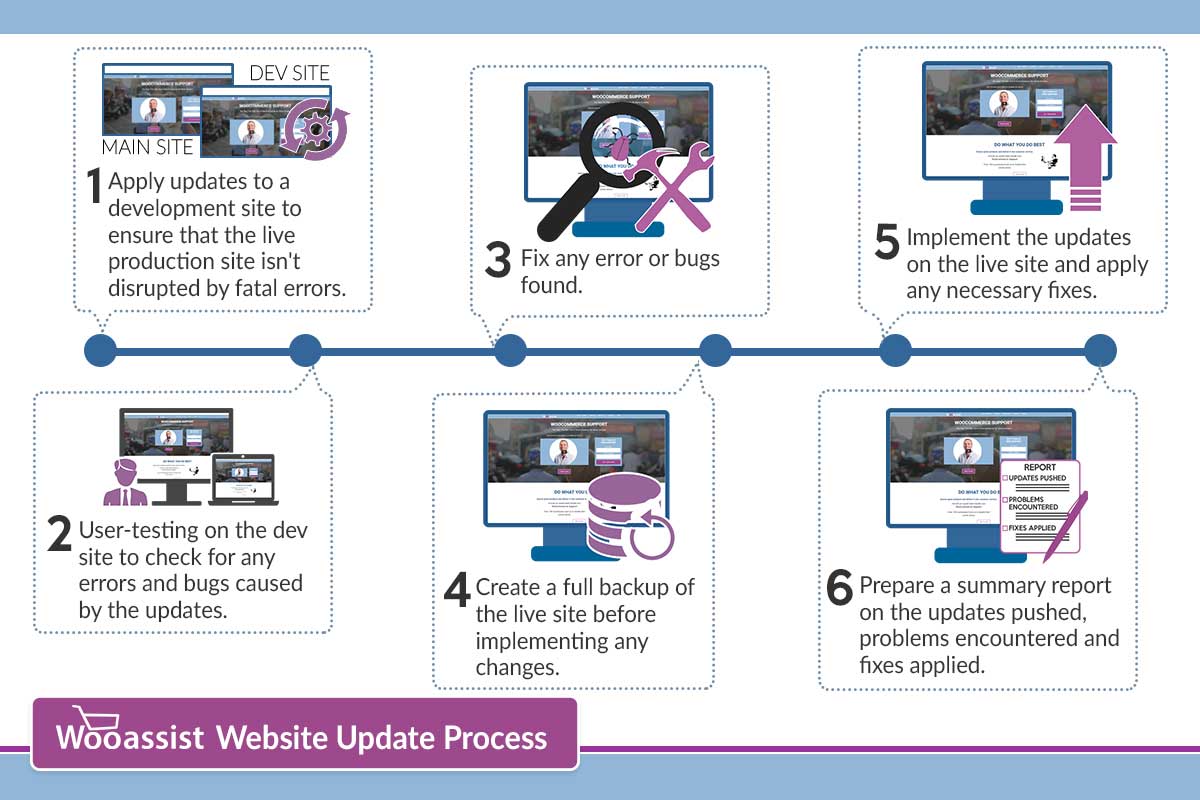
How we do updates (click to enlarge image):
wooassist-website-update-process

Although it might be possible to skip most of these steps, proceed directly to updating the live site and wait for whatever errors to come up, it may end up causing irreversible damage to your site. This could cost you thousands of dollars in lost sales and having support services spend more time fixing the issue when it could have been easily avoided in the first place.

On average, we take around 2 to 3 hours implementing the entire process when done once every month. We take pride in our service and do not cut corners and take shortcuts. If in the rare occassion that we miss an error that was created due to the updates, we will have it resolved at top priority.

Letting us do your site updates for you will rid you of having to worry about this part of website ownership altogether leaving you with peace of mind and time to focus on growing your business.

Filed Under: How-To Articles Tagged With: backup, how-to, plugins, security, Wooassist, WooCommerce, WordPress

Creating and Editing Products on WooCommerce

January 29, 2015 By John Leave a Comment

Creating and Editing Products

Want to boost your online conversion and sales? Adding more products to an already existing store, with an already existing user base, is the way to go!

You are not as limited by shelf space as a physical store, so make use of this and add more products. It makes sense that the more you have to offer the more you can sell, right? But should you be adding them yourself?

Our Solution for Convenience

If you have a lot of products in your WooCommerce store, it may be difficult to manage it on your own.Tweaking the look of your product page, as well as creating variable and grouped products can be a little too complicated.

Adding and managing products can take a lot of your precious time. For one, you have to familiarize yourself with how the product categories, tags and attributes work. Then, all product data should be input.

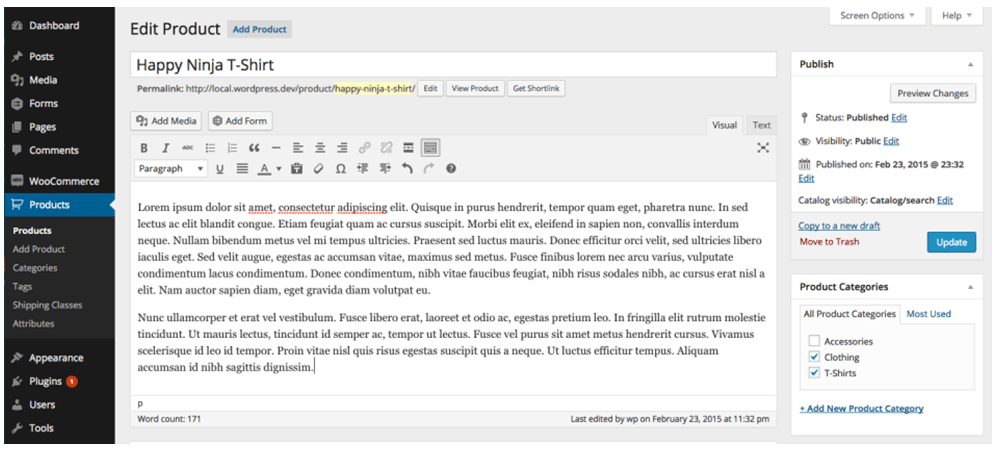
large

If you own the business, wouldn’t you rather have someone else do all this while you focus on growing your business?

Here’s the thing – you should spend more time working ‘on’ rather than ‘in’ your business. It means doing developmental activities to improve your business, rather than routine activities that you do every day to keep the business going. Why? Read more about this post here.

Instead of staring at your WordPress dashboard and clicking on Add New Product day in and day out,use the time in planning, marketing, and following up on leads. Or, spend the time with your family.

Our team can help you out with your WooCommerce store so you can prioritize on your tasks that really matter. Leverage your time by hiring people who can create, add, and edit products on your online store – fast.

Filed Under: How-To Articles Tagged With: admin, how-to, outsourcing, product management, Wooassist, WooCommerce, WooCommerce products

Backup Your WooCommerce Store on WordPress

January 29, 2015 By John Leave a Comment

hard-drive-656122_1280

Your online store may be up and running, but it still requires consistent management. Your database grows as you add new products or post something on your blog. It would be a shame if you lose everything in an instant.

This can be avoided by backing up your data. It’s one of the best ways to protect your investment. This post explains the importance of being backed up.

Set Your Own Backup

Most site owners assume that their web host does all the backing up. While most web hosts do have backups, they are not as reliable as your own. What’s more, there’s always a chance that your host failed to do so.

unita-disco-rigido-arch-01r

Not setting up your own backup is an unacceptable mistake. You can either learn to backup your data on WooCommerce, or you could have others to do it for you. These simple steps can teach you how to backup the data on your site. It’s crucial to choose a reliable web host that provides better security, and has backup solutions in case something happens to your own database.

Doing this right from the moment you go live with your WooCommerce store assures you peace of mind. Having all your data backed up means you don’t need to worry as much about any security problems. Your original site and all-important data can always be recovered.

WordPress-Specific Options

You shouldn’t rely solely on the backups made by web host companies. It’s because the backups they make, are not specific to WordPress. You need to look for WordPress-specific options. Using remote backup services is one good example. These services use cloud servers and guarantees that your data would be safe and secure.

BlogVault provides real-time backup solution in WooCommerce. It guarantees immediate backup with each update done. For a more detailed description of BlogVault, you can check it here.

For more information on how to backup your data on WooCommerce, check our earlier post. Having a good backup process helps keep all your data safe. But if you have your hands full on other areas of your business, the Wooassist team can setup a solid process for your online store.

Filed Under: How-To Articles Tagged With: backup, how-to, website maintenance, WooCommerce, WordPress

Speed Optimization to Help Your Online Store Rank Higher

January 29, 2015 By John Leave a Comment

SnapCrab_2015-07-03_10-57-18_No-0000

Site speed sells – it can help your rankings, and increase conversion. Why is this so? First of all, Google announced that ‘page speed’ is now a ranking factor. Next, ensuring that your pages load quickly can lead to customer satisfaction. When you’re in the ecommerce industry,it is a must to invest in site speed optimization.

Higher Conversion Rates

A website that possesses optimum load speed has higher conversion rates. Any delay in site speed equates to unsatisfied customers. It’s enough reason to make them leave and go to other sites. Remember, your loss is your competition’s gain.

SnapCrab_2015-07-03_10-57-36_No-0000

Google has always rewarded sites that have clean codes and download quickly. They even launched a new web-based tool, which analyzes the performance of web pages. They also provide specific suggestions for making them faster. You can read more of this here.

This means that if your site loads slower, it will rank poorly in the search engines. You need speed optimization to help your online store rank higher.

Optimizing Site Speed

The window of opportunity for websites to engage and catch the interest of users is pretty small. We’re talking around three to five seconds. After that, users may leave.Chances are, they wouldn’t bother to make another visit. That converts to lost revenue, which hurts your bottom-line.

Page loading speed is the first thing site visitors notice. It even takes precedence over the site’s design. For that reason, you might find these tips about optimizing website speed helpful. Even more so for larger sites that have plenty of products.

Building and maintaining an ideal website takes a lot of hard work. There are so many things to consider, and site speed optimization is not the least of those. A fast loading site is essential to ranking well in Google and the other search engines.

Filed Under: How-To Articles Tagged With: e-commerce, how-to, page speed, site speed optimization

  • « Previous Page
  • 1
  • …
  • 18
  • 19
  • 20
  • 21
  • 22
  • …
  • 24
  • Next Page »
Let us support your online store so you can manage your business

Get started today

Get 2 Hours of FREE SUPPORT

We are so confident that you will love our services that we will give you your first 4 hours at a 50% discount

That’s 4 hours for only $75

BUY NOW

Free eBook

5 Things Every Online Store Can Fix On Their Website In The Next Week To Increase Sales

Quick Links

  • How it Works
  • Pricing
  • Blog
  • Contact
  • About Wooassist
  • My Account
  • Checkout
  • Privacy Policy
  • Cookie Policy
  • Terms and Conditions

Wooassist

Australia:
59 Luke St.
Hemmant QLD 4174

Philippines:
San Miguel St.
Poblacion, Iligan City 9200

Connect


Copyright © 2026 · Wooassist

Yours FREE!

5 Things Every Online Store Can Fix On Their Website In The Next Week To Increase Sales