
Wooassist

Assistance for Your Woocommerce Store

  • How it Works
  • Pricing
  • Services
    • Site Maintenance
    • AI SEO and Content Marketing
  • Blog
    • How-To Articles
    • Code Snippets
    • SEO For E-Commerce
    • Theme and Plugin Reviews
    • Wooassist News
    • WordPress/WooCommerce News
    • Interviews
  • About Us
  • Contact
You are here: Home / Archives for responsive design

10 Things You Can Do Right Now to Improve Your WooCommerce Store

October 10, 2017 By John Leave a Comment

Ecommerce - Improve your WooCommerce StoreAs a WooCommerce store owner, your goal is to make your business as profitable as it can be. Here, we list down 10 things that you can do today to improve your WooCommerce store.

1. Add a call-to-action button on your home page

Adding a call-to-action button on your home page encourages your visitors to take whatever action you want them to take. You can direct them to click on your shop, sign up to your email newsletter, send you an email, call you, or add a product to the cart.

thumbs-up

2. Add your contact details

Making sure that your contact details are immediately visible will increase your site’s trust rating. It can be your email or phone number. You can even add your store’s address if you have a physical store.

3. Add an email capture form

Getting your customer’s emails will allow you to send newsletters or special offers to those who sign up.

4. Remove distractions from your checkout page

Removing distractions from your checkout page will reduce cart abandonment. When a customer reaches your checkout page, you don’t want them clicking anything else except that “Pay Now” button.

5. Add related products to your product page

Adding related products to your products page will encourage your customers to purchase more items from your store. This will increase your average order value.

6. Offer free shipping

Not everyone can offer free shipping. But if you are able to, free shipping can really amp up your conversion rates. You can also offer free shipping with a minimum order value or for specific locations only. Make sure your visitors know you offer free shipping by placing a notice in a prominent area of your site.

7. Optimize your product copy

There are a lot of ways to optimize your product copy. You can optimize your copy to appeal to customers by emphasizing on the problems that your products can solve. You can also optimize your product copy to include technical details. Lastly, you can optimize your copy for ease of reading. How you optimize your product copy really depends on your product and your customer profile. You can use Hemingwayapp to check your copy’s readability score.

8. Optimize images on your WooCommerce store

product-zoom-in

When uploading product images, you must first optimize your product images to make sure you are uploading the correct image sizes. To determine the correct image sizes for your theme, you will need to use the “Inspect Element” feature of your browser. You will then need to go to WooCommerce settings to set the correct image size. Uploading anything bigger than the image placeholder’s size is a waste of resources and will just slow down your site. You can learn how to optimize images for the web in this blog post.

9. Remove sliders and use a single hero image with a call-to-action

Sure, sliders look good. But the truth is, they may actually do more harm than good to your site. Sliders can really slow down a site and a slow site is bad for SEO and conversion rate. Also, sliders can confuse customers and makes for bad user experience. Your website must send a clear message on what you want your customers to do. A slider just confuses your customers with various images that look like advertisements.

10. Make your site is mobile responsive

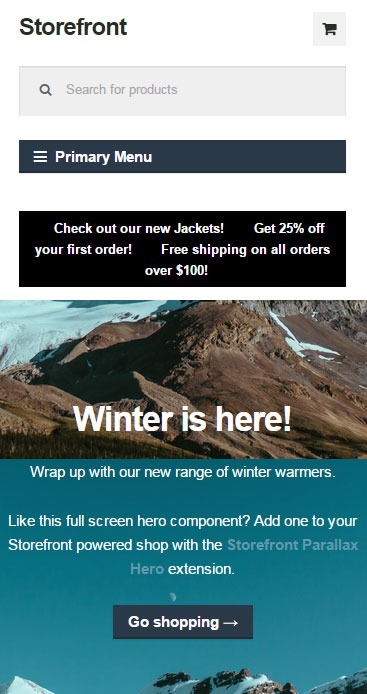
If you have not updated your site’s design for years, it might not be mobile responsive. This means that your website does not adapt to different screen sizes which makes browsing on a mobile device difficult. This is not good for your site’s user experience. Also, having a mobile responsive WooCommerce store is an advantage in terms of SEO. You can address this by using a responsive theme such as Storefront or the Genesis framework with a Genesis child theme. Both these themes are compatible with WooCommerce.

If you need any help getting any of these things done, you can contact us and we will help you get these sorted. If you have any questions, you can let us know in the comments section.
Filed Under: How-To Articles Tagged With: admin, best practices, call-to-action, content marketing, conversion optimization, design tweaks, e-commerce, how-to, optimizations, page speed, responsive design, website maintenance

How to Rename Primary Menu in Mobile View for Storefront Theme

February 26, 2015 By John 6 Comments

Updated 18/2/16 : Storefront Theme was updated. Adding a filter hook to rename the navigation.

Rename Primary Menu in Mobile View for Storefront ThemeIf you have donned the Storefront Theme by WooThemes and tested the mobile view, you might have noticed that your main navigation/menu turns into a collapsible menu. While this menu does serve its purpose in the mobile view, it being named “Primary Menu” isn’t very desirable. You most likely need to change it to something more appropriate for your needs.
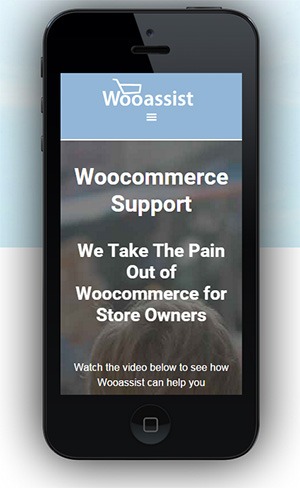
Different websites have different navigations so from the theme developer’s standpoint, putting in a not very descriptive text like “Primary Menu” will serve its purpose just fine. But for a website owner like you who knows what he wants, you’d want something more specific for that mobile collapsible menu. Maybe you’re selling your own line of apparel and your menu is filled with different product categories, so you want the text to be something like “Product Categories”, “Browse Clothing Line” or maybe even make it a call-to-action like “Shop Now” or “Shop Online”. Bottomline, you know what you need the text to be on that mobile collapsible menu. Lucky for you, it’s easy enough to accomplish with a few lines of code.

Get a Child Theme

Before we proceed, make sure you are running your website on a child theme. To begin with, there is really no reason why you shouldn’t have a child theme unless you want any changes you made to your theme to disappear whenever the theme updates. If you don’t have a child theme yet, get one.

Add the Filter

Now that you have a child theme, paste this code into your child theme’s functions.php file.

add_filter( 'storefront_menu_toggle_text', 'jk_storefront_menu_toggle_text' );
function jk_storefront_menu_toggle_text( $text ) {
 $text = __( 'MY NAVIGATION' );
 return $text;
}


Change the Text

Do you see the line with the following code?

$text = __( 'MY NAVIGATION' );

You’ll just need to modify the text “MY NAVIGATION” and change it with the text that you want on your collapsible mobile menu.


Filed Under: Code Snippets, How-To Articles Tagged With: call-to-action, child theme, code snippet, design tweaks, how-to, mobile friendly, navigation, responsive design, Storefront, woothemes

Google Mobile Friendly Update: Is Your Online Store Ready?

May 4, 2015 By John Leave a Comment

wooassist-iphoneGoogle mobile friendly update to penalize non-mobile friendly websites is out. Don’t tell me you didn’t see this coming. As more people used mobile devices to surf the internet, Google had to act. It was only a matter of time before Google started prioritizing websites that are optimized for mobile devices. The new algorithm came into effect April 21.
If you have an e-commerce store you should be concerned about all updates from Google. For a lot of online stores, the success of your business depends on Google. This update could destroy your rankings if your website is not mobile responsive. If ranking high in Google is a big part of your revenue strategy then this could be disastrous for your business.

What You Should Do

Use this Mobile-Friendly Test. If your website passes the test, then you have nothing to worry about. But if your website fails the test, you’ll be presented with suggestions on how you can resolve the problem.

If you have an e-commerce store using WooCommerce, there are a lot of responsive WordPress themes that you can use. These responsive themes are optimized for use on mobile devices. WooTheme’s own Storefront theme made especially for WooCommerce is responsive so that’s worth a look. We can also recommend Genesis themes from StudioPress.

How Much Will it Cost?

mobileThat question is a bit like. “I need a car. How much will that cost?” Of course, the answer is, “It depends”. But to give you an example, we have recently upgraded a few clients themes to the new Storefront theme for between $400-$600.
When upgrading a theme, you tend to notice things that you probably should have noticed on the original site, and need to update those as well. So setting a budget of $1000 – $1500 is probably more realistic.

Should You Have Made Your Site Responsive 12 Months Ago Anyway?

This update by Google might just be the thing that most store owners needed to push them into action. Non-responsive ecommerce sites are more than likely leaving a lot of money on table. There is some strong evidence to support this: 14-brands-that-increased-conversion-rates-via-responsive-design

For example, O’Neill Clothing’s redesign achieved some fairly spectacular results on iPhone/iPod:

  • Conversions increased by 65.71%.
  • Transactions went up 112.5%.
  • Revenue increased by 101.25%.

Similarly, on Android devices:

  • Conversions shot up by 407.32%.
  • Transactions increased by 333.33%.
  • Revenue increased by a whopping 591.42%.

Personally, we haven’t seen results this good on the sites we manage. But nonetheless, all responsive redesigns we have done have paid for themselves within 6 months.

The Mobile Friendly Algorithm

Like usual, Google’s algorithm remains a trade secret. It is now up to SEO experts to try to figure out what the algorithm considers in its ratings. Google is actually forgiving this time around as they did provide that tool that will let you check if your website meets their mobile-friendly standards.

If you want to see what your ecommerce store looks like on different mobile devices, you can use this mobile user testing tool. This tool emulates screen sizes of the most popular mobile devices so you can see exactly what your site looks like on a mobile device.

What Sites Were Affected

According to an article from USA Today, the algorithm update could affect as much as 40% of top websites.

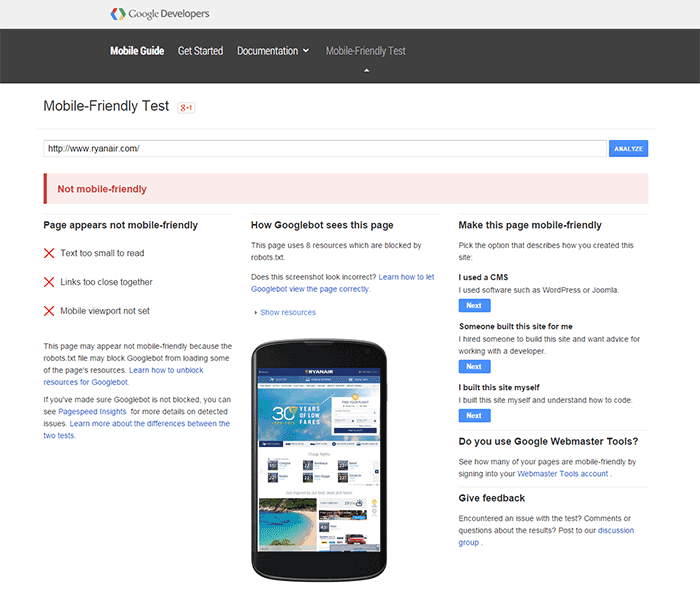
Here is the test result of one website that did not meet Google’s mobile-friendly update.

ryanair-non-mobile-friendly

A few weeks before the new algorithm came into effect, tech website TechCrunch tested the websites of Fortune 500 companies. Surprisingly, 44% of Fortune 500 companies’ websites did not pass the mobile-friendly test. So if your ecommerce store didn’t pass the test, you are not alone.

I Failed the Mobile Friendly Test. Should I be Worried?

Well, you should be worried. Still, according to an article from Search Engine Land, it’s not too late to act. You can still fix your website. While some changes in rankings were seen just a day after the update, these changes were not significant. This does not mean you shouldn’t bother doing anything. Sooner or later, Google could clamp down and bring harsher penalties to non-mobile friendly websites. Don’t wait for it to hit hard before you do something.

Filed Under: How-To Articles, SEO For E-Commerce Tagged With: e-commerce, Genesis, Google+, how-to, mobile friendly, responsive design, Storefront

  • « Previous Page
  • 1
  • 2
Let us support your online store so you can manage your business

Get started today

Get 2 Hours of FREE SUPPORT

We are so confident that you will love our services that we will give you your first 4 hours at a 50% discount

That’s 4 hours for only $75

BUY NOW

Free eBook

5 Things Every Online Store Can Fix On Their Website In The Next Week To Increase Sales

Quick Links

  • How it Works
  • Pricing
  • Blog
  • Contact
  • About Wooassist
  • My Account
  • Checkout
  • Privacy Policy
  • Cookie Policy
  • Terms and Conditions

Wooassist

Australia:
59 Luke St.
Hemmant QLD 4174

Philippines:
San Miguel St.
Poblacion, Iligan City 9200

Connect


Copyright © 2026 · Wooassist

Yours FREE!

5 Things Every Online Store Can Fix On Their Website In The Next Week To Increase Sales
