Wooassist

Assistance for Your Woocommerce Store

  • How it Works
  • Pricing
  • Services
    • Site Maintenance
    • AI SEO and Content Marketing
  • Blog
    • How-To Articles
    • Code Snippets
    • SEO For E-Commerce
    • Theme and Plugin Reviews
    • Wooassist News
    • WordPress/WooCommerce News
    • Interviews
  • About Us
  • Contact
You are here: Home / Archives for SEO For E-Commerce

How to Outsource Writing Blog Posts and Get 55% More Traffic to Your Site

October 7, 2015 By John Leave a Comment

blog-793047_640

Did you know that e-commerce websites that have a blog gain 55% more traffic?

Writing blog posts can be a daunting and a time-consuming task. Learning how to outsource writing blog posts makes a lot of sense. However, before you go about outsourcing, you should get a few things organized.

Prepare a Blog Strategy

If you already have a blog and didn’t start it with a strategy in mind, then you are doing it wrong. Without a clear strategy in mind, you are unlikely to reach your objectives. With a strategy, you will have a goal and everything you do on your blog should contribute to achieving that goal.

strategy

Being consistent with your strategy is key according to Neil Patel.

It’s hard – if not impossible – to succeed at content marketing without creating blog posts on a regular basis. Every successful blog is built on a solid foundation of content, but it’s consistency that’s the real key to success.

If you are going to write content, write the best content on that topic. Competition is tight so doing anything less than the best is not likely to give any results.

Prepare a Style Guide

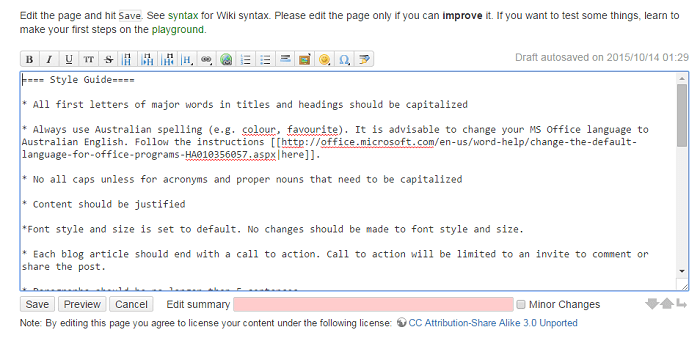
What is a style guide? Think of a style guide as the written rules for your blog. It can be a simple bullet point list available on the web. We use Dokuwiki for this.
style-guide

Your style guide should show what kind of language will be used throughout your blog. For example, if your target market is Australia, you should be using Australian English. If your market is the US, then US English.  Your style guide should also contain your preferred spelling of words with multiple spellings. Examples of words with different spellings are “aesthetic” and “esthetic” or “e-commerce” vs “ecommerce”.

You can also list how you plan to use images on your style guide including preferred sizes and alignment.

This style guide should be updated from time to time and should be made available to anyone writing content for you.

Prepare a Customer Persona­­

customer-personaYour blog needs to speak the language of your customers. This is best achieved by creating a customer persona. Check out this blog post to learn how to create a customer persona.

When you know your audience, you understand their needs. If you understand their needs you can speak their language and give them exactly what they want.

Prepare a Content Roadmap

A content roadmap shows a list of blog post ideas that you want to add to your blog. Each idea should include a title, a summary, and sources that you plan to use. You can have the writer that you will outsource do this after you have shown him/her your blog strategy.

Outsourcing a Writer

When it’s time to outsource a writer for your blog, share all the documents that you have prepared. This includes your blog strategy, style guide, customer persona, and content roadmap if you did it already. This will give the writer a better idea on how to write content that will accomplish your goals and speak with your customers.

blogging

Note that it might take a while before you can find a writer that you will like. Don’t be afraid to try a few writers to find the one satisfies your needs.

Find a Writer that Knows SEO

When looking for a writer to write content for your blog, you should find a writer that is knowledgeable in SEO. A blog should be targeting long-tail keywords. To know what a long-tail keyword is and to learn how it can be used to attract more visitors to your site, check out this post.

Communicating with the Writer

Your roadmap is not set in stone and should change from time to time as new trends arise and/or you come up with new ideas. You will often think of a topic that you need to act on straight away. When this happens a rough draft or a summary of the article will do to start with.

See what your writer comes back with and then make suggestions if needed. It will be much easier for you to start with a draft a quality writer has already created than a blank page

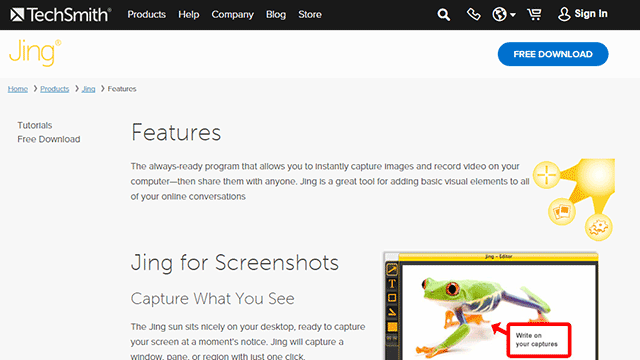
Sometimes you will need to talk about the content that you want written. It might be a good idea to record a video brief of the instructions. We do this sometimes and in such cases, we make use of Jing. Jing will capture a video of your screen. With a mic, you can send instructions. When you’re done making the video, you can just send a link to the contractor. Compared to Skype conversations, this is better as the contractor can review the instructions when needed.
jing

Proofreading and Editing Content

Proofreading and editing content is an important process that needs to be done every time you will publish content. Never skip this process as a poorly written blog post with lots of grammar and spelling errors will reflect poorly on your brand.

Even if you opt to write the blog posts yourself and not outsource. This is one step that you must outsource. You need a fresh pair of eyes on your content.

In our case, we have at least two other people check any article before it is published. The writer writes the content and sends it to the first editor who will check the content and give feedback. If there any changes to be made, it is returned to the writer to make the changes. After that, the article will be sent to the second editor. The second editor will check the style, fix any grammar or spelling errors, and ensure that it follows the blog style guide. The “Track Changes” function in Microsoft Word works great for proofreading and editing content.

track-changes

Summary

To sum it up, outsourcing a writer for your blog doesn’t mean just jumping in and immediately hiring someone to do the writing for you. You need to have a clear strategy before you do any of that. In line with your strategy, you should also prepare a blog style guide, a customer persona, and a content roadmap. When that’s out of the way, you can start looking for a writer that will accomplish all of your writing needs. Finding that perfect writer can take a while so keep at it.

Do you have any other tips for outsourcing a writer for a blog? Let us know in the comments.
Filed Under: How-To Articles, SEO For E-Commerce Tagged With: blog, customer persona, how-to, marketing strategy, outsourcing

Understanding Search Engine Optimization (SEO) Basics for Your Online Store

January 29, 2015 By John Leave a Comment

searchengineoptimization

Google’s business model is to return the most relevant search results on the web. That’s why people keep using them – and by ‘people’, it includes your potential customers. Being ranked on the top pages allows companies to receive more visitors and generate more leads.

Google uses complex algorithms to assess the relevance of website across the web. They have hundreds of criteria for determining rankings.

A high ranking in Google translates to more site visitors and potential revenue. But how do you achieve that coveted status?

The answer is a well-rounded website.

It should be a site built on a best-practice code base that offers interesting and engaging content users are searching for. In your case, it is an online store using the Woocommerce platform. Understanding Search Engine Optimization (SEO) for your online store is one of the main factors to creating a well-rounded website.

Search Terms

What terms are your ideal clients using when searching for your service? Play around by creating synonyms, abbreviations, plurals, past tense, present tense, verbs nouns, etc. From one word, multiple search terms can be obtained.

For example, from the word car, we can get: car, vans, automobile, pick-up, etc. You will not rank for cars because it’s too popular, making the competition tight. Go for specific keyword “phrases” like “funny car stickers” or “ford car mats” to help you rank higher, and attract your ideal client.

You can use tools such as:

  • Google Keyword Planner (formerly the Keyword Tool).
  • http://ubersuggest.org/
  • https://serps.com/tools/keywords

Once you come up with your list of keyword phrases, dedicate an optimized page on your site for each keyword phrase.

You can outsource some of the research, but the business owner or sales manager needs to check the list. There is no point optimizing your site for key phrases of products that you either don’t sell, or make very little margin from.

Help Google Find You

Assist Google by labeling your content. Everything on your site can be labeled by meta data. Meta data is not visible to the user, but helps Google web crawlers identify what your site is about.

SnapCrab_2015-06-26_14-32-58_No-0000

All good website platforms like WordPress have this baked in to make it easy to add “meta data” to any page on your site.

Using our example above, “funny car stickers” would need to have a page on your site with metatags, something like:

Title: Funny Car Stickers | Bumper and Window Stickers. Car Decals
Description: Find 1000s+ of Unique Bumper Stickers & Car Decals. Tons of Funny designs available, or personalize your own!

On its own, meta data won’t do much to get you in the rankings. It needs relevant content to back up what the meta data is saying about your site. Your content needs keywords, plus synonyms, and related words. If you are writing about the topic you want to rank for, then this should happen naturally.

On-Page -> Off-Page SEO

Up until this point we have been talking about on-page SEO, which involves strategies controlled by the website owner. Wooassist can help with all your on-page SEO needs, but at this stage we don’t offer an off-page SEO service.

Our proficiency is the technical aspects of WordPress and Woocommerce, not content creation. Off-page SEO is the overall publishing and running of the website across the internet. It involves obtaining in-bound links from other websites. To do that, you need remarkable content that people will share and link to.

Improving Relevance and Authority

Linking from relevant websites is still the number one way to rank high in Google. It’s just harder now to achieve this. A few years ago, it was possible to create these links and trick Google into thinking you were popular.

Now, part of Google’s mission is to detect “un-natural” links, and mark it as deceptive and manipulative. Any link scheme is a violation of Google’s Webmaster Guidelines.

Google encourages quality content, and they define it as written by an expert or enthusiast who knows the topic well. Choose topics that are driven by genuine interests of readers of the site. Provide useful content that people will link to, and share with their friends on social media.

With all the factors you need to consider about SEO, it is easy to make mistakes. Here is a good write-up about those common SEO mistakes that you need to avoid.

The irony is, your site will rank high in Google when there is no longer any need. If you create great content that Google wants you to, and people are sharing your content, then you can get a lot of traffic to your site without the help of Google.

Filed Under: How-To Articles, SEO For E-Commerce Tagged With: Google+, how-to, keyword research, SEO strategy, SEO tools

How to Set Up WordPress SEO by Yoast for WooCommerce

March 26, 2015 By John Leave a Comment

How to Set Up WordPress SEO by Yoast

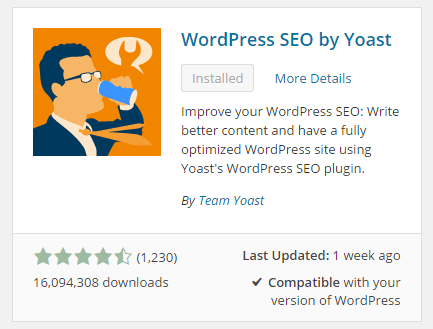
The WordPress SEO plugin by Yoast with over 16 million downloads is easily one of the best plugins that you need to have on your website. Whether it’s a personal blog, an e-commerce store, or a company website, you should have this plugin. In fact, many WordPress developers have WordPress SEO by Yoast in their list of plugins to install each time they create a new website. Many of you may already know a bit (or a lot) about SEO and that’s okay. That just means you’ll make better use of this plugin. And for those that don’t know much about SEO, don’t worry. The plugin is user friendly. I’ll walk you through all the functionalities so you’ll know how to set up WordPress SEO by Yoast for WooCommerce.

Installing WordPress SEO by Yoast for WooCommerce

To install the plugin, head over to the plugin developer’s website. Once there, download the plugin and upload it at the plugin page of your WordPress Dashboard.

You can search for the plugin on the plugin repository by going to your WordPress Dashboard. Click on “Plugins” and then “Add New”. From there just use the search bar to search for the WordPress SEO plugin and click on “Install Now”.

SEO Plugin Especially for WooCommerce

For WooCommercestore owners, getting the premium Yoast WooCommerce SEO plugin is a worthwhile buy. When used with the WordPress SEO plugin, you can better optimize your WooCommerce store. It enhances the existing Open Graph and Twitter Card enhancements in the WordPress SEO plugin. It will also optimize your sitemap for an ecommerce store setup, among other things. For a guide on how to set this up, check out this post.

Optimizing Product Pages for SEO for WooCommerce

The single most important function of the WordPress SEO plugin by Yoast is its ability to help you optimize your blog posts and pages for SEO. That includes WooCommerce products. WooCommerce products work just like posts/pages so it is the same procedure. So when I say page or post, the same applies to WooCommerce products.

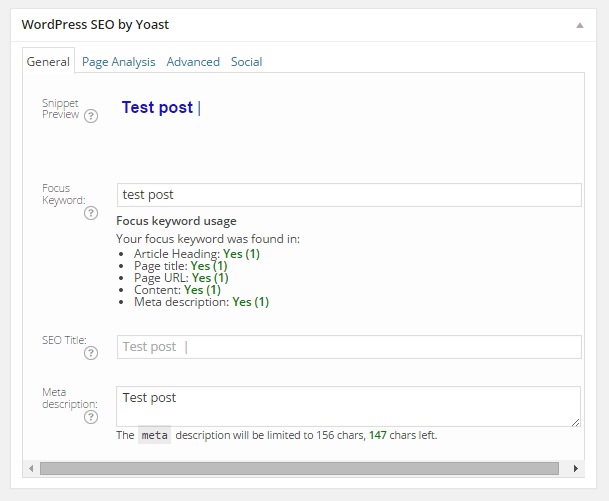
Optimizing posts/pages is easy enough. You can do it right after you finish creating the post/page in WordPress. When you’re on the post or page, just scroll down and there will be a section named “WordPress SEO by Yoast”. On the General tab, you’ll see a Snippet Preview. This is how your post/page will show up on the Google search results page. And the fun part is that you can edit how your post will show up. First off, you set a focus keyword. This should be the keyword that you want your blog post or page to rank for. What you should be aiming for is to have this focus keyword in:

  • the title of your article
  • in the body of the content especially in the first paragraph
  • and the meta description which you can set in the field where it says meta description

If you got that all right, you should be seeing all green below the focus keyword that you set.

post-optimization

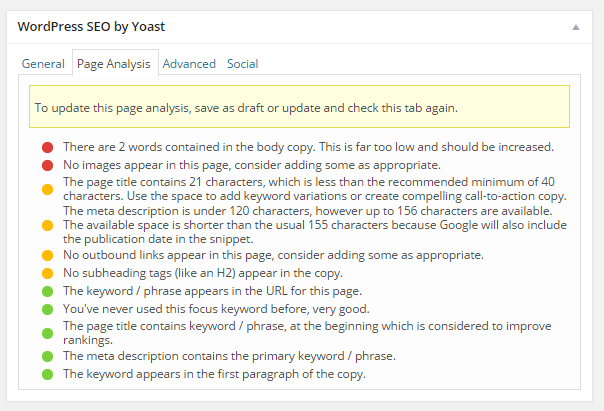
You can also click on the Page Analysis tab to get more information and other suggestions to improve your post/page. You don’t have to follow all the suggestions. But following everything will help increase the quality of your post/page.

page-analysis

You can tweak a bunch of other settings under the Advanced tab so feel free to change them as you see fit. You can even change how your post would appear when it gets shared on social media under the Social tab.

Optimizing WooCommerce Product Categories for SEO

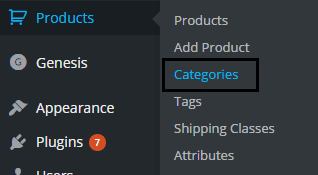
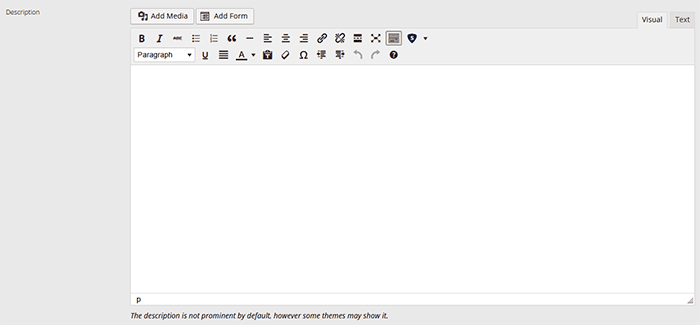
woocommerce-product-categoriesSimilarly, you can also optimize WooCommerce product categories for SEO. Just go to “Products” and click on “Categories” Edit the category that you want to optimize. When you scroll down to the bottom of the “Edit Category” page, you’ll see a section called Yoast SEO Settings. Fill in the SEO Title and SEO Description fields and click on Update.
optimizing-product-categories

Unlike when optimizing product pages, you don’t get to set a focus keyword. However, you can still target a keyword by including the keyword in the SEO Title and SEO Description fields. You should also put it in the Category Description field above the Yoast SEO Settings section.

Note that not all themes are able to display product category description on the category page but if your theme supports this function, the text that you put will appear on your product category page.

product-description

Verifying Your Website with Search Console

Verifying your website with different Google Search Console tools is important if you want your site crawled. It will have your website crawled by spiders. I don’t mean actual spiders. I mean search engine spiders that index websites on different search engines. Verifying with different webmaster tools can be a complex process but this is made easy with the WordPress SEO plugin.

Linking with Social Media Profiles

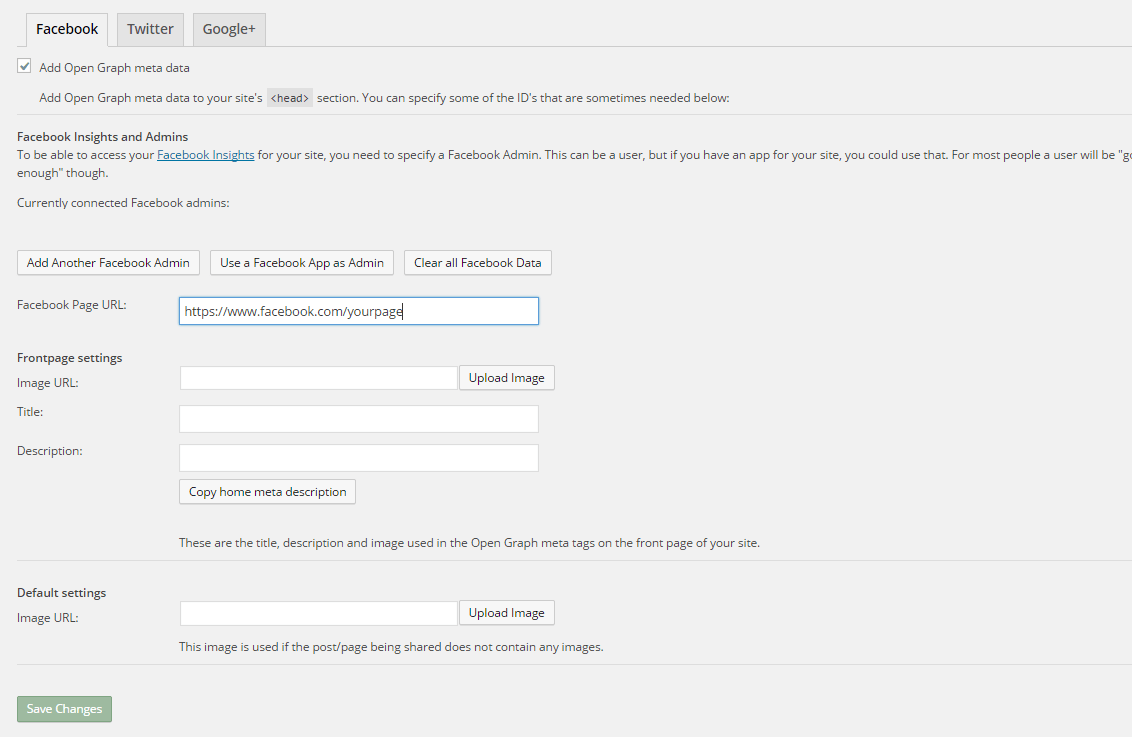
You can connect your website with your social media pages with the WordPress SEO plugin. You can do this by going to “SEO” and then clicking on “Social”. Here there are three tabs: Facebook, Twitter and Google+.

How to Connect Facebook

Linking Facebook to your site allows you access to Facebook Insights. If you already have a Facebook page, you just need to get the URL of your Facebook page. Copy the URL and then paste it where it says “Facebook Page URL”. You can then set the administrators for your page by clicking on Add Facebook Admin. If you are an advanced user, you can tweak a bunch of other settings. When you’re done, just click on “Save Changes”.

facebook

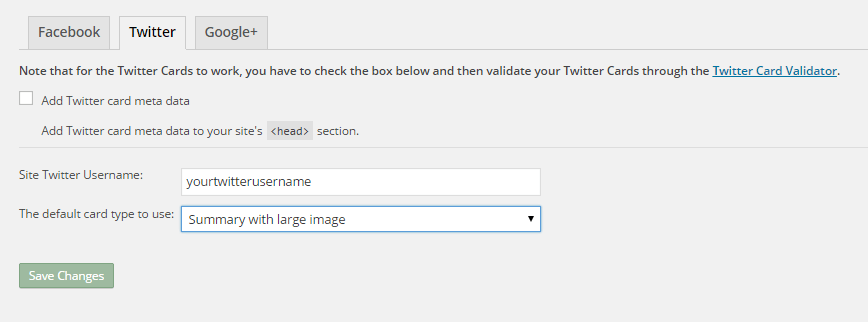
How to Set Up Twitter Cards

Do you use Twitter? Have you ever seen links in Twitter that show a snippet of the page that it links to? That’s called a Twitter card and you can enable that on your website using WordPress SEO. The usual thing is that enabling Twitter cards would call for you to add some lines of code to your header. But WordPress SEO eliminates the need for that.

twitter

How do you do this? On the Social section of the plugin, click on Twitter. Fill in your Twitter username on the appropriate field. Specify the kind of Twitter card that you want to have then click on “Save Changes”. You’re not done yet. You still need to confirm your Twitter card. Head over to this link. Specify the URL and click on “Preview Card”. After that, click on “Request Approval” and fill out the form. Finally, click on another “Request Approval”.

Soon, you’ll be able to see Twitter cards on your Twitter links.

The premium YoastWooCommerce SEO plugin will further help you optimize your Twitter Cards if you have that.

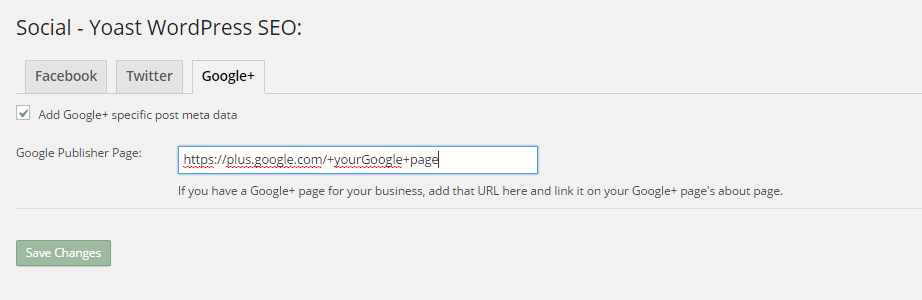
How to Connect Google+

To connect your website with Google+ means setting your Google+ profile as the publisher of your content with the “rel=publisher” markup. “Rel=publisher” is an authorship markup which connects websites to Google+ pages (not personal profiles).

To connect your Google+ company page, head over to the “Social” section of the plugin and click on Google+. Fill out the field with the URL of your company page on Google+ and click on “Save Changes”.

google+

You might have heard of “rel=author” which links the content to the Google+ profile of the author. When implemented in the proper way, “rel=author” should show a snippet of the content with a photo of the author in the SERPs page. If you’re a writer and you’re hyped by that, I’d hate to burst your bubble but “rel=author” is no longer supported by Google. You can read more about it here.

Improving Sharing on Pinterest

Pinterest is another social media platform that’s worth mentioning. It has great potential for e-commerce stores. Why? Because Pinterest is image-based. The YoastWooCommerce SEO plugin makes sharing on Pinterest more worthwhile. After setting Twitter products and Schema Open Graph additions, your pins on Pinterest will start to show in a different way. In most cases, WooCommerce product will show up like posts. But with the plugin configured, your products will show up as “products”. They will show product related information such as price and variations.

Implementing Sitemaps with WordPress SEO

In a nutshell, sitemaps communicate with search engines to let the latter know when there are changes to the website. There are a lot of plugins that lets you create a sitemap. If you are already using the WordPress SEO plugin, just use the built-in sitemap module. Looking for another plugin just add an extra load to your server.

sitemaps

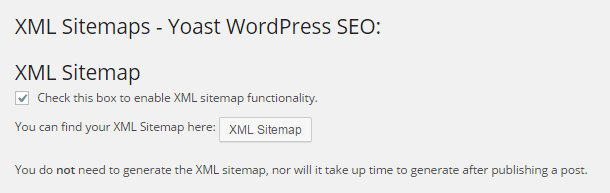
To get your sitemap, go to the plugin’s “XML Sitemaps” tab and then tick on the first box to enable sitemaps and click on “Save Changes”. There are a bunch of settings that you can tweak. You can have a look at them and change them as you please. They are pretty much self-explanatory.

You also might want to get the WooCommerce SEO plugin, which was mentioned above a couple of times. This removes some unnecessary bits from your sitemap in automatic fashion.

Check out our post on how to create a sitemap for your WooCommerce store to learn about sitemaps and other means of creating it.

Permalink Settings

Permalink settings all have to do with your URLs. I would not recommend changing any of the settings here but you are free to check them out and change them as you please.

Enabling Breadcrumbs with WordPress SEO

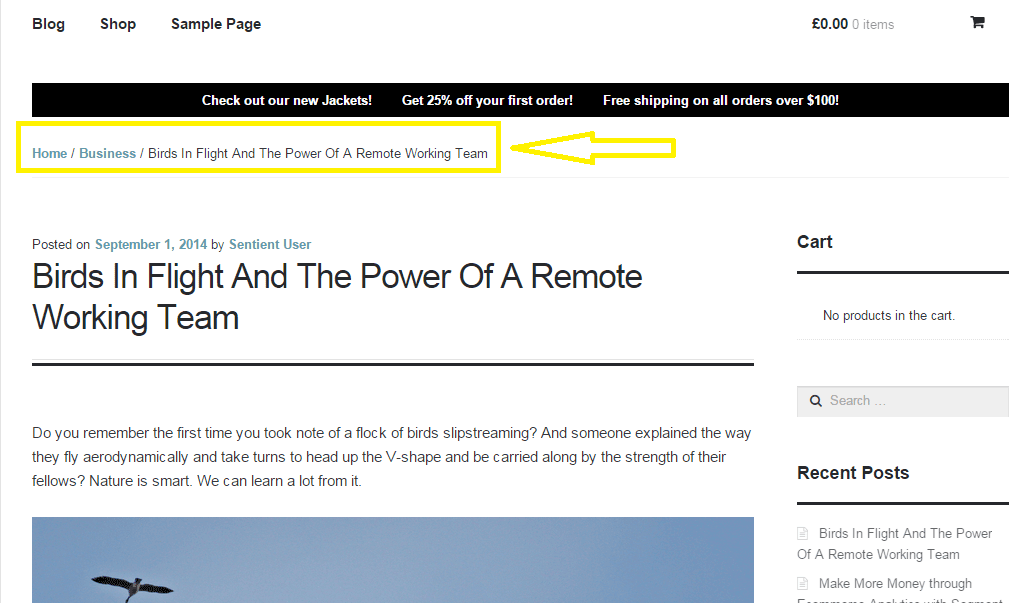
Breadcrumbs, when enabled, helps users identify where they are on your website. It also helps search engines determine your website’s structure. See the image below.  Where the yellow arrow is pointing at, that’s the breadcrumbs.

Enabling breadcrumbs on your website is simpler than snapping your fingers. Just go to SEO and then click on Internal Links. You should see a box that says “Enable Breadcrumbs”. So just tick that box and save. There are a few settings that you can tweak so just change them up as you need.

breadcrumbs

Did we miss anything? Or do you have any questions about the WordPress SEO plugin? Let us know in the comments.

Filed Under: How-To Articles, SEO For E-Commerce Tagged With: blog, breadcrumbs, content marketing, Google Webmaster Tools, Google+, how-to, navigation, optimizations, plugins, SEO tools, social media, Twitter, WooCommerce, WordPress, WordPress SEO, XML sitemap, Yoast

How to Optimize WooCommerce Products for SEO

May 31, 2018 By John 1 Comment

You’ve set up your WooCommerce store but you’re not getting any traffic. You wonder what you’re doing wrong. Have you optimized your product pages for SEO? If not, that could be one of the reasons why you’re not getting any traffic. In this article, we’ll teach you how to optimize your WooCommerce products for SEO.

Why Optimize for SEO?

You can do all the link-building you want but if the pages that you want to rank for are not properly optimized for SEO, then you’ll have a hard getting ranked on top of Google.

Still, traffic is just a metric and what really matters is your conversion rate. Even if you are getting thousands in traffic but they are not converting, you still have a problem. On the other hand, you can’t convert anyone if you are not getting any traffic at all. Essentially, SEO and conversion optimization go hand-in-hand.

You have to optimize for SEO to make sure you are attracting the right people to your WooCommerce store.

Steps on How to Optimize WooCommerce Products for SEO

Identify What Keywords to Optimize For

Normally, it will be difficult to rank for regular keywords. For example, if you are selling digital cameras, it will be difficult to compete with Wikipedia or Amazon unless your WooCommerce store is already an authority on digital cameras. So optimizing for the keyword “digital cameras” won’t work for you. This is where long-tail keywords come in.

What is a Long-Tail keyword?

Compared to a regular keyword, long tail keywords are longer and more specific. Instead of optimizing for “digital camera”, you can optimize for specific camera models or for specific features of digital cameras. Optimize for anything unique about the product that you are selling. A few examples of long-tail keywords can be “digital camera for underwater photography”, “digital cameras for beginners”, or “sports action digital camera”.

Do Your Keyword Research

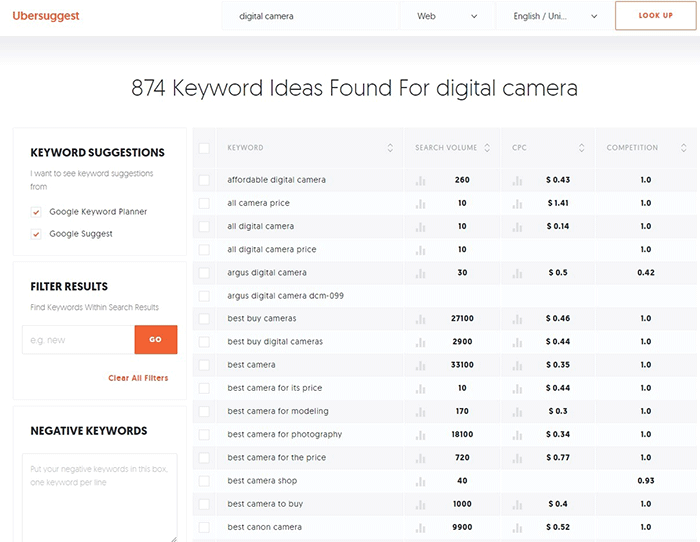
Don’t start optimizing until you do your keyword research. You can use whatever keyword research tool you have at your disposal. We can also recommend Ubersuggest. Just pop in a basic keyword and you can get a list of long-tail keywords that you can optimize for along with some valuable search data. You can even filter the keyword ideas and remove negative keywords. You can also export the keywords into a handy CSV file.

Ubersuggest Keyword Research

Add the Long-Tail Keyword to Your Product Page

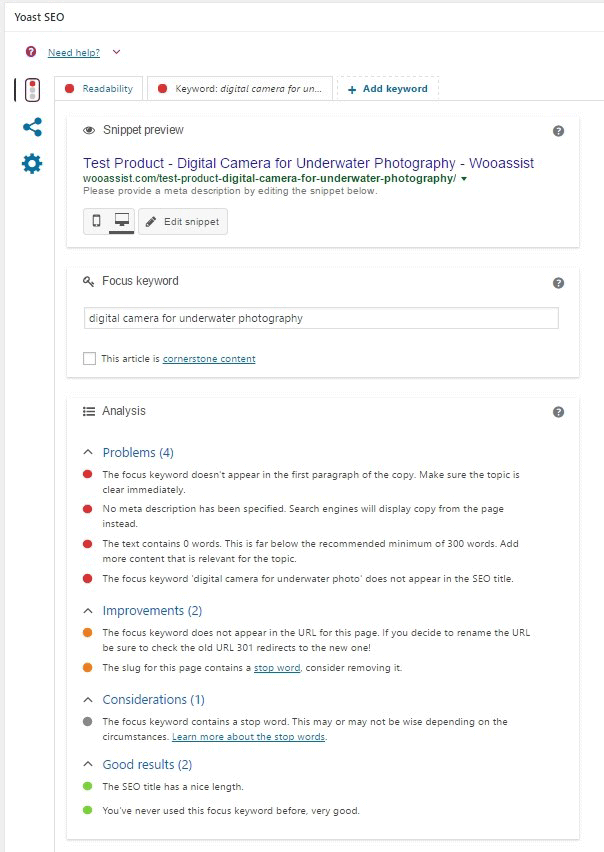
To help with optimizing your WooCommerce Products for SEO, you can use the WordPress SEO plugin by Yoast. The plugin provides detailed information on how you can optimize your products for SEO. It also has a boatload of other features that will help boost your SEO. Just install the plugin and you’ll gain access to the SEO optimizations block on your WooCommerce product editor.

When optimizing products for SEO, input the long-tail keyword that you wish to target on the “Focus Keyword” field. After doing this, you can see the analysis section below will show you recommendations on how you can improve your product’s SEO score.

How to Optimize WooCommerce Products for SEO

Generally, you will need to add your focus keywords to:

  1. The article title
  2. The first paragraph of the article
  3. One of the heading tags
  4. On the body of the article
  5. In one of the image alt tags
  6. In the URL/slug

You don’t need to force yourself to do every little thing that the Yoast SEO section recommends. Just use it a rough guide since it does recommend the currently known best practices.

Improving Content Readability

Google now also considers content readability as an SEO ranking factor. So it is important to ensure that your product descriptions are easy to read. In some cases, you may have to use some technical terms when writing your product descriptions and that’s totally fine. Depending on your products, that may actually be best practice. Still, it’s a good idea to check the readability of your content.

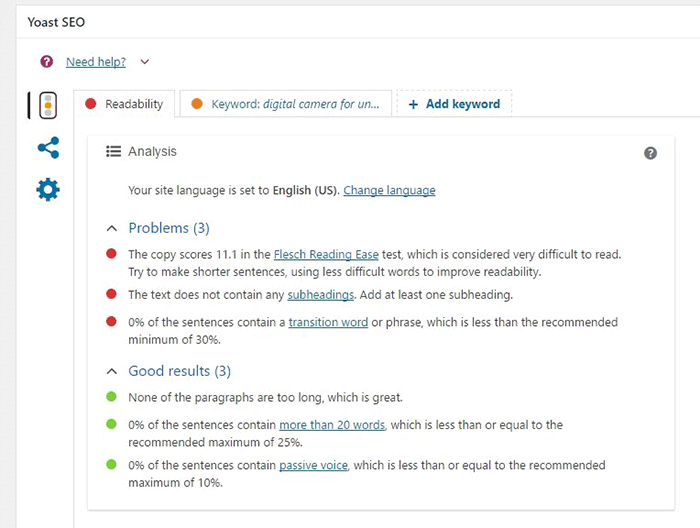
The Yoast SEO section also gives recommendations on Readability. Just click on the readability tab and you’ll see the problems that need to be addressed.

WooCommerce Products Optimize for Readability

When creating your product descriptions, you can also use Hemingwayapp to optimize its readability. You can also use this tool when writing blog posts.

Now that you know how to optimize your content for SEO, people who are interested in your products are now more likely to find your products. If you need help with SEO optimizations, the Wooassist Team can help. We’ll start off by doing an SEO audit of your site so we can determine what needs to be addressed and move forward from there.

Optimizing your WooCommerce store does not end with product optimizations. There are other optimizations that need to be done to ensure you are maximizing your conversion rates.

Filed Under: How-To Articles, SEO For E-Commerce Tagged With: keyword research, optimizations, seo, SEO strategy, SEO tools, WooCommerce, WooCommerce products, woocommerce seo, WordPress SEO, Yoast

Why Use Long-Tail Keywords for your WooCommerce SEO

October 13, 2016 By John Leave a Comment

Are you optimizing your WooCommerce products but find that you are not getting any traction? It could be because you are optimizing for the wrong keywords. Many e-commerce businesses find more success with long-tail keywords. But what are long tail keywords and why use long-tail keywords for your WooCommerce SEO?

What are Long-Tail Keywords?

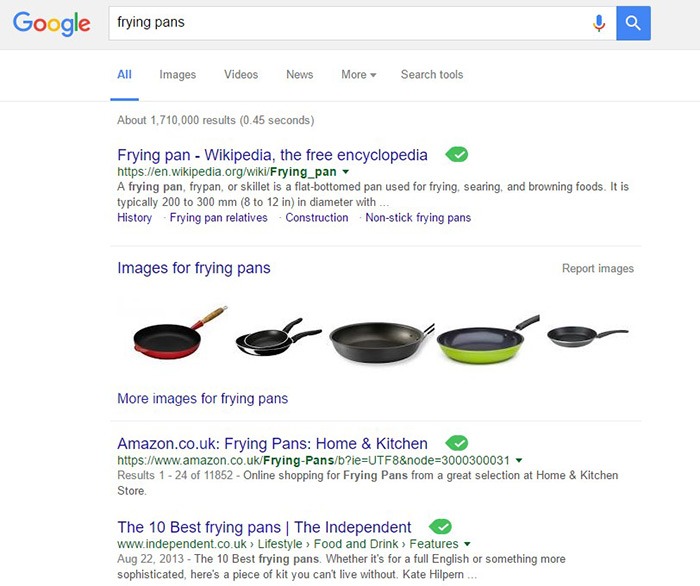
Long-tail keywords are longer, more specific keywords; much like a keyphrase. For example, if you are running an e-commerce store that sells frying pans, you could be tempted to optimize for keywords such as “frying pans”. However, ranking for “frying pans” would be very difficult. Do you expect to beat Wikipedia or Amazon who holds the top two spots in Google’s search results page? Even if you hire the most expensive SEO agency, that’s going to be hard to topple.

Why Use Long-Tail Keywords for your WooCommerce SEO

Let’s try to improve the keyword “frying-pan”. “Non-stick frying pan” is an improvement. It is more specific compared to just “frying pan” but this can still be made more targeted. “Non-stick stainless-steel frying pan” or “non-stick stainless-steel frying pan for induction stove” is taking it a step further.

bulls-eyeBenefits of Using Long-Tail Keywords

Long-Tail Keywords Produce Targeted Traffic that Converts Better

Long-tail keywords may or may not result in less traffic. The traffic that you do get will be more targeted and that means better conversion. Don’t stress yourself too much about losing traffic because traffic is a useless statistic. The important statistic to watch out for is your conversion rate because this is the moneymaker. Optimize your e-commerce store for increased conversion; not for increased traffic.

Long-Tail Keywords are Easier to Rank for

Because there is less competition for long-tail keywords, it is easier to rank for them. With a properly optimized page, you can land a top spot in the search results page. As long as you follow other known SEO best practices, this is achievable.

seo-google

But They Have Low Search Volume?

You might be looking at search data using Google’s Keyword Tool or any other tools. Then you see that there is no search volume for the long-tail keyword that you want to target. Don’t fret. Having no search volume does not mean that it will not show up in search results. Long-tail keywords are actually valuable. In the video below, Rand Fishkin talks about how valuable long-tail keywords are.

How to Choose the Right Long-Tail Keywords

Choosing the right long-tail keyword for your WooCommerce store is not difficult if you know who your customers are. If you already have a definitive image of your customers, then that’s a good thing. If not, it is imperative to identify your customer persona.

When you’ve created your customer persona, put yourself in your customers’ shoes. Think. What keyword would you search for if you were looking for the product you are selling? There is no single correct way to go about this. Most of the time, you will find that customers are looking for something specific. And once you identify that, that’s what you optimize for.

customer-persona

How Does Long-Tail Fare vs Popular Keywords?

If you choose to optimize for regular keywords, then you’re going to have a hard time getting to Page 1 of Google’s search results page. And if you don’t hit page one, then it won’t even matter. Page 1 of the search results page shows the top 10 results for the keyword. If you are ranked 11th, you’ll hardly get any traffic. This is not meant to discourage you to pursue the big keywords since it is not an impossible feat. It is possible but it’ll take some real genius or a lot of luck. Long-tail keywords, on the other hand, are easier to rank for.

Use Long-Tail Keywords with Other SEO Best Practices

seo-strategy

Using long-tail keywords alone won’t make your e-commerce store a conversion powerhouse. You need to use these keywords with other known SEO best practices. If you are using long-tail keywords right but doing everything else wrong, then it is not likely that you will get conversions.

You should create quality content that is easy to read. You should use proper URL structuring. Make your URLs readable. Implement proper navigation and good user interface. Upload a sitemap and make sure search engines can crawl your site. Use images properly and optimize your site for increased conversion. There’s a lot more to this but here’s a guide from Google to help you get started on best practices.

And that explains why you should use long-tail keywords for your WooCommerce store. If you have any questions, let us know in the comments.

Filed Under: SEO For E-Commerce Tagged With: best practices, e-commerce, marketing strategy, optimizations, SEO strategy

  • « Previous Page
  • 1
  • …
  • 4
  • 5
  • 6
  • 7
  • Next Page »
Let us support your online store so you can manage your business

Get started today

Get 2 Hours of FREE SUPPORT

We are so confident that you will love our services that we will give you your first 4 hours at a 50% discount

That’s 4 hours for only $75

BUY NOW

Free eBook

5 Things Every Online Store Can Fix On Their Website In The Next Week To Increase Sales

Quick Links

  • How it Works
  • Pricing
  • Blog
  • Contact
  • About Wooassist
  • My Account
  • Checkout
  • Privacy Policy
  • Cookie Policy
  • Terms and Conditions

Wooassist

Australia:
59 Luke St.
Hemmant QLD 4174

Philippines:
San Miguel St.
Poblacion, Iligan City 9200

Connect


Copyright © 2026 · Wooassist

Yours FREE!

5 Things Every Online Store Can Fix On Their Website In The Next Week To Increase Sales