Wooassist

Assistance for Your Woocommerce Store

  • How it Works
  • Pricing
  • Services
    • Site Maintenance
    • AI SEO and Content Marketing
  • Blog
    • How-To Articles
    • Code Snippets
    • SEO For E-Commerce
    • Theme and Plugin Reviews
    • Wooassist News
    • WordPress/WooCommerce News
    • Interviews
  • About Us
  • Contact
You are here: Home / Archives for John

Wooassist Team Retreat in the Beautiful Island of Bantayan

September 7, 2015 By John Leave a Comment

wooassist_team

When it comes to company retreats, I know what you’re probably thinking – trust falls and motivational speakers. Thankfully, our team-building trip goes far deeper than that. This is a company retreat designed by and for, the Wooassist team.

On August 15-18 2015, Wooassist conducted a team retreat together with its Managing Director, Nicholas Jones, in the beautiful island of Bantayan.

Bantayan_Island

Lead developer, Junix Villacorta says:

The idea started when Nick informed John and me that he will be coming to Cebu on August 15. I was the one who proposed the venue, as I have already been to Bantayan Island with my friends.

Why a Company Retreat?

Changing pace with a retreat is said to re-energize an organizational team, whether you’re running a company of five or 100. It encourages collaboration and strengthens internal bonds. We also had these goals in mind:

To improve communication. We wanted to break down barriers through group activities prepared by our Project Manager, John Gamor. By working through a task, the multiplicity of skills within the team is highlighted and the group learns new ways of working together.

John adds:

As a remote-team, I believe it is especially important for us to have these kinds of events from time to time to break off from the routinary days spent in front of the computer working at home.

wooassist_dinner

To work toward a shared goal. Each member of the team has a different key-performance metrics, and perceptions of a successful day.

Nick asked us to answer “What do you want Wooassist to be?” The activity helped us realize the true goals of the company 3 years from now, and the role of each member in achieving those objectives.

To create a stronger-knit team. We may interact with team members in Skype or Asana every day, but spending a couple days away with them, talking, eating and sharing a bike ride, brought us closer. It enhanced our trust and appreciation for one another.

A company retreat is an opportunity for us to meet in person, and know each other beyond just online correspondence.

Travelling to Bantayan Island

The travel to Bantayan was a memorable experience for us. We had to get up really early, around 5 am, to ride the first bus going to Hagnaya port, which was about 3-hours away. From there, we had a 1 hour boat ride to the island.

Junix shares his experience:

When we got to the municipality of Carmen, the bus stopped due to a broken engine. We were almost halfway. We had to wait for more than an hour for the next bus to arrive. When we got to the next bus, most of us had to stand for hours on the bus ride as no seats were available.

Port

Thankfully, we encountered no problems with the ferry ride to Sta. Fe. We were all seated properly and rested for the whole duration of the travel.

Company Retreat Activities

John and Junix prepared some events set-up to help facilitate social interaction. Most of the meals were also taken as a group, for light-hearted banter to ensue. Junix acted as our guide for the whole trip, and took care of our Sunday schedule.

The team decided to go to Ogtong Cave Resort. It has a white sand beach, just at the foot of coral rocks, putting the resort on an elevated position. Its cave is one of the most visited and interesting places to see in Bantayan.

cave_bantayan_island

Nick has this to share:

I chose the cave in the morning and kayaking and beach volleyball in the afternoon. It was a great day and I got to bond with the team through friendly banter, some more serious conversations, and generally just hanging out together in such a beautiful place.

Monday was the business part of the trip. The team got to business by discussing the company’s future plans, 3 years and 5 years from now. Nick’s piece was all about the business model and the different strategies we might take. Junix and John went on with creating more products for Wooassist, and hiring more employees.

Nick felt inspired that everyone was on the same page:

The culture of the team was much more focused on success and making Wooassist profitable and getting bigger and better clients than on the more social and community aspects of a company, while this wouldn’t work for a lot of companies, it seems to suit our personalities.

Wooassist Open Forum Session

For Monday’s afternoon session, the team planned on an open-forum activity, wherein each can air their grievances. The goal was to talk about any open conflicts and general impressions that they had with the rest of the team.

As Nick suggested, we had to write notes for each Wooassist member, and point out their strengths and weaknesses. As Nick would put it, we were very respectful to the absent team members and were honest about their assets and shortfalls and any challenges we had with them.

The team mostly had good things to say about each other, and some small criticisms were taken in constructively.

John shares:

You can’t be a Wooassist team-member if you get your feelings hurt every time someone criticizes you.

Here’s an interesting story from Nick:

Then it was my turn. I knew this would be hard for them, doing it to their boss. I got some compliments that they were grateful that I listened to their ideas, and gave them more freedom to work creatively.

I explained that my goal was to employ people smarter than myself and had achieved that goal. It wasn’t going to serve me to well to not listen to what these highly talented individuals had to say. John went out on a limb and said that he had found my harsh words hurtful at times, but now looking back is grateful I was so direct with him.

We left the meeting on quite a high. We had just admitted the best and worst of each other to work with and there was this big feeling of how grateful we all were to be working with each other, and how much we were looking forward to building Wooassist together in the future.

Enjoying Bantayan Island

We spent 4 days and 3 nights on the island of Bantayan. We hired motor bikes for a quick tour around the island, and spent time on different beach locations. More or less, the team is given free rein to relax and sort out any pent-up stress.


wooassist_retreat

bike_ride_bantayan_island

It was also a time for Nick to get used to the Filipino culture, including riding a bike ‘Filipino style’. Junix have chosen a great place for our retreat – white-sand beaches, breathtaking landscapes, historical caves, and amazing food!

For John:

This trip has surely been a refreshing and relaxing experience. And I also got to know Nick, Junix and Alfa better and have a better understanding with each other when it comes to work.

Conclusion

Junix was such a good host, helping us to learn about the Cebuano culture. He and his girlfriend Joy, gave us a really fun and exciting experience.

But of course, this retreat wouldn’t be possible without Nick, who made us realize how important it is to get to know each team member. It’s not enough to just look through their Asana profiles. It’s good to learn that we’re working towards the same goal – Wooassist’s success!


Filed Under: Wooassist News Tagged With: company development, outsourcing, Wooassist

On page SEO for Ecommerce: The Online Store Ultimate Guide

September 2, 2015 By John Leave a Comment

on-page-SEO

I know I need SEO, but I don’t know exactly what I need.

We have heard this statement several times. Entrepreneurs realize the value of SEO, but they don’t truly know how to do it for their e-commerce business.

Before embarking on optimizing on page SEO for ecommerce, it’s crucial to understand what you hope to gain.

In this article, you’ll learn about the following:

  • Understanding your SEO needs so you can focus on the most profitable areas
  • How SEO really works for E-Commerce Websites
  • Our 8 step technical On-Page SEO process to guarantee you more traffic.
  • Our 7 Step On-Page SEO guide to user experience and engagement

Most users prefer using Google because it returns the most relevant search results on the web – and by ‘users’, we mean your potential customers. This means that being ranked on the top pages allows online stores to receive more visitors and generate more leads.

So, how can you rank higher than your competitors on Google?

The answer is a well-rounded website. Whether you’re just getting started with a new online store, or improving an existing site, you need to step up your SEO game.

I. Understanding your SEO needs

SEO-success
SEO can help potential customers find your store in search results. Let’s say someone is looking for a product you’re selling. How can we make Google recommend your brand to that user, instead of another store? This is where SEO can help.

A. Business Goals

Your business goals should always come first. Do you want to increase conversion? Build brand or product awareness? If your business goals are clearly set, it will be easier to determine the SEO strategy that will best fit your needs.

B. Existing Performance

Look at your analytics data to assess the existing performance of your site. It will show your site’s traffic and conversion trends over the years, helping you understand what keywords you need to optimize for. We will show you exactly how to do keyword research shortly.

C. Resource Constraints

After looking at your analytics data, and knowing where you’re lacking, you’ll know how to fill in the gaps. Know where you need help, and it will make the SEO planning easier.

II. SEO Basics for E-commerce Websites

SEO-google

For an e-commerce site, driving relevant traffic to boost sales is crucial.

It’s critical for websites to appear on Page 1 of Google. Surprisingly, the top three organic positions alone receive 58.4 percent of all clicks from users.

CTR

Websites ranked number one received an average click-through rate of 36.4 percent. The second spot received a CTR of 12.5 percent, and number three had a share of 9.5 percent.

Do you want to know how to rank your e-commerce site? Read on.

A. Start your Research

On-page SEO work needs two types of research: Keyword and Competitor Research.

The primary objective of doing research is to identify the gaps between your site, and the sites that are doing better. Keep in mind that the market you are about to enter might already be well-served by savvy site owners.

1. Keyword Research

First of all, targeting the wrong keywords makes your campaign ineffective. It can lead to low quality traffic, and few conversions.

Go for keywords that are highly relevant to your brand or products. What terms are your ideal clients using when searching for your service?

You can use tools such as:

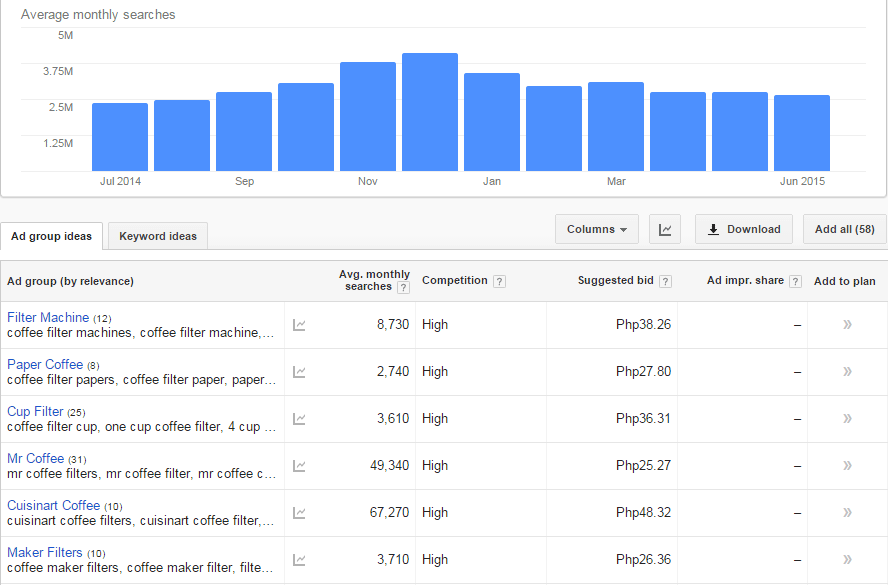
Google Keyword Planner (formerly the Keyword Tool)

keyword-tool

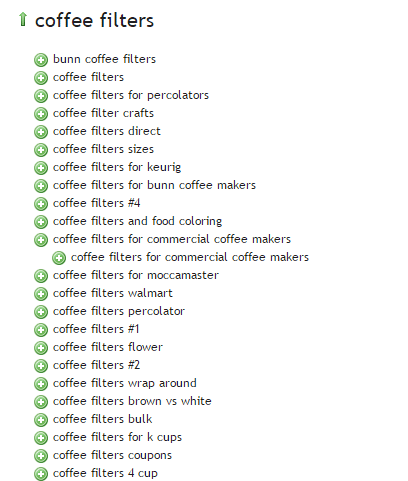
Übersuggest

ubersuggest

2. Competitor Research

Insightful competitor analysis

Insightful competitor analysis is an essential strategy to find out what rival e-commerce firms are doing. In SEO, you can track and analyze the performance of your competitors in relatively simple ways.

Which keywords are your main competitors going for?

List down the keywords which your competitors appear to be using with their SEO strategy. Check if they have higher Domain Authority and Page Authorities than you.

  • Domain Authority is a calculated metric for how well a given domain is likely to rank in Google’s search results. It is used to compare one site to another, or to track the strength of your website over time. It is scored on a 100-point, logarithmic scale.
  • Page Authority is a calculated metric for how well a given webpage is likely to rank in Google’s search results. It is also scored on a 100-point, logarithmic scale, and used to predict how well a specific page will rank on search engines.

If your competitors have higher DA’s or PA’s than you, contending against them will be very difficult. So, it may be a good idea to focus on other keywords or “longer tail” keywords instead.

You can use these tools to determine DA’s and PA’s:

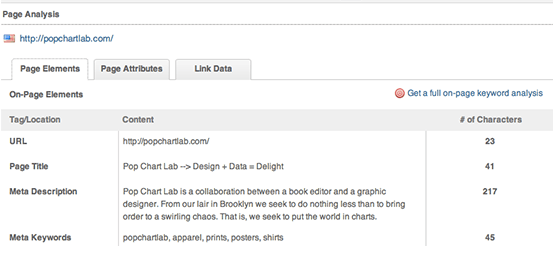
MozBar

Allows for checking the SEO title and description your competitors use in their title tags.

moz-browser-extension

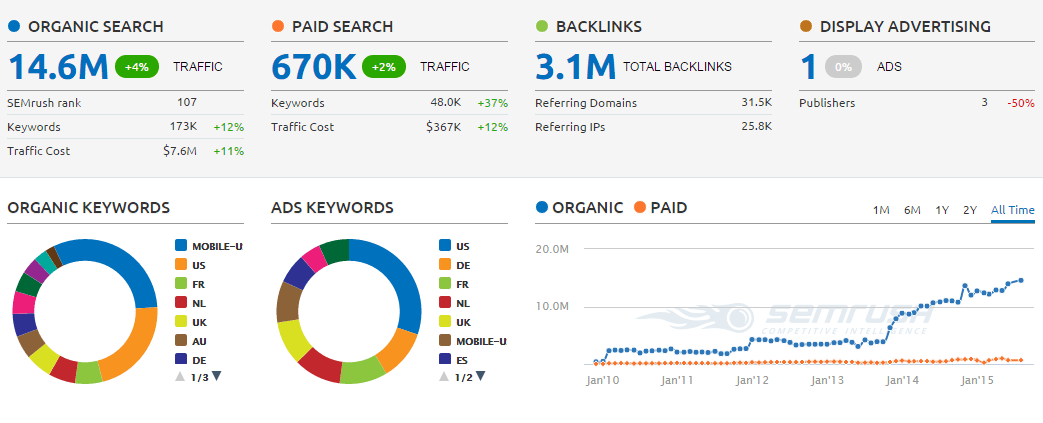
SEMrush

Allows for seeing what keywords your competitors are ranking for on both organic and paid search.

SEMRush

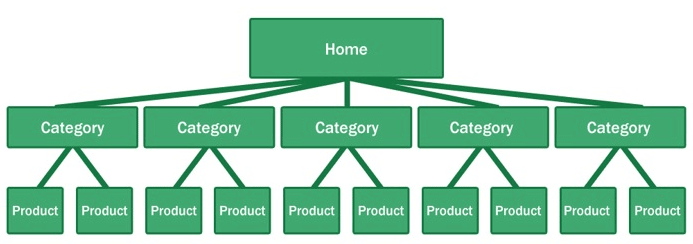
What is their site architecture like?

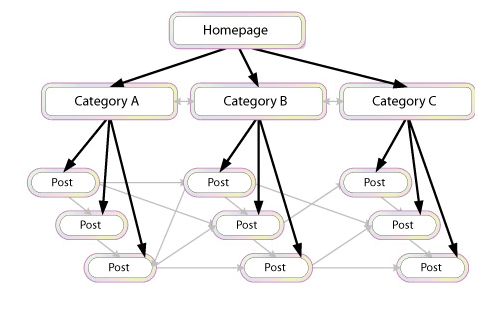
Try to look at the site architecture of competing sites, or the biggest companies in your industry. Pay special attention to popular products in a particular category, related products, top rated products, and recently viewed products.

site-architecture

Here’s why your site architecture is essential for organic traffic:

  • Google considers your site’s homepage the most authoritative page, so content closest to the homepage receives the most value.
  • By structuring your e-commerce store correctly, your main level navigation pages, such as the category pages, will contain a majority of your site’s authority.
  • Adding relevant, high-quality content to your main level navigation pages can increase conversion, page authority, and sub-category page’s authority.

B. Identify Current Problems

After discovering what keywords are going to make you the most profit comes auditing your site for problems.

404-error

1. Find site errors

Here are the top errors you’ll want to correct:

  • Redirecting any 404 pages to actual content
  • Changing 302 redirects to 301 redirects
  • Updating duplicate content pages, meta titles, and meta descriptions

The above mentioned are called HTTP status codes. These are three-digit numbers returned by servers that indicate the status of a web element.

404 HTTP status code

It can be shown as 404 Error, 404 Not Found, Error 404, 404 File or Directory Not Found, etc. This status code means that the server has not found anything matching the Request-URL. Or, simply the page you were trying to reach on a site couldn’t be found on their server, has been removed or does not exist.

Having lots of 404 pages will hurt your site in many ways. For instance, if a ranking page resolves to a 404 error, it might frustrate the user. This means you will be throwing away some earning potential. Google also counts it as a poor user experience. If you don’t fix the errors, Google will eventually remove that page from their index, which will eventually hurt your overall rankings.

302 Redirect HTTP status code

It’s also known as a temporary redirect. 302 should be put in place if you want to redirect visitors into another webpage, but you plan to bring the redirected page back after some time.

It’s not really recommended since it can hurt your site’s search engine visibility. While the redirected page will retain its page authority and traffic value, the temporary page won’t accumulate any. It’s often used to test a new page. You can gain client feedback without affecting the old page’s ranking.

301 Redirect HTTP status code

This refers to a permanent redirect from one URL to the other. All qualities of the redirected page will be passed on to the detour page. A 301 redirect is often implemented if one is ready to make a test page permanent. The old page will be removed from Google’s index, and the new one will replace it.

Without 301 redirect, the web authority which your previous domain collected will be thrown right out the window. Any inbound links earned will be lost, and you won’t get any SEO credit.

There are dozens of free online services that are capable of checking your website for errors, and finding ways of improving your web page.

Google Webmaster Tools, for instance, can help you identify any page or links with errors, scan for malware, find pages with short or missing titles, find duplicate meta tags, and much more.

2. Determine your site speed

Any delay is enough reason to make your customers leave. This converts to lost revenue, which can hurt your bottom-line.

One study revealed that 1 in 2 visitors will abandon a website that takes more than 6 seconds to load.

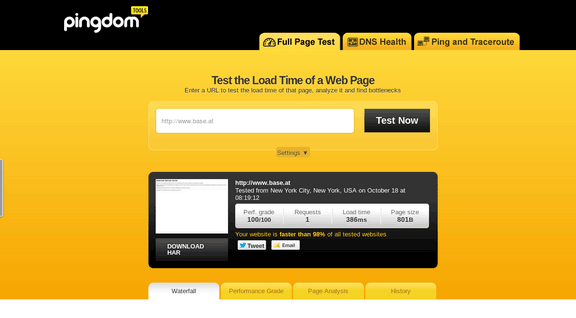
There are various tools to help you check your loading speed:

  • Yahoo! Y slow
  • Google Page Speed
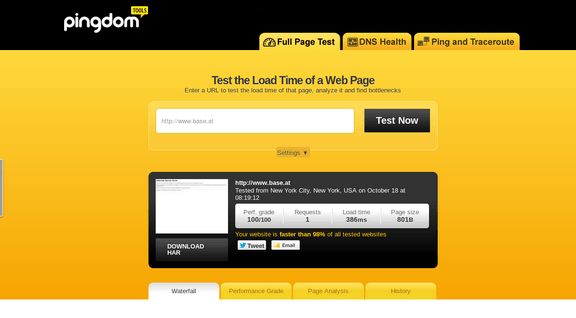
  • Pingdom is the quickest and easiest one

pingdom-site-speed-test

For a more in-depth guide to how to speed up your site see our article here.

C. On-Page Optimization

On-page optimization includes all of the actions you take within your own web pages to help your site rank better.

Learn more about on-page optimization for your online store on the next step.

III. Optimizing On-page SEO Technical Factors

optimizing-on-page-SEO

If your online store is not optimized for both search engines and users, you have a small chance for success. On-Page SEO refers to the settings you can apply on the website so that it is optimized for search engines.

A. Why start with On-page SEO?

  • With On-Page SEO, you ‘speak’ the language of search engines. You can easily make them understand what your website is about.
  • On-Page SEO can make the users happy. It ensures that your website is setup correctly, which leads to a better user experience.
  • Before promoting your site through off-page SEO, you need to be sure that the website is optimized and is running smoothly.

If you don’t know the basics of on-page SEO, you have very little chance of securing top spots for competitive key phrases. Get it right and you’ll succeed on the search engines.

Here are the basic factors of on-page SEO:

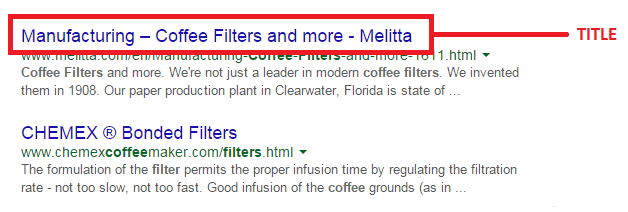
1. Title Tag

Title tags or title elements define the title of a document. It should be an accurate and concise description of a page’s content.

title-tag

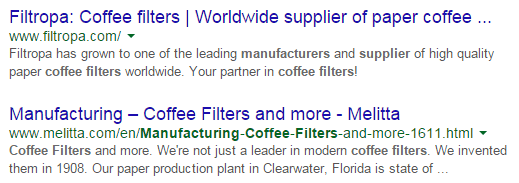
Place your main keyword and variations in the title tag of a page. Google would display around 70 characters of a title tag, or based on pixel width. You can preview how your title tags will appear like through Moz’s preview tool. Make sure to include your business name along with the main keyword phrase you are targeting.

2. Title Tag Optimization

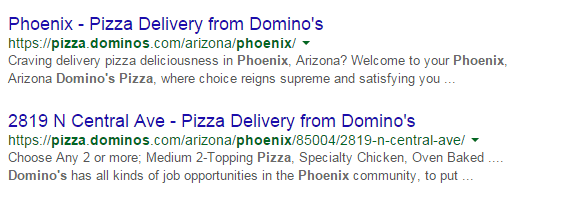
Your site’s title has to be appealing enough for a user to want to find out more information.

title-tag-optimization

Things to include in your title:

  • Business Name: Aside from customers may search you by your brand name, it’s also important for breading purposes. In the example above, it’s Domino’s.
  • Keywords: Putting certain keywords in your title can help them rank, just don’t staff too many. Domino’s used ‘pizza delivery’.
  • Toll-free numbers: It helps your visitors to take a direct action, and makes your title look professional. Users are left with an impression of authenticity of the business.

B. Meta Descriptions

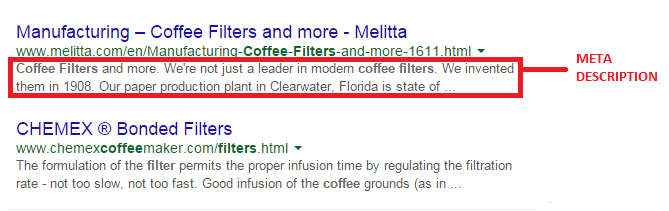
A meta description is the snippet of information below the link of a search result. It describes the contents of the page to the searcher, with the goal of convincing the searcher to click through to your website.

meta-description

They may not contribute as a ranking signal but meta descriptions can encourage people to want to visit your website. It describes your business and shows up in the search results page beneath the title tag. It should be well-written and approximately 156 characters.

Think of meta description as a sales pitch for what the landing page is about. Get practical instructions on how to update them using WooCommerce.

1. Meta Tags Optimization

As mentioned earlier, meta description is something that when done properly can urge users to check out your website.

meta-tag-optimization

Things to include in your Meta Description:

  • Selling Point: To get some advantage, write what your customers want to hear. For instance, a phrase like ‘affordable, all-natural coffee filters from only $3.99’ may result in more clicks.
  • Keywords: It will give you some advantage in Google’s relevancy algorithm.
  • Toll Free Numbers: If you don’t want to place it in your title tag, include it in your meta description instead. Again, it may help your visitors to take a direct action.

C. Heading Tags

Use headings correctly without over-optimizing them. Your main keyword should be in a H1 tag. Split sub-headings up with H2 and H3 tags. Only use the H1 tag once, and others can be used multiple times.

For more information of the correct use of when and how to use heading tags, check out How To Use H1-H6 HTML Elements Properly.

1. HTML Tags Optimization

The text inside your header tags is given very high importance by the search engine. They highlight certain parts of your website.

Header 1: Use it to define the most important section of your page. The H1 tag is an influential ranking factor, and an important signal to search engines as to what a page of content is about.

Header 2: Use it for sub-titles or important sections of your pages.

D. Content

Your content should be written primarily for users, and secondly for search engines. Make sure that the content on your homepage helps visitors learn more about your business, and the products you’re offering.

Use the keywords from your research, but make it look as natural as possible and easy to understand for the user.

Again, don’t forget to use H tags to break up your content into easy to digest sections.

E. URL Structure

Which has a more search engine friendly URL structure: “www.domain.com/page-name/” or “www.domain.com/index.php?id=1?” Obviously, the former makes more sense to both users and search engines.

Avoid having main pages sit too many directories deep in your site. Use hyphens rather than underscores. If you do make changes, implement 301 redirects from the old URL to the new. This way, your users won’t have to face 404 pages.

F. Keyword Optimization

Keyword stuffing is no longer acceptable. Maintain a balance between your keywords and your content.

1. Elements of Keyword Optimization:

  • Keyword Density: In SEO, keyword density is the measurement in percentage of the number of times a particular keyword or phrase appears compared to the total number of words in a page. It’s also an indicator whether your page is relevant to the targeted keyword. Yoast SEO plugin can help analyze keyword density.
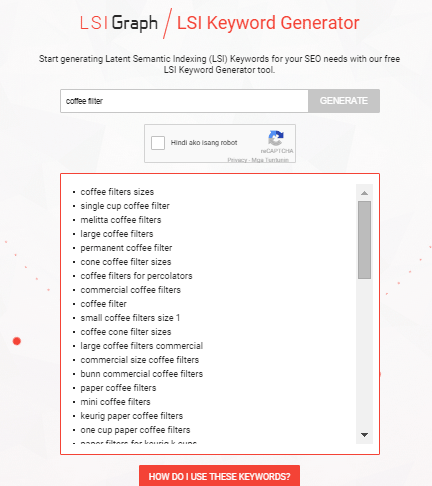
  • Related Keywords: Related keywords are keywords of industries and markets that are closely or somehow related to your niche. It’s using related, but less obvious keywords to bring targeted, conversion-friendly traffic. LSI is smart enough to see ‘coffee filters’ is somehow closely related to tea and accessories for brewing. LSI Graph is a good tool to find LSI keywords.

LSI

  • Long Tail Keywords: These are longer and more specific keyword phrases that visitors are more likely to use. It’s about adding common words like ‘best’, ‘free’, ‘cheap’, or ‘top’ to your actual keywords. Long tail keywords can help you craft the kind of content that engages and inspires readers.

Long tail keywords have less competition, give more qualified leads, and improve head term rankings. According to a research by Statistica, 50% of your focus should be on long-tail keywords in order to achieve a successful On-page SEO.

G. Internal Link Optimization

Internal linking is when you link pages of your website to other pages within your website. It’s a process that involves optimizing internal links, in order for algorithms to determine the relevance of web page content.

internal-link-optimization

If you lack internal links, it will be difficult for Google to crawl and index deeper sections of your website.

1. Why are internal links important?

  1. Internal links improve your ‘link flow’ or page rank to individual pages on your site, helping them to rank better.
  1. The anchor text of links helps Google to understand the context of a webpage, and to rank better.
  • Anchor text: It’s what you call the clickable text in a hyperlink. A good anchor text includes the appropriate keyword to give the page it is linking to more relevant meaning.
  1. Internal links help Google Bots crawl and access different parts of your site, and also improve user experience.

H. Image Optimization

On-page images need to be optimized because search engines can’t read them. This means the web crawlers would only read the text.

1. Elements of Image Optimization:

  • Alt text: Try to move the mouse over an image on a website. If a short description appears, that is alternate text. You can use your relevant keywords as ALT text.
  • File name: Use meaningful file names for your images, such as ‘coffee-filter-basket.jpg’ instead of just ‘DSC1234.jpg’. Make sure the file name is relevant to the image.

IV. Optimizing On-Page SEO for User Experience and Engagement.

user-experience

Google has been updating its ranking factors consistently, and user experience and engagement have become one of them, especially for mobile. What links UX and SEO? It’s about attracting visitors and converting them into customers.

Once you create a great user experience, visitors would perceive your site positively which encourages sharing, return visits, bookmarking, and inbound links. These factors are signals recognized by the search engines, contributing to high rankings.

  1. Focus on designs that fit SEO principles – you need to maximize H1 and H2 titles, optimize menu names and functionalities, create a clear navigation path, and provide focused product names and descriptions.
  1. Call-to-action – CTA buttons or even links with CTA should be designed not only for user experience, but also linked to content and page elements optimized for SEO.
  1. Focus on quality – when talking about quality websites, user experience is also taken into account page speed, easy navigation, internal link structure, descriptive content, and page layout.

A. Engagement Metrics

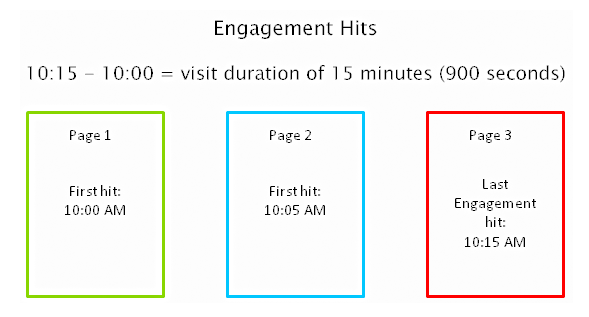
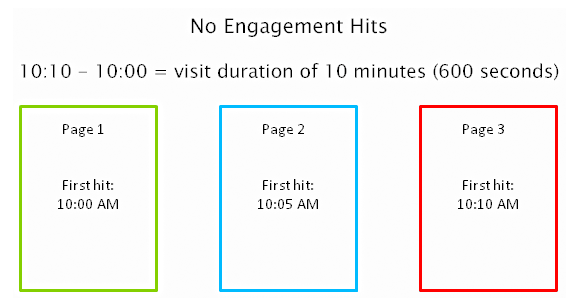
As a search engine delivers a page of results to you, it observes how you engage with those results, measuring the success of the rankings in the process. Search engines are looking for that ‘long click’, wherein a user does not immediately return to the search page.

engagement-metrics

For instance, you click on the first link found on the SERP, then immediately hit the back button and clicked the second link. The search engine will interpret this as not being satisfied with the first result.

engagement-hits

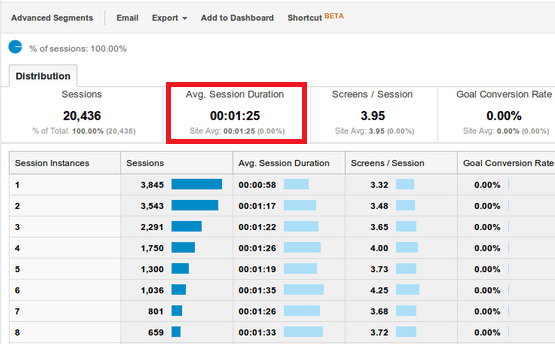
1. How important is Time on Site?

Time on site or visit duration refers to how long a visitor stays on your website. Because Google wants to give their users the best experience, they actively measure user behavior to help shape their algorithm. If a user is spending a significant time on a site, interacting with it, and going deeper within the content, it means there is something of value on the site for that particular user.

time-on-site

2. What is Relevance?

The relevance of a website’s content is particularly important for search engines. The term ‘relevance’ describes the extent to which the content of a website corresponds to the search term used. It can affect a website’s ranking in the search results, for a given search term.

If you’re selling coffee filters, you must not go off topic and talk about juicing machines. Go for the search terms that your potential customers are searching for. “Disposable paper coffee filters” could be a good choice for a keyword for a coffee-filter vendor, but “coffee maker parts” might not work. You would be confusing yourself, your to-be customers, and the search engines. Your relevance would get hurt, hence you ranking would get hurt too.

Ask yourself, how relevant is your page content to the keyword query of your visitor? You can make your site more relevant to searchers by optimizing the different on-page factors discussed in Part III. They include your site’s meta tags, headings, body text, and other content.

3. Google will reward you for being relevant.

According to Google’s official blog, their goal is simple: to give people the most relevant answers to their queries as quickly as possible.

relevance-to-users-reward

Maintaining your site’s relevance may lead to more clicks, and a higher position in search results. When Google changed its algorithm last February 2011, they began promoting sites with reports, in-depth analyses, and other forms of high-quality, value-adding content. Sites that were deemed irrelevant and invaluable by the algorithm were demoted.

4. How Google determines relevance?

Google displays web pages in their search results based on the authority and relevance of the page. So, how does it determine relevance? According to Neil Patel, it analyzes a page’s content based on several factors, including where and how often you use certain words in that piece of content. You can check out Google’s other ranking factors here.

Let’s move on to your WooCommerce product page.

B. Important Elements for On-Page Optimization

These are the elements that are important for on-page optimization:

1. Customer Reviews

These reviews not only improve your business, they also provide an amazing source of unique content. Internet Retailer reveals that an online store can increase its e-commerce conversion rate by 14-76% by adding product reviews.

Search engine spiders like unique content that is regularly updated, and user reviews are a great way to create more of this on your website. According to data, 88% of consumers trust online reviews as much as personal recommendations. This means that potential customers will be searching for the name of the product plus the word ‘review’, or related words such as ‘ratings’.

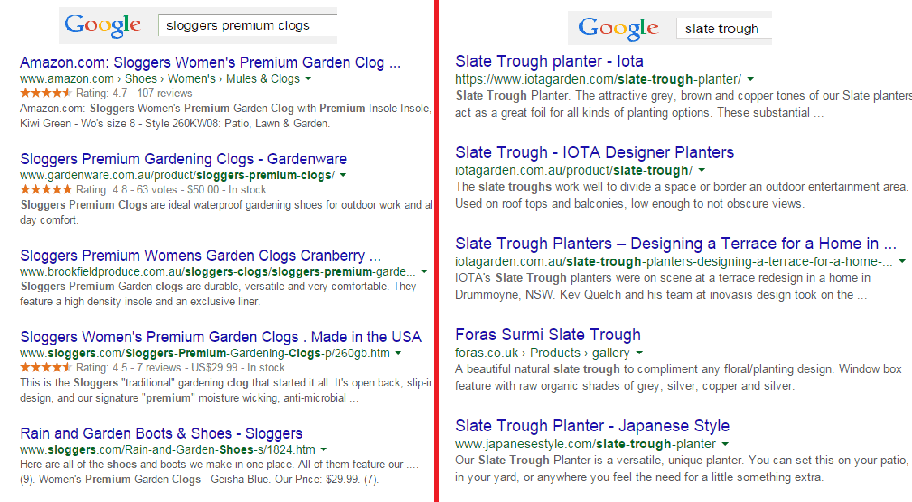
Compare these two images on SERPs:

customer-review-SERPS

The organic search results on the left are showing ratings just above the meta tag, while the image on the right doesn’t. So, what determines if ratings are shown on SERPs?

Apparently, sites on the left are using schema markup on their reviews. That is why their ratings occur on SERPs.

In AdWords, they are enabled through the product reviews ad extension. You have to submit your product data to Google, and be a client of selected review websites. Get reviewed by at least 30 unique users, submit your reviews to Google, and have your review extension enabled!

Increased CTR on results pages

Correctly formatted reviews can help increase click-throughs from search engine results pages. In the image below, the addition of star ratings make the first and third results stand out.

increased-CTR

Increased conversion rates

By increasing the chance of a click-through, you’re also increasing the chance for conversion. User reviews can increase trust in your ecommerce site, and can help remove doubts about products.

To collect customer reviews, try the following:

  • Email customers a few weeks after purchasing and ask for a review.
  • Offer discounts or other incentives on their next purchase in exchange for a review.

Don’t worry about negative reviews. Instead, take it as an opportunity to show good customer service. Offer to replace the faulty product or offer a refund.

2. Pagination

Because e-commerce sites are promoting a variety of products, they´re ultimately forced to divide them into multiple pages. This process is called pagination.

If you have product categories that contain thousands of products, make sure that all of them are indexed and regularly crawled. Google has some good instruction on pagination with rel=“next” and rel=“prev”.

Pagination affects two critical elements of search engine accessibility:

Crawl Depth: Google demands best practices, wherein spiders should reach content-rich pages in as few clicks as possible. If you have too much paginated content, Googlebot won’t travel through all of them. It won’t be able to index the final pages.

Duplicate Content: Search engines want to show only a single URL for a piece of content. If pagination is not implemented correctly, it may cause duplicate content problems. This will cause some confusion for the Googlebot, especially during search queries.

3. Page Speed

Google announced that website speed would begin having an impact on search ranking. Apparently for Google, a poor performing website results in a poor user experience. It’s enough reason for a website to gain less promotion in search results.

A user is not going to wait for your product pages to load, so you should care about site speed. Any delay is enough reason to make your customers leave. This converts to lost revenue, which can hurt your bottom-line.

There are several ways to optimize your WooCommerce site’s speed. You can read all about it here.

4. Search Option

Even with a good navigation structure, there are users who will just prefer to search. That’s why a search box has become an essential element of e-commerce sites.

Using your search feature, you can track your customers’ searches using CMS or Google Analytics. What phrases are they using? Does your site return good results? Is your search function working for singular and plural keywords?

search-option

Monitor the number of people who search and then leave straight away. What prevents them to go through the checkout process? Try including special offers related to the search, and see if it lessens your bounce rate. The data you have collected will help you improve your website and customer experience.

5. Product Description

It is very important to make your product descriptions unique. For retailers, don’t just rely on the manufacturer’s brochure. If you do, then you’ll have the same content as hundreds of other retailers. Make it unique and engaging.

Product descriptions shouldn’t just describe your products, product descriptions should sell them.

Here’s how:

Focus on your ideal buyer

If you focus on a huge group of buyers, you may end up addressing no one at all. Imagine your ideal buyer and consider how you would speak to him if you were selling your product face-to-face. Does he appreciate a good humor?

ThinkGeek starts their product description as:

think-geek

Entice with benefits

A consumer always wants to know what’s in it for them. What are your product’s features and specifications? Know how to highlight the benefits.

entice-with-benefits

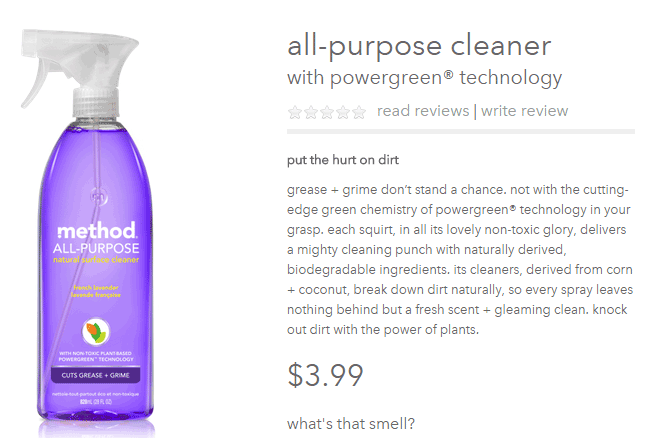
Methodhome highlights the powergreen action of their all-purpose cleaner, wherein grease and grime don’t stand a chance!

6. Business Information

To optimize your business information, make sure that it’s complete and accurate.

Phone number: this can actually inspire trust. If a phone number is shown, it gives customers the impression that you can provide customer support if ever they encounter some problems with the purchase.

Company details: this is especially helpful if you’re trying to target local markets. If you give Google some location signals, it can help your location keywords rank.

7. Social Sharing

Are you happy with how social share buttons work on your website? To maximize the benefits, social share buttons need to be optimized.

social-sharing

What’s an optimized share button?

It’s a share button that automatically generates a shareable message with custom information for your brand.

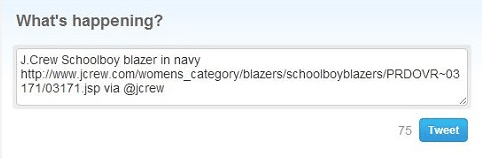
Here’s an example of an optimized Tweet:

Notice that the tweet has the brand’s Twitter handle @jcrew.

brand-on-Twitter-handle

Customizing your share buttons let your readers share useful information, and help you control brand messaging at the same time. You’re making it easy for your visitors to share your products on their social media profiles.

We all know how social media connects people who value each other’s opinions. People who see content being shared by their friends, family, or colleagues will think that it’s something worth checking out. This means more traffic to your site!

You can place social share buttons…

  • After the point of purchase on a confirmation type page
  • Email follow up and correspondence
  • After a review has been published – give the reviewer the option to share their review

V. Conclusion

team

With these steps, you can start optimizing the pages of your online store. If you want to do this by yourself, there are plenty of SEO tools given in this article to help you optimize your rankings. Nevertheless, don’t be shy to reach out to a professional for help. On the other side of the coin don’t try and outsource this completely, no one understands your products like you; an internal team member with intimate knowledge of the products and target market needs to be involved.

If on-page optimization is done right, you will see an increase in quality traffic, which will lead to more conversions and repeat visitors.

Keep in mind that Google constantly updates their algorithms, which also means you have to be up-to-date with your strategies. It may require a lot of work, but the benefits are worth it.

Filed Under: SEO For E-Commerce Tagged With: 404 error, conversion optimization, Google Analytics, Google Webmaster Tools, keyword research, redirection, SEO strategy, SEO tools, site speed optimization, social media

How to Speed Up Your WooCommerce Store

August 3, 2015 By John 3 Comments

SnapCrab_2015-07-03_10-57-18_No-0000

Aside from the products or services you offer, there’s another crucial factor that may affect your conversion rate. We’re talking about your site speed. Any delay is enough reason to make your customers leave. This converts to lost revenue, which can hurt your bottom-line. How can you prevent or change this? This article will serve as an in-depth guide to and will teach you how to speed up your WooCommerce store.

In this article, you’ll learn about the following:

  • Why invest in site speed optimization?
  • What hardware and software you need?
  • Improving Site Speed by Caching and Minifying
  • Speed Up Site by Optimizing Images for Web
  • Using a CDN to Increase Site Speed
  • Cleaning Your Database to Speed Up Site
  • More Ways on How to Speed Up Your WooCommerce store

Why Invest in Site Speed Optimization?

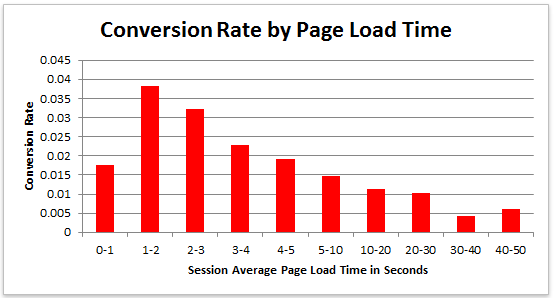
Studies reveal revealed that 47% of visitors expect a page to load in under 2 seconds. Around 40% of these will abandon a web page if it takes more than 3 seconds to load. Meanwhile, 52% claim that quick page loads are important for their loyalty to a site.

conversion-rate-by-page-load-time

What do these findings tell you, a site owner?

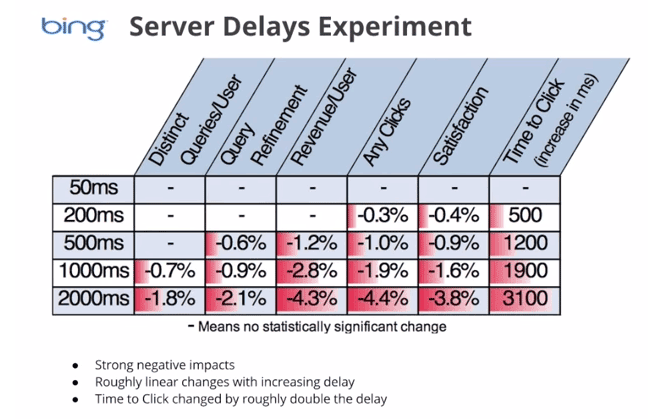
It just shows that site speed is very important. Those two seconds are crucial to capture your visitor’s attention, convince them to hang around, and increase your chance for conversion. Microsoft Bing also conducted a research about server delays and the effect they bring on user behavior.

server-delays-experiment

According to the results, a 2-second longer delay in page responsiveness reduced user satisfaction by 3.8%. They navigated 4.4% fewer pages, with a 4.3% lesser e-commerce revenue per user. Every second matters online.

Here’s the thing: visitors – your potential customers – can’t really tell the difference if a page is ‘just’ slow, or isn’t working at all. Thus, a slow website is quite the same as not having one. Most users won’t stare at the screen and wait. They move on to the next website and never come back.

site-visitors

Google announced that it has included site speed in its ranking algorithm. If your site speed is slow, it can affect SEO by having reduced rankings. They even launched a new web-based tool, which analyzes the performance of web pages.

With these information, we now know that site speed not only sells, but also leads to customer satisfaction and increased conversion.

If your site speed is slow, it’s time to fix that. Read on.

What Hardware And Software You Need?

The foundation you set up for your e-commerce site has a lot to do with its speed. If it’s the root of the problem, quick fixes won’t help. But, what makes a good foundation, and how can you set up a website that runs at lightning speed?

Web Hosting Provider.

What’s your current hosting package? For an e-commerce site, you shouldn’t go with the cheapest. They may have limited RAM, processing power, and disk space which won’t benefit your site at all.

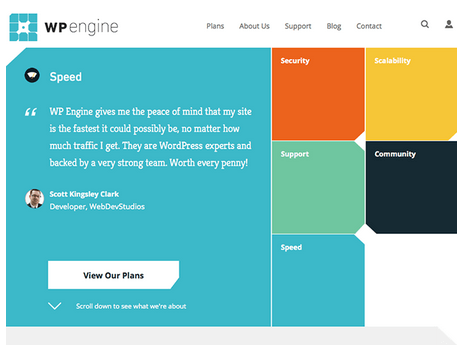
wp-engine

Wooassist recommends:
Wpengine and Siteground

Please note that we are affiliates of these hosts but we have only chosen them based on our years of experience dealing with hosting services for our clients’ and our own sites. And we can say that these two are among the best. If you were to sign up to either of them, we’d be grateful if you did so by clicking either of the links above.

WordPress Themes

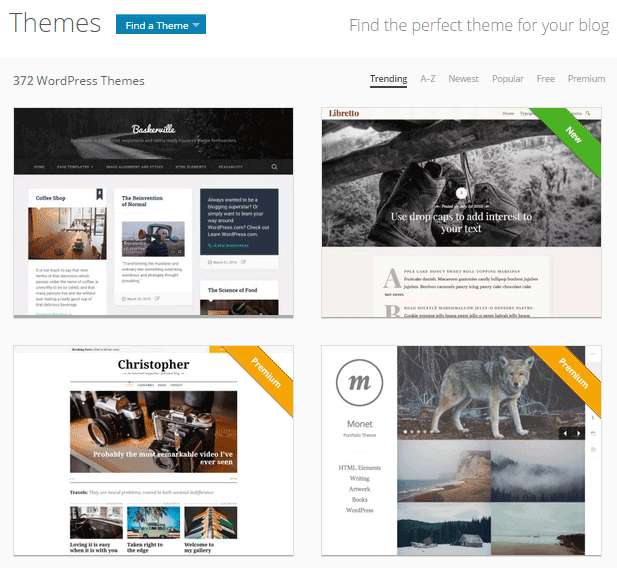
Not all WordPress themes are created equal, and not all are extremely fast and well-coded. In choosing a theme, checking the demo speed is a must. Tools such as Pingdom will give you an idea of how well-coded it is.

wp-themes

Wooassist recommends:
Storefront by Woothemes or Any HTML5 theme at Studio Press

Content Delivery Network

CDN is a system of distributed servers that accelerate the delivery of web content, and rich media to internet-connected devices. Since your bandwidth is spread across many different servers, the load on a single server is reduced.

Wooassist recommends:
Wpengine comes with CDN included or Cloudflare

Improving Site Speed by Caching and Minifying

caching-and-minification

Let’s start with the most popular, and probably, the easiest thing: Caching.

What is Caching?

Caching is storing your dynamic content in the server as static content. Serving static content is faster as opposed to dynamic content, which means longer page load times. It’s a fundamental technique of reducing database load and speeding up WordPress websites.

There are two types of Caching:

  • Client-Side
  • Server-Side

Let’s move on to Minification.

When developers make code, they make code with a lot of white space. This practice makes the code easier to read and understand for humans. However, computers don’t need that white space. It just makes reading the code take longer.

Minification is removing all that white space and optimizing the code. This makes it easier for machines to make parsing the webpage faster.

How to Implement Caching and Minification?

It may sound all too complicated, but don’t worry. It is really very simple. All you need is one plugin to do both, and it has all the caching and minification solutions you need.

W3 Total Cache

It’s the second most popular plugin with almost 4 million downloads and a 4.5 star rating. W3 Total Cache is more suitable for high traffic websites running from a VPS or a better hosting environment.

How to Set up Caching with W3 Total Cache?

  1. Before installing W3 Total Cache, uninstall other caching plugins like WP Super Cache
  2. Go to your WordPress admin panel and click on Plugins > Add New

w3-total-cache

  1. Search for “W3 Total Cache”
  2. Click on the ‘Install Now’ button and then activate
  3. Click on Performance on your WordPress dashboard and go to General Settings
  4. The first option that you see on this page is Page Cache.
  5. Check the ‘Enable’ box
  6. Click on ‘Save all settings’

By having this enabled, you will significantly decrease your load time.

How to Set up Minification with W3 Total Cache?

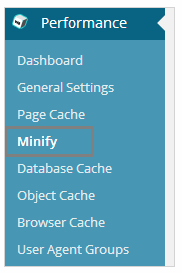
  1. minifyGo to your WordPress dashboard and click on Performance
  2. Look for ‘Minify’ under the Performance menu
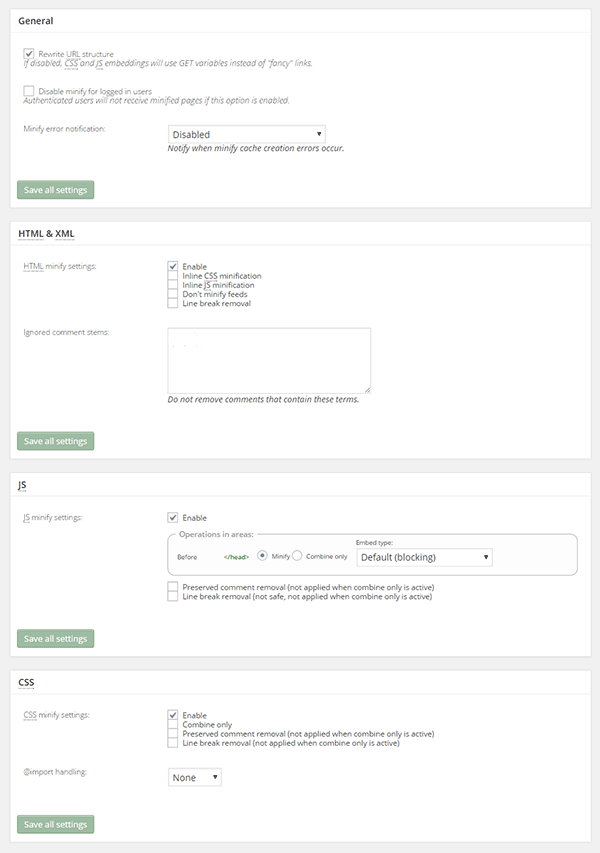
  3. Tick “Enable” for HTML & XML, JS, and CSS.

minify-2

  1. Click on ‘Save all settings’

The goal of minification is to make the source code “smaller” in order to improve your site’s performance. Get a more detailed information on each of the settings offered in Minification here.

Speed Up Site by Optimizing Images for Web

Your customers won’t wait around for that picture to load.

customers

Another technique to improve your online store’s performance is optimizing images on your website. High-resolution images may look great, but when you’re loading a 2MB image, it’s going to do more harm than good.

Aim for an image size of less than 100KB, but if you can go smaller without compromising quality, then better. It’s a rule of thumb to not let the images look bad or pixelated.

Striking a balance between a good looking image, and an acceptable image size, shouldn’t be a complex task.

Here are a few ways on how to optimize images for the web:

Using Photoshop

Before you upload your next product photo, logo, or banner image to your store, check the image size first.

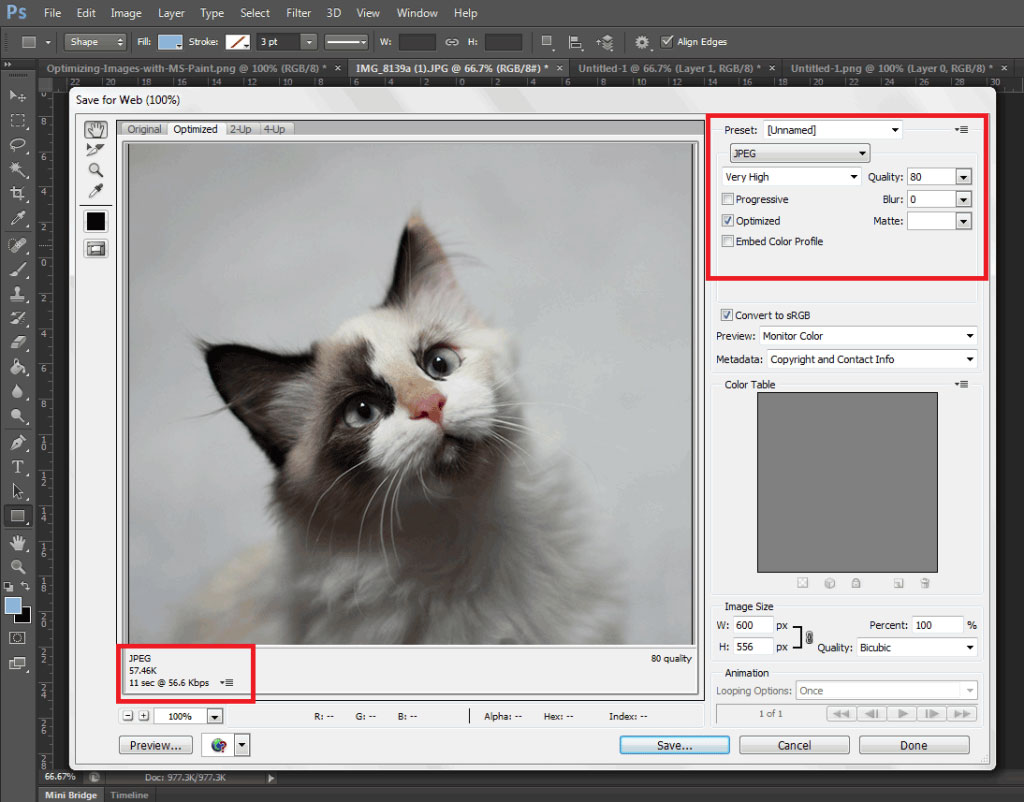
optimizing-images-in-Photoshop

Open the image in Photoshop and view it at a 100%.

If the exact size is too large to be displayed on a computer monitor, you need to edit the size of the image. You don’t have to be a Photoshop wizard. Just open the image on Photoshop, and resize or crop your image to the appropriate size. Apart from that, you also need to consider its format and compression.

If you have a style, preset image sizes that you should be using. Click on File and Save for Web (Ctrl + Shift + Alt + S). The smaller the size the faster the image loads on the page.

Using WordPress Plugins

What if you don’t have Photoshop? And, you don’t have the time to optimize every image you add to your e-commerce store? You can always rely on some WordPress Plugins.

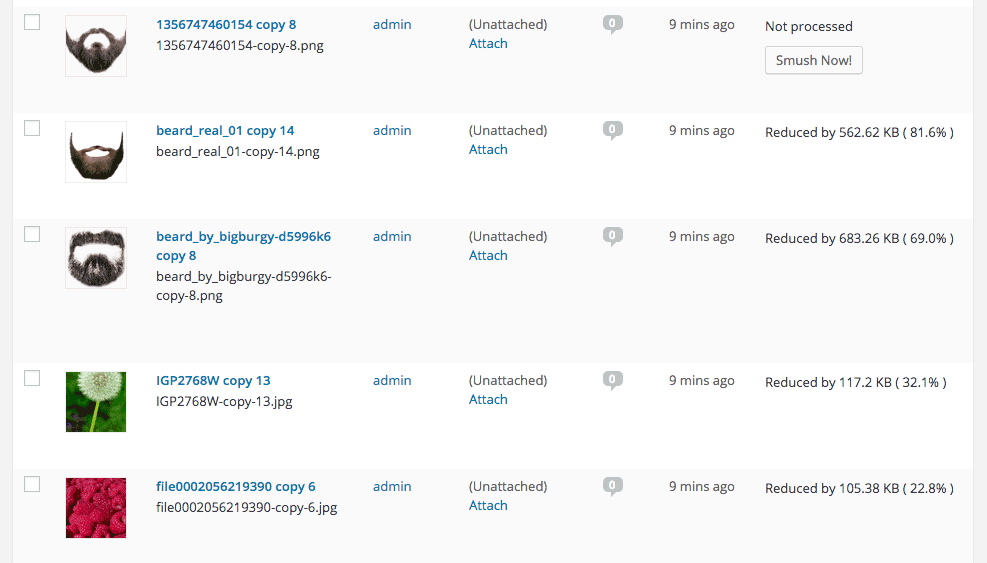
WP-Smush

Take WP Smush, for example. It’s popular for stripping hidden, bulky information from your images, reducing the file size without losing quality. You just need to upload your images, as you normally would, and the plugin will do its work behind the scenes.

The free version of the plugin cannot optimize images larger than 1M. You need to upgrade to WP Smush Pro to optimize images up to 8 MB.

Using a CDN to Increase Site Speed

CDN

So far, we’ve talked about optimizing images, caching, and minification. Now, it’s time to explore the concept of using a Content Delivery Network or CDN, and how it can help increase your site speed.

What is a CDN?

As mentioned earlier, CDN is a network of servers located at different locations around the world. It functions to cache the content of your website, so it can be delivered faster to your visitors based on their location.

Let’s say you’re server is based in Australia. Visitors far away from your geographic location will have a hard time connecting to your website. This would result in delayed responses.

With a Content Delivery Network, browsers will have a nearby server that they can connect to. This will deliver your content much faster. CDNs will mostly benefit the websites that cater to a global audience.

Because there are many options available, choosing the right CDN for your website can be tricky. It depends entirely on your needs, and the popularity of your site. Large-scale enterprise sites usually use popular CDN companies Akamai and Level3.

Setting Up CloudFlare CDN through CPanel

When it comes to small website owners, one of the more popular CDN solutions is CloudFlare. They offer a basic free plan that includes fast site performance, board security protection, and powerful stats about your visitors.

If you’re not sure if your hosting is a partner, you can check this list from CloudFlare.

According to CloudFlare, on average, a website using the CDN will load twice as fast, use 60 percent less bandwidth, have 65 percent fewer requests, and is more secure.

If your website is hosted on a CloudFlare hosting partner, you can easily use the tool available on CPanel.

  1. Go to CPanel’s ‘Site Improvement Tools’

cloudflare

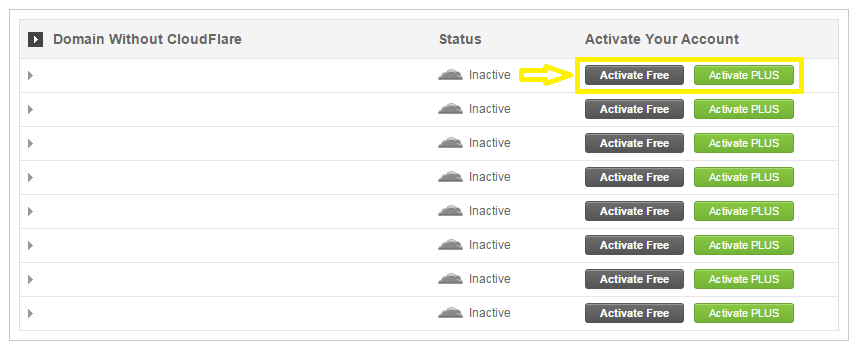
  1. Click on the CloudFlare icon
  2. Tick ‘Activate Free’ for the free version or ‘Activate PLUS’ for the paid version

cloudflare-in-cpanel

  1. Enter your email to create an account with CloudFlare
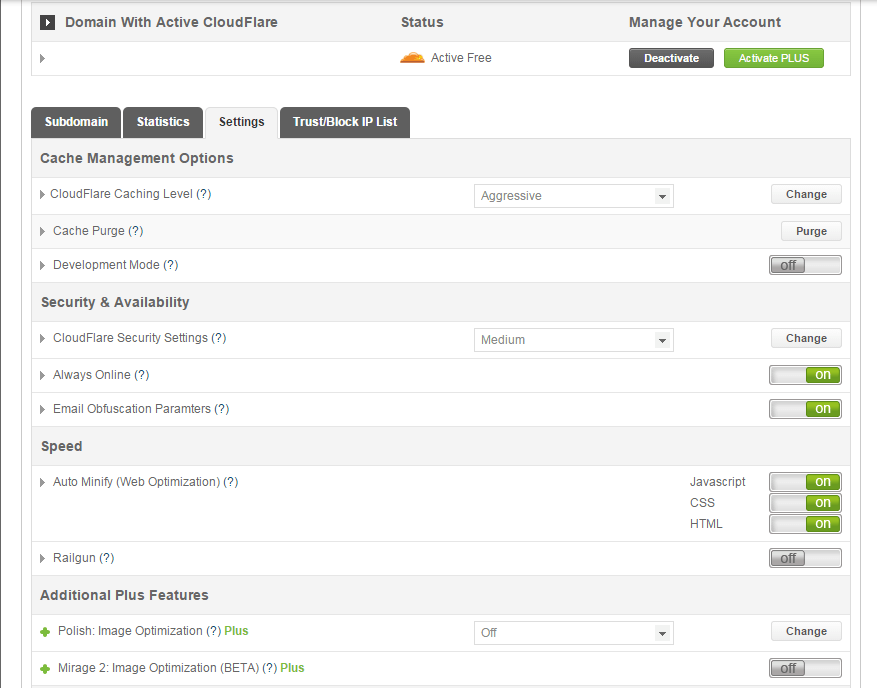
  2. Once activated, click ‘Manage’ to tweak certain settings

cloudflare-settings

And that’s it. Your CloudFlare CDN is all set and the performance of your website should be improving soon.

Setting Up CloudFlare Manually

Here’s what you need to do too set up CloudFlare manually:

  1. Sign up for an account
  2. Add your website on “Select a website” page for scanning
  3. A list of all found DNS records will be shown
  4. Set any subdomains that you would like to pass through CloudFlare
  5. Click on “I’ve added all missing records, continue” once you’re ready.
  6. Choose a plan, free or paid (SSLs won’t work with the free version)

You also need to edit the name server to the new one provided by CloudFlare. You can do this by going to CPanel, and clicking on Domain Manager. Then, go back to CloudFlare settings and click on “I’ve updated my name servers, continue”.

Note: It may take up to 24 hours for the name servers to be completely active.

With a CDN in place, your site should be running a lot faster. This improves the overall user experience and even boost your conversion rates.

Cleaning Your Database to Speed Up Your Site

cleaning-your-database

It’s a strategy that’s rarely discussed. Nevertheless, it can speed up your site just as well as the other methods. It’s maintaining and cleaning your database.

You might think that database is just one of the requirements for a WordPress install. It is, however, more than just that. If you keep your database clean and optimized, it can shave a few seconds of loading speed.

Remember, one or two seconds saved could mean the difference between a bounce and a conversion.

What’s In Your Database?

A database is just like your computer’s hard drive. It’s where all your data is stored. It contains important information such as: posts, pages, your WooCommerce products, comments and product reviews, users and customer information, URLs, etc.

For those who have been using WordPress for a while, doing regular clean ups allow you to reduce your database size. This can lead to quicker, and smaller backup files.

What’s there to clean?

cleaning-your-database-2

Over continued use of WordPress, your database accumulates many spam comments, copies of post revisions, trashed comments, remnants from plugins you are no longer using, themes, and more. When that becomes too large and bloated then website performance will suffer.

Backup Your Website First!

Before you start any database cleaning, it’s very important to create a backup of your website. If your database gets erased or corrupted, you stand to lose everything you have written. There are a couple of plugins in WordPress that can help you do this.

Your hosting provider will most likely have a backup of your website too. Here’s more detailed information on backing up your database in WordPress.

Cleaning Your Database

You may clean up your website database manually, or use these awesome plugins:

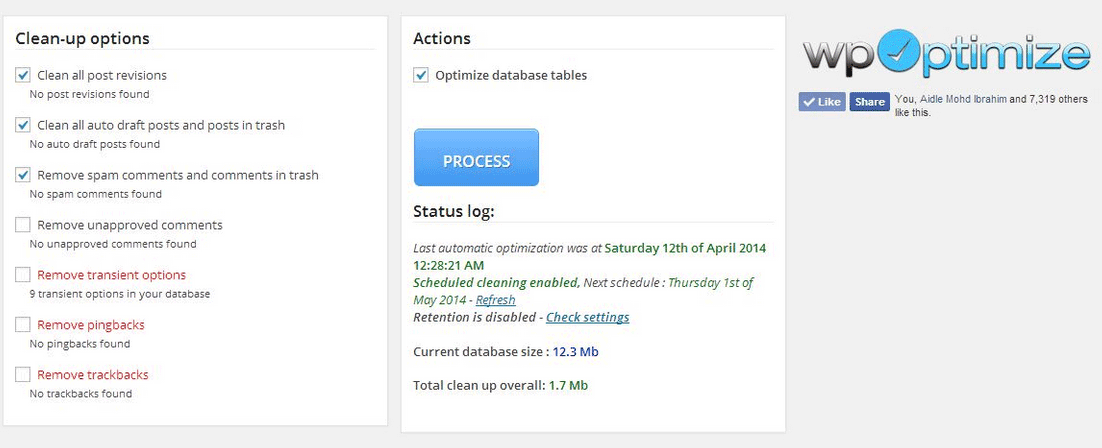
  1. WP-Optimize

wp-optimize

One of the most popular and easiest plugins for cleaning your database. It allows you to schedule a regular database cleanup which can be pretty handy. However, WP-Optimize plugin uses direct delete SQL queries which can leave orphaned data left behind.

  1. WP-Sweep

This plugin allows you to clean up unused, orphaned and duplicated data in your WordPress. It can also show you a report of how much clutter you can clean. WP-Sweep uses proper WordPress delete functions.

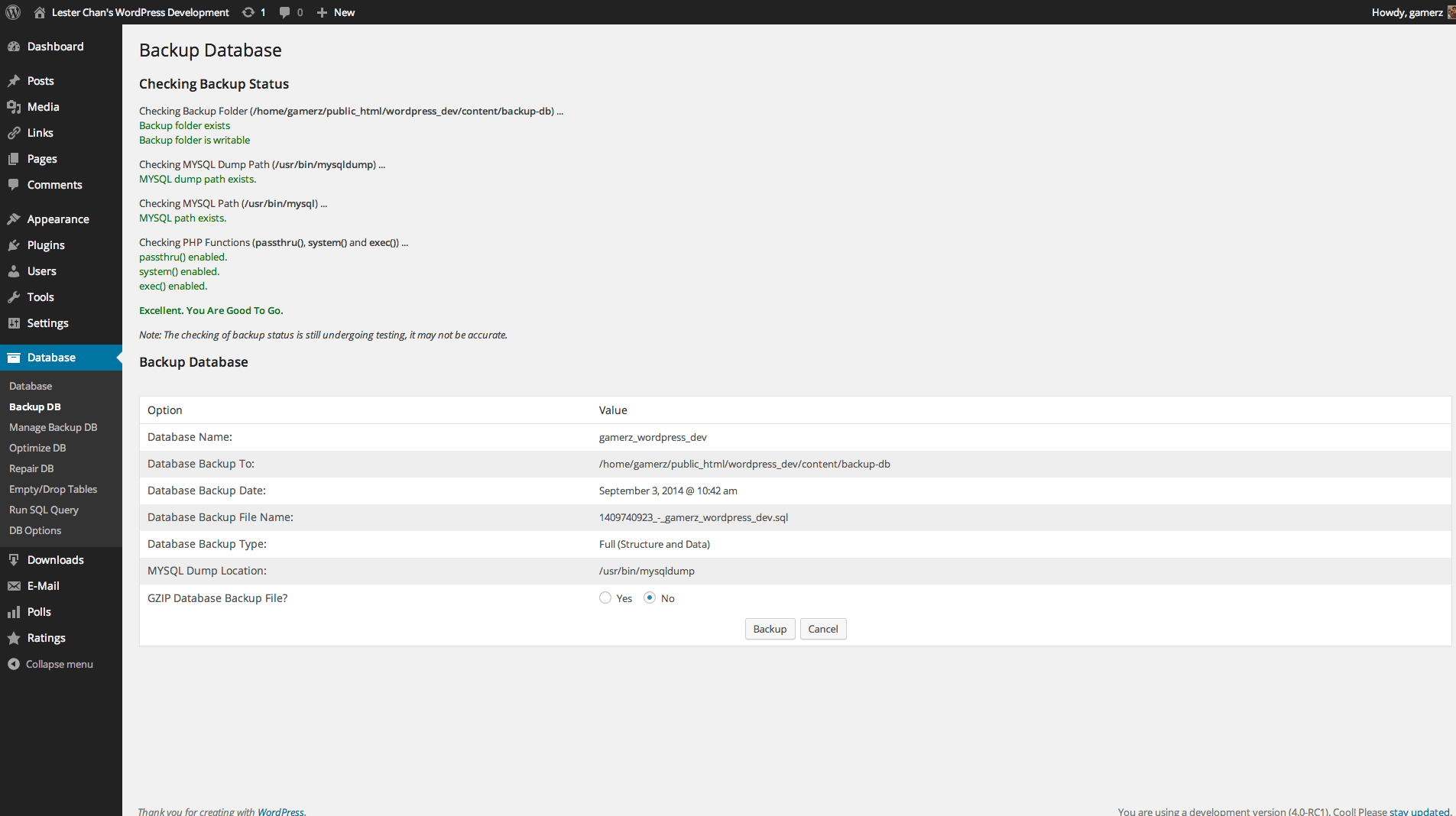
  1. WP-DBManager

wp-dbmanager

Geared for more advanced users, setting up WP-DBManager can be tricky if you’re not familiar with database elements. It offers more customizable options and features, but it cannot clear bloat.

If you want to use WP-DBManager for its features, look for other means to clear database bloat.

More Ways on How to Speed Up Your WooCommerce Store

woocommerce

Once you’ve set up a solid foundation for your e-commerce site, it’s time to do some fine-tuning. That is, if you’re still having speed issues with your WooCommerce website. Here are more useful tips to help you to solve this matter.

1. Upgrade your hosting account

As soon as you can afford it, do upgrade your hosting account. It would be better to use a good hosting publisher rather than shared hosting. Not only it can improve your site speed, but also prevent down time during high traffic periods.

2. Test your current speed

Checking the current performance of the website gives you a benchmark to compare against after you make the changes. There are various tools to help you check your loading speed:

  • Yahoo! Y slow
  • Google Page Speed
  • Pingdom is the quickest and easiest one

pingdom

3. Use minimum number of WordPress plugins

Using too many plugins in a website can slow your website speed, particularly if you’re using social-sharing plugins. It will help to identify plugins that are slowing you down.

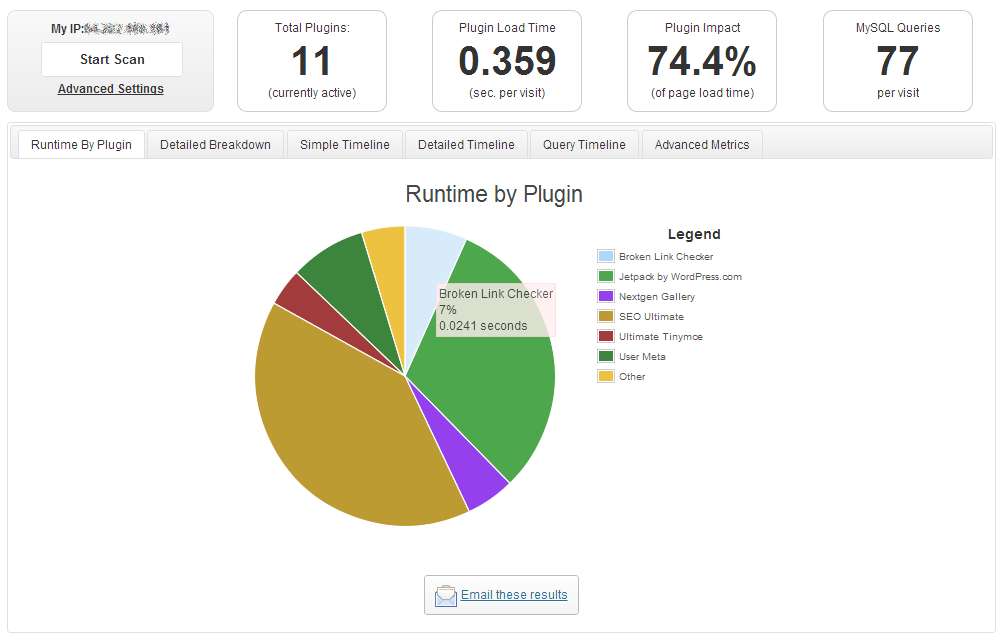
P3 (Plugin Performance Profiler) is a well-known diagnostic plugin that shows which plugins are slowing down your site. It creates a profile of your WordPress site’s plugins’ performance by measuring their impact on your site’s load time.

p3

Once you’ve identified them, you can make an informed decision about whether to keep them, replace them or remove them entirely.

4. Compress your website

Gzip is the most popular, and effective compression method that reduces the response size by about 70%.

Compressing files on your computer as a ZIP file can reduce its total size, which makes it both easier and faster to send to someone. Gzip works the same way, but with your Web page files.

After installation, Gzip automatically compresses your website’s files as ZIP files. This can save bandwidth, and speed up page-loading times. When a user visits your site, their browser will automatically unzip the files and show their contents.

Some plugins will add Gzip to your website in a few simple clicks. For those who want to install it manually, it’s actually very simple.

    1. Open your .htaccess file, which is found in the root directory on your server
    2. Add the following code
AddOutputFilterByType DEFLATE text/plain
AddOutputFilterByType DEFLATE text/html
AddOutputFilterByType DEFLATE text/xml
AddOutputFilterByType DEFLATE text/css
AddOutputFilterByType DEFLATE application/xml
AddOutputFilterByType DEFLATE application/xhtml+xml
AddOutputFilterByType DEFLATE application/rss+xml
AddOutputFilterByType DEFLATE application/javascript
AddOutputFilterByType DEFLATE application/x-javascript
  1. Test whether it’s working by going to Check Gzip Compression

5. Optimize your homepage

Your homepage is a crucial part of your site because visitors land there the most. There are a few easy ways to ensure that your homepage loads quickly.

  • Show excerpts instead of full posts
  • Reduce the number of posts to 5 or 7
  • Remove unnecessary sharing widgets
  • Remove inactive plugins and widgets that you don’t need

A clean and focused homepage design will help your page not only look good, but load quicker as well.

6. CSS on Top and JavaScript at the Bottom

It’s widely recommended to link your style sheets as close to the top of the page. The reason is that browsers won’t render a page before rendering the CSS file.

Meanwhile, JavaScript should be as close to the bottom of the footer. Doing so can prevent browsers from parsing anything until it has fully loaded.

With just this simple fix, page-loading speed will improve, since files are forced to be downloaded in the optimal order.

7. Disable content hot linking and leeching

When other sites direct link to the images on your site, it can make your server load increasingly high. This adds up as more and more people “scrape” your posts.

Conclusion:

Just How Important is Site Speed?

importance-of-site-speed

Consumers take advantage of online shopping because of the convenience it offers. Most people can’t stand waiting in lines. And, they especially get frustrated when it’s taking longer than expected.

Now, going back to your website, users won’t wait for your site to load. If it takes too long, they’ll definitely find another online store.

Another thing to keep in mind is that Google wants the best experience for their users, giving site speed utmost importance. They even reward sites that have clean codes and download quickly.

Page speed is now one of 200 or so signals Google uses to determine rank. More importantly, do it for your existing and potential customers. The faster a page loads, the more satisfied they will be.

Filed Under: How-To Articles Tagged With: best practices, caching, CDN, CloudFlare, conversion optimization, CPanel, Genesis, how-to, minification, optimizations, photoshop, SEO tools, site speed optimization, Siteground, Storefront, W3 Total Cache, website maintenance, WooCommerce, woothemes, WordPress, WPengine

4 Steps to Creating Better Customer Personas for Online Stores

July 27, 2015 By John Leave a Comment

Not everyone is your customer. So, before spending thousands of dollars on your marketing campaigns, it’s important to know who you are trying to reach.

Creating customer personas should be the first step to any marketing campaign.

What you will learn:

  • How to increase sales using customer personas
  • How to create customer personas without breaking the bank?
  • Case studies on popular brands’ success and failure.
  • How to use your customer persona to 10X revenues?

To learn more, keep reading.

Susan, David, Matt, Monica, or John – one of these personas can be your customer. Consider them hypothetical representations of your target audience’s fears, favorite places online, and motivation to purchase your product.

If you’re like many small business owners who don’t have the means to hire a full-blown marketing team, it’s up to you to identify what makes your customers tick. Here is what we have done for our customer personas at Wooassist.

According to eMarketer’s latest forecasts, e-commerce sales will top $7 trillion by 2025.

With many ecommerce stores found on the web today, coming up with an effective marketing campaign can help a company get ahead of the competition.

Why Do Some Marketing Campaigns Succeed And Others Fail?

marketing-fail

It’s very important for marketers to put themselves into the shoes of their target audience. Companies that know how to think like, feel like and behave like their potential customers have the definite advantage.

It’s not a new technique.

Think of your favorite book author or screenwriter. When working on a new character, they write about every possible detail, from that character’s life, background and thought process.

Why Creating Customer Personas are Important?

Customer personas are becoming increasingly useful not only for large companies, but also for smaller online retailers. It’s now possible to have ultra-targeted ads and communications.

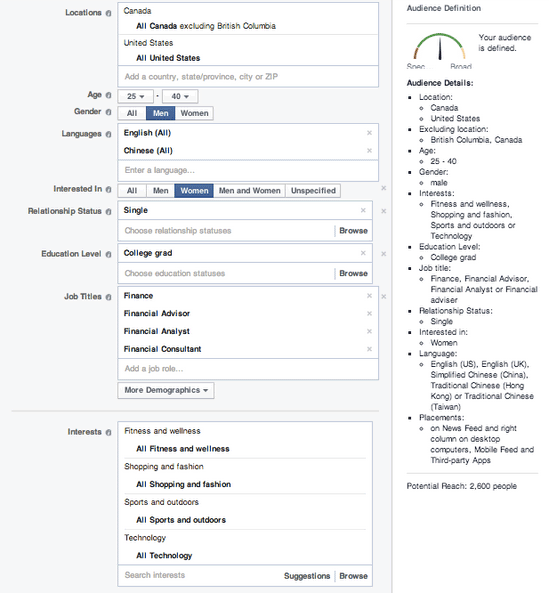
Take a look at Facebook’s advanced targeting when it comes to their advertising:

facebook-targetting

One can target a very specific audience. You can base it on a customer’s location, age, language spoken, education level and interests. To do this effectively, a company needs to define their customer personas.

Case Study 1: Subway’s Jared

Subway, a popular fast-food franchise for sandwiches, named their fictional persona Jared. He is an overweight American who wants an easy-to-follow, affordable diet plan with lots of choices and familiar foods.

subway

When Subway has to make a marketing decision, they first ask, “Would Jared want this?”

This buyer persona helped Subway redefine itself as a healthy place to eat, and they reorganized its menu to highlight its low-calorie meal options.

So, are you ready to revamp your advertising?

If you’re planning to start an e-commerce business, or already have an existing one, it’s time to discover the concept of Customer Persona, and how it can help you grow success.

Step 1: Meet Your Potential Customer

Personas are fictional, generalized characters built from the real words of real consumers. They incorporate the various goals, needs, and observed behavior patterns among your real and potential customers.

It is not merely a description.

More than a one-dimensional profile, it delves more on the specific attitudes, concerns and criteria that drive prospective customers to choose you, or your competitor. When you have these insights, you have the knowledge to align your marketing decisions.

SUSAN is one example of a customer persona.

Watch the video below:

Before going through the basic customer persona template, it’s important to know where to get all the information you need – sources to help your persona take shape.

Take a look on these three places:

  1. Site analytics.
analytics

Take advantage of your site’s analytics. It’ll allow you to see what led your audience to your site, and even the device they used. Take note of where they came from, the keywords they’ve used, and how long they’ve spent on your site.

  1. Social Media.
social-media

They call it ‘social media listening’. Twitter, Facebook, LinkedIn, YouTube, etc. – explore on the different social media platforms to find your potential customers and get to know them. What are their questions, or common problems? How can your products or services be the solution?

  1. Surveys and interviews.
survey

Personas will become more useful if they’re based on interviews, or surveys, gathered from the buyers themselves, customer service interactions, and even sales people. These data can reveal a deeper insight into a customer’s goals and values.

Components of a Customer Persona

persona-components

When creating your persona, you need to address include several of its components. Take a closer look at your customer base. Identify both ‘good’ and ‘bad’ customers to get a more rounded understanding.

Let’s go through the ABCs of creating your customer personas:

Name.

It may seem unnecessary, but giving the persona a name is essential. It makes the persona closer to resembling a real person. It will also be easier to refer to your persona, instead of having to refer to it as a broad idea.

Background.

This includes the basic background information, including demographics and psychographics. Age, gender, location, family life, likes and dislikes, and location – these data will help you understand the motivations of your audience when it comes to navigating.

Goals.

Remember SUSAN – what was her goal when looking for a product? It’s to get the best price. Setting goals for your persona helps in identifying the results they want. Do they shop by price? Do they want to find a vendor they can work with quickly?

Online Skills.

How comfortable is your character online? Understanding their technical skills lets a business build its website in a way that customers can navigate with ease. It tells you how your audience interacts with your brand.

Platform.

What platforms are they using to get to your website? Your website should have a responsive design, so it can render correctly in any device. Including this in your persona ensures that your website is optimized.

Step 2: Create Your Customer Persona

Once you really get to know your customers, you will be able to make a more meaningful connection. Using a combination of raw data and educated guesses, which can include demographics and behavior, you will be able to create a client persona that portrays your model customer.

Give Your Persona a Name

It can be whatever you choose. Humanize it – give it a real name and even a photo. This psychological detail allows a marketer to see his products from the persona’s perspective.

persona-name

GardenWare does a good job of identifying their customer persona by creating two distinct profiles of their customers.

Job, role, and company.

The best resource for these data is from surveys or interview results. Build surveys that include a field for job title, or type of business.

Demographic information.

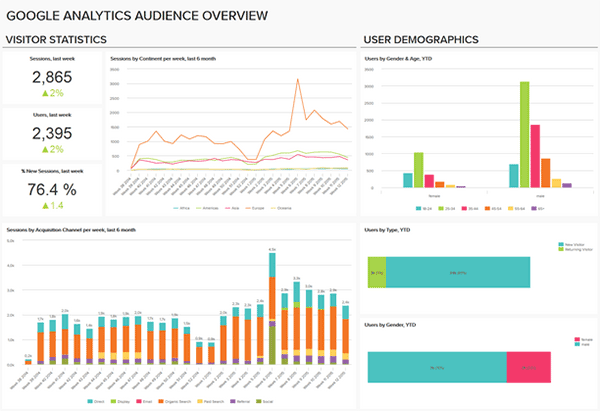
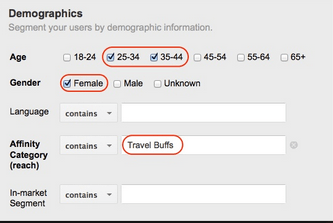
analytics-1

For this section of your template, don’t just rely on your best educated guesses. You can get some insight from Google Analytics and survey results.

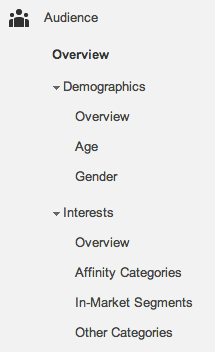
Five dimensions available include Age, Gender, Affinity Categories, In-Market Segments, and Other Categories.

Affinity Categories identifies users in terms of lifestyle. In-Market Segments identifies users in terms of their product-purchase interests. On the other hand, ‘Other Categories’ provides a more specific, focused view.

analytics-2

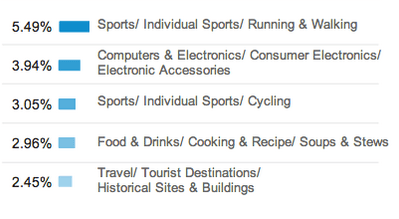
Google Analytics can also reveal the interests of your site’s visitors. Once you know their interests, you can come up with more customer-oriented posts and ads, in any platform.

analytics-3

For data which are not found on your analytics, you can check on your survey or interview results. Make sure to ask the right questions to get the most accurate responses.

Goals, Obstacles, Values and Fears.

To determine objectives, customer interviews will be of great help. As you identify these data, also come up with your solutions in order to help them meet their goals and overcome their challenges.

goals

Marketing Message.

After creating your fictional buyer, tailor your marketing message by identifying words that are likely to gain their attention. Make an effort to find out what triggers them to make a purchase. Common buzz words may include coupon, bargain, and sale.

marketing--message

How Many Do You Need?

You don’t have to minimize a thousand clients into just one representative. Ideally, there should be about 3 to 5 buyer personas for each business. These personas will be changing along with the growth of your store. You’ll have to review them from time to time.

Modern consumers are smarter. They know when they’re being manipulated.

poor-content

With a poorly-written content that’s all ‘sales talk’, that’s exactly what you’re making them feel. Be strategic and relate to them more as ‘human beings’. You’ll need a persona template, which you could apply in your marketing campaigns.

Case Study 2: MailChimp Persona Research

mailchimp-persona
Fred. MailChimp’s ideal user

Let’s take a look at MailChimp’s persona research. Their objective was to ‘find out who really uses MailChimp’. They believed that what they needed was a clear idea of their current users, to better empathize with them.

Here’s the process of their research:

  1. They interviewed stakeholders in order to identify who uses MailChimp. They were given the same characteristics – smart, self-reliant, and techie. Thus, they came up with the customer persona ‘Fred’.
  2. As for their next step, they ranked their pool of active users by industry. It was found that a huge number of MailChimp customers were represented by the nonprofits, education, and the arts.
  3. Subjects from popular industries were identified and interviewed. Customers were met at their workplaces, in different locations of North America and Europe. Data gathered also included the workplace’s environment, the customer’s emotional state, etc.
  4. Findings were organized and analyzed, and MailChimp discovered a lot of similarities across different roles or types of customers.
  5. MailChimp ended up with five archetypical personas, which they used as guides in developing MailChimp. The last step was sharing the outcome with the team. So, they created posters that now adorn the walls of their HQ.
Step 3: Put Your Persona to Work

Done with your customer persona? Great!

Now, it’s time to put those personas to work. Here are ways for you to start using them in order to make smarter marketing decisions.

Post Social Updates in Their Language.

social-media

When you post social updates, use the language your buyer persona uses. Is your persona a stay-at-home mom, or the head of the human resources? Speak like how you’d talk to someone in real life. Doing so can make your brand relatable.

Create Their Favorite How-To Blogs.

Even Google reminds online marketers to create relevant, educational content. With customer personas, you will be able to create content that makes a more meaningful connection. Write about the solution to their problems.

Customize Your Keyword Strategy.

Part of creating your persona is knowing their challenges. What’s the phrasing they’ll most likely use to search for solutions? Take this opportunity to customize your SEO, optimize content, and target keywords your buyer persona uses.

keyword-strategy

Create Offers That Can Solve Their Problems.

What does your target audience want help with? Since you have identified your customer persona’s fears and common obstacles, you will be able to offer effective solutions. This will mean more leads!

Align Campaigns With Your Persona’s Lifestyle

Is your buyer persona a night owl, or more of a morning person? What’s his or her daily lifestyle nuances? Let’s say your target audience goes on a vacation every summer. You can align your campaigns during that month.

campaign-personal-style

Apply Technology They Know How to Use.

Asking your customers to use a technology type that they aren’t comfortable using is not really a smart move. Take for example – making them download a mobile app when they don’t have a smartphone. Again, the platform they’re using is an important component to consider.

apply-technology

Mold Sales to Your Persona’s Decision-Making.

Is your buyer persona the budget conscious type? During the buying cycle, what information does he or she need to go through with the sale? This is a crucial information which can help your sales.

Case Study 3: JC Penney’s Big Mistake

JCP

JC Penney Corp. is a well-known chain of American mid-range department stores based in Texas. In June 2011, the company announced that they’ve hired Ron Johnson as CEO. He was the man in charge of Apple’s profitable retail stores, dubbed as Steve Jobs’ acolyte.

In just a month of his being CEO, Johnson suggested a radical rebranding.

Johnson

The plan was to create a more youth-oriented Penney, getting rid of its addiction to price promotions. The outcome was disastrous. JC Penney totally abandoned their existing customer personas. They have alienated traditional customers, without attracting new ones.

Around 16 months later, Johnson was out. Penney lost $1 billion during his one full year as CEO. After Johnson was gone, the company restored its past philosophy.

Ron Johnson admitted that he didn’t understand what his customers wanted. He didn’t take into account what drove JC Penney customers to shop.

How to Use Customer Personas

how-to-use-customer-personas

Don’t make the same mistake as Ron Johnson did. By clearly defining your buyer personas, you’ll have a much better idea of who, how, and where you should be marketing to achieve the greatest level of success.

Demographic data can help you target your ads, and psychographic information can help you create more engaging campaigns.

Step 4: Keep them on Target

Google always reminds us to keep our content fresh. One of the best ways to do that is keeping your customer personas on target.

How to keep your customer personas on target?

This means that you have to always keep their problems and concerns top of mind. You need to write directly to and for your buyer personas. Use them to modify and improve your marketing strategies.

Re-examine and Refresh.

It’s a competitive world out there. Make sure that your customer personas accurately reflect your target audience’s current life situation and purchasing needs. Do this on a regular basis. Put it in your calendar as necessary.

refresh

Prioritize Conversations with Customers.

It wouldn’t hurt to browse your blog and social media accounts and read customer comments. Include both positive and negative feedback. Doing so will provide your business with some fresh insights.

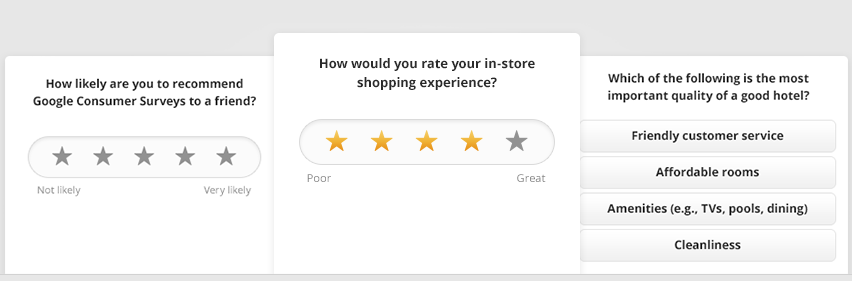
Use the Best Data Resources.

Google Consumer Surveys, Quora, Mechanical Turk, and other similar sources can help supplement your current data. Put them to good use in order to keep your personas fresh, and on target.

Google-survey
Google Consumer Survey

Add and Delete Personas.

The marketplace is ever evolving. In the months to come, there may be a need to add new personas and delete those who can no longer help. Personas are working tools that should be aligned to the present and the foreseeable future.

Visualize Your Audience.

You can either assign a photo to your customer persona, or keep photos of actual customers where you can see them. They’ll represent your target personas and remind you that you’re creating content for real people.

visualize

Popular Brands That Totally Get Their Buyer Personas

Do you ever buy products from the same brand, and stopped to think, ‘They totally get me’? It’s obviously a company that gets their target audience. Let’s take a look at some companies that totally “get” their buyer personas!
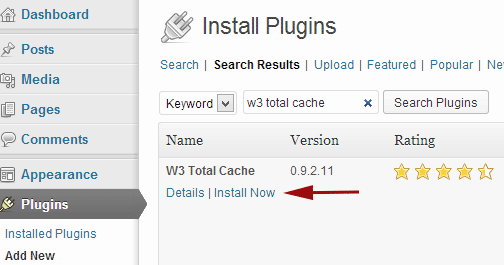
piece-of-cake

Seventeen Magazine

Believe it or not, Seventeen started shaping their customer personas back in the 1950s. The first buyer persona they’ve made was named Teena. They’ve based it on survey data from teenage girls and their mothers.

Seventeen Mag described Teena as the ‘High School Girl who has a peck of problems’.

seventeen

“She’s what older folks call an awkward adolescent — too tall, too plump, too shy — a little too much of a lot of little things. But they’re big things to Teena. She writes her favorite magazine for the tip-off on the clothes she wears, the food she eats, the lipstick she wields, the room she bunks in, the budget she keeps, the boy she has a crush on.”

Seventeen may have adjusted to the modern world, but its content still caters to girls like Teena, who have problems with their diet, boys, and dating. We can say that Seventeen has successfully channeled what was going on in high school girls’ minds.

Apple’s iPad 2

ipad2

When Apple launched its iPad2, the campaign was no longer geared towards consumers in general. Instead, Apple identified their customer persona as the on-the-go business professional who needs access at stock options, investment portfolios, etc.

They’ve promoted their iPad 2 into a device for a business professional who wants to make their job more effective and efficient.

JetBlue

jetblue

JetBlue finally took advantage of social media to reach a younger group of audience. The company’s buyer persona is now the low-budget traveler, who wants a comfortable yet affordable solution to flying.

fly-like-a-boss

They even tweeted their campaign ‘Fly like a BOSS’, and as expected, quick responses from their target audience were achieved.

Procter & Gamble

P&G

Procter & Gamble is known for the thousands of products they provide for households. And, one of their personas is the one who’s in charge of shopping for these items – moms!

One of their most unforgettable campaigns happened in 2012, which showed an ad dedicated to the Olympics. They called it ‘Raising an Olympian’, wherein the company focused on a mother’s role in her child’s success. Who can resist such a heart-moving story?

Conclusion

success

At the end of the day, you want to increase conversion rates and make more sales for your online store. And, creating buyer personas is an essential part of building a successful marketing strategy. You just have to know where, when and how to use it.

For your website.

Because of your customer persona, you will be able to craft a better user experience on your online store. You will be able to generate content that speaks directly to each persona, giving them solutions, instead of just generic content.

For your sales.

Your sales pitch is an important factor to your ecommerce conversion rate. It’s the last thing a customer reads before hitting the ‘buy now’ button. Customer personas can give ideas regarding the motivation, and psychology, behind the purchase.

For your content marketing.

You already know what type of articles your customer persona reads. Thus, you can create blog posts for your target audience. This makes your content relevant. It’ll attract more leads since you’re offering information they want, and they can actually use.

For your advertisements.

You may even use personas to optimize your PPC campaigns. Apply the same keywords your customer persona uses to make your ads more relevant. You can place banner ads on websites that your customers frequent. This will definitely improve your CTR.

Now that you have this information, you have the chance to make your marketing campaigns more effective. Don’t be afraid to meet your customers. The next time you launch a promotion, you can ask yourself the question…

‘Would Susan or Matt be interested in this news?’

Filed Under: How-To Articles Tagged With: customer persona, e-commerce, Google Analytics, how-to, keyword research, LinkedIn, marketing strategy, social media, Twitter

WooCommerce vs Magento: Which One Is Best For You?

July 22, 2015 By John 3 Comments

WooCommerce vs Magento

Last time, we compared WooCommerce with Shopify. Now, it’s WooCommerce Vs Magento. Here we will look at their strengths and weaknesses as e-commerce platforms. This will help you find out which is the better fit for your business.

Are you considering moving form Magento to Woocommerce? We have done this for a number of businesses and it can be a daunting task.

The functionality does not cross over exactly and it can become complex web of options and decisions. We offer a service to help with this here.

As of June 22, 2015, stats from Builtwith reveal that WooCommerce is now the most popular e-commerce platform. There has been an increase of 247,245 sites just this quarter. Records show there are around 937,743 live websites using WooCommerce.

woocommerce-usage-statistics

Meanwhile, Magento still remains the high-performance, scalable e-commerce solution for large businesses. More than 240,000 merchants worldwide put their trust in this software. Data shows 427,571 websites are using it.

If you are torn between the two, then you’ve come to the right place.

When it comes to choosing the right e-commerce platform for your business, there are a number of things to consider. We’ll go right ahead and explore the factors one by one.

The Face-Off: WooCommerce vs. Magento

face-off

WooCommerce:

This open source e-commerce plugin for WordPress was launched in 2011. It was aimed at small-to-medium online merchants already comfortable with a WordPress set up. To date, there has been a total of 8,432,130 WooCommerce downloads. It quickly became famous for being free in nature and its simplicity to install.

Leading brands that trust WooCommerce include:

woocommerce-brands

Magento:

The platform is now owned by eBay, a global leader in e-commerce. It provides two distinct versions – Community Edition and Enterprise Edition. Since its launch in 2008, there has been more than 500,000+ downloads. One can find more than 2000 various extensions for additional functionalities.

Leading brands that trust Magento include:

magento-brands

ROUND 1: ‘Getting Started’ Comparison

Platform: Both WooCommerce and Magento’s Community Edition are open-source e-commerce platforms. That means both platforms are available for free. Bigger businesses can upgrade to Magento’s Enterprise edition, for a subscription fee. WooCommerce is totally free, but it has fewer features compared to Magento’s Community Edition.


woocommerce

Pricing:

For development costs, Magento may be priced a bit higher. This is because you’ll need to find a capable developer to help build out the site. However, it gives you a better initial suite of features. WooCommerce is entirely free to download and install, but you’ll probably need to buy some of its extension. For instance, its full range of payment options.

Hosting:

WooCommerce is an extension of WordPress therefore, there are very few server requirements. There should be no issue, as long as your server supports MySQL or PHP. As for Magento, there is a slightly longer list of server requirements. It may also require some technical knowledge before one can set it up properly.

magento

Installation:

The WooCommerce plugin is developer and designer friendly. It is easy to customize and change. It has a thorough help section, and video tutorials for beginners to help you get up and running. Magento comes with a full installation wizard, and a comprehensive help section. Videos and tutorials are available from the support community as well.

Round Conclusion:

Because WooCommerce is easier to use, the platform is ideal for less sophisticated users. Magento may be a more flexible solution for sophisticated clients selling online at an enterprise level. However, it’s a bit tougher to understand.

ROUND 2: Plugins and Themes

woocommerce-themes

Plugins: WooCommerce has a slight edge over Magento because it can take advantage of WordPress plugins. Nevertheless, a lot of community extensions are available for Magento, which can be easily integrated to suffice business requirements.

Themes:

For both platforms, there are a lot of free and premium themes to choose from. Magento themes offer flexibility, functionality, and can be easily extended and modernized. But, you’ll need a professional webmaster to install, set up and update even the easiest Magento theme.

magento-themes

There are more WooCommerce themes to choose from compared to Magento choices. They’re also incredibly easy to install and upgrade. The only downside is they can conflict with other WP plugins. So, compatibility should be checked with WooCommerce before installing of any new plugin. This article can tell you more about the theme pros and cons of both platforms.

Customization:

Just because it’s free, doesn’t make WooCommerce a rigid platform. In fact, there’s a lot of room to customize and tweak your online store to a level of uniqueness. You can change pre-set CSS styles and color, tweak the code and experiment with the special features which each theme offers.

themes

With Magento, you also have the option to customize the theme as much or as little as you’d like. Your theme is designed to utilize all of Magento’s excellent built-in features that you should be taking advantage of.

Round Conclusion:

Magento can give you a bit more when it comes to extensions, but WooCommerce tends to be preferred because it relies on plugins for extra functionality. They basically have the same theme features. But, if you choose WordPress for your projects, then go for WooCommerce themes.

ROUND 3: Product Volume and Variations

Volume:

There is no real consensus on how many products you should have, for a WooCommerce store to be manageable. There are many WooCommerce stores out there that have thousands of products and manage just fine. According to MarketPress, 57% of WooCommerce store owners have more than 100 products, 40% has more than 250 products and 11% has up to 1,000 products.

store-volume

Magento will support an unlimited number of products. But as your catalog grows, you may start running into resource limitations that’ll require hosting upgrades, etc. When running a large catalog, product, URL rewrite, and inventory indexing are the major issues.

Variations:

Many WooCommerce users believe that WooCommerce only support up to 50 product variations per product, but this isn’t true. It can only create 50 variations at a time if you choose to automatically create the different product variations. After that you can again create another batch of 50.

magento-2

Magento supports multi-variant products, which they call configurable products. The platform treats a configurable product as a collection of simple products, and each variation has its own SKU and inventory listing. Here are steps to adding configurable products in Magento.

Multi-Store:

Multi-store is native to Magento. Let’s say you want to sell computer parts online, and your spouse wants to sell kitchen tools. It is unlikely that you would sell both of these product lines in a single store. With Magento, you can do both by setting up separate websites, wherein each can have its own domain name.

magento-multi-store

It’s possible to run WordPress as a multisite installation, and for each site, you can install plugins. Doing so allows you to control all three stores from one WP admin. However, WooCommerce doesn’t support this feature and cannot run multiple stores.

Round Conclusion:

As earlier mentioned, Magento is the better choice if you have a lot of products or products variation. Magento’s multi-store option is something to consider. While WooCommerce can handle an unlimited number of products, it becomes a lot difficult to manage if you have too many.

ROUND 4: Features and Ecommerce Trickery

Product Relations:

Magento features upsells, cross sells, and related products, which can all lead to more sales. You’re also able to add discount codes, and use an advanced filter to navigate your products. You can view them all on the same account.

magento-products

It’s simpler with WooCommerce. You can rate products and showcase best sellers, or sale items through the available widgets. Anything more complex than these features will require an add-on. The navigation is sophisticated, but not as much as Magento’s.

Integration:

WooCommerce integrates seamlessly into WordPress. It gives site owners the ability to set up and publish blog posts, as well as create content with its easy-to-use CMS. You can take advantage of the almost limitless plugins available to make your site do practically anything.

As for Magento, its CMS is nowhere near as well developed as WordPress. That is why creating a custom menu structure is more challenging compared to WP’s drag and drop user interface. To even establish a blog in Magento, an extension is required.

Navigation:

Making the navigation path simple and obvious for potential customers can decrease your bounce rate. Magento stores allow customers to filter product listings on the criteria they prefer, which includes price range, color, brand, size etc. This advanced navigation gives them a more efficient shopping experience.

magento-navigation

Just like Magento, WooCommerce also has layered navigation, but it only allows selecting a single attribute for filtering. With its custom navigation, however, you can easily mix and match categories and pages. You can arrange the menu items via their drag and drop interface.

Analytics:

WooCommerce has a built-in analytics system. It can show you data, such as total sales, sales by date, average order totals, individual customer statistics and much more. It neatly presents the figures via graphs, without the user ever having to leave their admin panel.

woocommerce-analytics

Although Magento doesn’t have their built-in analytics system, they provide a section to implement Google Analytics. Site owners can configure the free Google service to monitor their web sites’ traffic and conversion ratio. It can list and report the customers that make purchases and what they buy. You can follow these steps.

ROUND 5: SEO and Technical Support

SEO:

WooCommerce runs on WordPress, a renowned content creation platform. It’s one of the most reliable options when it comes to search engine optimization. Blog is organized, making it easy for admins to add and edit body content, as well as meta information. Here’s more information on WooCommerce SEO.

woocommerce-settings

Magento is also one of the most search engine friendly e-commerce platforms. Admins can implement a bevy of SEO techniques within Magento to enhance store ranking. You don’t need to do much to improve the on-page SEO. The main thing to do is to enable the URL rewriting.

magento-configuration

Support:

Because WooCommerce is a free platform, strict support is only provided for paid products. Most of the time, users are left to figure it out themselves. However, there are people on forums who are happy to lend a hand. And, there are companies like Wooassist, which provide a dedicated assistance with WooCommerce configuration, installation, and general use.

how-we-can-help

Although Magento’s team of support is available 24/7 around the globe, they provide resources to merchants based on the product you’re running. They offer assistance for installations and downloads, configurations, bug issues, and troubleshooting. Support for their community edition is provided through online forums as well.

Round Conclusion:

Both WooCommerce and Magento are SEO-friendly platforms. But, the well-supported and self-hosted WooCommerce can offer a wider range of free or low cost add-ons. If you aren’t technically-skilled, go for WooCommerce. Even without a strict customer care, the fact that it’s easier to use allows store owners to run it with minimal effort.

ROUND 6: Marketing Promotions and Tools

marketing-and-promotion

Landing page:

Building landing pages with WooCommerce can power numerous purchase options. Its reporting interface lets you know exactly how many sales occurred and when. You can also accept payments directly on site using any payment gateway, and can tie third-party shipping APIs to provide real time shipping rates.

There are many landing-page extensions in Magento, which can let you create multiple landing registration pages for your marketing campaigns. Similarly, it offers an affiliate tracking code to analyze the number of customers brought by each page. You can set payment configurations and shipping options for international users.

Newsletter:

WooCommerce is offering a flexible MailChimp integration for free. Admins can automatically subscribe customers to a designated MailChimp list.  It can help them stay up to date on their purchases. You can also opt for paid versions.

newsletter-configuration
Magento has its own newsletter plugin, which can help you inform customers about new promotions and discounts. The Magento Newsletter functionality allows store owners to send newsletters to clients who are subscribed to them. They also started to support MailChimp.

Round Conclusion:

WooCommerce core is bundled with numerous marketing features. It offers a simplified coupon system and improved support for discounting products to help you run sales and promotions. Marketing tools offered by Magento are neither expensive nor difficult to integrate as well.

In terms of marketing, it’s not a question of which one is better because both can be very powerful in their own rights. It is more a question of which one is right for your company.

Summary of Features and Drawbacks

woo

WooCommerce Features:

  • WooCommerce is entirely free to download and install, and there are very few server requirements.
  • Storefront design is clean and simple, but highly customizable. There are hundreds of themes available, and plenty of add-ons to optimize your site.
  • The reporting tool allows you to analyze incoming sales and reviews, stock levels and general store performance.
  • There are a variety of payment gateway extensions available. WooCommerce supports PayPal accepting credit cards and PayPal account payments.
  • Responsive design options, so your store will look good on a laptop, tablet or smartphone.
  • There is no real consensus on how many products and categories you should have.
  • Very SEO-friendly, with excellent blogging capabilities, to help you rank highly in Google searches.

WooCommerce Drawbacks:

  • Limited high-end features to support very large stores.
  • Some paid extensions are required, so the costs could quickly add up to be able to build a great store.
  • No free customer care, except for community forums.

magento-1

Magento Features:

  • Themes offer flexibility, functionality, and can be easily extended and modernized. You can customize the theme as much or as little as you’d like.
  • Magento will support an unlimited number of products and multi-variant products
  • Magento stores allow customers to filter product listings on the criteria they prefer, which includes price range, color, brand, size etc.
  • Huge community of users that offer help and support.
  • Very powerful system, so perfect for larger ecommerce stores. Scalable, so it can handle however many products you need to sell.
  • Offers multi-store feature to set up separate websites, wherein each can have its own domain name.
  • Multi-currency support, and mobile friendly with strong SEO functionality.

Magento Drawbacks:

  • Steep learning curve for those newbies. Could take a long time to learn how to use the system.
  • Add-ons are much more expensive than those available on the other platforms.
  • Its powerful system requires a dedicated server, which can be quite expensive.
  • Only offers free customer support to Enterprise version and Premium Enterprise version.
  • You might need to hire a professional who is able to code.

Are you considering moving form Magento to Woocommerce. We have done this for a number of businesses and it can be a daunting task.

The functionality does not cross over exactly and it can become complex web of options and decisions. We offer a service to help with this here

How to Choose an E-commerce Platform?

choose-platform

There are a number of things to consider when choosing the right e-commerce platform for your business. Before moving on to the final round, learning these factors will allow you to invest into an e-commerce platform that is right for your business.

Stock Size:

Consider the size of your stock, or the volume of products you’re planning to sell. If it’s just a couple of products, don’t go for a complicated platform. Make sure you’re paying the smallest amount of money for the services that you require.

Design options:

How would you like your online store to look? Most shoppers rely on site aesthetics to decide whether to trust a site. Your e-commerce platform should allow you to control and customize your online store.

Catalog:

If you’re planning on selling a diverse line of products, check the platform’s catalog features. Is it flexible enough for your presentation requirements? Be sure that it can present all of your products in the best possible way.

Payment Method:

PayPal is the easiest and popular payment processor, and not all platforms for e-commerce support third party these types of payment methods. Better check your platform-candidate regarding the payment methods they favor.

Payment Plan:

Select the platform that best suits your budget. Both WooCommerce and Magento offer free versions, but you’ll might need some extra features and extensions, for updates and maintenance. Look for opportunities to pay monthly amounts.

FINAL ROUND: Which One is Right for You?

e-commerce

Professional Requirements:  WooCommerce is extremely easy to use and can be handled even by the novice users. Magento, on the other hand, requires professional skills and some background knowledge on web development.

Magento Site
Magento Site

Setup and Customization: Setting up a website through Magento may demand adequate effort from the developer. Customization can also be time-consuming. When it comes to WooCommerce, you have WordPress as your structural and functional framework. Because WP’s admin panel is self-guided, a customized website can be launched in just a short period.

Flexibility and Functionality:

WordPress supports a large pool of themes and plugins, which can be applied to WooCommerce. Users are provided with flexibility both in design and performance. Compared to WP, Magento supports a smaller number of templates and extensions.

WooCommerce Site
WooCommerce Site

Premium vs. Free:

The base for WooCommerce – WordPress – is totally free to download and use or modify. Magento’s Community Edition is also free, but the Enterprise version is offered as premium. Magento extensions are also very costly. Meanwhile, premium WP templates are less expensive and easily affordable.

You’d think WooCommerce is a clear winner here, but it also has its limitations. It all depends on what your business can sustain.

Concluding Remarks:

Small and medium enterprises (SMEs) will most likely find more value from WooCommerce since it is easier to set up and use. Larger scale businesses can find more value in Magento as they are more likely able to justify the higher development costs.

Magento Site
Magento Site

SMEs will find good value in Magento because it offers more features out of the box. Inversely, larger businesses can also still find good value in WooCommerce being a user-friendly platform.

WooCommerce Site
WooCommerce Site

For larger companies selling a wide range of products, and businesses that have plans of expanding, Magento may be the best choice. For smaller stores looking for a simpler, initial user experience, WooCommerce will give you a great start.

Magento Site
Magento Site

To summarize, we list down below the possible reasons you should favor one platform over the other.

When to Choose WooCommerce?

  • If you have a limited development budget
  • If you are comfortable and familiar with the WordPress platform
  • If you have less than 1000 products and product variations.
  • If you want a platform that is easier to use
  • If you only have one e-commerce store

When to Choose Magento?

  • If you have a big development budget
  • If you want more functionality out of the box.
  • If you have more than 1000 products/product variations
  • If you are more of a technical user
  • If you want to manage more than one site on one backend.

Are you considering moving form Magento to Woocommerce. We have done this for a number of businesses and it can be a daunting task.

The functionality does not cross over exactly and it can become complex web of options and decisions. We offer a service to help with this here

Filed Under: Theme and Plugin Reviews Tagged With: e-commerce, Magento, WooCommerce

  • « Previous Page
  • 1
  • …
  • 31
  • 32
  • 33
  • 34
  • 35
  • …
  • 41
  • Next Page »
Let us support your online store so you can manage your business

Get started today

Get 2 Hours of FREE SUPPORT

We are so confident that you will love our services that we will give you your first 4 hours at a 50% discount

That’s 4 hours for only $75

BUY NOW

Free eBook

5 Things Every Online Store Can Fix On Their Website In The Next Week To Increase Sales

Quick Links

  • How it Works
  • Pricing
  • Blog
  • Contact
  • About Wooassist
  • My Account
  • Checkout
  • Privacy Policy
  • Cookie Policy
  • Terms and Conditions

Wooassist

Australia:
59 Luke St.
Hemmant QLD 4174

Philippines:
San Miguel St.
Poblacion, Iligan City 9200

Connect


Copyright © 2026 · Wooassist

Yours FREE!

5 Things Every Online Store Can Fix On Their Website In The Next Week To Increase Sales