Wooassist

Assistance for Your Woocommerce Store

  • How it Works
  • Pricing
  • Services
    • Site Maintenance
    • AI SEO and Content Marketing
  • Blog
    • How-To Articles
    • Code Snippets
    • SEO For E-Commerce
    • Theme and Plugin Reviews
    • Wooassist News
    • WordPress/WooCommerce News
    • Interviews
  • About Us
  • Contact
You are here: Home / Archives for conversion optimization

How to Properly Install SSL on Your WooCommerce Store

January 21, 2019 By John Leave a Comment

Having an SSL Certificate (using the https protocol) on ecommerce sites is now a must. Google has declared that they now consider HTTPS as a ranking signal. This means that it will be easier to rank your website in Google search results when you have an SSL Certificate installed.

What is HTTPS and Why Should You Bother?

An SSL Certificate is an encryption method that protects data being transferred from the browser to your servers. Having an SSL certificate ensures the security of your customers data. With SSL encryption, data is being transferred using an encrypted and secured connection. Even if an attacker is able to get a hold of the data, it will still need to be decrypted to be of any use.

If you do not have an SSL certificate installed on your WooCommerce store, a big warning will come up on browsers about your site not being secure. This could drive away potential customers. If this happens, the only way to reach your site is if users click on the “Advanced” link. After that, they will still need to confirm that they want to proceed to your site even if it not secure.
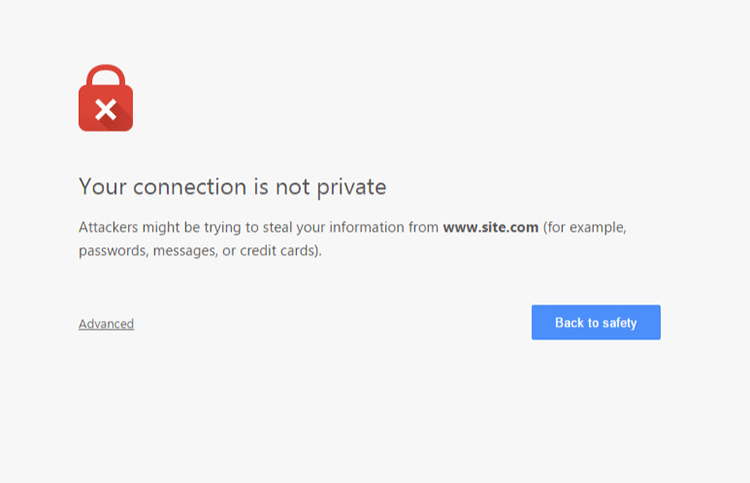
How to Properly Install SSL on Your WooCommerce Store

Having this warning appear on your site can have devastating effects on your traffic and especially your sales. Don’t take that risk.

What Do You Need to Get an SSL Certificate?

Most hosting companies such as WPEngine and Siteground can provide you with a free SSL certificate. You’ll just need to configure it on your site to use it. If your host is unable to provide you with a certificate, you can purchase one from RapidSSL or any other SSL provider. Configuring your SSL certificate is actually quite easy.

How to Install Your SSL Certificate

You will need to install your SSL on your domain using cPanel on your hosting account. If you host does not use cPanel, it will most likely have a wizard that can help you through the installation. You can get support from your host if you need help getting this done. When that’s done, you will need to head over to your WordPress Dashboard.

Configuring Your SSL Certificate using a Plugin

A simple method for configuring your SSL certificate is by using a plugin. Just go to your plugins page and search for the Really Simple SSL plugin. Install and activate it. After that, go to Settings > SSL. When you reach this page, the plugin will automatically detect your SSL certificate. When that’s done, your site will have a functioning SSL certificate.

Configuring Your SSL Certificate Manually

To configure your SSL manually, go to your WordPress Dahsboard, go to Settings. In the General Tab, under WordPRess Adress (URL) and Site Address (URL), change http to https.

Configure SSL on WordPress

Common Issues When Installing SSL

Sometimes, you may come across some issues when installing your certificate. Here are some common issues and fixes.

Mixed Content Errors

A common issue when installing an SSL certificate is that sometimes not all elements are being served securely. And you’ll get a warning like this:
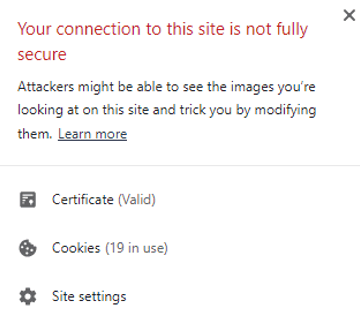
SSL Mixed Content Error

If you used Really Simple SSL plugin, that automatically takes care of elements not being served securely. If you did not use the plugin, you can still fix the issue albeit requiring a bit more work.

WPBeginner details steps on how you can fix mixed content errors on your site.

Cache Errors

If you are having some errors related to the cache after installing your SSL certificate, just clear your cache and that should fix the issue. Steps will vary depending on your caching plugin so it is best to consult your plugin documentation.

Final Notes

If you’ve set up your SSL certificate on your WooCommerce store, you are one step closer to maximizing your site’s security and increasing your store’s trust rating. If you need help installing your SSL certificate or if you are having issues with your SSL certificate, you can contact the Wooassist team for expert help.

Filed Under: How-To Articles Tagged With: conversion optimization, CPanel, security, SSL, trust rating

How to Write Persuasive Copy for Your Online Store

September 23, 2015 By John Leave a Comment

creating-persuasive-copy

Is your online store not giving the conversion rates you need? Something you might be overlooking is “persuasive copy”.

Persuasion and conversion go hand-in-hand. If you’re not persuading visitors, it’s going to be very hard for you to boost your conversion rate.

In this post, you’ll learn:

  • E-commerce Copywriting That Sells
  • E-commerce Copy Analysis – What’s Missing?
  • Elements of Persuasive Copy to Increase Sales
  • How To Write Seductive Sales Copy to Woo Your Customers

The Rise of Online Shopping

Online shopping is now extremely lucrative.

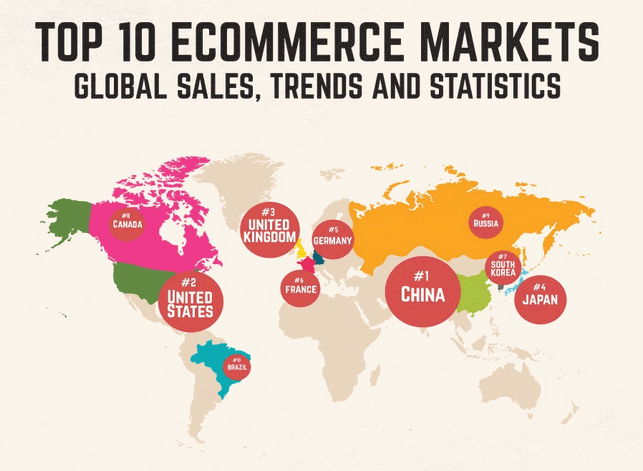
Just this month, Remarkety revealed that the world e-commerce market has amounted to trillions of dollars in sales projected for 2015. China has the biggest e-commerce market with $562.66B, followed by US with $349.06B and UK with $93.89B.

ecommerce-markets
Source: Remarkety

The numbers are surprising. No wonder both budding and existing entrepreneurs are taking advantage of the online market.

According to a study by Harris Interactive, 36% of customers gather information from a company website prior to making a purchase. Only 22% gather from face-to-face conversation with a salesperson, or other company representative.

This proves how important it is to fill your website with relevant information about your products or services. That information should be a credible, persuasive copy to enhance your visitors’ trust and convince them to buy from you.

E-commerce Copywriting That Sells

Your online store is part of a highly competitive web marketplace. It not only serves as a store, but also a catalog, marketing tool, and company information source. That is why you should know exactly how to sell with words.

Essentially, your copy must achieve two goals:

  1. Establish trust and
  2. Convince visitors that your product is right for them.

Setting Your Tone

Who, exactly, are you writing for?

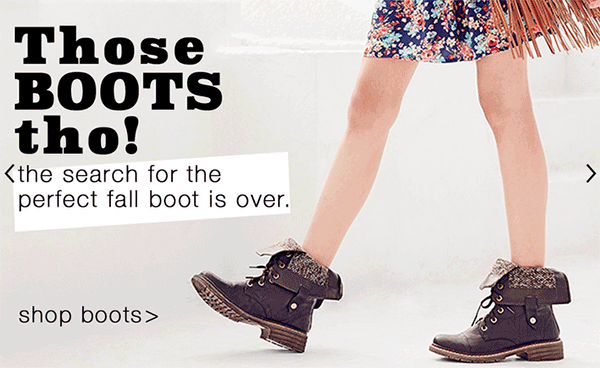
For instance, if your store sells products for teenagers, you wouldn’t want to use the formal writing style. Keep your copy focused on your target audience. Let your company’s personality shine through.

Image Source: http://store.delias.com/

Use this Customer or Buyer Persona to establish a tone for all of the copy throughout your site. Remember, each piece of copy is an opportunity to broadcast your brand.

There are three types of copy used by copywriters:

Informational. This is the type of copy often found in a site’s frequently-asked questions section. It offers customers to-the-point information. Straight-forward, uncluttered writing is often used, while still maintaining the tone.

Marketing. This copy is mainly used in promotional materials and product descriptions. It’s the most common form of copy, but it’s one of the hardest to write.

Notification. This copy appears when you want to notify a customer when they complete actions. They may encounter positive and negative messages. One example is when they stumble upon a dead link somewhere in your site.

Good Copywriting Samples

Being a copywriter isn’t easy. You need to have the ability to find the exact right words to sell whatever it is that your company is offering. Here are some websites with stellar copywriting.

Pay attention to their tones of voice.

1.     UrbanDaddy

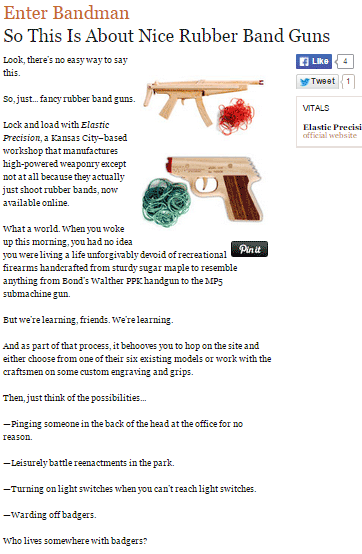
urbandaddy

This Enter Bandman copy is really far from ‘boring’. UrbanDaddy’s unique tone can be found in every single one of their copies. From their homepage down to their editorial policy, the company clearly knows their audience.

2.     GymIt

gymit

Instead of using the usual pics of ripped hunks and supermodels, with cliché fitness headlines, GymIt goes for a different approach. Their powerful copy is tailor made for the average Joe, and the humor’s great too!

3.     Velocity Partners

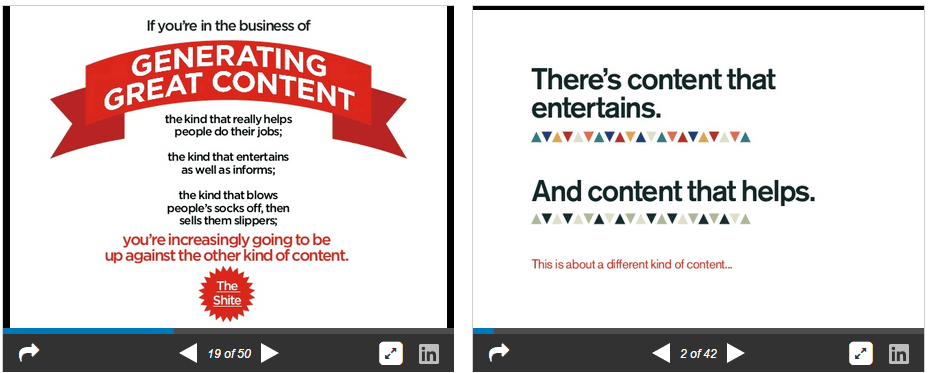
velocity-partners

This B2B marketing agency’s co-founder, Doug Kessler, is dubbed as the master of word economy. You can check out their popular slideshares here.

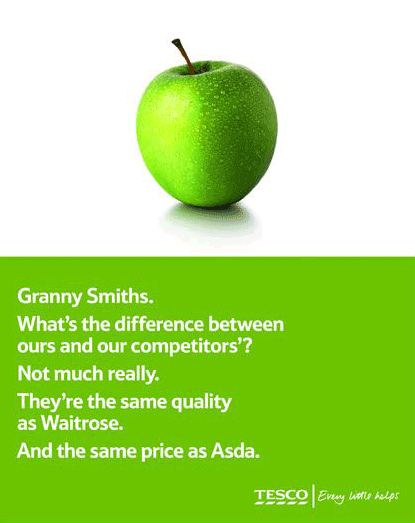
4.     Tesco

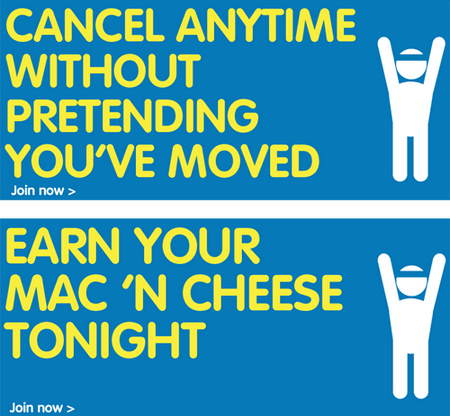
tesco

Tesco uses short sentences to captivate their audience, and they do it with a punch. It’s witty, personal, and effective. Of course, it depends on what you’re trying to sell and who your target audience is.

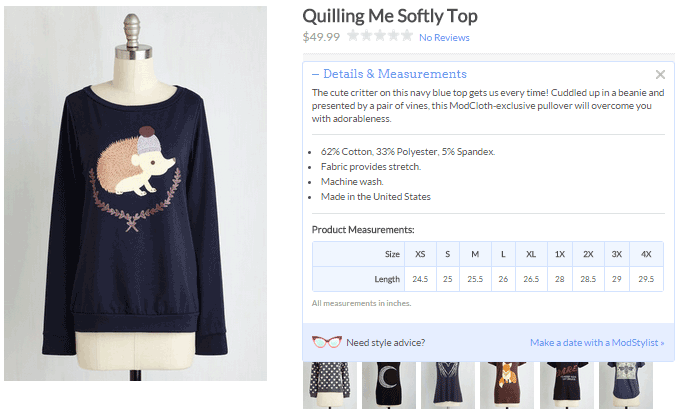
5.     ModCloth

modcloth

ModCloth is known for their joyous, pun-filled, and clever copy, especially when it comes to their product descriptions. They also tend to tell the story of what you’ll do while wearing their items.

Basic Rules to Follow

Avoid long sentences. Long sentences are difficult to digest, and inappropriate for persuading your audience. Shorten sentences by refraining from too many adjectives, adverbs, and pointless modifiers. Don’t use ‘for the purpose of’ when you can use ‘for’ instead.

Avoid jargon and clichés. Your aim is to sell and not to impress your readers with your vocabulary. Using jargon will only confuse your customers. If customers don’t understand something about your product, they won’t take the risk to buy it. Clichés are unoriginal and can only distract your readers.

Write in an active voice. This makes it easier to persuade your visitors to buy your products. It means to lead with the noun that is doing the action.

Hemingway is a great tool to run your copy through and reduce the fat.

E-commerce Copy Analysis – What’s Missing?

If you’re running an ecommerce site and you’re not testing your copy, you could be missing a huge opportunity to boost your sales. It’s recommended to test your copy for conversion drivers – relevance, clarity, and urgency.

ecommerce-copy-analysis

Relevance. Does the copy on the page relate to what the visitor thought he was going to see when he clicked on a link to your page? Be consistent with the incoming links.

Clarity. Does the landing page clearly articulate the value proposition? Clarity of content is often the most common factor ecommerce sites struggle with. If it’s hard to scan or understand, it can’t do its job.

Urgency. Is there an indication that the action needs to be taken now? The tone of the copy, offers, and deadlines can all influence urgency.

Test Your Copy

Businesses can make great gains by optimizing their site copy, content and headlines. As much as possible, find out what’s missing. Your visitors should understand your value proposition in your words.

While you’re focused on the merchandising aspects of your site, trying to get more products into carts, don’t neglect the benefits of testing copy.

Headlines

ecommerce-headlines

From the headline alone, do visitors understand why they should buy from your site, and not your competitors? Some sites bury their value proposition deep in the copy. Testing your headline can yield surprising results.

Most marketers know that connecting with customers on an emotional level is a key driver to increased sales and loyalty.

Transactional messages

ecommerce-shopping-cart

Managing your customer’s expectations reduces buyer anxiety. This copy drives action, and guides the customer towards completing the sale. Clarify expectations such as when to expect their shipments, or what will happen when they click the order button.

Tone of copy

Are you conveying the words your customers want to hear? Of the two call-to-actions, the first one was clear, but not compelling. The second is more personalized, gives a more positive message, and therefore more effective.

“Please select your tax-deductible gift amount below.”

“Yes I will donate a tax deductible gift of:”

Ideas, not words

Once you know what’s missing, you can apply the results across all the copy on your site. If you’re testing the effect of customer-focused copy, you might learn something about how your customers react.

Elements of Persuasive Copy to Increase Sales

Your copy should be engaging and should bring customers closer to your brand, allowing them to see what’s in it for them. A copywriter persuades customers to see their point of view. They want their writing to influence others in a positive manner.

Let’s have a look at the elements that contribute to persuasive copy:

1.    Conversational Tone

You won’t win over your readers with hyped copy. Customers turn away from anything over-the-top, especially those related to sales.

The first rule to writing persuasive copy is to write as you talk. Create that personal connection. This way it will be easier to read, since people usually have an internal monolog accompanying what they read.

2.    Be an Expert

You don’t necessarily need a degree or years of related experience. Being an expert just demonstrates that you’re knowledgeable in your particular market.

True experts know what they’re talking about. Establish yourself as an influencer by conveying confidence and certainty in your copy. Sharing your knowledge so others can learn bestows authority – and authority leads to persuasion.

3.    Good Structure

Copywriting is different from writing an essay or a short story. It’s more of a news article, wherein the most important information comes first.

This structure is called ‘inverted pyramid’. It starts with the relevant points, then followed by details. Make sure to captivate your audience with your headline, then motivate them to continue on with the benefits, features, and call-to-action.

4.    Give a Reason

Psychologist Ellen Langer has demonstrated in her book ‘Mindfulness’ that people are more likely to comply with a request if they’re given a reason, via the word ‘because’. Why are you asking them to take action?

You can also use the words ‘imagine’ or ‘picture’ to influence your readers into putting themselves into their desired outcome.

5.    Benefits, Then Features

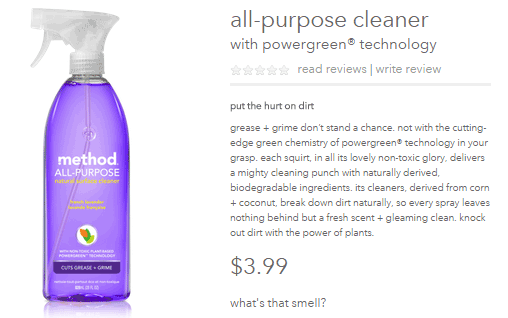
By using a ‘benefit first’ content strategy, customers will immediately know what’s in it for them. A benefit answers the question, ‘so what’. When you show the benefits of your product, think of it like telling a story. You want to engage the audience and leave them feeling an emotional connection.

Take this example from Method Home.

method-home

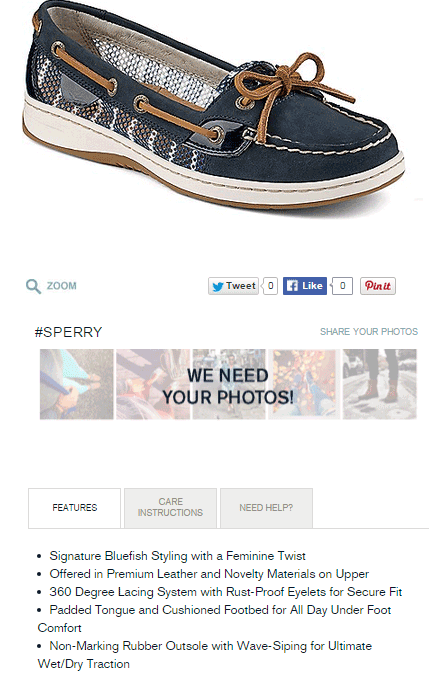
Product features are physical characteristics of a product sold and marketed by the company. It includes the form, color, size, weight, odor, material, and tactile qualities. They provide added functionality to products on your site.

Take a look at the product features from Sperry.

sperry

5.    Write for Scanners

Most online consumers scan a web page first, and if they find it interesting, they go on to read the whole article.  A study by Nielsen Norman Group revealed that 79% of customers don’t read, but scan when they are browsing.

It’s because of the following reasons:

  • Reading on a computer screen strains the eyes.
  • People’s ever-dwindling spans of attention.
  • Customers who are mostly surfing the Internet are on-the-go.
  • There are millions of websites vying for their attention.

You can persuade your prospects to actually read your content by using some of these eye candy elements:

  • Headings and subheads, relevant and on topic
  • Bullet lists to highlight benefits and features
  • Font variations, bold, italics, and colored links
  • Short sentences and short paragraphs, each with one idea only
  • Images and infographics
  • Memorable captions

How to Write Seductive Sales Copy

Ecommerce merchants have many pages to write copy for. Home and landing pages, category pages, product descriptions, articles, and shopping messages are just a few. It’s always important to strengthen your editorial skills whether you’re a seasoned writer or a novice.

Formula for Persuasive Copy

You can always start with the 1-2-3-4 method. It’s a handy little checklist for any copy you write. It’s so simple you won’t have to look it up.

1.     What I’ve got for you

What’s your product? What does it do? Who is it for? Let the folks know what they’re in for. Start with a simple overview, a birds-eye look at what you’ve got to offer.

persuasive-copy-formula

What’s in the box? These are the ‘features’ of your product or service. The best way to list them is usually a series of fascinating bullet points. Include enough specifics to make the product feel valuable.

When you can, attach a benefit to each feature.

Instead of saying, “Next-action worksheets come with every module.”

A better version is, “Next-action worksheets come with every module, so you can take what you’re learning and immediately put it into action.”

2.     What it’s going to do for you?

There’s a saying that goes, “sell with benefits, support with features”.

What’s better about life with your product? Talk about the great benefits of taking action. Describe the end result, or the “after” picture once your customer has bought your product and used it as you recommend.

3.     Who are you?

Most of the time, you need to establish your authority. Show in your copy that you know what you’re talking about. Make your customers believe that you’re a trustworthy and worthwhile person.

For instance, if your site is all about gardening, and there’s a photo of you in front of your own garden, customers will consider you more credible.

4.     What you should do next?

 This is where call-to-action comes in play.

From a copywriting standpoint, it’s been proven time and time again that if you want someone to do something, you’ll get better results if you tell them exactly what to do. A MarketingSherpa experiment revealed that two or three “click” link words can lift click through rates by more than 8%.

Never assume that a customer knows the whole process. A reader needs to know specifically what to do next. Don’t just put a link in. Instead, tell her to ‘click here’. 

7 Bulletproof Copywriting Techniques

Many people misinterpret the uniqueness of effective copywriting. It’s more than writing the hard-sell sales letter. A well-crafted copywriting should stand on its own without the overabundance of sales language and design embellishments.

Here are some seductive copywriting techniques from Henneke Duistermaat, a UK based content marketing expert:

  • 1. Create a One Big Idea

copy-headline

A good headline focuses on one big idea – usually your product’s most important benefit. Focus on that one message that you want to communicate to your audience.

  • 2. Short and Broken Sentences

Sales copy is different from academic writing. Readers will not make the effort of reading your entire content. Short sentences are much easier to read than long, spiritless sentences.

It doesn’t matter if you start a sentence with an ‘And’ or ‘But’. As long as it works. Shorter sentences improve the rhythm of copy. Don’t be afraid to cut long sentences into two.

  • 3. Be Memorable with Sound Bites

sound-bites

Sound bites are described as easy-to-remember, easy-to-quote nuggets of wisdom. They communicate one idea in a short and simple way. Contrast or surprise is used to startle the brain and attract attention.

“Everything you need. Everywhere you go.”

“The thinnest, lightest, fastest iPhone ever.”

“So much more than before. And so much less, too.”

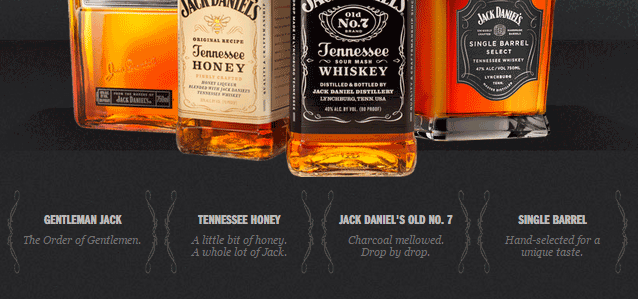
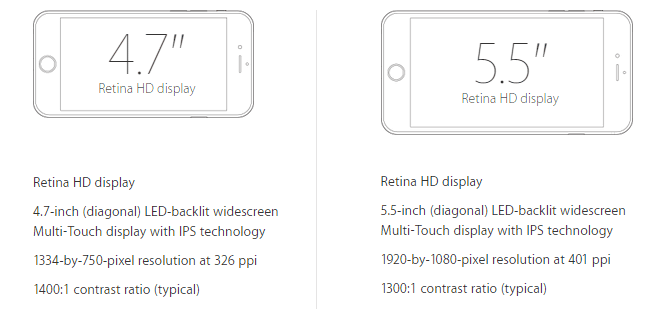
  • 4. Be Credible with Technical Details

copy-technical-details

Technical details are not only a sign of expertise, but also enhance trust, and make you more convincing. Presenting exact details actually sell.

  • 5. Fascinate with Stories

What stories can you tell about your product? Can you explain where the idea for your product came from? Sharing stories is a powerful copywriting tool. You can share the challenges you had to overcome, just make the delivery fascinating.

copy-storytelling

  • 6. Persuade with Problems

Customers often search for solutions. So, present features and specifications as solutions to their problems. Consider what problem each of your product’s features solves.

  • 7. Create a Persuasive Call-to-Action

copy-call-to-action

Your site may have a compelling headline, a well-written sales copy, and an unbelievable opt-in offer. But all these things are of no use if you don’t include a clear call-to-action. A good CTA should stand out and be specific.

More inspiring call-to-action examples in this article.

4 Copywriting Tricks Swiped from Psychology

Good persuasive writing leaves you wanting more, right? Here are four useful, little-known tricks from Joanna Wiebe, author of “Copy Hackers”.

1.    Don’t Be Sloppy – Write Rhyming Copy

A study conducted by Dr. Matthew McGlone found that rhyming phrases are somewhat believed more accurately.

Take this Animoto snippet for example. See that second line?

rhyming-copy

Rhyme has the power to influence the way we think, which relates to psychology. So, one rule to consider in writing a copy is, if it rhymes, it must be true.

2.    Use a Word that Humanoids Don’t Expect to See

According to Wiebe, “unusual or unfamiliar material is easier to remember than common material.” This is actually called the Bizarreness Effect.

As a copywriter, you have to grab that chance for recall. And, recall is a big deal not only for converting visitors. Customers need to remember messages as they move through your site. A study from Purdue University found that people were best able to recall messages when bizarre nouns were mixed with common words in a standard sentence.

3.    Repeat Your Message Again and Again

The more you hear a message, the more likely you are to believe it’s true. This is due to the Illusion of Truth Effect. In other words, repetition works.

It’s not just copying and pasting your marketing materials. For the Illusion of Truth Effect to work, you can use a copywriting technique called “3D”. It’s where you write the same message three different ways in sequence.

It actually works best when your audience isn’t that attentive. It doesn’t matter whether or not the audience is concentrating hard, repetition will increase persuasion.

4.    Organize Your Lists so Peeps Remember the Right Stuff

This method is about the Serial Position Effect. It simply states that people remember what they saw first or last, but almost never what they saw in the middle. This affects online customers as well.

So, in creating your copy, what stuff are you okay with your visitors NOT seeing? That’s what you should put in the middle of your bullet list, or in your Features page.

However, there’s always an exception, right? The Von Restorff Effect states that if an item in the middle of your list stands out, your visitors may remember that part better.

Conclusion

Start spotting these persuasion elements in your online store and you’ll be on your way to increasing sales.

Your online store offers you the opportunity to connect with potential buyers and to differentiate your products while establishing credibility and trust. Make the most of this opportunity by diving into your website copy with a clear purpose in mind.

In creating the content for a product description, an advertisement, a landing page, or a sales email, you want the copy to be powerful enough to convert visitors to sales.  Lead your boring copy out of the grave and make it live.

Filed Under: How-To Articles Tagged With: best practices, call-to-action, conversion optimization, copy writing, customer persona, e-commerce, how-to, infographic

13 Routine Maintenance Tasks that You Should Do on WordPress and WooCommerce

April 2, 2018 By John Leave a Comment

Routine Maintenance Tasks for WordPress

Maintaining a WooCommerce store is a lot of work. There are a lot of routine maintenance tasks for WordPress and WooCommerce that need to be done on a regular basis. In this post, we list down the most important tasks that you should do on your WooCommerce store.

1. Create Regular Website Backups

Create Regular Website BackupsCreating regular site backups is critical. It is your first fallback in case something breaks on your site. While you can make backups manually, it is important to make regular automated backups. Check with your hosting provider if they create regular backups of your database as well as a complete backup of your site. You can also install a backup plugin such as Updraft Plus or BackWPup and set it up to make regular automated backups for you. We still recommend creating manual backups before doing major work on your WooCommerce store though.

2. Update WordPress, WooCommerce, Themes and Plugins

Updating all elements of your WooCommerce store should be done on a regular basis. Do this weekly if you have the time. If not, monthly updates are good enough. Updates include updating WordPress Core, themes, WooCommerce and all other installed plugins. Remember to backup up your site before proceeding with updates since updates could cause your website to break. If you have a development site, it would be best to test the updates first on this staging environment. Then, do some user testing to make sure that there are no errors. After that, you can proceed to update your live site. When that’s done, you will need to do another round of testing. Some important elements to test include checkout, add to cart, contact form emails, opt-in forms and other customizations that were done on the site.

3. Update WooCommerce Template Files

After updating WooCommerce, you will sometimes get an error notifying you of outdated WooCommerce template files. This just means that your theme has not updated to include the latest WooCommerce template files. In some cases, this could cause some formatting issues on your store. If there are no errors on your store, you can simply wait for your theme to release an update that includes the most recent template files. Or you can also fix this manually by following the steps in this documentation from WooCommerce.

4. Change User Passwords

It is important to use strong passwords. However, it is just as important to change passwords on a regular basis. There are times when security breaches can go undetected for a long time. Changing your password regularly blocks out these security breaches that you might not realize are there. You should change your password for WordPress admin, FTP, database and cPanel. And a pro-tip, never use “admin” as your username. This is the first username that hackers try out when brute forcing into websites.

5. Optimize Your Product Images

We’ve always emphasized the importance of optimizing images for your WooCommerce store to keep your site running fast. If you have uploaded any product image that is more than 100KB in size, it might be a good idea to replace that image with an optimized product image. To learn more, you can check out our blog post on how to optimize images.

6. Approve and Respond to Product Reviews

Moderate Product ReviewsIf you are not asking your customers for product reviews then you might want to reconsider. Most people who buy online look for product reviews before they decide to purchase something. One study found that 85.57% of users read reviews before they purchase. And if you are asking your customers for product reviews, then you will need to approve reviews on a regular basis. A word of advice, do not remove negative reviews of your products. Instead, make it an avenue where you can show good customer service. Respond to the negative review. Offer a replacement for a defective product or offer a refund. People reading reviews will want to see some negative reviews to get a well-rounded picture of your product. When moderating reviews, you only need to remove the spam reviews.

7. Approve and Respond to Blog Comments

If you have a blog that is made to drive customer engagement, then your blog will most likely attract comments. Same with product reviews; don’t delete the negative comments. Rather, address them positively. Remove any spam comments as this will negatively impact the user experience of your blog. If you are using Akismet: Anti Spam plugin, this will block out most spam comments. However, some spam comments can still get through and you will need to manage them manually.

8. Test Your Contact Forms and Email Opt-in Forms

Every now and then, you will need to make sure that your contact forms and email opt-in forms are working. Just fill in your forms and send. If you receive it in your email, then you’re all good. But if you don’t, there’s something wrong and you need to do something about it. Have your developer look into it.

9. Optimize Your Database

Over time, your database accumulates a lot of gunk and you need to clean it to make sure your website runs fast. Before you go about this task, make sure you create a backup. You can choose to clean your database manually if you are comfortable and familiar with working on your database. Otherwise, you can use a plugin to do the optimizations for you. Notable plugins include WP-DBManager and WP-Optimize. You can check out our guide on how to clean your database.

10. Test Your WooCommerce Store’s Speed

If you have not yet made optimizations to your WooCommerce store’s speed, you should consider doing it now. Site speed has become increasingly important for WooCommerce store owners. Google now considers site speed as a ranking factor for SEO. Also, if you have a slow site, this will negatively impact the customer’s experience on your site. It is easy for your customers to buy instead from your competitors. You can test your site speed on Google’s Page Speed test and Google will provide you with recommendations on how you can improve your site’s speed. Other notable tools that you can use to test your site are Pingdom Website Speed Test and GTmetrix.

11. Scan Your Site for Malware

One way to keep on top of your website’s security is to regularly test your site for any malware. If you are connected to Google Search Console, it will let you know if malware is detected on your site. If your site has been found to have any form of malware, Google Chrome will actually alert your visitors that your site is dangerous. This can have devastating effects on your traffic and conversion rate. No one will want to enter their payment information on a site that has malware. In extreme cases, Google may block your site from appearing in the Google search results page. You want to prevent this from happening. It would be best to invest on your site’s security by installing a security plugin such as Sucuri Security and WordFence. Even if you have those plugins installed, it is still a good idea to a manual scan. You can scan your website at Sucuri’s Website Malware and Security Scanner, or at SiteGuarding. If any manual scans detect anything malicious, you can contact your developer to fix the issue. You should get it fixed before Google applies any penalties. Wooassist also offers a security hardening service to improve the security of your site so you can prevent this from happening.

12. Fix Broken Links

Broken links are bad for user experience so check your site regularly for any broken links. You can use W3C Link Checker or any other similar tool to check for broken links. Once you’ve found the broken links on your site, you can start fixing them. You can either remove the links or points the links to a new relevant URL.

13. Test Your Checkout Process

Last but definitely not the least; you should regularly test your checkout process. If you suddenly experience loss of sales, it’s a good idea to test your checkout. There might be an error that prevents your customers from checking out. Testing also gives you a feel of what your customers go through so you can optimize your checkout. Once you’ve determined that your checkout has problems, you can check out our post on how to fix the most common checkout problems in WooCommerce.

Final Notes

By doing these tasks on a regular basis, you can keep yourself on top of any issues that may occur on your WooCommerce store. If you find yourself overwhelmed by the all these, you can hire someone else to do it. You can also contact us and our team will be glad to assist with any of these tasks.

Are there any other routine maintenance tasks for WordPress and WooCommerce you think should be done on a regular basis? Do you have any suggestions? Let us know in the comments.

Filed Under: How-To Articles Tagged With: blog, contact form, conversion optimization, image optimization, plugins, security, site speed optimization, website maintenance, WooCommerce, WooCommerce products, WordPress, WordPress SEO, WordPress updates

How to Recover Abandoned Carts in WooCommerce?

November 30, 2019 By John Leave a Comment

How to Recover Abandoned Carts in WooCommerce

It’s not uncommon for ecommerce shoppers to abandon carts. You may not know it, but your store might also be suffering from carts being abandoned. This problem can be addressed however. To start, you must determine why your customers abandon their carts.

Why online shoppers abandon carts and what you can do about it?

There are various reasons why online shoppers abandon their carts. We lay out the most common ones and what you can do to address them.

Checkout is Too Complicated

Your customers will nitpick and that is to be expected. When you make your customers jump hoops during checkout, you’re not doing them a favor. Your checkout should be quick and straightforward. If you must add some other stuff that will complicate checkout, consider if you can add it on the thank you page instead. The thank you page is the page where the customer is redirected to after making a successful purchase. If you need help tweaking your thank you page, the Wooassist team can help.

Users Need to Create an Account to Check Out

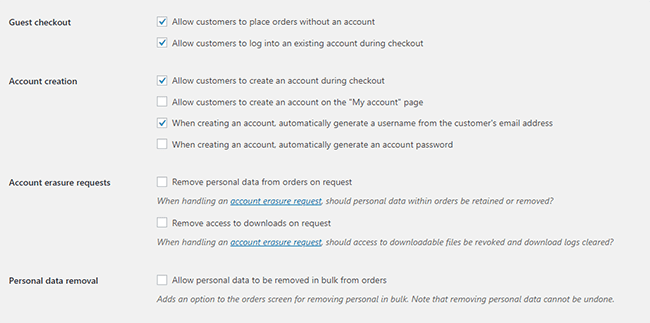
Internet users are already burned out having to create an account for each internet service that they use. Don’t add to that burden. Don’t force your customers to create an account if it’s not necessary. To enable guest checkouts on WooCommerce, go to your WordPress Dashboard, click on WooCommerce > Settings. Under the Account and Privacy tab, enable “Allow customers to place orders without an account”. You can tweak other account related settings here to your liking.

Too Many Checkout Form Fields

The default WooCommerce checkout page is good enough as it is. There is no need to add more fields unless necessary. If you’ve edited your checkout page before to add some unnecessary fields, look into it and consider removing it.

Unexpected Charges

Customers will abandon your checkout when they see the shipping fee. No one will force you to offer free shipping if it will make your business unsustainable. There are however some things that you can do to reduce abandoned carts as a result of shipping and other fees. People now are more accepting of shipping fees. For other fees, be transparent from the get-go. If you charge taxes, handling fees, and other fees, make it clear starting from the product page that you charge these fees. If they are suddenly greeted by these fees on checkout, it will look like unscrupulous practice.

Too Many Clicks to Checkout

Reducing cart abandonment is all about simplifying your product purchase process. Ideally, it should not take more than three clicks for a customer to check out. If it takes four clicks to check out, that is one click too many. Get rid of unnecessary barriers to completing checkout.

Don’t Make it Hard to Contact You

Some of your prospective customers will look for your contact details before they make a purchase. If they added a product to their cart but could not find your contact information or even a contact us page, there is a high likelihood that that user will abandon that cart. To prevent this from happening, make sure you have a contact us page. Even better, if you can add your email or phone number on your WooCommerce store’s header.

Payment Issues

Another common reason for abandoning shopping carts is payment issue. When the customer tries to pay for his/her order and it fails, you can bet that cart will be abandoned. The solution here is simple. Offer more than one mode of payment. Some common payment channels you can use are Paypal, Stripe, Authorize.net, Apple Pay, Amazon Pay, and Square.

Other Things You Can Do to Reduce Cart Abandonment

Show Security Certificates

To be able to sell your products or services online, you’ll need to be able to establish that you are trustworthy. You can show security certificates and security seals on your checkout page to improve your trust rating. Some security seals that you can add to your site as Norton, McAfee and TRUSTe.

Offer Free Shipping

Free shipping can significantly reduce your cart abandonment rates. However, not every business can make a profit when offering free shipping. As an alternative, you can offer free shipping when your customers meets a required minimum order value or quantity. This strategy can also help improve your average order value.

Offer a Money-Back Guarantee

Most consumer laws dictate that you should have a return policy anyway. So there’s no reason not to do it. Making your money-back guarantee known shows your prospective customers that you have faith in the quality of your product or service. Don’t worry about the people that might abuse your money-back guarantee. It hardly ever happens. And if it happens a lot, the problem might be your product.

Improve Your Page Load Speeds

If your site is slow, some of your prospective customers might get frustrated and abandon their carts. Make sure your site is fast.

How to Recover Abandoned Carts

There are many ways to recover abandoned carts. Some of the more common methods are remarketing and abandoned cart emails.

Using Remarketing to Recover Abandoned Carts

There are many platforms that you can use for remarketing. Essentially, remarketing works by saving a cookie on the user’s browser so you can show them your tailored ads. Neil Patel details how you can use remarking on Adwords to recover abandoned carts. Facebook is another platform that you can use for remarketing. SproutSocial details how to use remarketing on Facebook.

Using Abandoned Cart Emails to Recover Abandoned Carts

Abandoned cart emails send your customers a reminder email if they did not complete their purchase. For guest checkouts, this requires that the user must at least have entered his/her email address. This won’t be an issue if you require your customers to register before making a purchase. Do note however that requiring customers to create an account may hurt your conversion rates. There are a lot of abandoned cart email plugins that work for WooCommerce, you just have to find the plugin that works for your needs.

Recover abandoned carts and improve your sales by implementing these strategies. If you have any questions, you can post a comment below. If you need help setting up abandoned cart emails or anything else, you can send us email.

Filed Under: How-To Articles Tagged With: abandoned carts, checkout, checkout form, conversion optimization, email marketing, optimizations, remarketing, security, trust rating, WooCommerce, woocommerce checkout

How to Add a Hero Image in Storefront

July 1, 2016 By John 36 Comments

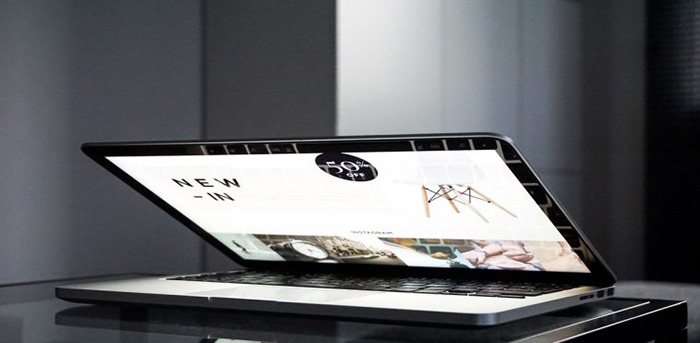
laptop_Hero-Image

The idea of using hero images came about because of issues caused by homepage sliders. Using a homepage slider is discouraged as it will slow down your WooCommerce store and it doesn’t have good conversion rates. If your WooCommerce store running on Storefront has sliders and you are looking for a good alternative, you should consider using a hero image instead.

What is a Hero Image?

To better explain what a hero image is, let’s define what is the “fold” and “above the fold content”. Originally, the fold is a term used in the newspaper industry. Since newspapers are normally folded in half, the upper half of the front page will be the part of the newspaper that is exposed. This is where the most important content is featured, hence the term “above the fold content”. In web design, this is the area of the page that can be seen without scrolling down.

A hero image takes up most of the space above the fold. The trend is to make it large, attractive and relative to the content of the entire site.

It is important that you provide a complete overview of what your company/site is about with just a glance of your hero image. 90% of the time, the hero image has a large text in the center that is related to the branding of the site.

Preparing Your Images

Before you add your image, make sure you have it optimized for web use. You’d want to have the best image quality for the hero image, but you have to take into account the image size as well. As of 2016, the most common screen resolution is 1920x1080px. You should try not to go over this mark. Any excess is just a waste of page size and will just slow down your page load time.

Once you get the right resolution, try to further reduce the image size by down-scaling the image quality. You can actually reduce the image quality without having noticeable pixelation in the image. This is because the human eye can only see limited minute differences in the color changes. Try to strike a balance between having a small image size and having a good looking image. Check out this other post on how to optimize images. Once you are done preparing your image, just upload it to your WordPress site.

Adding a Hero Image in Storefront

To add a full-width hero image in Storefront, we need to use Storefront’s extensive hooks. We’ll just need to insert a few lines of code.

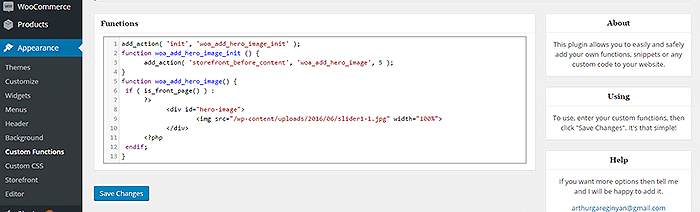
How-to-add-a-hero-image-in-Storefront-Appearance-Functions

If you are comfortable working with code, you can paste the code below in the functions.php of your child theme. If you are a novice user, we recommend using My Custom Functions plugin to insert the code. Note that one error can cause your entire site to crash.

how to add a hero image in storefront

Copy and paste the code below. Just replace the “/wp-content/uploads/imageurl.jpg” with the URL of the image you uploaded earlier. Width set to 100% makes your image responsive to different screen sizes.

add_action( 'init', 'woa_add_hero_image_init' );
function woa_add_hero_image_init () {
   add_action( 'storefront_before_content', 'woa_add_hero_image', 5 );
}
function woa_add_hero_image() {
   if ( is_front_page() ) :
      ?>
         <div id="hero-image">
             <img src="/wp-content/uploads/imageurl.jpg" width="100%">
         </div>
      <?php
   endif;
}

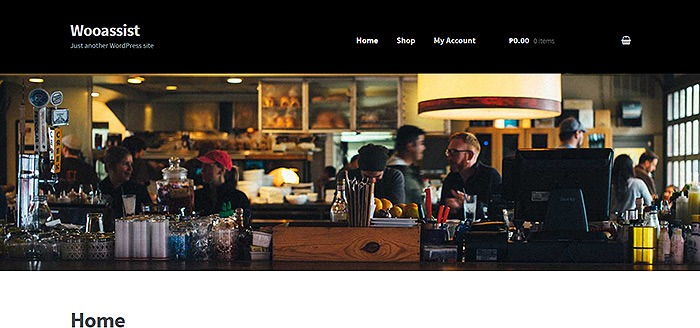
Your hero image should now appear on your homepage below the main navigation.

If you want to add a link to the shop page or any other url on your image, copy and paste the code below. Just replace the “http://change_me_to_your_url” with the URL you want to link to.

add_action( 'init', 'woa_add_hero_image_init' );
function woa_add_hero_image_init () {
   add_action( 'storefront_before_content', 'woa_add_hero_image', 5 );
}
function woa_add_hero_image() {
   if ( is_front_page() ) :
      ?>
         <div id="hero-image">
             <a href="http://change_me_to_your_url"><img src="/wp-content/uploads/imageurl.jpg" width="100%"></a>
         </div>
      <?php
   endif;
}

Final Notes

Hero images are more effective than sliders in terms of aesthetics. You don’t have to keep using sliders if it’s slowing down your site. Explore more options. Keep your site simple and fast.

If you are still using sliders, you are most likely hurting your site speed. And a slow WooCommerce store will convert less. Your Google rankings could also suffer as a result. It’s time to do away with the slider. Go with a hero image instead.

Was this tutorial helpful? If you have any questions or anything you’d like to add, please let us know in the comments.

Filed Under: Code Snippets, How-To Articles Tagged With: admin, best practices, code snippet, conversion optimization, design tweaks, how-to, image optimization, plugins, site speed optimization, Storefront

  • « Previous Page
  • 1
  • 2
  • 3
  • 4
  • 5
  • 6
  • 7
  • Next Page »
Let us support your online store so you can manage your business

Get started today

Get 2 Hours of FREE SUPPORT

We are so confident that you will love our services that we will give you your first 4 hours at a 50% discount

That’s 4 hours for only $75

BUY NOW

Free eBook

5 Things Every Online Store Can Fix On Their Website In The Next Week To Increase Sales

Quick Links

  • How it Works
  • Pricing
  • Blog
  • Contact
  • About Wooassist
  • My Account
  • Checkout
  • Privacy Policy
  • Cookie Policy
  • Terms and Conditions

Wooassist

Australia:
59 Luke St.
Hemmant QLD 4174

Philippines:
San Miguel St.
Poblacion, Iligan City 9200

Connect


Copyright © 2026 · Wooassist

Yours FREE!

5 Things Every Online Store Can Fix On Their Website In The Next Week To Increase Sales