Wooassist

Assistance for Your Woocommerce Store

  • How it Works
  • Pricing
  • Services
    • Site Maintenance
    • AI SEO and Content Marketing
  • Blog
    • How-To Articles
    • Code Snippets
    • SEO For E-Commerce
    • Theme and Plugin Reviews
    • Wooassist News
    • WordPress/WooCommerce News
    • Interviews
  • About Us
  • Contact
You are here: Home / Archives for conversion optimization

How to Create an Awesome About Us Page for your WooCommerce Store

March 3, 2016 By John Leave a Comment

awesome about us page main-imageYour e-commerce site is the face of your company and your brand on the web. Your “About Us” page tells your visitors who you are and what you do. In this post, we will teach you how to create an awesome About Us page.

What is an About Us Page?

The About Us page introduces your brand to your visitors. More people check a website’s About Us page before making online purchases.

About Us Page Statistics

According to the NN Group, while most websites do have an About Us page, these websites often do a poor job of presenting their About pages. They also found that there are more people who couldn’t find information about a company or organization. Factual information from these websites was replaced by out of place marketing. As a result, the subjective satisfaction of website users decreased from 5.2 to 4.6, on a 1-7 scale.

Importance of an About Us Page

Increased Trust Rating

People who shop online check for proof that the company they are buying from is legit. Showing your website’s legitimacy boosts your credibility. This just shows that consumers are very wary of where they spend their money. The About Us page helps you show consumers that you are worthy of their trust, money, and time.

Increased Conversion

In another study, consumers spent five times more when shops tweaked their About Us page. They even spent 22.5% more, on average. These figures may rise depending on how good your About Us page is. Increase your profit by connecting with your visitors on a more personal level.

about-us-boost-conversion

SEO Opportunity

The SEO opportunity in About Us pages is no rocket science. This page can just contain more keywords related to your niche than other pages in your website. It’s a good idea to fit niche-related keywords all over the page, just don’t over-optimize.

Increased Engagement

Adding important internal links, other media and links to social media pages can help increase engagement. You can also add a contact form to serve as a lead generation tool to gather emails.

What Info Should I Put on My About Us Page?

Before creating an About Us page, here are a couple of things you need to do.

First, identify your audience or target market. Better yet, create a customer persona. Use this knowledge to customize the content on your page and reach out to that audience. Stay away from the typical general corporate-speak. Rather, use a personal but professional tone and feel.

Second, provide key context. The About Us page should show what your customers want to know about you. Every element, from text to multimedia, should be a part of your story. Make this page appear ‘human’. Customers enjoy getting a sense of the company behind a product and website.

How to Structure Your About Us page

Teaser or Tagline

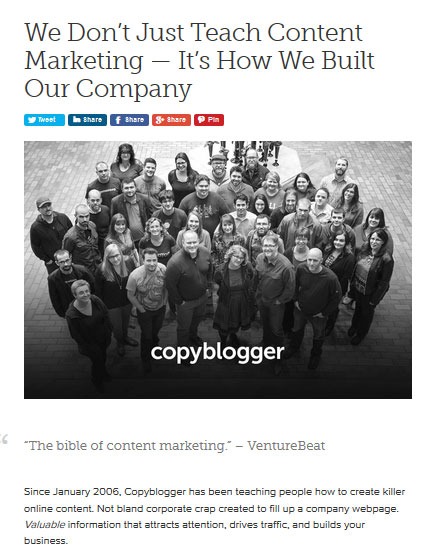
This is a brief phrase or statement that summarizes your organization. Copyblogger was witty enough with their power statement. What is your company about in a nutshell?
about-sample-copyblogger

The Round-Up

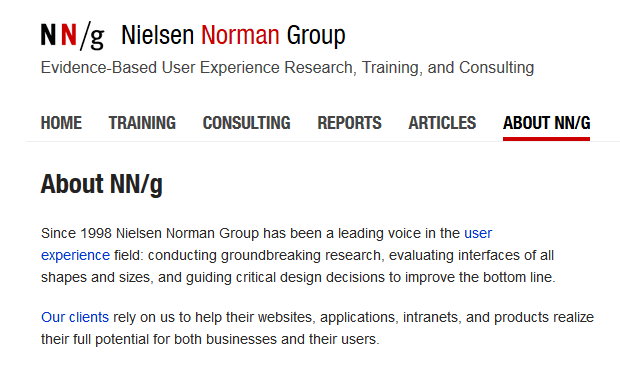
This section usually contains a paragraph or two. It features your company information, vision, goals and main accomplishments. Be careful not to overdo this by using empty superlatives. The goal here is to provide information and not to gloat.
about-sample-nng
A straightforward About Us page example from the Nielsen Norman Group.

Quick Facts

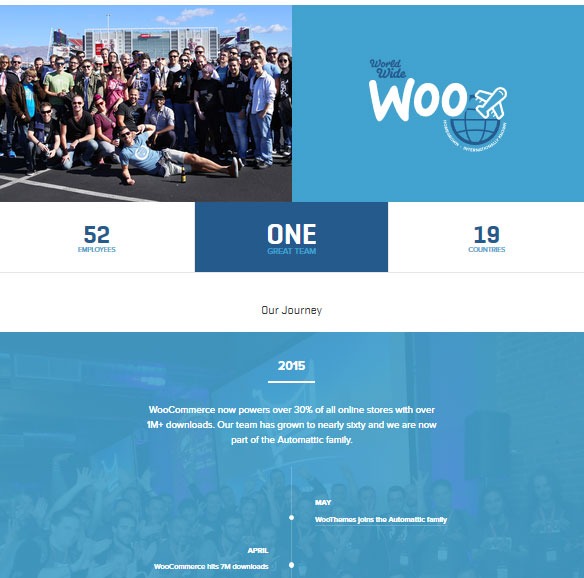
Add some quick facts on your About Us page. This can come in different forms. You can add information about your team, history, performance, or your office culture. Stay with the facts and let your customers be the judge. Get creative by using different multimedia or graphic elements. Just remember that whatever you put should be accurate and verifiable.
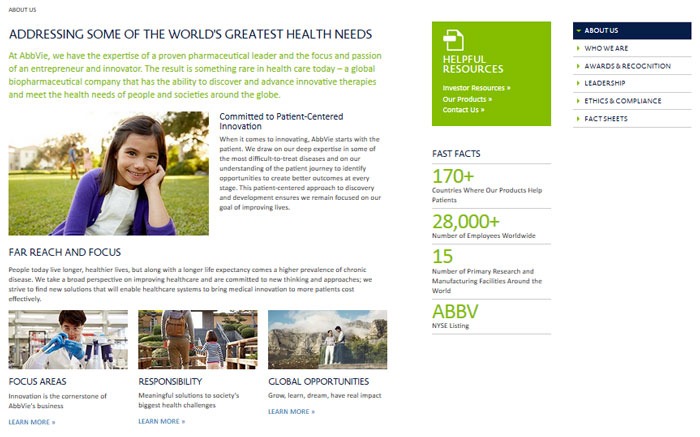
about-sample-abbvie
Easy on the eyes information from AbbVie.
about-sample-woothemes
Simple but informative layout from Woothemes.

Outsider’s Perspective

If you have industry awards, reviews and testimonials, let them be known in your About Us page. If you have a lot, you can add some highlights in the About Us page and link to a sub-page where the rest of the info is placed.
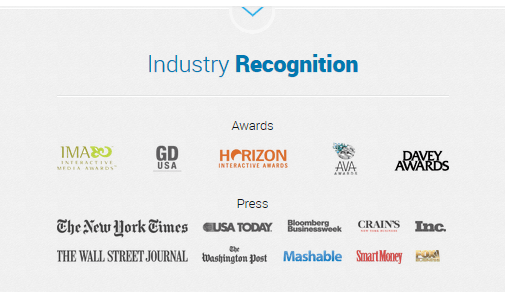
about-sample-blue-fountain-media-awards

Engagement

This is an avenue for interaction. Add elements like a contact form, social media buttons, and calls-to-action.
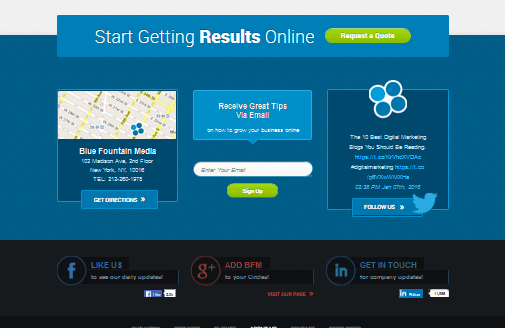
about-sample-blue-fountain-media-2

Introduce Your Team

Adding information about the people behind your company will boost your credibility. Take time to post photos or some quick information about your team. The National Center for Biotechnology Information found that photos inflate subjective feelings of truth.

How to Create an Awesome About Us Page

You can create your About Us page just as you would any other page. Some WordPress themes have a built-in special About Us page template. If your theme does not have that, you can create a simple About Us page by going to Pages and clicking on Add new. Add your content and then click on Publish to save your page.
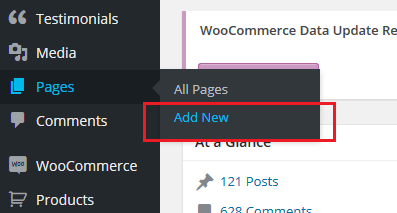
about-us-add-new-page

Add content to your About Us page as you would to any other kind of page.
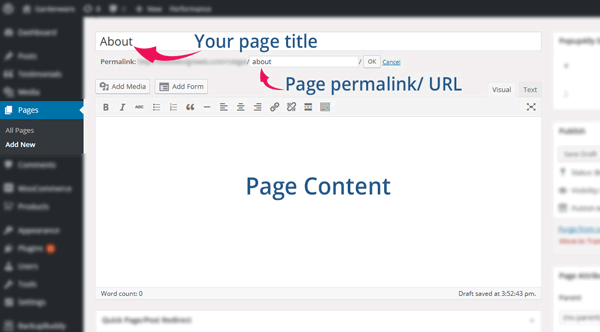
about us create page add content
Name your page “About”, “About Us” or “About ”. Use the same for the permalink.

about us create page

How to Add Your About Us Page to Navigation Menu

Once you’re done saving your page, you need to add it to your navigation menu. Go to Appearance > Menus.

To display your About Us page in your menu navigation, select About Us page in the list of pages. After that, click Add to Menu. Drag it to desired position. Click on ‘Save Menu’ when you’re done.

Plugins that Can Help Create an About Us Page

Plugins are your go-to solution if you don’t know how to code. Here’s a list of plugins that you can use to create an awesome About Us page.

Powr About Us

powr-about-us-pluginPowr About Us is a plugin with free and premium versions. The free version lets you create profiles for your company and employees. It has the features from the premium version, but it shows the plugin’s watermark logo and has limited support. The premium version has premium support, analytics, no access limits and no watermark logo. Once installed and activated, you will see a plug icon integrated in your Pages editor. It’s a drop down menu that lets you add shortcodes in the content area. This will help you create a professional About Us page. Once added, you will be able to edit them on the front end of your site.

Page Builder by SiteOrigin

page-builder-site-origin-pluginPage Builder by SiteOrigin is a free drag and drop page builder. It adds a ‘Page Builder’ tab in the Pages editor after installation and activation. This plugin has a lot of options that you can use to create an About Us page. It allows customization of page dimensions, layouts, and adding different elements to the page. For more advanced users, you can also use CSS to further tweak the look of your page. The plugin allows for creating some very unique About Us pages.

Team

team-about-us-pluginThe Team plugin by ParaThemes will help you build a responsive grid team profiles in WordPress. It uses pure HTML & CSS3 and is easy to customize. It lets you create profiles that include descriptions and links to social media profiles. The free version gives you enough customizations with unlimited team members. If you are not satisfied with the free version’s options, you can get their pro version which gives more in-depth custom controls. It has drag and drop, pop-up profiles, and more display options.

In Summary

The About Us page is an essential part of any website as it introduces your company or organization to your audience. For a Woocommerce site, having a good About Us page may result to an increase in the site’s performance. Creating an About Us page is simple and easy but you need to build it with your users in mind. You may also enlist the help of a plugin to help you create one. Do you have any more tips or ideas that you’d like to share regarding About Us? Let us know in the comments.


Filed Under: How-To Articles Tagged With: best practices, conversion optimization, how-to, plugins, WordPress

How to Build an Ecommerce Roadmap in Under 3 Hours for a ROI of $1000’s

February 16, 2016 By John 1 Comment

Ecommerce-Roadmap-in-Under-3-Hours-for-a-ROI-of-$1000’s

Objective of the Blueprint

My goal for this post is to educate retailers, on exactly what they need to have as the foundation of their website, to build a strong digital strategy on successful online store on top of.

This is an action document. Every philosophy is followed by a list of action steps.

There is nothing new here, we have merely taken the best advice from top web design firms and condensed it into an actionable post. If you were to spend 20k plus at a prestigious web agency these are the sort of questions they would address in the pre-contract and kick-off phase of the project.

Invest Just 3 Hours for a ROI of $1000’s

time-invest-roiI recognize the opportunity cost of your time and I wholeheartedly believe in delegating as much as possible. But this 3 hours is not one of those times, the reality is it will take someone else much longer than you to do this because the information is already in your head. If you can allocate just a few hours of your time you will end up with a website brief worth 1000’s of dollars.

You will be able to take this brief to a number of web agencies and be a highly sought after client. The biggest challenge web agencies have is a client not providing them with the information they need to do their job. If you present this finished document to them they will love you and you will likely get a much better rate.

Some of these questions may feel repetitive or as though you have answered them 100 times before. Trust this process in the knowledge that all high end web design firms insist on this type of documentation, known as the “Discovery Phase”, and build $2000 plus into the project price to extract this information out of their clients.

If you have a business or marketing plan and some of these questions may have already been addressed, by all means use that as a reference. The critical thing is that you have all the information in your “Website Blueprint”.

Your Business Objectives

Whats-Your-StoryThe very start of the website blueprint is to identify why you have or want a website in the first place. Your website should be the core of your marketing, not a separate entity. As such, your website objectives need to be the core of your business objectives.

I’m going to throw you in the deep end and run a list of questions that in time you should be able to answer. Don’t worry, these questions are not designed to be answered right now. They are just meant to get your thinking going.

  • What specific reasons do you have for owning a website?
  • Are you not really sure, but see everyone else has one and don’t want to miss out?
  • What would life look like if you didn’t have a website?
  • What % of income is generated from the site?
  • What % of leads is generated from the site?
  • If improvements were made to your website what increase in these percentages could you expect?
  • What does a successful website look like to you?

Now list the top three business objectives of your website. Here are some examples.

  • Be found on Google.
  • Sell Products.
  • Actively generate leads.
  • Pre-qualify clients.
  • Show we are an authority in our particular niche/segment.
  • Resource to describe the services you offer.

Branding

BrandingYou probably already have some sort of visual branding such as a logo with a color scheme and brand or trading name. It will be a wise investment to spend 30 minutes looking at these and assessing if they still fit the business objectives you are trying to achieve.


Grab some of your marketing assets, e.g. print brochure, letter head, business cards, existing website, and have these in front of you while you go through the rest of this section.

Who are you? What do you do? Who do you do it for?

When a customer visits your website for the first time, you have only a few seconds to answer these questions. The words you use are only one way to address this, There are a lot more subtle cues such as the color, images and font type you use.

  • Who are you?
  • What do you do?
  • Who do you do it for?

Before answering the above questions I want to take you through an exercise.

Answering these questions below first will assist in uncovering the personality of your brand. They may feel a bit weird, but try and see it through.

  • If your website was a car, what make and model would it be?
  • If your website was a cookie, what sort of cookie would it be?
  • 10 – 20 Words that describe the business.

On a scale of 1-5, 5 being my business is most like this word, rank the following words.

Thats-my-Business

  • Feminine
  • Masculine
  • Young
  • Mature
  • Luxury
  • Economical
  • Modern
  • Classic
  • Playful
  • Serious
  • Loud
  • Quiet
  • Simple
  • Complex
  • Subtle
  • Obvious

Target Audience for the Website

If you could have 10 new customers today, but they all had to be a clone of one of your existing customers, who would the existing customer be?

The best way to find that existing client is to identify who is the most profitable, gives you the least amount of grief, is a joy to work with, refers you to new business, pays on time and who you would genuinely like to have more of.

Describe your ideal client. *Some things to consider.

  • Your-Ideal-CustomerInvolved in what industry/business
  • Title
  • Income bracket
  • Education level
  • Lifestyle
  • Social circle
  • Recreation activities
  • Type of car they drive

Now you can answer:

  • Who are you?
  • What do you do?
  • Who do you do it for?

Positioning

The main thing about positioning is you have to take a position. If you try and be all things to all people you will be nothing to everyone. Here are some different ways to position yourself.

  • Industry Segment.
  • Geographic. Position yourself as the local expert.
  • Price. Expensive or budget.
  • Process. Demonstrate your process is better and more organised.
  • Customer service.

The previous exercises will help. Now you know who you are and who you want to serve, it’s now time to present yourself exactly as you want to be seen.

  • What is your niche, specialty, or position in the market?
  • What makes you different from your competitors?
  • What are your strengths that can give you a competitive edge?
  • What is your Unique Selling Proposition (USP)?

Now you are ready to create a positioning statement. Fill in the blanks below:

A [Your Company] client is someone who wants […………………………….] and recognizes our specialized focus in […………………………].

Content Audit

You now need to do an audit of what assets you have that will affirm your position in the market. These include:

businessman-write-laptop

  • Images
  • Videos
  • Articles
  • Interviews
  • Tutorials
  • Whitepapers
  • Case Studies
  • Portfolios
  • Testimonials

If they are already on your existing website, that’s great. The questions then are. “What is there?” and “Are they being used as effectively as possible?”

Eventually every piece of content on your site will need to be reviewed and updated as necessary. But for the moment, just taking stock will do. At a glance you will be able to:

  • See what assets you have
  • Rate their quality
  • Rate their relevance to your position in the Market.
  • See what areas you will need to increase your investment

Call to Action

Now you have identified what assets you have and what you need. Go back to your list of three business objectives for your website and spend a minute to review them and see if they are still relevant now that you have refined your position in the market.

Now with these objectives in mind what are the top three actions you want users to take when they visit your site?customer_shopping-cart

Here are some ideas:

  • Buy a product
  • Phone you
  • Browse your services
  • Fill out the contact/quote request form
  • Look at your portfolio
  • Give you their email address
  • Like your Facebook page

These top three actions need to be the most prevalent items on the main pages of your site visitors are coming to. You can find out which pages on your site visitors are landing on from Google Analytics.

Fulfilling Website User Needs

Users come to your site with specific tasks in mind. You need to identify what these are and then present them with choices that fulfill their needs at the same time as meeting your own business objectives.

  • Why would people visit your website?
  • What tasks do they want to complete when they are at your website?

There are a number of core functionalities most web users expect when they go to a web site, these are:

  • Contact
  • Services/Products Offered
  • About Us
  • FAQ

Contact Page

contact-us_small-iconsYour contact page is the page your customer sees after they have made a significant mental shift in their decision making process. The moment they click on the contact page they become more invested in you and your brand.

The way you approach this will depend on the personality of your brand and the services you offer. Here are a few options.

Serious. Just the facts.

Let people know where they are on the page with a “Contact Us” heading. Followed by; address, phone number, email, and trading/office hours (if applicable).

A map, either an embedded map or just a link to your address on Google maps.

Simple Contact Form including fields for:

  • Name
  • Email
  • Phone
  • Postal Address
  • Inquiries

Prompt the User to Think About Their Purchase.

If the product/service you sell is more involved and has multiple options and additional purchasing criteria, you can encourage your visitors to invest time and energy into getting somewhat emotionally involved about their potential purchase with you. You can add fields like:

  • Type of Project
  • Budget – If you can’t profitably serve projects under a certain amount you can use this as a filtering process by having a drop down and not offering budgets under $X
  • Timeline

If the project requirements are more detailed than a few fields it will be worth considering a separate page titled “quotation request” or “project planner”.

Add Some Personality to the Contact Page.

Add a big background image. This could be a recent project, a photo of the team, or an aerial view of your office.

  • Some fun or cheeky text, e.g. For a good time call …………………
  • Encourage the client to contact you through social media channels.

Products/Services Offered

Your category page, or pages, acts as a quick link for users to see the details of what you do and just as importantly don’t do.

It is important that the home page, portfolio and about page only give snap shots of what you do, so that the user does not get overwhelmed with details, and instead can get a feel of your positioning in under the 3 seconds you have their attention for.

The category page is your opportunity to go into the detail that you have intentionally held back on the home page, portfolio and about pages. Visitors clicking deeper into your site that get to your category and products pages have requested this information, so will spend slightly more time looking at it.

Photographer-Camera_SLRThey still won’t spend as much time as you think, or want, so use of sub-headings and thumbnail images is critical. 90% of people won’t read the body copy. It needs to capture the viewers’ attention in a matter of seconds. This is achieved by allowing the photos to tell the story.

Don’t take the photos on your phone. You at least need a good quality camera and preferably someone that knows what they are doing with it. If you don’t have someone with these skills you should hire a professional photographer.

Is there anyone on the team with a good quality camera that has some training in photography?

FAQ

What are the 5-10 most common questions you get asked? Wouldn’t it be nice not to have to answer these as often? Wouldn’t it be nice for your clients not to have to ask? And what about the ones that are too shy to ask? Could you be missing out on a lead?

It’s a simple and easy process and most web users interested in you will appreciate it.

About Us Page

About-Us_BusinessmanUse this opportunity to go deeper into establishing your position in the market. Review the answers to your questions from the positioning exercise and back this position up here.
This page should be kept reasonably brief and it’s a good opportunity to link to other areas of your site like:

  • Products/Services
  • Case Studies
  • Team member profiles
  • Blog
  • Whitepapers
  • Testimonials

Viewable on All Devices

mobile-devices-tablet-androidIt is estimated that over half of website visitors will be viewing your site first from a mobile device. If your website is not “responsive” to all screen sizes you could be losing important leads before you even begin.

Responsive design is the practice that allows a website’s pages to reformat themselves depending on which device they are being displayed on. This ensures that whatever screen size the user is viewing your website on it will remain user-friendly.

There is no excuse now for small business sites not to be responsive.

Sales Funnel and Lead Capture

People buy from other people they know, like and trust. The object of lead capture is to get your leads into your know-like-trust funnel, and the best way to do that is by giving them incredibly valuable information over time via email. Yes, boring old email.

The Hero’s Journey

Time-for-change_DoorLuke Skywalker was living a simple life as a farmer on the planet Tatooine. He knew there was more opportunity out there in the universe and through a series of events he was called by a message from the princess. At first he resisted, but then his mentor Obi-Wan Kenobi showed up and guided him.

This story structure has been used over and over again. The Matrix is another good example, with Neo and his mentor Morpheus. You can use this story structure to develop your buyer’s journey.

Most of you reading this will have something to sell online in firms with less than a 10-person staff. You have some knowledge of digital marketing and can’t deny you need a strong web presence. There are a number of things you think might benefit your business like:

  • Increase in online sales
  • Blogging
  • Weekly Newsletters
  • Social Media

And generally engaging at a deeper level with your customers via an online strategy.

But how to execute all these moving parts into a cohesive system that does not take all your time or cost the earth is a bit of a quandary. You are resistant to throwing 20-30k to what you don’t understand well enough to monitor, control and be guaranteed a return on your investment.

How am I doing so far?

Wooassist offers a service that is affordable and may solve a lot of your challenges. Instead of selling you our core offer straight away we present this article that guides you through the fundamentals of an online store.

There is nothing here that sounds too farfetched; just some common sense, down to earth advice. And by the time you finish reading this article, you will be much more confident and prepared to outsource some assistance for your online store.

Now Your Buyers Journey

Where Are They Now?

Going back to your ideal client. Where are they now? What problems and challenges are they trying to solve?

Start with the End in Mind.

What do you want them to ultimately do? What do you want to ultimately sell them? Is it a commodity product, a project with X budget or an ongoing maintenance contract?

Bridge the Gap.

It’s your job to guide them from where they are now to where they can be knowledgeable enough in your process and confident enough in your expertise to pay for your service.

Identify the time line from interest to purchase for the niche you are in and then list the information your client needs over this time period to get them to know, like and trust you.

This doesn’t have to be complicated; a simple 2000 word report to get their email address followed up by 5-10 pre-written automated emails could increase your sales by 50%.

You can get into more of these details later. For the moment, all I want you to do is a quick brain storm and come up with 3 potential topics for an eBook or whitepaper.

Ongoing Correspondence

Email-Ongoing-CorrespondenceThe 5-10 pre-written automated emails are called email auto responders. They are not “Buy Now”. Like dating, we are asked in for “coffee” at some stage, but usually not the first date. And it’s always better to be asked than to ask.
The email auto responders add to the value of the report. They prompt your subscriber to think about working with your firm without blatantly stating it.

After 5-10 emails it might be appropriate to offer a gateway product. It’s much easier for a customer to give you $1000 if they have already given you $100 and feel like they got value out of it. And it’s much easier for them to sign a 10k contract if they have gotten value out of $1000.

A gateway product could be a preliminary design, a consultation or an educational product like a series of video tutorials.

What gateway product/s could you offer?

Search Engine Optimization (SEO)

SEO-Search.Engine.OptimizationGoogle’s business model is to return the most relevant search results so people keep using them to search online. Google is very good at correctly assessing the most relevant websites and have hundreds of criteria to determine their rankings.

There is no longer a magic bullet. The answer is to have a well-rounded website built on a best practice code base that offers the content your users are searching for in an interesting and engaging way.

 Search Terms

What terms are your ideal client using when searching for your products or service?

They may not be the same terms that you use.

Make a list of the 5-10 phrases that you think your ideal client will be searching and then play around with creating synonyms, abbreviations, plurals, past tense, present tense, verbs nouns, etc. From one word “Shoe” we can get: shoes, footwear, runners, joggers, walkers and probably many more.

You will not rank for shoe, so it’s keyword “phrases” that we are looking for that will attract your ideal client. E.g. Comfortable walking shoes. The words need to be compared to other variants like comfy trekking footwear.

For the moment we are just looking to brainstorm, down the track you can compare these terms and phrases in Google Trends and the Adwords keyword tool.

To go the extra mile you can do a short-term Adwords campaign for a few hundred dollars testing all these key phrases. The data you get from the Adwords campaign will tell you what are the most commonly searched terms and what terms generate the most engagement on your site. You can measure this by bounce rate, pages visited and time on site.

Help Google Find You

Magnifying-GlassYou can assist Google by basically labelling your content. Everything on your site can be labelled by what’s called meta data. Meta data is not visible to the user, but helps Google web crawlers identify what your site is about. All good website platforms like WordPress have this baked in to make it very easy to add “meta data” to any page, image or link on your site.
On its own, meta data won’t do much to get you in the rankings. It needs to be accompanied with relevant content that backs up what the meta data is saying your site is about. Your content needs to have your keywords in it, plus synonyms and related words. If you are genuinely writing about the topic you want to rank for then this should happen naturally.

Let Google Know you are Relevant and an Authority

Having links to your site from other relevant websites is still the number one way to rank highly in Google. It’s just a lot harder now to game the search results. A few years ago it was possible to create these links yourself and trick Google into thinking you were popular, but Google has made it its mission to recognize “un-natural” links and have been very successful in this. The best way moving forward is to create content so good and useful that people will link to it from their site and will share it with their friends on social media.

For more detailed information check these links.

http://moz.com/beginners-guide-to-seo

http://static.googleusercontent.com/media/www.google.com/en//webmasters/docs/search-engine-optimization-starter-guide.pdf

Noticed I linked to them because they are highly valuable and useful.

The irony is you will rank high in Google when you no longer need to. If you create the great content that Google wants you to, and people are sharing your content, then you will be getting a lot of traffic to your site without the help of Google.

Local Geographic Focus

A lot of companies operate within a geographic boundary. Google Places is a great free service that you can sign up for and will increase your chances of ranking on the first page in the Google Maps section, which is right up the top of the search results.

http://www.google.com/business/

You can also increase your chances of getting ranked in Google places for specific searches for your local area by writing articles that relate your service to the needs and uniqueness of your local area.

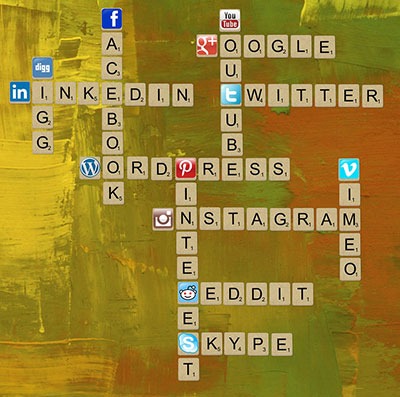
Social Media

Social media pages can become gateways to obtaining new clients and maintaining good relationships with your existing clients.

Scrabble_Social-MediaThe most important social networks to consider are:

  • Facebook
  • Twitter
  • LinkedIn
  • Google+

If your business relies heavily on visual media, then the following might also be considered:

  • Instagram
  • Youtube
  • Pinterest

How to Start

Once you have signed up for and created your social media profiles and pages, you can start getting followers or subscribers.

First off, try getting your own social media friends and connections, as well as your existing clients to like and follow your pages.

The next step is to create content that your targeted social media users will be interested in. These could be interesting photos, stories, articles and even recent info in your industry.

If you have created useful and interesting content, your followers will start sharing them with their own networks and this creates a chain reaction of sharing and get more people to see your content. If these people are interested in what your business offers, they will like your page and increase your social media presence.

It is also a good idea to provide links to your social media profiles directly on your website and email signatures.

Building Brand Awareness

Your social media profiles and pages give users an alternative glimpse from your website of what your company is all about. Give your profiles and pages an identity and real human voice that your ideal clients can relate to and who they would want to work with.

With that said, however, do not simply talk tirelessly about yourself. People use social media for connecting with others. They do not want to be simply marketed to.

Building Relationships

Web-tablet-social-mediaThe main purpose of creating a social media presence is to build and nurture relationships with your existing and previous customer base. Your social media profiles and pages can serve as a means for people to contact you and you can and should promptly reply to these inquiries as well.

If you keep your business at the forefront of your customers’ attention in social media, you will be the one they contact when they need to acquire your products and/or services once again.

Best Practices

  • Post content that is relevant to your industry like recent industry news.
  • Post content that interesting or informative to your audience like tips and tricks to home renovation.
  • Follow similar social media pages in your industry.
  • Be a part of the community. Interact, share others’ posts and respond to others’ interactions.
  • Make use of a human voice. Avoid sounding too corporate or salesy.
  • Observe social media etiquette. Your social media identity defines your brand identity.
  • Depending on your audience, post 1-4 short updates daily or 1-2 important announcements every week.

Social Media Tools

To save your time, there are multiple tools, free and paid, that can help automate your social media campaigns.

  • Hootsuite (https://hootsuite.com/)
  • Buffer (https://bufferapp.com/)

Conclusion

Start-Up_PlanningIf this is the first time you have read this, congratulations. Now go through it again and invest just three hours to build a really solid foundation for what is to become your website strategy.


If you have answered the questions, even with your best guesses, then congratulations. You have just developed a really solid platform for building a website strategy and put yourself miles ahead of your competition.

What to do now?

Collate your answers from this blueprint into an “Online Blueprint Document.” The time it takes you will pay dividends many times over.

Regardless of what you sell online there are 101 tasks you can outsource. Whether you choose a full service agency, do it yourself, or something in between like what wooassist.com offers, communication is the key and this doc will get your vision clearly stated and set the foundation for any web developer/designer relationship you have in the future.

Filed Under: How-To Articles Tagged With: best practices, conversion optimization, customer persona, LinkedIn, marketing strategy, social media, Twitter, Wooassist, WordPress, WordPress SEO

Analytics Reports Help Your Online Store Maximize Profits

January 29, 2015 By John Leave a Comment

SnapCrab_2015-06-26_15-06-01_No-0000

There is abundant data available on the Internet to help you better understand website traffic. All that data can be meaningless if you don’t know how to analyze and interpret it. Once you do, you could use the information to maximize your online store’s profits. You can do all that by making proper use of analytics reports.

Google has its own service for tracking and reporting website traffic – Google Analytics. Ecommerce sites can use analytics reports from this tool to assess their overall performance. Best of all, it’s free.Before we go any further, the first thing you need to do is register for Google Analytics and install the tracking code.

Creating Custom Reports

The most useful feature in Google Analytics, custom reports allow you find the data and presentation that is most relevant for your goals.You pick the dimensions and metrics and decide how they should be displayed. Google Analytics has over 70 standard reports to select from.

SnapCrab_2015-06-26_15-06-22_No-0000

This article can help you learn how to create and manage custom reports on Google Analytics on your own. You need not be an expert right away. What’s important is that you understand the process. Here’s another helpful resource on creating a custom report.

Wooassist Analytics Team

Google Analytics can monitor promotional activities, lead generation, visitor’s behaviour and conversion pattern. It can benefit your ecommerce store more than you expect.

Most website owners choose to do it themselves, but they end up collecting incorrect data. No matter easy it is to implement Google Analytics, you may still need the help of experts to make the best use of the data collected. If you find it too technical, or even time consuming to focus on, our Wooassist team can help you.

Filed Under: How-To Articles Tagged With: conversion optimization, e-commerce, Google Analytics, how-to, outsourcing, Wooassist

How to Create Calls-to-Action that Convert Online Sales

January 28, 2016 By John Leave a Comment

calls-to-action

Successfully selling online requires more than just posting your products on a WooCommerce site and hoping for the best. You also must increase your e-commerce site’s traffic with visitors that match your target market. This takes a considerable investment of time and money, so before that investment you need to make sure you are set up to convert all those visitors into customers. In this post, we will teach you how to create calls-to-action that convert for your WooCommerce store.

What is a Call-to-Action?

For e-commerce sites, a call-to-action (CTA) is a message that moves visitors toward your desired response. It can be a hyper-linked text or phrase, a button, a banner or any clickable element. Calls-to-action are usually seen in lead generation, sales funnels, trials and downloads. Its purpose is to help you achieve a goal or a conversion for your e-commerce store.

Why are Calls-to-Action Important for E-Commerce Stores?

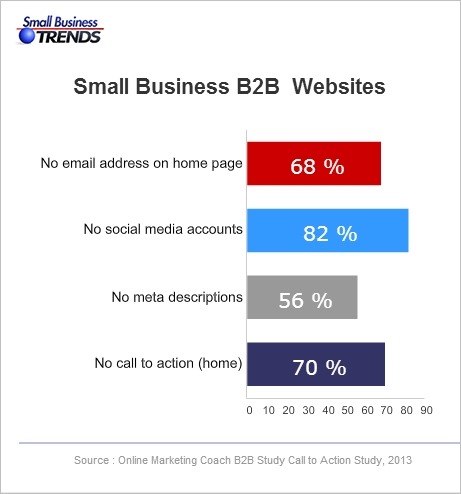
Ever wonder why some e-commerce sites make it big online while some do not? A survey on website failings showed that 70% of websites that fail do not have a CTA on their home page. Good website design and high traffic is not enough to get higher conversion rates. CTAs tell your visitors or audience what actions they can take.

B2B-call-to-action
Source: http://smallbiztrends.com/2013/08/b2b-small-business-websites-lack-call-to-action.html

There are nearly a billion active websites today. People could easily switch to another website if you don’t get them to take action. Your CTA is your marketing tool to educate, engage, and capture your potential customers. It will help you increase your conversion rate as you guide visitors to complete your e-commerce goals.

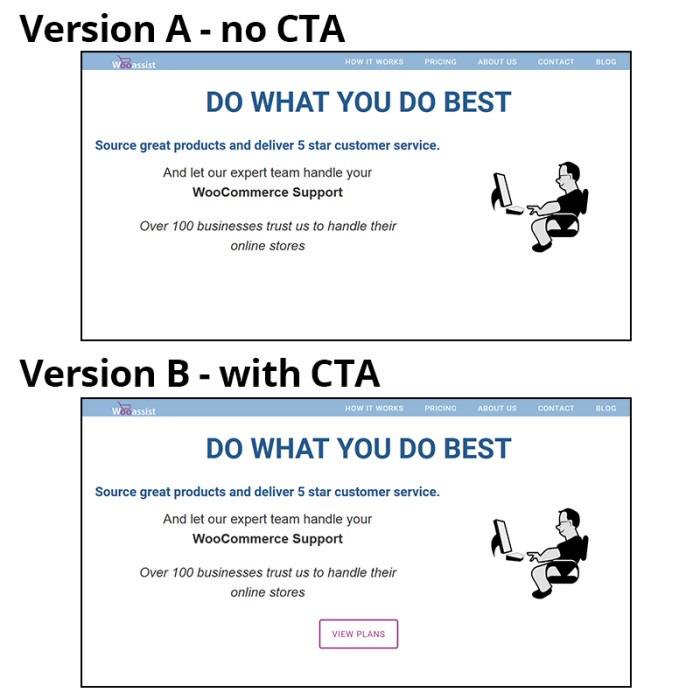
cta-samples-wooassist-view-plan

How to Create Calls-to-Action that Convert for Online Sales?

Having a CTA is not as simple as putting a text over a button. A weak or an unclear call-to-action may impede the sales process and you could end up losing a client. 30,000 new consumer products are being launched every year. Unfortunately, Clayton Christensen of Harvard Business School found that 95% of them fail.

Businesses often fail because they don’t take the time to understand their customers. Try to understand reasons behind sales and use that knowledge to your advantage. It will not only increase your online sales but promote customer loyalty.

There are four things you need to know to be able to create calls-to-action that convert online sales for your e-commerce store.

The Copy

You are often limited to just a few words or a phrase but that does not mean you should take this lightly. A subtle word change can make a big difference. Here are a few tips that you should consider.

Determine your Outcome

What outcome and action do you want from your audience? Is it accessing your shop page, signing up on your email list, downloading a trial version of the software, or downloading your e-book? Being clear with your desired outcome will allow you to get the results you want. CTAs should use specific, understandable and concrete language to lead customers to your goal. Avoid using ‘cute’ and vague language. To be effective, a customer must know what’s going to happen when they click on your CTA.

cta Change your life
Example of a vague CTA
cta Interested
Example of cute language. This CTA may seem attractive to some but it does not get as much clicks as ‘Download E-book’.

Identify your Audience

A CTA that works wonders for another website may not work the same way for you. A generic or copied call-to-action will work but conversions sky-rocket more with optimized versions. You can use analytics data to help you decide. Know your audience. Create a customer persona. By understanding your audiences’ desires and needs, you can convert them to paying customers better.

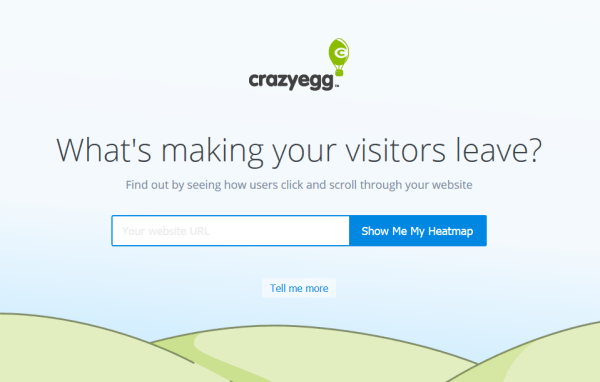
cta sample crazyegg
Crazy Egg asks its potential customers to try out their service for free.

Tailor to your Platform

Different platforms offer different methods of interaction so modify your call-to-action to the common responses for each medium. Requesting a comment or reaction is appropriate on a blog or social media post but not on a landing page.

cta sample share
This is the kind of CTA that you’ll use in a blog post.

Position is Key

Calls-to-action should be placed after informing your visitors of what they are getting at. It can either be above the fold or below. You can also consider following the F pattern. You can add it at the end of a video or set up your website to display them before your visitor exits.

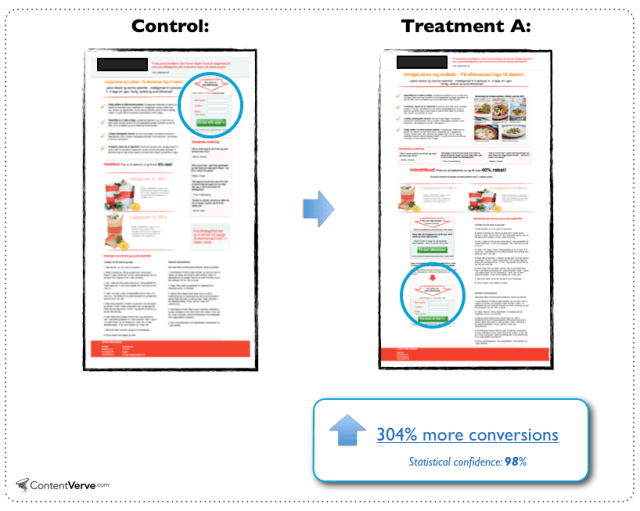
cta ab test sample
People need information so the change in location benefited this landing page.
Source: http://contentverve.com/10-call-to-action-case-studies-examples-from-button-tests/

Design is Important

Design should make your CTA noticeable but it should not interfere with your design. Don’t be too pushy with getting a sale as this might actually harm your online conversions. Your CTA needs to stand out from all the clutter. Try using white space to draw in more attention to it.

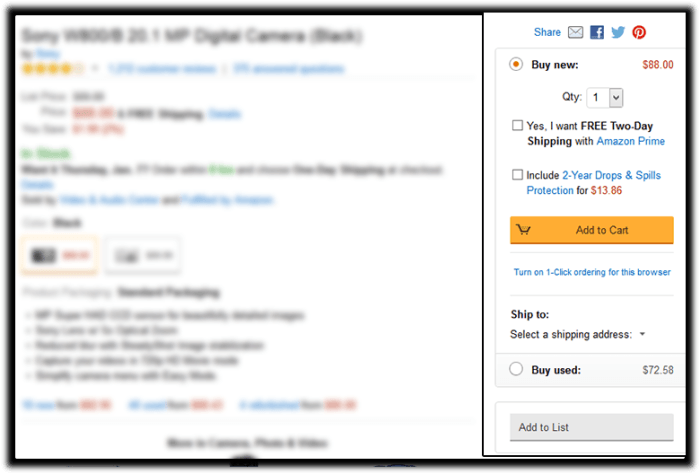
cta sample amazon ctas
Amazon’s add-to-cart button stands out more than other CTAs in this sidebar. Its cart icon is good for visual association.

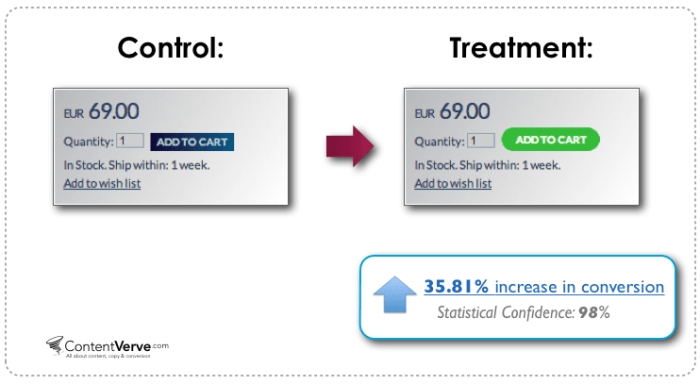
Colors help you increase your online conversion rates because colors have implied meanings. Your design needs balance. If you need a large button, choose a less prominent color that is relative to the elements around it. For smaller buttons, you may choose a brighter color. You can also make use of subtle hover animations.

cta ab test sample color
Change in color and design can increase conversion.
Source: http://contentverve.com/10-call-to-action-case-studies-examples-from-button-tests/

Optimization

Your CTA may be converting but is it the best one? Getting a high converting CTA needs constant testing. Set up your analytics and tracking services first. Use Google Analytics or Crazy Egg’s heat-maps and scroll-maps. You can also use A/B test services like Split Button for optimization. Once you have the data, do not be afraid to experiment and use the data to your advantage. You can use these A/B test ideas to get you started or check out this guide from Neil Patel on how to do split testing.

Summary

Calls-to-action help you to have higher conversion rates and good ROI for your e-commerce store. Good strategy, monitoring and optimization are keys to good CTAs. What calls-to-action ideas, experience and online marketing tips would you like to share for other online store owners? Let us know in the comments.

Filed Under: How-To Articles Tagged With: call-to-action, conversion optimization, e-commerce, how-to, marketing strategy, optimizations

WooCommerce Landing Pages to Boost Conversion

January 29, 2015 By John Leave a Comment

woocommerce-landing-pages

You just launched your e-commerce store using WooCommerce. Now, you want to go all out on your marketing campaign to boost conversion rates.If you want to get your campaign off to a great start, there’s one thing to remember – never start without a landing page.

What is a Landing Page?

A landing page is a standalone web page that stands apart from your actual website.  It is designed for a single focused objective, and serves as a guide for achieving conversion goals.It does not have any direct ties to your website. No global navigation exists to link the two together. Here is a good article explaining what it is.

SnapCrab_2015-07-03_10-28-23_No-0000

The landing page may be used either to capture leads or make a potential customer ready for purchase. Access to it is only possible through a link that you’ll provide in the content of your marketing campaign. This post further explains what a landing page is used for.

WooCommerce Landing Pages

Building landing pages for your WooCommerce store will help you generate more leads and conversions. Even if you plan to hand this task over to a professional, it would help if you understand the process.

This resource has tips on how to create effective landing pages.  WooCommerce Conductor. It can also show you how to create focused landing pages of featured WooCommerce products, capture leads, and build future marketing funnels.

SnapCrab_2015-07-03_10-28-41_No-0000

The first step to creating a successful, WooCommerce landing page is setting your business objectives. It’s worth noting that a landing page without a lot of thought behind it, will not be able to achieve its goals.

The potential uses for landing pages are almost limitless, but it can only benefit you if it’s done the right way. How well it is designed,and how skilfully it works,can make or break conversion. It is your ticket to more leads and sale, so having a professional landing page design is important. Let our Wooassist team do the job for you!

Filed Under: How-To Articles Tagged With: conversion optimization, how-to, marketing strategy, outsourcing, Wooassist, WooCommerce

  • « Previous Page
  • 1
  • 2
  • 3
  • 4
  • …
  • 7
  • Next Page »
Let us support your online store so you can manage your business

Get started today

Get 2 Hours of FREE SUPPORT

We are so confident that you will love our services that we will give you your first 4 hours at a 50% discount

That’s 4 hours for only $75

BUY NOW

Free eBook

5 Things Every Online Store Can Fix On Their Website In The Next Week To Increase Sales

Quick Links

  • How it Works
  • Pricing
  • Blog
  • Contact
  • About Wooassist
  • My Account
  • Checkout
  • Privacy Policy
  • Cookie Policy
  • Terms and Conditions

Wooassist

Australia:
59 Luke St.
Hemmant QLD 4174

Philippines:
San Miguel St.
Poblacion, Iligan City 9200

Connect


Copyright © 2026 · Wooassist

Yours FREE!

5 Things Every Online Store Can Fix On Their Website In The Next Week To Increase Sales