Wooassist

Assistance for Your Woocommerce Store

  • How it Works
  • Pricing
  • Services
    • Site Maintenance
    • AI SEO and Content Marketing
  • Blog
    • How-To Articles
    • Code Snippets
    • SEO For E-Commerce
    • Theme and Plugin Reviews
    • Wooassist News
    • WordPress/WooCommerce News
    • Interviews
  • About Us
  • Contact
You are here: Home / Archives for John

The Wooassist Blueprint: What Goes on in the Wooassist Backend

July 22, 2016 By John Leave a Comment

We’ve created our fair share of WordPress sites and provided support for other WooCommerce store owners since 2014. At the same time, we maintain and improve Wooassist.com. But what goes on in the Wooassist backend? Here we’ll provide a sneak peek of what goes on behind the scenes.

Publishing Platform

wordpress-logo

WordPress is one of the best Content Management System (CMS) with over 60 million websites powered, Woasssist included. It is free and open-source, with thousands of available plugins and themes to change and extend the look and functionality of your site.

Hosting Provider

WPEngine-logo-white

WPEngine provides one of the best WordPress hosting services on the web. Our hosting plan with WPEngine comes with caching, backup features and Content Delivery Network (CDN) provided by their partner MaxCDN. They use Ever Cache for speed and massive scalability. They also have one of the best support compared to other hosting providers.

WordPress Themes

Genesis Framework

logo-Genesis-Framework

Genesis Framework is a powerful foundation for building websites in WordPress. It is compatible with WooCommerce and anything can be customized around its core code using child themes. It is also SEO optimized.

 Parallax Pro

logo-Parallax-Pro-white

We use Parallax Pro theme on top of the Genesis framework. Notice how the Wooassist homepage content has a vertical design for easy visual eye movement and flow. As you scroll down the page, you will see that the content is divided into sections. The theme is also mobile responsive.

Installed Plugins

It is best practice to deactivate and delete any unused plugins on your site to minimize site bloat. Just stick to what features you need and the plugin that offers just that.

WooCommerce

WooCommerce

Since Wooassist provides WooCommerce support, it makes sense that we use WooCommerce.

Built with developers in mind, WooCommerce is extendable, adaptable and open source. It works with the core features of WordPress and is one of the most widely used ecommerce plugins. It’s free and allows for maximum flexibility and customization. You can even expand its features with a growing collection of more than 300 extensions.

WooCommerce Customizer
WooCommerce-Customizer

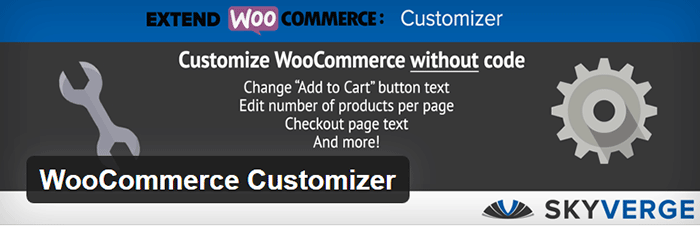
WooCommerce Customizer is a free plugin that adds an extra settings page for WooCommerce. This helps you make quick changes which otherwise would require writing some custom PHP functions. Basically, you can optimize the look of your WooCommerce store for optimum conversion, without writing any code.

Genesis Connect for WooCommerce

Genesis-Connect-for-WooCommerce

When WooCommerce is installed on a site using the Genesis platform, you may find some product pages do not display properly. Genesis Connect for WooCommerce fixes this by replacing WooCommerce’s built-in shop templates with its own Genesis-ready versions. These templates are single-product.php, archive-product.php and taxonomy.php.

WooCommerce Google Analytics Integration

WooCommerce-Google-Analytics-Integration

WooThemes created WooCommerce Google Analytics Integration plugin and is a must to integrate analytics in WooCommerce versions 2.1 and up. This plugin inserts tracking codes into your store pages.

WP-Optimize
WP-Optimize

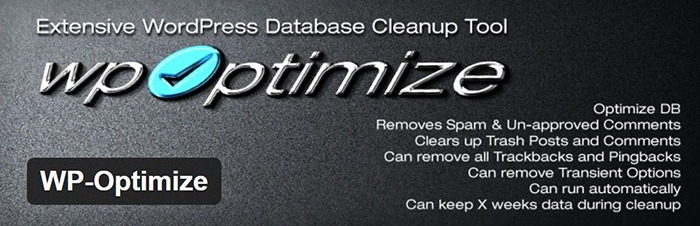
We use WP-Optimize to clean and keep our database down to a reasonable size. The plugin helps clean up your WordPress database by removing old revisions of posts and stale/trashed comments. It also allows for optimization of your WordPress core tables.

WordPress Related Posts

WordPress-Related-Posts

WordPress Related Posts automatically adds thumbnails at the footer of your content. This helps readers find other relevant posts in our blog for further reading.

WooCommerce Paypal Pro

WooCommerce-PayPal-Pro

We use WooCommerce Paypal Pro as our payment gateway. Our clients can pay with their credits cards. A Paypal account is not necessary.

WooCommerce Checkout Manager

WooCommerce-Checkout-Manager

We use WooCommerce Checkout Manager to customize the fields on our checkout page. This allows for faster and easier checkout.

Akismet

Akismet

We trust Akismet to safeguard our site against spam comments. This product by Automattic comes bundled with WordPress installations. You just need to sign up at their website and get your API key to activate it. Akismet automatically checks incoming comments and moves ‘spam-like’ comments to the Spam folder.

PopupAlly

PopupAlly

We use PopupAlly to show time-delayed and exit intent popups for our free e-book offer and newsletter subscription, respectively. The plugin makes it easy to customize popup forms even for novice users.

Yoast SEO

Yoast-SEO

We use Yoast SEO to optimize our blog post and pages for SEO. It is a powerful plugin that helps to give any site an SEO boost. This plugin can also help optimize product pages and product categories in WooCommerce.

Visual Form Builder

Visual-Form-Builder

We use Visual Form Builder to create forms such as our contact form and custom package form. Visual Form Builder is easy to set up and use even for novice users.

Responsive Pricing Table
Responsive-Pricing-Table

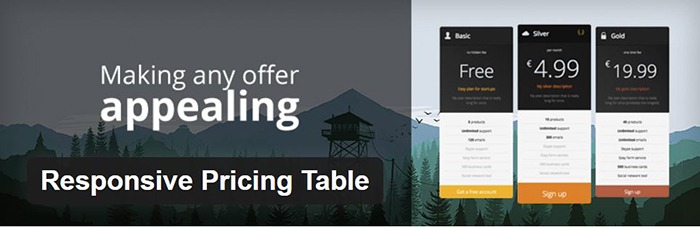
We use Responsive Pricing Table plugin to add a ‘Pricing Tables’ tab in the WordPress admin panel . This allows for creating pricing tables without coding. You can add features of up to 5 plans and display the price table anywhere with a shortcode.

Redirection

Redirection

Redirection is a free plugin that makes managing our 301 redirects easier. It also helps us keep tabs on any 404 errors. We use this mainly when changing slugs of blogs post when optimizing for SEO.

Filed Under: Theme and Plugin Reviews, Wooassist News Tagged With: Genesis, navigation, optimizations, plugins, PopupAlly, redirection, website development, Wooassist, WooCommerce, WooCommerce products, woothemes, WordPress, WPengine, Yoast

Ivan Bjelajac: On Working with Passionate People in a Dynamic Environment

July 11, 2016 By John Leave a Comment

Ivan-Bjelajac-Devana-COOUPDATE: Ivan Bjelajac is now CEO of Devana Technologies.


Ivan Bjelajac is Chief Operating Officer of Devana Technologies. Before joining Devana, he was a freelance web developer in 2006, moving onto various technical support and management roles. At one point, he became CEO of Cybernet Technologies. In this interview, Ivan shares his insights on the WordPress industry, how he does his job, the kind of people that he works with, and Kevin Garnett.
1. What sets ManageWP apart in today’s competitive WordPress niche?

I would say it’s the people. From the start of our journey we wanted to create a great premium product that would allow WordPress users to save time and increase productivity. It was the first product of its kind in the market and it obviously helped us out tremendously that we created a market niche in WordPress management but it’s not the product itself that earns us money. It’s the developers, product people and guys from the customer happiness departments that deliver the value to our customers on a daily basis. Without them we could not keep innovating and going the extra mile for our clients.  We would not be where we are today.

2. Could you describe the team that you are working with? How has your team dynamic changed over the years? What do you think can still be improved?

Devana-Technologies-Ivan-Bjelajac-Vladimir-Prelovac

Passionate is probably the right word. A number of people went through the company in the last 6 years, but passion has always been there.

In the beginning we thought we should just hire everyone that seemed to be good or have potential and we were completely flat as an organization. That did not turn out to be the best possible way to do things so now as the team grew we introduced strict hiring rules and gave more power to team leaders.

The good thing is that we managed to grow without sacrificing the focus on our customers and our product. We have some great mentors and seniors in our company and tend to hire great people, but we still have a long way to go when it comes to implementing processes, making our employee onboarding and development processes faster and more efficient.

3. Are there any people who have influenced your work ethic? And how? Are there any WordPress influencers that you look up to? Please tell us more about it.

Probably Kevin Garnett, although I have never met him personally. 😉

They say your own quality is an average of five people you spend the most time with. Most of the people I learned from are not involved with WordPress. Some are not even into technology but have successful businesses in other areas. I had the luck to surround myself with people that were not my role models but who did help me form certain beliefs. They are all of various ages, backgrounds and tend to offer different perspectives on things which can be invaluable.

When it comes to WordPress, there is of course our founder Vladimir Prelovac, whom I’ve known for 16 years and counting, but I also like to hear what Jason Cohen, Andrew Nacin, Adii Pienaar, Syed Balkhi and Mason James have to say about WordPress and business in general. I also tend to learn a lot from WordCamps and having different chances to talk to our customers in general.

Devana-Technologies-Ivan-Bjelajac-Vladimir-Prelovac-meeting

4. The work environment at Devana has been described as a ‘productive mess’. Can you tell us more about it?

Well I would have to say that it’s a pleasure and a curse to work with passionate people who believe in creating both great products for our users and in building a better life for their co-workers and their community. It is hard to match their resolve and honestly sometimes I find it hard to keep up. We tend to want to get too much done, step on each others toes, argue a lot but we also help each other, take pride in our work and keep a high standard of quality – so things tend to get unpredictable.

We are still looking for ways to incorporate a healthy amount of processes to go along with our creative chaos and keep that fine line between being efficient and creative.

5. What is a typical day for an Ivan Bjelajac? How do you get things done? Do you stick to a particular schedule or work rituals?

I would love for someone to answer this question for me. 🙂 We are a very dynamic environment so each day looks a lot different. I actively try to reduce the amount of things we work on and add more processes so hopefully I will be able to tell you about my typical day sometimes in the near future.

Devana-Technologies-Ivan-Bjelajac-meeting

6. Are you still involved in any development work for ManageWP or any other development projects?

Not that much. I am still involved in our business decisions, some feature and architecture decisions but I mostly focus on working with our partners and vendors. The team is more than capable doing most things without me and there are also many things where I actually think they are much better than me. I do tend to get involved a lot into our R&D. Sometimes our guys are happy about it and sometimes they hate me for it, but that is another story…

7. Aside from WordPress, what are your other interests? What do you like to do when you are not working?

I like to travel. I am trying to visit at least one country each month or two. Good thing is that my job actually helps me achieve that goal. Even if we are super-busy I can at least find a weekend to visit a conference or a WordCamp.

Ivan-Bjelajac-WordCamp-Europe-2015

8. Seems like you are fond of basketball. Have you ever played ball with the team at Devana?

Quite a few times though we haven’t done it for a while. We should probably do it again sometimes soon after we launch ManageWP Orion. That is a good idea, thanks for putting it in my head. 🙂

9. It is quite admirable that Devana has been pumping 10% of its profits Zivojin Misic Foundation. Why in particular did you choose this foundation?

All companies are built to make money. What makes them different is what they do with that money. There is a great TED talk by Simon Anholt that explains the concept we believe in.

When it comes to Zivojin Misic, we actually founded the foundation ourselves and so far it has been exclusively founded by our company. We chose to focus on education and promoting entrepreneurship because those are the areas that we think are lacking in systematic solutions and return the biggest ROI when it comes to our environment.

Ivan-Bjelajac-COO-Devana-Technologies-Zivojin-Misic

10. What makes you a successful COO? If you have one advice to give to a young entrepreneur, what would it be?

Be genuine. The COO is probably the only position in the company that is harder to describe than the CEO position as all kinds of different people get promoted to it and it is usually complementary to the CEO. So, as there are no 2 CEO’s that are exactly the same there usually are no 2 COO’s that are exactly the same and the position usually does not translate that well from company to company.

I think I owe my success to working with some great people and finding ways to help them do their jobs the best way possible without forgetting it’s about the product and other people in the company and mostly not about yourself.

So being a good COO is mostly about how well you play with others and complement your CEO and other senior executives.

If your main function is to play the role of an enabler for other people and you try to do it without being genuine – it’s probably not going to work out in the long run.

Filed Under: Interviews Tagged With: e-commerce, WordPress

How to Add a Hero Image in Storefront

July 1, 2016 By John 36 Comments

laptop_Hero-Image

The idea of using hero images came about because of issues caused by homepage sliders. Using a homepage slider is discouraged as it will slow down your WooCommerce store and it doesn’t have good conversion rates. If your WooCommerce store running on Storefront has sliders and you are looking for a good alternative, you should consider using a hero image instead.

What is a Hero Image?

To better explain what a hero image is, let’s define what is the “fold” and “above the fold content”. Originally, the fold is a term used in the newspaper industry. Since newspapers are normally folded in half, the upper half of the front page will be the part of the newspaper that is exposed. This is where the most important content is featured, hence the term “above the fold content”. In web design, this is the area of the page that can be seen without scrolling down.

A hero image takes up most of the space above the fold. The trend is to make it large, attractive and relative to the content of the entire site.

It is important that you provide a complete overview of what your company/site is about with just a glance of your hero image. 90% of the time, the hero image has a large text in the center that is related to the branding of the site.

Preparing Your Images

Before you add your image, make sure you have it optimized for web use. You’d want to have the best image quality for the hero image, but you have to take into account the image size as well. As of 2016, the most common screen resolution is 1920x1080px. You should try not to go over this mark. Any excess is just a waste of page size and will just slow down your page load time.

Once you get the right resolution, try to further reduce the image size by down-scaling the image quality. You can actually reduce the image quality without having noticeable pixelation in the image. This is because the human eye can only see limited minute differences in the color changes. Try to strike a balance between having a small image size and having a good looking image. Check out this other post on how to optimize images. Once you are done preparing your image, just upload it to your WordPress site.

Adding a Hero Image in Storefront

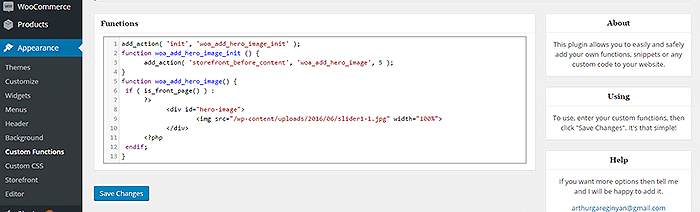
To add a full-width hero image in Storefront, we need to use Storefront’s extensive hooks. We’ll just need to insert a few lines of code.

How-to-add-a-hero-image-in-Storefront-Appearance-Functions

If you are comfortable working with code, you can paste the code below in the functions.php of your child theme. If you are a novice user, we recommend using My Custom Functions plugin to insert the code. Note that one error can cause your entire site to crash.

how to add a hero image in storefront

Copy and paste the code below. Just replace the “/wp-content/uploads/imageurl.jpg” with the URL of the image you uploaded earlier. Width set to 100% makes your image responsive to different screen sizes.

add_action( 'init', 'woa_add_hero_image_init' );
function woa_add_hero_image_init () {
   add_action( 'storefront_before_content', 'woa_add_hero_image', 5 );
}
function woa_add_hero_image() {
   if ( is_front_page() ) :
      ?>
         <div id="hero-image">
             <img src="/wp-content/uploads/imageurl.jpg" width="100%">
         </div>
      <?php
   endif;
}

Your hero image should now appear on your homepage below the main navigation.

If you want to add a link to the shop page or any other url on your image, copy and paste the code below. Just replace the “http://change_me_to_your_url” with the URL you want to link to.

add_action( 'init', 'woa_add_hero_image_init' );
function woa_add_hero_image_init () {
   add_action( 'storefront_before_content', 'woa_add_hero_image', 5 );
}
function woa_add_hero_image() {
   if ( is_front_page() ) :
      ?>
         <div id="hero-image">
             <a href="http://change_me_to_your_url"><img src="/wp-content/uploads/imageurl.jpg" width="100%"></a>
         </div>
      <?php
   endif;
}

Final Notes

Hero images are more effective than sliders in terms of aesthetics. You don’t have to keep using sliders if it’s slowing down your site. Explore more options. Keep your site simple and fast.

If you are still using sliders, you are most likely hurting your site speed. And a slow WooCommerce store will convert less. Your Google rankings could also suffer as a result. It’s time to do away with the slider. Go with a hero image instead.

Was this tutorial helpful? If you have any questions or anything you’d like to add, please let us know in the comments.

Filed Under: Code Snippets, How-To Articles Tagged With: admin, best practices, code snippet, conversion optimization, design tweaks, how-to, image optimization, plugins, site speed optimization, Storefront

The Ultimate Project Management System Review

June 24, 2016 By John 2 Comments

Project Management System Review

To improve our systems approach to doing business, the Wooassist team needed a project management (PM) system that works for us. So we reviewed the PM systems available online. Our goal was not to determine the best PM tool but to identify which PM tool works best for our purpose. What works for us, may not necessarily work for a different organization so we recommend reading into the reviews beyond the scores.

This was originally an internal document but we decided to share it with our readers to help other organizations choose a PM system that works for them.

Outlining Your Needs

There is a good deal of project management systems out there and it’s easy to get lost with all the choices or get stuck with the most popular brands. We will first need to outline our specific needs to narrow down all the choices. For this review, we have used the following criteria to judge these PM systems according to our needs.

  • Easy collaboration
  • Task management
  • Kanban board functionality/Graphical system
  • Employee timesheets/Timekeeping functionality
  • Pricing

PM systems that did not score high with our criteria were not necessarily terrible. They simply did not allow our organization to function as effectively and efficiently as possible.

Notable Exclusions / Honorable Mentions

Below are some good PM systems that just did not cater to all our needs:

  • Asana
  • Basecamp
  • Trello
  • Wrike
  • LiquidPlanner
  • Producteev

The Chosen Eleven

Even after narrowing down the field, we still came up with 11 contenders. We tested out the free trials for each of these tools and have come up with a concise review for each.

1.  Teamwork

Teamwork

  • Collaboration: 11/15
  • Organization: 11/15
  • Features: 12/15
  • Pricing: 1/5
  • Preference Bonus: 46/50
  • Rating: 81/100

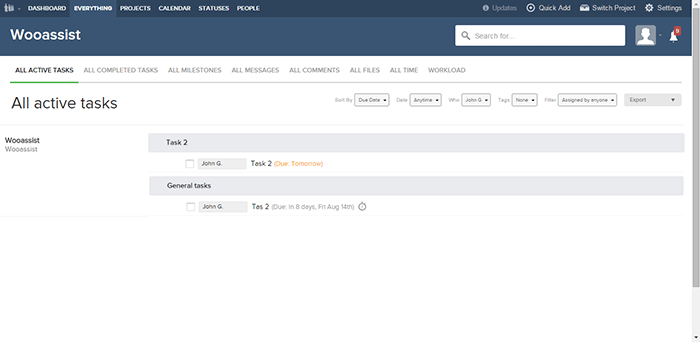
Our first impression was that the main interface was very clean and modern. Teamwork is one of the more well-known project management systems and the standard holds up. While the main interface is clean, under the hood it is packed with a lot of useful features.

If you’re used to another PM system, there will be an initial learning curve as you get used to the functionalities of Teamwork. Employee timekeeping is synced globally so it is a dependable feature as managers can easily view the daily work history of all employees. It also has an “Everything” page where all features are aggregated together so it is easy to track everything.

However, there were also a lot of functionalities that we simply did not need and they just increased the complexity. While the main interface is clean, it is not graphical which would have been user-friendly. There was also no simple prioritization feature for tasks irrespective of the project.

Our conclusion is that Teamwork with a clean interface and a myriad of features is a very good Project Management system. It is more suitable for organizations with higher-value projects and would be a top choice as an initial PM system.  It just did not fit our own requirements as we are an organization with small-value projects. Also, the additional features we did not need simply make it more complicated to use.

2. Orangescrum

Orangescrum

  • Collaboration: 6/15
  • Organization: 11/15
  • Features: 11/15
  • Pricing: 4/5
  • Preference Bonus: 46/50
  • Rating: 78/100

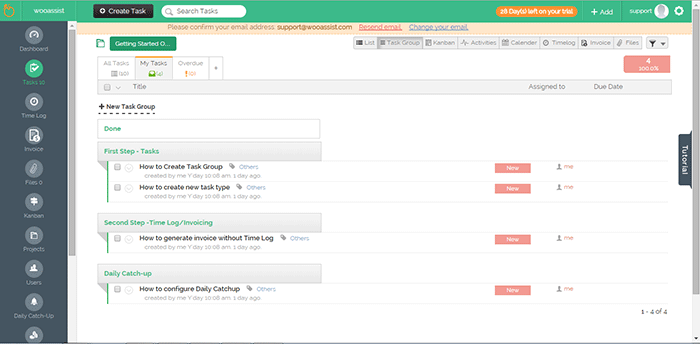
The aspect that first caught our attention was the sketchpad/draft-board design. In viewing tasks in Orangescrum, there are a lot of choices such as “list”, by “task group” and even Kanban.

The Kanban feature was a good inclusion but it seems that it had none of the common features in other Kanbans such as drag-and-drop functionality and customization of the columns. Only 3 columns can be displayed for the Kanban board.

It might be confusing switching between tasks as a task page takes up a whole page but at the same time, this could prove to be more productive as well.  A lot of details can be added to each task and that could be a good thing depending on the organization’s needs.

One problem though is that some of the different elements are separate from each other. The time logs for example. It will be difficult for people that need to work on different projects in a day. Each project is a separate entity and there is no way to aggregate tasks on all projects.

There are no notifications on the interface itself so this limits collaboration. Users also can’t be tagged and there is no common posting system.

Our conclusion for Orangescrum is that it has a clean and user-friendly design. However, it gets lower scores in other aspects such as collaboration and lack of supporting features.

3. GetHarvest

GetHarvest

  • Collaboration: 5/15
  • Organization: 12/15
  • Features: 7/15
  • Pricing: 1/5
  • Preference Bonus: 46/50
  • Rating: 71/100

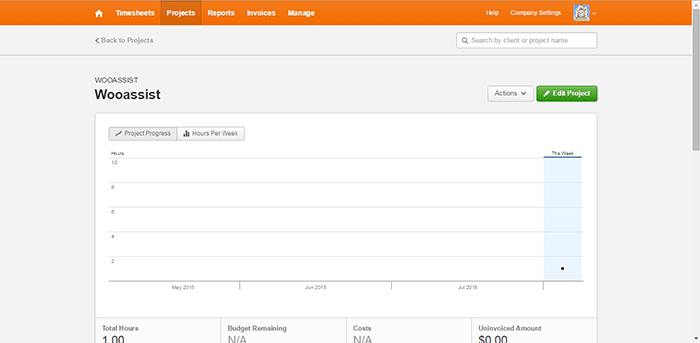
The interface of GetHarvest was one of the cleanest among the PM systems we reviewed. The top navigation bar shows the Timesheets, Projects, Reports, Invoices, and Manage links. These are core features for any PM system without all the fluff.

GetHarvest looked streamlined initially. Upon further assessment, we found that it is essentially a stripped-down Project Management system. It is great for accounting and the default setup is great in that it gives a bird’s eye view of the projects of the organization but it is limited to that. If users require subprojects and task-specific organization, they will need to integrate GetHarvest with other systems such as Asana.

Our conclusion for GetHarvest is that the interface is very clean and minimalistic but out-of-the-box. It simply lacked too many features compared to the other PM systems in this list.

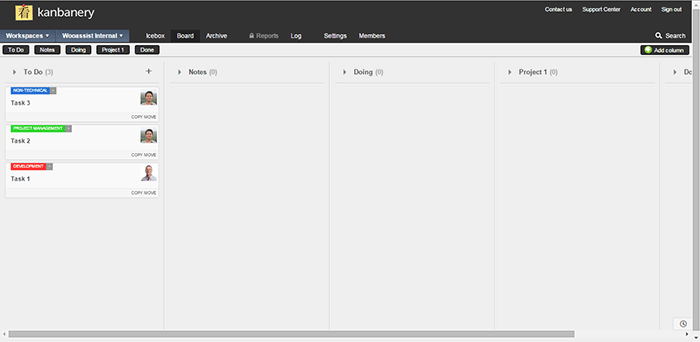
4. Kanbanery

Kanbanery

  • Collaboration: 12/15
  • Organization: 13/15
  • Features: 10/15
  • Pricing: 2/5
  • Preference Bonus: 48/50
  • Rating: 85/100

We were actually quite impressed with Kanbanery. Its interface is streamlined and it holds up to its promise of being a Visual Project Management Tool.

The Kanban boards are great and they are really customizable. The customization options are also tucked away quite nicely in that they won’t become cluttered for those that won’t use them. The updates to the boards are also synced in real-time and everyone on the team is informed when there are changes. Moving tasks to different boards is also possible so that’s another plus. It also has an activity stream that acts as a notification area.

One minor gripe is that the pages can be slow to load and changes can also take a while to be set. Although the bigger issue here is with timekeeping. There is no timer, no stopwatch, and no way to log the time at all.

The bottom line for Kanbanery is that it is a very good PM tool that strikes the right balance between a clean exterior and an abundance of settings under the hood, especially for its Kanban board. It also scores well in collaboration but the biggest flaw is the lack of any time-keeping function.

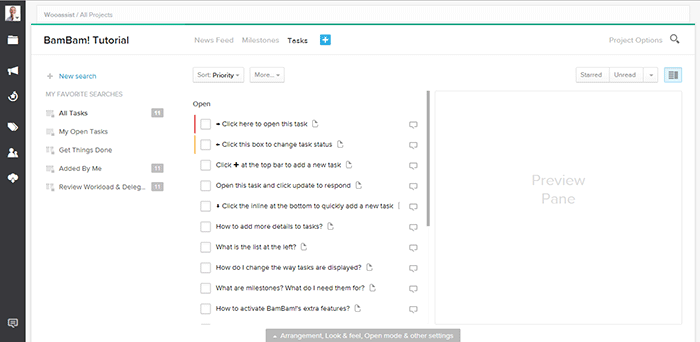
5. Dobambam

Dobambam

  • Collaboration: 9/15
  • Organization: 7/15
  • Features: 12/15
  • Pricing: 3/5
  • Preference Bonus: 46/50
  • Rating: 77/100

Our first impression of Dobambam was that it looked like a robust system and it felt similar to Asana.

The interface is very customizable. There are a lot of options on the view such as list view or card view. The tasks are very customizable too. It shows a lot of details but might be a bit excessive depending on your specific requirements. It does get confusing with all the available features. Some features you can add to the default functionalities are time-tracking and a wiki.

Our verdict for Dobambam is that it’s a full-featured task management system complete with time-keeping and detailed task views. However, this may also become a disadvantage depending on the organization as it is not as streamlined as other PM systems.

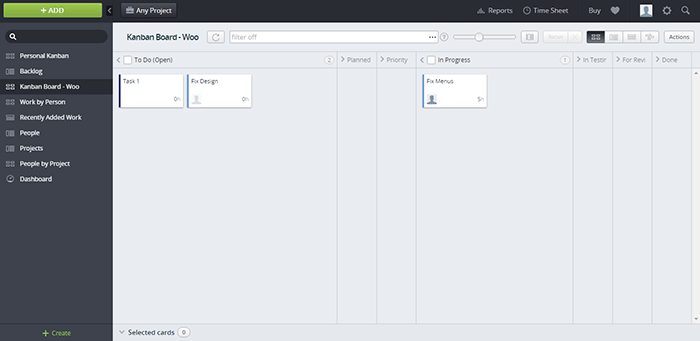
6. TargetProcess3

TargetProcess3

  • Collaboration: 10/15
  • Organization: 10/15
  • Features: 13/15
  • Pricing: 0/5
  • Preference Bonus: 46/50
  • Rating: 79/100

When we signed up for Target Process 3, the first screen that was shown was a choice of workflows: Scrum, Kanban, or a custom one. After choosing, we were presented with an introductory video and a mini-tutorial. These were very informative and did a good job of introducing TP3’s interface. It felt like the TargetProcess organization really cares for its users.

The aspect of the tool that left a strong impression was its overall power. It is extremely customizable and it’s like each user gets a chance to build their own PM system all inside TP3. Whether you prefer lists or a visual view, each user is given the chance to choose along with many other customization options. Another thing we liked is that the boards are all in-sync with each other. This means you can mark a task as in progress on one board and this change is applied across all boards.

The only problem is that with all the power, there’s a very steep learning curve. With all the bells and whistles, it can get confusing for a user. Some users may not even notice that a feature was available or not. In our case, TP3 was a bit over the top.

Our conclusion is that it is a very powerful task management system perfectly suited for software development teams. The customizability is its strongest point but it takes a while to master. This PM tool is best suited for advanced users.

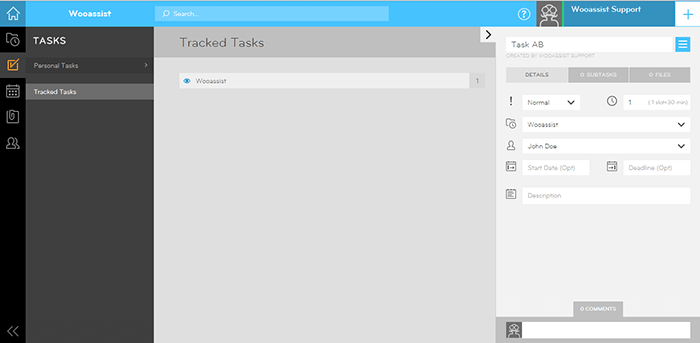
 7. ThriveTeam

ThriveTeam

  • Collaboration: 6/15
  • Organization: 11/15
  • Features: 7/15
  • Pricing: 0/5
  • Preference Bonus: 46/50
  • Rating: 70/100

ThriveTeam is the definition of minimalism. Everything is clean and well laid out.

One of its unique functionalities is that there are no Save/Ok/Enter/Submit/etc. buttons. You will just need to write on the input fields and the changes are automatically saved. It could help with efficiency but the functionality is still awkward for people that are used to having the buttons. Sometimes after filling in a field nothing happens and you’re left guessing what to do next. On another note, its timekeeping system seems to be robust.

One thing is for sure, it is not built for task management and collaboration is limited. This system is similar to GetHarvest in some respect but it is also a slightly poorer version. As with GH, its functionalities are limited.

The bottom line for ThriveTeam is that its strength seems to be in Project Management and Accounting. The interface is clean due to a minimalistic design but the functionalities are a bit awkward and limited.

8. LeanKit

LeanKit

  • Collaboration: 12/15
  • Organization: 13/15
  • Features: 10/15
  • Pricing: 0/5
  • Preference Bonus: 48/50
  • Rating: 83/100

Our first impression of LeanKit is that it is very organized in the board/project level.

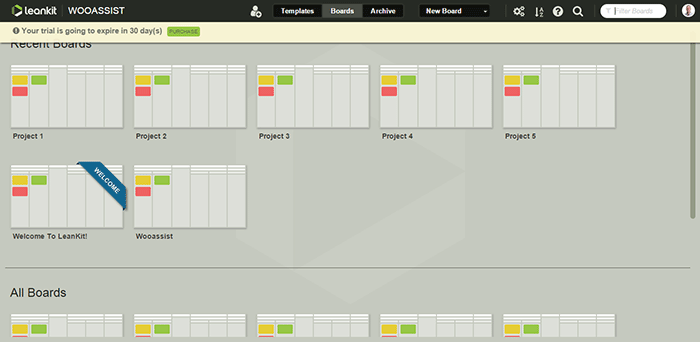
The graphical style is a step up from all the other text-type PM systems. Creating boards is easy and straightforward as you only need a title and description. Finding them in your list of boards is easy as well with the help of a search filter. The Kanban boards themselves are highly customizable. However, the board layout editor takes a bit of getting used to.

Another negative aspect is that the email notifications do not provide a preview of the task details. But overall, we were satisfied with its collaboration with real-time updates of changes on the boards. It seems like a complete package but as with Kanbanery, it lacks a time-keeping function which is a big blow to its potential.

Our conclusion for LeanKit is that it is a robust Kanban/Scrum-based project management system. The graphical style makes the setup very clean and organized and it scores great in collaboration and task management. It just lacks any sort of time-keeping functionality that ultimately brings its score down quite a bit.

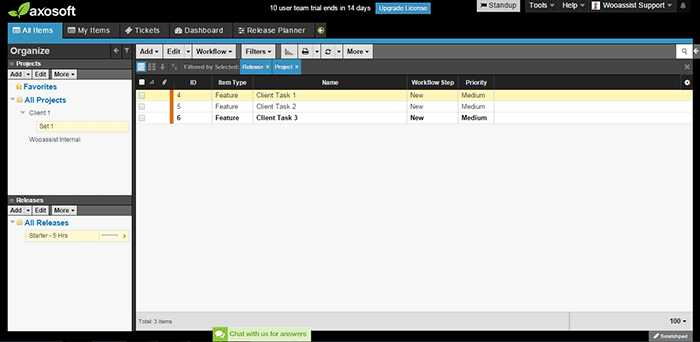
9. Axosoft

Axosoft

  • Collaboration: 10/15
  • Organization: 13/15
  • Features: 13/15
  • Pricing: 0/5
  • Preference Bonus: 48/50
  • Rating: 84/100

Our first impression of Axosoft is that it is professional, full-featured software (it should be when one considers the price).

Axosoft also offers its software to be installed locally. It is noticeable even in the browser application that the design is closer to a desktop application. Even though there are a lot of settings, tabs, lists, and other buttons, everything feels very organized and intuitive.

It also offers custom workflows which include Scrum and Kanban. We first thought that it would be better for large companies but it turns out that it can be used by any organization.

One weakness though is that there are no notifications. When a task is assigned, the assignee may not realize that a task has been assigned.

All in all, Axosoft seems to be a very powerful system. It really is an enterprise solution for project management. By default, it is geared more towards organizations that develop software but almost any type of organization can benefit from it. The design is organized and intuitive and overall, it is a well-built piece of software.

10. Hiveflux

Hiveflux

  • Collaboration: 9/15
  • Organization: 9/15
  • Features: 12/15
  • Pricing: 2/5
  • Preference Bonus: 46/50
  • Rating: 78/100

The first thing that came to mind when we accessed Hiveflux is that the design goes for a modern look reminiscent of Window’s Metro UI. It is sleek but we didn’t fall in love at first sight.

It is minimalistic but will take some getting used to. It does have good features, such as the built-in calendar that is perfect for synchronizing company events. It also has a powerful search feature, file uploads, and a time-keeping option for tasks. But collaboration between users felt a bit sluggish due to the lack of notifications even on email.

Our verdict for Hiveflux is that it is a sleek and minimalistic PM system with select but powerful features such as file uploads, time-keeping, and search. However, the minimalism also lends itself to a mediocre user experience. It should be a good choice for some teams but it’s not the one for us.

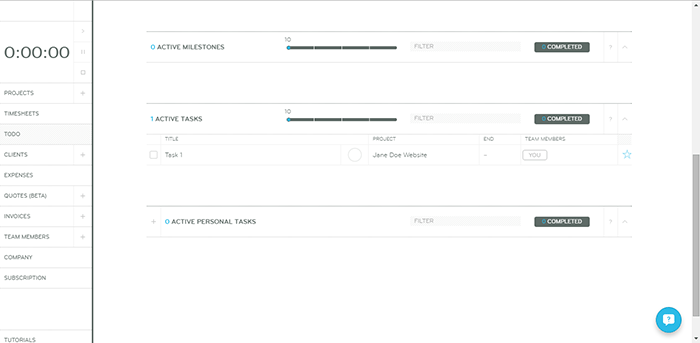
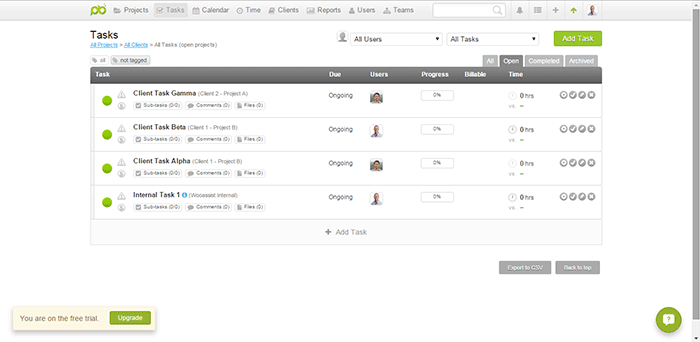
11. ProjectBubble

ProjectBubble

  • Collaboration: 12/15
  • Organization: 12/15
  • Features: 12/15
  • Pricing: 1/5
  • Preference Bonus: 50/50
  • Rating: 87/100

Nothing stood out at first. The design scheme and the setup looked normal. ProjectBubble does have the most important features such as a task management system and employee timesheets. It also has nifty bonus features such as its calendar and helpful reports.

What is special about it is that aside from tasks organized by project, projects are also organized by client. This makes it very useful when a client has multiple projects. Users can also be set up as teams so an entire team can work on a project without getting confused by another team’s projects.

The timesheets feature needs special mention as it is one of the most complete among all the other PM systems in this review.

All in all, ProjectBubble doesn’t sport dazzling game-changing features but it does what it does very well, and it does a lot of stuff. The only weakness would probably be aesthetic but that’s a very small factor. It is definitely not a visual system and it has no kanban. If it gets that feature then it would be perfect.

The bottom line for ProjectBubble is that instead of implementing new game-changing features, it sticks to the basics and does all the fundamental features really well. It scores very well in the most important areas (task management, collaboration, etc.) but its strongest feature is its “complete” timekeeping. The only minor flaw is that the setup is definitely not visual.

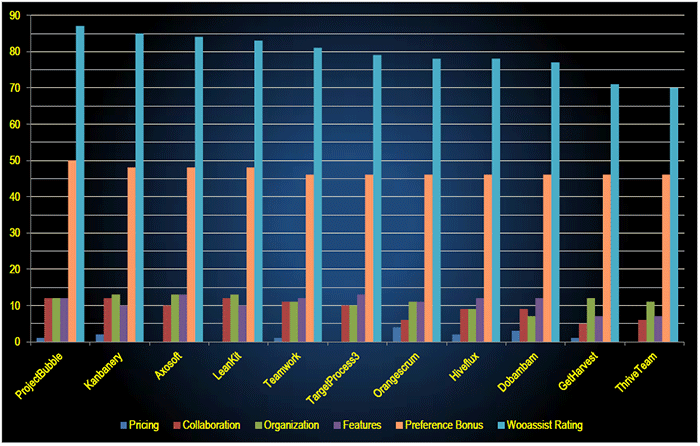
 Overall Rankings

PM-Systems-Review_Overall-Rankings

  1. ProjectBubble (87/100)
  2. Kanbanery (85/10)
  3. Axosoft (84/100)
  4. LeanKit (83/100)
  5. Teamwork (81/100)
  6. TargetProcess3 (79/100)
  7. Orangescrum (78/100)
  8. Hiveflux (78/100)
  9. Dobambam (77/100)
  10. GetHarvest (71/100)
  11. ThriveTeam (70/100)

Conclusion

Reviewing all of the above affirmed the idea that there is no single best project management system. Each system has its strengths and weaknesses. And these may vary depending on the needs and preferences of the user. Make use of the free trial period to determine which tool is best suited to your organization. For us, we decided to go with a system making use of Asana and Kanbanflow. These tools take care of all our needs for now.

If you’re looking to set up your own project management system, this review should lead you in the right direction. Go ahead and make your own list and test each one.

What about you? What project management system do you use in your organization?

Filed Under: Theme and Plugin Reviews Tagged With: admin, best practices, project management, task management, Wooassist

Wooassist Reviews the Best WooCommerce Hosting Services

June 16, 2016 By John Leave a Comment

serverThe right hosting service should be secure. Your hosting service should be able to help you solve hosting-related problems and quick. Your hosting service should be fast because quick page loads are critical in retaining site visitors. So what is the best WooCommerce hosting service?

Here is our review of some of the more popular hosting services around.

GoDaddy

GoDaddy_logo

Our rating: 7/10

GoDaddy has one of the cheapest plans available for website owners. They have a basic plan for those on a tight budget. Their basic plan has limited features and may not be a good choice. Make sure to check if these features will fit your needs as you might end up spending more with add-ons. Choose their higher priced packages if you need better functionalities such as a staging site to aid in development work.

Its performance and speed are acceptable but not that outstanding. As for support, it is not as good as other hosting services. All in all, it’s a decent hosting service. There is not much to worry about if you decide to go with them.

Bluehost

Bluehost

Our rating: 8/10

Bluehost is one of the most popular hosting services. For us, this popularity is reasonable. We haven’t had much trouble with the sites hosted in Bluehost that we’ve handled. Its server response time or speed can range from average to fast. It is still better than other shared hosting providers.

Their basic plan has less storage compared to GoDaddy’s but they offer more features. Features include a Global CDN, domain privacy, and SiteBackup. Your online store can benefit from better speed and security. In a hostbenchmarker study, Bluehost support takes some time to respond compared to other hosting services. We haven’t had much opportunity to work with their support though. To us, this gives them more value in that we or our clients haven’t had much to complain about.

Web Synthesis

Web-Synthesis

Our rating: 7/10

Synthesis is another good hosting service for online stores. It is a managed hosting service so it’s a bit pricier than others. They offer features that optimize site performance and security. Their speed is one of the fastest around. They also have an efficient support team.

The downside is that they don’t provide a staging site feature. This might complicate the development of your site. The usage of a staging/development site is best practice for website development. With a staging site, you’re able test your website updates before applying them to your live site.

Their processing power is also great but they have metered bandwidths. It’s not much to worry about as they provide 2TB-6TB plans. Unless you get huge bursts of traffic from content going viral, you’ll be okay. Overall, it provides a reliable hosting service.

Siteground

Siteground

Our rating: 9/10

We consider Siteground as one of the best hosting services for online stores and websites in general. Other review sites have pegged it as their top hosting service. Our experience with it has also been great.

The prices for its plans are reasonable. It has a metered bandwidth but the speed is top-notch with their super-caching feature. At the time of writing, they have servers in 3 continents and offer free CDN to each account.

All plans provide a decent backup service. Based on our experience, their customer service is good. You won’t find many hosting services giving the same value for money as Siteground.

WP Engine

WPEngine

Our rating: 9/10

WP Engine is a managed WordPress hosting service. This makes it work well for WooCommerce sites. It’s our hosting of choice for Wooassist.com. We chose this as it works great and comes with a host of other features.

In our experience, speed has not been a problem. They use EverCache for speed and massive scalability. They are also CDN-ready and this helps in delivering global content. They also offer good security and backup features to boot.

In addition, they also have the best support service compared to other hosting sites we have worked with. They don’t have the cheapest plans but they have reasonable and flexible value-for-money plans. We consider it the best hosting for low to medium volume online stores.

VPS Hosting Services

VPS-Hosting

Our rating: 5/10

This isn’t a review on a particular hosting but VPS or Virtual Private Server hosting in general. This type of hosting service is well suited for large websites. It is also a type of shared hosting that benefits most advanced users. Its pricing is not as cheap as the hosting services we reviewed in this post, but it’s not as expensive as dedicated servers.

The downside is its standard interface requires a lot of digging. Some services may be inflexible or frustrating because of its steep learning curve. Most VPSs do not come with a myriad of features, unlike the hosting services we reviewed in this post.

Not exclusive to VPS, but bursts of traffic tend to slow down a VPS-hosted site too much. The entire website could also go down because of this. They have failed in speed and reliability. For your WooCommerce store, we’d recommend to stay away from VPS hosting services in general.

Conclusion

Choosing a hosting service is something that you should do after thorough consideration. Read the fine print and the features before you pay for the service. This will keep you from wasting your time and money for hosting that is not a good fit for your WooCommerce store. Please note that even if we are affiliates with Siteground and WP Engine, we chose them based on years of experience. We have dealt with these hosting services for our clients’ and our own sites. We can attest that these two are among the best. If you were to sign up to either of them, we’d be grateful if you did so by clicking either of the links above.

Filed Under: Theme and Plugin Reviews Tagged With: backup, page speed, security, site speed optimization, Siteground, WooCommerce, WPengine

  • « Previous Page
  • 1
  • …
  • 23
  • 24
  • 25
  • 26
  • 27
  • …
  • 41
  • Next Page »
Let us support your online store so you can manage your business

Get started today

Get 2 Hours of FREE SUPPORT

We are so confident that you will love our services that we will give you your first 4 hours at a 50% discount

That’s 4 hours for only $75

BUY NOW

Free eBook

5 Things Every Online Store Can Fix On Their Website In The Next Week To Increase Sales

Quick Links

  • How it Works
  • Pricing
  • Blog
  • Contact
  • About Wooassist
  • My Account
  • Checkout
  • Privacy Policy
  • Cookie Policy
  • Terms and Conditions

Wooassist

Australia:
59 Luke St.
Hemmant QLD 4174

Philippines:
San Miguel St.
Poblacion, Iligan City 9200

Connect


Copyright © 2026 · Wooassist

Yours FREE!

5 Things Every Online Store Can Fix On Their Website In The Next Week To Increase Sales